TSM FastBack Technical Enablement Name Tivoli Storage Software [email_address]
Agenda Overview and Architecture TSM FastBack Technology Overview Design Considerations and Best Practices Roadmap & Updates Collateral
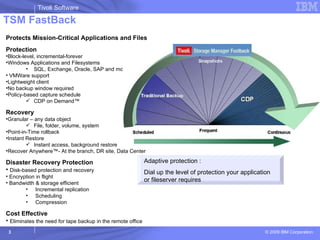
TSM FastBack Adaptive protection : Dial up the level of protection your application or fileserver requires Protects Mission-Critical Applications and Files Protection Block-level, incremental-forever Windows Applications and Filesystems SQL, Exchange, Oracle, SAP and more VMWare support Lightweight client No backup window required Policy-based capture schedule CDP on Demand™ Recovery Granular – any data object File, folder, volume, system Point-in-Time rollback Instant Restore Instant access, background restore Recover Anywhere™- At the branch, DR site, Data Center Disaster Recovery Protection Disk-based protection and recovery Encryption in flight Bandwidth & storage efficient Incremental replication Scheduling Compression Cost Effective Eliminates the need for tape backup in the remote office
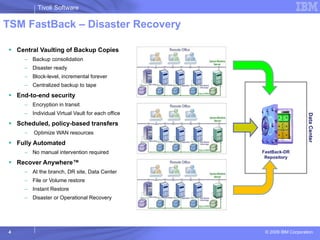
TSM FastBack – Disaster Recovery Central Vaulting of Backup Copies Backup consolidation Disaster ready Block-level, incremental forever Centralized backup to tape End-to-end security Encryption in transit Individual Virtual Vault for each office Scheduled, policy-based transfers Optimize WAN resources Fully Automated No manual intervention required Recover Anywhere™ At the branch, DR site, Data Center  File or Volume restore Instant Restore Disaster or Operational Recovery Data Center FastBack-DR Repository
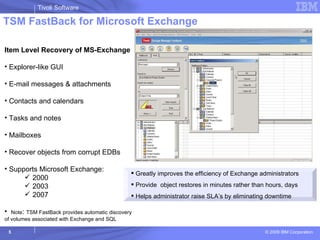
TSM FastBack for Microsoft Exchange Item Level Recovery of MS-Exchange Explorer-like GUI E-mail messages & attachments Contacts and calendars Tasks and notes Mailboxes Recover objects from corrupt EDBs Supports Microsoft Exchange: 2000 2003 2007 Note :  TSM FastBack provides automatic discovery  of volumes associated with Exchange and SQL Greatly improves the efficiency of Exchange administrators Provide  object restores in minutes rather than hours, days  Helps administrator raise SLA’s by eliminating downtime
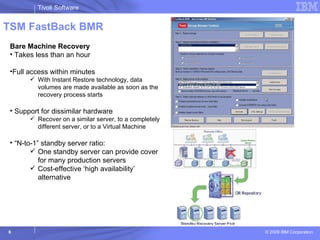
TSM FastBack BMR Bare Machine Recovery Takes less than an hour Full access within minutes With Instant Restore technology, data volumes are made available as soon as the recovery process starts Support for dissimilar hardware Recover on a similar server, to a completely different server, or to a Virtual Machine  “ N-to-1” standby server ratio: One standby server can provide cover for many production servers Cost-effective ‘high availability’ alternative
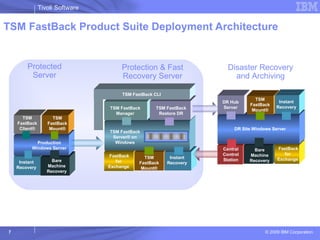
TSM FastBack Product Suite Deployment Architecture TSM FastBack Mount® Instant Recovery Production Windows Server DR Site Windows Server DR Hub Server TSM FastBack Mount® Instant Recovery TSM FastBack Server® on Windows TSM FastBack Manager TSM FastBack Restore DR TSM FastBack CLI TSM FastBack Client® TSM FastBack Mount® Instant Recovery Protected Server Protection & Fast Recovery Server Disaster Recovery and Archiving FastBack for Exchange Central Control Station FastBack for Exchange Bare Machine Recovery Bare Machine Recovery
Agenda Overview and Architecture TSM FastBack Technology Overview Design Considerations and Best Practices Roadmap & Updates Collateral
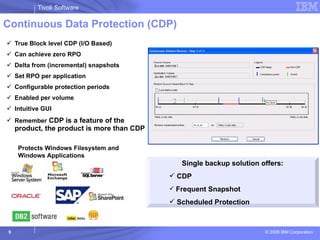
Continuous Data Protection (CDP) True Block level CDP (I/O Based) Can achieve zero RPO Delta from (incremental) snapshots Set RPO per application Configurable protection periods Enabled per volume Intuitive GUI Remember  CDP is a feature of the product, the product is more than CDP Single backup solution offers: CDP Frequent Snapshot Scheduled Protection Protects Windows Filesystem and Windows Applications
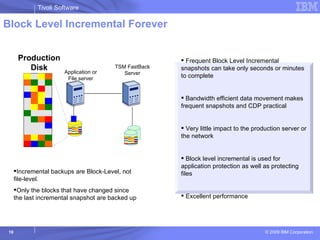
Block Level Incremental Forever Application or File server Production Disk Incremental backups are Block-Level, not file-level.  Only the blocks that have changed since the last incremental snapshot are backed up Frequent Block Level Incremental snapshots can take only seconds or minutes  to complete Bandwidth efficient data movement makes frequent snapshots and CDP practical Very little impact to the production server or the network Block level incremental is used for application protection as well as protecting files Excellent performance TSM FastBack Server
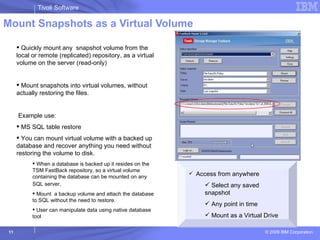
Mount Snapshots as a Virtual Volume Quickly mount any  snapshot volume from the local or remote (replicated) repository, as a virtual volume on the server (read-only)  Mount snapshots into virtual volumes, without actually restoring the files. Example use: MS SQL table restore You can mount virtual volume with a backed up database and recover anything you need without restoring the volume to disk. When a database is backed up it resides on the TSM FastBack repository, so a virtual volume containing the database can be mounted on any SQL server . Mount  a backup volume and attach the database to SQL without the need to restore.  User can manipulate data using native database tool Access from anywhere Select any saved snapshot Any point in time Mount as a Virtual Drive
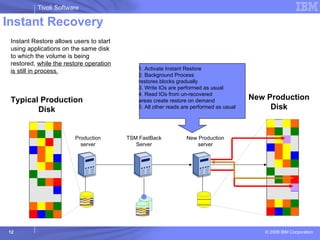
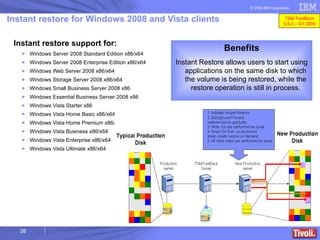
Instant Recovery   1. Activate Instant Restore 2. Background Process  restores blocks gradually 3. Write IOs are performed as usual 4. Read IOs from un-recovered  areas create restore on demand 5. All other reads are performed as usual  Production server New Production Disk Instant Restore allows users to start using applications on the same disk to which the volume is being restored,  while the restore operation is still in process. TSM FastBack Server New Production server Typical Production Disk
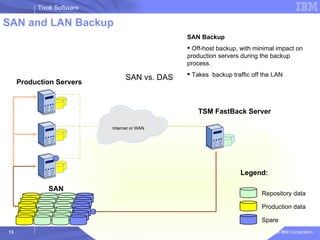
SAN and LAN Backup  SAN TSM FastBack Server Internet or WAN Production Servers Legend: Repository data Production data Spare SAN vs. DAS SAN Backup Off-host backup, with minimal impact on production servers during the backup process. Takes  backup traffic off the LAN
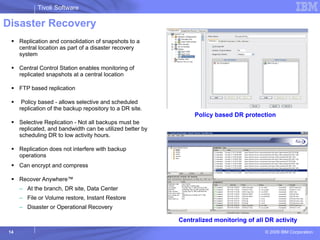
Disaster Recovery Replication and consolidation of snapshots to a central location as part of a disaster recovery system Central Control Station enables monitoring of replicated snapshots at a central location  FTP based replication Policy based - allows selective and scheduled replication of the backup repository to a DR site. Selective Replication - Not all backups must be replicated, and bandwidth can be utilized better by scheduling DR to low activity hours. Replication does not interfere with backup operations Can encrypt and compress Recover Anywhere™ At the branch, DR site, Data Center File or Volume restore, Instant Restore Disaster or Operational Recovery Policy based DR protection Centralized monitoring of all DR activity
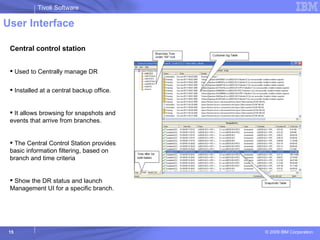
User Interface Central control station Used to Centrally manage DR  Installed at a central backup office.  It allows browsing for snapshots and events that arrive from branches. The Central Control Station provides basic information filtering, based on branch and time criteria Show the DR status and launch Management UI for a specific branch.
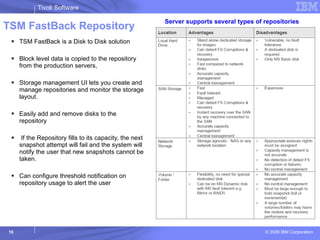
TSM FastBack Repository TSM FastBack is a Disk to Disk solution  Block level data is copied to the repository from the production servers,  Storage management UI lets you create and manage repositories and monitor the storage layout. Easily add and remove disks to the repository If the Repository fills to its capacity, the next snapshot attempt will fail and the system will notify the user that new snapshots cannot be taken. Can configure threshold notification on repository usage to alert the user Server supports several types of repositories
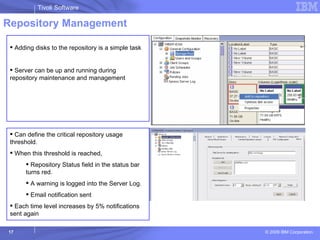
Repository Management Adding disks to the repository is a simple task Server can be up and running during repository maintenance and management Can define the critical repository usage threshold.  When this threshold is reached, Repository Status field in the status bar turns red. A warning is logged into the Server Log.  Email notification sent Each time level increases by 5% notifications sent again
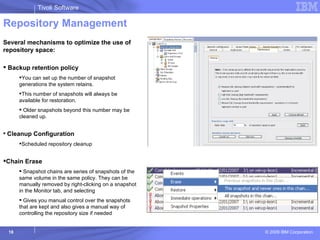
Repository Management Several mechanisms to optimize the use of repository space: Backup retention policy  You can set up the number of snapshot generations the system retains.  This number of snapshots will always be available for restoration.  Older snapshots beyond this number may be cleaned up. Cleanup Configuration Scheduled repository cleanup Chain Erase Snapshot chains are series of snapshots of the same volume in the same policy. They can be manually removed by right-clicking on a snapshot in the Monitor tab, and selecting Gives you manual control over the snapshots that are kept and also gives a manual way of controlling the repository size if needed
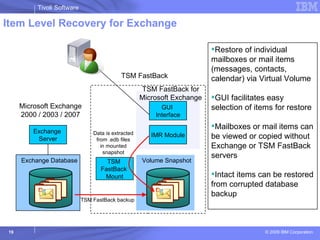
Item Level Recovery for Exchange Exchange  Server .edb files Exchange Database IMR Module GUI  Interface Microsoft Exchange 2000 / 2003 / 2007 TSM FastBack TSM  FastBack  Mount Data is extracted from .edb files in mounted snapshot TSM FastBack for Microsoft Exchange TSM FastBack backup .edb files Volume Snapshot Restore of individual mailboxes or mail items (messages, contacts, calendar) via Virtual Volume  GUI facilitates easy selection of items for restore  Mailboxes or mail items can be viewed or copied without Exchange or TSM FastBack servers Intact items can be restored from corrupted database backup
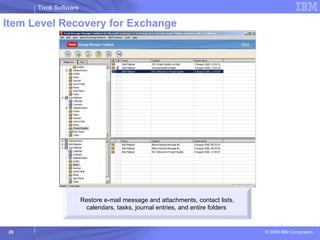
Item Level Recovery for Exchange Restore e-mail message and attachments, contact lists, calendars, tasks, journal entries, and entire folders
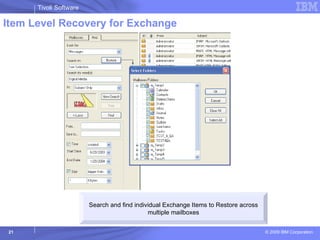
Item Level Recovery for Exchange Search and find individual Exchange Items to Restore across multiple mailboxes
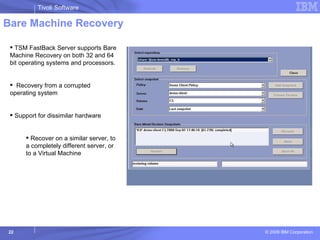
Bare Machine Recovery TSM FastBack Server supports Bare Machine Recovery on both 32 and 64 bit operating systems and processors.  Recovery from a corrupted operating system Support for dissimilar hardware Recover on a similar server, to a completely different server, or to a Virtual Machine
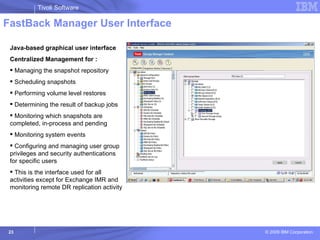
FastBack Manager User Interface Java-based graphical user interface  Centralized Management for : Managing the snapshot repository Scheduling snapshots Performing volume level restores Determining the result of backup jobs Monitoring which snapshots are completed, in-process and pending Monitoring system events Configuring and managing user group privileges and security authentications for specific users This is the interface used for all activities except for Exchange IMR and monitoring remote DR replication activity
TSM FastBack Shell CLI Can be thought of as a command line API (application interface) to TSM FastBack Server and TSM FastBack Mount Can Access most TSM FastBack function from the command line called TSM FastBack Shell Can be used to automate some tasks, and to perform complex integration with third party tools. TSM FastBack Shell provides three modes of operation: Interactive mode: A menu-guided mode recommended for the less experienced users Command line mode: In this mode, individual commands, command types, tags and parameters are entered •  Script file: Used to execute multiple commands written in an ASCII text editor Example: to add an incremental job named Accounting_Daily, that will run every working day (from Monday to Thursday), every 2 hours, between 07:30 to 20:30 TSM FastBackShell –c job add –jname Accounting_Daily [-start “01-19-2004 07:30”] [- interval 2:00] [-exclude from 21:00 to 07:00] [-type inc] [-schedule 32]
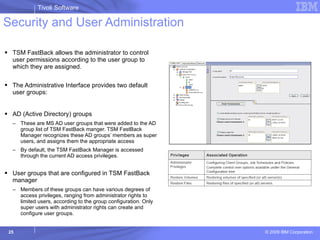
Security and User Administration TSM FastBack allows the administrator to control user permissions according to the user group to which they are assigned. The Administrative Interface provides two default user groups: AD (Active Directory) groups  These are MS AD user groups that were added to the AD group list of TSM FastBack manger. TSM FastBack Manager recognizes these AD groups’ members as super users, and assigns them the appropriate access By default, the TSM FastBack Manager is accessed through the current AD access privileges. User groups that are configured in TSM FastBack manager Members of these groups can have various degrees of access privileges, ranging from administrator rights to limited users, according to the group configuration. Only super users with administrator rights can create and configure user groups.
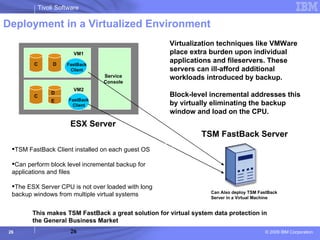
Deployment in a Virtualized Environment VM1 C D C VM2 Service Console TSM FastBack Server ESX Server D E TSM FastBack Client installed on each guest OS Can perform block level incremental backup for applications and files The ESX Server CPU is not over loaded with long backup windows from multiple virtual systems Can Also deploy TSM FastBack Server in a Virtual Machine Virtualization techniques like VMWare place extra burden upon individual applications and fileservers. These servers can ill-afford additional workloads introduced by backup.  Block-level incremental addresses this by virtually eliminating the backup window and load on the CPU.  This makes TSM FastBack a great solution for virtual system data protection in the General Business Market FastBack Client FastBack  Client
FastBack 5.5.2 (Delivered December 2008) FastBack 5.5.3 (Delivered April 2009)
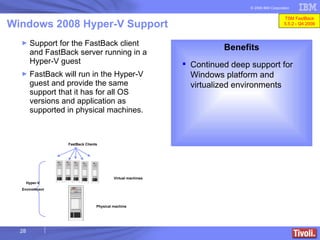
Support for the FastBack client and FastBack server running in a Hyper-V guest  FastBack will run in the Hyper-V guest and provide the same support that it has for all OS versions and application as supported in physical machines.   Windows 2008 Hyper-V Support Benefits Continued deep support for Windows platform and virtualized environments Physical machine Virtual machines Hyper-V Environment FastBack Clients TSM FastBack 5.5.2 - Q4 2008
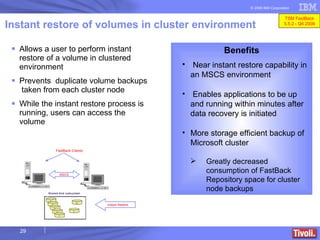
Instant restore of volumes in cluster environment Allows a user to perform instant restore of a volume in clustered environment Prevents  duplicate volume backups  taken from each cluster node While the instant restore process is running, users can access the volume Benefits Near instant restore capability in an MSCS environment Enables applications to be up and running within minutes after data recovery is initiated More storage efficient backup of Microsoft cluster Greatly decreased consumption of FastBack Repository space for cluster node backups MSCS Instant Restore FastBack Clients TSM FastBack 5.5.2 - Q4 2008
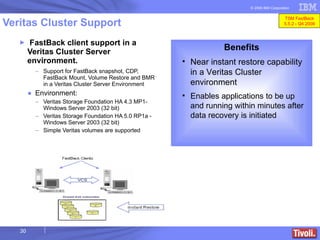
FastBack client support in a Veritas Cluster Server environment. Support for FastBack snapshot, CDP, FastBack Mount, Volume Restore and BMR in a Veritas Cluster Server Environment Environment: Veritas Storage Foundation HA 4.3 MP1- Windows Server 2003 (32 bit)   Veritas Storage Foundation HA 5.0 RP1a   - Windows Server 2003 (32 bit)   Simple Veritas volumes are supported Veritas Cluster Support Benefits Near instant restore capability in a Veritas Cluster environment Enables applications to be up and running within minutes after data recovery is initiated TSM FastBack 5.5.2 - Q4 2008
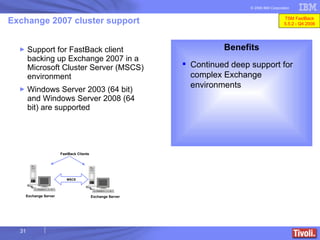
Support for FastBack client backing up Exchange 2007 in a Microsoft Cluster Server (MSCS) environment Windows Server 2003 (64 bit) and Windows Server 2008 (64 bit) are supported   Exchange 2007 cluster support Benefits Continued deep support for complex Exchange environments MSCS FastBack Clients Exchange Server Exchange Server TSM FastBack 5.5.2 - Q4 2008
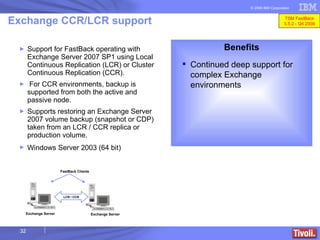
Support for FastBack operating with Exchange Server 2007 SP1 using Local Continuous Replication (LCR) or Cluster Continuous Replication (CCR).  For CCR environments, backup is supported from both the active and passive node. Supports restoring an Exchange Server 2007 volume backup (snapshot or CDP)  taken from an LCR / CCR replica or production volume.  Windows Server 2003 (64 bit)   Exchange CCR/LCR support Benefits Continued deep support for complex Exchange environments LCR / CCR FastBack Clients Exchange Server Exchange Server TSM FastBack 5.5.2 - Q4 2008
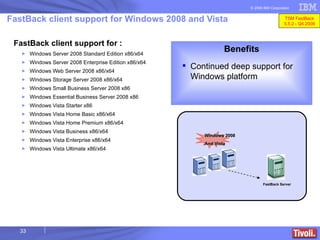
FastBack client support for : Windows Server 2008 Standard Edition x86/x64 Windows Server 2008 Enterprise Edition x86/x64 Windows Web Server 2008  x86/x64 Windows Storage Server 2008  x86/x64 Windows Small Business Server 2008  x86 Windows Essential Business Server 2008  x86 Windows Vista Starter  x86 Windows Vista Home Basic  x86/x64 Windows Vista Home Premium  x86/x64 Windows Vista Business  x86/x64 Windows Vista Enterprise  x86/x64 Windows Vista Ultimate  x86/x64 FastBack client support for Windows 2008 and Vista Benefits Continued deep support for Windows platform FastBack Server Windows 2008 And Vista TSM FastBack 5.5.2 - Q4 2008
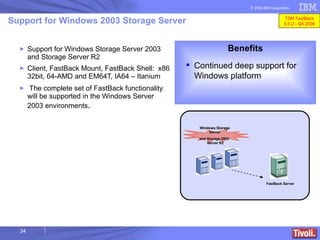
Support for Windows Storage Server 2003 and Storage Server R2  Client, FastBack Mount, FastBack Shell:  x86 32bit, 64-AMD and EM64T, IA64 – Itanium  The complete set of FastBack functionality will be supported in the Windows Server 2003 environments .  Support for Windows 2003 Storage Server Benefits Continued deep support for Windows platform FastBack Server Windows Storage Server 2003 and Storage Server R2  TSM FastBack 5.5.2 - Q4 2008
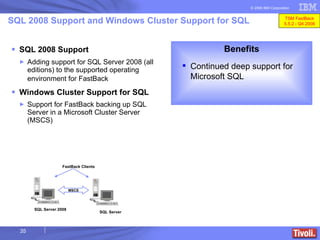
SQL 2008 Support Adding support for SQL Server 2008 (all editions) to the supported operating environment for FastBack   Windows Cluster Support for SQL  Support for FastBack backing up SQL Server in a Microsoft Cluster Server (MSCS)  SQL 2008 Support and Windows Cluster Support for SQL  MSCS FastBack Clients Benefits Continued deep support for Microsoft SQL SQL Server 2008 SQL Server TSM FastBack 5.5.2 - Q4 2008
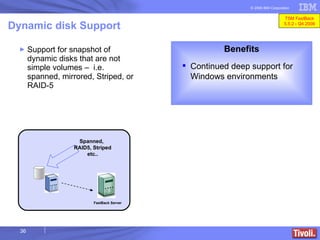
Support for snapshot of  dynamic disks that are not simple volumes –  i.e. spanned, mirrored, Striped, or RAID-5 Dynamic disk Support Benefits Continued deep support for Windows environments FastBack Server Spanned, RAID5, Striped etc.. TSM FastBack 5.5.2 - Q4 2008
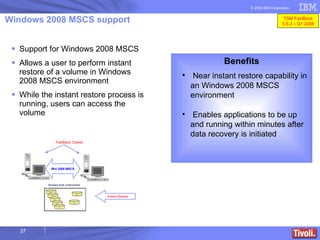
Windows 2008 MSCS support Support for Windows 2008 MSCS Allows a user to perform instant restore of a volume in Windows 2008 MSCS environment While the instant restore process is running, users can access the volume Benefits Near instant restore capability in an Windows 2008 MSCS environment Enables applications to be up and running within minutes after data recovery is initiated Win 2008 MSCS Instant Restore FastBack Clients TSM FastBack 5.5.3 – Q1 2008
Instant restore for Windows 2008 and Vista clients Instant restore support for: Windows Server 2008 Standard Edition x86/x64 Windows Server 2008 Enterprise Edition x86/x64 Windows Web Server 2008  x86/x64 Windows Storage Server 2008  x86/x64 Windows Small Business Server 2008  x86 Windows Essential Business Server 2008  x86 Windows Vista Starter  x86 Windows Vista Home Basic  x86/x64 Windows Vista Home Premium  x86/x64 Windows Vista Business  x86/x64 Windows Vista Enterprise  x86/x64 Windows Vista Ultimate  x86/x64 Benefits Instant Restore allows users to start using applications on the same disk to which the volume is being restored, while the restore operation is still in process. TSM FastBack 5.5.3 – Q1 2009
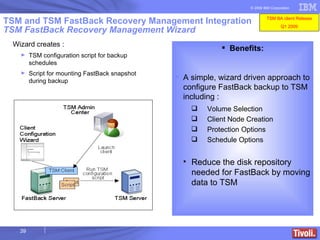
TSM and TSM FastBack Recovery Management Integration TSM FastBack Recovery Management Wizard Benefits: A simple, wizard driven approach to configure FastBack backup to TSM including : Volume Selection Client Node Creation Protection   Options Schedule Options Reduce the disk repository needed for FastBack by moving data to TSM Wizard creates : TSM configuration script for backup schedules Script for mounting FastBack snapshot during backup TSM BA client Release Q1 2009
Agenda Overview and Architecture TSM FastBack Technology Overview Design Considerations and Best Practices Roadmap & Updates Collateral
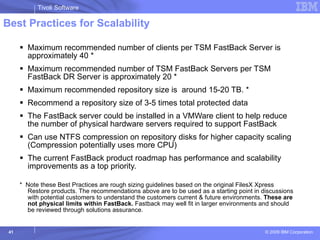
Best Practices for Scalability Maximum recommended number of clients per TSM FastBack Server is approximately 40 * Maximum recommended number of TSM FastBack Servers per TSM FastBack DR Server is approximately 20 * Maximum recommended repository size is  around 15-20 TB. *  Recommend a repository size of 3-5 times total protected data The FastBack server could be installed in a VMWare client to help reduce the number of physical hardware servers required to support FastBack Can use NTFS compression on repository disks for higher capacity scaling (Compression potentially uses more CPU) The current FastBack product roadmap has performance and scalability improvements as a top priority. *  Note these Best Practices are rough sizing guidelines based on the original FilesX Xpress Restore products. The recommendations above are to be used as a starting point in discussions with potential customers to understand the customers current & future environments.  These are not physical limits within FastBack.  Fastback may well fit in larger environments and should be reviewed through solutions assurance.
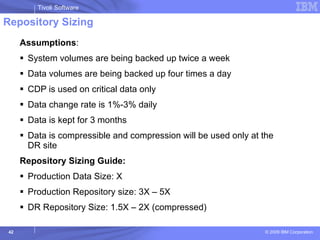
Repository Sizing  Assumptions :  System volumes are being backed up twice a week Data volumes are being backed up four times a day CDP is used on critical data only Data change rate is 1%-3% daily Data is kept for 3 months Data is compressible and compression will be used only at the DR site Repository Sizing Guide: Production Data Size: X Production Repository size: 3X – 5X DR Repository Size: 1.5X – 2X (compressed)
Best Practices for Protecting the TSM FastBack Repository Backup TSM FastBack Server to TSM If using TSM FastBack DR to provide DR for TSM FastBack Servers then use TSM to Backup TSM FastBack DR server
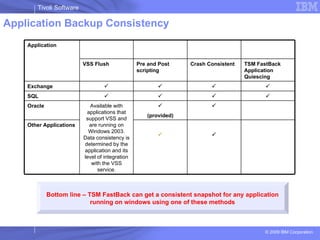
Application Backup Consistency  Bottom line – TSM FastBack can get a consistent snapshot for any application running on windows using one of these methods Application VSS Flush  Pre and Post scripting Crash Consistent  TSM FastBack Application Quiescing Exchange     SQL     Oracle Available with applications that support VSS and are running on Windows 2003. Data consistency is determined by the application and its level of integration with the VSS service.  (provided)  Other Applications  
Qualifications & Best Practices for POC Several text documents are available on these subjects including example customer agreement documents.
Agenda Overview and Architecture TSM FastBack Technology Overview Design Considerations and Best Practices Roadmap & Updates Collateral
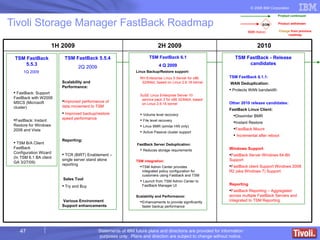
Tivoli Storage Manager FastBack Roadmap TSM FastBack 5.5.3 1Q 2009  FastBack: Support FastBack with W2008 MSCS (Microsoft cluster) FastBack: Instant Restore for Windows 2008 and Vista TSM B/A Client FastBack Configuration Wizard  (In TSM 6.1 BA client GA 3/27/09) TSM FastBack 6.1 4 Q 2009 Linux Backup/Restore support: RH Enterprise Linux 5 Server for x86 32/64bit, based on Linux 2.6.18 kernel SuSE Linux Enterprise Server 10 service pack 2 for x86 32/64bit, based on Linux 2.6.16 kernel  Volume level recovery File level recovery Linux BMR (similar HW only) Active Passive cluster support  FastBack Server Deduplication: Reduces storage requirements TSM integration:  TSM Admin Center provides integrated policy configuration for customers using Fastback and TSM Launch from TSM Admin Center to FastBack Manager UI Scalability and Performance: Enhancements to provide significantly faster backup performance TSM FastBack 5.5.4 2Q 2009 Scalability and Performance: Improved performance of data movement to TSM Improved backup/restore speed performance Reporting: TCR (BIRT) Enablement – single server stand alone reporting Sales Tool Try and Buy Various Environment Support enhancements TSM FastBack - Release candidates TSM FastBack 6.1.1: WAN Deduplication: Protects WAN bandwidth Other 2010 release candidates: FastBack Linux Client: Dissimilar BMR Instant Restore FastBack Mount Incremental after reboot Windows Support FastBack Server Windows 64-Bit Support  FastBack client Support Windows 2008 R2 (aka Windows 7) Support Reporting FastBack Reporting – Aggregated across multiple FastBack Servers and  Integrated to TSM Reporting
Agenda Overview and Architecture TSM FastBack Technology Overview Design Considerations and Best Practices Roadmap & Updates Collateral
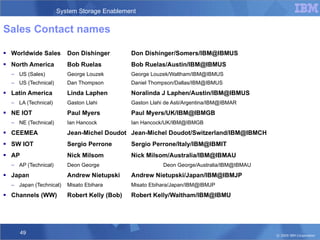
Sales Contact names  Worldwide Sales Don Dishinger Don Dishinger/Somers/IBM@IBMUS North America Bob Ruelas Bob Ruelas/Austin/IBM@IBMUS US (Sales) George Louzek George Louzek/Waltham/IBM@IBMUS US (Technical) Dan Thompson Daniel Thompson/Dallas/IBM@IBMUS Latin America Linda Laphen Noralinda J Laphen/Austin/IBM@IBMUS LA (Technical) Gaston Llahi Gaston Llahi de Asti/Argentina/IBM@IBMAR NE IOT Paul Myers Paul Myers/UK/IBM@IBMGB NE (Technical) Ian Hancock Ian Hancock/UK/IBM@IBMGB CEEMEA Jean-Michel Doudot Jean-Michel Doudot/Switzerland/IBM@IBMCH SW IOT Sergio Perrone Sergio Perrone/Italy/IBM@IBMIT AP Nick Milsom Nick Milsom/Australia/IBM@IBMAU AP (Technical) Deon George Deon George/Australia/IBM@IBMAU Japan  Andrew Nietupski Andrew Nietupski/Japan/IBM@IBMJP Japan (Technical) Misato Ebihara Misato Ebihara/Japan/IBM@IBMJP Channels (WW) Robert Kelly (Bob) Robert Kelly/Waltham/IBM@IBMU
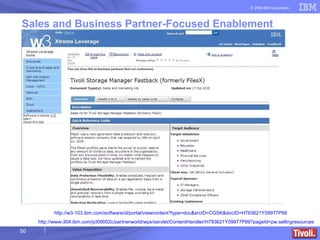
Sales and Business Partner-Focused Enablement IBM -  http://w3-103.ibm.com/software/xl/portal/viewcontent?type=doc&srcID=CGSK&docID=H793621Y09977P99 Partners –  http://www-304.ibm.com/jct09002c/partnerworld/wps/servlet/ContentHandler/H793621Y09977P99?pageId=pw.sellingresources ** IBM Internal only
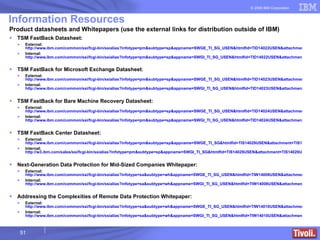
Information Resources Product datasheets and Whitepapers (use the external links for distribution outside of IBM) TSM FastBack Datasheet: External:  http://www.ibm.com/common/ssi/fcgi-bin/ssialias?infotype=pm&subtype=sp&appname=SWGE_TI_SG_USEN&htmlfid=TID14022USEN&attachment=TID14022USEN.PDF Internal:  http://www.ibm.com/common/ssi/fcgi-bin/ssialias?infotype=pm&subtype=sp&appname=SWGI_TI_SG_USEN&htmlfid=TID14022USEN&attachment=TID14022USEN.PDF TSM FastBack for Microsoft Exchange Datasheet : External:  http://www.ibm.com/common/ssi/fcgi-bin/ssialias?infotype=pm&subtype=sp&appname=SWGE_TI_SG_USEN&htmlfid=TID14023USEN&attachment=TID14023USEN.PDF Internal:  http://www.ibm.com/common/ssi/fcgi-bin/ssialias?infotype=pm&subtype=sp&appname=SWGI_TI_SG_USEN&htmlfid=TID14023USEN&attachment=TID14023USEN.PDF TSM FastBack for Bare Machine Recovery Datasheet: External:  http://www.ibm.com/common/ssi/fcgi-bin/ssialias?infotype=pm&subtype=sp&appname=SWGE_TI_SG_USEN&htmlfid=TID14024USEN&attachment=TID14024USEN.PDF Internal:  http://www.ibm.com/common/ssi/fcgi-bin/ssialias?infotype=pm&subtype=sp&appname=SWGI_TI_SG_USEN&htmlfid=TID14024USEN&attachment=TID14024USEN.PDF TSM FastBack Center Datasheet: External:  http://www.ibm.com/common/ssi/fcgi-bin/ssialias?infotype=pm&subtype=sp&appname=SWGE_TI_SG&htmlfid=TIS14029USEN&attachment=TIS14029USEN.PDF Internal:  http://w3.ibm.com/sales/ssi/fcgi-bin/ssialias?infotype=pm&subtype=sp&appname=SWGI_TI_SG&htmlfid=TIS14029USEN&attachment=TIS14029USEN.PDF Next-Generation Data Protection for Mid-Sized Companies Whitepaper: External:  http://www.ibm.com/common/ssi/fcgi-bin/ssialias?infotype=sa&subtype=wh&appname=SWGE_TI_SG_USEN&htmlfid=TIW14008USEN&attachment=TIW14008USEN.PDF Internal:  http://www.ibm.com/common/ssi/fcgi-bin/ssialias?infotype=sa&subtype=wh&appname=SWGI_TI_SG_USEN&htmlfid=TIW14008USEN&attachment=TIW14008USEN.PDF Addressing the Complexities of Remote Data Protection Whitepaper: External:  http://www.ibm.com/common/ssi/fcgi-bin/ssialias?infotype=sa&subtype=wh&appname=SWGE_TI_SG_USEN&htmlfid=TIW14010USEN&attachment=TIW14010USEN.PDF Internal:  http://www.ibm.com/common/ssi/fcgi-bin/ssialias?infotype=sa&subtype=wh&appname=SWGI_TI_SG_USEN&htmlfid=TIW14010USEN&attachment=TIW14010USEN.PDF
Information Resources Product Web Pages IBM Tivoli Storage Manager FastBack http://www.ibm.com/software/tivoli/products/storage-mgr-fastback/ IBM Tivoli Storage Manager FastBack for Microsoft Exchange http://www.ibm.com/software/tivoli/products/storage-mgr-fastback-exchange/ IBM Tivoli Storage Manager FastBack for Bare Machine Recovery http://www.ibm.com/software/tivoli/products/storage-mgr-fastback-bmr/ IBM Tivoli Storage Manager FastBack Center http://www.ibm.com/software/tivoli/products/storage-mgr-fastback-center/
Information Resources Collateral – datasheets and whitepapers IBM Tivoli Storage Manager FastBack IBM Tivoli Storage Manager FastBack for Microsoft Exchange IBM Tivoli Storage Manager FastBack for Bare Machine Recovery IBM Tivoli Storage Manager FastBack Center Addressing the Complexities of Remote Data Protection Next-Generation Data Protection for Mid-Sized Companies
Thank You

Fastback Technical Enablementv1

  • 1.
    TSM FastBack TechnicalEnablement Name Tivoli Storage Software [email_address]
  • 2.
    Agenda Overview andArchitecture TSM FastBack Technology Overview Design Considerations and Best Practices Roadmap & Updates Collateral
  • 3.
    TSM FastBack Adaptiveprotection : Dial up the level of protection your application or fileserver requires Protects Mission-Critical Applications and Files Protection Block-level, incremental-forever Windows Applications and Filesystems SQL, Exchange, Oracle, SAP and more VMWare support Lightweight client No backup window required Policy-based capture schedule CDP on Demand™ Recovery Granular – any data object File, folder, volume, system Point-in-Time rollback Instant Restore Instant access, background restore Recover Anywhere™- At the branch, DR site, Data Center Disaster Recovery Protection Disk-based protection and recovery Encryption in flight Bandwidth & storage efficient Incremental replication Scheduling Compression Cost Effective Eliminates the need for tape backup in the remote office
  • 4.
    TSM FastBack –Disaster Recovery Central Vaulting of Backup Copies Backup consolidation Disaster ready Block-level, incremental forever Centralized backup to tape End-to-end security Encryption in transit Individual Virtual Vault for each office Scheduled, policy-based transfers Optimize WAN resources Fully Automated No manual intervention required Recover Anywhere™ At the branch, DR site, Data Center File or Volume restore Instant Restore Disaster or Operational Recovery Data Center FastBack-DR Repository
  • 5.
    TSM FastBack forMicrosoft Exchange Item Level Recovery of MS-Exchange Explorer-like GUI E-mail messages & attachments Contacts and calendars Tasks and notes Mailboxes Recover objects from corrupt EDBs Supports Microsoft Exchange: 2000 2003 2007 Note : TSM FastBack provides automatic discovery of volumes associated with Exchange and SQL Greatly improves the efficiency of Exchange administrators Provide object restores in minutes rather than hours, days Helps administrator raise SLA’s by eliminating downtime
  • 6.
    TSM FastBack BMRBare Machine Recovery Takes less than an hour Full access within minutes With Instant Restore technology, data volumes are made available as soon as the recovery process starts Support for dissimilar hardware Recover on a similar server, to a completely different server, or to a Virtual Machine “ N-to-1” standby server ratio: One standby server can provide cover for many production servers Cost-effective ‘high availability’ alternative
  • 7.
    TSM FastBack ProductSuite Deployment Architecture TSM FastBack Mount® Instant Recovery Production Windows Server DR Site Windows Server DR Hub Server TSM FastBack Mount® Instant Recovery TSM FastBack Server® on Windows TSM FastBack Manager TSM FastBack Restore DR TSM FastBack CLI TSM FastBack Client® TSM FastBack Mount® Instant Recovery Protected Server Protection & Fast Recovery Server Disaster Recovery and Archiving FastBack for Exchange Central Control Station FastBack for Exchange Bare Machine Recovery Bare Machine Recovery
  • 8.
    Agenda Overview andArchitecture TSM FastBack Technology Overview Design Considerations and Best Practices Roadmap & Updates Collateral
  • 9.
    Continuous Data Protection(CDP) True Block level CDP (I/O Based) Can achieve zero RPO Delta from (incremental) snapshots Set RPO per application Configurable protection periods Enabled per volume Intuitive GUI Remember CDP is a feature of the product, the product is more than CDP Single backup solution offers: CDP Frequent Snapshot Scheduled Protection Protects Windows Filesystem and Windows Applications
  • 10.
    Block Level IncrementalForever Application or File server Production Disk Incremental backups are Block-Level, not file-level. Only the blocks that have changed since the last incremental snapshot are backed up Frequent Block Level Incremental snapshots can take only seconds or minutes to complete Bandwidth efficient data movement makes frequent snapshots and CDP practical Very little impact to the production server or the network Block level incremental is used for application protection as well as protecting files Excellent performance TSM FastBack Server
  • 11.
    Mount Snapshots asa Virtual Volume Quickly mount any snapshot volume from the local or remote (replicated) repository, as a virtual volume on the server (read-only) Mount snapshots into virtual volumes, without actually restoring the files. Example use: MS SQL table restore You can mount virtual volume with a backed up database and recover anything you need without restoring the volume to disk. When a database is backed up it resides on the TSM FastBack repository, so a virtual volume containing the database can be mounted on any SQL server . Mount a backup volume and attach the database to SQL without the need to restore. User can manipulate data using native database tool Access from anywhere Select any saved snapshot Any point in time Mount as a Virtual Drive
  • 12.
    Instant Recovery 1. Activate Instant Restore 2. Background Process restores blocks gradually 3. Write IOs are performed as usual 4. Read IOs from un-recovered areas create restore on demand 5. All other reads are performed as usual Production server New Production Disk Instant Restore allows users to start using applications on the same disk to which the volume is being restored, while the restore operation is still in process. TSM FastBack Server New Production server Typical Production Disk
  • 13.
    SAN and LANBackup SAN TSM FastBack Server Internet or WAN Production Servers Legend: Repository data Production data Spare SAN vs. DAS SAN Backup Off-host backup, with minimal impact on production servers during the backup process. Takes backup traffic off the LAN
  • 14.
    Disaster Recovery Replicationand consolidation of snapshots to a central location as part of a disaster recovery system Central Control Station enables monitoring of replicated snapshots at a central location FTP based replication Policy based - allows selective and scheduled replication of the backup repository to a DR site. Selective Replication - Not all backups must be replicated, and bandwidth can be utilized better by scheduling DR to low activity hours. Replication does not interfere with backup operations Can encrypt and compress Recover Anywhere™ At the branch, DR site, Data Center File or Volume restore, Instant Restore Disaster or Operational Recovery Policy based DR protection Centralized monitoring of all DR activity
  • 15.
    User Interface Centralcontrol station Used to Centrally manage DR Installed at a central backup office. It allows browsing for snapshots and events that arrive from branches. The Central Control Station provides basic information filtering, based on branch and time criteria Show the DR status and launch Management UI for a specific branch.
  • 16.
    TSM FastBack RepositoryTSM FastBack is a Disk to Disk solution Block level data is copied to the repository from the production servers, Storage management UI lets you create and manage repositories and monitor the storage layout. Easily add and remove disks to the repository If the Repository fills to its capacity, the next snapshot attempt will fail and the system will notify the user that new snapshots cannot be taken. Can configure threshold notification on repository usage to alert the user Server supports several types of repositories
  • 17.
    Repository Management Addingdisks to the repository is a simple task Server can be up and running during repository maintenance and management Can define the critical repository usage threshold. When this threshold is reached, Repository Status field in the status bar turns red. A warning is logged into the Server Log. Email notification sent Each time level increases by 5% notifications sent again
  • 18.
    Repository Management Severalmechanisms to optimize the use of repository space: Backup retention policy You can set up the number of snapshot generations the system retains. This number of snapshots will always be available for restoration. Older snapshots beyond this number may be cleaned up. Cleanup Configuration Scheduled repository cleanup Chain Erase Snapshot chains are series of snapshots of the same volume in the same policy. They can be manually removed by right-clicking on a snapshot in the Monitor tab, and selecting Gives you manual control over the snapshots that are kept and also gives a manual way of controlling the repository size if needed
  • 19.
    Item Level Recoveryfor Exchange Exchange Server .edb files Exchange Database IMR Module GUI Interface Microsoft Exchange 2000 / 2003 / 2007 TSM FastBack TSM FastBack Mount Data is extracted from .edb files in mounted snapshot TSM FastBack for Microsoft Exchange TSM FastBack backup .edb files Volume Snapshot Restore of individual mailboxes or mail items (messages, contacts, calendar) via Virtual Volume GUI facilitates easy selection of items for restore Mailboxes or mail items can be viewed or copied without Exchange or TSM FastBack servers Intact items can be restored from corrupted database backup
  • 20.
    Item Level Recoveryfor Exchange Restore e-mail message and attachments, contact lists, calendars, tasks, journal entries, and entire folders
  • 21.
    Item Level Recoveryfor Exchange Search and find individual Exchange Items to Restore across multiple mailboxes
  • 22.
    Bare Machine RecoveryTSM FastBack Server supports Bare Machine Recovery on both 32 and 64 bit operating systems and processors. Recovery from a corrupted operating system Support for dissimilar hardware Recover on a similar server, to a completely different server, or to a Virtual Machine
  • 23.
    FastBack Manager UserInterface Java-based graphical user interface Centralized Management for : Managing the snapshot repository Scheduling snapshots Performing volume level restores Determining the result of backup jobs Monitoring which snapshots are completed, in-process and pending Monitoring system events Configuring and managing user group privileges and security authentications for specific users This is the interface used for all activities except for Exchange IMR and monitoring remote DR replication activity
  • 24.
    TSM FastBack ShellCLI Can be thought of as a command line API (application interface) to TSM FastBack Server and TSM FastBack Mount Can Access most TSM FastBack function from the command line called TSM FastBack Shell Can be used to automate some tasks, and to perform complex integration with third party tools. TSM FastBack Shell provides three modes of operation: Interactive mode: A menu-guided mode recommended for the less experienced users Command line mode: In this mode, individual commands, command types, tags and parameters are entered • Script file: Used to execute multiple commands written in an ASCII text editor Example: to add an incremental job named Accounting_Daily, that will run every working day (from Monday to Thursday), every 2 hours, between 07:30 to 20:30 TSM FastBackShell –c job add –jname Accounting_Daily [-start “01-19-2004 07:30”] [- interval 2:00] [-exclude from 21:00 to 07:00] [-type inc] [-schedule 32]
  • 25.
    Security and UserAdministration TSM FastBack allows the administrator to control user permissions according to the user group to which they are assigned. The Administrative Interface provides two default user groups: AD (Active Directory) groups These are MS AD user groups that were added to the AD group list of TSM FastBack manger. TSM FastBack Manager recognizes these AD groups’ members as super users, and assigns them the appropriate access By default, the TSM FastBack Manager is accessed through the current AD access privileges. User groups that are configured in TSM FastBack manager Members of these groups can have various degrees of access privileges, ranging from administrator rights to limited users, according to the group configuration. Only super users with administrator rights can create and configure user groups.
  • 26.
    Deployment in aVirtualized Environment VM1 C D C VM2 Service Console TSM FastBack Server ESX Server D E TSM FastBack Client installed on each guest OS Can perform block level incremental backup for applications and files The ESX Server CPU is not over loaded with long backup windows from multiple virtual systems Can Also deploy TSM FastBack Server in a Virtual Machine Virtualization techniques like VMWare place extra burden upon individual applications and fileservers. These servers can ill-afford additional workloads introduced by backup. Block-level incremental addresses this by virtually eliminating the backup window and load on the CPU. This makes TSM FastBack a great solution for virtual system data protection in the General Business Market FastBack Client FastBack Client
  • 27.
    FastBack 5.5.2 (DeliveredDecember 2008) FastBack 5.5.3 (Delivered April 2009)
  • 28.
    Support for theFastBack client and FastBack server running in a Hyper-V guest FastBack will run in the Hyper-V guest and provide the same support that it has for all OS versions and application as supported in physical machines. Windows 2008 Hyper-V Support Benefits Continued deep support for Windows platform and virtualized environments Physical machine Virtual machines Hyper-V Environment FastBack Clients TSM FastBack 5.5.2 - Q4 2008
  • 29.
    Instant restore ofvolumes in cluster environment Allows a user to perform instant restore of a volume in clustered environment Prevents duplicate volume backups taken from each cluster node While the instant restore process is running, users can access the volume Benefits Near instant restore capability in an MSCS environment Enables applications to be up and running within minutes after data recovery is initiated More storage efficient backup of Microsoft cluster Greatly decreased consumption of FastBack Repository space for cluster node backups MSCS Instant Restore FastBack Clients TSM FastBack 5.5.2 - Q4 2008
  • 30.
    FastBack client supportin a Veritas Cluster Server environment. Support for FastBack snapshot, CDP, FastBack Mount, Volume Restore and BMR in a Veritas Cluster Server Environment Environment: Veritas Storage Foundation HA 4.3 MP1- Windows Server 2003 (32 bit) Veritas Storage Foundation HA 5.0 RP1a - Windows Server 2003 (32 bit) Simple Veritas volumes are supported Veritas Cluster Support Benefits Near instant restore capability in a Veritas Cluster environment Enables applications to be up and running within minutes after data recovery is initiated TSM FastBack 5.5.2 - Q4 2008
  • 31.
    Support for FastBackclient backing up Exchange 2007 in a Microsoft Cluster Server (MSCS) environment Windows Server 2003 (64 bit) and Windows Server 2008 (64 bit) are supported Exchange 2007 cluster support Benefits Continued deep support for complex Exchange environments MSCS FastBack Clients Exchange Server Exchange Server TSM FastBack 5.5.2 - Q4 2008
  • 32.
    Support for FastBackoperating with Exchange Server 2007 SP1 using Local Continuous Replication (LCR) or Cluster Continuous Replication (CCR). For CCR environments, backup is supported from both the active and passive node. Supports restoring an Exchange Server 2007 volume backup (snapshot or CDP) taken from an LCR / CCR replica or production volume. Windows Server 2003 (64 bit) Exchange CCR/LCR support Benefits Continued deep support for complex Exchange environments LCR / CCR FastBack Clients Exchange Server Exchange Server TSM FastBack 5.5.2 - Q4 2008
  • 33.
    FastBack client supportfor : Windows Server 2008 Standard Edition x86/x64 Windows Server 2008 Enterprise Edition x86/x64 Windows Web Server 2008 x86/x64 Windows Storage Server 2008 x86/x64 Windows Small Business Server 2008 x86 Windows Essential Business Server 2008 x86 Windows Vista Starter x86 Windows Vista Home Basic x86/x64 Windows Vista Home Premium x86/x64 Windows Vista Business x86/x64 Windows Vista Enterprise x86/x64 Windows Vista Ultimate x86/x64 FastBack client support for Windows 2008 and Vista Benefits Continued deep support for Windows platform FastBack Server Windows 2008 And Vista TSM FastBack 5.5.2 - Q4 2008
  • 34.
    Support for WindowsStorage Server 2003 and Storage Server R2 Client, FastBack Mount, FastBack Shell: x86 32bit, 64-AMD and EM64T, IA64 – Itanium The complete set of FastBack functionality will be supported in the Windows Server 2003 environments . Support for Windows 2003 Storage Server Benefits Continued deep support for Windows platform FastBack Server Windows Storage Server 2003 and Storage Server R2 TSM FastBack 5.5.2 - Q4 2008
  • 35.
    SQL 2008 SupportAdding support for SQL Server 2008 (all editions) to the supported operating environment for FastBack Windows Cluster Support for SQL Support for FastBack backing up SQL Server in a Microsoft Cluster Server (MSCS) SQL 2008 Support and Windows Cluster Support for SQL MSCS FastBack Clients Benefits Continued deep support for Microsoft SQL SQL Server 2008 SQL Server TSM FastBack 5.5.2 - Q4 2008
  • 36.
    Support for snapshotof dynamic disks that are not simple volumes – i.e. spanned, mirrored, Striped, or RAID-5 Dynamic disk Support Benefits Continued deep support for Windows environments FastBack Server Spanned, RAID5, Striped etc.. TSM FastBack 5.5.2 - Q4 2008
  • 37.
    Windows 2008 MSCSsupport Support for Windows 2008 MSCS Allows a user to perform instant restore of a volume in Windows 2008 MSCS environment While the instant restore process is running, users can access the volume Benefits Near instant restore capability in an Windows 2008 MSCS environment Enables applications to be up and running within minutes after data recovery is initiated Win 2008 MSCS Instant Restore FastBack Clients TSM FastBack 5.5.3 – Q1 2008
  • 38.
    Instant restore forWindows 2008 and Vista clients Instant restore support for: Windows Server 2008 Standard Edition x86/x64 Windows Server 2008 Enterprise Edition x86/x64 Windows Web Server 2008 x86/x64 Windows Storage Server 2008 x86/x64 Windows Small Business Server 2008 x86 Windows Essential Business Server 2008 x86 Windows Vista Starter x86 Windows Vista Home Basic x86/x64 Windows Vista Home Premium x86/x64 Windows Vista Business x86/x64 Windows Vista Enterprise x86/x64 Windows Vista Ultimate x86/x64 Benefits Instant Restore allows users to start using applications on the same disk to which the volume is being restored, while the restore operation is still in process. TSM FastBack 5.5.3 – Q1 2009
  • 39.
    TSM and TSMFastBack Recovery Management Integration TSM FastBack Recovery Management Wizard Benefits: A simple, wizard driven approach to configure FastBack backup to TSM including : Volume Selection Client Node Creation Protection Options Schedule Options Reduce the disk repository needed for FastBack by moving data to TSM Wizard creates : TSM configuration script for backup schedules Script for mounting FastBack snapshot during backup TSM BA client Release Q1 2009
  • 40.
    Agenda Overview andArchitecture TSM FastBack Technology Overview Design Considerations and Best Practices Roadmap & Updates Collateral
  • 41.
    Best Practices forScalability Maximum recommended number of clients per TSM FastBack Server is approximately 40 * Maximum recommended number of TSM FastBack Servers per TSM FastBack DR Server is approximately 20 * Maximum recommended repository size is around 15-20 TB. * Recommend a repository size of 3-5 times total protected data The FastBack server could be installed in a VMWare client to help reduce the number of physical hardware servers required to support FastBack Can use NTFS compression on repository disks for higher capacity scaling (Compression potentially uses more CPU) The current FastBack product roadmap has performance and scalability improvements as a top priority. * Note these Best Practices are rough sizing guidelines based on the original FilesX Xpress Restore products. The recommendations above are to be used as a starting point in discussions with potential customers to understand the customers current & future environments. These are not physical limits within FastBack. Fastback may well fit in larger environments and should be reviewed through solutions assurance.
  • 42.
    Repository Sizing Assumptions : System volumes are being backed up twice a week Data volumes are being backed up four times a day CDP is used on critical data only Data change rate is 1%-3% daily Data is kept for 3 months Data is compressible and compression will be used only at the DR site Repository Sizing Guide: Production Data Size: X Production Repository size: 3X – 5X DR Repository Size: 1.5X – 2X (compressed)
  • 43.
    Best Practices forProtecting the TSM FastBack Repository Backup TSM FastBack Server to TSM If using TSM FastBack DR to provide DR for TSM FastBack Servers then use TSM to Backup TSM FastBack DR server
  • 44.
    Application Backup Consistency Bottom line – TSM FastBack can get a consistent snapshot for any application running on windows using one of these methods Application VSS Flush Pre and Post scripting Crash Consistent TSM FastBack Application Quiescing Exchange     SQL     Oracle Available with applications that support VSS and are running on Windows 2003. Data consistency is determined by the application and its level of integration with the VSS service.  (provided)  Other Applications  
  • 45.
    Qualifications & BestPractices for POC Several text documents are available on these subjects including example customer agreement documents.
  • 46.
    Agenda Overview andArchitecture TSM FastBack Technology Overview Design Considerations and Best Practices Roadmap & Updates Collateral
  • 47.
    Tivoli Storage ManagerFastBack Roadmap TSM FastBack 5.5.3 1Q 2009 FastBack: Support FastBack with W2008 MSCS (Microsoft cluster) FastBack: Instant Restore for Windows 2008 and Vista TSM B/A Client FastBack Configuration Wizard (In TSM 6.1 BA client GA 3/27/09) TSM FastBack 6.1 4 Q 2009 Linux Backup/Restore support: RH Enterprise Linux 5 Server for x86 32/64bit, based on Linux 2.6.18 kernel SuSE Linux Enterprise Server 10 service pack 2 for x86 32/64bit, based on Linux 2.6.16 kernel Volume level recovery File level recovery Linux BMR (similar HW only) Active Passive cluster support FastBack Server Deduplication: Reduces storage requirements TSM integration: TSM Admin Center provides integrated policy configuration for customers using Fastback and TSM Launch from TSM Admin Center to FastBack Manager UI Scalability and Performance: Enhancements to provide significantly faster backup performance TSM FastBack 5.5.4 2Q 2009 Scalability and Performance: Improved performance of data movement to TSM Improved backup/restore speed performance Reporting: TCR (BIRT) Enablement – single server stand alone reporting Sales Tool Try and Buy Various Environment Support enhancements TSM FastBack - Release candidates TSM FastBack 6.1.1: WAN Deduplication: Protects WAN bandwidth Other 2010 release candidates: FastBack Linux Client: Dissimilar BMR Instant Restore FastBack Mount Incremental after reboot Windows Support FastBack Server Windows 64-Bit Support FastBack client Support Windows 2008 R2 (aka Windows 7) Support Reporting FastBack Reporting – Aggregated across multiple FastBack Servers and Integrated to TSM Reporting
  • 48.
    Agenda Overview andArchitecture TSM FastBack Technology Overview Design Considerations and Best Practices Roadmap & Updates Collateral
  • 49.
    Sales Contact names Worldwide Sales Don Dishinger Don Dishinger/Somers/IBM@IBMUS North America Bob Ruelas Bob Ruelas/Austin/IBM@IBMUS US (Sales) George Louzek George Louzek/Waltham/IBM@IBMUS US (Technical) Dan Thompson Daniel Thompson/Dallas/IBM@IBMUS Latin America Linda Laphen Noralinda J Laphen/Austin/IBM@IBMUS LA (Technical) Gaston Llahi Gaston Llahi de Asti/Argentina/IBM@IBMAR NE IOT Paul Myers Paul Myers/UK/IBM@IBMGB NE (Technical) Ian Hancock Ian Hancock/UK/IBM@IBMGB CEEMEA Jean-Michel Doudot Jean-Michel Doudot/Switzerland/IBM@IBMCH SW IOT Sergio Perrone Sergio Perrone/Italy/IBM@IBMIT AP Nick Milsom Nick Milsom/Australia/IBM@IBMAU AP (Technical) Deon George Deon George/Australia/IBM@IBMAU Japan Andrew Nietupski Andrew Nietupski/Japan/IBM@IBMJP Japan (Technical) Misato Ebihara Misato Ebihara/Japan/IBM@IBMJP Channels (WW) Robert Kelly (Bob) Robert Kelly/Waltham/IBM@IBMU
  • 50.
    Sales and BusinessPartner-Focused Enablement IBM - http://w3-103.ibm.com/software/xl/portal/viewcontent?type=doc&srcID=CGSK&docID=H793621Y09977P99 Partners – http://www-304.ibm.com/jct09002c/partnerworld/wps/servlet/ContentHandler/H793621Y09977P99?pageId=pw.sellingresources ** IBM Internal only
  • 51.
    Information Resources Productdatasheets and Whitepapers (use the external links for distribution outside of IBM) TSM FastBack Datasheet: External: http://www.ibm.com/common/ssi/fcgi-bin/ssialias?infotype=pm&subtype=sp&appname=SWGE_TI_SG_USEN&htmlfid=TID14022USEN&attachment=TID14022USEN.PDF Internal: http://www.ibm.com/common/ssi/fcgi-bin/ssialias?infotype=pm&subtype=sp&appname=SWGI_TI_SG_USEN&htmlfid=TID14022USEN&attachment=TID14022USEN.PDF TSM FastBack for Microsoft Exchange Datasheet : External: http://www.ibm.com/common/ssi/fcgi-bin/ssialias?infotype=pm&subtype=sp&appname=SWGE_TI_SG_USEN&htmlfid=TID14023USEN&attachment=TID14023USEN.PDF Internal: http://www.ibm.com/common/ssi/fcgi-bin/ssialias?infotype=pm&subtype=sp&appname=SWGI_TI_SG_USEN&htmlfid=TID14023USEN&attachment=TID14023USEN.PDF TSM FastBack for Bare Machine Recovery Datasheet: External: http://www.ibm.com/common/ssi/fcgi-bin/ssialias?infotype=pm&subtype=sp&appname=SWGE_TI_SG_USEN&htmlfid=TID14024USEN&attachment=TID14024USEN.PDF Internal: http://www.ibm.com/common/ssi/fcgi-bin/ssialias?infotype=pm&subtype=sp&appname=SWGI_TI_SG_USEN&htmlfid=TID14024USEN&attachment=TID14024USEN.PDF TSM FastBack Center Datasheet: External: http://www.ibm.com/common/ssi/fcgi-bin/ssialias?infotype=pm&subtype=sp&appname=SWGE_TI_SG&htmlfid=TIS14029USEN&attachment=TIS14029USEN.PDF Internal: http://w3.ibm.com/sales/ssi/fcgi-bin/ssialias?infotype=pm&subtype=sp&appname=SWGI_TI_SG&htmlfid=TIS14029USEN&attachment=TIS14029USEN.PDF Next-Generation Data Protection for Mid-Sized Companies Whitepaper: External: http://www.ibm.com/common/ssi/fcgi-bin/ssialias?infotype=sa&subtype=wh&appname=SWGE_TI_SG_USEN&htmlfid=TIW14008USEN&attachment=TIW14008USEN.PDF Internal: http://www.ibm.com/common/ssi/fcgi-bin/ssialias?infotype=sa&subtype=wh&appname=SWGI_TI_SG_USEN&htmlfid=TIW14008USEN&attachment=TIW14008USEN.PDF Addressing the Complexities of Remote Data Protection Whitepaper: External: http://www.ibm.com/common/ssi/fcgi-bin/ssialias?infotype=sa&subtype=wh&appname=SWGE_TI_SG_USEN&htmlfid=TIW14010USEN&attachment=TIW14010USEN.PDF Internal: http://www.ibm.com/common/ssi/fcgi-bin/ssialias?infotype=sa&subtype=wh&appname=SWGI_TI_SG_USEN&htmlfid=TIW14010USEN&attachment=TIW14010USEN.PDF
  • 52.
    Information Resources ProductWeb Pages IBM Tivoli Storage Manager FastBack http://www.ibm.com/software/tivoli/products/storage-mgr-fastback/ IBM Tivoli Storage Manager FastBack for Microsoft Exchange http://www.ibm.com/software/tivoli/products/storage-mgr-fastback-exchange/ IBM Tivoli Storage Manager FastBack for Bare Machine Recovery http://www.ibm.com/software/tivoli/products/storage-mgr-fastback-bmr/ IBM Tivoli Storage Manager FastBack Center http://www.ibm.com/software/tivoli/products/storage-mgr-fastback-center/
  • 53.
    Information Resources Collateral– datasheets and whitepapers IBM Tivoli Storage Manager FastBack IBM Tivoli Storage Manager FastBack for Microsoft Exchange IBM Tivoli Storage Manager FastBack for Bare Machine Recovery IBM Tivoli Storage Manager FastBack Center Addressing the Complexities of Remote Data Protection Next-Generation Data Protection for Mid-Sized Companies
  • 54.

Editor's Notes

  • #12 TSM FastBack also provides very unique Virtual Recovery technology. With TSM FastBack Mount and Instant Restore software, our client software that can be loaded on any computer, snapshots can be accessed from anywhere for operational or Disaster Recovery. Simply open TSM FastBack Mount, browse for a local branch snapshot repository or a WAN based central snapshot vault at the main data center. Select the desired repository, the back-up policy, volume and point in time. You can click the TSM FastBack Mount button to instantly mount the selected volume snapshot as a virtual drive letter for restoration. You can then browse the entire volume in CIFS in real time as a local drive and restore any files you need. If you need to recover a volume and restart application services immediately in an outage scenario, select the Instant Restore button and re-start services by re-directing host server read requests to the selected snapshot while the snapshot data is being copied back to the production volume in the background. Both of these scenarios are now WAN enabled, which means you can perform both TSM FastBack Mount and Instant Restore operations from either a local branch snapshot, or a centrally stored snapshot that might be thousands of miles away.
  • #15 The TSM FastBack DR solution utilizes a proprietary protocol built over the standard FTP protocol. This approach benefits from the advantages of the well known FTP protocol (e.g. Firewall friendly, performance, stability), while putting in added value from TSM FastBack (compression, performance optimization, special error handling etc…). TSM FastBack DR FXP also uses the standard FTP over SSL features, to allow secure transfer
  • #26 Define a new group And from within TSM FastBack manager say that group is super users