Objectives
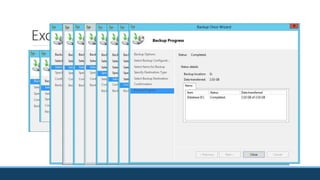
Backing up and recovering Exchange using Windows Server Backup
Using alternate methods to recover Exchange
Recovering the entire Exchange Server
Issues
Exchange MB servers store large amounts of mission critical data
MB servers have constant interaction with users
Complex environment creates variation in types of disasters you might recover from
Reliance on Active Directory
Service Level Agreements (SLAs)
Available backup technology
The Database Engine
Transactional database using the Extensible Storage Engine (ESE) known as Joint Engine
Technology (JET) blue.
Database utilizes a Balanced B+ tree organization optimized for Exchange Server storage.
Three locations where mail data is stored:
◦ Mailbox database (EDB file)
◦ Transaction log files (.log)
◦ Write ahead logging – data written from memory to the logs then committed to the database afterward.
◦ Checkpoint file tracks log files that have been committed to the database.
◦ Server memory
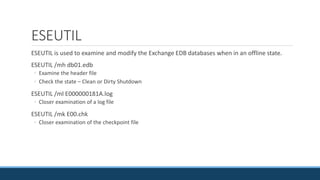
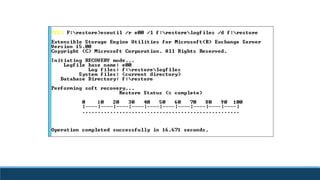
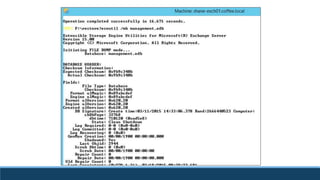
ESEUTIL
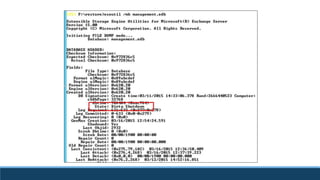
ESEUTIL is used to examine and modify the Exchange EDB databases when in an offline state.
ESEUTIL /mh db01.edb
◦ Examine the header file
◦ Check the state – Clean or Dirty Shutdown
ESEUTIL /ml E000000181A.log
◦ Closer examination of a log file
ESEUTIL /mk E00.chk
◦ Closer examination of the checkpoint file
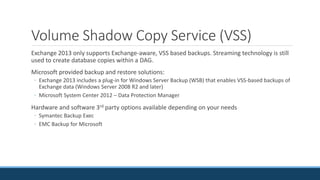
Volume Shadow Copy Service (VSS)
Exchange 2013 only supports Exchange-aware, VSS based backups. Streaming technology is still
used to create database copies within a DAG.
Microsoft provided backup and restore solutions:
◦ Exchange 2013 includes a plug-in for Windows Server Backup (WSB) that enables VSS-based backups of
Exchange data (Windows Server 2008 R2 and later)
◦ Microsoft System Center 2012 – Data Protection Manager
Hardware and software 3rd party options available depending on your needs
◦ Symantec Backup Exec
◦ EMC Backup for Microsoft
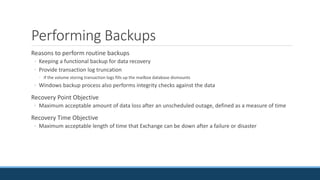
Performing Backups
Reasons to perform routine backups
◦ Keeping a functional backup for data recovery
◦ Provide transaction log truncation
◦ If the volume storing transaction logs fills up the mailbox database dismounts
◦ Windows backup process also performs integrity checks against the data
Recovery Point Objective
◦ Maximum acceptable amount of data loss after an unscheduled outage, defined as a measure of time
Recovery Time Objective
◦ Maximum acceptable length of time that Exchange can be down after a failure or disaster
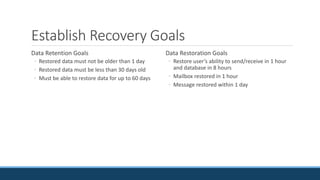
Establish Recovery Goals
Data Retention Goals
◦ Restored data must not be older than 1 day
◦ Restored data must be less than 30 days old
◦ Must be able to restore data for up to 60 days
Data Restoration Goals
◦ Restore user’s ability to send/receive in 1 hour
and database in 8 hours
◦ Mailbox restored in 1 hour
◦ Message restored within 1 day
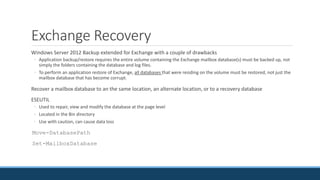
Exchange Recovery
Windows Server 2012 Backup extended for Exchange with a couple of drawbacks
◦ Application backup/restore requires the entire volume containing the Exchange mailbox database(s) must be backed up, not
simply the folders containing the database and log files.
◦ To perform an application restore of Exchange, all databases that were residing on the volume must be restored, not just the
mailbox database that has become corrupt.
Recover a mailbox database to an the same location, an alternate location, or to a recovery database
ESEUTIL
◦ Used to repair, view and modify the database at the page level
◦ Located in the Bin directory
◦ Use with caution, can cause data loss
Move-DatabasePath
Set-MailboxDatabase
Exchange Backup and Restore
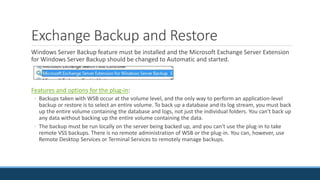
Windows Server Backup feature must be installed and the Microsoft Exchange Server Extension
for Windows Server Backup should be changed to Automatic and started.
Features and options for the plug-in:
◦ Backups taken with WSB occur at the volume level, and the only way to perform an application-level
backup or restore is to select an entire volume. To back up a database and its log stream, you must back
up the entire volume containing the database and logs, not just the individual folders. You can't back up
any data without backing up the entire volume containing the data.
◦ The backup must be run locally on the server being backed up, and you can't use the plug-in to take
remote VSS backups. There is no remote administration of WSB or the plug-in. You can, however, use
Remote Desktop Services or Terminal Services to remotely manage backups.
Exchange Backup and Restore
◦ The backup can be created on a local drive or on a remote network share.
◦ Only full backups should be taken. Log truncation will occur only after a successful completion of a VSS full
backup of a volume or folders containing an Exchange database.
◦ When restoring data, it's possible to restore only Exchange data. This data can be restored to its original
location or to an alternate location. If you restore the data to its original location, WSB and the plug-in
automatically handle the recovery process, including dismounting any existing database and replaying logs
into the restored database.
◦ The restore process doesn't support the Exchange recovery database (RDB). If you want to use an RDB, you
must restore the data to an alternate location and then manually copy or move the restored data from that
location into the RDB folder structure.
◦ When restoring Exchange data, all backed up databases must be restored together. You can't restore a single
database.
◦ Bare metal restores are supported when using WSB; however, the recommended recovery approach for
Exchange servers is to recover the Exchange server and then restore the data. If you are using a third-party
backup application (e.g., non-Microsoft), then support for bare metal restores of Exchange may be available
from your backup application vendor.
Exchange Backup and Restore
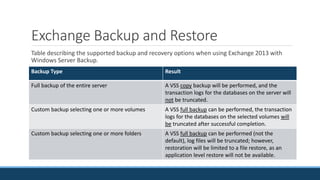
Table describing the supported backup and recovery options when using Exchange 2013 with
Windows Server Backup.
Backup Type Result
Full backup of the entire server A VSS copy backup will be performed, and the
transaction logs for the databases on the server will
not be truncated.
Custom backup selecting one or more volumes A VSS full backup can be performed, the transaction
logs for the databases on the selected volumes will
be truncated after successful completion.
Custom backup selecting one or more folders A VSS full backup can be performed (not the
default), log files will be truncated; however,
restoration will be limited to a file restore, as an
application level restore will not be available.
Exchange Backup and Restore
Backup of mailbox databases that are part of a DAG is supported but not restoring.
Windows Server Backup (WSB) application restore of a database restores the entire volume, not
to be used when multiple databases are stored on the same volume.
WSB supports restoring to an alternate location, used when multiple databases are stored on
the same volume.
Exchange Backup
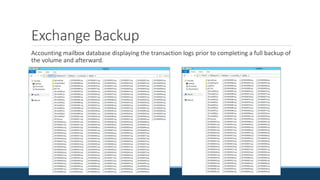
Exchange Backup
Accounting mailbox database displaying the transaction logs prior to completing a full backup of
the volume and afterward.
Exchange Backup
Last full backup and last incremental backup will be displayed on the databases properties when
performing application backups.
Recovery
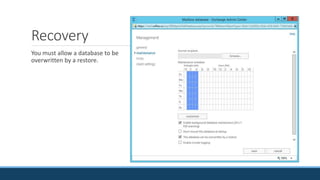
You must allow a database to be
overwritten by a restore.
Recovery
Two options when restoring mailbox databases:
◦ Restore the mailbox database to its original location
◦ Database is taken offline and overwritten by the backup.
◦ Information in transaction logs since the last backup is replayed.
◦ Restore the database to another location
◦ Used when you want to leave the original mailbox database running
◦ Allows you to restore to a recovery database and export data from the restored database to a PST file.
Recovery
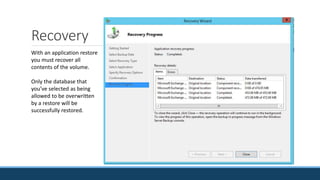
With an application restore
you must recover all
contents of the volume.
Only the database that
you’ve selected as being
allowed to be overwritten
by a restore will be
successfully restored.
Disconnected Mailboxes
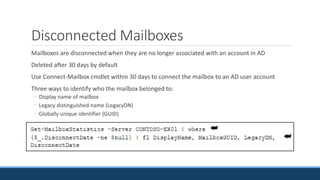
Mailboxes are disconnected when they are no longer associated with an account in AD
Deleted after 30 days by default
Use Connect-Mailbox cmdlet within 30 days to connect the mailbox to an AD user account
Three ways to identify who the mailbox belonged to:
◦ Display name of mailbox
◦ Legacy distinguished name (LegacyDN)
◦ Globally unique identifier (GUID)
Reconnecting Disconnected Mailboxes
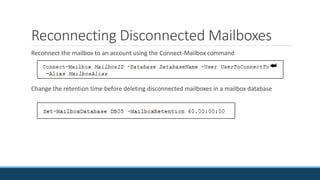
Reconnect the mailbox to an account using the Connect-Mailbox command
Change the retention time before deleting disconnected mailboxes in a mailbox database
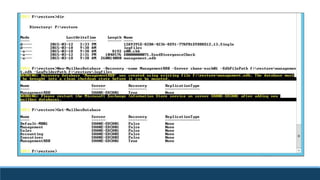
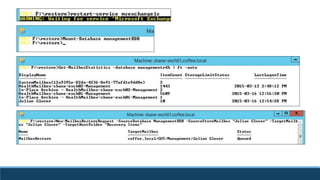
Recovery Database
Allows you to mount a restored database and
extract mailbox data from it via the
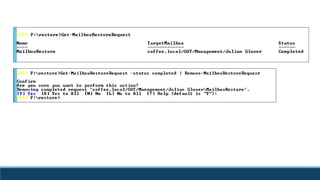
New-MailboxRestoreRequest cmdlet.
Exported data can be merged into an existing
mailbox.
Exchange 2013 only supports recovering
databases from Exchange 2013
Target mailbox must be in the same AD forest
as the database
Created and managed in the EMS only
Cannot be used to send/receive email
No client access protocols
No system or mailbox policies
One recovery database at a time
Does not count against 100 database limit
Cannot be used for public folders
Cannot backup a recovery database
Mailboxes are not connected to original
mailboxes
Recovery Database
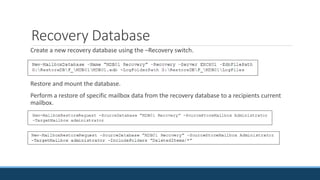
Create a new recovery database using the –Recovery switch.
Restore and mount the database.
Perform a restore of specific mailbox data from the recovery database to a recipients current
mailbox.
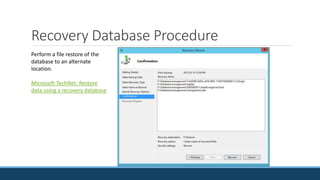
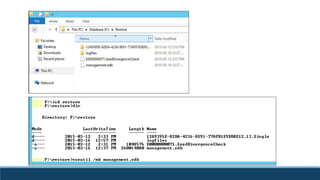
Recovery Database Procedure
Perform a file restore of the
database to an alternate
location.
Microsoft TechNet: Restore
data using a recovery database
Recovery Database
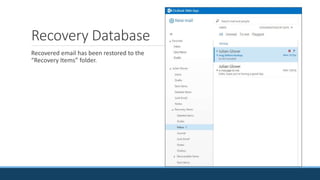
Recovered email has been restored to the
“Recovery Items” folder.
Recovery Methods
Dial-tone Recovery
◦ Refers to providing users with basic send/receive capabilities
◦ Achieved by mounting an empty database and associating users with it
◦ If users are running Outlook with cached Exchange mode enabled they will have their old emails during the
restore process
Deleted Mailbox Retention
◦ Deleted and disconnected mailboxes are kept in the mailbox database for 30 days by default
Single item recovery
◦ Deleted Item Retention
◦ Copies of deleted items are kept in the mailbox database for 14 days by default
◦ Can modify the retention period but this increases storage requirements
Set-Mailbox MailboxName –RetainDeletedItemsFor NumberofDays
◦ Enabled for a specific user using the Set-Mailbox cmdlet
Set-Mailbox MailboxName –SingleItemRecoveryEnabled $True
Finding Deleted Items
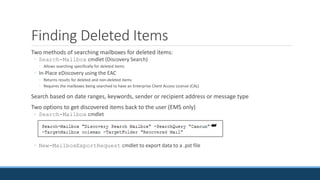
Two methods of searching mailboxes for deleted items:
◦ Search-Mailbox cmdlet (Discovery Search)
◦ Allows searching specifically for deleted items
◦ In-Place eDiscovery using the EAC
◦ Returns results for deleted and non-deleted items
◦ Requires the mailboxes being searched to have an Enterprise Client Access License (CAL)
Search based on date ranges, keywords, sender or recipient address or message type
Two options to get discovered items back to the user (EMS only)
◦ Search-Mailbox cmdlet
◦ New-MailboxExportRequest cmdlet to export data to a .pst file
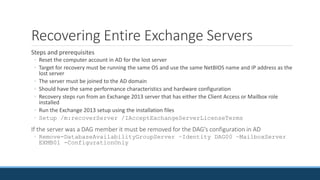
Recovering Entire Exchange Servers
Steps and prerequisites
◦ Reset the computer account in AD for the lost server
◦ Target for recovery must be running the same OS and use the same NetBIOS name and IP address as the
lost server
◦ The server must be joined to the AD domain
◦ Should have the same performance characteristics and hardware configuration
◦ Recovery steps run from an Exchange 2013 server that has either the Client Access or Mailbox role
installed
◦ Run the Exchange 2013 setup using the installation files
◦ Setup /m:recoverServer /IAcceptExchangeServerLicenseTerms
If the server was a DAG member it must be removed for the DAG’s configuration in AD
◦ Remove-DatabaseAvailabilityGroupServer –Identity DAG00 –MailboxServer
EXMB01 -ConfigurationOnly

Ch07 disaster recovery

  • 2.
    Objectives Backing up andrecovering Exchange using Windows Server Backup Using alternate methods to recover Exchange Recovering the entire Exchange Server
  • 3.
    Issues Exchange MB serversstore large amounts of mission critical data MB servers have constant interaction with users Complex environment creates variation in types of disasters you might recover from Reliance on Active Directory Service Level Agreements (SLAs) Available backup technology
  • 4.
    The Database Engine Transactionaldatabase using the Extensible Storage Engine (ESE) known as Joint Engine Technology (JET) blue. Database utilizes a Balanced B+ tree organization optimized for Exchange Server storage. Three locations where mail data is stored: ◦ Mailbox database (EDB file) ◦ Transaction log files (.log) ◦ Write ahead logging – data written from memory to the logs then committed to the database afterward. ◦ Checkpoint file tracks log files that have been committed to the database. ◦ Server memory
  • 5.
    ESEUTIL ESEUTIL is usedto examine and modify the Exchange EDB databases when in an offline state. ESEUTIL /mh db01.edb ◦ Examine the header file ◦ Check the state – Clean or Dirty Shutdown ESEUTIL /ml E000000181A.log ◦ Closer examination of a log file ESEUTIL /mk E00.chk ◦ Closer examination of the checkpoint file
  • 6.
    Volume Shadow CopyService (VSS) Exchange 2013 only supports Exchange-aware, VSS based backups. Streaming technology is still used to create database copies within a DAG. Microsoft provided backup and restore solutions: ◦ Exchange 2013 includes a plug-in for Windows Server Backup (WSB) that enables VSS-based backups of Exchange data (Windows Server 2008 R2 and later) ◦ Microsoft System Center 2012 – Data Protection Manager Hardware and software 3rd party options available depending on your needs ◦ Symantec Backup Exec ◦ EMC Backup for Microsoft
  • 7.
    Performing Backups Reasons toperform routine backups ◦ Keeping a functional backup for data recovery ◦ Provide transaction log truncation ◦ If the volume storing transaction logs fills up the mailbox database dismounts ◦ Windows backup process also performs integrity checks against the data Recovery Point Objective ◦ Maximum acceptable amount of data loss after an unscheduled outage, defined as a measure of time Recovery Time Objective ◦ Maximum acceptable length of time that Exchange can be down after a failure or disaster
  • 8.
    Establish Recovery Goals DataRetention Goals ◦ Restored data must not be older than 1 day ◦ Restored data must be less than 30 days old ◦ Must be able to restore data for up to 60 days Data Restoration Goals ◦ Restore user’s ability to send/receive in 1 hour and database in 8 hours ◦ Mailbox restored in 1 hour ◦ Message restored within 1 day
  • 9.
    Exchange Recovery Windows Server2012 Backup extended for Exchange with a couple of drawbacks ◦ Application backup/restore requires the entire volume containing the Exchange mailbox database(s) must be backed up, not simply the folders containing the database and log files. ◦ To perform an application restore of Exchange, all databases that were residing on the volume must be restored, not just the mailbox database that has become corrupt. Recover a mailbox database to an the same location, an alternate location, or to a recovery database ESEUTIL ◦ Used to repair, view and modify the database at the page level ◦ Located in the Bin directory ◦ Use with caution, can cause data loss Move-DatabasePath Set-MailboxDatabase
  • 10.
    Exchange Backup andRestore Windows Server Backup feature must be installed and the Microsoft Exchange Server Extension for Windows Server Backup should be changed to Automatic and started. Features and options for the plug-in: ◦ Backups taken with WSB occur at the volume level, and the only way to perform an application-level backup or restore is to select an entire volume. To back up a database and its log stream, you must back up the entire volume containing the database and logs, not just the individual folders. You can't back up any data without backing up the entire volume containing the data. ◦ The backup must be run locally on the server being backed up, and you can't use the plug-in to take remote VSS backups. There is no remote administration of WSB or the plug-in. You can, however, use Remote Desktop Services or Terminal Services to remotely manage backups.
  • 11.
    Exchange Backup andRestore ◦ The backup can be created on a local drive or on a remote network share. ◦ Only full backups should be taken. Log truncation will occur only after a successful completion of a VSS full backup of a volume or folders containing an Exchange database. ◦ When restoring data, it's possible to restore only Exchange data. This data can be restored to its original location or to an alternate location. If you restore the data to its original location, WSB and the plug-in automatically handle the recovery process, including dismounting any existing database and replaying logs into the restored database. ◦ The restore process doesn't support the Exchange recovery database (RDB). If you want to use an RDB, you must restore the data to an alternate location and then manually copy or move the restored data from that location into the RDB folder structure. ◦ When restoring Exchange data, all backed up databases must be restored together. You can't restore a single database. ◦ Bare metal restores are supported when using WSB; however, the recommended recovery approach for Exchange servers is to recover the Exchange server and then restore the data. If you are using a third-party backup application (e.g., non-Microsoft), then support for bare metal restores of Exchange may be available from your backup application vendor.
  • 12.
    Exchange Backup andRestore Table describing the supported backup and recovery options when using Exchange 2013 with Windows Server Backup. Backup Type Result Full backup of the entire server A VSS copy backup will be performed, and the transaction logs for the databases on the server will not be truncated. Custom backup selecting one or more volumes A VSS full backup can be performed, the transaction logs for the databases on the selected volumes will be truncated after successful completion. Custom backup selecting one or more folders A VSS full backup can be performed (not the default), log files will be truncated; however, restoration will be limited to a file restore, as an application level restore will not be available.
  • 13.
    Exchange Backup andRestore Backup of mailbox databases that are part of a DAG is supported but not restoring. Windows Server Backup (WSB) application restore of a database restores the entire volume, not to be used when multiple databases are stored on the same volume. WSB supports restoring to an alternate location, used when multiple databases are stored on the same volume.
  • 14.
  • 15.
    Exchange Backup Accounting mailboxdatabase displaying the transaction logs prior to completing a full backup of the volume and afterward.
  • 16.
    Exchange Backup Last fullbackup and last incremental backup will be displayed on the databases properties when performing application backups.
  • 17.
    Recovery You must allowa database to be overwritten by a restore.
  • 18.
    Recovery Two options whenrestoring mailbox databases: ◦ Restore the mailbox database to its original location ◦ Database is taken offline and overwritten by the backup. ◦ Information in transaction logs since the last backup is replayed. ◦ Restore the database to another location ◦ Used when you want to leave the original mailbox database running ◦ Allows you to restore to a recovery database and export data from the restored database to a PST file.
  • 19.
    Recovery With an applicationrestore you must recover all contents of the volume. Only the database that you’ve selected as being allowed to be overwritten by a restore will be successfully restored.
  • 20.
    Disconnected Mailboxes Mailboxes aredisconnected when they are no longer associated with an account in AD Deleted after 30 days by default Use Connect-Mailbox cmdlet within 30 days to connect the mailbox to an AD user account Three ways to identify who the mailbox belonged to: ◦ Display name of mailbox ◦ Legacy distinguished name (LegacyDN) ◦ Globally unique identifier (GUID)
  • 21.
    Reconnecting Disconnected Mailboxes Reconnectthe mailbox to an account using the Connect-Mailbox command Change the retention time before deleting disconnected mailboxes in a mailbox database
  • 22.
    Recovery Database Allows youto mount a restored database and extract mailbox data from it via the New-MailboxRestoreRequest cmdlet. Exported data can be merged into an existing mailbox. Exchange 2013 only supports recovering databases from Exchange 2013 Target mailbox must be in the same AD forest as the database Created and managed in the EMS only Cannot be used to send/receive email No client access protocols No system or mailbox policies One recovery database at a time Does not count against 100 database limit Cannot be used for public folders Cannot backup a recovery database Mailboxes are not connected to original mailboxes
  • 23.
    Recovery Database Create anew recovery database using the –Recovery switch. Restore and mount the database. Perform a restore of specific mailbox data from the recovery database to a recipients current mailbox.
  • 24.
    Recovery Database Procedure Performa file restore of the database to an alternate location. Microsoft TechNet: Restore data using a recovery database
  • 32.
    Recovery Database Recovered emailhas been restored to the “Recovery Items” folder.
  • 33.
    Recovery Methods Dial-tone Recovery ◦Refers to providing users with basic send/receive capabilities ◦ Achieved by mounting an empty database and associating users with it ◦ If users are running Outlook with cached Exchange mode enabled they will have their old emails during the restore process Deleted Mailbox Retention ◦ Deleted and disconnected mailboxes are kept in the mailbox database for 30 days by default Single item recovery ◦ Deleted Item Retention ◦ Copies of deleted items are kept in the mailbox database for 14 days by default ◦ Can modify the retention period but this increases storage requirements Set-Mailbox MailboxName –RetainDeletedItemsFor NumberofDays ◦ Enabled for a specific user using the Set-Mailbox cmdlet Set-Mailbox MailboxName –SingleItemRecoveryEnabled $True
  • 34.
    Finding Deleted Items Twomethods of searching mailboxes for deleted items: ◦ Search-Mailbox cmdlet (Discovery Search) ◦ Allows searching specifically for deleted items ◦ In-Place eDiscovery using the EAC ◦ Returns results for deleted and non-deleted items ◦ Requires the mailboxes being searched to have an Enterprise Client Access License (CAL) Search based on date ranges, keywords, sender or recipient address or message type Two options to get discovered items back to the user (EMS only) ◦ Search-Mailbox cmdlet ◦ New-MailboxExportRequest cmdlet to export data to a .pst file
  • 35.
    Recovering Entire ExchangeServers Steps and prerequisites ◦ Reset the computer account in AD for the lost server ◦ Target for recovery must be running the same OS and use the same NetBIOS name and IP address as the lost server ◦ The server must be joined to the AD domain ◦ Should have the same performance characteristics and hardware configuration ◦ Recovery steps run from an Exchange 2013 server that has either the Client Access or Mailbox role installed ◦ Run the Exchange 2013 setup using the installation files ◦ Setup /m:recoverServer /IAcceptExchangeServerLicenseTerms If the server was a DAG member it must be removed for the DAG’s configuration in AD ◦ Remove-DatabaseAvailabilityGroupServer –Identity DAG00 –MailboxServer EXMB01 -ConfigurationOnly