Fail Forward Fast
And other mantras teachers can use to enhance digital pedagogy
Molly B. Zielezinski PhD
BETT 2019
@mollybullock
Education Research
Ed Tech Industry
Teaching Practice
Insufficient
Stressed
Overwhelmed
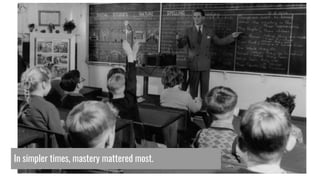
In simpler times, mastery mattered most.
Teaching in Modern Times
Teachers feel
disempowered.
@mollybullock
@mollybullock
The only constant
is change.
Where do we begin?
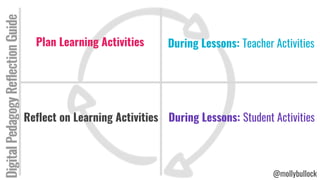
Plan Learning Activities
G1. Tool
DigitalPedagogyReflectionGuide
During Lessons: Teacher Activities
Reflect on Learning Activities During Lessons: Student Activities
@mollybullock
#4 Reflecting on Lessons
“Kaizen”: (n) making small changes, overcoming
resistance to change, growth through incremental change
“Fail Forward”: (v) to move fast, make mistakes, and
learn from them
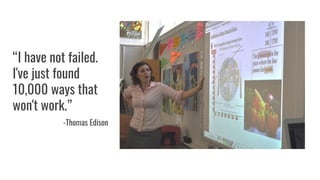
“I have not failed.
I've just found
10,000 ways that
won't work.”
-Thomas Edison
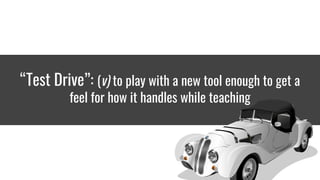
“Test Drive”: (v) to play with a new tool enough to get a
feel for how it handles while teaching
What are the benefits?
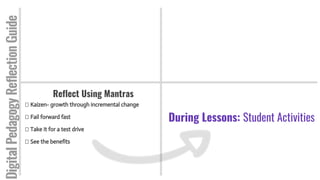
Reflect Using Mantras
Kaizen- growth through incremental change
Fail forward fast
Take it for a test drive
See the benefits
DigitalPedagogyReflectionGuide
During Lessons: Student Activities
#3 During Lessons
What do the students do?
“Model & nurture creativity & creative expression to communicate ideas,
knowledge, or connections.”
-ISTE Educator Standard 6d, 2016
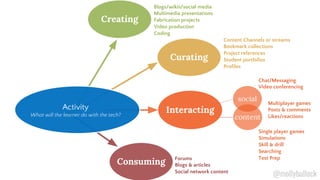
Consuming Forums
Blogs & articles
Social network content
Curating
Content Channels or streams
Bookmark collections
Project references
Student portfolios
Profiles
Creating
Interacting
social
Blogs/wikis/social media
Multimedia presentations
Fabrication projects
Video production
Coding
content
Single player games
Simulations
Skill & drill
Searching
Test Prep
Multiplayer games
Posts & comments
Likes/reactions
Chat/Messaging
Video conferencing
Activity
What will the learner do with the tech?
@mollybullock
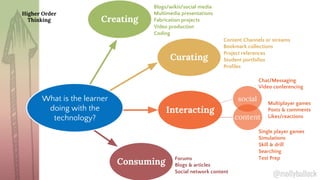
Consuming Forums
Blogs & articles
Social network content
Curating
Content Channels or streams
Bookmark collections
Project references
Student portfolios
Profiles
Creating
Interacting
social
Blogs/wikis/social media
Multimedia presentations
Fabrication projects
Video production
Coding
content
Single player games
Simulations
Skill & drill
Searching
Test Prep
Multiplayer games
Posts & comments
Likes/reactions
Chat/Messaging
Video conferencing
Higher Order
Thinking
What is the learner
doing with the
technology?
@mollybullock
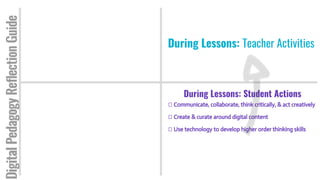
During Lessons: Student Actions
Communicate, collaborate, think critically, & act creatively
Create & curate around digital content
Use technology to develop higher order thinking skills
DigitalPedagogyReflectionGuide
During Lessons: Teacher Activities
#2 During Lessons
What does the teacher do?
Refresh
Norms & Routines
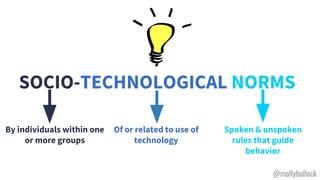
SOCIO-TECHNOLOGICAL NORMS
By individuals within one
or more groups
Spoken & unspoken
rules that guide
behavior
Of or related to use of
technology
@mollybullock
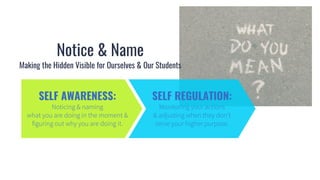
Notice & Name
Making the Hidden Visible for Ourselves & Our Students
SELF AWARENESS: SELF REGULATION:
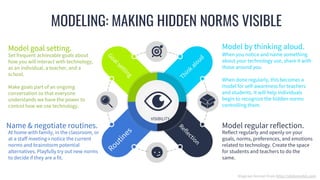
MODELING: MAKING HIDDEN NORMS VISIBLE
VISIBILITY
Routines
Thinkaloud
Goalsetting
Reflection
Diagram format from http://slidemodel.com
When you notice and name something
about your technology use, share it with
those around you.
When done regularly, this becomes a
model for self-awareness for teachers
and students. It will help individuals
begin to recognize the hidden norms
controlling them.
Model by thinking aloud.
Reflect regularly and openly on your
goals, norms, preferences, and emotions
related to technology. Create the space
for students and teachers to do the
same.
Model regular reflection.
Set frequent achievable goals about
how you will interact with technology,
as an individual, a teacher, and a
school.
Make goals part of an ongoing
conversation so that everyone
understands we have the power to
control how we use technology.
Model goal setting.
At home with family, in the classroom, or
at a staff meeting→ notice the current
norms and brainstorm potential
alternatives. Playfully try out new norms
to decide if they are a fit.
Name & negotiate routines.
“Establish a learning culture that promotes curiosity and critical
examination…and fosters digital literacy and media fluency.”
-ISTE Educator Standard 3b, 2016
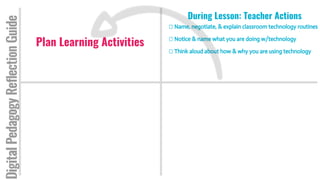
During Lesson: Teacher Actions
Name, negotiate, & explain classroom technology routines
Notice & name what you are doing w/technology
Think aloud about how & why you are using technology
DigitalPedagogyReflectionGuide
Plan Learning Activities
G1. Tool
#1 Planning Lessons
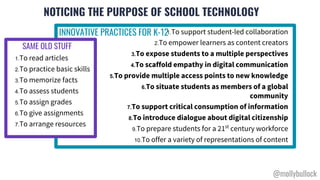
NOTICING THE PURPOSE OF SCHOOL TECHNOLOGY
1.To support student-led collaboration
2.To empower learners as content creators
3.To expose students to a multiple perspectives
4.To scaffold empathy in digital communication
5.To provide multiple access points to new knowledge
6.To situate students as members of a global
community
7.To support critical consumption of information
8.To introduce dialogue about digital citizenship
9.To prepare students for a 21st
century workforce
10.To offer a variety of representations of content
1.To read articles
2.To practice basic skills
3.To memorize facts
4.To assess students
5.To assign grades
6.To give assignments
7.To arrange resources
INNOVATIVE PRACTICES FOR K-12
SAME OLD STUFF
@mollybullock
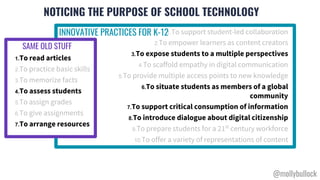
NOTICING THE PURPOSE OF SCHOOL TECHNOLOGY
1.To support student-led collaboration
2.To empower learners as content creators
3.To expose students to a multiple perspectives
4.To scaffold empathy in digital communication
5.To provide multiple access points to new knowledge
6.To situate students as members of a global
community
7.To support critical consumption of information
8.To introduce dialogue about digital citizenship
9.To prepare students for a 21st
century workforce
10.To offer a variety of representations of content
1.To read articles
2.To practice basic skills
3.To memorize facts
4.To assess students
5.To assign grades
6.To give assignments
7.To arrange resources
INNOVATIVE PRACTICES FOR K-12
SAME OLD STUFF
@mollybullock
“In interest-driven genres, it is the specialized activity, interest, or niche
identity that is the driving motivation…This results in a much deeper and more
sophisticated engagement with new media”
-Warschauer & Matuchniak, 2010
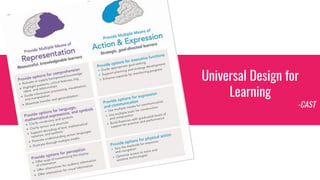
Universal Design for
Learning
-CAST
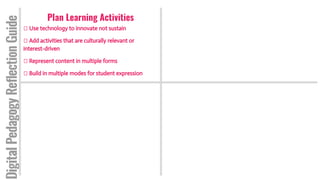
Plan Learning Activities
Use technology to innovate not sustain
Add activities that are culturally relevant or
interest-driven
Represent content in multiple forms
Build in multiple modes for student expression
DigitalPedagogyReflectionGuide
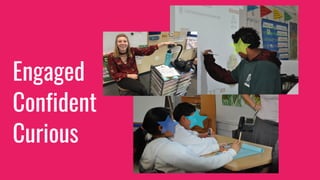
Confident
Engaged
Curious
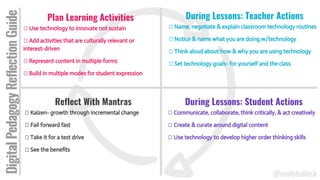
Plan Learning Activities
Use technology to innovate not sustain
Add activities that are culturally relevant or
interest-driven
Represent content in multiple forms
Build in multiple modes for student expression
During Lessons: Teacher Actions
Name, negotiate & explain classroom technology routines
Notice & name what you are doing w/technology
Think aloud about how & why you are using technology
Set technology goals- for yourself and the class
Reflect With Mantras
Kaizen- growth through incremental change
Fail forward fast
Take it for a test drive
See the benefits
During Lessons: Student Actions
Communicate, collaborate, think critically, & act creatively
Create & curate around digital content
Use technology to develop higher order thinking skills
DigitalPedagogyReflectionGuide
@mollybullock
THANK YOU!Questions? Get in touch.
molly@mbzlabs.com
Coming this spring from MBZ Labs & Stanford University...
Technology in Service of Learning Toolkit
Contains multiple rubrics and user guides for those interested in professional growth for teachers using technology.
Follow @mollybullock on Twitter to get your free copy of the toolkit this June.
Supplementary Slides
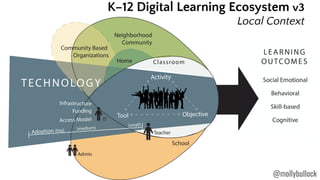
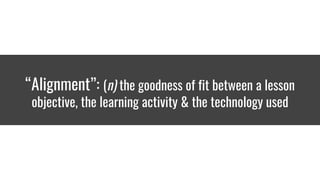
“Alignment”: (n) the goodness of fit between a lesson
objective, the learning activity & the technology used
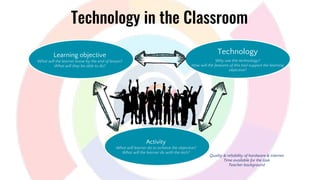
Activity
What will learner do to achieve the objective?
What will the learner do with the tech?
Learning objective
What will the learner know by the end of lesson?
What will they be able to do?
Technology
Why use this technology?
How will the features of this tool support the learning
objective?
Quality & reliability of hardware & internet
Time available for the task
Teacher background
Technology in the Classroom
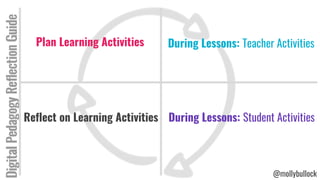
Plan Learning Activities
G1. Tool
DigitalPedagogyReflectionGuide
During Lessons: Teacher Activities
Reflect on Learning Activities During Lessons: Student Activities
@mollybullock

Fail Forward Fast and Other Tips for Teaching with Technology

  • 1.
    Fail Forward Fast Andother mantras teachers can use to enhance digital pedagogy Molly B. Zielezinski PhD BETT 2019 @mollybullock
  • 2.
    Education Research Ed TechIndustry Teaching Practice
  • 3.
  • 4.
    In simpler times,mastery mattered most.
  • 5.
  • 6.
  • 7.
  • 8.
  • 9.
  • 10.
  • 11.
    Plan Learning Activities G1.Tool DigitalPedagogyReflectionGuide During Lessons: Teacher Activities Reflect on Learning Activities During Lessons: Student Activities @mollybullock
  • 12.
  • 13.
    “Kaizen”: (n) makingsmall changes, overcoming resistance to change, growth through incremental change
  • 14.
    “Fail Forward”: (v)to move fast, make mistakes, and learn from them
  • 15.
    “I have notfailed. I've just found 10,000 ways that won't work.” -Thomas Edison
  • 16.
    “Test Drive”: (v)to play with a new tool enough to get a feel for how it handles while teaching
  • 17.
    What are thebenefits?
  • 18.
    Reflect Using Mantras Kaizen-growth through incremental change Fail forward fast Take it for a test drive See the benefits DigitalPedagogyReflectionGuide During Lessons: Student Activities
  • 19.
    #3 During Lessons Whatdo the students do?
  • 20.
    “Model & nurturecreativity & creative expression to communicate ideas, knowledge, or connections.” -ISTE Educator Standard 6d, 2016
  • 21.
    Consuming Forums Blogs &articles Social network content Curating Content Channels or streams Bookmark collections Project references Student portfolios Profiles Creating Interacting social Blogs/wikis/social media Multimedia presentations Fabrication projects Video production Coding content Single player games Simulations Skill & drill Searching Test Prep Multiplayer games Posts & comments Likes/reactions Chat/Messaging Video conferencing Activity What will the learner do with the tech? @mollybullock
  • 22.
    Consuming Forums Blogs &articles Social network content Curating Content Channels or streams Bookmark collections Project references Student portfolios Profiles Creating Interacting social Blogs/wikis/social media Multimedia presentations Fabrication projects Video production Coding content Single player games Simulations Skill & drill Searching Test Prep Multiplayer games Posts & comments Likes/reactions Chat/Messaging Video conferencing Higher Order Thinking What is the learner doing with the technology? @mollybullock
  • 23.
    During Lessons: StudentActions Communicate, collaborate, think critically, & act creatively Create & curate around digital content Use technology to develop higher order thinking skills DigitalPedagogyReflectionGuide During Lessons: Teacher Activities
  • 24.
    #2 During Lessons Whatdoes the teacher do?
  • 25.
  • 26.
    SOCIO-TECHNOLOGICAL NORMS By individualswithin one or more groups Spoken & unspoken rules that guide behavior Of or related to use of technology @mollybullock
  • 27.
    Notice & Name Makingthe Hidden Visible for Ourselves & Our Students SELF AWARENESS: SELF REGULATION:
  • 28.
    MODELING: MAKING HIDDENNORMS VISIBLE VISIBILITY Routines Thinkaloud Goalsetting Reflection Diagram format from http://slidemodel.com When you notice and name something about your technology use, share it with those around you. When done regularly, this becomes a model for self-awareness for teachers and students. It will help individuals begin to recognize the hidden norms controlling them. Model by thinking aloud. Reflect regularly and openly on your goals, norms, preferences, and emotions related to technology. Create the space for students and teachers to do the same. Model regular reflection. Set frequent achievable goals about how you will interact with technology, as an individual, a teacher, and a school. Make goals part of an ongoing conversation so that everyone understands we have the power to control how we use technology. Model goal setting. At home with family, in the classroom, or at a staff meeting→ notice the current norms and brainstorm potential alternatives. Playfully try out new norms to decide if they are a fit. Name & negotiate routines.
  • 29.
    “Establish a learningculture that promotes curiosity and critical examination…and fosters digital literacy and media fluency.” -ISTE Educator Standard 3b, 2016
  • 30.
    During Lesson: TeacherActions Name, negotiate, & explain classroom technology routines Notice & name what you are doing w/technology Think aloud about how & why you are using technology DigitalPedagogyReflectionGuide Plan Learning Activities G1. Tool
  • 31.
  • 32.
    NOTICING THE PURPOSEOF SCHOOL TECHNOLOGY 1.To support student-led collaboration 2.To empower learners as content creators 3.To expose students to a multiple perspectives 4.To scaffold empathy in digital communication 5.To provide multiple access points to new knowledge 6.To situate students as members of a global community 7.To support critical consumption of information 8.To introduce dialogue about digital citizenship 9.To prepare students for a 21st century workforce 10.To offer a variety of representations of content 1.To read articles 2.To practice basic skills 3.To memorize facts 4.To assess students 5.To assign grades 6.To give assignments 7.To arrange resources INNOVATIVE PRACTICES FOR K-12 SAME OLD STUFF @mollybullock
  • 34.
    NOTICING THE PURPOSEOF SCHOOL TECHNOLOGY 1.To support student-led collaboration 2.To empower learners as content creators 3.To expose students to a multiple perspectives 4.To scaffold empathy in digital communication 5.To provide multiple access points to new knowledge 6.To situate students as members of a global community 7.To support critical consumption of information 8.To introduce dialogue about digital citizenship 9.To prepare students for a 21st century workforce 10.To offer a variety of representations of content 1.To read articles 2.To practice basic skills 3.To memorize facts 4.To assess students 5.To assign grades 6.To give assignments 7.To arrange resources INNOVATIVE PRACTICES FOR K-12 SAME OLD STUFF @mollybullock
  • 35.
    “In interest-driven genres,it is the specialized activity, interest, or niche identity that is the driving motivation…This results in a much deeper and more sophisticated engagement with new media” -Warschauer & Matuchniak, 2010
  • 36.
  • 37.
    Plan Learning Activities Usetechnology to innovate not sustain Add activities that are culturally relevant or interest-driven Represent content in multiple forms Build in multiple modes for student expression DigitalPedagogyReflectionGuide
  • 38.
  • 39.
    Plan Learning Activities Usetechnology to innovate not sustain Add activities that are culturally relevant or interest-driven Represent content in multiple forms Build in multiple modes for student expression During Lessons: Teacher Actions Name, negotiate & explain classroom technology routines Notice & name what you are doing w/technology Think aloud about how & why you are using technology Set technology goals- for yourself and the class Reflect With Mantras Kaizen- growth through incremental change Fail forward fast Take it for a test drive See the benefits During Lessons: Student Actions Communicate, collaborate, think critically, & act creatively Create & curate around digital content Use technology to develop higher order thinking skills DigitalPedagogyReflectionGuide @mollybullock
  • 40.
    THANK YOU!Questions? Getin touch. molly@mbzlabs.com Coming this spring from MBZ Labs & Stanford University... Technology in Service of Learning Toolkit Contains multiple rubrics and user guides for those interested in professional growth for teachers using technology. Follow @mollybullock on Twitter to get your free copy of the toolkit this June.
  • 43.
  • 44.
    “Alignment”: (n) thegoodness of fit between a lesson objective, the learning activity & the technology used
  • 45.
    Activity What will learnerdo to achieve the objective? What will the learner do with the tech? Learning objective What will the learner know by the end of lesson? What will they be able to do? Technology Why use this technology? How will the features of this tool support the learning objective? Quality & reliability of hardware & internet Time available for the task Teacher background Technology in the Classroom
  • 46.
    Plan Learning Activities G1.Tool DigitalPedagogyReflectionGuide During Lessons: Teacher Activities Reflect on Learning Activities During Lessons: Student Activities @mollybullock