Hands-On Workshop:
    How to Use Facebook for Business


                     Welcome to a world of conversations
                             and relationships.


Sponsored by Design Action Studios (DAS) and
NR Computer Learning Center (NRCLC)                 We build brands.
Facts about NR Computer Learning Center


      • Established in 2002
      • Located in Orange, California
      • Provide workshops/webinars related to Small & Medium size
        Businesses (SMB):
      • Online Marketing / Social media
      • QuickBooks & Microsoft Excel
      • Website Design
      • Security Awareness
      • Basic Computer
      • Networking
      • Project Management
      • and more


                                            Social Media for Business |
Facts about NR Computer Learning Center


        • Corporate Training
        • Online and Onsite Training
        • Provide Test Preparation Classes, Software and
           Courseware
        • Authorized Testing Center for Certiport, Pearson
           and Prometric
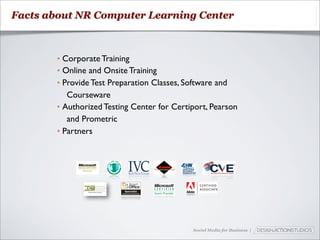
        • Partners


                                             Social Media for Business |
Logistics


       • Coffee & light snack
       • Restroom
       • Testing Room


                                Social Media for Business |
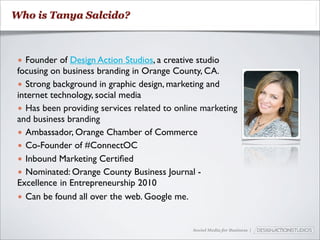
Who is Tanya Salcido?


 • Founder of Design Action Studios, a creative studio
 focusing on business branding in Orange County, CA.
 • Strong background in graphic design, marketing and
 internet technology, social media
 • Has been providing services related to online marketing
 and business branding
 • Ambassador, Orange Chamber of Commerce
 • Co-Founder of #ConnectOC
 • Inbound Marketing Certified
 • Nominated: Orange County Business Journal -
 Excellence in Entrepreneurship 2010
 • Can be found all over the web. Google me.


                                              Social Media for Business |
Today’s Schedule

Part 1: Introduction to Facebook                               BREAK
• What is Facebook?
• Why you should care
                                            Part 3: How to Set up a Fan Page
• Business Goals for Using Facebook
                                            • How to Promote a Business Page
Part 2: Setting Up Your Facebook Profile     • Enhancing your Page
• Personal Accounts vs. Business Accounts   • Using FBML
• A Tour of the Facebook User Homepage      • Optimizing your Brand Presence
• Step 1: Sign up for an account.           • How to Advertise on Facebook
• Step 2: Edit your profile.                • Measuring and Analyzing
• Step 3: Join networks.                    • Conclusion and Additional Resources
• Step 4: Connect with friends.
                                              - OPEN FOR ADDITIONAL QUESTIONS -
• Step 5: Share information.
• Step 6: Use applications.
• Privacy Settings

                                                Social Media for Business |
What is Social media?
Social Media


  It is the various online technology tools that enable
  people to communicate easily via the internet to share
  information and resources.


                                   Social Media for Business |
Social Media for Business |
How Social Media Can Work For Business


  Social media increases website traffic, subscribers,
  clients, builds relationships and strategic partnerships.


                                     Social Media for Business |
Two important steps to take
in order for social media to
       work for you.
1Make the shift from
traditional media
  to new media
2  It doesn’t
happen overnight!
Part 1: Introduction
       to Facebook
Facebook is ...


   A social media tool that allows marketers an
   opportunity to expand their online footprint and
   engage with customers directly by connecting
   people with those around them – friends, family,
   coworkers, or simply others with similar interests.


                                   Social Media for Business |
Why You Should Care
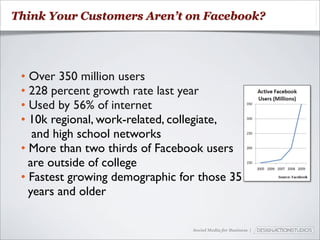
Think Your Customers Aren’t on Facebook?


 • Over 350 million users
 • 228 percent growth rate last year
 • Used by 56% of internet
 • 10k regional, work-related, collegiate,
    and high school networks
 • More than two thirds of Facebook users
   are outside of college
 • Fastest growing demographic for those 35
   years and older

                                 Social Media for Business |
Business Goals for
 Using Facebook
Business Goals for Facebook


   • Get found by people who are searching for your
     products or services
   • Connect and engage with current and potential
     customers
   • Create a community around your business
   • Promote content you create, including
     webinars, blog articles, or other resources


                               Social Media for Business |
Part 2: Setting up Your
       Facebook Profile
Personal Accounts vs.
   Business Pages
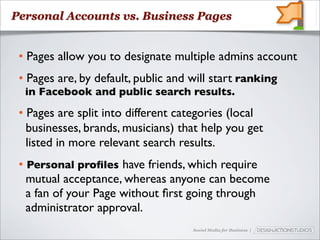
Personal Accounts vs. Business Pages


 • Pages allow you to designate multiple admins account
 • Pages are, by default, public and will start ranking
  in Facebook and public search results.
 • Pages are split into different categories (local
   businesses, brands, musicians) that help you get
   listed in more relevant search results.
 • Personal profiles have friends, which require
   mutual acceptance, whereas anyone can become
   a fan of your Page without first going through
   administrator approval.
                                     Social Media for Business |
What NOT to do with a personal profile


   Do not create a personal profile for your business.

      Profiles are meant for people and Pages
             are meant for businesses.


                                  Social Media for Business |
A Tour of the Facebook
   User Homepage
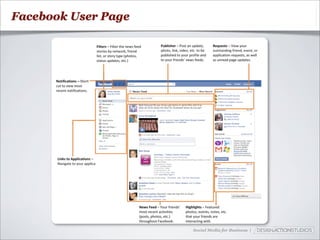
Facebook User Page


                     Social Media for Business |
Six Steps to Setting up
     your Account
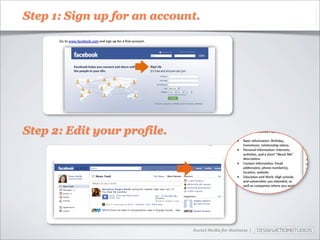
Step 1: Sign up for an account.


Step 2: Edit your profile.


                             Social Media for Business |
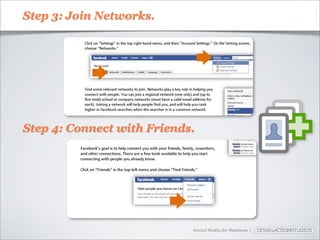
Step 3: Join Networks.


Step 4: Connect with Friends.


                            Social Media for Business |
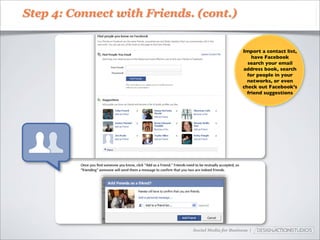
Step 4: Connect with Friends. (cont.)


                                                    Import a contact list,
                                                        have Facebook
                                                      search your email
                                                    address book, search
                                                      for people in your
                                                      networks, or even
                                                    check out Facebook’s
                                                      friend suggestions


                             Social Media for Business |
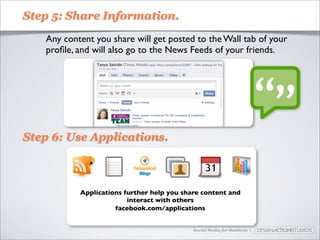
Step 5: Share Information.

   Any content you share will get posted to the Wall tab of your
   profile, and will also go to the News Feeds of your friends.


Step 6: Use Applications.


           Applications further help you share content and
                         interact with others
                     facebook.com/applications


                                            Social Media for Business |
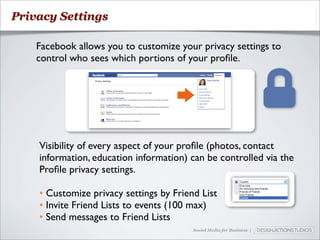
Privacy Settings

    Facebook allows you to customize your privacy settings to
    control who sees which portions of your profile.


    Visibility of every aspect of your profile (photos, contact
    information, education information) can be controlled via the
    Profile privacy settings.

    • Customize privacy settings by Friend List
    • Invite Friend Lists to events (100 max)
    • Send messages to Friend Lists
                                         Social Media for Business |
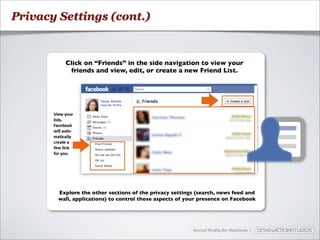
Privacy Settings (cont.)


          Click on “Friends” in the side navigation to view your
           friends and view, edit, or create a new Friend List.


        Explore the other sections of the privacy settings (search, news feed and
        wall, applications) to control those aspects of your presence on Facebook


                                                         Social Media for Business |
BREAK TIME!
Part 3: How to Set Up
        a Page
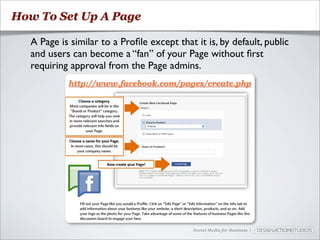
How To Set Up A Page

  A Page is similar to a Profile except that it is, by default, public
  and users can become a “fan” of your Page without first
  requiring approval from the Page admins.
           http://www.facebook.com/pages/create.php


                                            Social Media for Business |
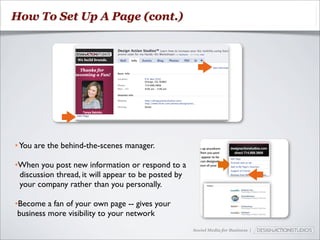
How To Set Up A Page (cont.)


• You are the behind-the-scenes manager.

•When you post new information or respond to a
 discussion thread, it will appear to be posted by
 your company rather than you personally.

•Become a fan of your own page -- gives your
 business more visibility to your network
                                                     Social Media for Business |
How to Promote a
 Business Page
How to Promote A Business Page


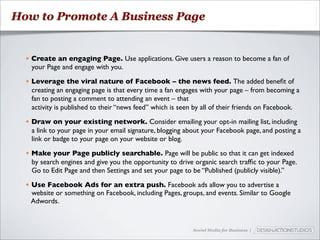
  • Create an engaging Page. Use applications. Give users a reason to become a fan of
    your Page and engage with you.

  • Leverage the viral nature of Facebook – the news feed. The added benefit of
    creating an engaging page is that every time a fan engages with your page – from becoming a
    fan to posting a comment to attending an event – that
    activity is published to their “news feed” which is seen by all of their friends on Facebook.

  • Draw on your existing network. Consider emailing your opt-in mailing list, including
    a link to your page in your email signature, blogging about your Facebook page, and posting a
    link or badge to your page on your website or blog.

  • Make your Page publicly searchable. Page will be public so that it can get indexed
    by search engines and give you the opportunity to drive organic search traffic to your Page.
    Go to Edit Page and then Settings and set your page to be “Published (publicly visible).”

  • Use Facebook Ads for an extra push. Facebook ads allow you to advertise a
    website or something on Facebook, including Pages, groups, and events. Similar to Google
    Adwords.


                                                            Social Media for Business |
Pull in Images & Video
Promote company commercials
+
Company event photos
-----------------------
One stop for all news and
information regarding your company
Enhancing Your Page
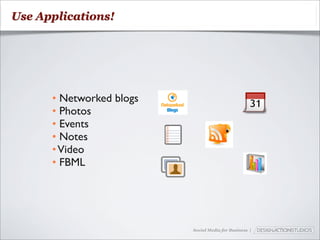
Use Applications!


      • Networked blogs
      • Photos
      • Events
      • Notes
      • Video
      • FBML


                          Social Media for Business |
Using FBML
Using FBML


   What is FBML?
    (Facebook Markup Language) - A way to add
    advanced functionality to your Page. It’s an application
    that will add a box to your Page in which you can render
    HTML or FBML (Facebook Markup Language) for
    enhanced Page customization.


                                        Social Media for Business |
Using FBML


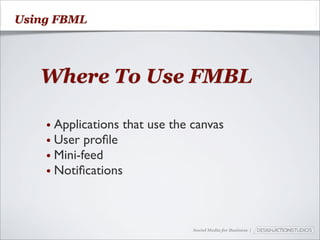
   Where To Use FMBL

    • Applications that   use the canvas
    • User profile
    • Mini-feed
    • Notifications


                                  Social Media for Business |
Using FBML


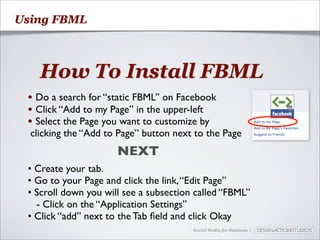
   How To Install FBML
 • Do a search for “static FBML” on Facebook
 • Click “Add to my Page” in the upper-left
 • Select the Page you want to customize by
  clicking the “Add to Page” button next to the Page
                      NEXT
 • Create your tab.
 • Go to your Page and click the link, “Edit Page”
 • Scroll down you will see a subsection called “FBML”
   - Click on the “Application Settings”
 • Click “add” next to the Tab field and click Okay
                                        Social Media for Business |
Using FBML


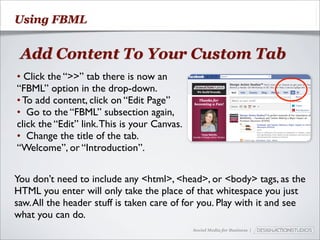
 Add Content To Your Custom Tab
• Click the “>>” tab there is now an
“FBML” option in the drop-down.
• To add content, click on “Edit Page”
• Go to the “FBML” subsection again,
click the “Edit” link. This is your Canvas.
• Change the title of the tab.
“Welcome”, or “Introduction”.


You don’t need to include any <html>, <head>, or <body> tags, as the
HTML you enter will only take the place of that whitespace you just
saw. All the header stuff is taken care of for you. Play with it and see
what you can do.
                                              Social Media for Business |
Using FBML


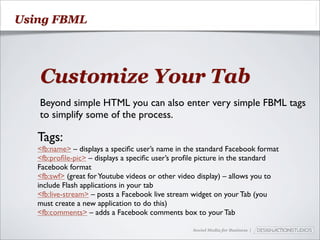
   Customize Your Tab
   Beyond simple HTML you can also enter very simple FBML tags
   to simplify some of the process.

   Tags:
   <fb:name> – displays a specific user’s name in the standard Facebook format
   <fb:profile-pic> – displays a specific user’s profile picture in the standard
   Facebook format
   <fb:swf> (great for Youtube videos or other video display) – allows you to
   include Flash applications in your tab
   <fb:live-stream> – posts a Facebook live stream widget on your Tab (you
   must create a new application to do this)
   <fb:comments> – adds a Facebook comments box to your Tab

                                                  Social Media for Business |
Using FBML


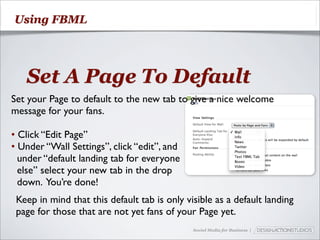
   Set A Page To Default
Set your Page to default to the new tab to give a nice welcome
message for your fans.

• Click “Edit Page”
• Under “Wall Settings”, click “edit”, and
  under “default landing tab for everyone
  else” select your new tab in the drop
  down. You’re done!
 Keep in mind that this default tab is only visible as a default landing
 page for those that are not yet fans of your Page yet.
                                              Social Media for Business |
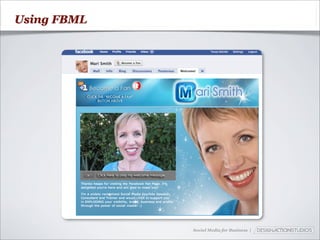
Using FBML


             Social Media for Business |
Optimizing your
Brand Presence
Optimizing Your Brand Preference


                 Create the
                 Picture Perfect
                 Profile Picture
                    200px wide by
                    600px in height

                            Social Media for Business |
Optimizing Your Brand Preference


   Select your vanity URL
          http://facebook.com/username


    Make it easy for potential clients to find your Fan Page.


                                         Social Media for Business |
How to Advertise
 on Facebook
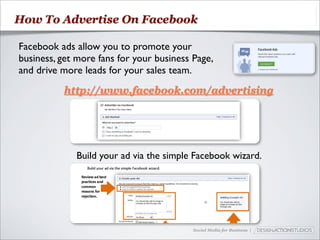
How To Advertise On Facebook

Facebook ads allow you to promote your
business, get more fans for your business Page,
and drive more leads for your sales team.
          http://www.facebook.com/advertising


             Build your ad via the simple Facebook wizard.


                                          Social Media for Business |
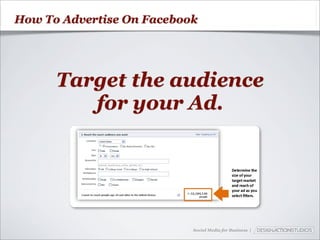
How To Advertise On Facebook


      Target the audience
         for your Ad.


                           Social Media for Business |
How To Advertise On Facebook
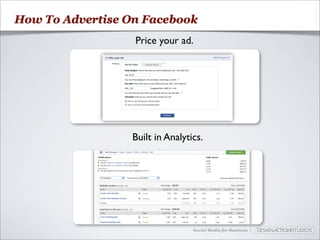
                  Price your ad.


                  Built in Analytics.


                                  Social Media for Business |
Measure and Analyze
Measure and Analyze


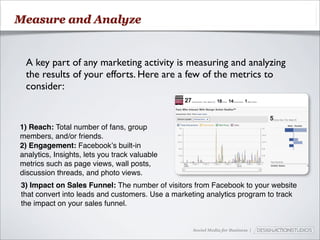
 A key part of any marketing activity is measuring and analyzing
 the results of your efforts. Here are a few of the metrics to
 consider:


1) Reach: Total number of fans, group
members, and/or friends.
2) Engagement: Facebookʼs built-in
analytics, Insights, lets you track valuable
metrics such as page views, wall posts,
discussion threads, and photo views.
3) Impact on Sales Funnel: The number of visitors from Facebook to your website
that convert into leads and customers. Use a marketing analytics program to track
the impact on your sales funnel.


                                                  Social Media for Business |
Conclusion and
Additional Resources
Businesses that
 get it right...
➡ Consistent with updates
➡ Share exclusive content
➡ Have contests & give-aways
➡ Insider access
What’s next?
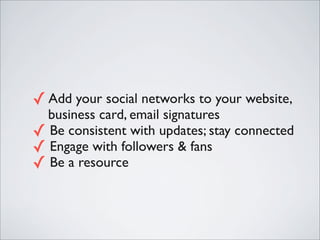
✓ Add your social networks to your website,
  business card, email signatures
✓ Be consistent with updates; stay connected
✓ Engage with followers & fans
✓ Be a resource
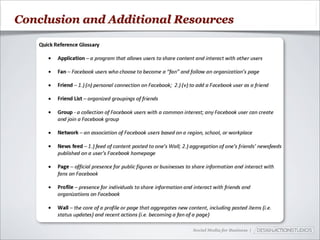
Conclusion and Additional Resources


                            Social Media for Business |
Thank you!

Facebook for Business

  • 1.
    Hands-On Workshop: How to Use Facebook for Business Welcome to a world of conversations and relationships. Sponsored by Design Action Studios (DAS) and NR Computer Learning Center (NRCLC) We build brands.
  • 2.
    Facts about NRComputer Learning Center • Established in 2002 • Located in Orange, California • Provide workshops/webinars related to Small & Medium size Businesses (SMB): • Online Marketing / Social media • QuickBooks & Microsoft Excel • Website Design • Security Awareness • Basic Computer • Networking • Project Management • and more Social Media for Business |
  • 3.
    Facts about NRComputer Learning Center • Corporate Training • Online and Onsite Training • Provide Test Preparation Classes, Software and Courseware • Authorized Testing Center for Certiport, Pearson and Prometric • Partners Social Media for Business |
  • 4.
    Logistics • Coffee & light snack • Restroom • Testing Room Social Media for Business |
  • 5.
    Who is TanyaSalcido? • Founder of Design Action Studios, a creative studio focusing on business branding in Orange County, CA. • Strong background in graphic design, marketing and internet technology, social media • Has been providing services related to online marketing and business branding • Ambassador, Orange Chamber of Commerce • Co-Founder of #ConnectOC • Inbound Marketing Certified • Nominated: Orange County Business Journal - Excellence in Entrepreneurship 2010 • Can be found all over the web. Google me. Social Media for Business |
  • 6.
    Today’s Schedule Part 1:Introduction to Facebook BREAK • What is Facebook? • Why you should care Part 3: How to Set up a Fan Page • Business Goals for Using Facebook • How to Promote a Business Page Part 2: Setting Up Your Facebook Profile  • Enhancing your Page • Personal Accounts vs. Business Accounts • Using FBML • A Tour of the Facebook User Homepage • Optimizing your Brand Presence • Step 1: Sign up for an account. • How to Advertise on Facebook • Step 2: Edit your profile. • Measuring and Analyzing • Step 3: Join networks. • Conclusion and Additional Resources • Step 4: Connect with friends. - OPEN FOR ADDITIONAL QUESTIONS - • Step 5: Share information. • Step 6: Use applications. • Privacy Settings Social Media for Business |
  • 7.
  • 8.
    Social Media It is the various online technology tools that enable people to communicate easily via the internet to share information and resources. Social Media for Business |
  • 9.
    Social Media forBusiness |
  • 10.
    How Social MediaCan Work For Business Social media increases website traffic, subscribers, clients, builds relationships and strategic partnerships. Social Media for Business |
  • 11.
    Two important stepsto take in order for social media to work for you.
  • 12.
    1Make the shiftfrom traditional media to new media
  • 13.
    2 Itdoesn’t happen overnight!
  • 14.
  • 15.
    Facebook is ... A social media tool that allows marketers an opportunity to expand their online footprint and engage with customers directly by connecting people with those around them – friends, family, coworkers, or simply others with similar interests. Social Media for Business |
  • 16.
  • 17.
    Think Your CustomersAren’t on Facebook? • Over 350 million users • 228 percent growth rate last year • Used by 56% of internet • 10k regional, work-related, collegiate, and high school networks • More than two thirds of Facebook users are outside of college • Fastest growing demographic for those 35 years and older Social Media for Business |
  • 18.
    Business Goals for Using Facebook
  • 19.
    Business Goals forFacebook • Get found by people who are searching for your products or services • Connect and engage with current and potential customers • Create a community around your business • Promote content you create, including webinars, blog articles, or other resources Social Media for Business |
  • 20.
    Part 2: Settingup Your Facebook Profile
  • 21.
    Personal Accounts vs. Business Pages
  • 22.
    Personal Accounts vs.Business Pages • Pages allow you to designate multiple admins account • Pages are, by default, public and will start ranking in Facebook and public search results. • Pages are split into different categories (local businesses, brands, musicians) that help you get listed in more relevant search results. • Personal profiles have friends, which require mutual acceptance, whereas anyone can become a fan of your Page without first going through administrator approval. Social Media for Business |
  • 23.
    What NOT todo with a personal profile Do not create a personal profile for your business. Profiles are meant for people and Pages are meant for businesses. Social Media for Business |
  • 24.
    A Tour ofthe Facebook User Homepage
  • 25.
    Facebook User Page Social Media for Business |
  • 26.
    Six Steps toSetting up your Account
  • 27.
    Step 1: Signup for an account. Step 2: Edit your profile. Social Media for Business |
  • 28.
    Step 3: JoinNetworks. Step 4: Connect with Friends. Social Media for Business |
  • 29.
    Step 4: Connectwith Friends. (cont.) Import a contact list, have Facebook search your email address book, search for people in your networks, or even check out Facebook’s friend suggestions Social Media for Business |
  • 30.
    Step 5: ShareInformation. Any content you share will get posted to the Wall tab of your profile, and will also go to the News Feeds of your friends. Step 6: Use Applications. Applications further help you share content and interact with others facebook.com/applications Social Media for Business |
  • 31.
    Privacy Settings Facebook allows you to customize your privacy settings to control who sees which portions of your profile. Visibility of every aspect of your profile (photos, contact information, education information) can be controlled via the Profile privacy settings. • Customize privacy settings by Friend List • Invite Friend Lists to events (100 max) • Send messages to Friend Lists Social Media for Business |
  • 32.
    Privacy Settings (cont.) Click on “Friends” in the side navigation to view your friends and view, edit, or create a new Friend List. Explore the other sections of the privacy settings (search, news feed and wall, applications) to control those aspects of your presence on Facebook Social Media for Business |
  • 33.
  • 34.
    Part 3: Howto Set Up a Page
  • 35.
    How To SetUp A Page A Page is similar to a Profile except that it is, by default, public and users can become a “fan” of your Page without first requiring approval from the Page admins. http://www.facebook.com/pages/create.php Social Media for Business |
  • 36.
    How To SetUp A Page (cont.) • You are the behind-the-scenes manager. •When you post new information or respond to a discussion thread, it will appear to be posted by your company rather than you personally. •Become a fan of your own page -- gives your business more visibility to your network Social Media for Business |
  • 37.
    How to Promotea Business Page
  • 38.
    How to PromoteA Business Page • Create an engaging Page. Use applications. Give users a reason to become a fan of your Page and engage with you. • Leverage the viral nature of Facebook – the news feed. The added benefit of creating an engaging page is that every time a fan engages with your page – from becoming a fan to posting a comment to attending an event – that activity is published to their “news feed” which is seen by all of their friends on Facebook. • Draw on your existing network. Consider emailing your opt-in mailing list, including a link to your page in your email signature, blogging about your Facebook page, and posting a link or badge to your page on your website or blog. • Make your Page publicly searchable. Page will be public so that it can get indexed by search engines and give you the opportunity to drive organic search traffic to your Page. Go to Edit Page and then Settings and set your page to be “Published (publicly visible).” • Use Facebook Ads for an extra push. Facebook ads allow you to advertise a website or something on Facebook, including Pages, groups, and events. Similar to Google Adwords. Social Media for Business |
  • 39.
    Pull in Images& Video Promote company commercials + Company event photos ----------------------- One stop for all news and information regarding your company
  • 40.
  • 41.
    Use Applications! • Networked blogs • Photos • Events • Notes • Video • FBML Social Media for Business |
  • 42.
  • 43.
    Using FBML What is FBML? (Facebook Markup Language) - A way to add advanced functionality to your Page. It’s an application that will add a box to your Page in which you can render HTML or FBML (Facebook Markup Language) for enhanced Page customization. Social Media for Business |
  • 44.
    Using FBML Where To Use FMBL • Applications that use the canvas • User profile • Mini-feed • Notifications Social Media for Business |
  • 45.
    Using FBML How To Install FBML • Do a search for “static FBML” on Facebook • Click “Add to my Page” in the upper-left • Select the Page you want to customize by clicking the “Add to Page” button next to the Page NEXT • Create your tab. • Go to your Page and click the link, “Edit Page” • Scroll down you will see a subsection called “FBML” - Click on the “Application Settings” • Click “add” next to the Tab field and click Okay Social Media for Business |
  • 46.
    Using FBML AddContent To Your Custom Tab • Click the “>>” tab there is now an “FBML” option in the drop-down. • To add content, click on “Edit Page” • Go to the “FBML” subsection again, click the “Edit” link. This is your Canvas. • Change the title of the tab. “Welcome”, or “Introduction”. You don’t need to include any <html>, <head>, or <body> tags, as the HTML you enter will only take the place of that whitespace you just saw. All the header stuff is taken care of for you. Play with it and see what you can do. Social Media for Business |
  • 47.
    Using FBML Customize Your Tab Beyond simple HTML you can also enter very simple FBML tags to simplify some of the process. Tags: <fb:name> – displays a specific user’s name in the standard Facebook format <fb:profile-pic> – displays a specific user’s profile picture in the standard Facebook format <fb:swf> (great for Youtube videos or other video display) – allows you to include Flash applications in your tab <fb:live-stream> – posts a Facebook live stream widget on your Tab (you must create a new application to do this) <fb:comments> – adds a Facebook comments box to your Tab Social Media for Business |
  • 48.
    Using FBML Set A Page To Default Set your Page to default to the new tab to give a nice welcome message for your fans. • Click “Edit Page” • Under “Wall Settings”, click “edit”, and under “default landing tab for everyone else” select your new tab in the drop down. You’re done! Keep in mind that this default tab is only visible as a default landing page for those that are not yet fans of your Page yet. Social Media for Business |
  • 49.
    Using FBML Social Media for Business |
  • 50.
  • 51.
    Optimizing Your BrandPreference Create the Picture Perfect Profile Picture 200px wide by 600px in height Social Media for Business |
  • 52.
    Optimizing Your BrandPreference Select your vanity URL http://facebook.com/username Make it easy for potential clients to find your Fan Page. Social Media for Business |
  • 53.
    How to Advertise on Facebook
  • 54.
    How To AdvertiseOn Facebook Facebook ads allow you to promote your business, get more fans for your business Page, and drive more leads for your sales team. http://www.facebook.com/advertising Build your ad via the simple Facebook wizard. Social Media for Business |
  • 55.
    How To AdvertiseOn Facebook Target the audience for your Ad. Social Media for Business |
  • 56.
    How To AdvertiseOn Facebook Price your ad. Built in Analytics. Social Media for Business |
  • 57.
  • 58.
    Measure and Analyze A key part of any marketing activity is measuring and analyzing the results of your efforts. Here are a few of the metrics to consider: 1) Reach: Total number of fans, group members, and/or friends. 2) Engagement: Facebookʼs built-in analytics, Insights, lets you track valuable metrics such as page views, wall posts, discussion threads, and photo views. 3) Impact on Sales Funnel: The number of visitors from Facebook to your website that convert into leads and customers. Use a marketing analytics program to track the impact on your sales funnel. Social Media for Business |
  • 59.
  • 60.
  • 61.
    ➡ Consistent withupdates ➡ Share exclusive content ➡ Have contests & give-aways ➡ Insider access
  • 62.
  • 63.
    ✓ Add yoursocial networks to your website, business card, email signatures ✓ Be consistent with updates; stay connected ✓ Engage with followers & fans ✓ Be a resource
  • 64.
    Conclusion and AdditionalResources Social Media for Business |
  • 65.