1.00 Hardware and Software
                         Capstone Activity

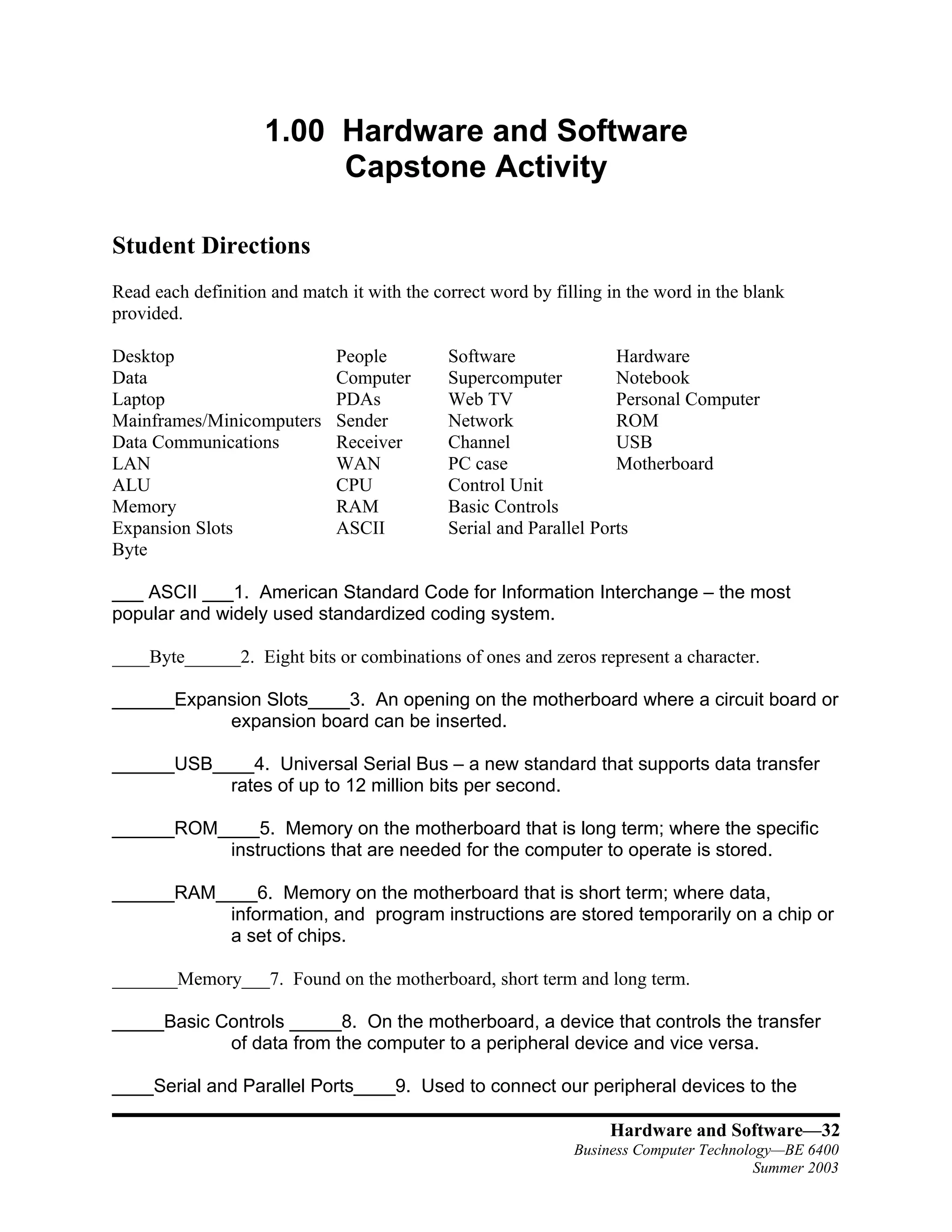
Student Directions
Read each definition and match it with the correct word by filling in the word in the blank
provided.

Desktop                       People         Software               Hardware
Data                          Computer       Supercomputer          Notebook
Laptop                        PDAs           Web TV                 Personal Computer
Mainframes/Minicomputers      Sender         Network                ROM
Data Communications           Receiver       Channel                USB
LAN                           WAN            PC case                Motherboard
ALU                           CPU            Control Unit
Memory                        RAM            Basic Controls
Expansion Slots               ASCII          Serial and Parallel Ports
Byte

___ ASCII ___1. American Standard Code for Information Interchange – the most
popular and widely used standardized coding system.

____Byte______2. Eight bits or combinations of ones and zeros represent a character.

______Expansion Slots____3. An opening on the motherboard where a circuit board or
           expansion board can be inserted.

______USB____4. Universal Serial Bus – a new standard that supports data transfer
           rates of up to 12 million bits per second.

______ROM____5. Memory on the motherboard that is long term; where the specific
          instructions that are needed for the computer to operate is stored.

______RAM____6. Memory on the motherboard that is short term; where data,
          information, and program instructions are stored temporarily on a chip or
          a set of chips.

_______Memory___7. Found on the motherboard, short term and long term.

_____Basic Controls _____8. On the motherboard, a device that controls the transfer
            of data from the computer to a peripheral device and vice versa.

____Serial and Parallel Ports____9. Used to connect our peripheral devices to the

                                                                   Hardware and Software—32
                                                              Business Computer Technology—BE 6400
                                                                                        Summer 2003
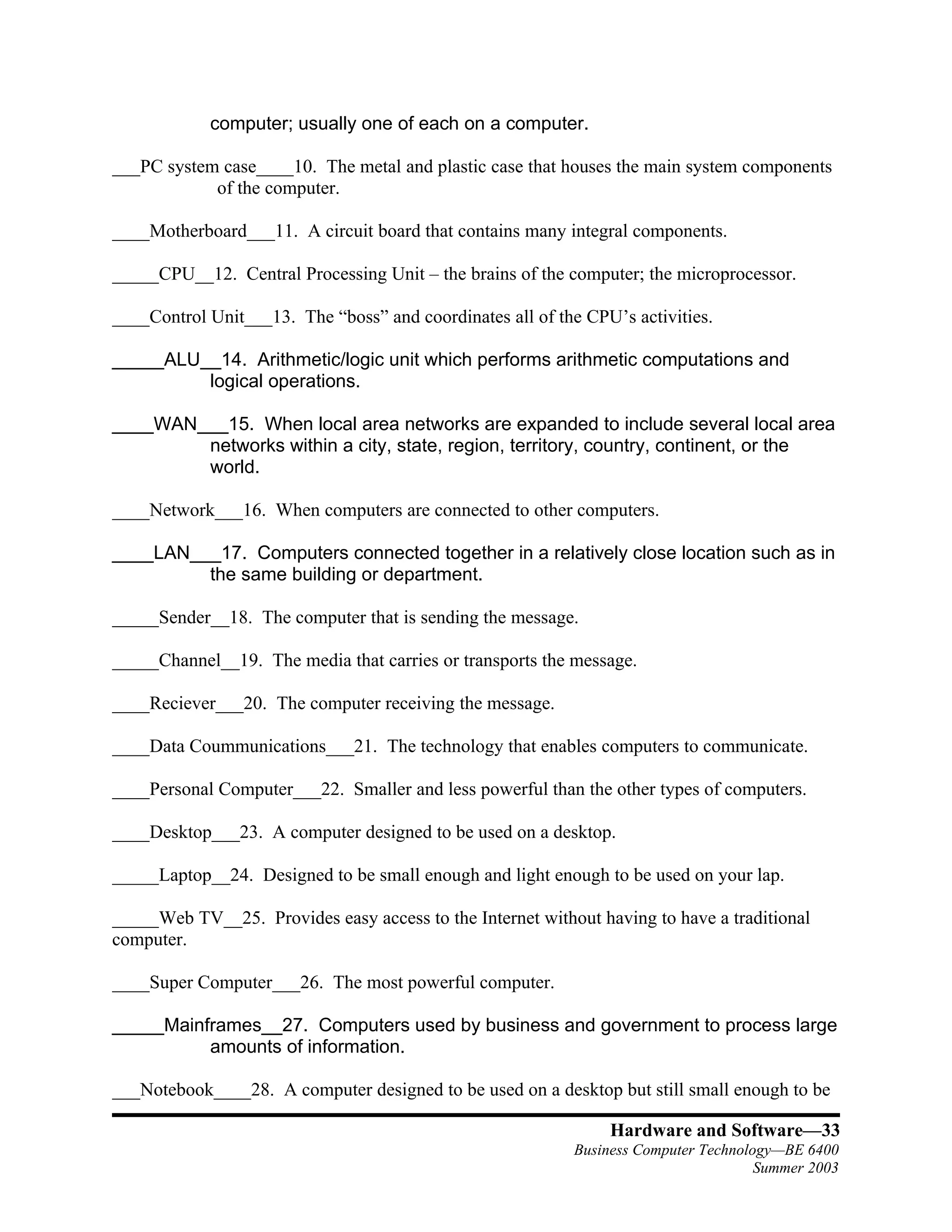
computer; usually one of each on a computer.

___PC system case____10. The metal and plastic case that houses the main system components
            of the computer.

____Motherboard___11. A circuit board that contains many integral components.

_____CPU__12. Central Processing Unit – the brains of the computer; the microprocessor.

____Control Unit___13. The “boss” and coordinates all of the CPU’s activities.

_____ALU__14. Arithmetic/logic unit which performs arithmetic computations and
         logical operations.

____WAN___15. When local area networks are expanded to include several local area
        networks within a city, state, region, territory, country, continent, or the
        world.

____Network___16. When computers are connected to other computers.

____LAN___17. Computers connected together in a relatively close location such as in
         the same building or department.

_____Sender__18. The computer that is sending the message.

_____Channel__19. The media that carries or transports the message.

____Reciever___20. The computer receiving the message.

____Data Coummunications___21. The technology that enables computers to communicate.

____Personal Computer___22. Smaller and less powerful than the other types of computers.

____Desktop___23. A computer designed to be used on a desktop.

_____Laptop__24. Designed to be small enough and light enough to be used on your lap.

_____Web TV__25. Provides easy access to the Internet without having to have a traditional
computer.

____Super Computer___26. The most powerful computer.

_____Mainframes__27. Computers used by business and government to process large
          amounts of information.

___Notebook____28. A computer designed to be used on a desktop but still small enough to be

                                                                Hardware and Software—33
                                                           Business Computer Technology—BE 6400
                                                                                     Summer 2003
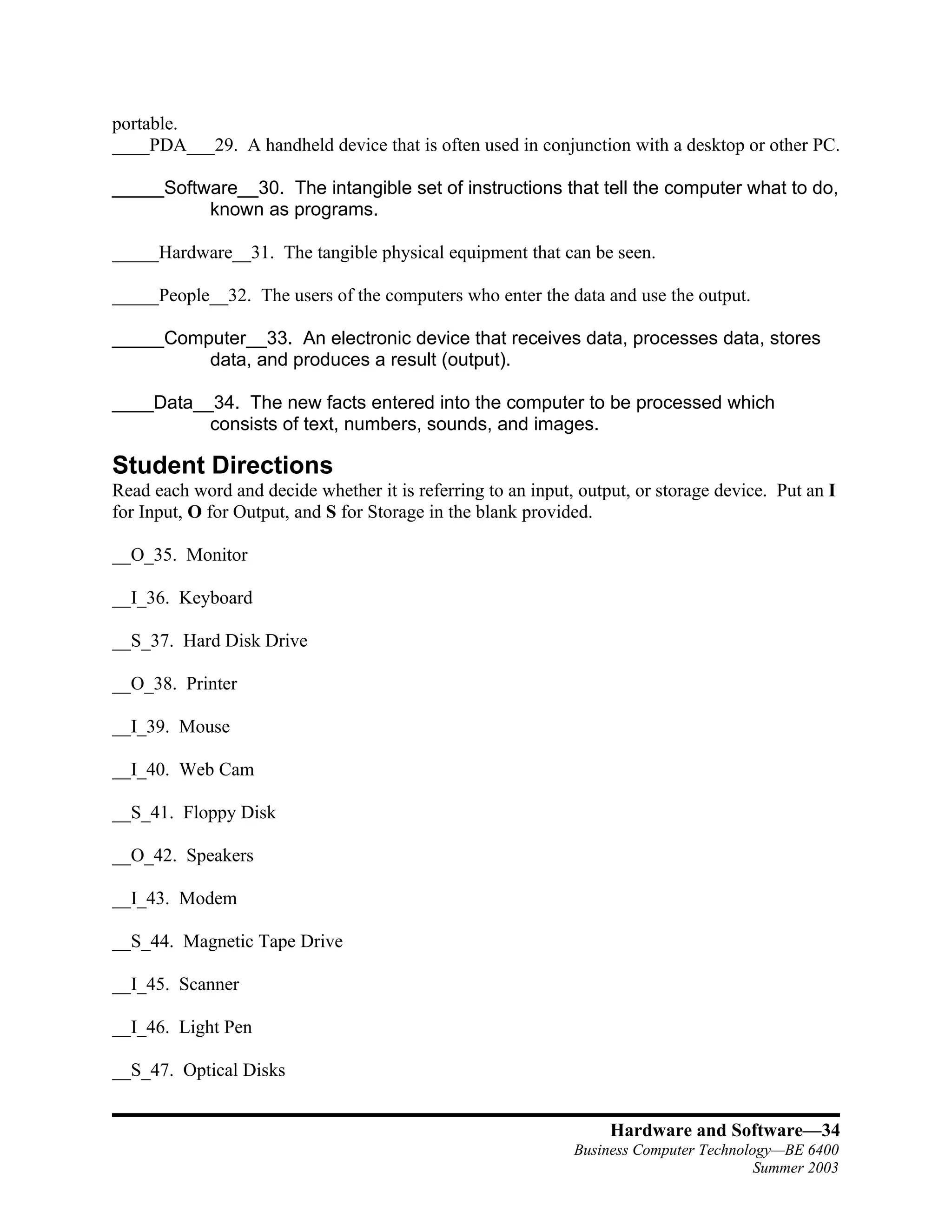
portable.
____PDA___29. A handheld device that is often used in conjunction with a desktop or other PC.

_____Software__30. The intangible set of instructions that tell the computer what to do,
          known as programs.

_____Hardware__31. The tangible physical equipment that can be seen.

_____People__32. The users of the computers who enter the data and use the output.

_____Computer__33. An electronic device that receives data, processes data, stores
         data, and produces a result (output).

____Data__34. The new facts entered into the computer to be processed which
          consists of text, numbers, sounds, and images.

Student Directions
Read each word and decide whether it is referring to an input, output, or storage device. Put an I
for Input, O for Output, and S for Storage in the blank provided.

__O_35. Monitor

__I_36. Keyboard

__S_37. Hard Disk Drive

__O_38. Printer

__I_39. Mouse

__I_40. Web Cam

__S_41. Floppy Disk

__O_42. Speakers

__I_43. Modem

__S_44. Magnetic Tape Drive

__I_45. Scanner

__I_46. Light Pen

__S_47. Optical Disks


                                                                   Hardware and Software—34
                                                              Business Computer Technology—BE 6400
                                                                                        Summer 2003
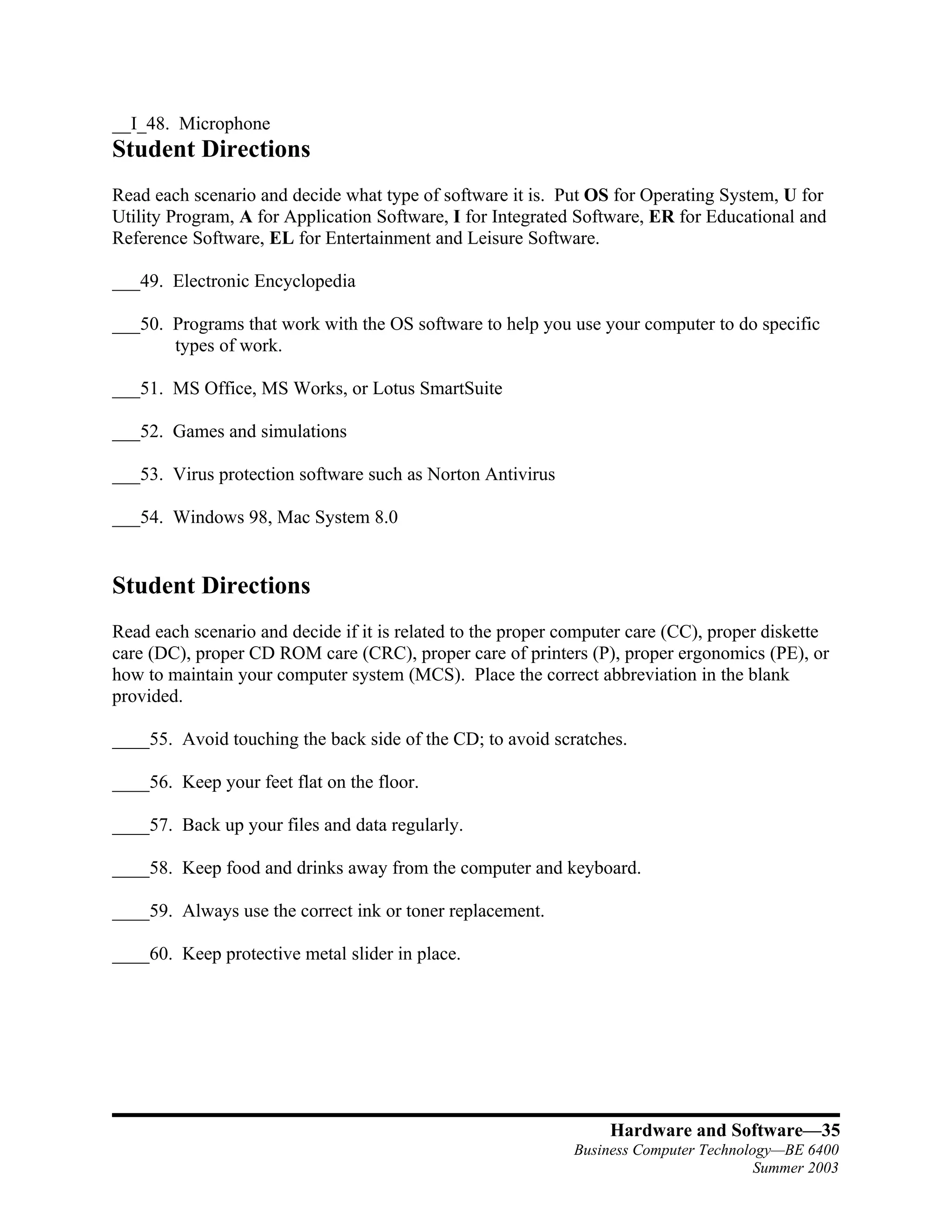
__I_48. Microphone
Student Directions
Read each scenario and decide what type of software it is. Put OS for Operating System, U for
Utility Program, A for Application Software, I for Integrated Software, ER for Educational and
Reference Software, EL for Entertainment and Leisure Software.

___49. Electronic Encyclopedia

___50. Programs that work with the OS software to help you use your computer to do specific
       types of work.

___51. MS Office, MS Works, or Lotus SmartSuite

___52. Games and simulations

___53. Virus protection software such as Norton Antivirus

___54. Windows 98, Mac System 8.0


Student Directions
Read each scenario and decide if it is related to the proper computer care (CC), proper diskette
care (DC), proper CD ROM care (CRC), proper care of printers (P), proper ergonomics (PE), or
how to maintain your computer system (MCS). Place the correct abbreviation in the blank
provided.

____55. Avoid touching the back side of the CD; to avoid scratches.

____56. Keep your feet flat on the floor.

____57. Back up your files and data regularly.

____58. Keep food and drinks away from the computer and keyboard.

____59. Always use the correct ink or toner replacement.

____60. Keep protective metal slider in place.


                                                                  Hardware and Software—35
                                                             Business Computer Technology—BE 6400
                                                                                       Summer 2003

F 1 00 Capstone Activity

  • 1.
    1.00 Hardware andSoftware Capstone Activity Student Directions Read each definition and match it with the correct word by filling in the word in the blank provided. Desktop People Software Hardware Data Computer Supercomputer Notebook Laptop PDAs Web TV Personal Computer Mainframes/Minicomputers Sender Network ROM Data Communications Receiver Channel USB LAN WAN PC case Motherboard ALU CPU Control Unit Memory RAM Basic Controls Expansion Slots ASCII Serial and Parallel Ports Byte ___ ASCII ___1. American Standard Code for Information Interchange – the most popular and widely used standardized coding system. ____Byte______2. Eight bits or combinations of ones and zeros represent a character. ______Expansion Slots____3. An opening on the motherboard where a circuit board or expansion board can be inserted. ______USB____4. Universal Serial Bus – a new standard that supports data transfer rates of up to 12 million bits per second. ______ROM____5. Memory on the motherboard that is long term; where the specific instructions that are needed for the computer to operate is stored. ______RAM____6. Memory on the motherboard that is short term; where data, information, and program instructions are stored temporarily on a chip or a set of chips. _______Memory___7. Found on the motherboard, short term and long term. _____Basic Controls _____8. On the motherboard, a device that controls the transfer of data from the computer to a peripheral device and vice versa. ____Serial and Parallel Ports____9. Used to connect our peripheral devices to the Hardware and Software—32 Business Computer Technology—BE 6400 Summer 2003
  • 2.
    computer; usually oneof each on a computer. ___PC system case____10. The metal and plastic case that houses the main system components of the computer. ____Motherboard___11. A circuit board that contains many integral components. _____CPU__12. Central Processing Unit – the brains of the computer; the microprocessor. ____Control Unit___13. The “boss” and coordinates all of the CPU’s activities. _____ALU__14. Arithmetic/logic unit which performs arithmetic computations and logical operations. ____WAN___15. When local area networks are expanded to include several local area networks within a city, state, region, territory, country, continent, or the world. ____Network___16. When computers are connected to other computers. ____LAN___17. Computers connected together in a relatively close location such as in the same building or department. _____Sender__18. The computer that is sending the message. _____Channel__19. The media that carries or transports the message. ____Reciever___20. The computer receiving the message. ____Data Coummunications___21. The technology that enables computers to communicate. ____Personal Computer___22. Smaller and less powerful than the other types of computers. ____Desktop___23. A computer designed to be used on a desktop. _____Laptop__24. Designed to be small enough and light enough to be used on your lap. _____Web TV__25. Provides easy access to the Internet without having to have a traditional computer. ____Super Computer___26. The most powerful computer. _____Mainframes__27. Computers used by business and government to process large amounts of information. ___Notebook____28. A computer designed to be used on a desktop but still small enough to be Hardware and Software—33 Business Computer Technology—BE 6400 Summer 2003
  • 3.
    portable. ____PDA___29. A handhelddevice that is often used in conjunction with a desktop or other PC. _____Software__30. The intangible set of instructions that tell the computer what to do, known as programs. _____Hardware__31. The tangible physical equipment that can be seen. _____People__32. The users of the computers who enter the data and use the output. _____Computer__33. An electronic device that receives data, processes data, stores data, and produces a result (output). ____Data__34. The new facts entered into the computer to be processed which consists of text, numbers, sounds, and images. Student Directions Read each word and decide whether it is referring to an input, output, or storage device. Put an I for Input, O for Output, and S for Storage in the blank provided. __O_35. Monitor __I_36. Keyboard __S_37. Hard Disk Drive __O_38. Printer __I_39. Mouse __I_40. Web Cam __S_41. Floppy Disk __O_42. Speakers __I_43. Modem __S_44. Magnetic Tape Drive __I_45. Scanner __I_46. Light Pen __S_47. Optical Disks Hardware and Software—34 Business Computer Technology—BE 6400 Summer 2003
  • 4.
    __I_48. Microphone Student Directions Readeach scenario and decide what type of software it is. Put OS for Operating System, U for Utility Program, A for Application Software, I for Integrated Software, ER for Educational and Reference Software, EL for Entertainment and Leisure Software. ___49. Electronic Encyclopedia ___50. Programs that work with the OS software to help you use your computer to do specific types of work. ___51. MS Office, MS Works, or Lotus SmartSuite ___52. Games and simulations ___53. Virus protection software such as Norton Antivirus ___54. Windows 98, Mac System 8.0 Student Directions Read each scenario and decide if it is related to the proper computer care (CC), proper diskette care (DC), proper CD ROM care (CRC), proper care of printers (P), proper ergonomics (PE), or how to maintain your computer system (MCS). Place the correct abbreviation in the blank provided. ____55. Avoid touching the back side of the CD; to avoid scratches. ____56. Keep your feet flat on the floor. ____57. Back up your files and data regularly. ____58. Keep food and drinks away from the computer and keyboard. ____59. Always use the correct ink or toner replacement. ____60. Keep protective metal slider in place. Hardware and Software—35 Business Computer Technology—BE 6400 Summer 2003