COMPUTER STUDIES
MADE SIMPLE 8 & 9
Acknowledgments
The pamphlet presented here is a result of broad-based consultation
involving several stakeholders within the system. Many Heads of
departments, and teachers were consulted to contribute towards the
completions of this pamphlet.
CONTENTS
CHAPTER 1:
INTRODUCTION TO COMPUTER STUDIES
•1.Terminologies
•2.Types of computers
•3. Parts of a computer
•4. Input and output devices
CHAPTER 2:
BASIC OPERATIONS OF A COMPUTER
• 1. Health and safety
• 2. Care for computers
• 3. Computer and peripherals
• 4. Security and viruses
• 5.Types of user interfaces
CHAPTER 3:
COMPUTERS IN EVERYDAY LIFE
• 1. Household appliances
• 2. Entertainment appliances
• 3. Office equipment
• 4. Industrial and commercial applications of computers
• 5. Computer based learning
CHAPTER 4
PRODUCTIVITY TOOLS (MICROSOFT WORD)
•1. Microsoft word
Chapter 5:
Productivity tools (Spreadsheets)
•2. Microsoft excel
CHAPTER 6:
PRODUCTIVITY TOOLS ( POWERPOINT)
•3. Microsoft power point
Chapter 7:
Networking and the internet
1. Networking
2. Using the internet
3. Web browsers
4. Using search engines
5. E mail.
Chapter 8:
Multimedia files
1. Introduction
2. Graphics
3. Video and audio
NOTES FOR STUDENTS
•.This pamphlet covers most topics in
computer studies junior level.The topics
have been appropriately sequenced to help
you appreciate and build up a sound
foundation in computer studies
to answer the questions at the appendix. • At the
start of each chapter, read through the learning
objectives.
• There are questions which will help you in your
preparation for computer studies tests and exams.
• You will find tips on how to answer the questions
at the appendix.
INTRODUCTION TO COMPUTERS
• 1. Terminologies
• 2. Types of computers
• 3. Parts of a computer
• 4. Computer Hardware: Input and output devices
• 5. Basic operations of a computer
Learning objectives
After you have studied this chapter, you should be able to:
1. Explain the meaning of the
terms :hardware, software, Information,
communication and others
2. Describe the main parts of a computer
3. State the three basic operations in a
computer system
4. Identify a computer as a general purpose
machine that operates under different sets of
instructions for various uses
5. Relate computer parts to the basic
operations Differentiate between data and
information.
6. State the main components of a computer
system
1.1 TERMINOLOGIES
Question 1
EXPLAIN THE FOLLOWING TERMS
a) Computer
b) Hardware
c) Software
d) Data
e) Information
Answers
a) COMPUTER :
✓ This is an electronic device that is able to
input, process data, store data and output
information.
✓ A computer is an electronic device that
manipulates information, or data. It has the
ability to store, retrieve and process data.
B) HARDWARE
•✓ Computer Hardware is the physical parts or components of a
computer.
•✓ These are computer components that one can see, touch and
feel.
•✓ Hardware: The term hardware refers to the physical
components of your computer such as mouse, keyboard, monitor,
CPU(system case), RAM
C) SOFTWARE
• ✓ Computer Software is a part of a computer system
that consists of data or computer instructions that
consist of data or computer instructions.
• ✓ Computer software is a collection of instructions
that enable the user to interact with the computer, its
hardware, or perform tasks.
d) DATA
•Unprocessed information which is not meaningful
e) INFORMATION
•Is processed data which has become meaningful
and useful to the user.
Other
important
terminologies
i) Peripheral Devices:
ii) A peripheral device is a piece of equipment that can be
connected to a computer for the purpose of data input,
output or both. Peripheral devices are used by human
beings to communicate with the Central Processing Unit
(CPU) of the computer. Examples are keyboard, joystick,
external CD, Monitor, printer, internet modem, Scanner,
speakers, mouse, Handheld etc.
ii) P.D.A (Personal Digital Assistant): It is a handheld
personal computer like a mobile handheld device that
provides computing and information storage and retrieval
capabilities for personal or business use, calendars etc.
iii) BIT is binary digits that are 0 or 1. The smallest unit of
storage.
iv) BYTE: is the unit of storage capacity which is equivalent
to 8 bits.
v) KB (Kilobytes): which is equivalent to 1000 bits.
vi) MB (Megabytes): It is a measurement of storage
capacity equivalent to 0ne million bits.
vii) GB Gigabytes: It a measurement of storage capacity of
the unit bit equivalent to 1000, 000, 000 bits.
viii) MHz (Megahertz): This is a measurement of frequency
equivalent to one million per second.
ix) GHz (Gigahertz) is a measurement of frequency
equivalent to one thousand million per cycle..
1.2 TYPES OF COMPUTERS
•Question
•(a) List the most common types of computers:
• Desktop computer/personal computer (PC)
• Laptop computer (portable computer)
• Personal Digital Assistant (PDA)
• Mainframe computer
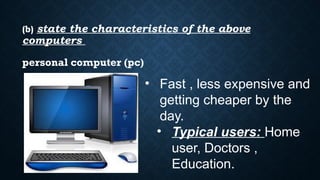
(b) state the characteristics of the above
computers
• Fast , less expensive and
getting cheaper by the
day.
• Typical users: Home
user, Doctors ,
Education.
personal computer (pc)
LAPTOP COMPUTER
• Laptop as PC in capacity
• It is portable computer
• Expensive than PC
• Typical Users: Business users
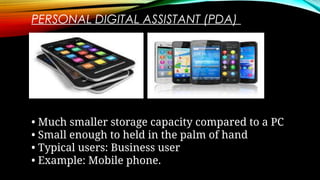
PERSONAL DIGITAL ASSISTANT (PDA)
• Much smaller storage capacity compared to a PC
• Small enough to held in the palm of hand
• Typical users: Business user
• Example: Mobile phone.
Mainframe computer
• Very powerful computer and it often connected to
many individual PCs over network.
• Faster than PCs, used for processing large amounts of
data as salaries.
• Very expensive.
• Typical Users: Banks and Building societies, Insurance.
1.3 MAIN PARTS OF A COMPUTER
•Questions
•(a) List the main parts of a computer
•(b) Define the main parts of a computer
•(c) List down the most commonly used computer
hardware
•(d) State the two types of computer software.
ANSWERS
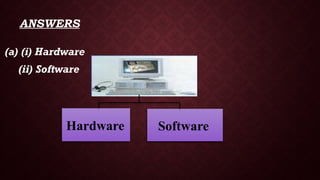
(a) (i) Hardware
(ii) Software
Hardware Software
(b) Hardware:
The term hardware refers to the physical components of
your computer such as mouse, keyboard, monitor, CPU
(system case), RAM
Software:
Computer software is simply the instructions given to
the hardware to carry out the actual work. In other
words, software is a general term for all computer
programs.
(C) THE MOST COMMONLY USED COMPUTER HARDWARE ARE:
• ✓ KEYBOARD
• ✓ MOUSE
• ✓ CENTRAL PROCESSING UNIT
• ✓ MONITOR
• ✓ SOUND CARD,
• ✓ MOTHER BOARD,
• ✓ PRINTER,
• ✓ SCANNER,
• ✓ UNINTERRUPTED POWER SUPPLY.
• ✓ MICROPHONE
• ✓ DIGITAL CAMERA
• ✓ SPEAKERS
(d) State and explain the two types of software:
The two main types of software are systems software and
the applications software.
e) What is systems software?
This is the type of software used by the computer to
accomplish tasks of general nature. These tasks are often
contrasted from those performed by the person using the
computer. Therefore, systems software is the software which
operates the hardware system of the computer. It is the one
which really makes a computer to be an automatic
machine. It is also called the operating system.
(f) What are the Functions of systems software?
➢ Controlling the internal function of the computer
➢ Controlling devices connected to the CPU
➢ Acting as a platform for applications software.
(g) Give examples of operating system software:
MS DOS,Windows 95, 98, 2000, XP, vista, windows 7,
windows 8, LINUX, UNIX, Ubuntu, Macintosh etc.
(h) What is application software?
This is the software in a computer used by people to
accomplish specific tasks. Whereas systems software is
directed towards the computer hardware in general,
applications software is directed towards the user.
(i) Give examples of application software.
Word processors (Ms word), Open Office Writer,
Spreadsheet (Ms Excel), Open Office Presentation,
database, Publisher, games etc.
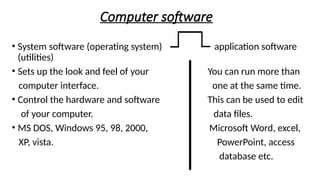
Computer software
• System software (operating system) application software
(utilities)
• Sets up the look and feel of your You can run more than
computer interface. one at the same time.
• Control the hardware and software This can be used to edit
of your computer. data files.
• MS DOS, Windows 95, 98, 2000, Microsoft Word, excel,
XP, vista. PowerPoint, access
database etc.
(j) Explain the use of the most commonly
used application software (utilities)
Word processing [creating letters – faxes –
Memos –– producing catalogue containing
graphics –business document]
Excel Spreadsheet [Charts – financial projection
–working with budgets]
Access database [sort large amount of
information – creating list of contact details]
PowerPoint presentation [create overhead
projections slides]
Web browsing[View web pages]
1.4.1 Computer Hardware
 Questions
 (a) State the components of a computer
 Answer
 Central Processing Unit (CPU)
 is an electronic circuitry within a computer that carries out the
instructions of a computer program by performing the basic
arithmetic, logical, control of input/output devices.
 Input devices:
 - is any hardware device that sends data to a computer,
allowing you to interact with and control the computer.
Examples are the Keyboard and the mouse.
Storage devices:
- These are computer equipment on which
information can be stored. E.g. Hard drive, Flash
drive, Compact disc etc.
Output devices:
- are devices used to send data from a computer
to another device or user.
Input devices:
- is any hardware device that sends data to a
computer, allowing you to interact with and
control the computer. Examples are the Keyboard
and the mouse.
A Computer system
Questions
(a)List the three basic operations of a computer system
Answer
✓ Input
✓ Processing
✓ Output
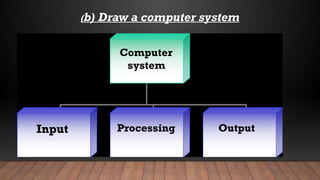
(b) Draw a computer system
Computer
system
Input Processing Output
(C) RELATE THE COMPONENTS OF A COMPUTER
(COMPUTER PARTS ) TO BASIC OPERATIONS
• Answer
•Input:-
•Information and programs are entered into the
computer system through input devices such as
key boards, disks or through networking with
other computers.
Processing:-
The CPU sometimes called the control unit directs
the operation of the input and output devices.
Output:-
These devices display information on the screen
(monitor) or the printers and sends information to
other computers.
Input devices
Questions
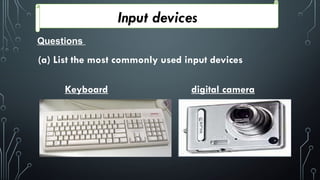
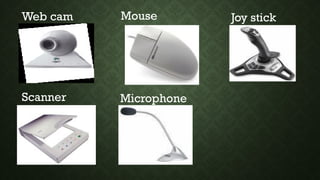
(a) List the most commonly used input devices
Keyboard digital camera
Web cam Mouse Joy stick
Scanner Microphone
(b) Explain the use of the mouse and keyboard input
devices.
Answer
Keyboard:
A keyboard is an input device that contains keys [buttons]
that the user presses to enter data into a computer
keyboard have 101 to 105 keys.
Mouse:
A mouse is a pointing device that fits under the palm of
one’s hand. Pointing devices minimize the amount of
typing a user has to do.
Processing (Central Processing Unit)
Questions
(a)Which part of the computer is used to process
information
Answer
The central processing unit (CPU)
(b) What are the basic functions of the CPU?
 Answer
 ✓ Processing data.
 ✓ It determines how fast your computer will
run.
 ✓ It is responsible for performing operations on
input to produce output in a systematic
manner.
 ✓ The processor is responsible for overall
control of all the components of the computer.
(c) State the components of the CPU?
Answer
✓ Control unit
✓ Arithmetic logic unit (ALU)
✓ On board cache.
d) State the functions of the control unit (CU)
Answer
✓ Stimulates and coordinates all the activities of a
computer.
✓ It fetches data from the ram for processing by the
ALU.
✓ By controlling the running of the program
instructions, the control unit of CPU maintains
order and directs the operation of the entire
system.
✓ It acts a central nervous system for the data
manipulating components.
✓ It also interprets the individual instructions
that comprise the computer program.These
instructions are in a language called machine
code (pattern of zeros and ones).
(e) What are the functions of the ALU?
Processing (Central Processing Unit)
Answers
✓ This is the component of a CPU that handles all
the computational jobs of a computer.
✓ The ALU acts a calculator, performing
arithmetic operations such as addition, subtraction,
multiplication, division and logical comparisons
such as deciding whether two numbers are equal.
(f) What values are used to measure the speed of the
CPU?
Answer
The speed of the CPU is measured in either Gigahertz (GHz)
or Megahertz (MHz) . For example
• 1 Megahertz is 1000,000 hertz, which means the CPU
performs 1 million actions per second.
• 1 Gigabytes is 1000,000,000 which means the CPU performs
1 billion actions per second.
• Today modern CPU run at the speed of 2.8 GHz meaning it
can perform 2,800,000,000 actions per second.
(g) Define unit of processing
Answer
These are measurements of rates of frequency
(h) Write down the steps to follow when checking the CPU
speed using Windows:
1. Click on the Start menu
2. Go to option Computer
3. After selection the option Computer you move or take your
cursor on the blank area of your computer.
4.Then right click on the blank area of your window and select
the last option which is properties.
5.You will be able to check the CPU speed of your computer.
(i) What are the factors that determine
computer performance?
Answer
✓ Free space on Hard disk
✓ Capacity of RAM
✓ Speed of CPU
✓ Quality of equipment’s is installed on PC
✓ Number of application running
• Questions
• (a) What is primary memory of a computer?
• Answer
• Primary Memory
• is computer memory that a processor or computer accesses first
or directly. It allows the processor to access running execution
application and services that are temporarily stored in a specific
memory location. It is also known as the Main Memory.
Computer memory
• b) Explain the various types of primary memory:
Answer
• i) Random Access Memory (R.A.M):
• This is a form of computer storage which stores data and
machine code currently being used. RAM memory is
volatile; this means that the memory loses data when
power is switched off. Because of this, it is advisable to
save your work on the disc say every 10-20 minutes when
you are typing a large document on your computer.
It is memory that is intimately associated
with the actual working of the computer.This
includes memory that holds start -up
routines as well the current program and
data it is working with.
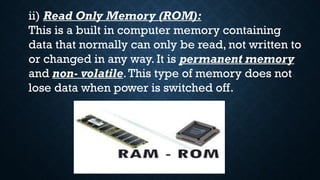
ii) Read Only Memory (ROM):
This is a built in computer memory containing
data that normally can only be read, not written to
or changed in any way. It is permanent memory
and non- volatile.This type of memory does not
lose data when power is switched off.
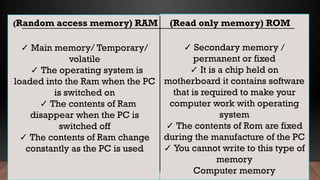
✓ Main memory/ Temporary/
volatile
✓ The operating system is
loaded into the Ram when the PC
is switched on
✓ The contents of Ram
disappear when the PC is
switched off
✓ The contents of Ram change
constantly as the PC is used
✓ Secondary memory /
permanent or fixed
✓ It is a chip held on
motherboard it contains software
that is required to make your
computer work with operating
system
✓ The contents of Rom are fixed
during the manufacture of the PC
✓ You cannot write to this type of
memory
Computer memory
(Random access memory) RAM (Read only memory) ROM
(iii) On-board-catch memory
This is a very high speed memory that the control
unit can access very quickly and use for
intermediate storage. Further, data and instructions
can be loaded into the cache before they are
actually needed.When they are needed, the
transfer is much faster than it would have been if
RAM had been used.
It is referred to as, memory in waiting e.g. when you
press print, it will ask for how
Storage
Questions
(a) What is storage?
Answer
Storage is a process/method of keep data, instructions and
information for future use/permanently.
(b) What are storage devices?
Answer
This is Computer equipment on which information can be
stored. E.g. Hard drive, Flash drive, Compact disc etc.
These are pieces of hardware that holds the storage media, such
as Floppy Disk Drive, Hard Drives, CDROM, DVD ROM, and Tape
Drive.
(c) State the two types of storage devices:
i. Internal storage or primary storage
These are storage devices that are found inside the computer
case and are referred to as Internal Hard Drive.
ii. External storage devices or secondary storage
These are devices that temporarily store information for
transporting computer to computer and are not permanently
fixed inside a computer. Examples such as Memory Card
Reader, USB Flash memory, External Optical Drives, Zip Drive.
(d) Give two reasons why primary storage is
important:
Answer
• They allow the data and applications to be loaded
very rapidly into memory and ready for use.
• They store operating systems and programs.
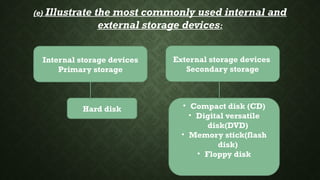
(e) Illustrate the most commonly used internal and
external storage devices:
Hard disk
External storage devices
Secondary storage
• Compact disk (CD)
• Digital versatile
disk(DVD)
• Memory stick(flash
disk)
• Floppy disk
Internal storage devices
Primary storage
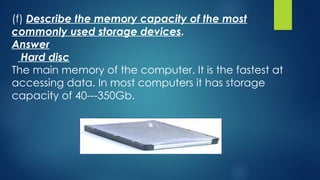
(f) Describe the memory capacity of the most
commonly used storage devices.
Answer
Hard disc
The main memory of the computer. It is the fastest at
accessing data. In most computers it has storage
capacity of 40---350Gb.
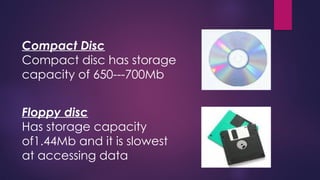
Compact Disc
Compact disc has storage
capacity of 650---700Mb
Floppy disc
Has storage capacity
of1.44Mb and it is slowest
at accessing data
Flash Disc
Has storage capacity which can range from 2Gb to 50Gb.
(g) What is a unit of storage
Answer
The measurements of storage capacity.
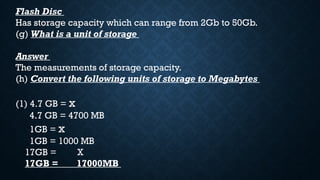
(h) Convert the following units of storage to Megabytes
(1) 4.7 GB = x
4.7 GB = 4700 MB
1GB = x
1GB = 1000 MB
17GB = X
17GB = 17000MB
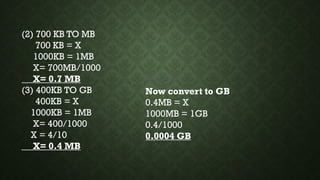
(2) 700 KB TO MB
700 KB = X
1000KB = 1MB
X= 700MB/1000
X= 0.7 MB
(3) 400KB TO GB
400KB = X
1000KB = 1MB
X= 400/1000
X = 4/10
X= 0.4 MB
Now convert to GB
0.4MB = X
1000MB = 1GB
0.4/1000
0.0004 GB
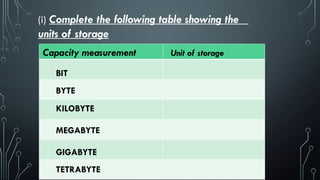
(i) Complete the following table showing the
units of storage
GIGABYTE
Capacity measurement Unit of storage
BIT
BYTE
KILOBYTE
MEGABYTE
TETRABYTE
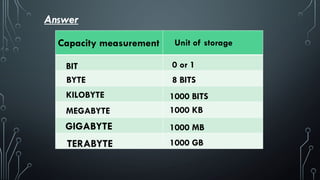
Capacity measurement Unit of storage
BIT 0 or 1
BYTE 8 BITS
KILOBYTE
MEGABYTE
GIGABYTE
TERABYTE
1000 BITS
1000 KB
1000 MB
1000 GB
Answer
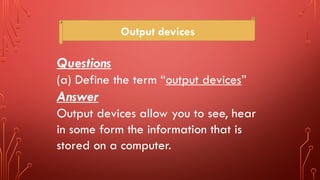
Output devices
Questions
(a) Define the term “output devices”
Answer
Output devices allow you to see, hear
in some form the information that is
stored on a computer.
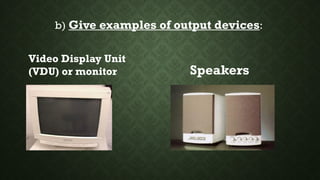
b) Give examples of output devices:
Video Display Unit
(VDU) or monitor Speakers
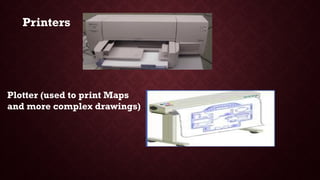
Plotter (used to print Maps
and more complex drawings)
Printers
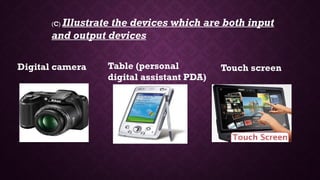
(c) Illustrate the devices which are both input
and output devices
Digital camera Table (personal
digital assistant PDA)
Touch screen
(d) Describe the functions of a monitor:
Answer
Monitor:
A monitor is a device that displays texts, graphics
and video visually .e.g.
L C D — Liquid Crystal Display
L E D - Light Emitting Diode
V D U - Visual Display Unit
(E) What two main factors determine the
quality of a monitor?
• Answer
• RESOLUTION: refers to the numbers of horizontal
and vertical pixels in a display device.
• PIXELS: this is the smallest unit of a digital image.
the higher the number of pixels, the higher the
resolution, and the greater the sharpness and
clarity of the images.
f) Define a printer
Answer
A printer produces hard copy [physical copy] of text
and graphics.
(g) How is the quality of a printer measured?
Answer
The resolution [quality] of a printer is measured in
dots per inch [DPI]. The higher the DPI, the higher
the print quality.
(h) How is the speed of a printer measured?
Answer
The speed of a printer is measured in pages per
minute [PPM].
(i) Give three (3) Examples of types of
printers:
Answer
✓ LaserJet printers
✓ Inkjet printers
✓ Office jet printers
Peripheral devices
Question
(a) What are peripheral devices
Answers
All hardware devices which are connected to the
computer systems case ranging from cables,
monitors, keyboard, printers, speakers etc.
Peripheral hardware
Is the name for the computer components that are
not found within the computer case.This includes
input devices such as a mouse, microphone and
keyboard, which carry information from the
computer user to the processor, and output devices
such as a monitor, printer and speakers, which
display or transmit information from the computer
back to the user.
Communication
Questions
(a) Define communication
Answer
Communication is the transmission of
data, instructions and information across a
distance from a sender to a receiver.
(b) What is a communication device?
A communication device is used to send {transmit} and
receive data, instructions and information between one or
more computers or mobile devices. A modem is an example
of a communication device.
(c) State the methods of communication:
Answer
Communication takes place over telephone lines, cellular
radio networks, satellites and other transmission media.
Satellite and cellular radio networks, are wireless
communications.
END OF PRESENTATION,
STUDY HARD.

CHAPTER 1 INTRODUCTION TO COMPUTERS GRADE 8 and 9.pptx

  • 1.
    COMPUTER STUDIES MADE SIMPLE8 & 9 Acknowledgments The pamphlet presented here is a result of broad-based consultation involving several stakeholders within the system. Many Heads of departments, and teachers were consulted to contribute towards the completions of this pamphlet.
  • 2.
    CONTENTS CHAPTER 1: INTRODUCTION TOCOMPUTER STUDIES •1.Terminologies •2.Types of computers •3. Parts of a computer •4. Input and output devices
  • 3.
    CHAPTER 2: BASIC OPERATIONSOF A COMPUTER • 1. Health and safety • 2. Care for computers • 3. Computer and peripherals • 4. Security and viruses • 5.Types of user interfaces
  • 4.
    CHAPTER 3: COMPUTERS INEVERYDAY LIFE • 1. Household appliances • 2. Entertainment appliances • 3. Office equipment • 4. Industrial and commercial applications of computers • 5. Computer based learning
  • 5.
    CHAPTER 4 PRODUCTIVITY TOOLS(MICROSOFT WORD) •1. Microsoft word
  • 6.
    Chapter 5: Productivity tools(Spreadsheets) •2. Microsoft excel
  • 7.
    CHAPTER 6: PRODUCTIVITY TOOLS( POWERPOINT) •3. Microsoft power point
  • 8.
    Chapter 7: Networking andthe internet 1. Networking 2. Using the internet 3. Web browsers 4. Using search engines 5. E mail.
  • 9.
    Chapter 8: Multimedia files 1.Introduction 2. Graphics 3. Video and audio
  • 10.
    NOTES FOR STUDENTS •.Thispamphlet covers most topics in computer studies junior level.The topics have been appropriately sequenced to help you appreciate and build up a sound foundation in computer studies
  • 11.
    to answer thequestions at the appendix. • At the start of each chapter, read through the learning objectives. • There are questions which will help you in your preparation for computer studies tests and exams. • You will find tips on how to answer the questions at the appendix.
  • 12.
    INTRODUCTION TO COMPUTERS •1. Terminologies • 2. Types of computers • 3. Parts of a computer • 4. Computer Hardware: Input and output devices • 5. Basic operations of a computer
  • 13.
    Learning objectives After youhave studied this chapter, you should be able to: 1. Explain the meaning of the terms :hardware, software, Information, communication and others 2. Describe the main parts of a computer 3. State the three basic operations in a computer system
  • 14.
    4. Identify acomputer as a general purpose machine that operates under different sets of instructions for various uses 5. Relate computer parts to the basic operations Differentiate between data and information. 6. State the main components of a computer system
  • 15.
    1.1 TERMINOLOGIES Question 1 EXPLAINTHE FOLLOWING TERMS a) Computer b) Hardware c) Software d) Data e) Information
  • 16.
    Answers a) COMPUTER : ✓This is an electronic device that is able to input, process data, store data and output information. ✓ A computer is an electronic device that manipulates information, or data. It has the ability to store, retrieve and process data.
  • 17.
    B) HARDWARE •✓ ComputerHardware is the physical parts or components of a computer. •✓ These are computer components that one can see, touch and feel. •✓ Hardware: The term hardware refers to the physical components of your computer such as mouse, keyboard, monitor, CPU(system case), RAM
  • 18.
    C) SOFTWARE • ✓Computer Software is a part of a computer system that consists of data or computer instructions that consist of data or computer instructions. • ✓ Computer software is a collection of instructions that enable the user to interact with the computer, its hardware, or perform tasks.
  • 19.
    d) DATA •Unprocessed informationwhich is not meaningful e) INFORMATION •Is processed data which has become meaningful and useful to the user.
  • 20.
    Other important terminologies i) Peripheral Devices: ii)A peripheral device is a piece of equipment that can be connected to a computer for the purpose of data input, output or both. Peripheral devices are used by human beings to communicate with the Central Processing Unit (CPU) of the computer. Examples are keyboard, joystick, external CD, Monitor, printer, internet modem, Scanner, speakers, mouse, Handheld etc.
  • 21.
    ii) P.D.A (PersonalDigital Assistant): It is a handheld personal computer like a mobile handheld device that provides computing and information storage and retrieval capabilities for personal or business use, calendars etc. iii) BIT is binary digits that are 0 or 1. The smallest unit of storage. iv) BYTE: is the unit of storage capacity which is equivalent to 8 bits. v) KB (Kilobytes): which is equivalent to 1000 bits.
  • 22.
    vi) MB (Megabytes):It is a measurement of storage capacity equivalent to 0ne million bits. vii) GB Gigabytes: It a measurement of storage capacity of the unit bit equivalent to 1000, 000, 000 bits. viii) MHz (Megahertz): This is a measurement of frequency equivalent to one million per second. ix) GHz (Gigahertz) is a measurement of frequency equivalent to one thousand million per cycle..
  • 23.
    1.2 TYPES OFCOMPUTERS •Question •(a) List the most common types of computers: • Desktop computer/personal computer (PC) • Laptop computer (portable computer) • Personal Digital Assistant (PDA) • Mainframe computer
  • 24.
    (b) state thecharacteristics of the above computers • Fast , less expensive and getting cheaper by the day. • Typical users: Home user, Doctors , Education. personal computer (pc)
  • 25.
    LAPTOP COMPUTER • Laptopas PC in capacity • It is portable computer • Expensive than PC • Typical Users: Business users
  • 26.
    PERSONAL DIGITAL ASSISTANT(PDA) • Much smaller storage capacity compared to a PC • Small enough to held in the palm of hand • Typical users: Business user • Example: Mobile phone.
  • 27.
    Mainframe computer • Verypowerful computer and it often connected to many individual PCs over network. • Faster than PCs, used for processing large amounts of data as salaries. • Very expensive. • Typical Users: Banks and Building societies, Insurance.
  • 28.
    1.3 MAIN PARTSOF A COMPUTER •Questions •(a) List the main parts of a computer •(b) Define the main parts of a computer •(c) List down the most commonly used computer hardware •(d) State the two types of computer software.
  • 29.
    ANSWERS (a) (i) Hardware (ii)Software Hardware Software
  • 30.
    (b) Hardware: The termhardware refers to the physical components of your computer such as mouse, keyboard, monitor, CPU (system case), RAM Software: Computer software is simply the instructions given to the hardware to carry out the actual work. In other words, software is a general term for all computer programs.
  • 31.
    (C) THE MOSTCOMMONLY USED COMPUTER HARDWARE ARE: • ✓ KEYBOARD • ✓ MOUSE • ✓ CENTRAL PROCESSING UNIT • ✓ MONITOR • ✓ SOUND CARD, • ✓ MOTHER BOARD, • ✓ PRINTER, • ✓ SCANNER, • ✓ UNINTERRUPTED POWER SUPPLY. • ✓ MICROPHONE • ✓ DIGITAL CAMERA • ✓ SPEAKERS
  • 32.
    (d) State andexplain the two types of software: The two main types of software are systems software and the applications software. e) What is systems software? This is the type of software used by the computer to accomplish tasks of general nature. These tasks are often contrasted from those performed by the person using the computer. Therefore, systems software is the software which operates the hardware system of the computer. It is the one which really makes a computer to be an automatic machine. It is also called the operating system.
  • 33.
    (f) What arethe Functions of systems software? ➢ Controlling the internal function of the computer ➢ Controlling devices connected to the CPU ➢ Acting as a platform for applications software. (g) Give examples of operating system software: MS DOS,Windows 95, 98, 2000, XP, vista, windows 7, windows 8, LINUX, UNIX, Ubuntu, Macintosh etc.
  • 34.
    (h) What isapplication software? This is the software in a computer used by people to accomplish specific tasks. Whereas systems software is directed towards the computer hardware in general, applications software is directed towards the user. (i) Give examples of application software. Word processors (Ms word), Open Office Writer, Spreadsheet (Ms Excel), Open Office Presentation, database, Publisher, games etc.
  • 35.
    Computer software • Systemsoftware (operating system) application software (utilities) • Sets up the look and feel of your You can run more than computer interface. one at the same time. • Control the hardware and software This can be used to edit of your computer. data files. • MS DOS, Windows 95, 98, 2000, Microsoft Word, excel, XP, vista. PowerPoint, access database etc.
  • 36.
    (j) Explain theuse of the most commonly used application software (utilities) Word processing [creating letters – faxes – Memos –– producing catalogue containing graphics –business document] Excel Spreadsheet [Charts – financial projection –working with budgets]
  • 37.
    Access database [sortlarge amount of information – creating list of contact details] PowerPoint presentation [create overhead projections slides] Web browsing[View web pages]
  • 38.
    1.4.1 Computer Hardware Questions  (a) State the components of a computer  Answer  Central Processing Unit (CPU)  is an electronic circuitry within a computer that carries out the instructions of a computer program by performing the basic arithmetic, logical, control of input/output devices.  Input devices:  - is any hardware device that sends data to a computer, allowing you to interact with and control the computer. Examples are the Keyboard and the mouse.
  • 39.
    Storage devices: - Theseare computer equipment on which information can be stored. E.g. Hard drive, Flash drive, Compact disc etc. Output devices: - are devices used to send data from a computer to another device or user. Input devices: - is any hardware device that sends data to a computer, allowing you to interact with and control the computer. Examples are the Keyboard and the mouse.
  • 40.
    A Computer system Questions (a)Listthe three basic operations of a computer system Answer ✓ Input ✓ Processing ✓ Output
  • 41.
    (b) Draw acomputer system Computer system Input Processing Output
  • 42.
    (C) RELATE THECOMPONENTS OF A COMPUTER (COMPUTER PARTS ) TO BASIC OPERATIONS • Answer •Input:- •Information and programs are entered into the computer system through input devices such as key boards, disks or through networking with other computers.
  • 43.
    Processing:- The CPU sometimescalled the control unit directs the operation of the input and output devices. Output:- These devices display information on the screen (monitor) or the printers and sends information to other computers.
  • 44.
    Input devices Questions (a) Listthe most commonly used input devices Keyboard digital camera
  • 45.
    Web cam MouseJoy stick Scanner Microphone
  • 46.
    (b) Explain theuse of the mouse and keyboard input devices. Answer Keyboard: A keyboard is an input device that contains keys [buttons] that the user presses to enter data into a computer keyboard have 101 to 105 keys. Mouse: A mouse is a pointing device that fits under the palm of one’s hand. Pointing devices minimize the amount of typing a user has to do.
  • 47.
    Processing (Central ProcessingUnit) Questions (a)Which part of the computer is used to process information Answer The central processing unit (CPU)
  • 48.
    (b) What arethe basic functions of the CPU?  Answer  ✓ Processing data.  ✓ It determines how fast your computer will run.  ✓ It is responsible for performing operations on input to produce output in a systematic manner.  ✓ The processor is responsible for overall control of all the components of the computer.
  • 49.
    (c) State thecomponents of the CPU? Answer ✓ Control unit ✓ Arithmetic logic unit (ALU) ✓ On board cache. d) State the functions of the control unit (CU) Answer ✓ Stimulates and coordinates all the activities of a computer. ✓ It fetches data from the ram for processing by the ALU.
  • 50.
    ✓ By controllingthe running of the program instructions, the control unit of CPU maintains order and directs the operation of the entire system. ✓ It acts a central nervous system for the data manipulating components. ✓ It also interprets the individual instructions that comprise the computer program.These instructions are in a language called machine code (pattern of zeros and ones).
  • 51.
    (e) What arethe functions of the ALU? Processing (Central Processing Unit) Answers ✓ This is the component of a CPU that handles all the computational jobs of a computer. ✓ The ALU acts a calculator, performing arithmetic operations such as addition, subtraction, multiplication, division and logical comparisons such as deciding whether two numbers are equal.
  • 52.
    (f) What valuesare used to measure the speed of the CPU? Answer The speed of the CPU is measured in either Gigahertz (GHz) or Megahertz (MHz) . For example • 1 Megahertz is 1000,000 hertz, which means the CPU performs 1 million actions per second. • 1 Gigabytes is 1000,000,000 which means the CPU performs 1 billion actions per second. • Today modern CPU run at the speed of 2.8 GHz meaning it can perform 2,800,000,000 actions per second.
  • 53.
    (g) Define unitof processing Answer These are measurements of rates of frequency (h) Write down the steps to follow when checking the CPU speed using Windows: 1. Click on the Start menu 2. Go to option Computer 3. After selection the option Computer you move or take your cursor on the blank area of your computer. 4.Then right click on the blank area of your window and select the last option which is properties. 5.You will be able to check the CPU speed of your computer.
  • 54.
    (i) What arethe factors that determine computer performance? Answer ✓ Free space on Hard disk ✓ Capacity of RAM ✓ Speed of CPU ✓ Quality of equipment’s is installed on PC ✓ Number of application running
  • 55.
    • Questions • (a)What is primary memory of a computer? • Answer • Primary Memory • is computer memory that a processor or computer accesses first or directly. It allows the processor to access running execution application and services that are temporarily stored in a specific memory location. It is also known as the Main Memory. Computer memory
  • 56.
    • b) Explainthe various types of primary memory: Answer • i) Random Access Memory (R.A.M): • This is a form of computer storage which stores data and machine code currently being used. RAM memory is volatile; this means that the memory loses data when power is switched off. Because of this, it is advisable to save your work on the disc say every 10-20 minutes when you are typing a large document on your computer.
  • 57.
    It is memorythat is intimately associated with the actual working of the computer.This includes memory that holds start -up routines as well the current program and data it is working with.
  • 58.
    ii) Read OnlyMemory (ROM): This is a built in computer memory containing data that normally can only be read, not written to or changed in any way. It is permanent memory and non- volatile.This type of memory does not lose data when power is switched off.
  • 59.
    ✓ Main memory/Temporary/ volatile ✓ The operating system is loaded into the Ram when the PC is switched on ✓ The contents of Ram disappear when the PC is switched off ✓ The contents of Ram change constantly as the PC is used ✓ Secondary memory / permanent or fixed ✓ It is a chip held on motherboard it contains software that is required to make your computer work with operating system ✓ The contents of Rom are fixed during the manufacture of the PC ✓ You cannot write to this type of memory Computer memory (Random access memory) RAM (Read only memory) ROM
  • 60.
    (iii) On-board-catch memory Thisis a very high speed memory that the control unit can access very quickly and use for intermediate storage. Further, data and instructions can be loaded into the cache before they are actually needed.When they are needed, the transfer is much faster than it would have been if RAM had been used. It is referred to as, memory in waiting e.g. when you press print, it will ask for how
  • 61.
    Storage Questions (a) What isstorage? Answer Storage is a process/method of keep data, instructions and information for future use/permanently. (b) What are storage devices? Answer This is Computer equipment on which information can be stored. E.g. Hard drive, Flash drive, Compact disc etc. These are pieces of hardware that holds the storage media, such as Floppy Disk Drive, Hard Drives, CDROM, DVD ROM, and Tape Drive.
  • 62.
    (c) State thetwo types of storage devices: i. Internal storage or primary storage These are storage devices that are found inside the computer case and are referred to as Internal Hard Drive. ii. External storage devices or secondary storage These are devices that temporarily store information for transporting computer to computer and are not permanently fixed inside a computer. Examples such as Memory Card Reader, USB Flash memory, External Optical Drives, Zip Drive.
  • 63.
    (d) Give tworeasons why primary storage is important: Answer • They allow the data and applications to be loaded very rapidly into memory and ready for use. • They store operating systems and programs.
  • 64.
    (e) Illustrate themost commonly used internal and external storage devices: Hard disk External storage devices Secondary storage • Compact disk (CD) • Digital versatile disk(DVD) • Memory stick(flash disk) • Floppy disk Internal storage devices Primary storage
  • 65.
    (f) Describe thememory capacity of the most commonly used storage devices. Answer Hard disc The main memory of the computer. It is the fastest at accessing data. In most computers it has storage capacity of 40---350Gb.
  • 66.
    Compact Disc Compact dischas storage capacity of 650---700Mb Floppy disc Has storage capacity of1.44Mb and it is slowest at accessing data
  • 67.
    Flash Disc Has storagecapacity which can range from 2Gb to 50Gb. (g) What is a unit of storage Answer The measurements of storage capacity. (h) Convert the following units of storage to Megabytes (1) 4.7 GB = x 4.7 GB = 4700 MB 1GB = x 1GB = 1000 MB 17GB = X 17GB = 17000MB
  • 68.
    (2) 700 KBTO MB 700 KB = X 1000KB = 1MB X= 700MB/1000 X= 0.7 MB (3) 400KB TO GB 400KB = X 1000KB = 1MB X= 400/1000 X = 4/10 X= 0.4 MB Now convert to GB 0.4MB = X 1000MB = 1GB 0.4/1000 0.0004 GB
  • 69.
    (i) Complete thefollowing table showing the units of storage GIGABYTE Capacity measurement Unit of storage BIT BYTE KILOBYTE MEGABYTE TETRABYTE
  • 70.
    Capacity measurement Unitof storage BIT 0 or 1 BYTE 8 BITS KILOBYTE MEGABYTE GIGABYTE TERABYTE 1000 BITS 1000 KB 1000 MB 1000 GB Answer
  • 71.
    Output devices Questions (a) Definethe term “output devices” Answer Output devices allow you to see, hear in some form the information that is stored on a computer.
  • 72.
    b) Give examplesof output devices: Video Display Unit (VDU) or monitor Speakers
  • 73.
    Plotter (used toprint Maps and more complex drawings) Printers
  • 74.
    (c) Illustrate thedevices which are both input and output devices Digital camera Table (personal digital assistant PDA) Touch screen
  • 75.
    (d) Describe thefunctions of a monitor: Answer Monitor: A monitor is a device that displays texts, graphics and video visually .e.g. L C D — Liquid Crystal Display L E D - Light Emitting Diode V D U - Visual Display Unit
  • 76.
    (E) What twomain factors determine the quality of a monitor? • Answer • RESOLUTION: refers to the numbers of horizontal and vertical pixels in a display device. • PIXELS: this is the smallest unit of a digital image. the higher the number of pixels, the higher the resolution, and the greater the sharpness and clarity of the images.
  • 77.
    f) Define aprinter Answer A printer produces hard copy [physical copy] of text and graphics. (g) How is the quality of a printer measured? Answer The resolution [quality] of a printer is measured in dots per inch [DPI]. The higher the DPI, the higher the print quality.
  • 78.
    (h) How isthe speed of a printer measured? Answer The speed of a printer is measured in pages per minute [PPM]. (i) Give three (3) Examples of types of printers: Answer ✓ LaserJet printers ✓ Inkjet printers ✓ Office jet printers
  • 79.
    Peripheral devices Question (a) Whatare peripheral devices Answers All hardware devices which are connected to the computer systems case ranging from cables, monitors, keyboard, printers, speakers etc.
  • 80.
    Peripheral hardware Is thename for the computer components that are not found within the computer case.This includes input devices such as a mouse, microphone and keyboard, which carry information from the computer user to the processor, and output devices such as a monitor, printer and speakers, which display or transmit information from the computer back to the user.
  • 81.
    Communication Questions (a) Define communication Answer Communicationis the transmission of data, instructions and information across a distance from a sender to a receiver.
  • 82.
    (b) What isa communication device? A communication device is used to send {transmit} and receive data, instructions and information between one or more computers or mobile devices. A modem is an example of a communication device. (c) State the methods of communication: Answer Communication takes place over telephone lines, cellular radio networks, satellites and other transmission media. Satellite and cellular radio networks, are wireless communications.
  • 83.