1
A
Technical Report
On
EYEOS TECHNOLOGY
Submitted in partial fulfilment of the
Requirements for the award of degree of
Bachelor of Technology
In
Computer Science and Engineering
By
S.DILEEP KUMAR
(12H61A05N9)
Under the Guidance of
Mrs G.SUDEEPTHI
Assistant Professor ,CSE Dept.
Department of Computer Science and Engineering
ANURAG GROUP OF INSTITUTIONS
(Formerly CVSR College of Engineering)
(An Autonomous Institution,Approved by AICTE and NBA Accredited)
Venkatapur (V), Ghatkesar (M), RR Dist., T.S-500088
(2012-2016)
2
Department of Computer Science and Engineering
ANURAG GROUP OF INSTITUTIONS
(Formerly CVSR College of Engineering)
(An AutonomousInstitution,Approved by AICTE and NBA Accredited)
Venkatapur (V), Ghatkesar (M), RR Dist., T.S-500088
CERTIFICATE
This is to certify that the Technical seminar Report entitled “EYEOS
TECHNOLOGY” being submitted by S.DILEEP KUMAR bearing the Hall Ticket number
12H61A05N9 in partial fulfillment of the requirements for the award of the degree of
the B.Tech in Computer Science and Engineering to Anurag Group of Institutions
(formerly CVSR College of Engineering), Hyderabad is a record of bonafide work
carried out by him under my guidance and supervision from December 2015 to April
2016.
InternalGuide HOD
Mrs G.SUDEEPTHI Dr.G.Vishnu Moorthy,
AssistantProfessor,CSEDept Professor,Deptof CSE
3
ACKNOWLEDGEMENT
It my privilege and pleasure to express profound sense of respect, gratitude
and indebtedness to my guide Mrs G.SUDEEPTHI, Assistant Professor, Dept. of
Computer Science and Engineering, Anurag Group of Institutions (formerly CVSR
College of Engineering), for her indefatigable inspiration, guidance, cogent discussion,
constructive criticisms and encouragement throughout this dissertation work.
I express my sincere gratitude to Dr.G.Vishnu Murthy, HOD and Associate
Professor of Department of Computer Science and Engineering, Anurag Group of
Institutions (formerly CVSR College of Engineering), for his suggestions, motivations
and co-operation for the successful completion of the work.
We extend my sincere thanks to Prof.M MuthaReddy, Principal,
ProfM.Bhagvanth Rao, Director, Dr.K.S.Rao, Director, Dr.V.Vijay Kumar, Dean, Dept.
of CSE, Anurag Group of Institutions (formerly CVSR college of
Engineering),Venkatapur(V),Ghatkesar(M), Ranga Reddy(Dist), for their
encouragement.
4
S.DILEEPKUMAR
(12H61A05N9)
Dept.of ComputerScience &Engineering,
ANURAGGROUP OFINSTITUTIONS.
DECLARATION
I hereby declare that the Technical seminar entitled “EYEOS TECHNOLOGY”
submitted to the Anurag Group of Institutions(CVSR College of Engineering) in partial
fulfilment of the requirements for the award of the degree of Bachelor of
Technology(B.Tech) in Computer Science and Engineering is a record of an original
work done by me under the guidance of Mrs G.SUDEEPTHI, Assistant Professor and
this work havenot been submitted to any other university for the award of any other
degree.
S.DILEEP KUMAR
(12H61A05N9)
Date:
Place:Hyderabad
5
ABSTRACT
EyeOS is an open source web desktop following the cloud computing concept . It is mainly
written in PHP, XML and JavaScript. It acts as a platform for web applications written using the
EyeOS Toolkit. It includes a Desktop environment with 67 applications and system utilities. It can
be accessed from Windows, Linux or from mobile devices that support the technologies. EyeOS is
one of those cloud computing operating systems.
It is based on an Open Source platform written mainly in PHP, XML and JavaScript. EyeOS lets you
upload your files and work with them no matter where you are. It contains applications like Word
Processor, Address Book, PDF reader, and many more developed by the community.
The idea behind EyeOS is that the whole system lives in the web browser. The client must have only
a web browser to work with EyeOS and all its applications, including Office and PIM ones. This
applies to for both modern and obsolete PC's An Open Source Platform designed to hold a wide
variety of Web Applications. EyeOS was thought of as a new definition of an Operating System,
where everything inside it can be accessed from everywhere inside a Network.
6
1.INTRODUCTION
There are a number of online operating systems available today, and the number is steadily
growing. EyeOS is a web-based open source platform designed to hold a wide variety of web
applications over it. It looks like a regular PC operating system, but it is that it can be accessed from
anywhere. If you travel all the time, or you don't own a PC or laptop or move often, then you can
access EyeOS from an Internet Cafe. All you need is a web browser, Internet access and EyeOS is
there for you, always, all the time.EyeOS is built on PHP and uses a combination of web standard
technologies such as HTML, JavaScript and CSS to create the UI. This means that it will run on any
standards browser. By itself, it doesnt require any extra plug-in in order to work. All it needs is a
PHP 5 capable server, which is the common denominator for just about any hosting package it
doesnt even require a database.
7
2.HISTORY
Establishment: In 2005, a group of young people worked together and put all their efforts in a
new project, a new open source web desktop, EyeOS.
August 1, 2005: The first publicly available EyeOS version was released as EyeOS 0.6.0. At the
time, it greatly participated in creating the definition of a web operating system and acted as a
concept. Quickly, a worldwide community of developers took part in the project and helped improve
it by translating, testing and developing it.
June 4, 2007: After two years of development, the EyeOS Team published EyeOS 1.0. Compared
with previous versions, EyeOS 1.0 introduced a complete reorganization of the code and some new
web technologies, like eyeSoft, a portage-based web software installation system.
July 2, 2007: With the release of the 1.1 version, EyeOS changed its license and migrated from GNU
GPL Version 2 to Version 3.
October 29, 2007: 1.2 version was launched with full integration compatibility with Microsoft Word
files.
January 15, 2008: EyeOS 1.5 Gala was liberated. The first version that supported both Microsoft
Office and OpenOffice.org file formats for documents, presentations and spreadsheets. It also had the
ability to import and export documents in both formats using server side scripting.
April 25, 2008: EyeOS 1.6 included many improvements such as synchronization with local
computers, drag and drop, a mobile version and more.
January 7, 2009: EyeOS 1.8 Lars featured a completely rewritten file manager and a new sound API
to develop media rich applications.
April 1, 2009: 1.8.5 version incorporated a new default theme and some rewritten apps like the Word
Processor and the Address Book.
8
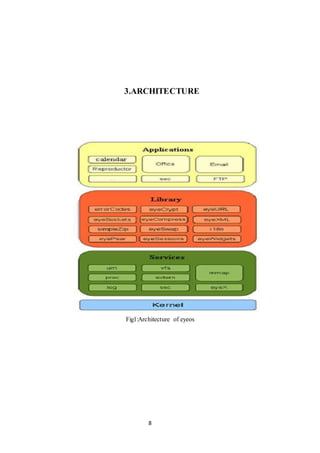
3.ARCHITECTURE
Fig1:Architecture of eyeos
9
4.PROCESS INSIDE EYEOS
Every time an application is executed, an entry in the process table of a user is created. This
entry is an associative array that contains information about the name, Process ID ,checksum ,
currentUser and the time it was launched. In the default installation, the process table is a session
variable named 'ProcessTable'. By default, an EyeOS application can have multiple instances of itself
running flawlessly. Every instance has its own entry on the Process Table and has its own
information separately from the others. Despite that behaviour, a programmer can make an
application to avoid having multiple instances by looking up the name of the application in the
process table.
10
5.FEATURES
 Being able to work from everywhere, regardless of whether or not you are using a full-
featured, modern computer, a mobile gadget, or a completely obsolete PC.
 Sharing resources easily between different work centres at company, or working from
different places and countries on the same projects.
 Always enjoying the same applications with the same open formats, and forgetting the usual
compatibility problems between office suites and traditional operating systems.
 Being able to continue working if you have to leave your local computer or if it just crashes,
without losing data or time: Just log in to your EyeOS from another place and continue
working.
 A Web OS runs on any Internet enabled computer or device. This is important for mobile
workers or people who don?t have their own computers and must work out of Internet cafes,
libraries, or schools.
 Web OS users can work, log out, and then log in later from a different computer.
 Web OS can run on different computers, the technology facilitates collaboration among
multiple work centres. The traditional OS runs on only one computer.
 Extensions such as the Network File System a way for different machines to import and
export local files and remote desktop a way to control one computer by using another device
allow easier access to information from multiple locations and better user collaboration.
 With a Web OS, users can store, find, and otherwise manage files and services, such as
calendars and email, from a Web desktop.
11
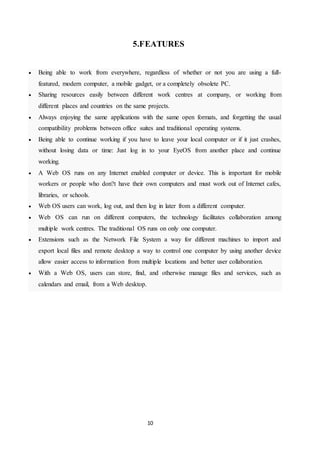
6.APPLICATION DOMAIN
Fig2:Application Domain
12
 EyeOS provides system for the users where they work with EyeOS and all its applications,
including Office and PIM ones. EyeOS provides a toolkit to create new applications easily.
 EyeOS can provide schools and universities with a full web platform where students, teachers
and parents will have a personal yet collaborative desktop to work and, communicate between
themselves and get organized inside and outside the school.
 With a private server, EyeOS can provide city councils, public library networks, free Internet
points and other public environments the perfect system for their users to have a web place to
work and communicate with the network managers, registering once and using it from every
point.
 One of the main triggers and great acceptance of people with regard to this service is its
availability online, which has no dependencies and has a strong security system, achieving
thus be an ideal application for storing content. This action may be useful for those who
travel frequently, for schools that want a centralized storage and available for intranets and
business in general and so on.; Even could be used in any future as a service to replace the
need for a hard disk.
13
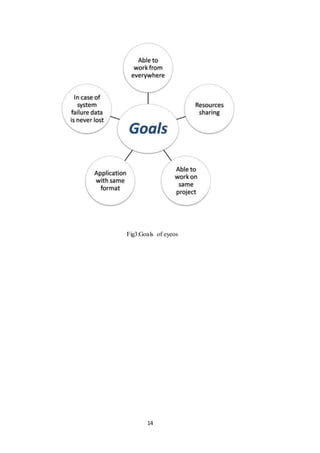
7.GOALS OF EYEOS
 Being able to work from everywhere, regardless of whether or not you are using a full-
featured, modern computer, a mobile gadget, or a completely obsolete PC.
 Sharing resources easily between different work centers at company, or working from
different places and countries on the same projects.
 Always enjoying the same applications with the same open formats, and forgetting the usual
compatibility problems between office suites and traditional operating systems.
 Being able to continue working if you have to leave your local computer or if it just crashes,
without loosing data or time: Just log in to your eyeOS from another place and continue
working.
14
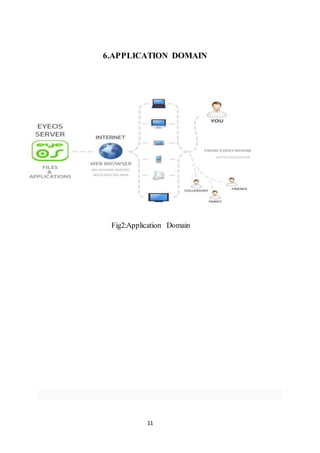
Fig3:Goals of eyeos
15
8.FEATURE SCOPE
 EyeOS 2.0 is a development framework for creating RIAs quickly and easily. It has been
fully developed using open technology and widely accepted standards, such as PHP, MySQL,
javascript, qooxdoo, log4php, phpunit, OpenOffice and others, allowing the system to work
on a common web server without any modification, and any standard browser, without
needing to install additional plugins.
 EyeOS 2.0 is much faster than EyeOS 1.x, since it gives much more prominence to
JavaScript. We have completely eliminated the PHP code which is not used for business
logic. As a result, the client needs to make fewer requests to the server, and makes them only
when needs persistence of data or specific business logic.
 EyeOS 2.0 has also added a cache system on the client side to eliminate server requests, even
when these are for data persistence. The logical architecture of the system remains very
similar to EyeOS 1.x, however, everything has been rewritten from scratch using design
patterns with object-oriented programming, where for example, each system service kernel
singleton component.
16
9.ADVANTAGES/DISADVANTAGES
ADVANTAGES:
 Portability
 Browser with java support is more enough
 Platform independent
 World wide Availability
 Remote storage facilities
DISADVANTAGES:
 Security
 Need for fast connection performance
17
10.CONCLUSION
It is designed for developers without experience to develop web applications. It Requires only a
browser, A browser with java support is more than enough. Through the file browser you can store
files over the internet and edit them as you want. communication can be done between users through
events. With the increasing use of high-speed internet technologies during the past few years, the cloud
computing has become more popular.
18
12.REFERENCES
 www.seminar4u.com/eyeos_technology
 www.wikipedia.com/eyeos_technology
 www.eyeos.org
 www.google.co.in/eyeos technology
 www.eyeos-app.org

eyeos technology

  • 1.
    1 A Technical Report On EYEOS TECHNOLOGY Submittedin partial fulfilment of the Requirements for the award of degree of Bachelor of Technology In Computer Science and Engineering By S.DILEEP KUMAR (12H61A05N9) Under the Guidance of Mrs G.SUDEEPTHI Assistant Professor ,CSE Dept. Department of Computer Science and Engineering ANURAG GROUP OF INSTITUTIONS (Formerly CVSR College of Engineering) (An Autonomous Institution,Approved by AICTE and NBA Accredited) Venkatapur (V), Ghatkesar (M), RR Dist., T.S-500088 (2012-2016)
  • 2.
    2 Department of ComputerScience and Engineering ANURAG GROUP OF INSTITUTIONS (Formerly CVSR College of Engineering) (An AutonomousInstitution,Approved by AICTE and NBA Accredited) Venkatapur (V), Ghatkesar (M), RR Dist., T.S-500088 CERTIFICATE This is to certify that the Technical seminar Report entitled “EYEOS TECHNOLOGY” being submitted by S.DILEEP KUMAR bearing the Hall Ticket number 12H61A05N9 in partial fulfillment of the requirements for the award of the degree of the B.Tech in Computer Science and Engineering to Anurag Group of Institutions (formerly CVSR College of Engineering), Hyderabad is a record of bonafide work carried out by him under my guidance and supervision from December 2015 to April 2016. InternalGuide HOD Mrs G.SUDEEPTHI Dr.G.Vishnu Moorthy, AssistantProfessor,CSEDept Professor,Deptof CSE
  • 3.
    3 ACKNOWLEDGEMENT It my privilegeand pleasure to express profound sense of respect, gratitude and indebtedness to my guide Mrs G.SUDEEPTHI, Assistant Professor, Dept. of Computer Science and Engineering, Anurag Group of Institutions (formerly CVSR College of Engineering), for her indefatigable inspiration, guidance, cogent discussion, constructive criticisms and encouragement throughout this dissertation work. I express my sincere gratitude to Dr.G.Vishnu Murthy, HOD and Associate Professor of Department of Computer Science and Engineering, Anurag Group of Institutions (formerly CVSR College of Engineering), for his suggestions, motivations and co-operation for the successful completion of the work. We extend my sincere thanks to Prof.M MuthaReddy, Principal, ProfM.Bhagvanth Rao, Director, Dr.K.S.Rao, Director, Dr.V.Vijay Kumar, Dean, Dept. of CSE, Anurag Group of Institutions (formerly CVSR college of Engineering),Venkatapur(V),Ghatkesar(M), Ranga Reddy(Dist), for their encouragement.
  • 4.
    4 S.DILEEPKUMAR (12H61A05N9) Dept.of ComputerScience &Engineering, ANURAGGROUPOFINSTITUTIONS. DECLARATION I hereby declare that the Technical seminar entitled “EYEOS TECHNOLOGY” submitted to the Anurag Group of Institutions(CVSR College of Engineering) in partial fulfilment of the requirements for the award of the degree of Bachelor of Technology(B.Tech) in Computer Science and Engineering is a record of an original work done by me under the guidance of Mrs G.SUDEEPTHI, Assistant Professor and this work havenot been submitted to any other university for the award of any other degree. S.DILEEP KUMAR (12H61A05N9) Date: Place:Hyderabad
  • 5.
    5 ABSTRACT EyeOS is anopen source web desktop following the cloud computing concept . It is mainly written in PHP, XML and JavaScript. It acts as a platform for web applications written using the EyeOS Toolkit. It includes a Desktop environment with 67 applications and system utilities. It can be accessed from Windows, Linux or from mobile devices that support the technologies. EyeOS is one of those cloud computing operating systems. It is based on an Open Source platform written mainly in PHP, XML and JavaScript. EyeOS lets you upload your files and work with them no matter where you are. It contains applications like Word Processor, Address Book, PDF reader, and many more developed by the community. The idea behind EyeOS is that the whole system lives in the web browser. The client must have only a web browser to work with EyeOS and all its applications, including Office and PIM ones. This applies to for both modern and obsolete PC's An Open Source Platform designed to hold a wide variety of Web Applications. EyeOS was thought of as a new definition of an Operating System, where everything inside it can be accessed from everywhere inside a Network.
  • 6.
    6 1.INTRODUCTION There are anumber of online operating systems available today, and the number is steadily growing. EyeOS is a web-based open source platform designed to hold a wide variety of web applications over it. It looks like a regular PC operating system, but it is that it can be accessed from anywhere. If you travel all the time, or you don't own a PC or laptop or move often, then you can access EyeOS from an Internet Cafe. All you need is a web browser, Internet access and EyeOS is there for you, always, all the time.EyeOS is built on PHP and uses a combination of web standard technologies such as HTML, JavaScript and CSS to create the UI. This means that it will run on any standards browser. By itself, it doesnt require any extra plug-in in order to work. All it needs is a PHP 5 capable server, which is the common denominator for just about any hosting package it doesnt even require a database.
  • 7.
    7 2.HISTORY Establishment: In 2005,a group of young people worked together and put all their efforts in a new project, a new open source web desktop, EyeOS. August 1, 2005: The first publicly available EyeOS version was released as EyeOS 0.6.0. At the time, it greatly participated in creating the definition of a web operating system and acted as a concept. Quickly, a worldwide community of developers took part in the project and helped improve it by translating, testing and developing it. June 4, 2007: After two years of development, the EyeOS Team published EyeOS 1.0. Compared with previous versions, EyeOS 1.0 introduced a complete reorganization of the code and some new web technologies, like eyeSoft, a portage-based web software installation system. July 2, 2007: With the release of the 1.1 version, EyeOS changed its license and migrated from GNU GPL Version 2 to Version 3. October 29, 2007: 1.2 version was launched with full integration compatibility with Microsoft Word files. January 15, 2008: EyeOS 1.5 Gala was liberated. The first version that supported both Microsoft Office and OpenOffice.org file formats for documents, presentations and spreadsheets. It also had the ability to import and export documents in both formats using server side scripting. April 25, 2008: EyeOS 1.6 included many improvements such as synchronization with local computers, drag and drop, a mobile version and more. January 7, 2009: EyeOS 1.8 Lars featured a completely rewritten file manager and a new sound API to develop media rich applications. April 1, 2009: 1.8.5 version incorporated a new default theme and some rewritten apps like the Word Processor and the Address Book.
  • 8.
  • 9.
    9 4.PROCESS INSIDE EYEOS Everytime an application is executed, an entry in the process table of a user is created. This entry is an associative array that contains information about the name, Process ID ,checksum , currentUser and the time it was launched. In the default installation, the process table is a session variable named 'ProcessTable'. By default, an EyeOS application can have multiple instances of itself running flawlessly. Every instance has its own entry on the Process Table and has its own information separately from the others. Despite that behaviour, a programmer can make an application to avoid having multiple instances by looking up the name of the application in the process table.
  • 10.
    10 5.FEATURES  Being ableto work from everywhere, regardless of whether or not you are using a full- featured, modern computer, a mobile gadget, or a completely obsolete PC.  Sharing resources easily between different work centres at company, or working from different places and countries on the same projects.  Always enjoying the same applications with the same open formats, and forgetting the usual compatibility problems between office suites and traditional operating systems.  Being able to continue working if you have to leave your local computer or if it just crashes, without losing data or time: Just log in to your EyeOS from another place and continue working.  A Web OS runs on any Internet enabled computer or device. This is important for mobile workers or people who don?t have their own computers and must work out of Internet cafes, libraries, or schools.  Web OS users can work, log out, and then log in later from a different computer.  Web OS can run on different computers, the technology facilitates collaboration among multiple work centres. The traditional OS runs on only one computer.  Extensions such as the Network File System a way for different machines to import and export local files and remote desktop a way to control one computer by using another device allow easier access to information from multiple locations and better user collaboration.  With a Web OS, users can store, find, and otherwise manage files and services, such as calendars and email, from a Web desktop.
  • 11.
  • 12.
    12  EyeOS providessystem for the users where they work with EyeOS and all its applications, including Office and PIM ones. EyeOS provides a toolkit to create new applications easily.  EyeOS can provide schools and universities with a full web platform where students, teachers and parents will have a personal yet collaborative desktop to work and, communicate between themselves and get organized inside and outside the school.  With a private server, EyeOS can provide city councils, public library networks, free Internet points and other public environments the perfect system for their users to have a web place to work and communicate with the network managers, registering once and using it from every point.  One of the main triggers and great acceptance of people with regard to this service is its availability online, which has no dependencies and has a strong security system, achieving thus be an ideal application for storing content. This action may be useful for those who travel frequently, for schools that want a centralized storage and available for intranets and business in general and so on.; Even could be used in any future as a service to replace the need for a hard disk.
  • 13.
    13 7.GOALS OF EYEOS Being able to work from everywhere, regardless of whether or not you are using a full- featured, modern computer, a mobile gadget, or a completely obsolete PC.  Sharing resources easily between different work centers at company, or working from different places and countries on the same projects.  Always enjoying the same applications with the same open formats, and forgetting the usual compatibility problems between office suites and traditional operating systems.  Being able to continue working if you have to leave your local computer or if it just crashes, without loosing data or time: Just log in to your eyeOS from another place and continue working.
  • 14.
  • 15.
    15 8.FEATURE SCOPE  EyeOS2.0 is a development framework for creating RIAs quickly and easily. It has been fully developed using open technology and widely accepted standards, such as PHP, MySQL, javascript, qooxdoo, log4php, phpunit, OpenOffice and others, allowing the system to work on a common web server without any modification, and any standard browser, without needing to install additional plugins.  EyeOS 2.0 is much faster than EyeOS 1.x, since it gives much more prominence to JavaScript. We have completely eliminated the PHP code which is not used for business logic. As a result, the client needs to make fewer requests to the server, and makes them only when needs persistence of data or specific business logic.  EyeOS 2.0 has also added a cache system on the client side to eliminate server requests, even when these are for data persistence. The logical architecture of the system remains very similar to EyeOS 1.x, however, everything has been rewritten from scratch using design patterns with object-oriented programming, where for example, each system service kernel singleton component.
  • 16.
    16 9.ADVANTAGES/DISADVANTAGES ADVANTAGES:  Portability  Browserwith java support is more enough  Platform independent  World wide Availability  Remote storage facilities DISADVANTAGES:  Security  Need for fast connection performance
  • 17.
    17 10.CONCLUSION It is designedfor developers without experience to develop web applications. It Requires only a browser, A browser with java support is more than enough. Through the file browser you can store files over the internet and edit them as you want. communication can be done between users through events. With the increasing use of high-speed internet technologies during the past few years, the cloud computing has become more popular.
  • 18.
    18 12.REFERENCES  www.seminar4u.com/eyeos_technology  www.wikipedia.com/eyeos_technology www.eyeos.org  www.google.co.in/eyeos technology  www.eyeos-app.org