Web Desktop
     RIA Framework
Private and Hybrid Cloud

 Your Gateway to the Cloud
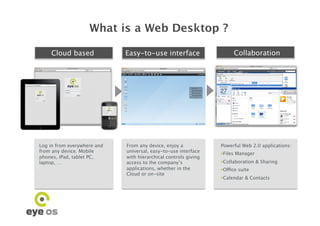
What is a Web Desktop ?

    Cloud based
             Easy-to-use interface
                    Collaboration


Log in from everywhere and   From any device, enjoy a            Powerful Web 2.0 applications:
from any device. Mobile      universal, easy-to-use interface
                                                                   iles Manager
                                                                  F
phones, iPad, tablet PC,     with hierarchical controls giving
laptop, …
                   access to the company’s               ollaboration & Sharing
                                                                  C
                             applications, whether in the          ffice suite
                                                                  O
                             Cloud or on-site
                                                                   alendar & Contacts
                                                                  C
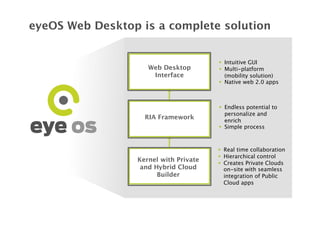
eyeOS Web Desktop is a complete solution


                                          Intuitive GUI
                     Web Desktop
         Multi-platform
                      Interface
           (mobility solution)
                                          Native web 2.0 apps


                                          Endless potential to
                                           personalize and
                    RIA Framework
         enrich
                                          Simple process


                                          Real time collaboration
                                          Hierarchical control
                  Kernel with Private     Creates Private Clouds
                   and Hybrid Cloud
       on-site with seamless
                        Builder
           integration of Public
                                           Cloud apps
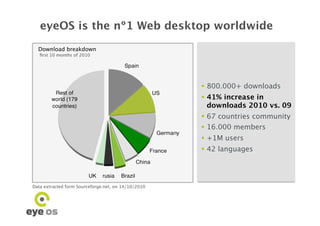
eyeOS is the nº1 Web desktop worldwide
  Download breakdown
   first 10 months of 2010 


                                                       800.000+ downloads
                                                       41% increase in
                                                        downloads 2010 vs. 09
                                                       67 countries community
                                                       16.000 members
                                                       +1M users
                                                       42 languages


Data extracted form Sourceforge.net, on 14/10/2010
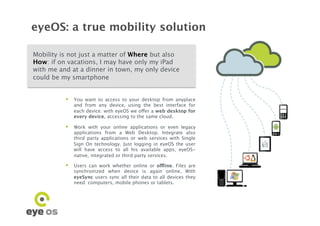
eyeOS: a true mobility solution

Mobility is not just a matter of Where but also
How: if on vacations, I may have only my iPad
with me and at a dinner in town, my only device
could be my smartphone


            You want to access to your desktop from anyplace
             and from any device, using the best interface for
             each device: with eyeOS we offer a web desktop for
             every device, accessing to the same cloud.

            Work with your online applications or even legacy
             applications from a Web Desktop. Integrate also
             third party applications or web services with Single
             Sign On technology. Just logging in eyeOS the user
             will have access to all his available apps, eyeOS-
             native, integrated or third party services.

            Users can work whether online or offline. Files are
             synchronized when device is again online. With
             eyeSync users sync all their data to all devices they
             need: computers, mobile phones or tablets.
Compatibility guaranteed
 Universal compatibility is key for large
 successful deployments an the corresponding
 cost savings in desktop and mobility solutions
 management


         eyeOS is developed with standard javascript and
            HTML. no local installation is needed: just open the
            browser! As it does not require flash nor java in the
            browser, eyeOS is compatible with any mobile phone
            browser. Any app developed with eyeOS can be adapted
            to any browser giving access to all data and applications
            in real time.

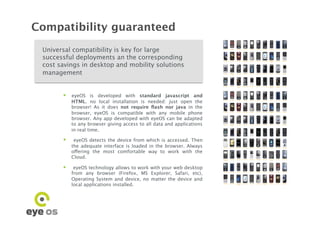
            eyeOS detects the device from which is accessed. Then
            the adequate interface is loaded in the browser. Always
            offering the most comfortable way to work with the
            Cloud.

         eyeOS technology allows to work with your web desktop
            from any browser (Firefox, MS Explorer, Safari, etc),
            Operating System and device, no matter the device and
            local applications installed.
Ease of use: 1 minute learning interface

 Mobility and universal access are
 worthless without a good and simple user
 interface


      •    Access to eyeOS is a simple log in from the
           browser

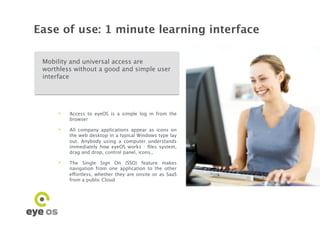
      •    All company applications appear as icons on
           the web desktop in a typical Windows type lay
           out. Anybody using a computer understands
           immediately how eyeOS works : files system,
           drag and drop, control panel, icons..

      •    The Single Sign On (SSO) feature makes
           navigation from one application to the other
           effortless, whether they are onsite or as SaaS
           from a public Cloud
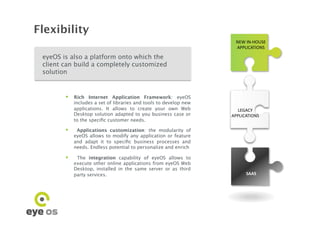
Flexibility
                                                                      NEW	
  IN-­‐HOUSE	
  
                                                                      APPLICATIONS	
  

 eyeOS is also a platform onto which the
 client can build a completely customized
 solution


          Rich Internet Application Framework: eyeOS
             includes a set of libraries and tools to develop new
             applications. It allows to create your own Web           LEGACY	
  	
  
             Desktop solution adapted to you business case or       APPLICATIONS	
  
             to the specific customer needs.

             Applications customization: the modularity of
             eyeOS allows to modify any application or feature
             and adapt it to specific business processes and
             needs. Endless potential to personalize and enrich

             The integration capability of eyeOS allows to
             execute other online applications from eyeOS Web
             Desktop, installed in the same server or as third
             party services.
                                               SAAS	
  
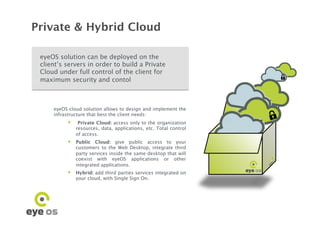
Private & Hybrid Cloud

 eyeOS solution can be deployed on the
 client’s servers in order to build a Private
 Cloud under full control of the client for
 maximum security and contol


                                                                  º	

     eyeOS cloud solution allows to design and implement the
     infrastructure that best the client needs:
            Private Cloud: access only to the organization
              resources, data, applications, etc. Total control
              of access.
            Public Cloud: give public access to your
              customers to the Web Desktop, integrate third
              party services inside the same desktop that will
              coexist with eyeOS applications or other
              integrated applications.
            Hybrid: add third parties services integrated on
              your cloud, with Single Sign On.
Scalability guaranteed

 Excellent scalability offers flexibility to the client
 while keeping hardware requirements under
 check

             IBM tested successfully the eyeOS performance
              as a Virtual Linux Desktop Cloud Services on
              System z (1). 
             IBM analyzed how eyeOS scales over a
              mainframe environment, multiple processors
              and up to thousands of users working
              simultaneously on a same environment

             Extract from IBM’s conclusions: “eyeOS has
              excellent scalability on System z running as a
              Linux guest under z/VM up through a 16
              processor image at optimum utilization. This
              is partially due to the fact that a single Linux
              guest container can support thousands of
              clients, rather than requiring one Linux guest
              per client..“


          (1) The results are detailed in Red Paper 4593 of IBM
Our services

                Specific developments
                Maintenance and 24/7 support
                Training to developers and system
               administrators

                Services to partners network
                Dual licensing


www.eyeos.org - team@eyeos.org - Pl. Universitat 5, 4-3 Barcelona - Spain +34 93 181 30 39

Eyeos1

  • 1.
    Web Desktop RIA Framework Private and Hybrid Cloud Your Gateway to the Cloud
  • 2.
    What is aWeb Desktop ? Cloud based Easy-to-use interface Collaboration Log in from everywhere and From any device, enjoy a Powerful Web 2.0 applications: from any device. Mobile universal, easy-to-use interface   iles Manager F phones, iPad, tablet PC, with hierarchical controls giving laptop, … access to the company’s   ollaboration & Sharing C applications, whether in the   ffice suite O Cloud or on-site   alendar & Contacts C
  • 3.
    eyeOS Web Desktopis a complete solution   Intuitive GUI Web Desktop   Multi-platform Interface (mobility solution)   Native web 2.0 apps   Endless potential to personalize and RIA Framework enrich   Simple process   Real time collaboration   Hierarchical control Kernel with Private   Creates Private Clouds and Hybrid Cloud on-site with seamless Builder integration of Public Cloud apps
  • 4.
    eyeOS is thenº1 Web desktop worldwide Download breakdown first 10 months of 2010  800.000+ downloads  41% increase in downloads 2010 vs. 09  67 countries community  16.000 members  +1M users  42 languages Data extracted form Sourceforge.net, on 14/10/2010
  • 5.
    eyeOS: a truemobility solution Mobility is not just a matter of Where but also How: if on vacations, I may have only my iPad with me and at a dinner in town, my only device could be my smartphone   You want to access to your desktop from anyplace and from any device, using the best interface for each device: with eyeOS we offer a web desktop for every device, accessing to the same cloud.   Work with your online applications or even legacy applications from a Web Desktop. Integrate also third party applications or web services with Single Sign On technology. Just logging in eyeOS the user will have access to all his available apps, eyeOS- native, integrated or third party services.   Users can work whether online or offline. Files are synchronized when device is again online. With eyeSync users sync all their data to all devices they need: computers, mobile phones or tablets.
  • 6.
    Compatibility guaranteed Universalcompatibility is key for large successful deployments an the corresponding cost savings in desktop and mobility solutions management   eyeOS is developed with standard javascript and HTML. no local installation is needed: just open the browser! As it does not require flash nor java in the browser, eyeOS is compatible with any mobile phone browser. Any app developed with eyeOS can be adapted to any browser giving access to all data and applications in real time.   eyeOS detects the device from which is accessed. Then the adequate interface is loaded in the browser. Always offering the most comfortable way to work with the Cloud.   eyeOS technology allows to work with your web desktop from any browser (Firefox, MS Explorer, Safari, etc), Operating System and device, no matter the device and local applications installed.
  • 7.
    Ease of use:1 minute learning interface Mobility and universal access are worthless without a good and simple user interface •  Access to eyeOS is a simple log in from the browser •  All company applications appear as icons on the web desktop in a typical Windows type lay out. Anybody using a computer understands immediately how eyeOS works : files system, drag and drop, control panel, icons.. •  The Single Sign On (SSO) feature makes navigation from one application to the other effortless, whether they are onsite or as SaaS from a public Cloud
  • 8.
    Flexibility NEW  IN-­‐HOUSE   APPLICATIONS   eyeOS is also a platform onto which the client can build a completely customized solution   Rich Internet Application Framework: eyeOS includes a set of libraries and tools to develop new applications. It allows to create your own Web LEGACY     Desktop solution adapted to you business case or APPLICATIONS   to the specific customer needs.   Applications customization: the modularity of eyeOS allows to modify any application or feature and adapt it to specific business processes and needs. Endless potential to personalize and enrich   The integration capability of eyeOS allows to execute other online applications from eyeOS Web Desktop, installed in the same server or as third party services. SAAS  
  • 9.
    Private & HybridCloud eyeOS solution can be deployed on the client’s servers in order to build a Private Cloud under full control of the client for maximum security and contol º eyeOS cloud solution allows to design and implement the infrastructure that best the client needs:   Private Cloud: access only to the organization resources, data, applications, etc. Total control of access.   Public Cloud: give public access to your customers to the Web Desktop, integrate third party services inside the same desktop that will coexist with eyeOS applications or other integrated applications.   Hybrid: add third parties services integrated on your cloud, with Single Sign On.
  • 10.
    Scalability guaranteed Excellentscalability offers flexibility to the client while keeping hardware requirements under check   IBM tested successfully the eyeOS performance as a Virtual Linux Desktop Cloud Services on System z (1).   IBM analyzed how eyeOS scales over a mainframe environment, multiple processors and up to thousands of users working simultaneously on a same environment   Extract from IBM’s conclusions: “eyeOS has excellent scalability on System z running as a Linux guest under z/VM up through a 16 processor image at optimum utilization. This is partially due to the fact that a single Linux guest container can support thousands of clients, rather than requiring one Linux guest per client..“ (1) The results are detailed in Red Paper 4593 of IBM
  • 11.
    Our services  Specific developments  Maintenance and 24/7 support  Training to developers and system administrators  Services to partners network  Dual licensing www.eyeos.org - team@eyeos.org - Pl. Universitat 5, 4-3 Barcelona - Spain +34 93 181 30 39