
Extent Test Report with Appium/Selenium – Version 3
Generating the stunning HTML Extent Report in Appium/Selenium
Raman Hullur
Prerequisites:
• Basics of Appium
• Java basic Programming skills.
Target Geeks:
• Quality Analyst
• Test Engineer
• Test Lead
• Test Manager
• SDET
• Software Engineer
http://extentreports.com/community/#Version_3 OR
https://www.nuget.org/packages/ExtentReports/
http://extentreports.relevantcodes.com/
https://mvnrepository.com/artifact/org.freemarker/freemarker
https://mvnrepository.com/artifact/org.mongodb/bson
Go through the extent report documentation before starting the scripting:
http://extentreports.com/community
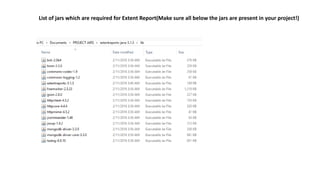
Required .jars can be downloaded here:
List of jars which are required for Extent Report(Make sure all below the jars are present in your project!)
FAQ:
How to add external jar files for Eclipse Project Directory?
https://stackoverflow.com/questions/3280353/how-to-import-a-jar-in-eclipse
How to use TestNG framework in eclipse projects?
https://www.slideshare.net/ramanhullur/testng-installation
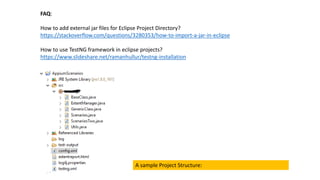
A sample Project Structure:
• Create a Java Project under eclipse IDE
• Add all Appium dependency .jar files and earlier mentioned Extent Report jars files to project.
http://www.oxfordmathcenter.com/drupal7/node/44
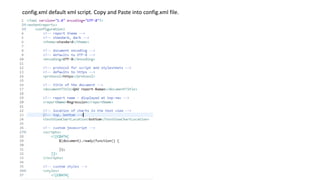
• Create a config.xml file under project folder and copy default xml content of extent report skeleton.
Code Ref: htmlReporter.loadXMLConfig("./config.xml"); [xml script file attached in next slide]
• Create an extentreport.html file under project folder/directory.
Code Ref: private static String filePath = "./extentreport.html"; [keep it blank in project]
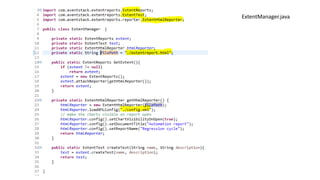
• Create a ExtentManager.java defualt class under project package where Base class created.
• Declare below the classes and import respective packages:
Packages:
import com.aventstack.extentreports.ExtentReports;
import com.aventstack.extentreports.ExtentTest;
import com.aventstack.extentreports.reporter.ExtentHtmlReporter;
Classes:
private static ExtentReports extent;
private static ExtentTest test;
private static ExtentHtmlReporter htmlReporter; //contd/-
config.xml default xml script. Copy and Paste into config.xml file.
ExtentManager.java
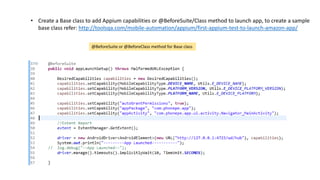
• Create a Base class to add Appium capabilities or @BeforeSuite/Class method to launch app, to create a sample
base class refer: http://toolsqa.com/mobile-automation/appium/first-appium-test-to-launch-amazon-app/
@BeforeSuite or @BeforeClass method for Base class
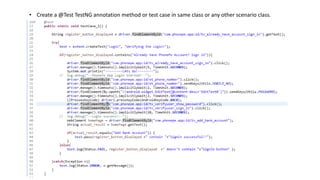
• Create a @Test TestNG annotation method or test case in same class or any other scenario class.
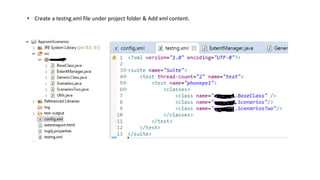
• Create a testng.xml file under project folder & Add xml content.
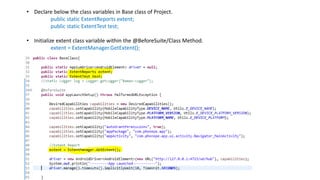
• Declare below the class variables in Base class of Project.
public static ExtentReports extent;
public static ExtentTest test;
• Initialize extent class variable within the @BeforeSuite/Class Method.
extent = ExtentManager.GetExtent();
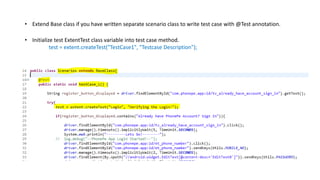
• Extend Base class if you have written separate scenario class to write test case with @Test annotation.
• Initialize test ExtentTest class variable into test case method.
test = extent.createTest("TestCase1", "Testcase Description");
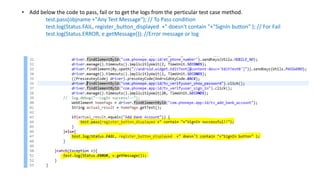
• Add below the code to pass, fail or to get the logs from the perticular test case method.
test.pass(objname +"Any Test Message"); // To Pass condition
test.log(Status.FAIL, register_button_displayed +" doesn't contain "+"SignIn button" ); // For Fail
test.log(Status.ERROR, e.getMessage()); //Error message or log
The End!! 
Any questions/Source Code? Comment on this LinkedIn article.

Extent Test report v3 with Appium/Selenium

  • 1.
    Extent Test Reportwith Appium/Selenium – Version 3 Generating the stunning HTML Extent Report in Appium/Selenium Raman Hullur
  • 2.
    Prerequisites: • Basics ofAppium • Java basic Programming skills. Target Geeks: • Quality Analyst • Test Engineer • Test Lead • Test Manager • SDET • Software Engineer
  • 3.
  • 4.
    List of jarswhich are required for Extent Report(Make sure all below the jars are present in your project!)
  • 5.
    FAQ: How to addexternal jar files for Eclipse Project Directory? https://stackoverflow.com/questions/3280353/how-to-import-a-jar-in-eclipse How to use TestNG framework in eclipse projects? https://www.slideshare.net/ramanhullur/testng-installation A sample Project Structure:
  • 7.
    • Create aJava Project under eclipse IDE • Add all Appium dependency .jar files and earlier mentioned Extent Report jars files to project. http://www.oxfordmathcenter.com/drupal7/node/44 • Create a config.xml file under project folder and copy default xml content of extent report skeleton. Code Ref: htmlReporter.loadXMLConfig("./config.xml"); [xml script file attached in next slide] • Create an extentreport.html file under project folder/directory. Code Ref: private static String filePath = "./extentreport.html"; [keep it blank in project] • Create a ExtentManager.java defualt class under project package where Base class created. • Declare below the classes and import respective packages: Packages: import com.aventstack.extentreports.ExtentReports; import com.aventstack.extentreports.ExtentTest; import com.aventstack.extentreports.reporter.ExtentHtmlReporter; Classes: private static ExtentReports extent; private static ExtentTest test; private static ExtentHtmlReporter htmlReporter; //contd/-
  • 8.
    config.xml default xmlscript. Copy and Paste into config.xml file.
  • 9.
  • 10.
    • Create aBase class to add Appium capabilities or @BeforeSuite/Class method to launch app, to create a sample base class refer: http://toolsqa.com/mobile-automation/appium/first-appium-test-to-launch-amazon-app/ @BeforeSuite or @BeforeClass method for Base class
  • 11.
    • Create a@Test TestNG annotation method or test case in same class or any other scenario class.
  • 12.
    • Create atestng.xml file under project folder & Add xml content.
  • 13.
    • Declare belowthe class variables in Base class of Project. public static ExtentReports extent; public static ExtentTest test; • Initialize extent class variable within the @BeforeSuite/Class Method. extent = ExtentManager.GetExtent();
  • 14.
    • Extend Baseclass if you have written separate scenario class to write test case with @Test annotation. • Initialize test ExtentTest class variable into test case method. test = extent.createTest("TestCase1", "Testcase Description");
  • 15.
    • Add belowthe code to pass, fail or to get the logs from the perticular test case method. test.pass(objname +"Any Test Message"); // To Pass condition test.log(Status.FAIL, register_button_displayed +" doesn't contain "+"SignIn button" ); // For Fail test.log(Status.ERROR, e.getMessage()); //Error message or log
  • 16.
    The End!!  Anyquestions/Source Code? Comment on this LinkedIn article.