A Java Framework for Automating Tests using
            Selenium Webdriver
What is jDriver?
 It a framework developed in Java to automate tests
    using Selenium Webdriver.
   It combines features of Java, Selenium Webdriver and
    Selenium RC.
   It is a generic framework that can be customized as per
    Project’s requirements.
   It helps Test Engineers in effective and faster script
    development.
   It makes test execution such an easy task that anyone
    with zero coding skills can execute the tests and
    understand the automatically generated detailed
    report.
Highlights of the framework
1. Ease of Running
 Just double-click a file, “jDriver_launcher.bat” and the
  job starts.
 No further human intervention required.
 You can even schedule it to run whole test suit at night
  and see the result when you are at work next morning.
2. Detailed Reporting
 Once the test script finishes execution it will
  automatically generate an Excel report mentioning all
  the test execution constraints, like -
   Step Summary
   Actual Outcome
   Step Status (Pass/Fail)
   Data used in each step
   Execution Summary – Script Passed/Failed ( No. of
      Passed, Failed and Total Steps)
   Execution Start Date and Time, Total execution time
   Browser, Platform, Application URL
3. Page Screenshot
 As a defect / step-failure is encountered, it takes the
  screenshot of the page.
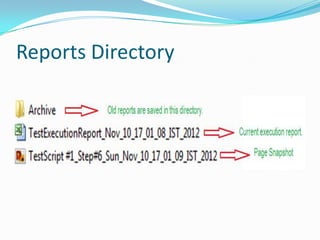
 The screenshot is saved along with Report file under
  the directory assigned for Reports.
 The Report File contains a link under the
  corresponding Step to open the screenshot directly.
 Page Screenshot would be of great help both for
  manual testers and developers to analyze what went
  wrong.
4. Separation of Data file
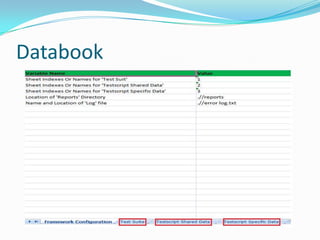
 The Databook consists of Framework Configuration
  data, TestSuite and Test data.
 Data will not be hard coded into the developed script.
  It will be kept and organised in Databook outside the
  code so that anyone can update the data, even if one
  has zero coding skills.
 Test data is kept and organized in such a way that
  makes it re-usable for multiple scripts.
5. Test Suit Management
 In the framework, Test Suite is kept and organized in
  Databook.
 To run a set of test scripts, just mark them as ‘true’ in
  the Excel sheet and launch the test.
 One can create test suite of ‘n’ test scripts and run any
  ‘m’ number of them at any time. It will generate
  separate result sheet for all ‘m’ number of test
  execution.
6. Multiple Browser Support
 It can run the script in following browsers –
    Mozilla Firefox
    Google Chrome
    Apple Safari
    Internet Explorer.
7. Reduced Development Time
 The framework has lots of features that helps in faster
 development.
   It has lots of generic methods that are independent of
    the application. They can be called directly from the test
    script.
   In addition to generic methods, it has a separate library
    to add re-usable methods specific to the Application.
8. Error Log File
 The framework has very good exception handling
  capabilities.
 Any exception that is not caught/handled in the code
  will be reported to Error Log File.
 Any event/exception/error can be explicitly reported
  to the Error Log File directly from the code.
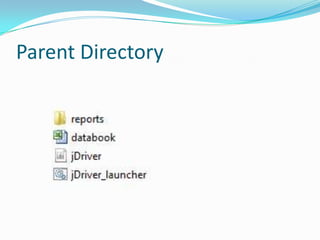
Framework Structure
Parent Directory
Reports Directory
Databook
Contact
 If you want your tests to be automated using jDriver,
  Please contact me at
  freelancer.testautomation@gmail.com
 Please feel free to visit my blog –
  www.TestAutomationFreelancer.blogspot.com
 Please provide you valuable suggestions on what
 features you want to be added in next release.
Thank You.

jDriver Presentation

  • 1.
    A Java Frameworkfor Automating Tests using Selenium Webdriver
  • 2.
    What is jDriver? It a framework developed in Java to automate tests using Selenium Webdriver.  It combines features of Java, Selenium Webdriver and Selenium RC.  It is a generic framework that can be customized as per Project’s requirements.  It helps Test Engineers in effective and faster script development.  It makes test execution such an easy task that anyone with zero coding skills can execute the tests and understand the automatically generated detailed report.
  • 3.
  • 4.
    1. Ease ofRunning  Just double-click a file, “jDriver_launcher.bat” and the job starts.  No further human intervention required.  You can even schedule it to run whole test suit at night and see the result when you are at work next morning.
  • 5.
    2. Detailed Reporting Once the test script finishes execution it will automatically generate an Excel report mentioning all the test execution constraints, like -  Step Summary  Actual Outcome  Step Status (Pass/Fail)  Data used in each step  Execution Summary – Script Passed/Failed ( No. of Passed, Failed and Total Steps)  Execution Start Date and Time, Total execution time  Browser, Platform, Application URL
  • 6.
    3. Page Screenshot As a defect / step-failure is encountered, it takes the screenshot of the page.  The screenshot is saved along with Report file under the directory assigned for Reports.  The Report File contains a link under the corresponding Step to open the screenshot directly.  Page Screenshot would be of great help both for manual testers and developers to analyze what went wrong.
  • 7.
    4. Separation ofData file  The Databook consists of Framework Configuration data, TestSuite and Test data.  Data will not be hard coded into the developed script. It will be kept and organised in Databook outside the code so that anyone can update the data, even if one has zero coding skills.  Test data is kept and organized in such a way that makes it re-usable for multiple scripts.
  • 8.
    5. Test SuitManagement  In the framework, Test Suite is kept and organized in Databook.  To run a set of test scripts, just mark them as ‘true’ in the Excel sheet and launch the test.  One can create test suite of ‘n’ test scripts and run any ‘m’ number of them at any time. It will generate separate result sheet for all ‘m’ number of test execution.
  • 9.
    6. Multiple BrowserSupport  It can run the script in following browsers –  Mozilla Firefox  Google Chrome  Apple Safari  Internet Explorer.
  • 10.
    7. Reduced DevelopmentTime  The framework has lots of features that helps in faster development.  It has lots of generic methods that are independent of the application. They can be called directly from the test script.  In addition to generic methods, it has a separate library to add re-usable methods specific to the Application.
  • 11.
    8. Error LogFile  The framework has very good exception handling capabilities.  Any exception that is not caught/handled in the code will be reported to Error Log File.  Any event/exception/error can be explicitly reported to the Error Log File directly from the code.
  • 12.
  • 13.
  • 14.
  • 15.
  • 16.
    Contact  If youwant your tests to be automated using jDriver, Please contact me at freelancer.testautomation@gmail.com  Please feel free to visit my blog – www.TestAutomationFreelancer.blogspot.com  Please provide you valuable suggestions on what features you want to be added in next release.
  • 17.