Int. J. Advanced Networking and Applications
Volume: 6 Issue: 4 Pages: 2359-2366 (2015) ISSN: 0975-0290
2359
Exploring the Feasibility of Adopting
Cloud Computing in Computer Center
Taiz University
Mohammed A.M. Ibrahim
Department of Information Technology, Taiz University, Republic of Yemen
Email: Email: sabri1966@yahoo.com
Alsabry, Fatimah, Ameen
Center for Graduate Studies Taiz University, Republic of Yemen
Email: fm_sbr@yahoo.com
----------------------------------------------------------------------ABSTRACT-----------------------------------------------------------
The paper would discuss the possibilities of using cloud computing as a solution to expand work efficiency at Taiz
university (TU) Computer Center and Information Technology (CCIT) labs, these Labs equipped with hardware
and software resources. Cloud computing has been adopted for managing the labs to facilitate maintenance and
network management according to cloud computing characteristics, also paper has studied the different types of
cloud-based computing to decide the appropriate type that would gain significant advantages for students and
lecturers. Surely result of this paper will be the guideline for all universities in Yemen to use the cloud computing
in different areas of their work.
Keywords - Distributed computing system , Network computing ,Cloud Computing, Infrastructure As A Service
(IAAS) layer, Platform As A Service (PAAS) layer, Software As A Service (SAAS) layer, private cloud, pubic
cloud, hybrid cloud.
-------------------------------------------------------------------------------------------------------------------------------------------------
Date of Submission: October 27, 2014 Date of Acceptance: November 20, 2014
-------------------------------------------------------------------------------------------------------------------------------------------------
I. INTRODUCTION
Recently cloud computing has offered attractive
solutions for many organizations especially academic and
research institutions to get their applications up and
running faster, with improved manageability however
software ,hardware maintenance efforts and reducing the
expenditures are features motivated us to used cloud
computing as a solution to expand work efficiency of the
labs and managements works at Taiz University Computer
Center & Information Technology (CCIT) funds limitation
are crucial problem . This paper will propose the adoption
of cloud computing to be a solution for managing
software, hardware and network management in computer
labs for facilitate maintenance efforts according to cloud
computing characteristics.
The proposed model of cloud computing will focus on the
most famed free cloud services, free IDEs and private
clouds. Although cloud computing provides dependable
and secured data storage which we will not discuss in this
paper. The main focusing on exploring the feasibility of
adopting cloud computing in CCIT labs as a solution to
facilitate the maintaining, learning, and teaching activities.
Furthermore, to choose the appropriate model with
compliance of the maintenance management then
identifies the challenges and proposes a roadmap that will
act as a guideline for technical and business managers
when evaluating a cloud adoption model. IT professionals
in computer center need to respond quickly to increasing
demands from students and lecturers, which make the
maintaining of dozens of computers to become a burden
task for them with fixed budgets and staff.
In this challenging environment, cloud-based computing
has become an increasingly attractive option for delivering
education services to develop the teaching network
management and facilitate the environment of IT
education with more availability, reliably, and
economically via remote access to the computing
resources or services provided by cloud providers through
a web browser or other remote desktop accessing
mechanisms.
Distributed computing system use several technologies for
solve complex issues based on computer networks [1,2]
thus technologies are Utility Computing, Cluster
Computing, Grid Computing ,Distributed Computing and
Cloud Computing. Intensive research works are being
performed. Most researchers believed that cloud-
computing technology will replace traditional IT systems,
in other hand cloud computing is cheapest technology and
economically if compared to the abovementioned
technologies and also a cloud computing system serving
for processing and storing of user data, by clustering and
virtualization of computing resources of multiple
computers an example Google , Amazon , IBM. In this
paper we have investigated cloud computing technology to
know if it is useful for the Computer Labs of Taiz
University, for this reason we have chosen to explore
Cloud Computing in taiz university (CCIT) the objective
is to study the different types of cloud-based computing to
decide the appropriate type that would gain significant
Int. J. Advanced Networking and Applicatio
Volume: 6 Issue: 4 Pages: 2359-2366 (20
advantages for students and lecturers wi
resources that are available.
2. REVIEW OF RELATED LITERATUR
The paper focus on the significance of cloud
a solution to facilitate maintaining, learning
in laboratories at the lowest cost and time
addition, it will discuss the possible choice
Maintenance Management to choose th
solution with compliance of the admi
Maintenance Management.
The literature review shows that researche
on the impacts of using cloud computing in
education fields. Several studies lead to foc
overall results. [3,4,5,6] The related lite
categorized and concluded as follows: 1) cl
impact in Enterprises, 2) cloud computin
migration, 3) cloud computing in education.
3. CLOUD COMPUTING IN EDUCATI
Cloud computing is a general term for del
services over the Internet. Google provides a
Google Docs, a widely used example of clo
[7]. Theory of Planned Behavior used
research in examining what factors influen
use Google Docs. [8] The researcher c
interviews and surveys to gain a better un
this phenomenon. The results derived from
show that at the university level, students
use Google Docs are positively and sig
researches’ findings can be used by multip
groups to better understand the factors i
usage of Google Docs.
in [8] article presents the blended learning
on cloud computing paradigms and the ma
customized for higher and postgraduate
engineering. Article starts from a funct
between traditional e-learning platforms
learning environments dedicated to
postgraduate education then it continu
technological aspects and the deployment di
learning cloud environment for engineering
article concluded that, the implement
interactive learning approach in individual
high retention factor (up to 80%) and the
learning develops the soft skills an
capabilities. In other words, the hybr
approach implements the synchronous
learning methodologies and allow the stude
participate to the educational.
[9]. put forward and design college labor
management system based on hybrid clou
function, and provide a good guide for
universities to achieve cloud computing
teaching management.
The paper establishes the university experim
management system based on hybrid clou
university experimental teaching platform
and sharing of resources.
ons
15) ISSN: 0975-0290
ith the limited
RE
d computing as
g, and teaching
as possible, in
s to apply it in
he appropriate
inistrators and
ers try to focus
enterprises and
us more on the
erature studies
oud computing
ng in projects
ION
livering hosted
a service called
oud computing.
to guide the
nce students to
onducted both
nderstanding of
m this research
s’ intentions to
gnificantly, the
ple stakeholder
nfluencing the
concept based
anner it can be
education in
tional analysis
and blended
higher and
ues with the
iagram of an e-
education. The
tation of the
study grants a
e collaborative
nd teamwork
rid class-ware
collaborative
ents to actively
ratory teaching
ud management
r colleges and
g experimental
mental teaching
ud, realized the
m construction
[10] concluded that there is significa
attitude of computer usage between be
the environment of cloud computing s
for elementary school students.
environment of IT education of cloud
had more positive attitude toward it.
correlation between the using beh
achievement for the IT education en
computing.
Several universities and research Instit
number of cloud computing environm
tools example can be seen in Baker U
Professional & Graduate Studies.
4. Types of Cloud Computing
In the literature review of the could c
four basic cloud delivery models, a
which relate to who provides th
Companies and organizations may em
combination of different models in del
and business services, today there are f
that companies and organizations ar
cloud Figure 1 shown four cloud comp
Figure 1 Shows the Four Cloud Compu
4.1 Private Cloud or Internal
Cloud services only provided for a
managed by the organization or a t
clouds are built to provide the IT
as a service, via an intranet, within
behind the firewall also this model
control over data, security, and qual
owners of this model have
applications. Private clouds may
enterprise datacenter, the key fea
are: Scalability, rapid provisioning,
Widespread virtualization. Apply pri
university, students, employees an
flexibly get access to virtual laborat
from anywhere, e.g. their home PC
reduce the burden of universities in
facilities and staff. The advantages of
enterprise IT include more cost e
management and higher levels of s
clouds are also more complicated
expensive to maintain than public clou
the private cloud computing
2360
ant difference in the
efore and after using
service IT education
After using, the
computing, students
There is a positive
avior and learning
nvironment of cloud
tutes have developed
ments and supported
University School of
computing there are
as outlined by [11]
he cloud services.
mploy one model or a
ivery of applications
four delivery models
re implementing for
puting models
uting Models
an organization and
hird party. Private
T activities/functions
n the enterprise and
is providing the
lity of service. The
e control over
be deployed in an
atures of this model
chargeback ability,
ivate cloud in Taiz
nd technicians can
tories and materials
s, laptop. This will
investing laboratory
f a private cloud over
effective datacenter
scalability. Private
to setup and more
uds. Figure 2 shown
Int. J. Advanced Networking and Applications
Volume: 6 Issue: 4 Pages: 2359-2366 (2015) ISSN: 0975-0290
2361
Figure 2 Private Cloud Computing
4.2 Public Cloud
IT activities/functions are provided “as a service,” over the
Internet. The cloud infrastructure (data and applications) is
owned and controlled by a third party which is an
organization selling cloud services and it is available to the
general public or a large industry group; that is, any user
may access and use a public cloud. public cloud services
can be Seen in figure 3.
Figure 3 Public Cloud Computing
Public service cloud consists of storage service providers
(free or charged) and web application for the public (for
example: e-mail, Amazon Elastic Compute Cloud, Cloud
Sun, IBM Blue Cloud, Google AppEngine or Windows
Azure Services Platform).
Public Cloud has several key features such as: Scalability,
Automatic/rapid provisioning, Standardized offerings,
Consumption-based pricing and Multi-tenancy, in addition
public cloud have several benefits such as: Easy and low
cost infrastructure management, offers various tools for
quick application deployment.
4.3 Hybrid Cloud
Hybrid clouds is Internal and external service delivery
methods are integrated, with activities/functions allocated
to based on security requirements and other established
policies. It is also known as “virtual private clouds”. The
cloud infrastructure is a composition of two or more
clouds (private, community, or public) that remain unique
entities but are bound together by standardized or
proprietary technology that enables data and application
portability (e.g., cloud bursting for load-balancing between
clouds). Figure 4 represents the hybrid cloud infrastructure
Public Clouds CCIT
Hybrid Clouds
Private Clouds
Private Clouds
Figure 4 Hybrid Cloud Infrastructure
4.4 Community Cloud
Community cloud infrastructure is shared by several
organizations and supports a specific community that has
shared concerns (e.g., mission, security requirements,
policy, and compliance considerations) where a company
can use IaaS, PaaS and also customized SaaS for their
business[12].
5. PRIVATE CLOUD IMPLEMENTATION
5.1 Problem description
Taiz University (TU) has become one of the first Yemeni
Universities to offer education and research programs to
its local and regional academic institutions and industry.
TU consists of eight faculties that award BSc, MSc, and
PhD degrees in many disciplines, and number of students
reached more than 24000 in 56 different academic
disciplines. Computer Center and Information Technology
(CCIT) was established to follow the recent technologies
in information technology and in software engineering, it
focus on adaptation the suite cloud computing
technologies to make it easier to apply in the activities of
the academic, administrative and community services. Due
to the increasing number of students, and trainers, CCIT
faces many obstacles during the work hour of labs. The IT
technicians and the managers of CCIT summary the
problem as follows:
• The training process is still performed in the
traditional way and is not using the most recent
technology and it does not correspond to the CCIT
objectives.
• Operating systems and related software applications
are installed and configured manually on each
computer in laboratories and this process takes a lot of
time and effort.
• Each course requires different environments
(operating systems, libraries and software
applications). Sometimes, they are incompatible and
conflicting with each other.
• The number of maintenance resources such as CDs
and DVDs are limited compared to the number of
computers which yield to installation delays and
course delay.
• The available hard disk space is not enough to store
the required software and this lead to slow response of
the devices.
• If a computer is crashed, IT technicians have to
manually reinstall the software and this effect the
students work in that time.
• Maintenance processes during the year cause
expenditures that is about 4.26% of the total
expenditures of CCIT.
• Frequent failures in the electricity cause delays
followed by a burden of maintenance activities.
To solve the above mentioned problems we proposed a
hybrid cloud computing model which consists of Ubuntu
private cloud with Eucalyptus as a private side of the
cloud, and Google Apps as a public side of the cloud. A
short description of the contents of proposed model
(hybrid cloud computing) is given as follows:
Int. J. Advanced Networking and Applications
Volume: 6 Issue: 4 Pages: 2359-2366 (2015) ISSN: 0975-0290
2362
5.2 Eucalyptus software
(Elastic Utility Computing architecture for Linking the
programs to useful systems) as in[13] Eucalyptus is a
linux-based software architecture that implements
scalable private and hybrid clouds within the existing IT
infrastructure(hardware, storage, and network). It
provides a virtual network overlay that both isolates
network traffic of different users and allows two or more
clusters to appear to belong to the same Local Area
Network (LAN).
5.3. Ubuntu Enterprise Cloud
UEC for very summarized, is a stack of applications
from Canonical included with Ubuntu Server Edition.
UEC includes Eucalyptus along with a number of other
open source software. UEC makes it very easy to install
and configure the cloud. According to the Ubuntu
enterprise documentation, Ubuntu private cloud with
Eucalyptus is chosen for the implementation for several
reasons:
a)It is Open Source Software (OSS) so the security
patches and version upgrades are free.
b)Eucalyptus is suited to support private cloud
solutions, and can be scale up.
c)Ubuntu Server with Eucalyptus and other
applications is easy to install and configure the
cloud.
d)Eucalyptus offers both computing and storage
facilities.
All the mentioned reasons was behind the motivated of
CCIT's maintenance Unit to create their own cloud
computing infrastructure with nothing more than
whatever commodity hardware they have available and
that already runs Ubuntu Server.
CCIT laboratories are only open at scheduled class hours
and not available for 24*7. So out of the class hours
access to laboratory facilities is limited or not possible.
As we know that cloud computing is useful in cases
where the demands for computing resources are
relatively small and stable. Such a situation reflects
CCIT.
Therefore the CCIT’s management has to focus on the
latest technologies for its activities by using the feasible
benefits of cloud computing types.
5.4 Implementation steps
The first step was to identify the data and applications
within the CCIT laboratories that will be moved into the
cloud. These data and applications are linked to three
categories of activities as shown in table 1.
Trainers (Teachers):
Develop lecture notes, lab manuals, and
multimedia presentations.
‐Communicate with students.
Prepare tests.
Students:
‐ Send feedback to trainers.
‐ Communicate with students (forums).
‐ Take the lectures and notes.
‐Send homework and projects.
Web Developers:
‐ Provide the training staff with software
(email accounts, operating systems,
productivity applications).
‐ Use the development tools needed to write
and host Web applications.
‐ Install the applications and programs into the
cloud image.
‐ Insert the information about the cloud server
such as the server name, IP address,
administrator’s, remote power management,
and the update of the default user name and
password.
Table 1: Data and Applications and Roles of Cloud
Services User Activities in CCIT.
The cloud users can be categorized to act with the
appropriate cloud computing types. Figure 5 illustrates
that student and trainers can use SaaS (software) by
enabling service providers to give them the needed
software. In addition they can use IaaS (infrastructure)
to access the virtual machines, raw (block) storage,
firewalls, load balancers, and networks are offered
which will navigate to provide cloud based services to
clients. On the other hand, the web developer can use
PaaS (platform) to configure and maintain the
operating systems, and to develop the applications
platform such as Microsoft’s Visual Studio.Net to
clients through internet service.
Figure 5. The main Users of Cloud Services in CCIT.
6. PROCESSES OF PROPOSED
The main processes of the proposed solution are
presented in figure 6. and are listed as follows:
1. The trainer prepares an application for the next
lesson.
2. The web developer prepares a virtual machine
image for the given applications. Only a single
virtual machine image for each course is stored on
the server.
Int. J. Advanced Networking and Applications
Volume: 6 Issue: 4 Pages: 2359-2366 (2015) ISSN: 0975-0290
2363
3. The students have access to laboratory
applications through virtual machines, instead of
access to physical machines in laboratories.
4. Student and trainer get to the server and select the
desired course. They have free choice to select
suitable programming languages, for example,
php, java, c++.
5. The server loads the image of the course from the
image repository to a virtual machine on the
server and runs that virtual machine for the
student to do practice.
6. When a computer is crashed, the student neither
has to wait for the laboratory manager to reinstall
that computer nor move to another computer. The
student just restarts the virtual machine, reloads
the image to this virtual machine and runs it to
continue his/her practicing.
7. Laboratory managers do not have to install and to
configure software applications for every
individual computer. Every time the software
applications and their configurations for a course
need to be changed, laboratory managers only
need to modify or reconfigure the master virtual
machine.
7. THE PROPOSED ARCHITECTURE
Detail and description of Ubuntu with Euclyptus cloud
architecture components such (Cloud Controller, Walrus
Storage Controller, Cluster Controller, Storage
Controller, Compute Node and Client machine) which
we have adopted in this paper can be seen in [14] and
figure 7 shown the proposed architectures. The proposed
architecture is performed on two servers(SERVER
1,SERVER 2) and one client machine (CLIENT 1) as
shown in figure 7.
Figure 7. Proposed Private Network Connection.
The proposed cloud components have a private network
via Ethernet network connectivity via switch layer 2.
• End-user requests to launch the instance via
authentication interface on the client machine and to
ensure that he/she Eucalyptus requires two sets of IP
addresses. The first range is private, to be used only
within the Eucalyptus system itself. The second
range is public, to be routable to and from end-users
and VM(Virtual Machine) instances. Both sets must
be unique to Eucalyptus, not in use by other
components or applications within the same
network.
• The CLC (Cloud Controller) must have TCP/IP
connectivity to all other Eucalyptus components.
• End-user typically interacts with Eucalyptus through
a client interface through sending messages via
TCP/IP to the machine on which the CLC (Cloud
Controller) is deployed.
• End-user should has permission to get the session.
• Identification of CC(Cluster Controller) to take
responsibility for deploying the instance and
identification of the NC for running the instance.
• Downloading the image from WS3Walrus Storage
Controller(SC) to NC images are cached so that
starting multiple instances of the same machine
image downloads that image only once.
• NC servers must be able to send messages to the
Walrus server because images are downloaded by
the NC using the Walrus URL. That is, the CLC
does not need to be able to route network traffic
directly to the NCs but Walrus is doing for the
purposes of image delivery.
• Kernel-based Virtual Machine (KVM) is a
virtualization solution for Linux on hardware that
contains virtualization extensions. In Eucalyptus.
KVM is chosen as preferred hypervisor. . KVM
VM
KVM
NOD
CONTROA
L
CC
WALRUS
CLC
SC
SERVER1
SERVER2
CLIENT 1
Figure 6. Processes of the Proposed Solution .
Server
Prepare required app.
1- Access
virtual machine
2- Request new
machine
3- Discover
existing
applications
4- Select course
5- Select suitable
programming
languages
1-Configure
machine image
2-Launch
applications on
machine image
3-Modify machine
image
Runs image
requested for
practice.
Int. J. Advanced Networking and Applications
Volume: 6 Issue: 4 Pages: 2359-2366 (2015) ISSN: 0975-0290
2364
allowing multiple operating systems to run
concurrently as VM on a host computer, hypervisor
manages the execution of the operating systems of
the virtual machines, called “instances”.
• Eucalyptus allows the running of instances from
both Linux-based images and Windows-based
images.
• The NC is running on each UEC node and is
controlling the instances on the node. Cluster
Controller (CC) gathers the data about physical
resource availability on the node and their
utilization, and the data about instances running on
that node.
8. CLOUD COMPUTING PROPOSED
REQUIRMENTS
UEC suggests hardware specification for a Eucalyptus
Cloud Infrastructure as follows:
Table1 Hardware for Server1
Table1 Hardware for Server 2
Table 1 Hardware for Client1
9. VIRTUALIZE COMPUTER LABS ON A
PRIVATE CLOUD
To virtualizes computer labs on a private cloud, a cloud
developer must perform the following tasks:
Step 1: Prepare a private network which equipped with
Layer 2 switches and connecting to servers with adequate
hard drive space or networked data storages, so that the
cloud clients can communicate with the cloud servers
and storage devices.
Each machine should have one extra NIC for avoid
network failure. hardware components).
Step 2: Installing and setting server 1.
Step 3: Installing and setting server 2.
Step 4: Installing Desktop version on the client machine
and install KVM to help for install images on KVM
platform and bundle them.
Step 5: Create custom Ubuntu machine image into CLC.
Step 6: Test the cloud workflow by running instance of
custom image.
Step 7: The servers and data storage devices may
generate heat during operation for that cooling system
and uninterruptible power supply must be available.
10. ACCESS Cloud SERVICES WORKFLOW
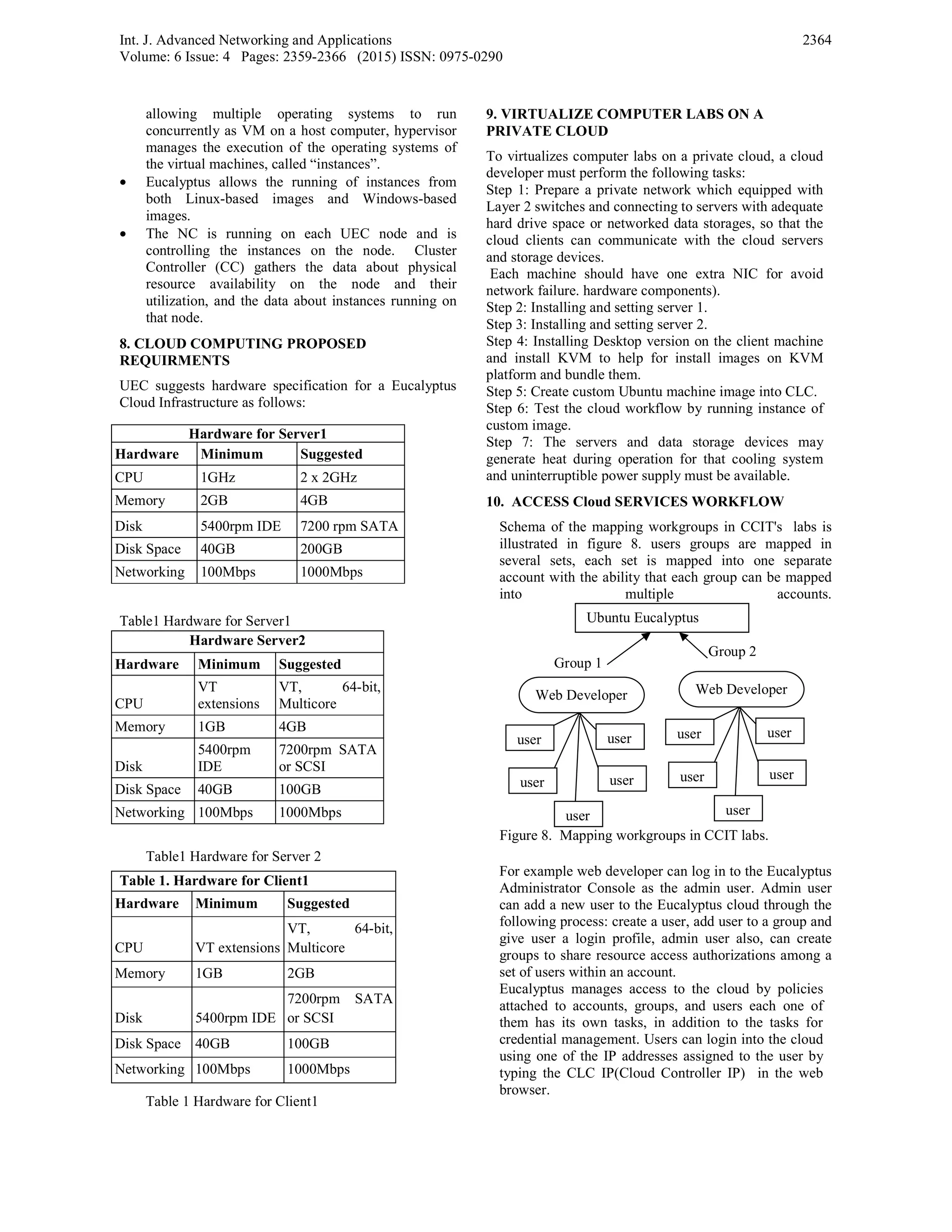
Schema of the mapping workgroups in CCIT's labs is
illustrated in figure 8. users groups are mapped in
several sets, each set is mapped into one separate
account with the ability that each group can be mapped
into multiple accounts.
For example web developer can log in to the Eucalyptus
Administrator Console as the admin user. Admin user
can add a new user to the Eucalyptus cloud through the
following process: create a user, add user to a group and
give user a login profile, admin user also, can create
groups to share resource access authorizations among a
set of users within an account.
Eucalyptus manages access to the cloud by policies
attached to accounts, groups, and users each one of
them has its own tasks, in addition to the tasks for
credential management. Users can login into the cloud
using one of the IP addresses assigned to the user by
typing the CLC IP(Cloud Controller IP) in the web
browser.
Hardware for Server1
Hardware Minimum Suggested
CPU 1GHz 2 x 2GHz
Memory 2GB 4GB
Disk 5400rpm IDE 7200 rpm SATA
Disk Space 40GB 200GB
Networking 100Mbps 1000Mbps
Hardware Server2
Hardware Minimum Suggested
CPU
VT
extensions
VT, 64-bit,
Multicore
Memory 1GB 4GB
Disk
5400rpm
IDE
7200rpm SATA
or SCSI
Disk Space 40GB 100GB
Networking 100Mbps 1000Mbps
Table 1. Hardware for Client1
Hardware Minimum Suggested
CPU VT extensions
VT, 64-bit,
Multicore
Memory 1GB 2GB
Disk 5400rpm IDE
7200rpm SATA
or SCSI
Disk Space 40GB 100GB
Networking 100Mbps 1000Mbps
Figure 8. Mapping workgroups in CCIT labs.
Group 1
Group 2
Web Developer
useruser
useruser
user
Web Developer
useruser
useruser
user
Ubuntu Eucalyptus
Int. J. Advanced Networking and Applications
Volume: 6 Issue: 4 Pages: 2359-2366 (2015) ISSN: 0975-0290
2365
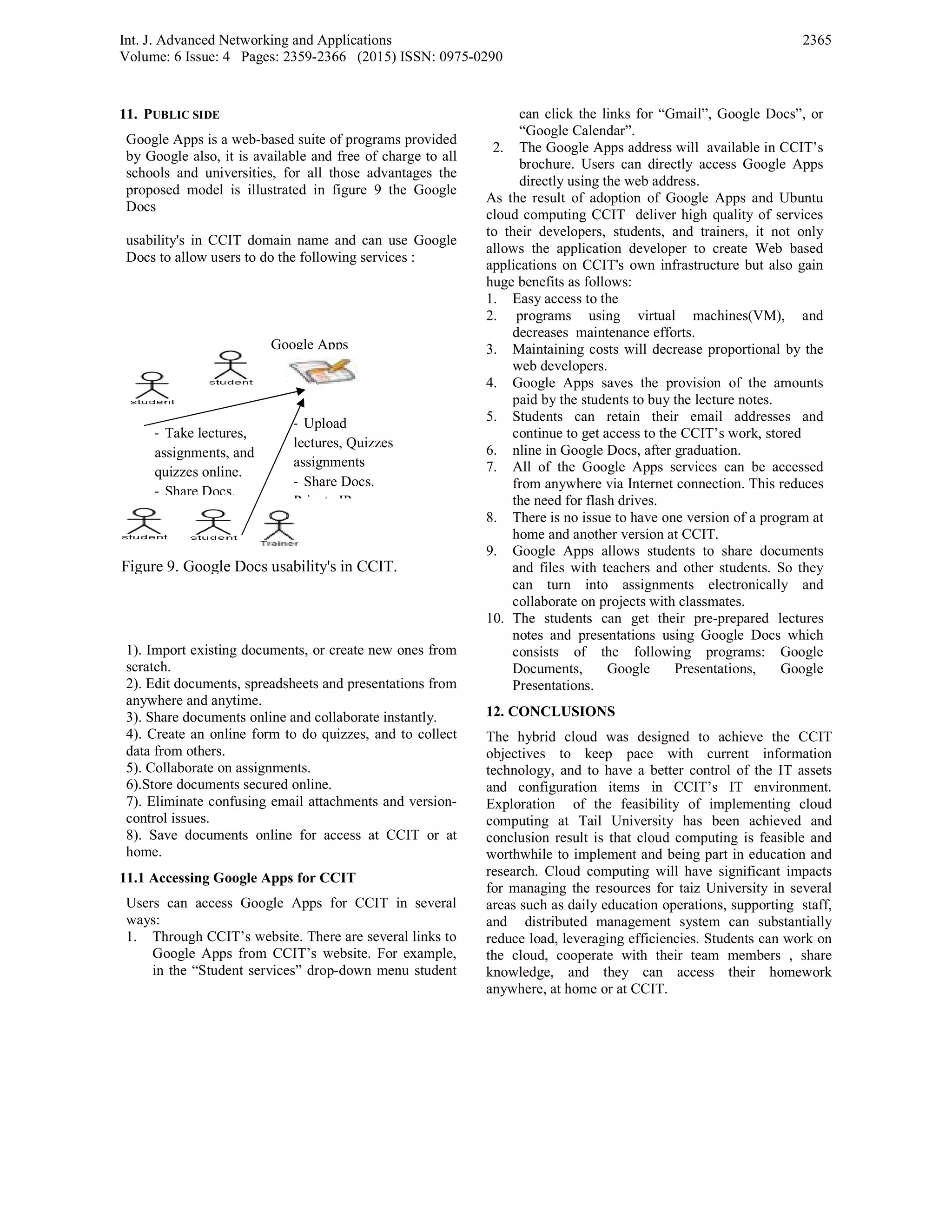
11. PUBLIC SIDE
Google Apps is a web-based suite of programs provided
by Google also, it is available and free of charge to all
schools and universities, for all those advantages the
proposed model is illustrated in figure 9 the Google
Docs
usability's in CCIT domain name and can use Google
Docs to allow users to do the following services :
1). Import existing documents, or create new ones from
scratch.
2). Edit documents, spreadsheets and presentations from
anywhere and anytime.
3). Share documents online and collaborate instantly.
4). Create an online form to do quizzes, and to collect
data from others.
5). Collaborate on assignments.
6).Store documents secured online.
7). Eliminate confusing email attachments and version-
control issues.
8). Save documents online for access at CCIT or at
home.
11.1 Accessing Google Apps for CCIT
Users can access Google Apps for CCIT in several
ways:
1. Through CCIT’s website. There are several links to
Google Apps from CCIT’s website. For example,
in the “Student services” drop-down menu student
can click the links for “Gmail”, Google Docs”, or
“Google Calendar”.
2. The Google Apps address will available in CCIT’s
brochure. Users can directly access Google Apps
directly using the web address.
As the result of adoption of Google Apps and Ubuntu
cloud computing CCIT deliver high quality of services
to their developers, students, and trainers, it not only
allows the application developer to create Web based
applications on CCIT's own infrastructure but also gain
huge benefits as follows:
1. Easy access to the
2. programs using virtual machines(VM), and
decreases maintenance efforts.
3. Maintaining costs will decrease proportional by the
web developers.
4. Google Apps saves the provision of the amounts
paid by the students to buy the lecture notes.
5. Students can retain their email addresses and
continue to get access to the CCIT’s work, stored
6. nline in Google Docs, after graduation.
7. All of the Google Apps services can be accessed
from anywhere via Internet connection. This reduces
the need for flash drives.
8. There is no issue to have one version of a program at
home and another version at CCIT.
9. Google Apps allows students to share documents
and files with teachers and other students. So they
can turn into assignments electronically and
collaborate on projects with classmates.
10. The students can get their pre-prepared lectures
notes and presentations using Google Docs which
consists of the following programs: Google
Documents, Google Presentations, Google
Presentations.
12. CONCLUSIONS
The hybrid cloud was designed to achieve the CCIT
objectives to keep pace with current information
technology, and to have a better control of the IT assets
and configuration items in CCIT’s IT environment.
Exploration of the feasibility of implementing cloud
computing at Tail University has been achieved and
conclusion result is that cloud computing is feasible and
worthwhile to implement and being part in education and
research. Cloud computing will have significant impacts
for managing the resources for taiz University in several
areas such as daily education operations, supporting staff,
and distributed management system can substantially
reduce load, leveraging efficiencies. Students can work on
the cloud, cooperate with their team members , share
knowledge, and they can access their homework
anywhere, at home or at CCIT.
‐ Take lectures,
assignments, and
quizzes online.
‐ Share Docs.
Figure 9. Google Docs usability's in CCIT.
‐ Upload
lectures, Quizzes
assignments
‐ Share Docs.
P i t IP
Google Apps
Int. J. Advanced Networking and Applications
Volume: 6 Issue: 4 Pages: 2359-2366 (2015) ISSN: 0975-0290
2366
REFERENCES
[1]. P. Sharma. Grid Computing Vs. Cloud Computing,
International Journal of Information and
Computation Technology. ISSN 0974-2239 Volume
3, Number 6 (2013), pp. 577-582.
[2]. B. Kahanwal , T. Singh. The Distributed Computing
Paradigms: P2P, Grid, Cluster, Cloud, and Jungle,
International Journal of Latest Research in Science
and Technology ISSN (Online):2278-5299
Vol.1,Issue 2 :Page No.183-187,July-August 2012.
[3]. J. C, H. S Industrial clusters' information based on
SaaS model. Paper presented at the International
Conference on Business Management and Electronic
Information (BMEI), 13-15 May, 2011.
[4]. C. S. Chien, J. Chien Insight to Cloud Computing
and Growing Impacts Information Computing and
Applications (Vol. 105), Springer, pp. 250-257.2010.
[5]. T. Dillon, W. Chen, & E . Chang Cloud Computing:
Issues and Challenges. Paper presented at the 24th
IEEE International Conference on Advanced
Information Networking and Applications (AINA),
20-23 April,2010.
[6]. M. Taylor, J. Haggerty, D. Gresty Forensic
investigation of cloud computing systems Journal of
Network Security, Volume 2011,Issue 3, March
2011, Pages 4-10.
[7]. B .Jeannette, R. Harvey Building a Virtual Archives
and Preservation Curriculum-Laboratory at Simmons
College: A Case Study in Collaborative Construction
Journal of Education for Library and Information
Science,Vol. 51, No. 4 October 2010), pp. 241-25.
[8]. M. Zaigham, Erl. Thomas, R. Puttini Cloud
Computing: Concepts, Technology & Architecture...
Publisher: Prentice Hall. Release Date: May
10, 2013.
[9]. P. Mell, T. Grance, Definition of Cloud Computing
Recommendations. Computer Security Division
Information Technology Laboratory National
Institute of Standards and Technology Gaithersburg,
MD 20899-8930 September 2011.
[10]. Czernicki, "IaaS, PaaS, and SaaS Terms Clearly
Explained and Defined."
http://www.silverlighthack.com/post/2011/02/27/Iaa
S-PaaS-and-SaaS-Terms-Explained-and-
Defined.aspx, February 27, 2011.
[11]. T. Behrend, E. Wiebe, J. London and E. Johnson.
Cloud Computing Adoption and Usage in
Community Colleges, Behaviour & Information
Technology, Volume 30, Issue 2, 2011, pp.231-240.
[12]. D. Nurmi, R .Wolski, C. Grzegorczyk,. The
eucalyptus open-source cloud-computing system in
Proceedings of the 2009 9th IEEE/ACM
International Symposium on Cluster Computing and
the Grid, pp. 124–131, IEEE Computer Society,
2009.
[13]. Dr.G.R.Karpagam1, J.Parkavi2, Setting up of an
Open Source based Private Cloud, IJCSI
International Journal of Computer Science Issues,
Vol. 8, Issue 3, No. 1, May 2011ISSN (Online):
1694-0814, www.IJCSI.org.
[14]. Google " Cloud Computing At The University
Level: A Study of Student Use of Cloud computing
Applications Master's Program in Business
Administration Walker College of Business, May
2011.
Authors Biography
Mohammed A.M. Ibrahim born in Taiz city, Yemen,
received his BSc degree in computer
science from Baghdad University, Iraq ,
in 1991, also he received his MSc in
computer science &engineering from
Shanghai University China,1996, and
his PhD degree in computer science and
engineering from Shanghai Jiaotong University, China
,2003, his research interests include grid computing, cloud
computing ,distributing computing ,network computing,
network security.

Exploring the Feasibility of Adopting Cloud Computing in Computer Center Taiz University

  • 1.
    Int. J. AdvancedNetworking and Applications Volume: 6 Issue: 4 Pages: 2359-2366 (2015) ISSN: 0975-0290 2359 Exploring the Feasibility of Adopting Cloud Computing in Computer Center Taiz University Mohammed A.M. Ibrahim Department of Information Technology, Taiz University, Republic of Yemen Email: Email: sabri1966@yahoo.com Alsabry, Fatimah, Ameen Center for Graduate Studies Taiz University, Republic of Yemen Email: fm_sbr@yahoo.com ----------------------------------------------------------------------ABSTRACT----------------------------------------------------------- The paper would discuss the possibilities of using cloud computing as a solution to expand work efficiency at Taiz university (TU) Computer Center and Information Technology (CCIT) labs, these Labs equipped with hardware and software resources. Cloud computing has been adopted for managing the labs to facilitate maintenance and network management according to cloud computing characteristics, also paper has studied the different types of cloud-based computing to decide the appropriate type that would gain significant advantages for students and lecturers. Surely result of this paper will be the guideline for all universities in Yemen to use the cloud computing in different areas of their work. Keywords - Distributed computing system , Network computing ,Cloud Computing, Infrastructure As A Service (IAAS) layer, Platform As A Service (PAAS) layer, Software As A Service (SAAS) layer, private cloud, pubic cloud, hybrid cloud. ------------------------------------------------------------------------------------------------------------------------------------------------- Date of Submission: October 27, 2014 Date of Acceptance: November 20, 2014 ------------------------------------------------------------------------------------------------------------------------------------------------- I. INTRODUCTION Recently cloud computing has offered attractive solutions for many organizations especially academic and research institutions to get their applications up and running faster, with improved manageability however software ,hardware maintenance efforts and reducing the expenditures are features motivated us to used cloud computing as a solution to expand work efficiency of the labs and managements works at Taiz University Computer Center & Information Technology (CCIT) funds limitation are crucial problem . This paper will propose the adoption of cloud computing to be a solution for managing software, hardware and network management in computer labs for facilitate maintenance efforts according to cloud computing characteristics. The proposed model of cloud computing will focus on the most famed free cloud services, free IDEs and private clouds. Although cloud computing provides dependable and secured data storage which we will not discuss in this paper. The main focusing on exploring the feasibility of adopting cloud computing in CCIT labs as a solution to facilitate the maintaining, learning, and teaching activities. Furthermore, to choose the appropriate model with compliance of the maintenance management then identifies the challenges and proposes a roadmap that will act as a guideline for technical and business managers when evaluating a cloud adoption model. IT professionals in computer center need to respond quickly to increasing demands from students and lecturers, which make the maintaining of dozens of computers to become a burden task for them with fixed budgets and staff. In this challenging environment, cloud-based computing has become an increasingly attractive option for delivering education services to develop the teaching network management and facilitate the environment of IT education with more availability, reliably, and economically via remote access to the computing resources or services provided by cloud providers through a web browser or other remote desktop accessing mechanisms. Distributed computing system use several technologies for solve complex issues based on computer networks [1,2] thus technologies are Utility Computing, Cluster Computing, Grid Computing ,Distributed Computing and Cloud Computing. Intensive research works are being performed. Most researchers believed that cloud- computing technology will replace traditional IT systems, in other hand cloud computing is cheapest technology and economically if compared to the abovementioned technologies and also a cloud computing system serving for processing and storing of user data, by clustering and virtualization of computing resources of multiple computers an example Google , Amazon , IBM. In this paper we have investigated cloud computing technology to know if it is useful for the Computer Labs of Taiz University, for this reason we have chosen to explore Cloud Computing in taiz university (CCIT) the objective is to study the different types of cloud-based computing to decide the appropriate type that would gain significant
  • 2.
    Int. J. AdvancedNetworking and Applicatio Volume: 6 Issue: 4 Pages: 2359-2366 (20 advantages for students and lecturers wi resources that are available. 2. REVIEW OF RELATED LITERATUR The paper focus on the significance of cloud a solution to facilitate maintaining, learning in laboratories at the lowest cost and time addition, it will discuss the possible choice Maintenance Management to choose th solution with compliance of the admi Maintenance Management. The literature review shows that researche on the impacts of using cloud computing in education fields. Several studies lead to foc overall results. [3,4,5,6] The related lite categorized and concluded as follows: 1) cl impact in Enterprises, 2) cloud computin migration, 3) cloud computing in education. 3. CLOUD COMPUTING IN EDUCATI Cloud computing is a general term for del services over the Internet. Google provides a Google Docs, a widely used example of clo [7]. Theory of Planned Behavior used research in examining what factors influen use Google Docs. [8] The researcher c interviews and surveys to gain a better un this phenomenon. The results derived from show that at the university level, students use Google Docs are positively and sig researches’ findings can be used by multip groups to better understand the factors i usage of Google Docs. in [8] article presents the blended learning on cloud computing paradigms and the ma customized for higher and postgraduate engineering. Article starts from a funct between traditional e-learning platforms learning environments dedicated to postgraduate education then it continu technological aspects and the deployment di learning cloud environment for engineering article concluded that, the implement interactive learning approach in individual high retention factor (up to 80%) and the learning develops the soft skills an capabilities. In other words, the hybr approach implements the synchronous learning methodologies and allow the stude participate to the educational. [9]. put forward and design college labor management system based on hybrid clou function, and provide a good guide for universities to achieve cloud computing teaching management. The paper establishes the university experim management system based on hybrid clou university experimental teaching platform and sharing of resources. ons 15) ISSN: 0975-0290 ith the limited RE d computing as g, and teaching as possible, in s to apply it in he appropriate inistrators and ers try to focus enterprises and us more on the erature studies oud computing ng in projects ION livering hosted a service called oud computing. to guide the nce students to onducted both nderstanding of m this research s’ intentions to gnificantly, the ple stakeholder nfluencing the concept based anner it can be education in tional analysis and blended higher and ues with the iagram of an e- education. The tation of the study grants a e collaborative nd teamwork rid class-ware collaborative ents to actively ratory teaching ud management r colleges and g experimental mental teaching ud, realized the m construction [10] concluded that there is significa attitude of computer usage between be the environment of cloud computing s for elementary school students. environment of IT education of cloud had more positive attitude toward it. correlation between the using beh achievement for the IT education en computing. Several universities and research Instit number of cloud computing environm tools example can be seen in Baker U Professional & Graduate Studies. 4. Types of Cloud Computing In the literature review of the could c four basic cloud delivery models, a which relate to who provides th Companies and organizations may em combination of different models in del and business services, today there are f that companies and organizations ar cloud Figure 1 shown four cloud comp Figure 1 Shows the Four Cloud Compu 4.1 Private Cloud or Internal Cloud services only provided for a managed by the organization or a t clouds are built to provide the IT as a service, via an intranet, within behind the firewall also this model control over data, security, and qual owners of this model have applications. Private clouds may enterprise datacenter, the key fea are: Scalability, rapid provisioning, Widespread virtualization. Apply pri university, students, employees an flexibly get access to virtual laborat from anywhere, e.g. their home PC reduce the burden of universities in facilities and staff. The advantages of enterprise IT include more cost e management and higher levels of s clouds are also more complicated expensive to maintain than public clou the private cloud computing 2360 ant difference in the efore and after using service IT education After using, the computing, students There is a positive avior and learning nvironment of cloud tutes have developed ments and supported University School of computing there are as outlined by [11] he cloud services. mploy one model or a ivery of applications four delivery models re implementing for puting models uting Models an organization and hird party. Private T activities/functions n the enterprise and is providing the lity of service. The e control over be deployed in an atures of this model chargeback ability, ivate cloud in Taiz nd technicians can tories and materials s, laptop. This will investing laboratory f a private cloud over effective datacenter scalability. Private to setup and more uds. Figure 2 shown
  • 3.
    Int. J. AdvancedNetworking and Applications Volume: 6 Issue: 4 Pages: 2359-2366 (2015) ISSN: 0975-0290 2361 Figure 2 Private Cloud Computing 4.2 Public Cloud IT activities/functions are provided “as a service,” over the Internet. The cloud infrastructure (data and applications) is owned and controlled by a third party which is an organization selling cloud services and it is available to the general public or a large industry group; that is, any user may access and use a public cloud. public cloud services can be Seen in figure 3. Figure 3 Public Cloud Computing Public service cloud consists of storage service providers (free or charged) and web application for the public (for example: e-mail, Amazon Elastic Compute Cloud, Cloud Sun, IBM Blue Cloud, Google AppEngine or Windows Azure Services Platform). Public Cloud has several key features such as: Scalability, Automatic/rapid provisioning, Standardized offerings, Consumption-based pricing and Multi-tenancy, in addition public cloud have several benefits such as: Easy and low cost infrastructure management, offers various tools for quick application deployment. 4.3 Hybrid Cloud Hybrid clouds is Internal and external service delivery methods are integrated, with activities/functions allocated to based on security requirements and other established policies. It is also known as “virtual private clouds”. The cloud infrastructure is a composition of two or more clouds (private, community, or public) that remain unique entities but are bound together by standardized or proprietary technology that enables data and application portability (e.g., cloud bursting for load-balancing between clouds). Figure 4 represents the hybrid cloud infrastructure Public Clouds CCIT Hybrid Clouds Private Clouds Private Clouds Figure 4 Hybrid Cloud Infrastructure 4.4 Community Cloud Community cloud infrastructure is shared by several organizations and supports a specific community that has shared concerns (e.g., mission, security requirements, policy, and compliance considerations) where a company can use IaaS, PaaS and also customized SaaS for their business[12]. 5. PRIVATE CLOUD IMPLEMENTATION 5.1 Problem description Taiz University (TU) has become one of the first Yemeni Universities to offer education and research programs to its local and regional academic institutions and industry. TU consists of eight faculties that award BSc, MSc, and PhD degrees in many disciplines, and number of students reached more than 24000 in 56 different academic disciplines. Computer Center and Information Technology (CCIT) was established to follow the recent technologies in information technology and in software engineering, it focus on adaptation the suite cloud computing technologies to make it easier to apply in the activities of the academic, administrative and community services. Due to the increasing number of students, and trainers, CCIT faces many obstacles during the work hour of labs. The IT technicians and the managers of CCIT summary the problem as follows: • The training process is still performed in the traditional way and is not using the most recent technology and it does not correspond to the CCIT objectives. • Operating systems and related software applications are installed and configured manually on each computer in laboratories and this process takes a lot of time and effort. • Each course requires different environments (operating systems, libraries and software applications). Sometimes, they are incompatible and conflicting with each other. • The number of maintenance resources such as CDs and DVDs are limited compared to the number of computers which yield to installation delays and course delay. • The available hard disk space is not enough to store the required software and this lead to slow response of the devices. • If a computer is crashed, IT technicians have to manually reinstall the software and this effect the students work in that time. • Maintenance processes during the year cause expenditures that is about 4.26% of the total expenditures of CCIT. • Frequent failures in the electricity cause delays followed by a burden of maintenance activities. To solve the above mentioned problems we proposed a hybrid cloud computing model which consists of Ubuntu private cloud with Eucalyptus as a private side of the cloud, and Google Apps as a public side of the cloud. A short description of the contents of proposed model (hybrid cloud computing) is given as follows:
  • 4.
    Int. J. AdvancedNetworking and Applications Volume: 6 Issue: 4 Pages: 2359-2366 (2015) ISSN: 0975-0290 2362 5.2 Eucalyptus software (Elastic Utility Computing architecture for Linking the programs to useful systems) as in[13] Eucalyptus is a linux-based software architecture that implements scalable private and hybrid clouds within the existing IT infrastructure(hardware, storage, and network). It provides a virtual network overlay that both isolates network traffic of different users and allows two or more clusters to appear to belong to the same Local Area Network (LAN). 5.3. Ubuntu Enterprise Cloud UEC for very summarized, is a stack of applications from Canonical included with Ubuntu Server Edition. UEC includes Eucalyptus along with a number of other open source software. UEC makes it very easy to install and configure the cloud. According to the Ubuntu enterprise documentation, Ubuntu private cloud with Eucalyptus is chosen for the implementation for several reasons: a)It is Open Source Software (OSS) so the security patches and version upgrades are free. b)Eucalyptus is suited to support private cloud solutions, and can be scale up. c)Ubuntu Server with Eucalyptus and other applications is easy to install and configure the cloud. d)Eucalyptus offers both computing and storage facilities. All the mentioned reasons was behind the motivated of CCIT's maintenance Unit to create their own cloud computing infrastructure with nothing more than whatever commodity hardware they have available and that already runs Ubuntu Server. CCIT laboratories are only open at scheduled class hours and not available for 24*7. So out of the class hours access to laboratory facilities is limited or not possible. As we know that cloud computing is useful in cases where the demands for computing resources are relatively small and stable. Such a situation reflects CCIT. Therefore the CCIT’s management has to focus on the latest technologies for its activities by using the feasible benefits of cloud computing types. 5.4 Implementation steps The first step was to identify the data and applications within the CCIT laboratories that will be moved into the cloud. These data and applications are linked to three categories of activities as shown in table 1. Trainers (Teachers): Develop lecture notes, lab manuals, and multimedia presentations. ‐Communicate with students. Prepare tests. Students: ‐ Send feedback to trainers. ‐ Communicate with students (forums). ‐ Take the lectures and notes. ‐Send homework and projects. Web Developers: ‐ Provide the training staff with software (email accounts, operating systems, productivity applications). ‐ Use the development tools needed to write and host Web applications. ‐ Install the applications and programs into the cloud image. ‐ Insert the information about the cloud server such as the server name, IP address, administrator’s, remote power management, and the update of the default user name and password. Table 1: Data and Applications and Roles of Cloud Services User Activities in CCIT. The cloud users can be categorized to act with the appropriate cloud computing types. Figure 5 illustrates that student and trainers can use SaaS (software) by enabling service providers to give them the needed software. In addition they can use IaaS (infrastructure) to access the virtual machines, raw (block) storage, firewalls, load balancers, and networks are offered which will navigate to provide cloud based services to clients. On the other hand, the web developer can use PaaS (platform) to configure and maintain the operating systems, and to develop the applications platform such as Microsoft’s Visual Studio.Net to clients through internet service. Figure 5. The main Users of Cloud Services in CCIT. 6. PROCESSES OF PROPOSED The main processes of the proposed solution are presented in figure 6. and are listed as follows: 1. The trainer prepares an application for the next lesson. 2. The web developer prepares a virtual machine image for the given applications. Only a single virtual machine image for each course is stored on the server.
  • 5.
    Int. J. AdvancedNetworking and Applications Volume: 6 Issue: 4 Pages: 2359-2366 (2015) ISSN: 0975-0290 2363 3. The students have access to laboratory applications through virtual machines, instead of access to physical machines in laboratories. 4. Student and trainer get to the server and select the desired course. They have free choice to select suitable programming languages, for example, php, java, c++. 5. The server loads the image of the course from the image repository to a virtual machine on the server and runs that virtual machine for the student to do practice. 6. When a computer is crashed, the student neither has to wait for the laboratory manager to reinstall that computer nor move to another computer. The student just restarts the virtual machine, reloads the image to this virtual machine and runs it to continue his/her practicing. 7. Laboratory managers do not have to install and to configure software applications for every individual computer. Every time the software applications and their configurations for a course need to be changed, laboratory managers only need to modify or reconfigure the master virtual machine. 7. THE PROPOSED ARCHITECTURE Detail and description of Ubuntu with Euclyptus cloud architecture components such (Cloud Controller, Walrus Storage Controller, Cluster Controller, Storage Controller, Compute Node and Client machine) which we have adopted in this paper can be seen in [14] and figure 7 shown the proposed architectures. The proposed architecture is performed on two servers(SERVER 1,SERVER 2) and one client machine (CLIENT 1) as shown in figure 7. Figure 7. Proposed Private Network Connection. The proposed cloud components have a private network via Ethernet network connectivity via switch layer 2. • End-user requests to launch the instance via authentication interface on the client machine and to ensure that he/she Eucalyptus requires two sets of IP addresses. The first range is private, to be used only within the Eucalyptus system itself. The second range is public, to be routable to and from end-users and VM(Virtual Machine) instances. Both sets must be unique to Eucalyptus, not in use by other components or applications within the same network. • The CLC (Cloud Controller) must have TCP/IP connectivity to all other Eucalyptus components. • End-user typically interacts with Eucalyptus through a client interface through sending messages via TCP/IP to the machine on which the CLC (Cloud Controller) is deployed. • End-user should has permission to get the session. • Identification of CC(Cluster Controller) to take responsibility for deploying the instance and identification of the NC for running the instance. • Downloading the image from WS3Walrus Storage Controller(SC) to NC images are cached so that starting multiple instances of the same machine image downloads that image only once. • NC servers must be able to send messages to the Walrus server because images are downloaded by the NC using the Walrus URL. That is, the CLC does not need to be able to route network traffic directly to the NCs but Walrus is doing for the purposes of image delivery. • Kernel-based Virtual Machine (KVM) is a virtualization solution for Linux on hardware that contains virtualization extensions. In Eucalyptus. KVM is chosen as preferred hypervisor. . KVM VM KVM NOD CONTROA L CC WALRUS CLC SC SERVER1 SERVER2 CLIENT 1 Figure 6. Processes of the Proposed Solution . Server Prepare required app. 1- Access virtual machine 2- Request new machine 3- Discover existing applications 4- Select course 5- Select suitable programming languages 1-Configure machine image 2-Launch applications on machine image 3-Modify machine image Runs image requested for practice.
  • 6.
    Int. J. AdvancedNetworking and Applications Volume: 6 Issue: 4 Pages: 2359-2366 (2015) ISSN: 0975-0290 2364 allowing multiple operating systems to run concurrently as VM on a host computer, hypervisor manages the execution of the operating systems of the virtual machines, called “instances”. • Eucalyptus allows the running of instances from both Linux-based images and Windows-based images. • The NC is running on each UEC node and is controlling the instances on the node. Cluster Controller (CC) gathers the data about physical resource availability on the node and their utilization, and the data about instances running on that node. 8. CLOUD COMPUTING PROPOSED REQUIRMENTS UEC suggests hardware specification for a Eucalyptus Cloud Infrastructure as follows: Table1 Hardware for Server1 Table1 Hardware for Server 2 Table 1 Hardware for Client1 9. VIRTUALIZE COMPUTER LABS ON A PRIVATE CLOUD To virtualizes computer labs on a private cloud, a cloud developer must perform the following tasks: Step 1: Prepare a private network which equipped with Layer 2 switches and connecting to servers with adequate hard drive space or networked data storages, so that the cloud clients can communicate with the cloud servers and storage devices. Each machine should have one extra NIC for avoid network failure. hardware components). Step 2: Installing and setting server 1. Step 3: Installing and setting server 2. Step 4: Installing Desktop version on the client machine and install KVM to help for install images on KVM platform and bundle them. Step 5: Create custom Ubuntu machine image into CLC. Step 6: Test the cloud workflow by running instance of custom image. Step 7: The servers and data storage devices may generate heat during operation for that cooling system and uninterruptible power supply must be available. 10. ACCESS Cloud SERVICES WORKFLOW Schema of the mapping workgroups in CCIT's labs is illustrated in figure 8. users groups are mapped in several sets, each set is mapped into one separate account with the ability that each group can be mapped into multiple accounts. For example web developer can log in to the Eucalyptus Administrator Console as the admin user. Admin user can add a new user to the Eucalyptus cloud through the following process: create a user, add user to a group and give user a login profile, admin user also, can create groups to share resource access authorizations among a set of users within an account. Eucalyptus manages access to the cloud by policies attached to accounts, groups, and users each one of them has its own tasks, in addition to the tasks for credential management. Users can login into the cloud using one of the IP addresses assigned to the user by typing the CLC IP(Cloud Controller IP) in the web browser. Hardware for Server1 Hardware Minimum Suggested CPU 1GHz 2 x 2GHz Memory 2GB 4GB Disk 5400rpm IDE 7200 rpm SATA Disk Space 40GB 200GB Networking 100Mbps 1000Mbps Hardware Server2 Hardware Minimum Suggested CPU VT extensions VT, 64-bit, Multicore Memory 1GB 4GB Disk 5400rpm IDE 7200rpm SATA or SCSI Disk Space 40GB 100GB Networking 100Mbps 1000Mbps Table 1. Hardware for Client1 Hardware Minimum Suggested CPU VT extensions VT, 64-bit, Multicore Memory 1GB 2GB Disk 5400rpm IDE 7200rpm SATA or SCSI Disk Space 40GB 100GB Networking 100Mbps 1000Mbps Figure 8. Mapping workgroups in CCIT labs. Group 1 Group 2 Web Developer useruser useruser user Web Developer useruser useruser user Ubuntu Eucalyptus
  • 7.
    Int. J. AdvancedNetworking and Applications Volume: 6 Issue: 4 Pages: 2359-2366 (2015) ISSN: 0975-0290 2365 11. PUBLIC SIDE Google Apps is a web-based suite of programs provided by Google also, it is available and free of charge to all schools and universities, for all those advantages the proposed model is illustrated in figure 9 the Google Docs usability's in CCIT domain name and can use Google Docs to allow users to do the following services : 1). Import existing documents, or create new ones from scratch. 2). Edit documents, spreadsheets and presentations from anywhere and anytime. 3). Share documents online and collaborate instantly. 4). Create an online form to do quizzes, and to collect data from others. 5). Collaborate on assignments. 6).Store documents secured online. 7). Eliminate confusing email attachments and version- control issues. 8). Save documents online for access at CCIT or at home. 11.1 Accessing Google Apps for CCIT Users can access Google Apps for CCIT in several ways: 1. Through CCIT’s website. There are several links to Google Apps from CCIT’s website. For example, in the “Student services” drop-down menu student can click the links for “Gmail”, Google Docs”, or “Google Calendar”. 2. The Google Apps address will available in CCIT’s brochure. Users can directly access Google Apps directly using the web address. As the result of adoption of Google Apps and Ubuntu cloud computing CCIT deliver high quality of services to their developers, students, and trainers, it not only allows the application developer to create Web based applications on CCIT's own infrastructure but also gain huge benefits as follows: 1. Easy access to the 2. programs using virtual machines(VM), and decreases maintenance efforts. 3. Maintaining costs will decrease proportional by the web developers. 4. Google Apps saves the provision of the amounts paid by the students to buy the lecture notes. 5. Students can retain their email addresses and continue to get access to the CCIT’s work, stored 6. nline in Google Docs, after graduation. 7. All of the Google Apps services can be accessed from anywhere via Internet connection. This reduces the need for flash drives. 8. There is no issue to have one version of a program at home and another version at CCIT. 9. Google Apps allows students to share documents and files with teachers and other students. So they can turn into assignments electronically and collaborate on projects with classmates. 10. The students can get their pre-prepared lectures notes and presentations using Google Docs which consists of the following programs: Google Documents, Google Presentations, Google Presentations. 12. CONCLUSIONS The hybrid cloud was designed to achieve the CCIT objectives to keep pace with current information technology, and to have a better control of the IT assets and configuration items in CCIT’s IT environment. Exploration of the feasibility of implementing cloud computing at Tail University has been achieved and conclusion result is that cloud computing is feasible and worthwhile to implement and being part in education and research. Cloud computing will have significant impacts for managing the resources for taiz University in several areas such as daily education operations, supporting staff, and distributed management system can substantially reduce load, leveraging efficiencies. Students can work on the cloud, cooperate with their team members , share knowledge, and they can access their homework anywhere, at home or at CCIT. ‐ Take lectures, assignments, and quizzes online. ‐ Share Docs. Figure 9. Google Docs usability's in CCIT. ‐ Upload lectures, Quizzes assignments ‐ Share Docs. P i t IP Google Apps
  • 8.
    Int. J. AdvancedNetworking and Applications Volume: 6 Issue: 4 Pages: 2359-2366 (2015) ISSN: 0975-0290 2366 REFERENCES [1]. P. Sharma. Grid Computing Vs. Cloud Computing, International Journal of Information and Computation Technology. ISSN 0974-2239 Volume 3, Number 6 (2013), pp. 577-582. [2]. B. Kahanwal , T. Singh. The Distributed Computing Paradigms: P2P, Grid, Cluster, Cloud, and Jungle, International Journal of Latest Research in Science and Technology ISSN (Online):2278-5299 Vol.1,Issue 2 :Page No.183-187,July-August 2012. [3]. J. C, H. S Industrial clusters' information based on SaaS model. Paper presented at the International Conference on Business Management and Electronic Information (BMEI), 13-15 May, 2011. [4]. C. S. Chien, J. Chien Insight to Cloud Computing and Growing Impacts Information Computing and Applications (Vol. 105), Springer, pp. 250-257.2010. [5]. T. Dillon, W. Chen, & E . Chang Cloud Computing: Issues and Challenges. Paper presented at the 24th IEEE International Conference on Advanced Information Networking and Applications (AINA), 20-23 April,2010. [6]. M. Taylor, J. Haggerty, D. Gresty Forensic investigation of cloud computing systems Journal of Network Security, Volume 2011,Issue 3, March 2011, Pages 4-10. [7]. B .Jeannette, R. Harvey Building a Virtual Archives and Preservation Curriculum-Laboratory at Simmons College: A Case Study in Collaborative Construction Journal of Education for Library and Information Science,Vol. 51, No. 4 October 2010), pp. 241-25. [8]. M. Zaigham, Erl. Thomas, R. Puttini Cloud Computing: Concepts, Technology & Architecture... Publisher: Prentice Hall. Release Date: May 10, 2013. [9]. P. Mell, T. Grance, Definition of Cloud Computing Recommendations. Computer Security Division Information Technology Laboratory National Institute of Standards and Technology Gaithersburg, MD 20899-8930 September 2011. [10]. Czernicki, "IaaS, PaaS, and SaaS Terms Clearly Explained and Defined." http://www.silverlighthack.com/post/2011/02/27/Iaa S-PaaS-and-SaaS-Terms-Explained-and- Defined.aspx, February 27, 2011. [11]. T. Behrend, E. Wiebe, J. London and E. Johnson. Cloud Computing Adoption and Usage in Community Colleges, Behaviour & Information Technology, Volume 30, Issue 2, 2011, pp.231-240. [12]. D. Nurmi, R .Wolski, C. Grzegorczyk,. The eucalyptus open-source cloud-computing system in Proceedings of the 2009 9th IEEE/ACM International Symposium on Cluster Computing and the Grid, pp. 124–131, IEEE Computer Society, 2009. [13]. Dr.G.R.Karpagam1, J.Parkavi2, Setting up of an Open Source based Private Cloud, IJCSI International Journal of Computer Science Issues, Vol. 8, Issue 3, No. 1, May 2011ISSN (Online): 1694-0814, www.IJCSI.org. [14]. Google " Cloud Computing At The University Level: A Study of Student Use of Cloud computing Applications Master's Program in Business Administration Walker College of Business, May 2011. Authors Biography Mohammed A.M. Ibrahim born in Taiz city, Yemen, received his BSc degree in computer science from Baghdad University, Iraq , in 1991, also he received his MSc in computer science &engineering from Shanghai University China,1996, and his PhD degree in computer science and engineering from Shanghai Jiaotong University, China ,2003, his research interests include grid computing, cloud computing ,distributing computing ,network computing, network security.