Exploring KML Transformers
and Attributes
Kirsten Lawrence, GISP
Senior GIS Analyst @ Caltrans
Feature Class to KML the Old Way,
Before FME…
!  Several different applications were used to get
from A (feature class) to B (KML)
!  KML files were manually edited in a text editor to
achieve desired styling
!  A time consuming process, every time
!  So many steps made it inevitable to miss one
Feature Class to KML the New Way,
Using FME…
!  Just one application to get from A to B
!  No manual editing of files post creation
!  Time spent on developing a workspace, then just
press a button when the data needs updating
!  Workflow automation minimizes errors
Project Example:
Create a spatial database of Surveyed
overhead signs for Caltrans District 4 and
publish the information in KML/KMZ
format to the web
Project Workflow
!  A python script organizes the workflow, calling
arcpy and other custom functions to format and
geoprocess the tabular surveyed data
!  The python script runs the FME workspace that
builds out the KMZ using fmeobjects and the
FMEWorkspaceRunner class
!  The script uploads the final KMZ to the web via
pysftp
Hi
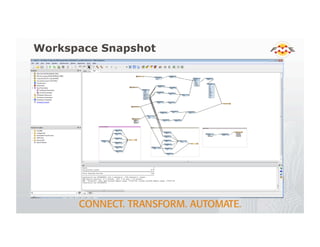
Workspace Snapshot
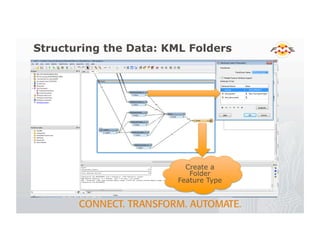
Structuring the Data: KML Folders
Create a
Folder
Feature Type
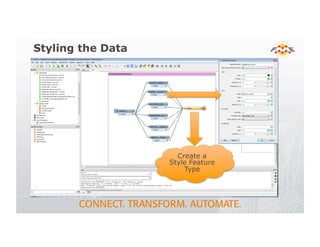
Styling the Data
Create a
Style Feature
Type
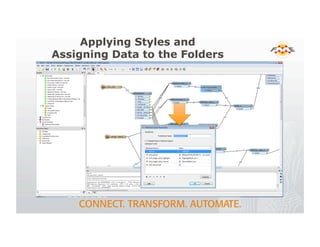
Applying Styles and
Assigning Data to the Folders
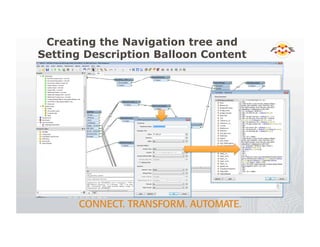
Creating the Navigation tree and
Setting Description Balloon Content
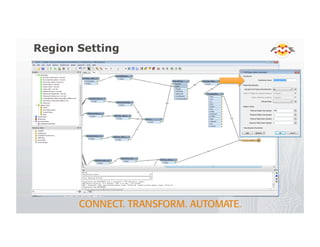
Region Setting
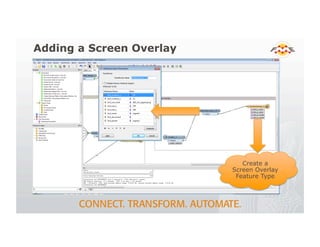
Adding a Screen Overlay
Create a
Screen Overlay
Feature Type
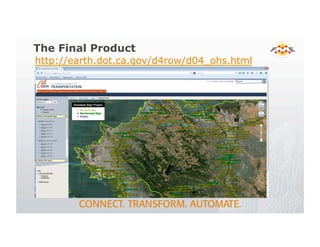
The Final Product
http://earth.dot.ca.gov/d4row/d04_ohs.html
Thank You!
!  Questions?
!  For more information:
!  Kirsten Lawrence, kirsten.lawrence@dot.ca.gov
!  Caltrans
!  http://fmepedia.safe.com/

Exploring KML Transformers

  • 1.
    Exploring KML Transformers andAttributes Kirsten Lawrence, GISP Senior GIS Analyst @ Caltrans
  • 2.
    Feature Class toKML the Old Way, Before FME… !  Several different applications were used to get from A (feature class) to B (KML) !  KML files were manually edited in a text editor to achieve desired styling !  A time consuming process, every time !  So many steps made it inevitable to miss one
  • 3.
    Feature Class toKML the New Way, Using FME… !  Just one application to get from A to B !  No manual editing of files post creation !  Time spent on developing a workspace, then just press a button when the data needs updating !  Workflow automation minimizes errors
  • 4.
    Project Example: Create aspatial database of Surveyed overhead signs for Caltrans District 4 and publish the information in KML/KMZ format to the web
  • 5.
    Project Workflow !  Apython script organizes the workflow, calling arcpy and other custom functions to format and geoprocess the tabular surveyed data !  The python script runs the FME workspace that builds out the KMZ using fmeobjects and the FMEWorkspaceRunner class !  The script uploads the final KMZ to the web via pysftp Hi
  • 6.
  • 7.
    Structuring the Data:KML Folders Create a Folder Feature Type
  • 8.
    Styling the Data Createa Style Feature Type
  • 9.
    Applying Styles and AssigningData to the Folders
  • 10.
    Creating the Navigationtree and Setting Description Balloon Content
  • 11.
  • 12.
    Adding a ScreenOverlay Create a Screen Overlay Feature Type
  • 13.
  • 14.
    Thank You! !  Questions? ! For more information: !  Kirsten Lawrence, kirsten.lawrence@dot.ca.gov !  Caltrans !  http://fmepedia.safe.com/