USING MICROSOFT
EXCEL WITH BUSINESS
RESEARCH METHODS
www.drjayeshpatidar.blogspot.com
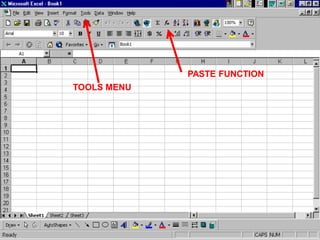
TITLE BAR
MENU BAR
STANDARD TOOLBAR
FORMATTING TOOLBAR

FORMULA BAR

ACTIVE CELL
PASTE FUNCTION
TOOLS MENU
The Paste Function Provides
Numerous Statistical
Operations
The Statistical Function
Category
Data Analysis
Dialog Box
• Click on “Tools”
• Select “Data Analysis”
• Select statistical operation
o

such as Histogram
Functions
• Functions are predefined formulas for
mathematical operations
• They perform calculations by using
specific values, called arguments
• Arguments indicate data or a range of
cells
• Arguments are performed, in a
particular order, called the syntax.
Functions
• Functions are predefined formulas for
mathematical operations
• They perform calculations by using
specific values, called arguments
• Arguments are performed, in a
particular order, called the syntax.
• For example, the SUM function adds
values or ranges of cells
Easy to Use Paste Functions
•
•
•
•
•

AVERAGE (MEAN)
MEDIAN
MODE
SUM
STANDARD DEVIATION
Functions
• The syntax of a function begins with the
function name
• followed by an opening parenthesis
• the arguments for the function
• separated by commas
• a closing parenthesis.
• If the function starts a formula, an equal
sign (=) is typed before the function
name.
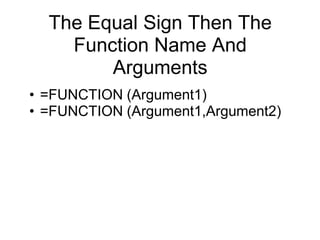
The Equal Sign Then The
Function Name And
Arguments
• =FUNCTION (Argument1)
• =FUNCTION (Argument1,Argument2)
Arguments
• Typical arguments are numbers, text,
arrays, and cell references.
• Arguments can also be constants,
formulas, or other functions.
The AVERAGE Function
Located in the Statistical Category
Data Array
•
•
•
•

The data appear in cells A2 through 14
A2:A14
Sometimes written with dollars signs
$A$2:$A$14
Sum, Average, and Standard
Deviation
•
•
•
•

=FUNCTION (Argument1)
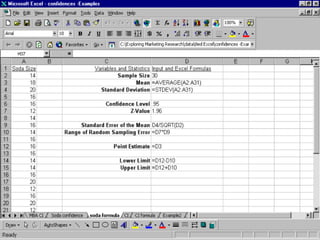
=SUM(A2:A9)
=AVERAGE(A2:A9)
=STDEVA(A2:A9)
SUM Function
Sales Call Example
AVERAGE (Mean) Function
Sales Call Example
Standard Deviation Function
Sales Call Example
Variance s2: (algebraic, scalable computation)

s

2

n
n
n
1
1
1
2
2

 ( xi  x )  n  1 [ xi  n ( xi ) 2 ]
n  1 i 1
i 1
i 1

Standard deviation s is the square root of variance s2
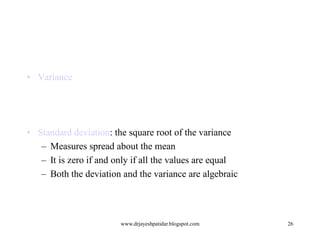
• Variance

• Standard deviation: the square root of the variance
– Measures spread about the mean
– It is zero if and only if all the values are equal
– Both the deviation and the variance are algebraic

www.drjayeshpatidar.blogspot.com

26
Data Dispersion Characteristics
•

Motivation
–

•

Data dispersion characteristics
–

•

To better understand the data: central tendency, variation and spread
median, max, min, quantiles, outliers, variance, etc.

Numerical dimensions correspond to sorted intervals
–
–

•

Data dispersion: analyzed with multiple granularities of precision
Boxplot or quantile analysis on sorted intervals

Dispersion analysis on computed measures
–

Folding measures into numerical dimensions

–

Boxplot or quantile analysis on the transformed cube

www.drjayeshpatidar.blogspot.com

27
Measuring the Central Tendency
•

Mean
–

•

1 n
x   xi
n i 1

n

Weighted arithmetic mean

x 

Median: A holistic measure
–

w x
i 1
n

i

i

w
i 1

i

Middle value if odd number of values, or average of the middle two
values otherwise

–

•

estimated by interpolation

Mode
–

Value that occurs most frequently in the data

–

Unimodal, bimodal, trimodal

–

Empirical formula:

mean  mode  3  (mean  median)
www.drjayeshpatidar.blogspot.com

28
Measuring the Dispersion of Data
•

Quartiles, outliers and boxplots
–
–

Inter-quartile range: IQR = Q3 – Q1

–

Five number summary: min, Q1, M, Q3, max

–

Boxplot: ends of the box are the quartiles, median is marked, whiskers,
and plot outlier individually

–
•

Quartiles: Q1 (25th percentile), Q3 (75th percentile)

Outlier: usually, a value higher/lower than 1.5 x IQR

Variance and standard deviation
–

Variance s2: (algebraic, scalable computation)
s

–

2

n
n
n
1
1
1
2
2

 ( xi  x )  n  1 [ xi  n ( xi ) 2 ]
n  1 i 1
i 1
i 1

Standard deviation s is the square root of variance s2
www.drjayeshpatidar.blogspot.com

29
Boxplot Analysis

• Five-number summary of a distribution:
Minimum, Q1, M, Q3, Maximum

• Boxplot
– Data is represented with a box
– The ends of the box are at the first and third quartiles,
i.e., the height of the box is IRQ
– The median is marked by a line within the box
– Whiskers: two lines outside the box extend to
Minimum and Maximum
www.drjayeshpatidar.blogspot.com

30
A Boxplot
A boxplot

www.drjayeshpatidar.blogspot.com

31
Visualization of Data Dispersion:
Boxplot Analysis

www.drjayeshpatidar.blogspot.com

32
Mining Descriptive Statistical Measures in Large
Databases
• Variance
1 n
1 
1
2
2
2
s 
 ( xi  x ) 
 xi  n  xi  
n  1 i 1
n 1 

2

• Standard deviation: the square root of the variance
– Measures spread about the mean
– It is zero if and only if all the values are equal
– Both the deviation and the variance are algebraic

www.drjayeshpatidar.blogspot.com

33
Histogram Analysis
• Graph displays of basic statistical class descriptions
– Frequency histograms
• A univariate graphical method
• Consists of a set of rectangles that reflect the counts or frequencies of
the classes present in the given data

www.drjayeshpatidar.blogspot.com

34
Quantile Plot
• Displays all of the data (allowing the user to assess both the
overall behavior and unusual occurrences)
• Plots quantile information
– For a data xi data sorted in increasing order, fi indicates
that approximately 100 fi% of the data are below or equal
to the value xi

www.drjayeshpatidar.blogspot.com

35
Quantile-Quantile (Q-Q) Plot
• Graphs the quantiles of one univariate distribution against
the corresponding quantiles of another
• Allows the user to view whether there is a shift in going from
one distribution to another

www.drjayeshpatidar.blogspot.com

36
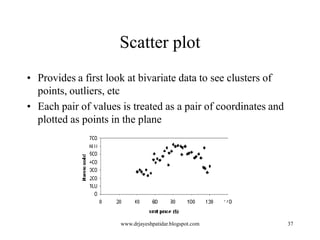
Scatter plot
• Provides a first look at bivariate data to see clusters of
points, outliers, etc
• Each pair of values is treated as a pair of coordinates and
plotted as points in the plane

www.drjayeshpatidar.blogspot.com

37
Loess Curve
• Adds a smooth curve to a scatter plot in order to provide
better perception of the pattern of dependence
• Loess curve is fitted by setting two parameters: a smoothing
parameter, and the degree of the polynomials that are fitted
by the regression

www.drjayeshpatidar.blogspot.com

38
Graphic Displays of Basic Statistical
Descriptions
•

•
•
•

•
•

Histogram: (shown before)
Boxplot: (covered before)
Quantile plot: each value xi is paired with fi indicating that
approximately 100 fi % of data are  xi
Quantile-quantile (q-q) plot: graphs the quantiles of one
univariant distribution against the corresponding quantiles of
another
Scatter plot: each pair of values is a pair of coordinates and
plotted as points in the plane
Loess (local regression) curve: add a smooth curve to a
scatter plot to provide better perception of the pattern of
dependence
www.drjayeshpatidar.blogspot.com
39
Proportion
•
•
•
•

=COUNT
=COUNTIF
DIVIDE COUNTIF BY COUNT
=D3/D2
Frequency Distributions
• There are alternative ways of
constructing frequency distributions
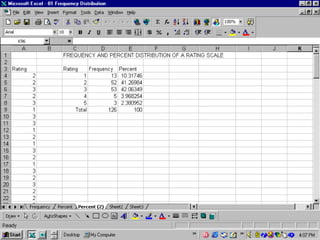
• COUNTIF function
• HISTOGRAM function
=COUNTIF(A6:A134,1)
=D4/D9*100
Histogram Function
• Tools -Data Analysis-Histogram
• Bins
The bins are the
frequency
categories
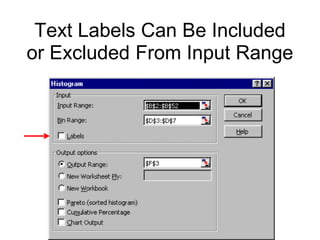
Insert Input and Bin Ranges
Text Labels Can Be Included
or Excluded From Input Range
The Chart Wizard
The Descriptive Statistics
Function
SEVERAL ROWS OF DATA ARE HIDDEN
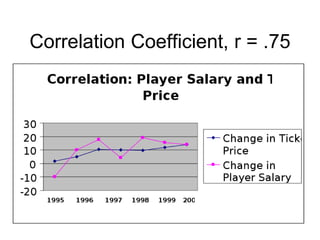
Correlation
Correlation Coefficient, r = .75
Regression Analysis
Excel and research

Excel and research

  • 1.
    USING MICROSOFT EXCEL WITHBUSINESS RESEARCH METHODS www.drjayeshpatidar.blogspot.com
  • 2.
    TITLE BAR MENU BAR STANDARDTOOLBAR FORMATTING TOOLBAR FORMULA BAR ACTIVE CELL
  • 3.
  • 4.
    The Paste FunctionProvides Numerous Statistical Operations
  • 5.
  • 6.
    Data Analysis Dialog Box •Click on “Tools” • Select “Data Analysis” • Select statistical operation o such as Histogram
  • 10.
    Functions • Functions arepredefined formulas for mathematical operations • They perform calculations by using specific values, called arguments • Arguments indicate data or a range of cells • Arguments are performed, in a particular order, called the syntax.
  • 11.
    Functions • Functions arepredefined formulas for mathematical operations • They perform calculations by using specific values, called arguments • Arguments are performed, in a particular order, called the syntax. • For example, the SUM function adds values or ranges of cells
  • 12.
    Easy to UsePaste Functions • • • • • AVERAGE (MEAN) MEDIAN MODE SUM STANDARD DEVIATION
  • 13.
    Functions • The syntaxof a function begins with the function name • followed by an opening parenthesis • the arguments for the function • separated by commas • a closing parenthesis. • If the function starts a formula, an equal sign (=) is typed before the function name.
  • 14.
    The Equal SignThen The Function Name And Arguments • =FUNCTION (Argument1) • =FUNCTION (Argument1,Argument2)
  • 15.
    Arguments • Typical argumentsare numbers, text, arrays, and cell references. • Arguments can also be constants, formulas, or other functions.
  • 16.
    The AVERAGE Function Locatedin the Statistical Category
  • 18.
    Data Array • • • • The dataappear in cells A2 through 14 A2:A14 Sometimes written with dollars signs $A$2:$A$14
  • 20.
    Sum, Average, andStandard Deviation • • • • =FUNCTION (Argument1) =SUM(A2:A9) =AVERAGE(A2:A9) =STDEVA(A2:A9)
  • 23.
  • 24.
  • 25.
    Standard Deviation Function SalesCall Example Variance s2: (algebraic, scalable computation) s 2 n n n 1 1 1 2 2   ( xi  x )  n  1 [ xi  n ( xi ) 2 ] n  1 i 1 i 1 i 1 Standard deviation s is the square root of variance s2
  • 26.
    • Variance • Standarddeviation: the square root of the variance – Measures spread about the mean – It is zero if and only if all the values are equal – Both the deviation and the variance are algebraic www.drjayeshpatidar.blogspot.com 26
  • 27.
    Data Dispersion Characteristics • Motivation – • Datadispersion characteristics – • To better understand the data: central tendency, variation and spread median, max, min, quantiles, outliers, variance, etc. Numerical dimensions correspond to sorted intervals – – • Data dispersion: analyzed with multiple granularities of precision Boxplot or quantile analysis on sorted intervals Dispersion analysis on computed measures – Folding measures into numerical dimensions – Boxplot or quantile analysis on the transformed cube www.drjayeshpatidar.blogspot.com 27
  • 28.
    Measuring the CentralTendency • Mean – • 1 n x   xi n i 1 n Weighted arithmetic mean x  Median: A holistic measure – w x i 1 n i i w i 1 i Middle value if odd number of values, or average of the middle two values otherwise – • estimated by interpolation Mode – Value that occurs most frequently in the data – Unimodal, bimodal, trimodal – Empirical formula: mean  mode  3  (mean  median) www.drjayeshpatidar.blogspot.com 28
  • 29.
    Measuring the Dispersionof Data • Quartiles, outliers and boxplots – – Inter-quartile range: IQR = Q3 – Q1 – Five number summary: min, Q1, M, Q3, max – Boxplot: ends of the box are the quartiles, median is marked, whiskers, and plot outlier individually – • Quartiles: Q1 (25th percentile), Q3 (75th percentile) Outlier: usually, a value higher/lower than 1.5 x IQR Variance and standard deviation – Variance s2: (algebraic, scalable computation) s – 2 n n n 1 1 1 2 2   ( xi  x )  n  1 [ xi  n ( xi ) 2 ] n  1 i 1 i 1 i 1 Standard deviation s is the square root of variance s2 www.drjayeshpatidar.blogspot.com 29
  • 30.
    Boxplot Analysis • Five-numbersummary of a distribution: Minimum, Q1, M, Q3, Maximum • Boxplot – Data is represented with a box – The ends of the box are at the first and third quartiles, i.e., the height of the box is IRQ – The median is marked by a line within the box – Whiskers: two lines outside the box extend to Minimum and Maximum www.drjayeshpatidar.blogspot.com 30
  • 31.
  • 32.
    Visualization of DataDispersion: Boxplot Analysis www.drjayeshpatidar.blogspot.com 32
  • 33.
    Mining Descriptive StatisticalMeasures in Large Databases • Variance 1 n 1  1 2 2 2 s   ( xi  x )   xi  n  xi   n  1 i 1 n 1   2 • Standard deviation: the square root of the variance – Measures spread about the mean – It is zero if and only if all the values are equal – Both the deviation and the variance are algebraic www.drjayeshpatidar.blogspot.com 33
  • 34.
    Histogram Analysis • Graphdisplays of basic statistical class descriptions – Frequency histograms • A univariate graphical method • Consists of a set of rectangles that reflect the counts or frequencies of the classes present in the given data www.drjayeshpatidar.blogspot.com 34
  • 35.
    Quantile Plot • Displaysall of the data (allowing the user to assess both the overall behavior and unusual occurrences) • Plots quantile information – For a data xi data sorted in increasing order, fi indicates that approximately 100 fi% of the data are below or equal to the value xi www.drjayeshpatidar.blogspot.com 35
  • 36.
    Quantile-Quantile (Q-Q) Plot •Graphs the quantiles of one univariate distribution against the corresponding quantiles of another • Allows the user to view whether there is a shift in going from one distribution to another www.drjayeshpatidar.blogspot.com 36
  • 37.
    Scatter plot • Providesa first look at bivariate data to see clusters of points, outliers, etc • Each pair of values is treated as a pair of coordinates and plotted as points in the plane www.drjayeshpatidar.blogspot.com 37
  • 38.
    Loess Curve • Addsa smooth curve to a scatter plot in order to provide better perception of the pattern of dependence • Loess curve is fitted by setting two parameters: a smoothing parameter, and the degree of the polynomials that are fitted by the regression www.drjayeshpatidar.blogspot.com 38
  • 39.
    Graphic Displays ofBasic Statistical Descriptions • • • • • • Histogram: (shown before) Boxplot: (covered before) Quantile plot: each value xi is paired with fi indicating that approximately 100 fi % of data are  xi Quantile-quantile (q-q) plot: graphs the quantiles of one univariant distribution against the corresponding quantiles of another Scatter plot: each pair of values is a pair of coordinates and plotted as points in the plane Loess (local regression) curve: add a smooth curve to a scatter plot to provide better perception of the pattern of dependence www.drjayeshpatidar.blogspot.com 39
  • 40.
  • 43.
    Frequency Distributions • Thereare alternative ways of constructing frequency distributions • COUNTIF function • HISTOGRAM function
  • 45.
  • 49.
    Histogram Function • Tools-Data Analysis-Histogram • Bins
  • 51.
    The bins arethe frequency categories
  • 52.
    Insert Input andBin Ranges
  • 53.
    Text Labels CanBe Included or Excluded From Input Range
  • 54.
  • 56.
  • 64.
    SEVERAL ROWS OFDATA ARE HIDDEN
  • 65.
    SEVERAL ROWS OFDATA ARE HIDDEN
  • 71.
  • 74.
  • 75.