ANIMATION-BANNER
This is my animated
advertising banner that
I have placed on my
home page. It plays
when you first go on to
the website and then
every time you press
replay, it replays. Also
the sound only plays if
you click the sound
button.
ANIMATION-PICTURE SLIDE SHOW
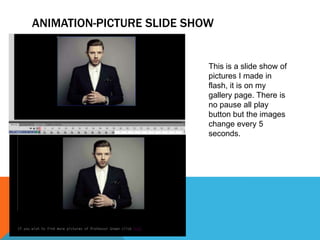
This is a slide show of
pictures I made in
flash, it is on my
gallery page. There is
no pause all play
button but the images
change every 5
seconds.
ANIMATION- HOME PAGE SLIDE SHOW
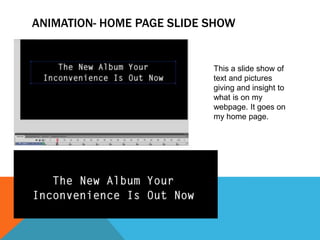
This a slide show of
text and pictures
giving and insight to
what is on my
webpage. It goes on
my home page.
ANIMATION-SCROLL BOX
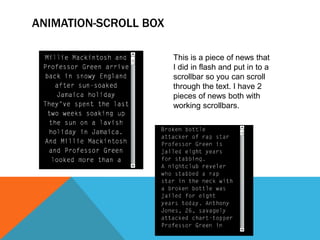
This is a piece of news that
I did in flash and put in to a
scrollbar so you can scroll
through the text. I have 2
pieces of news both with
working scrollbars.
MOVIE CLIPS
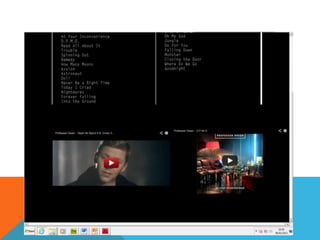
These are movies clips that I
have put on my songs page.
It is 2 Professor Green songs
SOUNDS
When the sound button on my
banner is clicked it plays a
Professor Green song as
shown on the series of
pictures.
SOUNDS
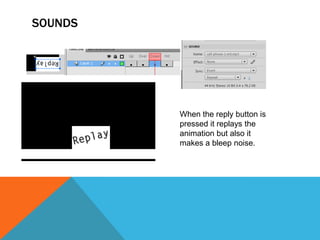
When the reply button is
pressed it replays the
animation but also it
makes a bleep noise.
TEXT
EXTERNAL LINKS
When you click the ‘More information on him’ link it takes you to Professor
Greens official website. This is one of my external links found in the navigation
bar.
EXTERNAL LINKS
The song button takes you to Professor Greens YouTube page. This also
found on my navigation bar.
EXTERNAL LINKS
When you click ‘ITunes’ it takes you to the apple website. This too
is found on the navigation bar.
FORMS
These are 2 forms I made in flash to
put on my website, they both have a
submit button. The top form is for
the viewers of my webpage to leave
their thoughts about my page. The
bottom one is a form that goes on
the tickets page for viewers to buy
concert tickets.
NAVIGATION BAR
This is my navigation bar with the drop downs shown. All the
hyperlinks work on my navigation bar work. You can get to any page
from any of the pages.
INDEX
BIOGRAPHY
NEWS
GALLERY
HIS MUSIC
UPCOMING EVENTS
BACKUP FILES ON DROPBOX
FILE LAYOUT
IMAGE OPTIMISATION
This is me resizing an image
to make it look its very best.
This is s that it looks good
quality and so it doesn’t look
stretched or squished. I also
cropped out part of the
photo so that it fitted in the
space on my webpage I
wanted it in.
EMAIL LINK
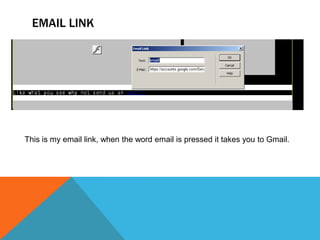
This is my email link, when the word email is pressed it takes you to Gmail.
AN IMAGE MAP
This is my image map, when
the different faces are clicked
it takes you to a different
external link.
For example when eminem is
clicked it takes you to his
webpage.
ROLLOVER IMAGE
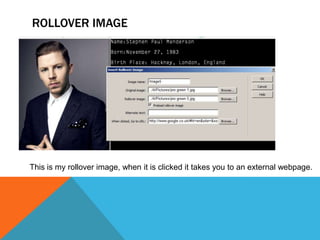
This is my rollover image, when it is clicked it takes you to an external webpage.

Evidence

  • 2.
    ANIMATION-BANNER This is myanimated advertising banner that I have placed on my home page. It plays when you first go on to the website and then every time you press replay, it replays. Also the sound only plays if you click the sound button.
  • 3.
    ANIMATION-PICTURE SLIDE SHOW Thisis a slide show of pictures I made in flash, it is on my gallery page. There is no pause all play button but the images change every 5 seconds.
  • 4.
    ANIMATION- HOME PAGESLIDE SHOW This a slide show of text and pictures giving and insight to what is on my webpage. It goes on my home page.
  • 5.
    ANIMATION-SCROLL BOX This isa piece of news that I did in flash and put in to a scrollbar so you can scroll through the text. I have 2 pieces of news both with working scrollbars.
  • 6.
    MOVIE CLIPS These aremovies clips that I have put on my songs page. It is 2 Professor Green songs
  • 7.
    SOUNDS When the soundbutton on my banner is clicked it plays a Professor Green song as shown on the series of pictures.
  • 8.
    SOUNDS When the replybutton is pressed it replays the animation but also it makes a bleep noise.
  • 9.
  • 10.
    EXTERNAL LINKS When youclick the ‘More information on him’ link it takes you to Professor Greens official website. This is one of my external links found in the navigation bar.
  • 11.
    EXTERNAL LINKS The songbutton takes you to Professor Greens YouTube page. This also found on my navigation bar.
  • 12.
    EXTERNAL LINKS When youclick ‘ITunes’ it takes you to the apple website. This too is found on the navigation bar.
  • 13.
    FORMS These are 2forms I made in flash to put on my website, they both have a submit button. The top form is for the viewers of my webpage to leave their thoughts about my page. The bottom one is a form that goes on the tickets page for viewers to buy concert tickets.
  • 14.
    NAVIGATION BAR This ismy navigation bar with the drop downs shown. All the hyperlinks work on my navigation bar work. You can get to any page from any of the pages.
  • 15.
  • 16.
  • 18.
  • 20.
  • 21.
  • 23.
  • 24.
  • 25.
  • 26.
    IMAGE OPTIMISATION This isme resizing an image to make it look its very best. This is s that it looks good quality and so it doesn’t look stretched or squished. I also cropped out part of the photo so that it fitted in the space on my webpage I wanted it in.
  • 27.
    EMAIL LINK This ismy email link, when the word email is pressed it takes you to Gmail.
  • 28.
    AN IMAGE MAP Thisis my image map, when the different faces are clicked it takes you to a different external link. For example when eminem is clicked it takes you to his webpage.
  • 29.
    ROLLOVER IMAGE This ismy rollover image, when it is clicked it takes you to an external webpage.