

EVERNOTE: 
HOW WE BUILD FOR ANDROID 
Speaker: Reid Baker (@reidbaker)
WHAT DO I MEAN BY “BIG” 
More than a dozen android engineers 
Engineers in 3 timezones 
Releases go to multiple app stores, ex. 
Amazon, Samsung, Chromebook, etc. 
Million+ reviews and more than 50 
million downloads 
Android’s infamous 65k method limit
SUGGESTED TEAM BASELINE 
Use source control and have some method of code review 
Use a Modern build system 
Verify that code compiles before it interrupts the rest of the team 
Use a bug tracker so things are less likely to slip through the 
cracks 
Have a chat room where newer members can ask questions 
without interrupting another teammates.
USE A MODERN BUILD SYSTEM 
Choices include Gradle 
(recommended), Buck, and Maven 
Reduces friction when adding 
teammates 
Allows each teammate to build 
the same way 
Encourages automation where 
humans might make an error
HOW WE DO IT 
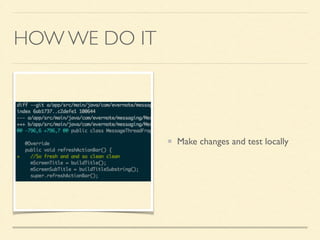
Make changes and test locally
HOW WE DO IT 
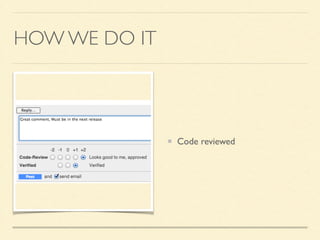
Code reviewed
HOW WE DO IT 
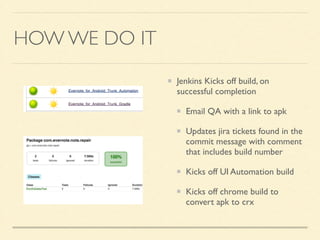
Jenkins Kicks off build, on 
successful completion 
Email QA with a link to apk 
Updates jira tickets found in the 
commit message with comment 
that includes build number 
Kicks off UI Automation build 
Kicks off chrome build to 
convert apk to crx
HOW WE DO IT 
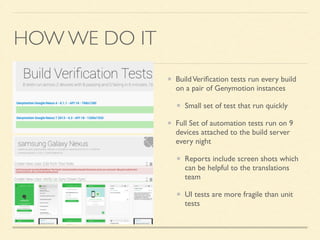
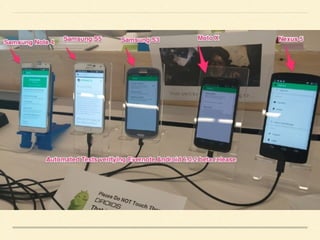
Build Verification tests run every build 
on a pair of Genymotion instances 
Small set of test that run quickly 
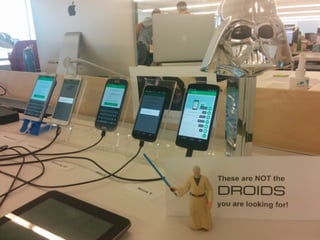
Full Set of automation tests run on 9 
devices attached to the build server 
every night 
Reports include screen shots which 
can be helpful to the translations 
team 
UI tests are more fragile than unit 
tests
UI TESTS: LESSONS LEARNED 
When working with real devices you can’t assume they are ready 
We built tools that let us remove all packages, send adb commands to all devices, and 
restart each device 
Built an app that can verify devices are ready to run tests. ex. wake the screen or verify 
an internet connection 
Using 3rd party services like AppThwack can let you test on a broad range of devices 
Knowing the commit that broke the UI speeds up the time to fix issues 
Testing code in another process is not supported. 
A work around is to use keyboard inputs
UI TESTS: OTHER PERKS 
UI Automation has other advantages outside of testing 
We can easily take screen shots of our signup flow on many 
types of devices in every language we support and hand those 
screenshots to our translations team for feedback. 
We can test database migrations across a many old versions of 
Evernote. This process was time consuming for QA and 
involved a lot of waiting.
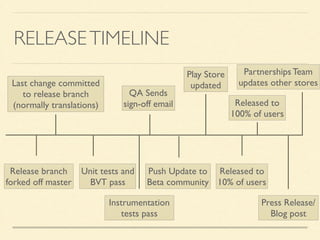
RELEASE TIMELINE 
Partnerships Team 
updates other stores 
Released to 
100% of users 
Released to 
10% of users 
QA Sends 
sign-off email 
Last change committed 
to release branch 
(normally translations) 
Release branch 
forked off master 
Unit tests and 
BVT pass 
Instrumentation 
tests pass 
Play Store 
updated 
Push Update to 
Beta community 
Press Release/ 
Blog post
QUESTIONS? 
@reidbaker

Evernote release process

  • 1.
    EVERNOTE: HOW WEBUILD FOR ANDROID Speaker: Reid Baker (@reidbaker)
  • 2.
    WHAT DO IMEAN BY “BIG” More than a dozen android engineers Engineers in 3 timezones Releases go to multiple app stores, ex. Amazon, Samsung, Chromebook, etc. Million+ reviews and more than 50 million downloads Android’s infamous 65k method limit
  • 3.
    SUGGESTED TEAM BASELINE Use source control and have some method of code review Use a Modern build system Verify that code compiles before it interrupts the rest of the team Use a bug tracker so things are less likely to slip through the cracks Have a chat room where newer members can ask questions without interrupting another teammates.
  • 4.
    USE A MODERNBUILD SYSTEM Choices include Gradle (recommended), Buck, and Maven Reduces friction when adding teammates Allows each teammate to build the same way Encourages automation where humans might make an error
  • 5.
    HOW WE DOIT Make changes and test locally
  • 6.
    HOW WE DOIT Code reviewed
  • 7.
    HOW WE DOIT Jenkins Kicks off build, on successful completion Email QA with a link to apk Updates jira tickets found in the commit message with comment that includes build number Kicks off UI Automation build Kicks off chrome build to convert apk to crx
  • 8.
    HOW WE DOIT Build Verification tests run every build on a pair of Genymotion instances Small set of test that run quickly Full Set of automation tests run on 9 devices attached to the build server every night Reports include screen shots which can be helpful to the translations team UI tests are more fragile than unit tests
  • 11.
    UI TESTS: LESSONSLEARNED When working with real devices you can’t assume they are ready We built tools that let us remove all packages, send adb commands to all devices, and restart each device Built an app that can verify devices are ready to run tests. ex. wake the screen or verify an internet connection Using 3rd party services like AppThwack can let you test on a broad range of devices Knowing the commit that broke the UI speeds up the time to fix issues Testing code in another process is not supported. A work around is to use keyboard inputs
  • 12.
    UI TESTS: OTHERPERKS UI Automation has other advantages outside of testing We can easily take screen shots of our signup flow on many types of devices in every language we support and hand those screenshots to our translations team for feedback. We can test database migrations across a many old versions of Evernote. This process was time consuming for QA and involved a lot of waiting.
  • 13.
    RELEASE TIMELINE PartnershipsTeam updates other stores Released to 100% of users Released to 10% of users QA Sends sign-off email Last change committed to release branch (normally translations) Release branch forked off master Unit tests and BVT pass Instrumentation tests pass Play Store updated Push Update to Beta community Press Release/ Blog post
  • 14.