B Y B E N B L A K E S L E Y
Looking at my prelimary task, I have learned a lot of new technical
skills, which I have been able to implement into my actual
magazine along with my blog work. I have never used Photoshop
CS6 before so it was a good opportunity for me to get a basic
understanding for how it works and learn how all the buttons work.
I created a magazine for a school with details of school events and
other information for the school term.
Contents pageFront cover
Photoshop CS6
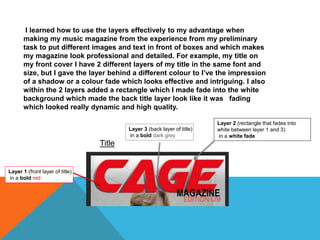
I learned how to use the layers effectively to my advantage when
making my music magazine from the experience from my preliminary
task to put different images and text in front of boxes and which makes
my magazine look professional and detailed. For example, my title on
my front cover I have 2 different layers of my title in the same font and
size, but I gave the layer behind a different colour to I’ve the impression
of a shadow or a colour fade which looks effective and intriguing. I also
within the 2 layers added a rectangle which I made a crossfade into the
white and black background which made the back title layer look like it
was fading which looked really dynamic and high quality.
Layer 1 (front layer of title)
in a bold red
Layer 3 (back layer of title)
in a bold dark grey
Layer 2 (rectangle that fades into
white between layer 1 and 3)
in a white fade
Title
Layer 4 (rectangle that is at the
so fades with the white in a blac
fade
I learned from my preliminary task the importance of quality pictures
and how effective they can be as they really contribute to the mood of
the page. My preliminary task had pictures but they wasn’t very good
and I put more effort into getting more relevant and more focused
images to make them stand out. I realised that the picture can dictate
contrast the colours so I used a simple colour scheme.
I used very dull picture which should
have included more blue as the
theme of the magazine. However the
limited colours on the image meant
putting other colours like red made it
really stand out, which is effective. I
used this to my advantage on my real
magazine where I used a grey photo
so the bright yellow and red stand
out.
Preliminary front cover Real front cover
The barcode of my preliminary task looked unprofessional as it had a
small white background that looked foreign and wrong to the blue
background. This is something I wanted to change as it really looked
poor and low quality so I made sure I made it look more integrated and
professional by fitting it around similar dark colours, smaller and
sideways.
Preliminary front cover Real front cover
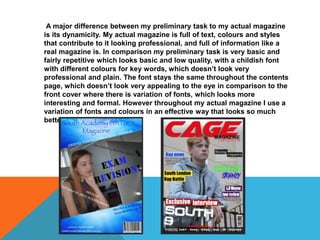
A major difference between my preliminary task to my actual magazine
is its dynamicity. My actual magazine is full of text, colours and styles
that contribute to it looking professional, and full of information like a
real magazine is. In comparison my preliminary task is very basic and
fairly repetitive which looks basic and low quality, with a childish font
with different colours for key words, which doesn’t look very
professional and plain. The font stays the same throughout the contents
page, which doesn’t look very appealing to the eye in comparison to the
front cover where there is variation of fonts, which looks more
interesting and formal. However throughout my actual magazine I use a
variation of fonts and colours in an effective way that looks so much
better.

Evaluation Question

  • 1.
    B Y BE N B L A K E S L E Y
  • 2.
    Looking at myprelimary task, I have learned a lot of new technical skills, which I have been able to implement into my actual magazine along with my blog work. I have never used Photoshop CS6 before so it was a good opportunity for me to get a basic understanding for how it works and learn how all the buttons work. I created a magazine for a school with details of school events and other information for the school term. Contents pageFront cover Photoshop CS6
  • 3.
    I learned howto use the layers effectively to my advantage when making my music magazine from the experience from my preliminary task to put different images and text in front of boxes and which makes my magazine look professional and detailed. For example, my title on my front cover I have 2 different layers of my title in the same font and size, but I gave the layer behind a different colour to I’ve the impression of a shadow or a colour fade which looks effective and intriguing. I also within the 2 layers added a rectangle which I made a crossfade into the white and black background which made the back title layer look like it was fading which looked really dynamic and high quality. Layer 1 (front layer of title) in a bold red Layer 3 (back layer of title) in a bold dark grey Layer 2 (rectangle that fades into white between layer 1 and 3) in a white fade Title Layer 4 (rectangle that is at the so fades with the white in a blac fade
  • 4.
    I learned frommy preliminary task the importance of quality pictures and how effective they can be as they really contribute to the mood of the page. My preliminary task had pictures but they wasn’t very good and I put more effort into getting more relevant and more focused images to make them stand out. I realised that the picture can dictate contrast the colours so I used a simple colour scheme. I used very dull picture which should have included more blue as the theme of the magazine. However the limited colours on the image meant putting other colours like red made it really stand out, which is effective. I used this to my advantage on my real magazine where I used a grey photo so the bright yellow and red stand out. Preliminary front cover Real front cover
  • 5.
    The barcode ofmy preliminary task looked unprofessional as it had a small white background that looked foreign and wrong to the blue background. This is something I wanted to change as it really looked poor and low quality so I made sure I made it look more integrated and professional by fitting it around similar dark colours, smaller and sideways. Preliminary front cover Real front cover
  • 6.
    A major differencebetween my preliminary task to my actual magazine is its dynamicity. My actual magazine is full of text, colours and styles that contribute to it looking professional, and full of information like a real magazine is. In comparison my preliminary task is very basic and fairly repetitive which looks basic and low quality, with a childish font with different colours for key words, which doesn’t look very professional and plain. The font stays the same throughout the contents page, which doesn’t look very appealing to the eye in comparison to the front cover where there is variation of fonts, which looks more interesting and formal. However throughout my actual magazine I use a variation of fonts and colours in an effective way that looks so much better.