By Phillip Cullen
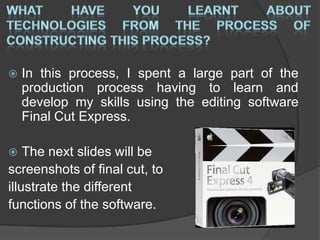
 In this process, I spent a large part of the
production process having to learn and
develop my skills using the editing software
Final Cut Express.
 The next slides will be
screenshots of final cut, to
illustrate the different
functions of the software.
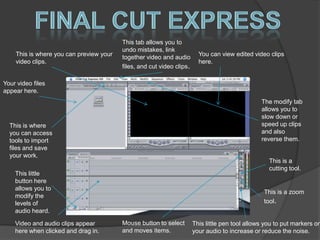
This is where you can preview your
video clips.
Your video files
appear here.
You can view edited video clips
here.
This is where
you can access
tools to import
files and save
your work.
This tab allows you to
undo mistakes, link
together video and audio
files, and cut video clips.
The modify tab
allows you to
slow down or
speed up clips
and also
reverse them.
Video and audio clips appear
here when clicked and drag in.
This little
button here
allows you to
modify the
levels of
audio heard.
Mouse button to select
and moves items.
This is a
cutting tool.
This is a zoom
tool.
This little pen tool allows you to put markers on
your audio to increase or reduce the noise.
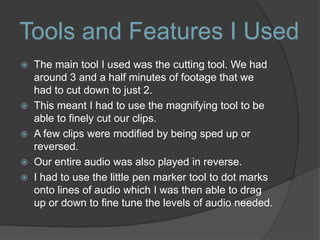
 The main tool I used was the cutting tool. We had
around 3 and a half minutes of footage that we
had to cut down to just 2.
 This meant I had to use the magnifying tool to be
able to finely cut our clips.
 A few clips were modified by being sped up or
reversed.
 Our entire audio was also played in reverse.
 I had to use the little pen marker tool to dot marks
onto lines of audio which I was then able to drag
up or down to fine tune the levels of audio needed.
Tools and Features I Used
 A major feature I used during the post-
production stage of the film was
implementing titles.
 To do this I had to create a template with
the written sentence and then apply a font
and size.
 Sometimes I did not get it correct the first
and so other attempts were required by
changing the size or its position within the
frame.
 On the next slide are some pictures from
the film.
Tools and Features I Used
Screenshots from the Film
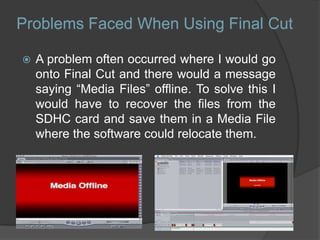
 A problem often occurred where I would go
onto Final Cut and there would a message
saying “Media Files” offline. To solve this I
would have to recover the files from the
SDHC card and save them in a Media File
where the software could relocate them.
Problems Faced When Using Final Cut
 Initially trying to use Final Cut was a
daunting task, but I eventually
familiarised myself with all of the
necessary tools I needed to use the
program, and by the end of the editing
stage, had become a proficient enough
user to be able to assist others with
using the program.
Final Thoughts

Evaluation question 7

  • 1.
  • 2.
     In thisprocess, I spent a large part of the production process having to learn and develop my skills using the editing software Final Cut Express.  The next slides will be screenshots of final cut, to illustrate the different functions of the software.
  • 3.
    This is whereyou can preview your video clips. Your video files appear here. You can view edited video clips here. This is where you can access tools to import files and save your work. This tab allows you to undo mistakes, link together video and audio files, and cut video clips. The modify tab allows you to slow down or speed up clips and also reverse them. Video and audio clips appear here when clicked and drag in. This little button here allows you to modify the levels of audio heard. Mouse button to select and moves items. This is a cutting tool. This is a zoom tool. This little pen tool allows you to put markers on your audio to increase or reduce the noise.
  • 4.
     The maintool I used was the cutting tool. We had around 3 and a half minutes of footage that we had to cut down to just 2.  This meant I had to use the magnifying tool to be able to finely cut our clips.  A few clips were modified by being sped up or reversed.  Our entire audio was also played in reverse.  I had to use the little pen marker tool to dot marks onto lines of audio which I was then able to drag up or down to fine tune the levels of audio needed. Tools and Features I Used
  • 5.
     A majorfeature I used during the post- production stage of the film was implementing titles.  To do this I had to create a template with the written sentence and then apply a font and size.  Sometimes I did not get it correct the first and so other attempts were required by changing the size or its position within the frame.  On the next slide are some pictures from the film. Tools and Features I Used
  • 6.
  • 7.
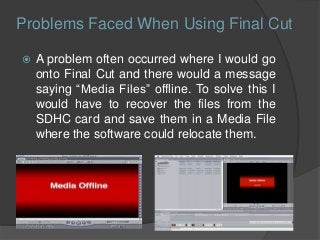
     A problemoften occurred where I would go onto Final Cut and there would a message saying “Media Files” offline. To solve this I would have to recover the files from the SDHC card and save them in a Media File where the software could relocate them. Problems Faced When Using Final Cut
  • 8.
     Initially tryingto use Final Cut was a daunting task, but I eventually familiarised myself with all of the necessary tools I needed to use the program, and by the end of the editing stage, had become a proficient enough user to be able to assist others with using the program. Final Thoughts