FRONT COVER &
CONTENTS PAGE
EVALUATION.
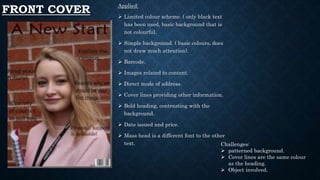
FRONT COVER Applied:
 Limited colour scheme. ( only black text
has been used, basic background that is
not colourful.
 Simple background. ( basic colours, does
not draw much attention).
 Barcode.
 Images related to content.
 Direct mode of address.
 Cover lines providing other information.
 Bold heading, contrasting with the
background.
 Date issued and price.
 Mass head is a different font to the other
text. Challenges:
 patterned background.
 Cover lines are the same colour
as the heading.
 Object involved.
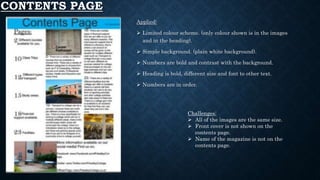
CONTENTS PAGE
Applied:
 Limited colour scheme. (only colour shown is in the images
and in the heading).
 Simple background. (plain white background).
 Numbers are bold and contrast with the background.
 Heading is bold, different size and font to other text.
 Numbers are in order.
Challenges:
 All of the images are the same size.
 Front cover is not shown on the
contents page.
 Name of the magazine is not on the
contents page.
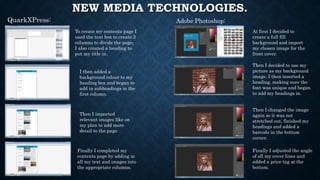
NEW MEDIA TECHNOLOGIES.
QuarkXPress: Adobe Photoshop:
To create my contents page I
used the text box to create 3
columns to divide the page,
I also created a heading to
put my title in.
I then added a
background colour to my
heading box and began to
add in subheadings in the
first column.
Then I imported
relevant images like on
my plan to add more
detail to the page.
Finally I completed my
contents page by adding in
all my text and images into
the appropriate columns.
At first I decided to
create a full fill
background and import
my chosen image for the
front cover.
Then I decided to use my
picture as my background
image, I then inserted a
heading, making sure the
font was unique and began
to add my headings in.
Then I changed the image
again so it was not
stretched out, finished my
headings and added a
barcode in the bottom
corner.
Finally I adjusted the angle
of all my cover lines and
added a price tag at the
bottom.
BENEFITS & DRAWBACKS.
Benefits:
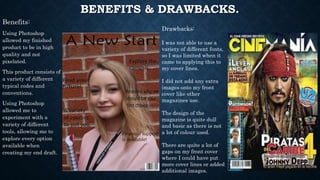
Using Photoshop
allowed my finished
product to be in high
quality and not
pixelated.
This product consists of
a variety of different
typical codes and
conventions.
Using Photoshop
allowed me to
experiment with a
variety of different
tools, allowing me to
explore every option
available when
creating my end draft.
Drawbacks:
I was not able to use a
variety of different fonts,
so I was limited when it
came to applying this to
my cover lines.
I did not add any extra
images onto my front
cover like other
magazines use.
The design of the
magazine is quite dull
and basic as there is not
a lot of colour used.
There are quite a lot of
gaps on my front cover
where I could have put
more cover lines or added
additional images.
BENEFITS & DRAWBACKS.
Benefits:
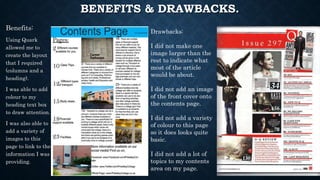
Using Quark
allowed me to
create the layout
that I required
(columns and a
heading).
I was able to add
colour to my
heading text box
to draw attention.
I was also able to
add a variety of
images to this
page to link to the
information I was
providing.
Drawbacks:
I did not make one
image larger than the
rest to indicate what
most of the article
would be about.
I did not add an image
of the front cover onto
the contents page.
I did not add a variety
of colour to this page
so it does looks quite
basic.
I did not add a lot of
topics to my contents
area on my page.

Evaluation

  • 1.
    FRONT COVER & CONTENTSPAGE EVALUATION.
  • 2.
    FRONT COVER Applied: Limited colour scheme. ( only black text has been used, basic background that is not colourful.  Simple background. ( basic colours, does not draw much attention).  Barcode.  Images related to content.  Direct mode of address.  Cover lines providing other information.  Bold heading, contrasting with the background.  Date issued and price.  Mass head is a different font to the other text. Challenges:  patterned background.  Cover lines are the same colour as the heading.  Object involved.
  • 3.
    CONTENTS PAGE Applied:  Limitedcolour scheme. (only colour shown is in the images and in the heading).  Simple background. (plain white background).  Numbers are bold and contrast with the background.  Heading is bold, different size and font to other text.  Numbers are in order. Challenges:  All of the images are the same size.  Front cover is not shown on the contents page.  Name of the magazine is not on the contents page.
  • 4.
    NEW MEDIA TECHNOLOGIES. QuarkXPress:Adobe Photoshop: To create my contents page I used the text box to create 3 columns to divide the page, I also created a heading to put my title in. I then added a background colour to my heading box and began to add in subheadings in the first column. Then I imported relevant images like on my plan to add more detail to the page. Finally I completed my contents page by adding in all my text and images into the appropriate columns. At first I decided to create a full fill background and import my chosen image for the front cover. Then I decided to use my picture as my background image, I then inserted a heading, making sure the font was unique and began to add my headings in. Then I changed the image again so it was not stretched out, finished my headings and added a barcode in the bottom corner. Finally I adjusted the angle of all my cover lines and added a price tag at the bottom.
  • 5.
    BENEFITS & DRAWBACKS. Benefits: UsingPhotoshop allowed my finished product to be in high quality and not pixelated. This product consists of a variety of different typical codes and conventions. Using Photoshop allowed me to experiment with a variety of different tools, allowing me to explore every option available when creating my end draft. Drawbacks: I was not able to use a variety of different fonts, so I was limited when it came to applying this to my cover lines. I did not add any extra images onto my front cover like other magazines use. The design of the magazine is quite dull and basic as there is not a lot of colour used. There are quite a lot of gaps on my front cover where I could have put more cover lines or added additional images.
  • 6.
    BENEFITS & DRAWBACKS. Benefits: UsingQuark allowed me to create the layout that I required (columns and a heading). I was able to add colour to my heading text box to draw attention. I was also able to add a variety of images to this page to link to the information I was providing. Drawbacks: I did not make one image larger than the rest to indicate what most of the article would be about. I did not add an image of the front cover onto the contents page. I did not add a variety of colour to this page so it does looks quite basic. I did not add a lot of topics to my contents area on my page.