Establish reliable builds and deployments 
Meet Magento Switzerland 2014 
Zurich, October 24, 2014 Marco Bamert
© Unic - Slide 3 
Me 
• Marco Bamert 
• Started working at www.unic.com in 2007 
• Senior Application Engineer 
• First Magento project 2008, Magento ever since
© Unic - Slide 4 
History 
• Desire to automate builds arose during the 2nd Magento project 
• First attempt with Scripts, then Maven which worked for quite some time 
• Until we more and more needed to customize it 
• So we decided to rebuild it from scratch with everything we learnt
© Unic - Slide 5 
A standardized and automated way of 
Click putting to different edit Master parts title together style 
to get a 
running Magento site on a server. 
Pragmatic definition of a build framework
© Unic - Slide 6 
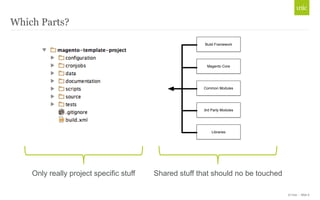
Which Parts? 
Build Framework 
Magento Core 
Common Modules 
3rd Party Modules 
Libraries 
Only really project specific stuff Shared stuff that should no be touched
• Have a standardized way of building and deploying projects and common modules 
• Project setup should not take more than 20 minutes (all inclusive) 
• Don’t depend on external resources for build and deployments 
• Have everything in control and integrate with tools currently in use 
• Have a flexible framework that works “out of the box” but is customizable - in a 
standardized way 
• Use the same framework on every environment, except for releases 
• Project should know as little as possible about the framework 
• Ability to automate the whole build and deployment pipeline 
© Unic - Slide 7 
Goals
© Unic - Slide 8 
Tools in use 
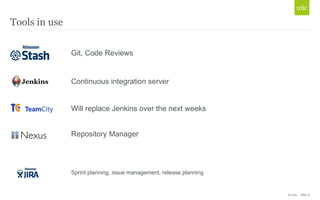
Git, Code Reviews 
Continuous integration server 
Will replace Jenkins over the next weeks 
Repository Manager 
Sprint planning, issue management, release planning
© Unic - Slide 9 
Repository Manager ? 
- A repository manager stores and 
Click organizes to edit binary Master software title style 
components 
for use in development, deployment, 
and provisioning. 
http://www.sonatype.com/nexus/why-nexus/why-use-a-repo-manager
© Unic - Slide 10 
Why use an artifact storage like Nexus? 
• Faster and more reliable builds 
• Caching 
• Eliminating Risk 
• Compliance 
• Lifecycle Management 
• Specific Access Restrictions
© Unic - Slide 11 
Tools: 
• PHing Is Not GNU make; it's a PHP project build system or build tool based on 
Apache Ant 
• Written in PHP 
• Easily extendable with custom Tasks 
• http://www.phing.info/
© Unic - Slide 12 
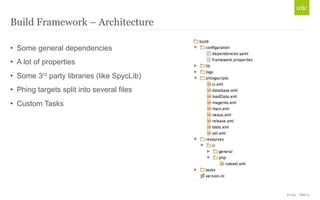
Build Framework – Architecture 
• Some general dependencies 
• A lot of properties 
• Some 3rd party libraries (like SpycLib) 
• Phing targets split into several files 
• Custom Tasks
© Unic - Slide 13 
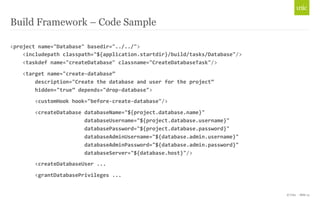
Build Framework – Code Sample 
<project 
name="Database" 
basedir="../../"> 
<includepath 
classpath="${application.startdir}/build/tasks/Database"/> 
<taskdef 
name="createDatabase" 
classname="CreateDatabaseTask"/> 
<target 
name="create-­‐database” 
description="Create 
the 
database 
and 
user 
for 
the 
project” 
hidden="true” 
depends="drop-­‐database"> 
<customHook 
hook="before-­‐create-­‐database"/> 
<createDatabase 
databaseName="${project.database.name}" 
databaseUsername="${project.database.username}" 
databasePassword="${project.database.password}" 
databaseAdminUsername="${database.admin.username}" 
databaseAdminPassword="${database.admin.password}" 
databaseServer="${database.host}"/> 
<createDatabaseUser 
... 
<grantDatabasePrivileges 
...
© Unic - Slide 14 
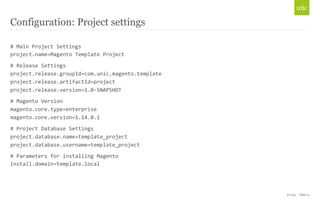
Configuration: Project settings 
# 
Main 
Project 
Settings 
project.name=Magento 
Template 
Project 
# 
Release 
Settings 
project.release.groupId=com.unic.magento.template 
project.release.artifactId=project 
project.release.version=1.0-­‐SNAPSHOT 
# 
Magento 
Version 
magento.core.type=enterprise 
magento.core.version=1.14.0.1 
# 
Project 
Database 
Settings 
project.database.name=template_project 
project.database.username=template_project 
# 
Parameters 
for 
installing 
Magento 
install.domain=template.local
© Unic - Slide 15 
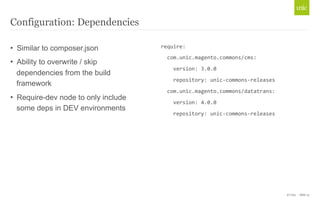
Configuration: Dependencies 
• Similar to composer.json 
• Ability to overwrite / skip 
dependencies from the build 
framework 
• Require-dev node to only include 
some deps in DEV environments 
require: 
com.unic.magento.commons/cms: 
version: 
3.0.0 
repository: 
unic-­‐commons-­‐releases 
com.unic.magento.commons/datatrans: 
version: 
4.0.0 
repository: 
unic-­‐commons-­‐releases
© Unic - Slide 16 
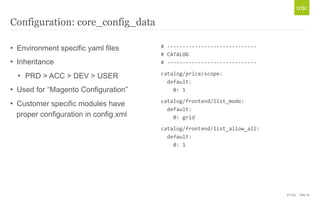
Configuration: core_config_data 
• Environment specific yaml files 
• Inheritance 
• PRD > ACC > DEV > USER 
• Used for “Magento Configuration” 
• Customer specific modules have 
proper configuration in config.xml 
# 
-­‐-­‐-­‐-­‐-­‐-­‐-­‐-­‐-­‐-­‐-­‐-­‐-­‐-­‐-­‐-­‐-­‐-­‐-­‐-­‐-­‐-­‐-­‐-­‐-­‐-­‐-­‐-­‐-­‐ 
# 
CATALOG 
# 
-­‐-­‐-­‐-­‐-­‐-­‐-­‐-­‐-­‐-­‐-­‐-­‐-­‐-­‐-­‐-­‐-­‐-­‐-­‐-­‐-­‐-­‐-­‐-­‐-­‐-­‐-­‐-­‐-­‐ 
catalog/price/scope: 
default: 
0: 
1 
catalog/frontend/list_mode: 
default: 
0: 
grid 
catalog/frontend/list_allow_all: 
default: 
0: 
1
© Unic - Slide 17 
Build process: Tell the project how to build itself 
$ 
phing 
init-­‐build-­‐framework 
... 
Project 
> 
install-­‐build-­‐framework: 
[httpget] 
Fetching 
https://nexus.unic.com/nexus/service/local/artifact/maven/redirect? 
r=unic-­‐commons-­‐releases&g=com.unic.magento&a=build-­‐framework&v=LATEST&e=zip 
... 
BUILD 
FINISHED
© Unic - Slide 18 
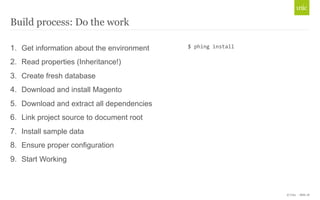
Build process: Do the work 
1. Get information about the environment 
2. Read properties (Inheritance!) 
3. Create fresh database 
4. Download and install Magento 
5. Download and extract all dependencies 
6. Link project source to document root 
7. Install sample data 
8. Ensure proper configuration 
9. Start Working 
$ 
phing 
install
© Unic - Slide 19 
Build process: Artifact creation – Step 1 
1. Project is build on Jenkins (automatically or manually) 
2. Compress important stuff, ignore the rest 
3. Upload the compressed Artifact to Nexus
© Unic - Slide 20 
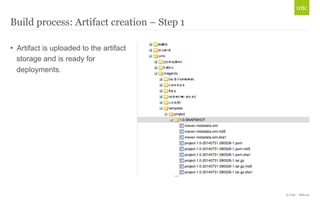
Build process: Artifact creation – Step 1 
• Artifact is uploaded to the artifact 
storage and is ready for 
deployments.
© Unic - Slide 21 
Build process: Configure the server – Step 2 
• Only the server itself knows the passwords and configuration 
• Most of the configuration is standardized but can be configured to specific needs 
• Server specific local.xml is stored on the server and injected into the deployed 
version
© Unic - Slide 22 
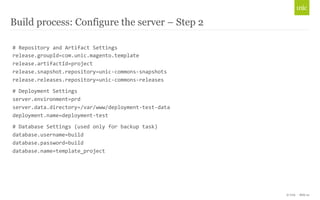
Build process: Configure the server – Step 2 
# 
Repository 
and 
Artifact 
Settings 
release.groupId=com.unic.magento.template 
release.artifactId=project 
release.snapshot.repository=unic-­‐commons-­‐snapshots 
release.releases.repository=unic-­‐commons-­‐releases 
# 
Deployment 
Settings 
server.environment=prd 
server.data.directory=/var/www/deployment-­‐test-­‐data 
deployment.name=deployment-­‐test 
# 
Database 
Settings 
(used 
only 
for 
backup 
task) 
database.username=build 
database.password=build 
database.name=template_project
© Unic - Slide 23 
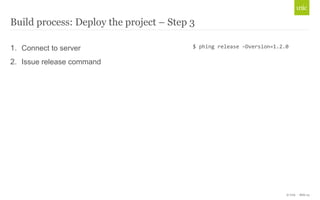
Build process: Deploy the project – Step 3 
1. Connect to server 
2. Issue release command 
$ 
phing 
release 
–Dversion=1.2.0
© Unic - Slide 24 
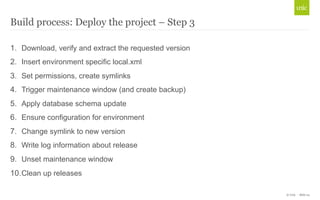
Build process: Deploy the project – Step 3 
1. Download, verify and extract the requested version 
2. Insert environment specific local.xml 
3. Set permissions, create symlinks 
4. Trigger maintenance window (and create backup) 
5. Apply database schema update 
6. Ensure configuration for environment 
7. Change symlink to new version 
8. Write log information about release 
9. Unset maintenance window 
10. Clean up releases
© Unic - Slide 25 
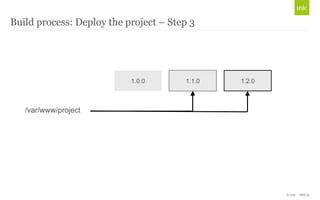
Build process: Deploy the project – Step 3 
/var/www/project 
1.0.0 1.1.0 1.2.0
© Unic - Slide 26
© Unic - Slide 27 
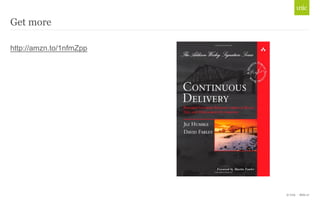
Get more 
http://amzn.to/1nfmZpp
© Unic - Slide 28 
Resources & links 
• Phing (http://www.phing.info/) 
• Nexus (http://www.sonatype.com/nexus) 
• git-flow (https://github.com/nvie/gitflow) 
• Atlassian Stash (https://www.atlassian.com/software/stash) 
• Atlassian Jira (https://www.atlassian.com/software/jira) 
• TeamCity (http://www.jetbrains.com/teamcity/)
© Unic - Seite 29
Unic AG 
Hohlstrasse 536 
8048 Zürich 
Tel +41 44 560 12 12 
Fax +41 44 560 12 13 
info@unic.com 
www.unic.com 
© Unic - Seite 30 
Marco Bamert 
Senior Application Engineer 
marco.bamert@unic.com

Establish reliable builds and deployments with Magento

  • 1.
    Establish reliable buildsand deployments Meet Magento Switzerland 2014 Zurich, October 24, 2014 Marco Bamert
  • 3.
    © Unic -Slide 3 Me • Marco Bamert • Started working at www.unic.com in 2007 • Senior Application Engineer • First Magento project 2008, Magento ever since
  • 4.
    © Unic -Slide 4 History • Desire to automate builds arose during the 2nd Magento project • First attempt with Scripts, then Maven which worked for quite some time • Until we more and more needed to customize it • So we decided to rebuild it from scratch with everything we learnt
  • 5.
    © Unic -Slide 5 A standardized and automated way of Click putting to different edit Master parts title together style to get a running Magento site on a server. Pragmatic definition of a build framework
  • 6.
    © Unic -Slide 6 Which Parts? Build Framework Magento Core Common Modules 3rd Party Modules Libraries Only really project specific stuff Shared stuff that should no be touched
  • 7.
    • Have astandardized way of building and deploying projects and common modules • Project setup should not take more than 20 minutes (all inclusive) • Don’t depend on external resources for build and deployments • Have everything in control and integrate with tools currently in use • Have a flexible framework that works “out of the box” but is customizable - in a standardized way • Use the same framework on every environment, except for releases • Project should know as little as possible about the framework • Ability to automate the whole build and deployment pipeline © Unic - Slide 7 Goals
  • 8.
    © Unic -Slide 8 Tools in use Git, Code Reviews Continuous integration server Will replace Jenkins over the next weeks Repository Manager Sprint planning, issue management, release planning
  • 9.
    © Unic -Slide 9 Repository Manager ? - A repository manager stores and Click organizes to edit binary Master software title style components for use in development, deployment, and provisioning. http://www.sonatype.com/nexus/why-nexus/why-use-a-repo-manager
  • 10.
    © Unic -Slide 10 Why use an artifact storage like Nexus? • Faster and more reliable builds • Caching • Eliminating Risk • Compliance • Lifecycle Management • Specific Access Restrictions
  • 11.
    © Unic -Slide 11 Tools: • PHing Is Not GNU make; it's a PHP project build system or build tool based on Apache Ant • Written in PHP • Easily extendable with custom Tasks • http://www.phing.info/
  • 12.
    © Unic -Slide 12 Build Framework – Architecture • Some general dependencies • A lot of properties • Some 3rd party libraries (like SpycLib) • Phing targets split into several files • Custom Tasks
  • 13.
    © Unic -Slide 13 Build Framework – Code Sample <project name="Database" basedir="../../"> <includepath classpath="${application.startdir}/build/tasks/Database"/> <taskdef name="createDatabase" classname="CreateDatabaseTask"/> <target name="create-­‐database” description="Create the database and user for the project” hidden="true” depends="drop-­‐database"> <customHook hook="before-­‐create-­‐database"/> <createDatabase databaseName="${project.database.name}" databaseUsername="${project.database.username}" databasePassword="${project.database.password}" databaseAdminUsername="${database.admin.username}" databaseAdminPassword="${database.admin.password}" databaseServer="${database.host}"/> <createDatabaseUser ... <grantDatabasePrivileges ...
  • 14.
    © Unic -Slide 14 Configuration: Project settings # Main Project Settings project.name=Magento Template Project # Release Settings project.release.groupId=com.unic.magento.template project.release.artifactId=project project.release.version=1.0-­‐SNAPSHOT # Magento Version magento.core.type=enterprise magento.core.version=1.14.0.1 # Project Database Settings project.database.name=template_project project.database.username=template_project # Parameters for installing Magento install.domain=template.local
  • 15.
    © Unic -Slide 15 Configuration: Dependencies • Similar to composer.json • Ability to overwrite / skip dependencies from the build framework • Require-dev node to only include some deps in DEV environments require: com.unic.magento.commons/cms: version: 3.0.0 repository: unic-­‐commons-­‐releases com.unic.magento.commons/datatrans: version: 4.0.0 repository: unic-­‐commons-­‐releases
  • 16.
    © Unic -Slide 16 Configuration: core_config_data • Environment specific yaml files • Inheritance • PRD > ACC > DEV > USER • Used for “Magento Configuration” • Customer specific modules have proper configuration in config.xml # -­‐-­‐-­‐-­‐-­‐-­‐-­‐-­‐-­‐-­‐-­‐-­‐-­‐-­‐-­‐-­‐-­‐-­‐-­‐-­‐-­‐-­‐-­‐-­‐-­‐-­‐-­‐-­‐-­‐ # CATALOG # -­‐-­‐-­‐-­‐-­‐-­‐-­‐-­‐-­‐-­‐-­‐-­‐-­‐-­‐-­‐-­‐-­‐-­‐-­‐-­‐-­‐-­‐-­‐-­‐-­‐-­‐-­‐-­‐-­‐ catalog/price/scope: default: 0: 1 catalog/frontend/list_mode: default: 0: grid catalog/frontend/list_allow_all: default: 0: 1
  • 17.
    © Unic -Slide 17 Build process: Tell the project how to build itself $ phing init-­‐build-­‐framework ... Project > install-­‐build-­‐framework: [httpget] Fetching https://nexus.unic.com/nexus/service/local/artifact/maven/redirect? r=unic-­‐commons-­‐releases&g=com.unic.magento&a=build-­‐framework&v=LATEST&e=zip ... BUILD FINISHED
  • 18.
    © Unic -Slide 18 Build process: Do the work 1. Get information about the environment 2. Read properties (Inheritance!) 3. Create fresh database 4. Download and install Magento 5. Download and extract all dependencies 6. Link project source to document root 7. Install sample data 8. Ensure proper configuration 9. Start Working $ phing install
  • 19.
    © Unic -Slide 19 Build process: Artifact creation – Step 1 1. Project is build on Jenkins (automatically or manually) 2. Compress important stuff, ignore the rest 3. Upload the compressed Artifact to Nexus
  • 20.
    © Unic -Slide 20 Build process: Artifact creation – Step 1 • Artifact is uploaded to the artifact storage and is ready for deployments.
  • 21.
    © Unic -Slide 21 Build process: Configure the server – Step 2 • Only the server itself knows the passwords and configuration • Most of the configuration is standardized but can be configured to specific needs • Server specific local.xml is stored on the server and injected into the deployed version
  • 22.
    © Unic -Slide 22 Build process: Configure the server – Step 2 # Repository and Artifact Settings release.groupId=com.unic.magento.template release.artifactId=project release.snapshot.repository=unic-­‐commons-­‐snapshots release.releases.repository=unic-­‐commons-­‐releases # Deployment Settings server.environment=prd server.data.directory=/var/www/deployment-­‐test-­‐data deployment.name=deployment-­‐test # Database Settings (used only for backup task) database.username=build database.password=build database.name=template_project
  • 23.
    © Unic -Slide 23 Build process: Deploy the project – Step 3 1. Connect to server 2. Issue release command $ phing release –Dversion=1.2.0
  • 24.
    © Unic -Slide 24 Build process: Deploy the project – Step 3 1. Download, verify and extract the requested version 2. Insert environment specific local.xml 3. Set permissions, create symlinks 4. Trigger maintenance window (and create backup) 5. Apply database schema update 6. Ensure configuration for environment 7. Change symlink to new version 8. Write log information about release 9. Unset maintenance window 10. Clean up releases
  • 25.
    © Unic -Slide 25 Build process: Deploy the project – Step 3 /var/www/project 1.0.0 1.1.0 1.2.0
  • 26.
    © Unic -Slide 26
  • 27.
    © Unic -Slide 27 Get more http://amzn.to/1nfmZpp
  • 28.
    © Unic -Slide 28 Resources & links • Phing (http://www.phing.info/) • Nexus (http://www.sonatype.com/nexus) • git-flow (https://github.com/nvie/gitflow) • Atlassian Stash (https://www.atlassian.com/software/stash) • Atlassian Jira (https://www.atlassian.com/software/jira) • TeamCity (http://www.jetbrains.com/teamcity/)
  • 29.
    © Unic -Seite 29
  • 30.
    Unic AG Hohlstrasse536 8048 Zürich Tel +41 44 560 12 12 Fax +41 44 560 12 13 info@unic.com www.unic.com © Unic - Seite 30 Marco Bamert Senior Application Engineer marco.bamert@unic.com