
ASP.NET CORE 帶您
讀源碼
WebSocket 篇
WebSocket
■ Duplex bi-directional Api for web
server  client
■ RFC 6455
https://tools.ietf.org/html/rfc6455
■ W3C standard:
https://www.w3.org/TR/websockets
/
■ Transport protocol intro:
https://www.youtube.com/watch?v=
9FqjRN4VYUU
■ Js Client & protocol packet format
intro: https://hpbn.co/websocket/
WebSocket
Connect State Transition
1. Connection Upgrade
(Protocol Switch)
2. Data In/Out arbitrarily
(Ping  Pong to detect online)
3. Close connection handshake
Transfer “Frame” format
Read the source?!
Experiment with source!!
(tracing/logging or make it
debuggable)■ Client :
websocket-sharp
https://sta.github.io/websocket-
sharp/
■ Server :
ASP.NET Core v2.1.1 Websocket
https://docs.microsoft.com/en-
us/aspnet/core/fundamentals/webso
ckets?view=aspnetcore-2.1
websocket-sharp
■ Run on .NET Framework 3.5 and above, Mono, Unity3D
■ A single DLL provide websocket client/server functionality, comply with RFC 6455
■ HTTPS encrypt/decrypt algorithm is via Framework functionality
■ MIT license
websocket-sharp
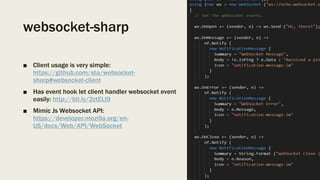
■ Client usage is very simple:
https://github.com/sta/websocket-
sharp#websocket-client
■ Has event hook let client handler websocket event
easily: http://bit.ly/2ztELl9
■ Mimic Js Websocket API:
https://developer.mozilla.org/en-
US/docs/Web/API/WebSocket
■ Entry Point: the “WebSocket” class: http://bit.ly/2L76Xf2
■ WebSocket Connect() Implementation:
– Connect() API : http://bit.ly/2KVjLsf
 doHandshake() : http://bit.ly/2J9ySJn
 setClientStream() : http://bit.ly/2zsdLCN
 createHandshakeRequest() : http://bit.ly/2KKAkHO
 sendHttpRequest() : http://bit.ly/2JeiYgX
 checkHandshakeResponse() : http://bit.ly/2zsim7O
=> Create “NetworkStream (http://bit.ly/2L3q5xE)” for afterward R/W operation
■ WebSocket Send() Implementation:
– Send() API : http://bit.ly/2LaYY0I
 send(Opcode opcode, Stream stream, bool compressed) : http://bit.ly/2N31aYq
 send(Fin fin, Opcode opcode, byte[] data, bool compressed) : http://bit.ly/2KPszQQ
 sendBytes(byte[] bytes) : http://bit.ly/2zoQCkx
=> Wrap input into a lot of “WebSocketFrame (http://bit.ly/2N5zfHh)” then write to stream
■ WebSocket OnMessage event Implementation:
– EventHandler<MessageEventArgs> OnMessage :
■ There’re two place emit the event:
– messagec(MessageEventArgs e) : http://bit.ly/2L7etGO
■ This is binding to Action<> _message field, which is invoked On:
– open() : http://bit.ly/2uaCGpl
■ Being called at Connect() API : http://bit.ly/2L65rgE
– message() : http://bit.ly/2KMUt00
– startReceiving() : http://bit.ly/2NEcATw
– open() : http://bit.ly/2zssHAE
=> Get data from internal _messageEventQueue.Dequeue() then invoke the event.
ASP.NET Core Websocket Server
■ The whole implementation across many “Nuget Packges (https://www.nuget.org/packages)”:
– Microsoft.AspNetCore.Websockets
– Microsoft.AspNetCore.Http.Abstractions
– Microsoft.AspNetCore.Http
– Microsoft.AspNetCore.Http.Extensions
– Microsoft.AspNetCore.Http.Features
– Microsoft.AspNetCore.Server.Kestrel
– Microsoft.AspNetCore.Server.Kestrel.Core
– System.Net.WebSockets.WebSocketProtocol
– System.Net.WebSockets
■ It’s impossible to get through whole source code simply by human 👀!!!
■ We have to “experiment it” with debuggable source code or being able to logging detail
information.
Build ASP.Net Core Framework
Package
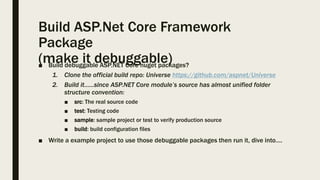
(make it debuggable)■ Build debuggable ASP.NET Core nuget packages?
1. Clone the official build repo: Universe https://github.com/aspnet/Universe
2. Build it…...since ASP.NET Core module’s source has almost unified folder
structure convention:
■ src: The real source code
■ test: Testing code
■ sample: sample project or test to verify production source
■ build: build configuration files
■ Write a example project to use those debuggable packages then run it, dive into….
Build ASP.Net Core Framework Package
■ To build individual packages:
1. In Windows machine, Install chocolatey, git for windows, Visual Studio 2017
and ASP.NET workload, node.js (for npm):
https://github.com/aspnet/Universe/wiki/Setting-a-machine-up-to-run-Universe
2. Clone Universe repo with correct tag ( -b 2.1.1), be sure to use --recursive to
get associated git submodule repo in modules folder.
3. Run build.cmd (build.sh) on top folder to let ASP.NET Core Buildtools setup
correct config files on first time, even if not all module can successful build.
4. Make sure the residue build process are all killed.
5. Switch to the module folder you want to build, delete anything in
artifactsbuild subfolder, then use:
build.cmd /p:CompileOnly=true /p:SkipTests=true
To build those Nuget packages of the module, Resulting files will reside in
module folder's artifactsbuild folder, and by default, they are debuggable.
Build ASP.Net Core Framework
Package
(make it debuggable)■ Use “find –iname“ or “dir /s” to find Nuget packages real source location in
Universe repo:
■ Exception:
Microsoft.AspNetCore.Server.Kestrel
Microsoft.AspNetCore.Server.Kestrel.Core
is in modulesKestrelHttpServer folder
■ But the
System.Net.WebSockets.WebSocketProtocol
System.Net.WebSockets
packages are .NET Core runtime’s built-in libraries, that belongs to the
“CoreFx (https://github.com/dotnet/corefx)” repo, not in ASP.NET Core
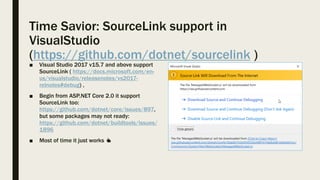
Time Savior: SourceLink support in
VisualStudio
(https://github.com/dotnet/sourcelink )
■ Visual Studio 2017 v15.7 and above support
SourceLink ( https://docs.microsoft.com/en-
us/visualstudio/releasenotes/vs2017-
relnotes#debug) ,
■ Begin from ASP.NET Core 2.0 it support
SourceLink too:
https://github.com/dotnet/core/issues/897,
but some packages may not ready:
https://github.com/dotnet/buildtools/issues/
1896
■ Most of time it just works 👍
■ Caveat:
– Can not use “GoToDefinition(F12)” if it hasn’t been using debugger dive into it.
– If source code already disappear on GitHub, it cannot work.
– Some too deep function(s) may not work (may be bug?!)
Example experiment project
■ Example source repo:
http://bit.ly/2KO3B4n
■ It use .NET Core SCD deployment
(http://bit.ly/2maxCgj)to let
ASP.NET core runtime use
debuggable Nuget packages we
created.
■ Runs only on Win10-x64
machine.
Some interesting digging result: (1)
■ WebSocket connection setup is implmented in “DefaultWebSocketManager”, its
AccetpWebSocketAsync() is forwarding Websocket upgrade connection work to
WebSocketMiddleware: http://bit.ly/2ukREs1
■ WebSocket SHA-1 encrypt key is hard-coded: http://bit.ly/2N2oTYT
Some interesting digging result: (2)
■ The real “Connection Upgrade” phase is done in
Microsoft.AspNetCore.Server.Kestrel
nuget package’s code, which is Web Server itself:
http://bit.ly/2umVGjz
■ And the WebSocket(http://bit.ly/2KO5uhK) instance is created from websocket
middleware using “HttpResponseStream” as source, the real class is
“ManagedWebSocket”, an internal un-documented Class:
Some interesting digging result: (3)
■ The Actual ReadAsync() & WriteAsync() implementation entry point is extension
methods: http://bit.ly/2uo2ZaL
■ Write data to websocket’s final operations is call HttpUpgradeStream’s
WriteAsync(), which is also located in Web Server itself (the
Microsoft.AspNetCore.Server.Kestrel.Core Nuget package) :
http://bit.ly/2uaKk33
■ Closing websocket implementation is done by ManagedWebSocket class itself:
http://bit.ly/2mbw9pW
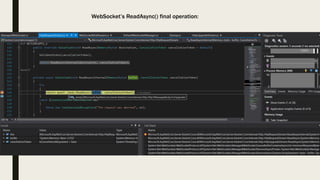
WebSocket’s ReadAsync() final operation:
WebSocket’s WriteAsync() final operation:
Conclusion
■ ASP.NET Core use many Abstract class and Interface in its API, and the real
implementation is DefaultOOXX most of the time.
Ex:
WebSocketManager  DefaultWebSocketManager
HttpContext  DefaultHttpContext
■ ASP.NET Core’s Middleware is binding via “Microsoft.AspNetCore.Http.Features”
Nuget’s code.
Resources & Tools:
■ SourceGrpah: https://sourcegraph.com/
■ VSCode & OmniSharp extension:
https://code.visualstudio.com/Docs/languages/csharp
■ MDN:
– Websocket API: https://developer.mozilla.org/en-
US/docs/Web/API/Websockets_API
– Writing WebSocket servers: https://developer.mozilla.org/en-
US/docs/Web/API/WebSockets_API/Writing_WebSocket_servers

WebSocket on client & server using websocket-sharp & ASP.NET Core

  • 1.
  • 2.
    WebSocket ■ Duplex bi-directionalApi for web server  client ■ RFC 6455 https://tools.ietf.org/html/rfc6455 ■ W3C standard: https://www.w3.org/TR/websockets / ■ Transport protocol intro: https://www.youtube.com/watch?v= 9FqjRN4VYUU ■ Js Client & protocol packet format intro: https://hpbn.co/websocket/
  • 3.
    WebSocket Connect State Transition 1.Connection Upgrade (Protocol Switch) 2. Data In/Out arbitrarily (Ping  Pong to detect online) 3. Close connection handshake Transfer “Frame” format
  • 4.
  • 5.
    Experiment with source!! (tracing/loggingor make it debuggable)■ Client : websocket-sharp https://sta.github.io/websocket- sharp/ ■ Server : ASP.NET Core v2.1.1 Websocket https://docs.microsoft.com/en- us/aspnet/core/fundamentals/webso ckets?view=aspnetcore-2.1
  • 6.
    websocket-sharp ■ Run on.NET Framework 3.5 and above, Mono, Unity3D ■ A single DLL provide websocket client/server functionality, comply with RFC 6455 ■ HTTPS encrypt/decrypt algorithm is via Framework functionality ■ MIT license
  • 7.
    websocket-sharp ■ Client usageis very simple: https://github.com/sta/websocket- sharp#websocket-client ■ Has event hook let client handler websocket event easily: http://bit.ly/2ztELl9 ■ Mimic Js Websocket API: https://developer.mozilla.org/en- US/docs/Web/API/WebSocket
  • 8.
    ■ Entry Point:the “WebSocket” class: http://bit.ly/2L76Xf2 ■ WebSocket Connect() Implementation: – Connect() API : http://bit.ly/2KVjLsf  doHandshake() : http://bit.ly/2J9ySJn  setClientStream() : http://bit.ly/2zsdLCN  createHandshakeRequest() : http://bit.ly/2KKAkHO  sendHttpRequest() : http://bit.ly/2JeiYgX  checkHandshakeResponse() : http://bit.ly/2zsim7O => Create “NetworkStream (http://bit.ly/2L3q5xE)” for afterward R/W operation ■ WebSocket Send() Implementation: – Send() API : http://bit.ly/2LaYY0I  send(Opcode opcode, Stream stream, bool compressed) : http://bit.ly/2N31aYq  send(Fin fin, Opcode opcode, byte[] data, bool compressed) : http://bit.ly/2KPszQQ  sendBytes(byte[] bytes) : http://bit.ly/2zoQCkx => Wrap input into a lot of “WebSocketFrame (http://bit.ly/2N5zfHh)” then write to stream
  • 9.
    ■ WebSocket OnMessageevent Implementation: – EventHandler<MessageEventArgs> OnMessage : ■ There’re two place emit the event: – messagec(MessageEventArgs e) : http://bit.ly/2L7etGO ■ This is binding to Action<> _message field, which is invoked On: – open() : http://bit.ly/2uaCGpl ■ Being called at Connect() API : http://bit.ly/2L65rgE – message() : http://bit.ly/2KMUt00 – startReceiving() : http://bit.ly/2NEcATw – open() : http://bit.ly/2zssHAE => Get data from internal _messageEventQueue.Dequeue() then invoke the event.
  • 10.
    ASP.NET Core WebsocketServer ■ The whole implementation across many “Nuget Packges (https://www.nuget.org/packages)”: – Microsoft.AspNetCore.Websockets – Microsoft.AspNetCore.Http.Abstractions – Microsoft.AspNetCore.Http – Microsoft.AspNetCore.Http.Extensions – Microsoft.AspNetCore.Http.Features – Microsoft.AspNetCore.Server.Kestrel – Microsoft.AspNetCore.Server.Kestrel.Core – System.Net.WebSockets.WebSocketProtocol – System.Net.WebSockets ■ It’s impossible to get through whole source code simply by human 👀!!! ■ We have to “experiment it” with debuggable source code or being able to logging detail information.
  • 11.
    Build ASP.Net CoreFramework Package (make it debuggable)■ Build debuggable ASP.NET Core nuget packages? 1. Clone the official build repo: Universe https://github.com/aspnet/Universe 2. Build it…...since ASP.NET Core module’s source has almost unified folder structure convention: ■ src: The real source code ■ test: Testing code ■ sample: sample project or test to verify production source ■ build: build configuration files ■ Write a example project to use those debuggable packages then run it, dive into….
  • 13.
    Build ASP.Net CoreFramework Package ■ To build individual packages: 1. In Windows machine, Install chocolatey, git for windows, Visual Studio 2017 and ASP.NET workload, node.js (for npm): https://github.com/aspnet/Universe/wiki/Setting-a-machine-up-to-run-Universe 2. Clone Universe repo with correct tag ( -b 2.1.1), be sure to use --recursive to get associated git submodule repo in modules folder. 3. Run build.cmd (build.sh) on top folder to let ASP.NET Core Buildtools setup correct config files on first time, even if not all module can successful build. 4. Make sure the residue build process are all killed. 5. Switch to the module folder you want to build, delete anything in artifactsbuild subfolder, then use: build.cmd /p:CompileOnly=true /p:SkipTests=true To build those Nuget packages of the module, Resulting files will reside in module folder's artifactsbuild folder, and by default, they are debuggable.
  • 14.
    Build ASP.Net CoreFramework Package (make it debuggable)■ Use “find –iname“ or “dir /s” to find Nuget packages real source location in Universe repo: ■ Exception: Microsoft.AspNetCore.Server.Kestrel Microsoft.AspNetCore.Server.Kestrel.Core is in modulesKestrelHttpServer folder ■ But the System.Net.WebSockets.WebSocketProtocol System.Net.WebSockets packages are .NET Core runtime’s built-in libraries, that belongs to the “CoreFx (https://github.com/dotnet/corefx)” repo, not in ASP.NET Core
  • 15.
    Time Savior: SourceLinksupport in VisualStudio (https://github.com/dotnet/sourcelink ) ■ Visual Studio 2017 v15.7 and above support SourceLink ( https://docs.microsoft.com/en- us/visualstudio/releasenotes/vs2017- relnotes#debug) , ■ Begin from ASP.NET Core 2.0 it support SourceLink too: https://github.com/dotnet/core/issues/897, but some packages may not ready: https://github.com/dotnet/buildtools/issues/ 1896 ■ Most of time it just works 👍
  • 16.
    ■ Caveat: – Cannot use “GoToDefinition(F12)” if it hasn’t been using debugger dive into it. – If source code already disappear on GitHub, it cannot work. – Some too deep function(s) may not work (may be bug?!)
  • 17.
    Example experiment project ■Example source repo: http://bit.ly/2KO3B4n ■ It use .NET Core SCD deployment (http://bit.ly/2maxCgj)to let ASP.NET core runtime use debuggable Nuget packages we created. ■ Runs only on Win10-x64 machine.
  • 19.
    Some interesting diggingresult: (1) ■ WebSocket connection setup is implmented in “DefaultWebSocketManager”, its AccetpWebSocketAsync() is forwarding Websocket upgrade connection work to WebSocketMiddleware: http://bit.ly/2ukREs1 ■ WebSocket SHA-1 encrypt key is hard-coded: http://bit.ly/2N2oTYT
  • 20.
    Some interesting diggingresult: (2) ■ The real “Connection Upgrade” phase is done in Microsoft.AspNetCore.Server.Kestrel nuget package’s code, which is Web Server itself: http://bit.ly/2umVGjz ■ And the WebSocket(http://bit.ly/2KO5uhK) instance is created from websocket middleware using “HttpResponseStream” as source, the real class is “ManagedWebSocket”, an internal un-documented Class:
  • 21.
    Some interesting diggingresult: (3) ■ The Actual ReadAsync() & WriteAsync() implementation entry point is extension methods: http://bit.ly/2uo2ZaL ■ Write data to websocket’s final operations is call HttpUpgradeStream’s WriteAsync(), which is also located in Web Server itself (the Microsoft.AspNetCore.Server.Kestrel.Core Nuget package) : http://bit.ly/2uaKk33 ■ Closing websocket implementation is done by ManagedWebSocket class itself: http://bit.ly/2mbw9pW
  • 22.
  • 23.
  • 24.
    Conclusion ■ ASP.NET Coreuse many Abstract class and Interface in its API, and the real implementation is DefaultOOXX most of the time. Ex: WebSocketManager  DefaultWebSocketManager HttpContext  DefaultHttpContext ■ ASP.NET Core’s Middleware is binding via “Microsoft.AspNetCore.Http.Features” Nuget’s code.
  • 25.
    Resources & Tools: ■SourceGrpah: https://sourcegraph.com/ ■ VSCode & OmniSharp extension: https://code.visualstudio.com/Docs/languages/csharp ■ MDN: – Websocket API: https://developer.mozilla.org/en- US/docs/Web/API/Websockets_API – Writing WebSocket servers: https://developer.mozilla.org/en- US/docs/Web/API/WebSockets_API/Writing_WebSocket_servers