Version 1.0.12 (January 2007)
Dino Esposito
http://weblogs.asp.net/despos
ASP.NET AJAX Extensions
Calling Remote Services from ASP.NET AJAX
Solid Quality ASP.NET AJAX
What You’re Going to See
• Defining remote services
• Implementing remote services
• REST vs. SOAP
• Considerations
Solid Quality ASP.NET AJAX
Need for services
• AJAX’s big win is invoking server code from the client page
– How do you expose server code to the client?
• Learn from the past
– Remote Scripting back in 1997
– Client engine nearly identical (was a Java applet)
– Server infrastructure based on classic ASP
– Public, fixed-name, contract-bound object exposed by the page and
invoked by the client code
– Contract implementation to determine subsequent server behavior
– Data exchanged through strings
– Client sets method to call and passes/receives values
Solid Quality ASP.NET AJAX
Define a contract
• Give your service an explicit contract
• Not strictly required by ASP.NET AJAX v1.0
• Implement the contract in a service class
– SOA architecture
Solid Quality ASP.NET AJAX
Expose the server API
• Build a RESTful service
– Build a service that documents itself through headers
and URLs, not SOAP
• Translated to the ASP.NET AJAX’s jargon
– Build an ASP.NET Web service with a special attribute
– Or
– Use the ASP.NET page as a special Web service
Solid Quality ASP.NET AJAX
Common misconception
• ASP.NET AJAX Lets You Call Web Services
– Untrue and incorrect
– but it may happen …
Solid Quality ASP.NET AJAX
REST vs. SOAP
• REpresentational State Transfer
– It’s all about the URL (and headers)
– Resource = URL
• Simple Object Access Protocol
– One URL fits all
– Use a XML schema to describe the call
– Use WSDL to describe the API
• SOAP-based services require the client know about
SOAP
Solid Quality ASP.NET AJAX
ASP.NET AJAX Perspective
• Expose the server API as REST services
• You write ASP.NET Web services with an extra
attribute
– Expose the service the REST way
– JSON feeds consumed
– No SOAP at all (simpler, faster)
– Same Origin Policy
• Call made to the local server
Solid Quality ASP.NET AJAX
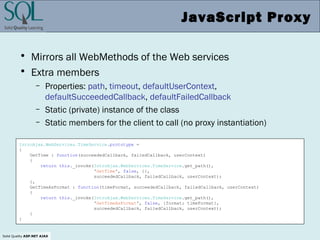
JavaScript Proxy
• Mirrors all WebMethods of the Web services
• Extra members
– Properties: path, timeout, defaultUserContext,
defaultSucceededCallback, defaultFailedCallback
– Static (private) instance of the class
– Static members for the client to call (no proxy instantiation)
IntroAjax.WebServices.TimeService.prototype =
{
GetTime : function(succeededCallback, failedCallback, userContext)
{
return this._invoke(IntroAjax.WebServices.TimeService.get_path(),
'GetTime', false, {},
succeededCallback, failedCallback, userContext);
},
GetTimeAsFormat : function(timeFormat, succeededCallback, failedCallback, userContext)
{
return this._invoke(IntroAjax.WebServices.TimeService.get_path(),
'GetTimeAsFormat', false, {format: timeFormat},
succeededCallback, failedCallback, userContext);
}
}
Solid Quality ASP.NET AJAX
Calling Web Methods
• Use static methods on the proxy and add callbacks
<script language="javascript" type="text/javascript">
function getTime() {
var timeFormat = "ddd, dd MMMM yyyy [hh:mm:ss]";
IntroAjax.WebServices.TimeService.GetTimeFormat(timeFormat, onMethodComplete);
}
function onMethodComplete(results) {
$get("Label1").innerHTML = results;
}
</script>
<html xmlns="http://www.w3.org/1999/xhtml">
<head runat="server"><title>The Time Web service</title></head>
<body>
<form id="form1" runat="server">
<asp:ScriptManager ID="ScriptManager1" runat="server">
<Services>
<asp:ServiceReference Path="~/WebServices/TimeService.asmx" />
</Services>
</asp:ScriptManager>
<h2> What time is it on the server? </h2>
<input type="button" value="Get Time" onclick="getTime()" />
<asp:Label runat="server" ID="Label1" />
</form>
</body>
</html>
Solid Quality ASP.NET AJAX
DEMO
• Invoking a Web service from an AJAX page
Solid Quality ASP.NET AJAX
JSON Serialization
• Page/server communication is based on strings
– Data is automatically serialized using JSON
• JavaScript Object Notation (simpler than XML)
– Text format to represent an object—actually, an (associative) array
– Needs a “proxy” to represent a server type
• Server and client infrastructure to proxy data
• Sample call:
– IntroAjax.TimeService.GetTimeFormat("ddd, dd MMMM yyyy [hh:mm:ss]", ...)
{"format":"ddd, dd MMMM yyyy [hh:mm:ss]"}
"Thu, 25 January 2007 [07:10:31]"
Request body
Response Content
Solid Quality ASP.NET AJAX
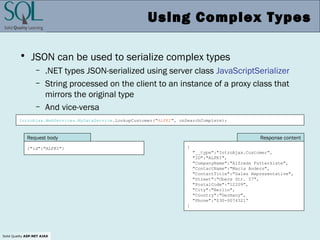
Using Complex Types
• JSON can be used to serialize complex types
– .NET types JSON-serialized using server class JavaScriptSerializer
– String processed on the client to an instance of a proxy class that
mirrors the original type
– And vice-versa
{"id":"ALFKI"} {
"__type":"IntroAjax.Customer",
"ID":"ALFKI",
"CompanyName":"Alfreds Futterkiste",
"ContactName":"Maria Anders",
"ContactTitle":"Sales Representative",
"Street":"Obere Str. 57",
"PostalCode":"12209",
"City":"Berlin",
"Country":"Germany",
"Phone":"030-0074321“
}
Response contentRequest body
IntroAjax.WebServices.MyDataService.LookupCustomer("ALFKI", onSearchComplete);
Solid Quality ASP.NET AJAX
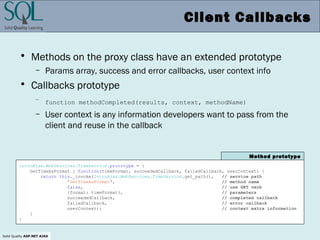
Client Callbacks
• Methods on the proxy class have an extended prototype
– Params array, success and error callbacks, user context info
• Callbacks prototype
– function methodCompleted(results, context, methodName)
– User context is any information developers want to pass from the
client and reuse in the callback
IntroAjax.WebServices.TimeService.prototype = {
GetTimeAsFormat : function(timeFormat, succeededCallback, failedCallback, userContext) {
return this._invoke(IntroAjax.WebServices.TimeService.get_path(), // service path
'GetTimeAsFormat', // method name
false, // use GET verb
{format: timeFormat}, // parameters
succeededCallback, // completed callback
failedCallback, // error callback
userContext); // context extra information
}
}
Method prototype
Solid Quality ASP.NET AJAX
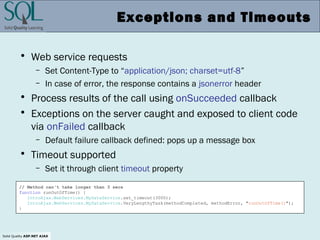
Exceptions and Timeouts
• Web service requests
– Set Content-Type to “application/json; charset=utf-8”
– In case of error, the response contains a jsonerror header
• Process results of the call using onSucceeded callback
• Exceptions on the server caught and exposed to client code
via onFailed callback
– Default failure callback defined: pops up a message box
• Timeout supported
– Set it through client timeout property
// Method can't take longer than 3 secs
function runOutOfTime() {
IntroAjax.WebServices.MyDataService.set_timeout(3000);
IntroAjax.WebServices.MyDataService.VeryLengthyTask(methodCompleted, methodError, "runOutOfTime()");
}
Solid Quality ASP.NET AJAX
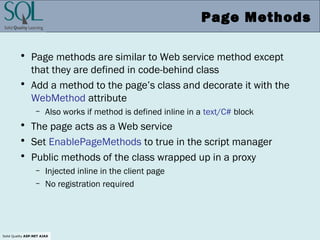
Page Methods
• Page methods are similar to Web service method except
that they are defined in code-behind class
• Add a method to the page’s class and decorate it with the
WebMethod attribute
– Also works if method is defined inline in a text/C# block
• The page acts as a Web service
• Set EnablePageMethods to true in the script manager
• Public methods of the class wrapped up in a proxy
– Injected inline in the client page
– No registration required
Solid Quality ASP.NET AJAX
Defining a Page Method
• Public and static method
– Add the WebMethod attribute
– No access to controls in the page
– Just a way to expose pieces of “business” logic
– Parameters and return values JSON-serialized
– Necessary type definition injected in the client page
public partial class Samples_Ch07_CallPageMethod : System.Web.UI.Page
{
:
[WebMethod]
public static DateTime GetTime()
{
return DateTime.Now;
}
}
Sample page method
Can be any .NET type, including
custom types
Solid Quality ASP.NET AJAX
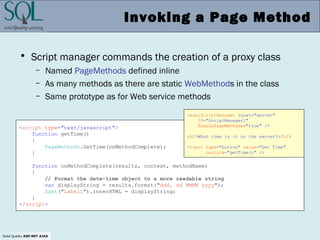
Invoking a Page Method
• Script manager commands the creation of a proxy class
– Named PageMethods defined inline
– As many methods as there are static WebMethods in the class
– Same prototype as for Web service methods
<script type="text/javascript">
function getTime()
{
PageMethods.GetTime(onMethodComplete);
}
function onMethodComplete(results, context, methodName)
{
// Format the date-time object to a more readable string
var displayString = results.format("ddd, dd MMMM yyyy");
$get("Label1").innerHTML = displayString;
}
</script>
<asp:ScriptManager runat="server"
ID="ScriptManager1"
EnablePageMethods="true" />
<h2>What time is it on the server?</h2>
<input type="button" value="Get Time"
onclick="getTime()" />
Solid Quality ASP.NET AJAX
DEMO
• Invoking a page method
• Accessing session state from the client
Solid Quality ASP.NET AJAX
Web services vs. Page methods
• Web service methods
– Callable from any pages and reusable
– Publicly exposed over the Web and publicly callable
• Page methods
– Have client callable server code without developing a Web service
– No page context associated with the call
• Can’t control who’s calling
– Do not use for critical BLL
– Only for UI-level logic
Solid Quality ASP.NET AJAX
Bridging External Services
• Web services you can call must be local to the application
– What if you want to call an external service?
– Different application OR different machine/network
• Client AJAX calls into an external service (i.e., Amazon)
– Can’t make assumptions on the Web server
• Client AJAX calls into an ASP.NET service
– Some browsers prohibit cross-site calls from the client
• The bottom line
– Client calls its own server
– Server places a server-to-server call to the Web service
Solid Quality ASP.NET AJAX
Server-to-Server
• Manual implementation
– Invoke a server method that, in turn, call the Web service
– Updatable panel or page method
• ASP.NET AJAX assisted implementation
– The bridge technology
– Enables developers to create programmatic gateways to Web
services on the Internet
– Chief enabling technology for building mash-ups
Solid Quality ASP.NET AJAX
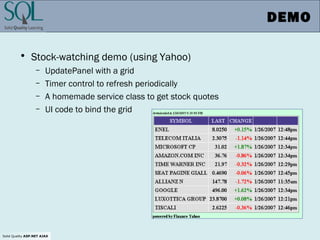
DEMO
• Stock-watching demo (using Yahoo)
– UpdatePanel with a grid
– Timer control to refresh periodically
– A homemade service class to get stock quotes
– UI code to bind the grid
Solid Quality ASP.NET AJAX
Summary
• In ASP.NET AJAX, Web services are a way to execute server-
side code in response to a client action
• Local Web services or page methods
• JSON serialization
• JavaScript callbacks to merge results with the page
• Server-to-server calls to external services
Solid Quality ASP.NET AJAX
References
• For more information, refer to
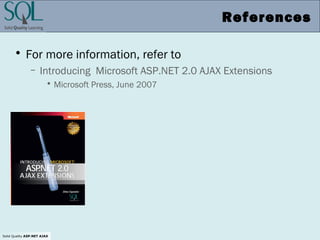
– Introducing Microsoft ASP.NET 2.0 AJAX Extensions
• Microsoft Press, June 2007

Espositoajaxremote 1210732828647866-8

  • 1.
    Version 1.0.12 (January2007) Dino Esposito http://weblogs.asp.net/despos ASP.NET AJAX Extensions Calling Remote Services from ASP.NET AJAX
  • 2.
    Solid Quality ASP.NETAJAX What You’re Going to See • Defining remote services • Implementing remote services • REST vs. SOAP • Considerations
  • 3.
    Solid Quality ASP.NETAJAX Need for services • AJAX’s big win is invoking server code from the client page – How do you expose server code to the client? • Learn from the past – Remote Scripting back in 1997 – Client engine nearly identical (was a Java applet) – Server infrastructure based on classic ASP – Public, fixed-name, contract-bound object exposed by the page and invoked by the client code – Contract implementation to determine subsequent server behavior – Data exchanged through strings – Client sets method to call and passes/receives values
  • 4.
    Solid Quality ASP.NETAJAX Define a contract • Give your service an explicit contract • Not strictly required by ASP.NET AJAX v1.0 • Implement the contract in a service class – SOA architecture
  • 5.
    Solid Quality ASP.NETAJAX Expose the server API • Build a RESTful service – Build a service that documents itself through headers and URLs, not SOAP • Translated to the ASP.NET AJAX’s jargon – Build an ASP.NET Web service with a special attribute – Or – Use the ASP.NET page as a special Web service
  • 6.
    Solid Quality ASP.NETAJAX Common misconception • ASP.NET AJAX Lets You Call Web Services – Untrue and incorrect – but it may happen …
  • 7.
    Solid Quality ASP.NETAJAX REST vs. SOAP • REpresentational State Transfer – It’s all about the URL (and headers) – Resource = URL • Simple Object Access Protocol – One URL fits all – Use a XML schema to describe the call – Use WSDL to describe the API • SOAP-based services require the client know about SOAP
  • 8.
    Solid Quality ASP.NETAJAX ASP.NET AJAX Perspective • Expose the server API as REST services • You write ASP.NET Web services with an extra attribute – Expose the service the REST way – JSON feeds consumed – No SOAP at all (simpler, faster) – Same Origin Policy • Call made to the local server
  • 9.
    Solid Quality ASP.NETAJAX JavaScript Proxy • Mirrors all WebMethods of the Web services • Extra members – Properties: path, timeout, defaultUserContext, defaultSucceededCallback, defaultFailedCallback – Static (private) instance of the class – Static members for the client to call (no proxy instantiation) IntroAjax.WebServices.TimeService.prototype = { GetTime : function(succeededCallback, failedCallback, userContext) { return this._invoke(IntroAjax.WebServices.TimeService.get_path(), 'GetTime', false, {}, succeededCallback, failedCallback, userContext); }, GetTimeAsFormat : function(timeFormat, succeededCallback, failedCallback, userContext) { return this._invoke(IntroAjax.WebServices.TimeService.get_path(), 'GetTimeAsFormat', false, {format: timeFormat}, succeededCallback, failedCallback, userContext); } }
  • 10.
    Solid Quality ASP.NETAJAX Calling Web Methods • Use static methods on the proxy and add callbacks <script language="javascript" type="text/javascript"> function getTime() { var timeFormat = "ddd, dd MMMM yyyy [hh:mm:ss]"; IntroAjax.WebServices.TimeService.GetTimeFormat(timeFormat, onMethodComplete); } function onMethodComplete(results) { $get("Label1").innerHTML = results; } </script> <html xmlns="http://www.w3.org/1999/xhtml"> <head runat="server"><title>The Time Web service</title></head> <body> <form id="form1" runat="server"> <asp:ScriptManager ID="ScriptManager1" runat="server"> <Services> <asp:ServiceReference Path="~/WebServices/TimeService.asmx" /> </Services> </asp:ScriptManager> <h2> What time is it on the server? </h2> <input type="button" value="Get Time" onclick="getTime()" /> <asp:Label runat="server" ID="Label1" /> </form> </body> </html>
  • 11.
    Solid Quality ASP.NETAJAX DEMO • Invoking a Web service from an AJAX page
  • 12.
    Solid Quality ASP.NETAJAX JSON Serialization • Page/server communication is based on strings – Data is automatically serialized using JSON • JavaScript Object Notation (simpler than XML) – Text format to represent an object—actually, an (associative) array – Needs a “proxy” to represent a server type • Server and client infrastructure to proxy data • Sample call: – IntroAjax.TimeService.GetTimeFormat("ddd, dd MMMM yyyy [hh:mm:ss]", ...) {"format":"ddd, dd MMMM yyyy [hh:mm:ss]"} "Thu, 25 January 2007 [07:10:31]" Request body Response Content
  • 13.
    Solid Quality ASP.NETAJAX Using Complex Types • JSON can be used to serialize complex types – .NET types JSON-serialized using server class JavaScriptSerializer – String processed on the client to an instance of a proxy class that mirrors the original type – And vice-versa {"id":"ALFKI"} { "__type":"IntroAjax.Customer", "ID":"ALFKI", "CompanyName":"Alfreds Futterkiste", "ContactName":"Maria Anders", "ContactTitle":"Sales Representative", "Street":"Obere Str. 57", "PostalCode":"12209", "City":"Berlin", "Country":"Germany", "Phone":"030-0074321“ } Response contentRequest body IntroAjax.WebServices.MyDataService.LookupCustomer("ALFKI", onSearchComplete);
  • 14.
    Solid Quality ASP.NETAJAX Client Callbacks • Methods on the proxy class have an extended prototype – Params array, success and error callbacks, user context info • Callbacks prototype – function methodCompleted(results, context, methodName) – User context is any information developers want to pass from the client and reuse in the callback IntroAjax.WebServices.TimeService.prototype = { GetTimeAsFormat : function(timeFormat, succeededCallback, failedCallback, userContext) { return this._invoke(IntroAjax.WebServices.TimeService.get_path(), // service path 'GetTimeAsFormat', // method name false, // use GET verb {format: timeFormat}, // parameters succeededCallback, // completed callback failedCallback, // error callback userContext); // context extra information } } Method prototype
  • 15.
    Solid Quality ASP.NETAJAX Exceptions and Timeouts • Web service requests – Set Content-Type to “application/json; charset=utf-8” – In case of error, the response contains a jsonerror header • Process results of the call using onSucceeded callback • Exceptions on the server caught and exposed to client code via onFailed callback – Default failure callback defined: pops up a message box • Timeout supported – Set it through client timeout property // Method can't take longer than 3 secs function runOutOfTime() { IntroAjax.WebServices.MyDataService.set_timeout(3000); IntroAjax.WebServices.MyDataService.VeryLengthyTask(methodCompleted, methodError, "runOutOfTime()"); }
  • 16.
    Solid Quality ASP.NETAJAX Page Methods • Page methods are similar to Web service method except that they are defined in code-behind class • Add a method to the page’s class and decorate it with the WebMethod attribute – Also works if method is defined inline in a text/C# block • The page acts as a Web service • Set EnablePageMethods to true in the script manager • Public methods of the class wrapped up in a proxy – Injected inline in the client page – No registration required
  • 17.
    Solid Quality ASP.NETAJAX Defining a Page Method • Public and static method – Add the WebMethod attribute – No access to controls in the page – Just a way to expose pieces of “business” logic – Parameters and return values JSON-serialized – Necessary type definition injected in the client page public partial class Samples_Ch07_CallPageMethod : System.Web.UI.Page { : [WebMethod] public static DateTime GetTime() { return DateTime.Now; } } Sample page method Can be any .NET type, including custom types
  • 18.
    Solid Quality ASP.NETAJAX Invoking a Page Method • Script manager commands the creation of a proxy class – Named PageMethods defined inline – As many methods as there are static WebMethods in the class – Same prototype as for Web service methods <script type="text/javascript"> function getTime() { PageMethods.GetTime(onMethodComplete); } function onMethodComplete(results, context, methodName) { // Format the date-time object to a more readable string var displayString = results.format("ddd, dd MMMM yyyy"); $get("Label1").innerHTML = displayString; } </script> <asp:ScriptManager runat="server" ID="ScriptManager1" EnablePageMethods="true" /> <h2>What time is it on the server?</h2> <input type="button" value="Get Time" onclick="getTime()" />
  • 19.
    Solid Quality ASP.NETAJAX DEMO • Invoking a page method • Accessing session state from the client
  • 20.
    Solid Quality ASP.NETAJAX Web services vs. Page methods • Web service methods – Callable from any pages and reusable – Publicly exposed over the Web and publicly callable • Page methods – Have client callable server code without developing a Web service – No page context associated with the call • Can’t control who’s calling – Do not use for critical BLL – Only for UI-level logic
  • 21.
    Solid Quality ASP.NETAJAX Bridging External Services • Web services you can call must be local to the application – What if you want to call an external service? – Different application OR different machine/network • Client AJAX calls into an external service (i.e., Amazon) – Can’t make assumptions on the Web server • Client AJAX calls into an ASP.NET service – Some browsers prohibit cross-site calls from the client • The bottom line – Client calls its own server – Server places a server-to-server call to the Web service
  • 22.
    Solid Quality ASP.NETAJAX Server-to-Server • Manual implementation – Invoke a server method that, in turn, call the Web service – Updatable panel or page method • ASP.NET AJAX assisted implementation – The bridge technology – Enables developers to create programmatic gateways to Web services on the Internet – Chief enabling technology for building mash-ups
  • 23.
    Solid Quality ASP.NETAJAX DEMO • Stock-watching demo (using Yahoo) – UpdatePanel with a grid – Timer control to refresh periodically – A homemade service class to get stock quotes – UI code to bind the grid
  • 24.
    Solid Quality ASP.NETAJAX Summary • In ASP.NET AJAX, Web services are a way to execute server- side code in response to a client action • Local Web services or page methods • JSON serialization • JavaScript callbacks to merge results with the page • Server-to-server calls to external services
  • 25.
    Solid Quality ASP.NETAJAX References • For more information, refer to – Introducing Microsoft ASP.NET 2.0 AJAX Extensions • Microsoft Press, June 2007