Welcome to All
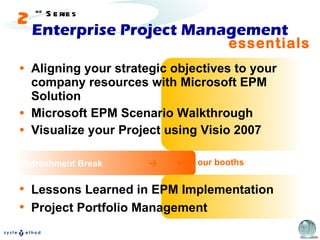
Enterprise Project Management Aligning your strategic objectives to your company resources with Microsoft EPM Solution Microsoft EPM Scenario Walkthrough Visualize your Project using Visio 2007 Refreshment Break  essentials Lessons Learned in EPM Implementation Project Portfolio Management visit our booths 2 nd  Series
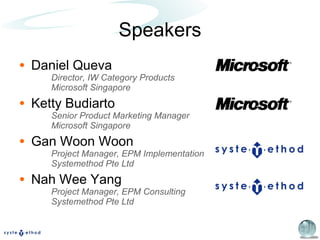
Speakers Daniel Queva  Director, IW Category Products Microsoft Singapore Ketty Budiarto Senior Product Marketing Manager Microsoft Singapore Gan Woon Woon Project Manager, EPM Implementation Systemethod Pte Ltd Nah Wee Yang Project Manager, EPM Consulting Systemethod Pte Ltd
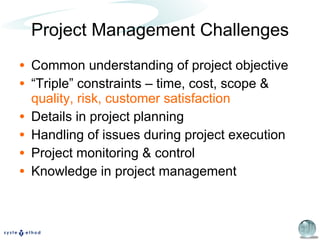
Project Management Challenges Common understanding of project objective “ Triple” constraints – time, cost, scope &  quality, risk, customer satisfaction Details in project planning Handling of issues during project execution Project monitoring & control Knowledge in project management
Microsoft EPM Solution Aligning your strategic objectives to your company resources with Microsoft EPM Solution Daniel Queva Director, IW Products
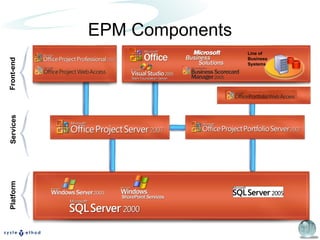
EPM Components Platform Front-end Services Line of Business Systems
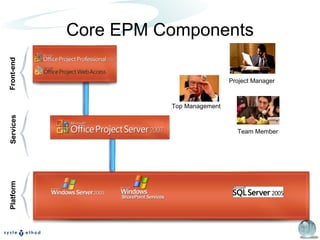
Core EPM Components Platform Front-end Services Top Management Project Manager Team Member
Microsoft EPM Solution EPM Scenario Walkthrough Gan Woon Woon Project Manager
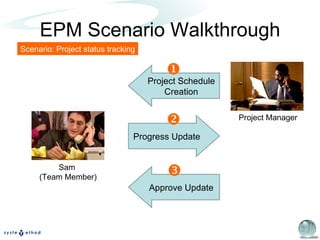
EPM Scenario Walkthrough Scenario: Project status tracking Project Schedule Creation Approve Update Progress Update    Project Manager Sam  (Team Member)
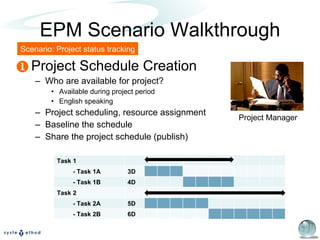
EPM Scenario Walkthrough Project Schedule Creation Who are available for project? Available during project period English speaking Project scheduling, resource assignment Baseline the schedule Share the project schedule (publish) Scenario: Project status tracking  Project Manager Task 1 - Task 1A 3D - Task 1B 4D Task 2 - Task 2A 5D - Task 2B 6D
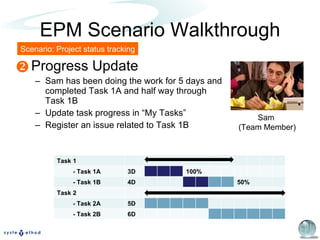
EPM Scenario Walkthrough Progress Update Sam has been doing the work for 5 days and completed Task 1A and half way through Task 1B Update task progress in “My Tasks” Register an issue related to Task 1B Scenario: Project status tracking  Sam  (Team Member) Task 1 - Task 1A 3D 100% - Task 1B 4D 50% Task 2 - Task 2A 5D - Task 2B 6D
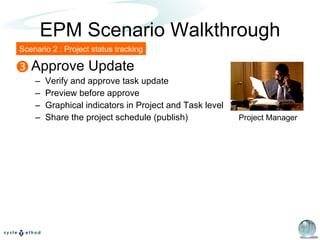
EPM Scenario Walkthrough Approve Update Verify and approve task update Preview before approve Graphical indicators in Project and Task level Share the project schedule (publish) Scenario 2 : Project status tracking  Project Manager
Microsoft EPM Solution Visualize your Project using Visio 2007 Ketty Budiarto Senior Product Marketing Manager
Microsoft EPM Solution Microsoft EPM Components EPM Implementation Approach Pilot EPM > Phased Implementation EPM Discovery Services Trial EPM software Services: installation, setup and training
Enterprise Project Management Coffee Break Systemethod Microsoft EPM Knowledge Method PM Training & PMP Exam Prep Courses Avantus, NetAssist & Comat Microsoft Authorized Training Partners (CPLS) essentials 2 nd  Series
Lessons Learned in EPM Implementation EPM Implementation in Singapore Power Nah Wee Yang Project Manager
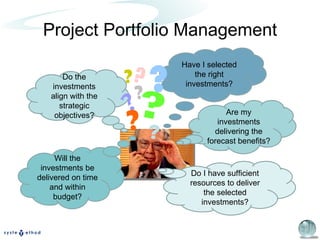
Project Portfolio Management Do the investments align with the strategic objectives? Have I selected the right investments? Do I have sufficient resources to deliver the selected investments? Will the investments be delivered on time and within budget? Are my investments delivering the forecast benefits? ? ? ? ? ? ? ? ?
Project Portfolio Management Portfolio Collection of projects Portfolio Management An approach to achieve strategic goals by… …  projects / programs, based upon alignment & contribution to the organization’s strategies and objectives. selecting prioritizing assessing managing ~  Standard for Portfolio Management Project Management Institute
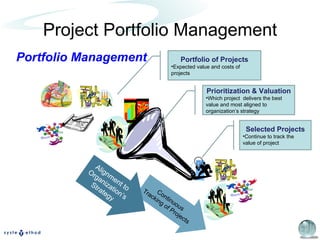
Project Portfolio Management Portfolio Management Continuous Tracking of Projects Alignment to Organization’s Strategy Selected Projects Continue to track the value of project  Portfolio of Projects Expected value and costs of projects Prioritization & Valuation Which project  delivers the best value and most aligned to organization’s strategy
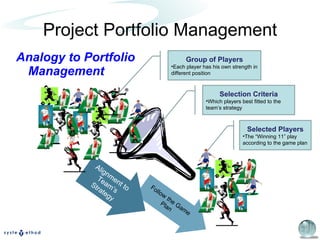
Project Portfolio Management Analogy to Portfolio Management Follow the Game Plan Alignment to Team’s Strategy Selected Players The “Winning 11” play according to the game plan Group of Players Each player has his own strength in different position Selection Criteria Which players best fitted to the team’s strategy
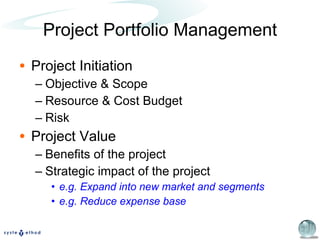
Project Initiation Objective & Scope Resource & Cost Budget Risk Project Value Benefits of the project Strategic impact of the project e.g. Expand into new market and segments e.g. Reduce expense base Project Portfolio Management
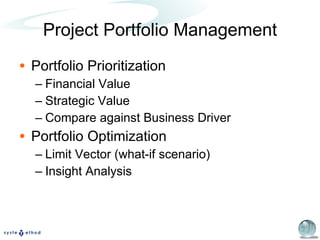
Portfolio Prioritization Financial Value Strategic Value Compare against Business Driver Portfolio Optimization Limit Vector (what-if scenario) Insight Analysis Project Portfolio Management
Project Portfolio Management Overview of Microsoft Project Portfolio Management Solution Gan Woon Woon Project Manager
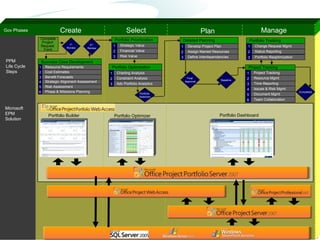
Create Select Plan Manage PPM Life Cycle Steps Gov Phases Final  Approval Baseline Microsoft EPM Solution Portfolio Dashboard Portfolio Optimizer Portfolio Builder Complete Project  Request  Form 1 st   Review 2 nd   Review Resource Requirements Business Case   Development Cost Estimates Risk Assessment Phase & Milestone Planning Strategic Alignment Assessment 2 1 4 5 6 Benefit Forecasts 3 Portfolio Prioritization Strategic Value Financial Value Risk Value Portfolio Optimization Charting Analysis Constraint Analysis Adv Portfolio Analytics 1 2 3 1 2 3 Portfolio  Selection Detailed Planning Develop Project Plan Assign Named Resources Define Interdependencies 1 2 3 Project Tracking Project Tracking Time Reporting 1 3 Issues & Risk Mgmt Document Mgmt  4 5 Team Collaboration  6 Resource Mgmt 2 Portfolio Tracking Change Request Mgmt Status Reporting Portfolio Reoptimization 1 2 3 Completed
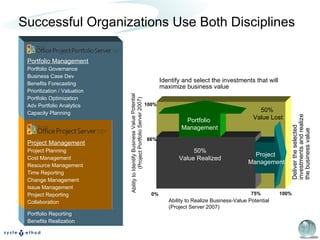
Portfolio Reporting Benefits Realization Successful Organizations Use Both Disciplines Project Management Project Planning Cost Management Resource Management Time Reporting Change Management Issue Management Project Reporting Collaboration Portfolio Management Portfolio Governance Business Case Dev Benefits Forecasting Prioritization / Valuation Portfolio Optimization Adv Portfolio Analytics Capacity Planning Deliver the selected investments and realize the business value Ability to Identify Business Value Potential  (Project Portfolio Server 2007) Ability to Realize Business-Value Potential (Project Server 2007) 75% 100% 66% 100% 0% Portfolio  Management Project  Management 50% Value Realized 50%  Value Lost Identify and select the investments that will maximize business value
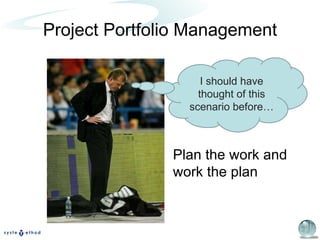
Project Portfolio Management I should have thought of this scenario before… Plan the work and work the plan
Few More Announcements Your  feedback  on this event EPM Eval Pack PMP Exam Prep tips and Course preview  5 December 2007 (Wed) 7pm – 9pm Email info@knowledgemethod.com Next Enterprise Project Management Essentials Seminar on  28 Feb 2008
Q & A EPM Thank you.

Enterprise Project Management Essential #2

  • 1.
  • 2.
  • 3.
    Enterprise Project ManagementAligning your strategic objectives to your company resources with Microsoft EPM Solution Microsoft EPM Scenario Walkthrough Visualize your Project using Visio 2007 Refreshment Break  essentials Lessons Learned in EPM Implementation Project Portfolio Management visit our booths 2 nd Series
  • 4.
    Speakers Daniel Queva Director, IW Category Products Microsoft Singapore Ketty Budiarto Senior Product Marketing Manager Microsoft Singapore Gan Woon Woon Project Manager, EPM Implementation Systemethod Pte Ltd Nah Wee Yang Project Manager, EPM Consulting Systemethod Pte Ltd
  • 5.
    Project Management ChallengesCommon understanding of project objective “ Triple” constraints – time, cost, scope & quality, risk, customer satisfaction Details in project planning Handling of issues during project execution Project monitoring & control Knowledge in project management
  • 6.
    Microsoft EPM SolutionAligning your strategic objectives to your company resources with Microsoft EPM Solution Daniel Queva Director, IW Products
  • 7.
    EPM Components PlatformFront-end Services Line of Business Systems
  • 8.
    Core EPM ComponentsPlatform Front-end Services Top Management Project Manager Team Member
  • 9.
    Microsoft EPM SolutionEPM Scenario Walkthrough Gan Woon Woon Project Manager
  • 10.
    EPM Scenario WalkthroughScenario: Project status tracking Project Schedule Creation Approve Update Progress Update    Project Manager Sam (Team Member)
  • 11.
    EPM Scenario WalkthroughProject Schedule Creation Who are available for project? Available during project period English speaking Project scheduling, resource assignment Baseline the schedule Share the project schedule (publish) Scenario: Project status tracking  Project Manager Task 1 - Task 1A 3D - Task 1B 4D Task 2 - Task 2A 5D - Task 2B 6D
  • 12.
    EPM Scenario WalkthroughProgress Update Sam has been doing the work for 5 days and completed Task 1A and half way through Task 1B Update task progress in “My Tasks” Register an issue related to Task 1B Scenario: Project status tracking  Sam (Team Member) Task 1 - Task 1A 3D 100% - Task 1B 4D 50% Task 2 - Task 2A 5D - Task 2B 6D
  • 13.
    EPM Scenario WalkthroughApprove Update Verify and approve task update Preview before approve Graphical indicators in Project and Task level Share the project schedule (publish) Scenario 2 : Project status tracking  Project Manager
  • 14.
    Microsoft EPM SolutionVisualize your Project using Visio 2007 Ketty Budiarto Senior Product Marketing Manager
  • 15.
    Microsoft EPM SolutionMicrosoft EPM Components EPM Implementation Approach Pilot EPM > Phased Implementation EPM Discovery Services Trial EPM software Services: installation, setup and training
  • 16.
    Enterprise Project ManagementCoffee Break Systemethod Microsoft EPM Knowledge Method PM Training & PMP Exam Prep Courses Avantus, NetAssist & Comat Microsoft Authorized Training Partners (CPLS) essentials 2 nd Series
  • 17.
    Lessons Learned inEPM Implementation EPM Implementation in Singapore Power Nah Wee Yang Project Manager
  • 18.
    Project Portfolio ManagementDo the investments align with the strategic objectives? Have I selected the right investments? Do I have sufficient resources to deliver the selected investments? Will the investments be delivered on time and within budget? Are my investments delivering the forecast benefits? ? ? ? ? ? ? ? ?
  • 19.
    Project Portfolio ManagementPortfolio Collection of projects Portfolio Management An approach to achieve strategic goals by… … projects / programs, based upon alignment & contribution to the organization’s strategies and objectives. selecting prioritizing assessing managing ~ Standard for Portfolio Management Project Management Institute
  • 20.
    Project Portfolio ManagementPortfolio Management Continuous Tracking of Projects Alignment to Organization’s Strategy Selected Projects Continue to track the value of project Portfolio of Projects Expected value and costs of projects Prioritization & Valuation Which project delivers the best value and most aligned to organization’s strategy
  • 21.
    Project Portfolio ManagementAnalogy to Portfolio Management Follow the Game Plan Alignment to Team’s Strategy Selected Players The “Winning 11” play according to the game plan Group of Players Each player has his own strength in different position Selection Criteria Which players best fitted to the team’s strategy
  • 22.
    Project Initiation Objective& Scope Resource & Cost Budget Risk Project Value Benefits of the project Strategic impact of the project e.g. Expand into new market and segments e.g. Reduce expense base Project Portfolio Management
  • 23.
    Portfolio Prioritization FinancialValue Strategic Value Compare against Business Driver Portfolio Optimization Limit Vector (what-if scenario) Insight Analysis Project Portfolio Management
  • 24.
    Project Portfolio ManagementOverview of Microsoft Project Portfolio Management Solution Gan Woon Woon Project Manager
  • 25.
    Create Select PlanManage PPM Life Cycle Steps Gov Phases Final Approval Baseline Microsoft EPM Solution Portfolio Dashboard Portfolio Optimizer Portfolio Builder Complete Project Request Form 1 st Review 2 nd Review Resource Requirements Business Case Development Cost Estimates Risk Assessment Phase & Milestone Planning Strategic Alignment Assessment 2 1 4 5 6 Benefit Forecasts 3 Portfolio Prioritization Strategic Value Financial Value Risk Value Portfolio Optimization Charting Analysis Constraint Analysis Adv Portfolio Analytics 1 2 3 1 2 3 Portfolio Selection Detailed Planning Develop Project Plan Assign Named Resources Define Interdependencies 1 2 3 Project Tracking Project Tracking Time Reporting 1 3 Issues & Risk Mgmt Document Mgmt 4 5 Team Collaboration 6 Resource Mgmt 2 Portfolio Tracking Change Request Mgmt Status Reporting Portfolio Reoptimization 1 2 3 Completed
  • 26.
    Portfolio Reporting BenefitsRealization Successful Organizations Use Both Disciplines Project Management Project Planning Cost Management Resource Management Time Reporting Change Management Issue Management Project Reporting Collaboration Portfolio Management Portfolio Governance Business Case Dev Benefits Forecasting Prioritization / Valuation Portfolio Optimization Adv Portfolio Analytics Capacity Planning Deliver the selected investments and realize the business value Ability to Identify Business Value Potential (Project Portfolio Server 2007) Ability to Realize Business-Value Potential (Project Server 2007) 75% 100% 66% 100% 0% Portfolio Management Project Management 50% Value Realized 50% Value Lost Identify and select the investments that will maximize business value
  • 27.
    Project Portfolio ManagementI should have thought of this scenario before… Plan the work and work the plan
  • 28.
    Few More AnnouncementsYour feedback on this event EPM Eval Pack PMP Exam Prep tips and Course preview 5 December 2007 (Wed) 7pm – 9pm Email info@knowledgemethod.com Next Enterprise Project Management Essentials Seminar on 28 Feb 2008
  • 29.
    Q & AEPM Thank you.

Editor's Notes

  • #26 07/10/11 12:58 © 2004 Microsoft Corporation. All rights reserved. This presentation is for informational purposes only. Microsoft makes no warranties, express or implied, in this summary. The diagram shows the following: Best practice governance phases (Create, Select, Plan, and Manage): A project will pass through these best practice phases throughout its life cycle. PPM Life Cycle Steps: These more granular steps provide more detailed overview of the primary activities and events that a project will complete during its life cycle. For example: In the Create governance phase, a project request is captured and users begin to develop a detailed business case to support the idea. In the Select governance phase, all competing projects within the portfolio are prioritized and optimized against budgetary constraints. This results in selecting a project portfolio that best aligns with the organization’s strategic priorities. In the Plan governance phase, the project managers begin to develop the detailed project plans for each of the selected projects before the project is approved and given a baseline. In the Manage governance phase, the project is tracked to a successful conclusion. The bottom half of the diagram shows the products within the EPM Solution (with particular reference to Office Project Portfolio Server 2007). Notice that in this example the products have been deployed to align with the different governance phases: Office Project Portfolio Server 2007 includes three modules (Portfolio Builder, Portfolio Optimizer, and Portfolio Dashboard). The Portfolio Builder aligns with the Create phase. The Builder’s primary role is to capture the project request and develop high-level or detailed business cases in accordance with defined governance workflows. The Portfolio Optimizer aligns with the Select phase. The Optimizer’s primary role is to prioritize, optimize, and select project portfolios that best align with the organization’s business strategy. The Portfolio Dashboard straddles the Plan and Manage phases. The Dashboard provides executives with visibility and control across their project portfolios. In this deployment example, Office Project Portfolio Server 2007 is used to capture and select project requests. The project is then sent to Project Server to be managed to a successful conclusion. (Note: Project requests can also be captured in Project Web Access and sent to the Portfolio Optimizer module for prioritization and selection.)
  • #27 07/10/11 12:58 © 2004 Microsoft Corporation. All rights reserved. This presentation is for informational purposes only. Microsoft makes no warranties, express or implied, in this summary. Successful organizations require both disciplines. Portfolio Management (supported by Office Project Portfolio Server 2007) starts before and goes beyond traditional Project Management (supported by Office Project Server 2007) and includes the following capabilities: On the front end: Portfolio governance Business case development Benefits forecasting Analytical techniques to prioritize, optimize, and select the portfolio that best aligns with the organization’s strategic priorities. Capacity planning On the back end: Portfolio level reporting Benefits realization Merging these two disciplines forms Project Portfolio Management, which answers the following questions: [Read from slide]