Kuninobu Sasaki, Data Center Solution Architect, NVIDIA, 1/22/2020
Enroot と Pyxis で
快適コンテナ生活
Slurm User Group Meetup Tokyo #1
2
Follow us on Twitter: @NVIDIAAIJPSlurm User Group Meetup Tokyo #SUGMT
アジェンダ
1.NVIDIA と HPC, DL, コンテナ
2. 新しいコンテナランタイム
3. そのための SLURM プラグイン
NVIDIA DGX SUPERPOD
NVIDIA 社内の大規模クラスター
DGX-2 で構成されたスーパーコンピューター
• HPL で 9.4 PF | Top500 リストの 20 位 (19/11)
https://www.top500.org/system/179691
• ~200 AI PF | ResNet-50 のトレーニングを 2 分未満で
モジュール化され拡張の容易なアーキテクチャー
• 3 週間で構築
• 計算、通信、ストレージ、ソフトウェアを最適化
統合されたソフトウェアスタック
• NGC から無料で入手可能
• 96 DGX-2H
• 10 Mellanox EDR IB per node
• 1,536 V100 Tensor Core GPUs
• 1 megawatt of power
自動運転 | 音声認識/合成 | ヘルスケア | グラフィックス | HPC
4
Follow us on Twitter: @NVIDIAAIJPSlurm User Group Meetup Tokyo #SUGMT
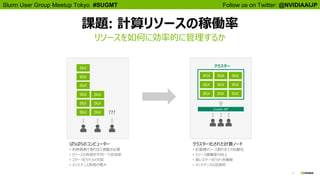
課題: 計算リソースの稼働率
リソースを如何に効率的に管理するか
クラスター化された計算ノード
• 計算機リソース割り当ての自動化
• リソース稼働率の向上
• 高いスケーリビリティを確保
• メンテナンスも効率的
DGX DGX DGX
DGX DGX DGX
DGX DGX DGX
Cluster API
DGX
DGX
DGX
DGX DGX
DGX
DGX DGX
DGX
ばらばらのコンピューター
• 利用者側で割り当て調整が必要
• リソースの負荷が不均一で非効率
• スケーラビリティの欠如
• メンテナンス負荷の増大
???
クラスター
5
Follow us on Twitter: @NVIDIAAIJPSlurm User Group Meetup Tokyo #SUGMT
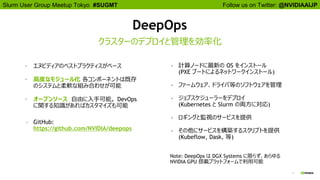
DeepOps
• エヌビディアのベストプラクティスがベース
• 高度なモジュール化 各コンポーネントは既存
のシステムと柔軟な組み合わせが可能
• オープンソース 自由に入手可能。 DevOps
に関する知識があればカスタマイズも可能
• GitHub:
https://github.com/NVIDIA/deepops
クラスターのデプロイと管理を効率化
• 計算ノードに最新の OS をインストール
(PXE ブートによるネットワークインストール)
• ファームウェア、ドライバ等のソフトウェアを管理
• ジョブスケジューラーをデプロイ
(Kubernetes と Slurm の両方に対応)
• ロギングと監視のサービスを提供
• その他にサービスを構築するスクリプトを提供
(Kubeflow, Dask, 等)
Note: DeepOps は DGX Systems に限らず、あらゆる
NVIDIA GPU 搭載プラットフォームで利用可能
6
Follow us on Twitter: @NVIDIAAIJPSlurm User Group Meetup Tokyo #SUGMT
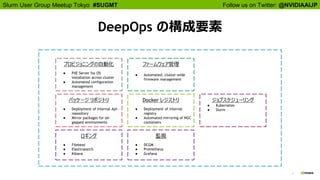
プロビジョニングの自動化
● PXE Server for OS
installation across cluster
● Automated configuration
management
Docker レジストリ
● Deployment of internal
registry
● Automated mirroring of NGC
containers
監視
● DCGM
● Prometheus
● Grafana
パッケージ リポジトリ
● Deployment of internal Apt-
repository
● Mirror packages for air-
gapped environments
ロギング
● Filebeat
● Elasticsearch
● Kibana
ファームウェア管理
● Automated, cluster-wide
firmware management
ジョブスケジューリング
● Kubernetes
● Slurm
DeepOps の構成要素
7
Follow us on Twitter: @NVIDIAAIJPSlurm User Group Meetup Tokyo #SUGMT
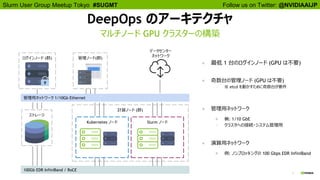
DeepOps のアーキテクチャ
マルチノード GPU クラスターの構築
● 奇数台の管理ノード (GPU は不要)
○ ※ etcd を動かすために奇数台が要件
管理ノード(群)ログインノード (群)
ストレージ
管理用ネットワーク 1/10Gb Ethernet
100Gb EDR InfiniBand / RoCE
計算ノード (群)
Slurm ノードKubernetes ノード
データセンター
ネットワーク
● 最低 1 台のログインノード (GPU は不要)
● 管理用ネットワーク
● 例: 1/10 GbE
○ クラスタへの接続・システム管理用
● 演算用ネットワーク
● 例: ノンブロッキングの 100 Gbps EDR InfiniBand
Follow us on Twitter: @NVIDIAAIJPSlurm User Group Meetup Tokyo #SUGMT
8
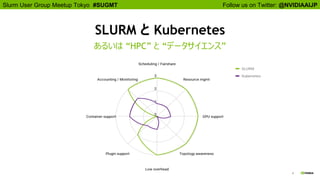
SLURM と Kubernetes
あるいは “HPC” と “データサイエンス”
Follow us on Twitter: @NVIDIAAIJPSlurm User Group Meetup Tokyo #SUGMT
9
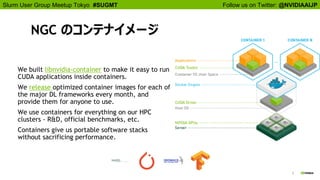
NGC のコンテナイメージ
We built libnvidia-container to make it easy to run
CUDA applications inside containers.
We release optimized container images for each of
the major DL frameworks every month, and
provide them for anyone to use.
We use containers for everything on our HPC
clusters - R&D, official benchmarks, etc.
Containers give us portable software stacks
without sacrificing performance.
10
Follow us on Twitter: @NVIDIAAIJPSlurm User Group Meetup Tokyo #SUGMT
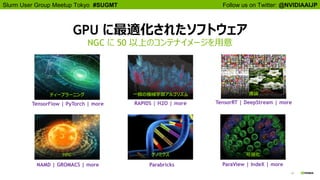
GPU に最適化されたソフトウェア
NGC に 50 以上のコンテナイメージを用意
ディープラーニング 一般の機械学習アルゴリズム
HPC 可視化
推論
ゲノミクス
NAMD | GROMACS | more
RAPIDS | H2O | more TensorRT | DeepStream | more
Parabricks ParaView | IndeX | more
TensorFlow | PyTorch | more
11
Follow us on Twitter: @NVIDIAAIJPSlurm User Group Meetup Tokyo #SUGMT
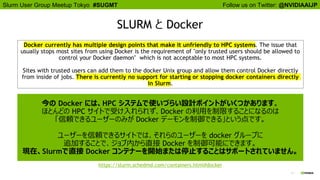
SLURM と Docker
https://slurm.schedmd.com/containers.html#docker
Docker currently has multiple design points that make it unfriendly to HPC systems. The issue that
usually stops most sites from using Docker is the requirement of "only trusted users should be allowed to
control your Docker daemon" which is not acceptable to most HPC systems.
Sites with trusted users can add them to the docker Unix group and allow them control Docker directly
from inside of jobs. There is currently no support for starting or stopping docker containers directly
in Slurm.
今の Docker には、HPC システムで使いづらい設計ポイントがいくつかあります。
ほとんどの HPC サイトで受け入れられず、Docker の利用を制限することになるのは
「信頼できるユーザーのみが Docker デーモンを制御できる」という点です。
ユーザーを信頼できるサイトでは、それらのユーザーを docker グループに
追加することで、ジョブ内から直接 Docker を制御可能にできます。
現在、Slurmで直接 Docker コンテナーを開始または停止することはサポートされていません。
12
Follow us on Twitter: @NVIDIAAIJPSlurm User Group Meetup Tokyo #SUGMT
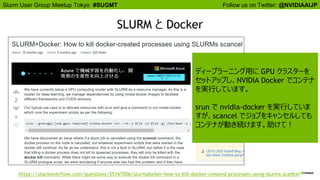
SLURM と Docker
https://stackoverflow.com/questions/55167006/slurmdocker-how-to-kill-docker-created-processes-using-slurms-scancel
ディープラーニング用に GPU クラスターを
セットアップし、NVIDIA Docker でコンテナ
を実行しています。
srun で nvidia-docker を実行していま
すが、scancel でジョブをキャンセルしても
コンテナが動き続けます。助けて!
13
Follow us on Twitter: @NVIDIAAIJPSlurm User Group Meetup Tokyo #SUGMT
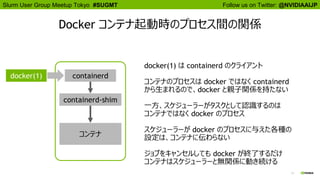
Docker コンテナ起動時のプロセス間の関係
docker(1) containerd
containerd-shim
コンテナ
docker(1) は containerd のクライアント
コンテナのプロセスは docker ではなく containerd
から生まれるので、docker と親子関係を持たない
一方、スケジューラーがタスクとして認識するのは
コンテナではなく docker のプロセス
スケジューラーが docker のプロセスに与えた各種の
設定は、コンテナに伝わらない
ジョブをキャンセルしても docker が終了するだけ
コンテナはスケジューラーと無関係に動き続ける
Follow us on Twitter: @NVIDIAAIJPSlurm User Group Meetup Tokyo #SUGMT
14
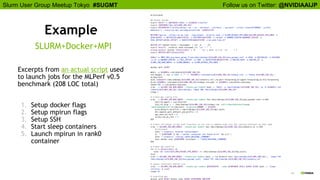
Example
Excerpts from an actual script used
to launch jobs for the MLPerf v0.5
benchmark (208 LOC total)
1. Setup docker flags
2. Setup mpirun flags
3. Setup SSH
4. Start sleep containers
5. Launch mpirun in rank0
container
SLURM+Docker+MPI
Follow us on Twitter: @NVIDIAAIJPSlurm User Group Meetup Tokyo #SUGMT
15
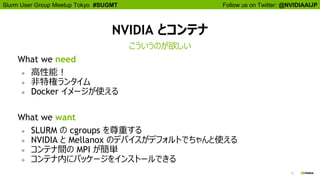
NVIDIA とコンテナ
What we need
● 高性能!
● 非特権ランタイム
● Docker イメージが使える
What we want
● SLURM の cgroups を尊重する
● NVIDIA と Mellanox のデバイスがデフォルトでちゃんと使える
● コンテナ間の MPI が簡単
● コンテナ内にパッケージをインストールできる
こういうのが欲しい
16
Follow us on Twitter: @NVIDIAAIJPSlurm User Group Meetup Tokyo #SUGMT
アジェンダ
1. NVIDIA と HPC, DL, コンテナ
2. 新しいコンテナランタイム
3. そのための SLURM プラグイン
Follow us on Twitter: @NVIDIAAIJPSlurm User Group Meetup Tokyo #SUGMT
17
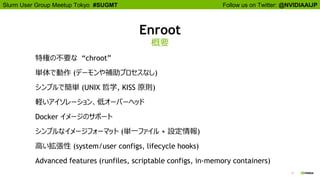
Enroot
概要
特権の不要な “chroot”
単体で動作 (デーモンや補助プロセスなし)
シンプルで簡単 (UNIX 哲学, KISS 原則)
軽いアイソレーション、低オーバーヘッド
Docker イメージのサポート
シンプルなイメージフォーマット (単一ファイル + 設定情報)
高い拡張性 (system/user configs, lifecycle hooks)
Advanced features (runfiles, scriptable configs, in-memory containers)
18
Follow us on Twitter: @NVIDIAAIJPSlurm User Group Meetup Tokyo #SUGMT
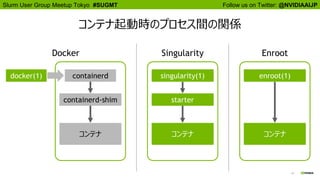
コンテナ起動時のプロセス間の関係
Singularity
singularity(1)
starter
コンテナ
Enroot
enroot(1)
コンテナ
Docker
docker(1) containerd
containerd-shim
コンテナ
Follow us on Twitter: @NVIDIAAIJPSlurm User Group Meetup Tokyo #SUGMT
19
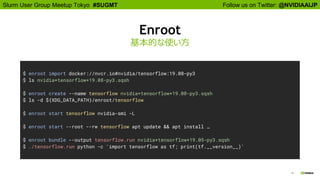
Enroot
基本的な使い方
$ enroot import docker://nvcr.io#nvidia/tensorflow:19.08-py3
$ ls nvidia+tensorflow+19.08-py3.sqsh
$ enroot create --name tensorflow nvidia+tensorflow+19.08-py3.sqsh
$ ls -d ${XDG_DATA_PATH}/enroot/tensorflow
$ enroot start tensorflow nvidia-smi -L
$ enroot start --root --rw tensorflow apt update && apt install …
$ enroot bundle --output tensorflow.run nvidia+tensorflow+19.05-py3.sqsh
$ ./tensorflow.run python -c 'import tensorflow as tf; print(tf.__version__)'
Follow us on Twitter: @NVIDIAAIJPSlurm User Group Meetup Tokyo #SUGMT
20
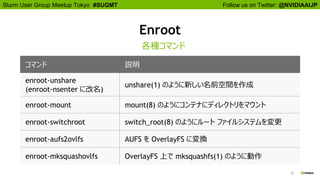
Enroot
各種コマンド
コマンド 説明
enroot-unshare
(enroot-nsenter に改名)
unshare(1) のように新しい名前空間を作成
enroot-mount mount(8) のようにコンテナにディレクトリをマウント
enroot-switchroot switch_root(8) のようにルート ファイルシステムを変更
enroot-aufs2ovlfs AUFS を OverlayFS に変換
enroot-mksquashovlfs OverlayFS 上で mksquashfs(1) のように動作
Follow us on Twitter: @NVIDIAAIJPSlurm User Group Meetup Tokyo #SUGMT
21
Enroot
スクラッチからコンテナを作成
$ curl https://cdimage.ubuntu.com/[...]/ubuntu-base-16.04-core-amd64.tar.gz | tar -C ubuntu -xz
$ enroot-unshare bash
$ cat << EOF | enroot-mount --root ubuntu -
ubuntu / none bind,rprivate
/proc /proc none rbind
/dev /dev none rbind
/sys /sys none rbind
EOF
$ exec enroot-switchroot ubuntu bash
22
Follow us on Twitter: @NVIDIAAIJPSlurm User Group Meetup Tokyo #SUGMT
アジェンダ
1. NVIDIA と HPC, DL, コンテナ
2. 新しいコンテナランタイム
3. そのための SLURM プラグイン
Follow us on Twitter: @NVIDIAAIJPSlurm User Group Meetup Tokyo #SUGMT
23
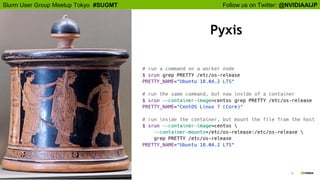
Pyxis
Follow us on Twitter: @NVIDIAAIJPSlurm User Group Meetup Tokyo #SUGMT
24
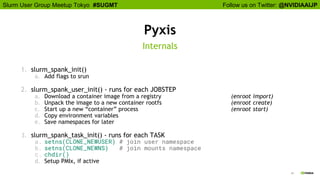
Pyxis
1. slurm_spank_init()
a. Add flags to srun
2. slurm_spank_user_init() - runs for each JOBSTEP
a. Download a container image from a registry (enroot import)
b. Unpack the image to a new container rootfs (enroot create)
c. Start up a new “container” process (enroot start)
d. Copy environment variables
e. Save namespaces for later
3. slurm_spank_task_init() - runs for each TASK
a. setns(CLONE_NEWUSER) # join user namespace
b. setns(CLONE_NEWNS) # join mounts namespace
c. chdir()
d. Setup PMIx, if active
Internals
Follow us on Twitter: @NVIDIAAIJPSlurm User Group Meetup Tokyo #SUGMT
25
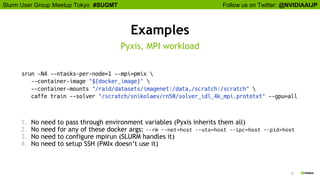
Examples
1. No need to pass through environment variables (Pyxis inherits them all)
2. No need for any of these docker args: --rm --net=host --uts=host --ipc=host --pid=host
3. No need to configure mpirun (SLURM handles it)
4. No need to setup SSH (PMIx doesn’t use it)
Pyxis, MPI workload
Follow us on Twitter: @NVIDIAAIJPSlurm User Group Meetup Tokyo #SUGMT
26
What Could Be Next
Allow pyxis to use a squashfile directly
Add pyxis flags to sbatch/salloc
Add backends for different “container runtimes”
27
Follow us on Twitter: @NVIDIAAIJPSlurm User Group Meetup Tokyo #SUGMT
CONNECT
Connect with hundreds of experts
from top industry, academic,
startup, and government
organizations
LEARN
Gain insight and valuable
hands-on training through
over 500+ sessions
DISCOVER
See how GPU technology is
creating breakthroughs in deep
learning, cybersecurity, data
science, healthcare and more
INNOVATE
Explore disruptive innovations
that can transform your work
早期割引は 2 月 13 日まで | VIP コード NVKSASAKI でさらに 25% OFF!
2020/3/22~26 | シリコンバレー
プレミア AI カンファレンスへようこそ
www.nvidia.com/gtc
EnrootとPyxisで快適コンテナ生活

EnrootとPyxisで快適コンテナ生活

  • 1.
    Kuninobu Sasaki, DataCenter Solution Architect, NVIDIA, 1/22/2020 Enroot と Pyxis で 快適コンテナ生活 Slurm User Group Meetup Tokyo #1
  • 2.
    2 Follow us onTwitter: @NVIDIAAIJPSlurm User Group Meetup Tokyo #SUGMT アジェンダ 1.NVIDIA と HPC, DL, コンテナ 2. 新しいコンテナランタイム 3. そのための SLURM プラグイン
  • 3.
    NVIDIA DGX SUPERPOD NVIDIA社内の大規模クラスター DGX-2 で構成されたスーパーコンピューター • HPL で 9.4 PF | Top500 リストの 20 位 (19/11) https://www.top500.org/system/179691 • ~200 AI PF | ResNet-50 のトレーニングを 2 分未満で モジュール化され拡張の容易なアーキテクチャー • 3 週間で構築 • 計算、通信、ストレージ、ソフトウェアを最適化 統合されたソフトウェアスタック • NGC から無料で入手可能 • 96 DGX-2H • 10 Mellanox EDR IB per node • 1,536 V100 Tensor Core GPUs • 1 megawatt of power 自動運転 | 音声認識/合成 | ヘルスケア | グラフィックス | HPC
  • 4.
    4 Follow us onTwitter: @NVIDIAAIJPSlurm User Group Meetup Tokyo #SUGMT 課題: 計算リソースの稼働率 リソースを如何に効率的に管理するか クラスター化された計算ノード • 計算機リソース割り当ての自動化 • リソース稼働率の向上 • 高いスケーリビリティを確保 • メンテナンスも効率的 DGX DGX DGX DGX DGX DGX DGX DGX DGX Cluster API DGX DGX DGX DGX DGX DGX DGX DGX DGX ばらばらのコンピューター • 利用者側で割り当て調整が必要 • リソースの負荷が不均一で非効率 • スケーラビリティの欠如 • メンテナンス負荷の増大 ??? クラスター
  • 5.
    5 Follow us onTwitter: @NVIDIAAIJPSlurm User Group Meetup Tokyo #SUGMT DeepOps • エヌビディアのベストプラクティスがベース • 高度なモジュール化 各コンポーネントは既存 のシステムと柔軟な組み合わせが可能 • オープンソース 自由に入手可能。 DevOps に関する知識があればカスタマイズも可能 • GitHub: https://github.com/NVIDIA/deepops クラスターのデプロイと管理を効率化 • 計算ノードに最新の OS をインストール (PXE ブートによるネットワークインストール) • ファームウェア、ドライバ等のソフトウェアを管理 • ジョブスケジューラーをデプロイ (Kubernetes と Slurm の両方に対応) • ロギングと監視のサービスを提供 • その他にサービスを構築するスクリプトを提供 (Kubeflow, Dask, 等) Note: DeepOps は DGX Systems に限らず、あらゆる NVIDIA GPU 搭載プラットフォームで利用可能
  • 6.
    6 Follow us onTwitter: @NVIDIAAIJPSlurm User Group Meetup Tokyo #SUGMT プロビジョニングの自動化 ● PXE Server for OS installation across cluster ● Automated configuration management Docker レジストリ ● Deployment of internal registry ● Automated mirroring of NGC containers 監視 ● DCGM ● Prometheus ● Grafana パッケージ リポジトリ ● Deployment of internal Apt- repository ● Mirror packages for air- gapped environments ロギング ● Filebeat ● Elasticsearch ● Kibana ファームウェア管理 ● Automated, cluster-wide firmware management ジョブスケジューリング ● Kubernetes ● Slurm DeepOps の構成要素
  • 7.
    7 Follow us onTwitter: @NVIDIAAIJPSlurm User Group Meetup Tokyo #SUGMT DeepOps のアーキテクチャ マルチノード GPU クラスターの構築 ● 奇数台の管理ノード (GPU は不要) ○ ※ etcd を動かすために奇数台が要件 管理ノード(群)ログインノード (群) ストレージ 管理用ネットワーク 1/10Gb Ethernet 100Gb EDR InfiniBand / RoCE 計算ノード (群) Slurm ノードKubernetes ノード データセンター ネットワーク ● 最低 1 台のログインノード (GPU は不要) ● 管理用ネットワーク ● 例: 1/10 GbE ○ クラスタへの接続・システム管理用 ● 演算用ネットワーク ● 例: ノンブロッキングの 100 Gbps EDR InfiniBand
  • 8.
    Follow us onTwitter: @NVIDIAAIJPSlurm User Group Meetup Tokyo #SUGMT 8 SLURM と Kubernetes あるいは “HPC” と “データサイエンス”
  • 9.
    Follow us onTwitter: @NVIDIAAIJPSlurm User Group Meetup Tokyo #SUGMT 9 NGC のコンテナイメージ We built libnvidia-container to make it easy to run CUDA applications inside containers. We release optimized container images for each of the major DL frameworks every month, and provide them for anyone to use. We use containers for everything on our HPC clusters - R&D, official benchmarks, etc. Containers give us portable software stacks without sacrificing performance.
  • 10.
    10 Follow us onTwitter: @NVIDIAAIJPSlurm User Group Meetup Tokyo #SUGMT GPU に最適化されたソフトウェア NGC に 50 以上のコンテナイメージを用意 ディープラーニング 一般の機械学習アルゴリズム HPC 可視化 推論 ゲノミクス NAMD | GROMACS | more RAPIDS | H2O | more TensorRT | DeepStream | more Parabricks ParaView | IndeX | more TensorFlow | PyTorch | more
  • 11.
    11 Follow us onTwitter: @NVIDIAAIJPSlurm User Group Meetup Tokyo #SUGMT SLURM と Docker https://slurm.schedmd.com/containers.html#docker Docker currently has multiple design points that make it unfriendly to HPC systems. The issue that usually stops most sites from using Docker is the requirement of "only trusted users should be allowed to control your Docker daemon" which is not acceptable to most HPC systems. Sites with trusted users can add them to the docker Unix group and allow them control Docker directly from inside of jobs. There is currently no support for starting or stopping docker containers directly in Slurm. 今の Docker には、HPC システムで使いづらい設計ポイントがいくつかあります。 ほとんどの HPC サイトで受け入れられず、Docker の利用を制限することになるのは 「信頼できるユーザーのみが Docker デーモンを制御できる」という点です。 ユーザーを信頼できるサイトでは、それらのユーザーを docker グループに 追加することで、ジョブ内から直接 Docker を制御可能にできます。 現在、Slurmで直接 Docker コンテナーを開始または停止することはサポートされていません。
  • 12.
    12 Follow us onTwitter: @NVIDIAAIJPSlurm User Group Meetup Tokyo #SUGMT SLURM と Docker https://stackoverflow.com/questions/55167006/slurmdocker-how-to-kill-docker-created-processes-using-slurms-scancel ディープラーニング用に GPU クラスターを セットアップし、NVIDIA Docker でコンテナ を実行しています。 srun で nvidia-docker を実行していま すが、scancel でジョブをキャンセルしても コンテナが動き続けます。助けて!
  • 13.
    13 Follow us onTwitter: @NVIDIAAIJPSlurm User Group Meetup Tokyo #SUGMT Docker コンテナ起動時のプロセス間の関係 docker(1) containerd containerd-shim コンテナ docker(1) は containerd のクライアント コンテナのプロセスは docker ではなく containerd から生まれるので、docker と親子関係を持たない 一方、スケジューラーがタスクとして認識するのは コンテナではなく docker のプロセス スケジューラーが docker のプロセスに与えた各種の 設定は、コンテナに伝わらない ジョブをキャンセルしても docker が終了するだけ コンテナはスケジューラーと無関係に動き続ける
  • 14.
    Follow us onTwitter: @NVIDIAAIJPSlurm User Group Meetup Tokyo #SUGMT 14 Example Excerpts from an actual script used to launch jobs for the MLPerf v0.5 benchmark (208 LOC total) 1. Setup docker flags 2. Setup mpirun flags 3. Setup SSH 4. Start sleep containers 5. Launch mpirun in rank0 container SLURM+Docker+MPI
  • 15.
    Follow us onTwitter: @NVIDIAAIJPSlurm User Group Meetup Tokyo #SUGMT 15 NVIDIA とコンテナ What we need ● 高性能! ● 非特権ランタイム ● Docker イメージが使える What we want ● SLURM の cgroups を尊重する ● NVIDIA と Mellanox のデバイスがデフォルトでちゃんと使える ● コンテナ間の MPI が簡単 ● コンテナ内にパッケージをインストールできる こういうのが欲しい
  • 16.
    16 Follow us onTwitter: @NVIDIAAIJPSlurm User Group Meetup Tokyo #SUGMT アジェンダ 1. NVIDIA と HPC, DL, コンテナ 2. 新しいコンテナランタイム 3. そのための SLURM プラグイン
  • 17.
    Follow us onTwitter: @NVIDIAAIJPSlurm User Group Meetup Tokyo #SUGMT 17 Enroot 概要 特権の不要な “chroot” 単体で動作 (デーモンや補助プロセスなし) シンプルで簡単 (UNIX 哲学, KISS 原則) 軽いアイソレーション、低オーバーヘッド Docker イメージのサポート シンプルなイメージフォーマット (単一ファイル + 設定情報) 高い拡張性 (system/user configs, lifecycle hooks) Advanced features (runfiles, scriptable configs, in-memory containers)
  • 18.
    18 Follow us onTwitter: @NVIDIAAIJPSlurm User Group Meetup Tokyo #SUGMT コンテナ起動時のプロセス間の関係 Singularity singularity(1) starter コンテナ Enroot enroot(1) コンテナ Docker docker(1) containerd containerd-shim コンテナ
  • 19.
    Follow us onTwitter: @NVIDIAAIJPSlurm User Group Meetup Tokyo #SUGMT 19 Enroot 基本的な使い方 $ enroot import docker://nvcr.io#nvidia/tensorflow:19.08-py3 $ ls nvidia+tensorflow+19.08-py3.sqsh $ enroot create --name tensorflow nvidia+tensorflow+19.08-py3.sqsh $ ls -d ${XDG_DATA_PATH}/enroot/tensorflow $ enroot start tensorflow nvidia-smi -L $ enroot start --root --rw tensorflow apt update && apt install … $ enroot bundle --output tensorflow.run nvidia+tensorflow+19.05-py3.sqsh $ ./tensorflow.run python -c 'import tensorflow as tf; print(tf.__version__)'
  • 20.
    Follow us onTwitter: @NVIDIAAIJPSlurm User Group Meetup Tokyo #SUGMT 20 Enroot 各種コマンド コマンド 説明 enroot-unshare (enroot-nsenter に改名) unshare(1) のように新しい名前空間を作成 enroot-mount mount(8) のようにコンテナにディレクトリをマウント enroot-switchroot switch_root(8) のようにルート ファイルシステムを変更 enroot-aufs2ovlfs AUFS を OverlayFS に変換 enroot-mksquashovlfs OverlayFS 上で mksquashfs(1) のように動作
  • 21.
    Follow us onTwitter: @NVIDIAAIJPSlurm User Group Meetup Tokyo #SUGMT 21 Enroot スクラッチからコンテナを作成 $ curl https://cdimage.ubuntu.com/[...]/ubuntu-base-16.04-core-amd64.tar.gz | tar -C ubuntu -xz $ enroot-unshare bash $ cat << EOF | enroot-mount --root ubuntu - ubuntu / none bind,rprivate /proc /proc none rbind /dev /dev none rbind /sys /sys none rbind EOF $ exec enroot-switchroot ubuntu bash
  • 22.
    22 Follow us onTwitter: @NVIDIAAIJPSlurm User Group Meetup Tokyo #SUGMT アジェンダ 1. NVIDIA と HPC, DL, コンテナ 2. 新しいコンテナランタイム 3. そのための SLURM プラグイン
  • 23.
    Follow us onTwitter: @NVIDIAAIJPSlurm User Group Meetup Tokyo #SUGMT 23 Pyxis
  • 24.
    Follow us onTwitter: @NVIDIAAIJPSlurm User Group Meetup Tokyo #SUGMT 24 Pyxis 1. slurm_spank_init() a. Add flags to srun 2. slurm_spank_user_init() - runs for each JOBSTEP a. Download a container image from a registry (enroot import) b. Unpack the image to a new container rootfs (enroot create) c. Start up a new “container” process (enroot start) d. Copy environment variables e. Save namespaces for later 3. slurm_spank_task_init() - runs for each TASK a. setns(CLONE_NEWUSER) # join user namespace b. setns(CLONE_NEWNS) # join mounts namespace c. chdir() d. Setup PMIx, if active Internals
  • 25.
    Follow us onTwitter: @NVIDIAAIJPSlurm User Group Meetup Tokyo #SUGMT 25 Examples 1. No need to pass through environment variables (Pyxis inherits them all) 2. No need for any of these docker args: --rm --net=host --uts=host --ipc=host --pid=host 3. No need to configure mpirun (SLURM handles it) 4. No need to setup SSH (PMIx doesn’t use it) Pyxis, MPI workload
  • 26.
    Follow us onTwitter: @NVIDIAAIJPSlurm User Group Meetup Tokyo #SUGMT 26 What Could Be Next Allow pyxis to use a squashfile directly Add pyxis flags to sbatch/salloc Add backends for different “container runtimes”
  • 27.
    27 Follow us onTwitter: @NVIDIAAIJPSlurm User Group Meetup Tokyo #SUGMT CONNECT Connect with hundreds of experts from top industry, academic, startup, and government organizations LEARN Gain insight and valuable hands-on training through over 500+ sessions DISCOVER See how GPU technology is creating breakthroughs in deep learning, cybersecurity, data science, healthcare and more INNOVATE Explore disruptive innovations that can transform your work 早期割引は 2 月 13 日まで | VIP コード NVKSASAKI でさらに 25% OFF! 2020/3/22~26 | シリコンバレー プレミア AI カンファレンスへようこそ www.nvidia.com/gtc