Research in LOIS and  Library Databases HIST 311 (Piscopo), Spring 2008 Jeff Karlsen, LRC Librarian [email_address]
Doing research in LOIS and text databases: Getting started What is your  topic ?  You should be able to summarize it in a single phrase What are  keywords ? Ideas, phrases, topics When you search for information, you can combine them
Topic    Keywords Topic : History of Hmong people and immigration to United States Keywords : Hmong, Miao  (variants/synonyms) history immigration Laos, Vietnam, China Vietnam War
Topic    Keywords General topic : History of Las Vegas Keywords : Las Vegas history urban development, cities, growth gambling, gaming organized crime, mob
Topic    Keywords General topic : History of Photography Keywords : photography history  (notice a theme?) When?  19 th  century, 20 th  century Where? Europe, United States, India, etc. Narrowing the topic: amateur, daguerrotype, instant, etc.
Library Website Link on the SCC website http://scc.losrios.edu Library home page http://scc.losrios.edu/~library
LOIS : Books, audio/visual media, reserve materials, e-books
DATABASES  – articles, image collections, reference works, e-books
Using LOIS When searching for books on a particular topic, you have a choice of searching by  keyword  or by  subject Keyword searching Ideas, words, phrases—can be in title, subject, author, chapter titles Lots of results Not very precise Subject searching Subject terms are in a particular form—not intuitive Fewer results—you might miss some relevant books More precise
LOIS Keywords    Subject Enter keywords Skim results for promising books Click on the title to see the full record Look at subject Good subject headings; click on one to see more books on the same topic
LOIS Subject Searching On search screen (“Start Over”), choose “Subject” Type first words of subject ( e.g. vocational guidance) Browse list Combine subject terms
Important search tips: Boolean logic AND  finds only those materials that contain BOTH terms OR  finds materials that use EITHER term (more results) NOT  (sometimes  AND NOT ) finds articles that contain one term, but not the other. history  AND  photography 20th  OR  twentieth fashion  NOT  photography
LOIS: Where is the book? Location : SCC=Sacramento City College SCC-Reference-2nd Floor : Reference collection, does not leave the building SCC-Circ Desk-2 Hour : Reserve book, can only be checked out for 2 hours SCC-3rd Floor : Can be checked out for 3 weeks Online E-Book : can be viewed via the Internet (requires Student Access card barcode and PIN) Non-reserve, non-reference books at other Los Rios campuses ( ARC, CRC, FLC ) can be requested (2-4 days)
LOIS: Searching SCC only Click drop-down menu to select Sacramento City College If you have a little more time, request books from other campuses
Accessing databases from home: ARE YOU IN THE SYSTEM? In LOIS, go to the  My Record  section. If you can view your record in LOIS, then you can access resources from home (and renew and request books, too!). If not, visit the Circulation Desk.
Finding articles and data: using Library  Databases  vs. Web (Google, Wikipedia, etc.) Information from high-quality sources, including peer-reviewed journals; mostly not available on open Web No advertising Saves you time Research Library (ProQuest) : information on various topics; scholarly and non-scholarly JSTOR : scholarly articles, including many from  historical  journals Oxford Reference Online, Encyclopædia Britannica Online :  background reading, context
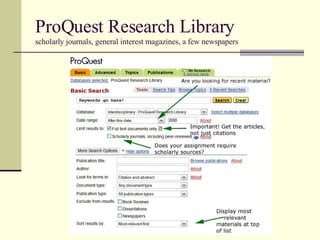
ProQuest Research Library scholarly journals, general interest magazines, a few newspapers
Important search tips Enclose phrases in quotation marks (“white slavery”); not always necessary, but never hurts Ending a word with an asterisk (*) searches different endings (politic* searches politics, political, politician etc.) Keyword often searches only the citation (title, author, abstract, subjects), not full-text of article.  You can often direct the search engine to search full-text in a dropdown screen.
ProQuest Research Library: Results ProQuest will suggest topics from its vocabulary—click on one to get all articles in that category
ProQuest Research Library: Results Check boxes to “mark” for later review Takes you back to the search screen to build on your last search ProQuest will suggest topics to make a new search for you
ProQuest Research Library: Collecting materials “ Mark” documents to review later Use “My Research” tab to view marked documents E-mail, print, or save full text PDF generally better for preserving images—they don’t always display correctly in “Text+Graphics” Choose citation format—beware, sometimes format is not done correctly
JSTOR : Advanced Search Screen JSTOR contains lots of reviews; exclude unless you want them SCC is unlikely to have these Journals go back to the late 1800s!
Questions? Need more help? Reference Desk, 2 nd  floor of Learning Resource Center Phone: 558-2461 E-mail me:  [email_address]

Hist311 (Piscopo)

  • 1.
    Research in LOISand Library Databases HIST 311 (Piscopo), Spring 2008 Jeff Karlsen, LRC Librarian [email_address]
  • 2.
    Doing research inLOIS and text databases: Getting started What is your topic ? You should be able to summarize it in a single phrase What are keywords ? Ideas, phrases, topics When you search for information, you can combine them
  • 3.
    Topic  Keywords Topic : History of Hmong people and immigration to United States Keywords : Hmong, Miao (variants/synonyms) history immigration Laos, Vietnam, China Vietnam War
  • 4.
    Topic  Keywords General topic : History of Las Vegas Keywords : Las Vegas history urban development, cities, growth gambling, gaming organized crime, mob
  • 5.
    Topic  Keywords General topic : History of Photography Keywords : photography history (notice a theme?) When? 19 th century, 20 th century Where? Europe, United States, India, etc. Narrowing the topic: amateur, daguerrotype, instant, etc.
  • 6.
    Library Website Linkon the SCC website http://scc.losrios.edu Library home page http://scc.losrios.edu/~library
  • 7.
    LOIS : Books,audio/visual media, reserve materials, e-books
  • 8.
    DATABASES –articles, image collections, reference works, e-books
  • 9.
    Using LOIS Whensearching for books on a particular topic, you have a choice of searching by keyword or by subject Keyword searching Ideas, words, phrases—can be in title, subject, author, chapter titles Lots of results Not very precise Subject searching Subject terms are in a particular form—not intuitive Fewer results—you might miss some relevant books More precise
  • 10.
    LOIS Keywords  Subject Enter keywords Skim results for promising books Click on the title to see the full record Look at subject Good subject headings; click on one to see more books on the same topic
  • 11.
    LOIS Subject SearchingOn search screen (“Start Over”), choose “Subject” Type first words of subject ( e.g. vocational guidance) Browse list Combine subject terms
  • 12.
    Important search tips:Boolean logic AND finds only those materials that contain BOTH terms OR finds materials that use EITHER term (more results) NOT (sometimes AND NOT ) finds articles that contain one term, but not the other. history AND photography 20th OR twentieth fashion NOT photography
  • 13.
    LOIS: Where isthe book? Location : SCC=Sacramento City College SCC-Reference-2nd Floor : Reference collection, does not leave the building SCC-Circ Desk-2 Hour : Reserve book, can only be checked out for 2 hours SCC-3rd Floor : Can be checked out for 3 weeks Online E-Book : can be viewed via the Internet (requires Student Access card barcode and PIN) Non-reserve, non-reference books at other Los Rios campuses ( ARC, CRC, FLC ) can be requested (2-4 days)
  • 14.
    LOIS: Searching SCConly Click drop-down menu to select Sacramento City College If you have a little more time, request books from other campuses
  • 15.
    Accessing databases fromhome: ARE YOU IN THE SYSTEM? In LOIS, go to the My Record section. If you can view your record in LOIS, then you can access resources from home (and renew and request books, too!). If not, visit the Circulation Desk.
  • 16.
    Finding articles anddata: using Library Databases vs. Web (Google, Wikipedia, etc.) Information from high-quality sources, including peer-reviewed journals; mostly not available on open Web No advertising Saves you time Research Library (ProQuest) : information on various topics; scholarly and non-scholarly JSTOR : scholarly articles, including many from historical journals Oxford Reference Online, Encyclopædia Britannica Online : background reading, context
  • 17.
    ProQuest Research Libraryscholarly journals, general interest magazines, a few newspapers
  • 18.
    Important search tipsEnclose phrases in quotation marks (“white slavery”); not always necessary, but never hurts Ending a word with an asterisk (*) searches different endings (politic* searches politics, political, politician etc.) Keyword often searches only the citation (title, author, abstract, subjects), not full-text of article. You can often direct the search engine to search full-text in a dropdown screen.
  • 19.
    ProQuest Research Library:Results ProQuest will suggest topics from its vocabulary—click on one to get all articles in that category
  • 20.
    ProQuest Research Library:Results Check boxes to “mark” for later review Takes you back to the search screen to build on your last search ProQuest will suggest topics to make a new search for you
  • 21.
    ProQuest Research Library:Collecting materials “ Mark” documents to review later Use “My Research” tab to view marked documents E-mail, print, or save full text PDF generally better for preserving images—they don’t always display correctly in “Text+Graphics” Choose citation format—beware, sometimes format is not done correctly
  • 22.
    JSTOR : AdvancedSearch Screen JSTOR contains lots of reviews; exclude unless you want them SCC is unlikely to have these Journals go back to the late 1800s!
  • 23.
    Questions? Need morehelp? Reference Desk, 2 nd floor of Learning Resource Center Phone: 558-2461 E-mail me: [email_address]