INTERNATIONAL UNIVERSITY OF EAST AFRFICA
INFORMATION SYSTEM SECURITY
ASSIGNMENT PRESENTATION
BY
SHAMSU MUSA ABDULRASHEED
PRESENTED TO
FACULTY OF SCIENCE AND TECHNOLOGY
INTERNATIONAL UNIVERSITY OF EAST AFRICA(IUEA)
SUPERVISOR
Mr. ELU EMANEUL (Phd, CIL )
ENCRYPTION AND DECRYPTION 2.0
Introduction.
Encryption and Decryption supports Windows 7, Vista, XP, 2008, 2003, 2000, ME, 98 (32-bit
and 64-bit versions).
Encryption and Decryption is strong text and file encryption freeware that allows you to
protect the privacy of your email messages, instant messages, chat messages, documents
and sensitive files by encrypting them with AES 256-bit key encryption.
With Encryption and Decryption you can safely send encrypted messages and emails over
the Internet, share private information with your friends, family, co-workers and safely store
sensitive data on your computer.
Key features:-
• Reliable and easy-to-use encryption freeware
• Protects the privacy of your instant messages when you use Skype, chats, ICQ, etc
• Allows you to safely send secure emails and other confidential information
• Helps you safely store sensitive information on your computer
Encryption and Decryption is text and file encryption freeware that provides high security and
allows you to safely store and share sensitive data.
Cipher text?
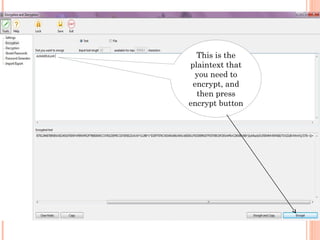
1. Double-click the Encryption and Decryption desktop icon.
2. Click the 'Tools' button, and then select 'Encryption'.
3. Select the 'Text' option.
4. Enter the text you want to encrypt in the 'Text you want to encrypt' area.
5. Click the 'Encrypt' button or the 'Encrypt and Copy' button.
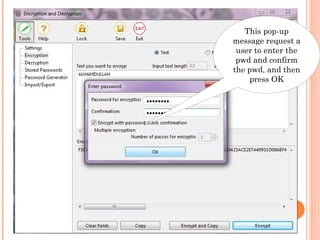
6. Enter the password for encryption and confirm it.
7. Enable or disable the 'Encrypt with password check confirmation' option
and then click OK.
Your text in the encrypted form will appear in the 'Encrypted text' area. In
case of using the 'Encrypt and Copy' button, the encrypted text will be also
copied to the clipboard.
Now you can safely store your text message or document on the computer,
send it in emails or transfer it in any other ways.
How the software works
This is the
plaintext that
you need to
encrypt, and
then press
encrypt button
This pop-up
message request a
user to enter the
pwd and confirm
the pwd, and then
press OK
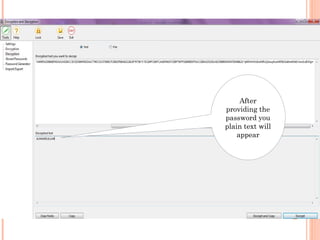
Decipher text?
1. Double-click the Encryption and Decryption desktop icon.
2. Click the 'Tools' button, and then select 'Decryption'.
3. Select the 'Text' option
4. Paste the text you want to decrypt in the 'Encrypted text you want to decrypt'
area.
5. Click the 'Decrypt' button or the 'Decrypt and Copy' button.
6. Enter the password for decryption and confirm it. Note: it is the same
password that was used for encryption.
7. The decrypted text will appear in the 'Decrypted text' area.
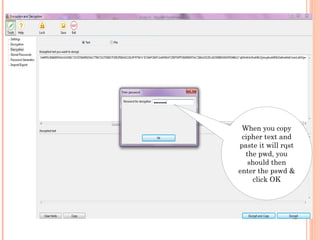
When you copy
cipher text and
paste it will rqst
the pwd, you
should then
enter the pswd &
click OK
After
providing the
password you
plain text will
appear
ALGORITHM
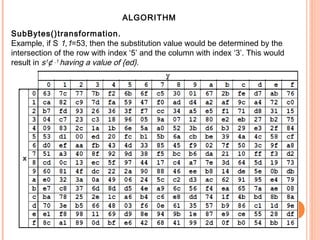
SubBytes()transformation.
Example, if S 1,1=53, then the substitution value would be determined by the
intersection of the row with index ‘5’ and the column with index ‘3’. This would
result in s1
¢ ,1
having a value of {ed}.
ALGORITHM
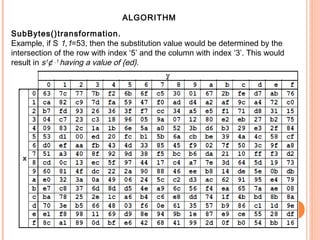
SubBytes()transformation.
Example, if S 1,1=53, then the substitution value would be determined by the
intersection of the row with index ‘5’ and the column with index ‘3’. This would
result in s1
¢ ,1
having a value of {ed}.

Encrip 2.0

  • 1.
    INTERNATIONAL UNIVERSITY OFEAST AFRFICA INFORMATION SYSTEM SECURITY ASSIGNMENT PRESENTATION BY SHAMSU MUSA ABDULRASHEED PRESENTED TO FACULTY OF SCIENCE AND TECHNOLOGY INTERNATIONAL UNIVERSITY OF EAST AFRICA(IUEA) SUPERVISOR Mr. ELU EMANEUL (Phd, CIL )
  • 2.
    ENCRYPTION AND DECRYPTION2.0 Introduction. Encryption and Decryption supports Windows 7, Vista, XP, 2008, 2003, 2000, ME, 98 (32-bit and 64-bit versions). Encryption and Decryption is strong text and file encryption freeware that allows you to protect the privacy of your email messages, instant messages, chat messages, documents and sensitive files by encrypting them with AES 256-bit key encryption. With Encryption and Decryption you can safely send encrypted messages and emails over the Internet, share private information with your friends, family, co-workers and safely store sensitive data on your computer. Key features:- • Reliable and easy-to-use encryption freeware • Protects the privacy of your instant messages when you use Skype, chats, ICQ, etc • Allows you to safely send secure emails and other confidential information • Helps you safely store sensitive information on your computer Encryption and Decryption is text and file encryption freeware that provides high security and allows you to safely store and share sensitive data.
  • 3.
    Cipher text? 1. Double-clickthe Encryption and Decryption desktop icon. 2. Click the 'Tools' button, and then select 'Encryption'. 3. Select the 'Text' option. 4. Enter the text you want to encrypt in the 'Text you want to encrypt' area. 5. Click the 'Encrypt' button or the 'Encrypt and Copy' button. 6. Enter the password for encryption and confirm it. 7. Enable or disable the 'Encrypt with password check confirmation' option and then click OK. Your text in the encrypted form will appear in the 'Encrypted text' area. In case of using the 'Encrypt and Copy' button, the encrypted text will be also copied to the clipboard. Now you can safely store your text message or document on the computer, send it in emails or transfer it in any other ways. How the software works
  • 4.
    This is the plaintextthat you need to encrypt, and then press encrypt button
  • 5.
    This pop-up message requesta user to enter the pwd and confirm the pwd, and then press OK
  • 6.
    Decipher text? 1. Double-clickthe Encryption and Decryption desktop icon. 2. Click the 'Tools' button, and then select 'Decryption'. 3. Select the 'Text' option 4. Paste the text you want to decrypt in the 'Encrypted text you want to decrypt' area. 5. Click the 'Decrypt' button or the 'Decrypt and Copy' button. 6. Enter the password for decryption and confirm it. Note: it is the same password that was used for encryption. 7. The decrypted text will appear in the 'Decrypted text' area.
  • 7.
    When you copy ciphertext and paste it will rqst the pwd, you should then enter the pswd & click OK
  • 8.
  • 9.
    ALGORITHM SubBytes()transformation. Example, if S1,1=53, then the substitution value would be determined by the intersection of the row with index ‘5’ and the column with index ‘3’. This would result in s1 ¢ ,1 having a value of {ed}.
  • 10.
    ALGORITHM SubBytes()transformation. Example, if S1,1=53, then the substitution value would be determined by the intersection of the row with index ‘5’ and the column with index ‘3’. This would result in s1 ¢ ,1 having a value of {ed}.