LESSON 1 : INFORMATION AND COMMUNICATIONS TECHNOLOGY
Online Systems, Functions and Platforms
The online platform in the use of ICT makes it easier for users to interact, collect
and use the data from the users interactions for their own particular needs.
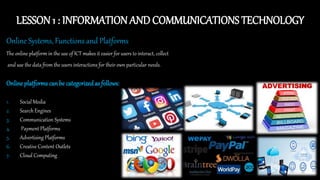
Online platforms can be categorizedas follows:
1. Social Media
2. Search Engines
3. Communication Systems
4. Payment Platforms
5. Advertising Platforms
6. Creative Content Outlets
7. Cloud Computing
LESSON 2 : SAFETY, SECURITY, AND ETHICS
OnlineSafety and Security
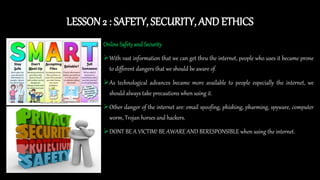
With vast information that we can get thru the internet, people who uses it became prone
to different dangers that we should be aware of.
As technological advances became more available to people especially the internet, we
should always take precautions when using it.
Other danger of the internet are: email spoofing, phishing, pharming, spyware, computer
worm, Trojan horses and hackers.
DONT BE A VICTIM! BE AWARE AND BERESPONSIBLE when using the internet.
LESSON 3 : ONLINE RESEARCH
Contextual Online Search Steps
1. Identify/choose a topic
2. Topic or task definition
3. Identify methods of search
4. Identify research resources
5. Make research strategies
6. Compile research results
7. Evaluate research results
8. List references for citation
LESSON 4 : APPLIED PRODUCTIVITY TOOLS
MailMerge
Mail merge is used to create multiple documents at once.
These documents have identical layout, formatting, text, and graphics.
Only specific sections of each document varies and is personalized. The documents Word can create
with mail merge include bulk labels, letters, envelopes, and emails.
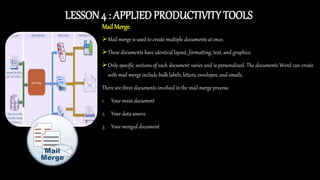
There are three documents involved in the mail merge process:
1. Your main document
2. Your data source
3. Your merged document
LESSON 5 : IMAGINGAND DESIGN FOR ONLINE
1. PURPOSE
Each page of your website needs to have a clear
purpose, and to fulfill a specific need for your
website users in the most effective way possible.
2. COMMUNICATION
It is important to communicate clearly, and make
your information easy to read and digest.
3. TYPEFACES
 Sans Serif fonts such as Arial and Verdana are easier
to read online .
 The ideal font size for reading easily online is 16px
and stick to a maximum of 3 typefaces in a maximum
of 3 point sizes to keep your design streamlined.
10 TOPPRINCIPLESOFEFFECTIVEWEBDESIGN
4. COLOURS
 Complementary colors create balance and harmony.
 Using contrasting colors for the text and background
will make reading easier on the eye.
5. IMAGES
A picture can speak a thousand words, and choosing the
right images for your website can help with brand positioning
and connecting with your target
audience.
6. NAVIGATION
Navigation is about how easy it
is for people to take action and
move around your website.
7. GRIDBASEDLAYOUTS
Grid based layouts arrange content into sections, columns and
boxes that line up and feel balanced, which leads to a better
looking website design.
8. “F” PATTERNDESIGN
Eye tracking studies have identified that people scan computer
screens in
an “F” pattern.
9. LOADTIME
A website should load fast when
accessed by users.
10. MOBILEFRIENDLY
It is important to consider if your website is mobile friendly. If your website is not mobile
friendly, you can either rebuild it in a responsive layout (this means your website will adjust
to different screen widths) or you can build a dedicated mobile site (a separate website
optimized specifically for mobile
users).
LESSON6: ONLINE PLATFORMTOOLS FOR ICT CONTENT
DEVELOPMENT
Nature and Purposes of Online Platforms and Applications
Online
is the condition of being connected to a
network of computers or other devices.
The term is frequently used to describe
someone who is currently connected to
the Internet.
Platform
is a group of technologies that are used as a base
upon which other applications, processes or
technologies are developed.
Online Platform
is a specially developed platform using
Internet technology for the design and
development of teaching and learning
purposes.

Empowerment technology

  • 2.
    LESSON 1 :INFORMATION AND COMMUNICATIONS TECHNOLOGY Online Systems, Functions and Platforms The online platform in the use of ICT makes it easier for users to interact, collect and use the data from the users interactions for their own particular needs. Online platforms can be categorizedas follows: 1. Social Media 2. Search Engines 3. Communication Systems 4. Payment Platforms 5. Advertising Platforms 6. Creative Content Outlets 7. Cloud Computing
  • 3.
    LESSON 2 :SAFETY, SECURITY, AND ETHICS OnlineSafety and Security With vast information that we can get thru the internet, people who uses it became prone to different dangers that we should be aware of. As technological advances became more available to people especially the internet, we should always take precautions when using it. Other danger of the internet are: email spoofing, phishing, pharming, spyware, computer worm, Trojan horses and hackers. DONT BE A VICTIM! BE AWARE AND BERESPONSIBLE when using the internet.
  • 4.
    LESSON 3 :ONLINE RESEARCH Contextual Online Search Steps 1. Identify/choose a topic 2. Topic or task definition 3. Identify methods of search 4. Identify research resources 5. Make research strategies 6. Compile research results 7. Evaluate research results 8. List references for citation
  • 5.
    LESSON 4 :APPLIED PRODUCTIVITY TOOLS MailMerge Mail merge is used to create multiple documents at once. These documents have identical layout, formatting, text, and graphics. Only specific sections of each document varies and is personalized. The documents Word can create with mail merge include bulk labels, letters, envelopes, and emails. There are three documents involved in the mail merge process: 1. Your main document 2. Your data source 3. Your merged document
  • 6.
    LESSON 5 :IMAGINGAND DESIGN FOR ONLINE 1. PURPOSE Each page of your website needs to have a clear purpose, and to fulfill a specific need for your website users in the most effective way possible. 2. COMMUNICATION It is important to communicate clearly, and make your information easy to read and digest. 3. TYPEFACES  Sans Serif fonts such as Arial and Verdana are easier to read online .  The ideal font size for reading easily online is 16px and stick to a maximum of 3 typefaces in a maximum of 3 point sizes to keep your design streamlined. 10 TOPPRINCIPLESOFEFFECTIVEWEBDESIGN 4. COLOURS  Complementary colors create balance and harmony.  Using contrasting colors for the text and background will make reading easier on the eye. 5. IMAGES A picture can speak a thousand words, and choosing the right images for your website can help with brand positioning and connecting with your target audience. 6. NAVIGATION Navigation is about how easy it is for people to take action and move around your website. 7. GRIDBASEDLAYOUTS Grid based layouts arrange content into sections, columns and boxes that line up and feel balanced, which leads to a better looking website design. 8. “F” PATTERNDESIGN Eye tracking studies have identified that people scan computer screens in an “F” pattern. 9. LOADTIME A website should load fast when accessed by users. 10. MOBILEFRIENDLY It is important to consider if your website is mobile friendly. If your website is not mobile friendly, you can either rebuild it in a responsive layout (this means your website will adjust to different screen widths) or you can build a dedicated mobile site (a separate website optimized specifically for mobile users).
  • 7.
    LESSON6: ONLINE PLATFORMTOOLSFOR ICT CONTENT DEVELOPMENT Nature and Purposes of Online Platforms and Applications Online is the condition of being connected to a network of computers or other devices. The term is frequently used to describe someone who is currently connected to the Internet. Platform is a group of technologies that are used as a base upon which other applications, processes or technologies are developed. Online Platform is a specially developed platform using Internet technology for the design and development of teaching and learning purposes.