EMIS USER
GUIDE
1. SEARCH BAR
2. SOURCES – EDITOR’S
CHOICE
3. COUNTRY ANALYSIS
4. INDUSTRY ANALYSIS
5. COMPANY ANALYSIS
6. DEALWATCH (M&A)
1. SEARCH BAR
I. FILTERS
II. BOOLEAN OPERATORS
III. TIPS
IV. EXAMPLE
4
I. SEARCH BAR: FILTERS
Boolean Search:
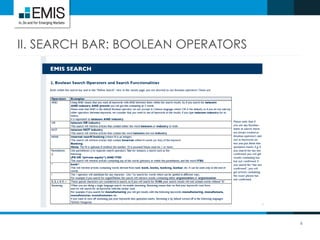
 Incorporate Boolean operators (AND, OR, NEAR10…) into search strings
 See slide 6 for a list of operators
Category “Shortcuts”:
 Switch between News, Reports, Statistics, etc. to search within that category only
Basic Filters:
 Date Range
 Country Selection
 Content Language
More Filters:
 Sources, i.e. Publication Name
 Industries
 Topics, e.g. FDI, Political, EU, etc.
 Source Types, e.g. Brokerage Houses, Newspapers, etc.
 Content Types, e.g. News, Ratings, etc.
 Document Format
5
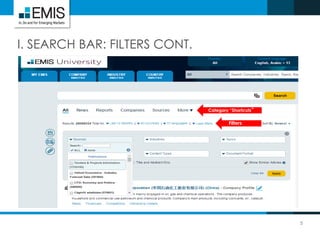
I. SEARCH BAR: FILTERS CONT.
Category “Shortcuts”
Filters
II. SEARCH BAR: BOOLEAN OPERATORS
6
7
III. SEARCH BAR: TIPS
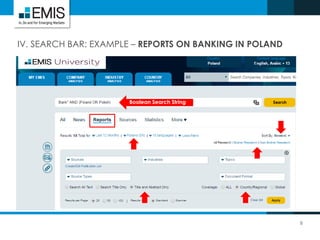
Use “Search Title Only” or “Search Title and Abstract Only” to ensure keywords bring
out the most relevant results
For reports:
 Select “Country/Regional” reports to get country specific results. All countries are
tagged to reports classified as “Global”
 Switch between “Broker” and “Non-Broker Research”
Sort by “Newest” content to receive the most recent results or by “page count” to
receive the most comprehensive reports at the top
See next slide for example
8
IV. SEARCH BAR: EXAMPLE – REPORTS ON BANKING IN POLAND
Boolean Search String
2. SOURCES
EDITOR’S CHOICE
10
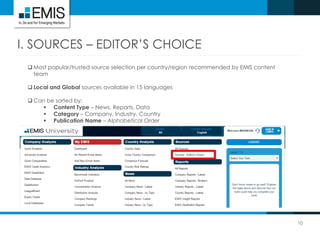
I. SOURCES – EDITOR’S CHOICE
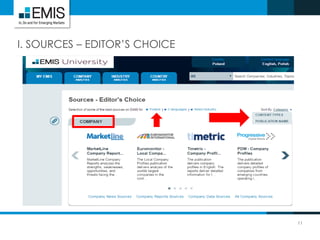
 Most popular/trusted source selection per country/region recommended by EMIS content
team
 Local and Global sources available in 15 languages
 Can be sorted by:
 Content Type – News, Reports, Data
 Category – Company, Industry, Country
 Publication Name – Alphabetical Order
11
I. SOURCES – EDITOR’S CHOICE
3. COUNTRY ANALYSIS
I. CONSENSUS FORECAST
II. COUNTRY RISK RATINGS
13
I. COUNTRY ANALYSIS: CONSENSUS FORECAST
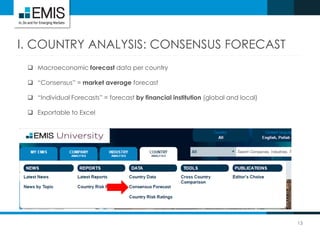
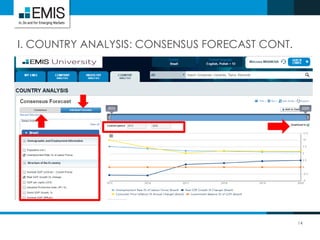
 Macroeconomic forecast data per country
 “Consensus” = market average forecast
 “Individual Forecasts” = forecast by financial institution (global and local)
 Exportable to Excel
14
I. COUNTRY ANALYSIS: CONSENSUS FORECAST CONT.
15
II. COUNTRY ANALYSIS: COUNTRY RISK RATINGS
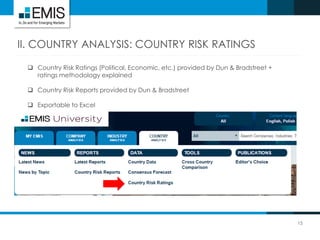
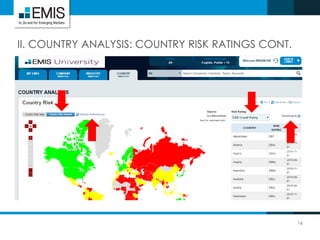
 Country Risk Ratings (Political, Economic, etc.) provided by Dun & Bradstreet +
ratings methodology explained
 Country Risk Reports provided by Dun & Bradstreet
 Exportable to Excel
16
II. COUNTRY ANALYSIS: COUNTRY RISK RATINGS CONT.
4. INDUSTRY ANALYSIS
I. COMPARE TRENDS
II. BENCHMARK
18
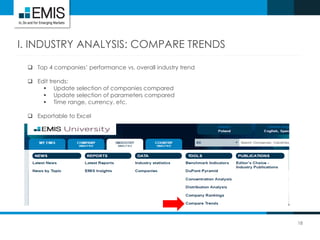
I. INDUSTRY ANALYSIS: COMPARE TRENDS
 Top 4 companies’ performance vs. overall industry trend
 Edit trends:
 Update selection of companies compared
 Update selection of parameters compared
 Time range, currency, etc.
 Exportable to Excel
19
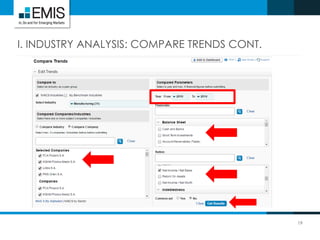
I. INDUSTRY ANALYSIS: COMPARE TRENDS CONT.
20
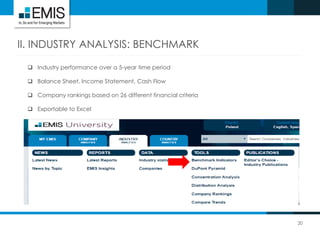
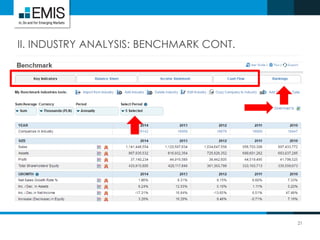
II. INDUSTRY ANALYSIS: BENCHMARK
 Industry performance over a 5-year time period
 Balance Sheet, Income Statement, Cash Flow
 Company rankings based on 26 different financial criteria
 Exportable to Excel
21
II. INDUSTRY ANALYSIS: BENCHMARK CONT.
5. COMPANY ANALYSIS
I. QUICK SCREENER
II. FINANCIALS + SIMILAR
COMPANIES
III. CREDIT ANALYTICS
23
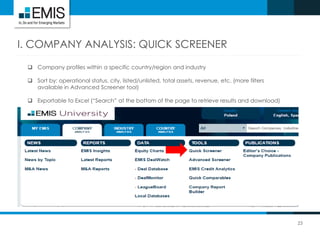
I. COMPANY ANALYSIS: QUICK SCREENER
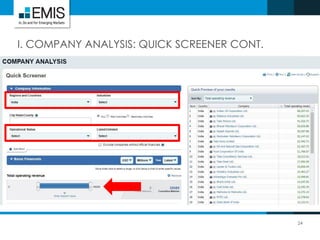
 Company profiles within a specific country/region and industry
 Sort by: operational status, city, listed/unlisted, total assets, revenue, etc. (more filters
available in Advanced Screener tool)
 Exportable to Excel (“Search” at the bottom of the page to retrieve results and download)
24
I. COMPANY ANALYSIS: QUICK SCREENER CONT.
25
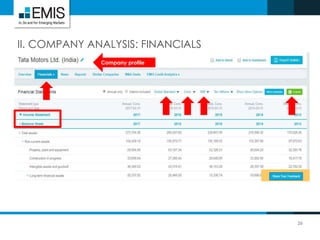
II. COMPANY ANALYSIS: FINANCIALS + SIMILAR COMPANIES
 Financials:
 Income Statement, Balance Sheet, Cash Flows, Ratios, Multiples
 Local (country’s standards) or global standard (EMIS’ standardised template
 enables to compare financials across geographies)
 Choose currency, individual/consolidated financials, etc.
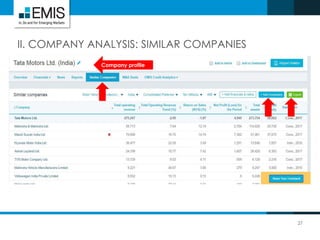
 Similar companies = compare financials amongst competitors
 Exportable to Excel
 Access through company profile
26
II. COMPANY ANALYSIS: FINANCIALS
Company profile
27
II. COMPANY ANALYSIS: SIMILAR COMPANIES
Company profile
28
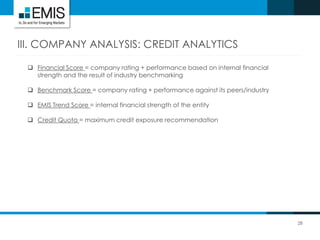
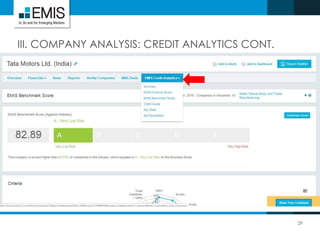
III. COMPANY ANALYSIS: CREDIT ANALYTICS
 Financial Score = company rating + performance based on internal financial
strength and the result of industry benchmarking
 Benchmark Score = company rating + performance against its peers/industry
 EMIS Trend Score = internal financial strength of the entity
 Credit Quota = maximum credit exposure recommendation
29
III. COMPANY ANALYSIS: CREDIT ANALYTICS CONT.
6. DEALWATCH
I. DEAL DATABASE
II. DEALMONITOR
31
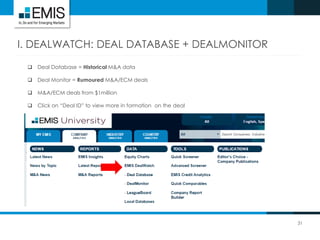
I. DEALWATCH: DEAL DATABASE + DEALMONITOR
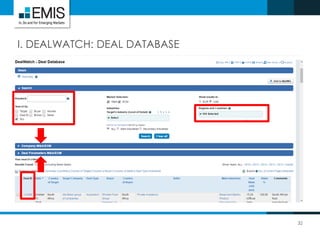
 Deal Database = Historical M&A data
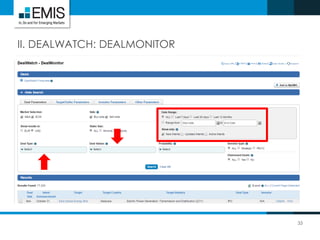
 Deal Monitor = Rumoured M&A/ECM deals
 M&A/ECM deals from $1million
 Click on “Deal ID” to view more in formation on the deal
32
I. DEALWATCH: DEAL DATABASE
33
II. DEALWATCH: DEALMONITOR
CONTACT:
34
Peggy Chan
Account Manager, ASEAN
Suite 5-3 & 5-3A, 5th Floor, Wisma UOA II, No.21 Jalan Pinang,
50450 Kuala Lumpur, Malaysia
t: +603 2166 9921 ext 177 | m: +6012 9987 822
e: pchan@emis.com | w: www.emis.com
Follow us: LinkedIn | Twitter | Facebook |
Follow us: LinkedIn | Twitter | Facebook | Blog
Watch our: EMIS Video

EMIS User Guide

  • 1.
  • 2.
    1. SEARCH BAR 2.SOURCES – EDITOR’S CHOICE 3. COUNTRY ANALYSIS 4. INDUSTRY ANALYSIS 5. COMPANY ANALYSIS 6. DEALWATCH (M&A)
  • 3.
    1. SEARCH BAR I.FILTERS II. BOOLEAN OPERATORS III. TIPS IV. EXAMPLE
  • 4.
    4 I. SEARCH BAR:FILTERS Boolean Search:  Incorporate Boolean operators (AND, OR, NEAR10…) into search strings  See slide 6 for a list of operators Category “Shortcuts”:  Switch between News, Reports, Statistics, etc. to search within that category only Basic Filters:  Date Range  Country Selection  Content Language More Filters:  Sources, i.e. Publication Name  Industries  Topics, e.g. FDI, Political, EU, etc.  Source Types, e.g. Brokerage Houses, Newspapers, etc.  Content Types, e.g. News, Ratings, etc.  Document Format
  • 5.
    5 I. SEARCH BAR:FILTERS CONT. Category “Shortcuts” Filters
  • 6.
    II. SEARCH BAR:BOOLEAN OPERATORS 6
  • 7.
    7 III. SEARCH BAR:TIPS Use “Search Title Only” or “Search Title and Abstract Only” to ensure keywords bring out the most relevant results For reports:  Select “Country/Regional” reports to get country specific results. All countries are tagged to reports classified as “Global”  Switch between “Broker” and “Non-Broker Research” Sort by “Newest” content to receive the most recent results or by “page count” to receive the most comprehensive reports at the top See next slide for example
  • 8.
    8 IV. SEARCH BAR:EXAMPLE – REPORTS ON BANKING IN POLAND Boolean Search String
  • 9.
  • 10.
    10 I. SOURCES –EDITOR’S CHOICE  Most popular/trusted source selection per country/region recommended by EMIS content team  Local and Global sources available in 15 languages  Can be sorted by:  Content Type – News, Reports, Data  Category – Company, Industry, Country  Publication Name – Alphabetical Order
  • 11.
    11 I. SOURCES –EDITOR’S CHOICE
  • 12.
    3. COUNTRY ANALYSIS I.CONSENSUS FORECAST II. COUNTRY RISK RATINGS
  • 13.
    13 I. COUNTRY ANALYSIS:CONSENSUS FORECAST  Macroeconomic forecast data per country  “Consensus” = market average forecast  “Individual Forecasts” = forecast by financial institution (global and local)  Exportable to Excel
  • 14.
    14 I. COUNTRY ANALYSIS:CONSENSUS FORECAST CONT.
  • 15.
    15 II. COUNTRY ANALYSIS:COUNTRY RISK RATINGS  Country Risk Ratings (Political, Economic, etc.) provided by Dun & Bradstreet + ratings methodology explained  Country Risk Reports provided by Dun & Bradstreet  Exportable to Excel
  • 16.
    16 II. COUNTRY ANALYSIS:COUNTRY RISK RATINGS CONT.
  • 17.
    4. INDUSTRY ANALYSIS I.COMPARE TRENDS II. BENCHMARK
  • 18.
    18 I. INDUSTRY ANALYSIS:COMPARE TRENDS  Top 4 companies’ performance vs. overall industry trend  Edit trends:  Update selection of companies compared  Update selection of parameters compared  Time range, currency, etc.  Exportable to Excel
  • 19.
    19 I. INDUSTRY ANALYSIS:COMPARE TRENDS CONT.
  • 20.
    20 II. INDUSTRY ANALYSIS:BENCHMARK  Industry performance over a 5-year time period  Balance Sheet, Income Statement, Cash Flow  Company rankings based on 26 different financial criteria  Exportable to Excel
  • 21.
  • 22.
    5. COMPANY ANALYSIS I.QUICK SCREENER II. FINANCIALS + SIMILAR COMPANIES III. CREDIT ANALYTICS
  • 23.
    23 I. COMPANY ANALYSIS:QUICK SCREENER  Company profiles within a specific country/region and industry  Sort by: operational status, city, listed/unlisted, total assets, revenue, etc. (more filters available in Advanced Screener tool)  Exportable to Excel (“Search” at the bottom of the page to retrieve results and download)
  • 24.
    24 I. COMPANY ANALYSIS:QUICK SCREENER CONT.
  • 25.
    25 II. COMPANY ANALYSIS:FINANCIALS + SIMILAR COMPANIES  Financials:  Income Statement, Balance Sheet, Cash Flows, Ratios, Multiples  Local (country’s standards) or global standard (EMIS’ standardised template  enables to compare financials across geographies)  Choose currency, individual/consolidated financials, etc.  Similar companies = compare financials amongst competitors  Exportable to Excel  Access through company profile
  • 26.
    26 II. COMPANY ANALYSIS:FINANCIALS Company profile
  • 27.
    27 II. COMPANY ANALYSIS:SIMILAR COMPANIES Company profile
  • 28.
    28 III. COMPANY ANALYSIS:CREDIT ANALYTICS  Financial Score = company rating + performance based on internal financial strength and the result of industry benchmarking  Benchmark Score = company rating + performance against its peers/industry  EMIS Trend Score = internal financial strength of the entity  Credit Quota = maximum credit exposure recommendation
  • 29.
    29 III. COMPANY ANALYSIS:CREDIT ANALYTICS CONT.
  • 30.
    6. DEALWATCH I. DEALDATABASE II. DEALMONITOR
  • 31.
    31 I. DEALWATCH: DEALDATABASE + DEALMONITOR  Deal Database = Historical M&A data  Deal Monitor = Rumoured M&A/ECM deals  M&A/ECM deals from $1million  Click on “Deal ID” to view more in formation on the deal
  • 32.
  • 33.
  • 34.
    CONTACT: 34 Peggy Chan Account Manager,ASEAN Suite 5-3 & 5-3A, 5th Floor, Wisma UOA II, No.21 Jalan Pinang, 50450 Kuala Lumpur, Malaysia t: +603 2166 9921 ext 177 | m: +6012 9987 822 e: pchan@emis.com | w: www.emis.com Follow us: LinkedIn | Twitter | Facebook | Follow us: LinkedIn | Twitter | Facebook | Blog Watch our: EMIS Video