April, 2011 Product presentation  FrontiersInsight.com User guide
Contents General information Main page “ News” section “ M&A deals” section “ Companies” section “ Stock markets” section “ Research” section “ Statistics” section Premium features
1.  General information
General information Countries covered :  Mongolia, CIS (All except Russia), Africa (Zimbabwe, South Africa, Nigeria), Asia (Nepal, Cambodia, Vietnam)  250+ information sources 19 stock exchanges :  KASE   and   LSE  ( Kazakhstan ) MSE  ( Mongolia) TRSE and Elsis-savdo  ( Uzbekistan ) Stock exchange Kyrgystan-BTS,   Kyrgyz stock exchange  ( Kyrgystan ) Zimbabwe Stock Exchange UX and PFTS (Ukraine) MOLDSE (Moldova)  Botswana  Stock Exchange Caucasus countries (Armenia, Georgia, Azerbaijan) 30+ stock exchanges (Asia and Africa) are in negotiation process
Database  ( 01 . 04 .20 11 ) 14,0 00+  public and private companies 180, 000+  news ,  substantial facts and events entries : 5,0 00+  corporate events 20,0 00+  announcements of substantial facts 14,0 00+  financial reports : 6,0 00+  balance sheets 6,0 00+  profit and loss accounts 16,0 00+  entries about company executives 5,0 00+  entries about company shareholders  ( legal entities and individuals )
2.  Main page
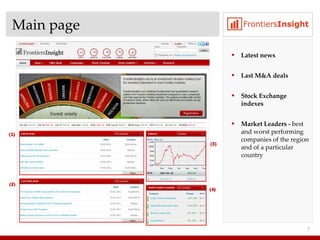
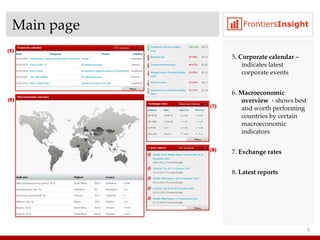
Main page Latest news Last M&A deals Stock Exchange indexes Market Leaders -  best and worst performing companies   of the region and of a particular country
Main page 5.  Corporate calendar –  indicates latest corporate events 6.  Macroeconomic overview  - shows best and worth performing countries by certain macroeconomic indicators  7.  Exchange rates 8.  Latest reports
3.  “News” section
News News types : news corporate and other events substantial facts Tagging  –  each news item is assigned corresponding Company and Industry tags ,  which makes navigation in the system easy
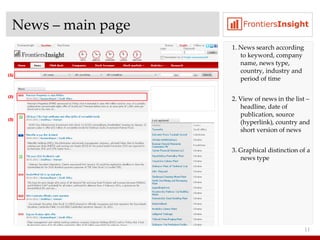
News  –  main page 1. News search   according to keyword, company name, news type, country, industry and period of time 2. View of news in the list  –  headline, date of publication, source (hyperlink), country and short version of news 3. Graphical distinction   of a news type
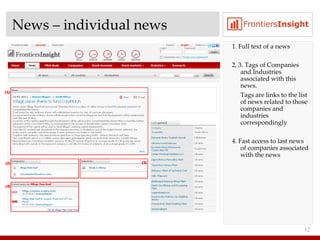
News  –  individual news 1. Full text of a news 2, 3. Tags of Companies and Industries associated with this news. Tags are links to the list of news related to those companies and industries correspondingly 4.  Fast access to last news of companies associated with the news
4 .  “M&A deals” section
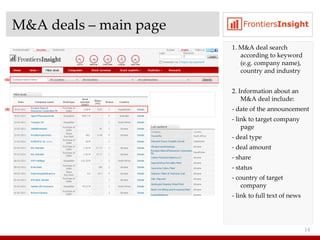
M&A deals  –  main page 1. M&A deal search   according to keyword (e.g. company name), country and industry 2. Information about an M&A deal include: - date of the announcement - link to target company page - deal type - deal amount - share - status - country of target company - link to full text of news
5 .  “Companies” section
Companies Companies are assigned alternative names ,  e.g.   for Pahtabank – Pakhtabank, Paxtabank .  This enhances effectiveness of companies search   – system will find sought company, if any of common names of that company is entered as a search criteria. Classification of companies according to   GICS  ( Global Industry Classification Standards ).
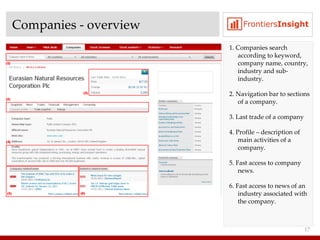
Companies  -  overview 1. Companies search according to keyword, company name, country, industry and sub-industry . 2. Navigation bar to sections of a company .  3. Last trade of a company 4.  Profile  –  description of main activities of a company . 5.  Fast access to company news . 6.  Fast access to news of an industry associated with the company .
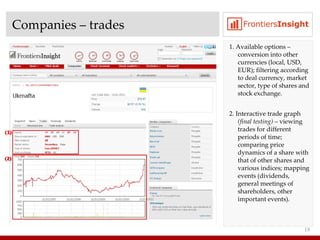
Companies  –  trades 1. Available options  –  conversion into other currencies (local, USD, EUR) ;  filtering according to deal currency ,  market sector, type of shares and stock exchange . 2. Interactive trade graph  ( final testing )  –  viewing trades for different periods of time;   comparing price dynamics of a share with that of other shares and various indices ;  mapping events  ( dividends ,  general meetings of shareholders, other important events ).
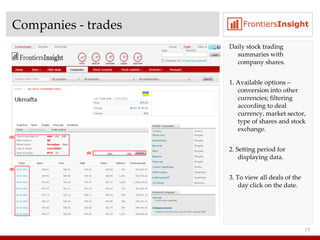
Companies  -  trades Daily stock trading summaries with company shares . 1. Available options  –  conversion into other currencies ;  filtering according to deal currency ,  market sector, type of shares and stock exchange . 2. Setting period for displaying data .  3. To view all deals of the day click on the date .
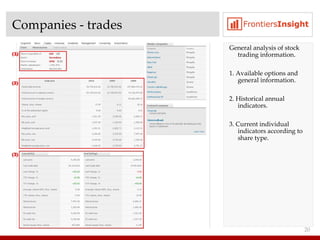
Companies  -  trades General analysis of stock trading information. 1. Available options and general information . 2. Historical annual indicators .  3. Current individual indicators according to share type .
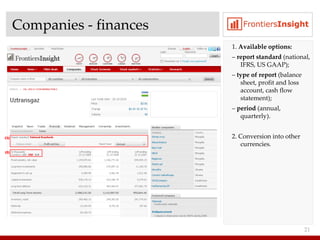
Companies  -  finances 1.  Available options : –  report standard   ( national ,  IFRS ,  US GAAP) ; –  type of report  ( balance sheet ,  profit and loss account ,  cash flow statement) ; –  period  ( annual ,  quarterly) . 2. Conversion into other currencies .
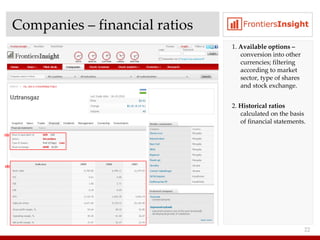
Companies  –  financial ratios 1.  Available options   –  conversion into other currencies ;  filtering according to market sector, type of shares and stock exchange . 2.  Historical ratios  calculated on the basis of financial statements .
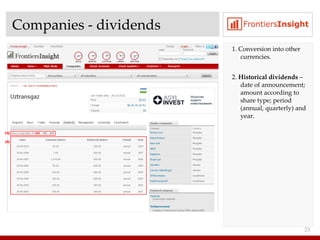
Companies  -  dividends 1. Conversion into other currencies . 2.  Historical dividends  –  date of announcement ;  amount according to share type ;  period  ( annual ,  quarterly )  and year .
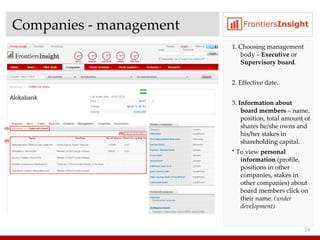
Companies  -  management 1. Choosing management body  –  Executive   or  Supervisory board . 2. Effective date . 3.  Information about board members  –  name ,  position ,  total amount of shares he/she owns and his/her stakes in shareholding capital . *  To view  personal information  (profile, positions in other companies, stakes in other companies) about board members click on their name.  (under development)
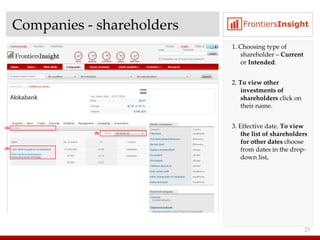
Companies  -  shareholders 1. Choosing type of shareholder  –  Current  or  Intended . 2.  To view other investments of shareholders  click on their name . 3 . Effective date.  To view the list of shareholders for other dates  choose from dates in the drop-down list .
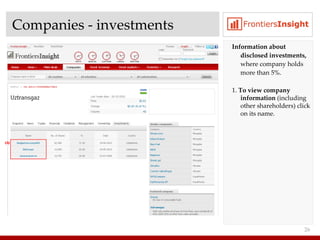
Companies  -  investments Information about disclosed investments ,  where company holds more than  5%. 1 .  To view company information  (including other shareholders) click on its name .
6 .  “Stock markets” section
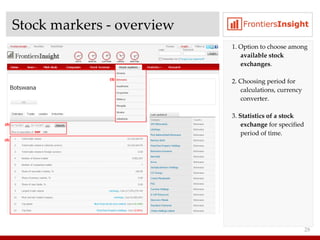
Stock markers - overview 1 . Option to choose among  available stock exchanges . 2.  Choosing period for calculations, currency converter . 3.  Statistics of a stock exchange  for specified period of time .
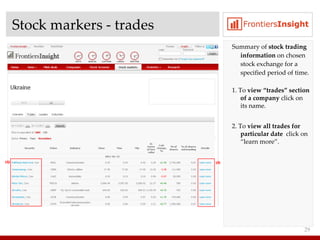
Stock markers - trades Summary of  stock trading information  on chosen stock exchange for a specified period of time . 1 . To  view “trades” section of a company  click on its name . 2.  To  view all trades for particular date  click on “learn more” .
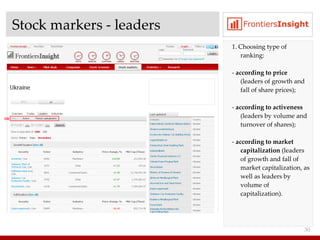
Stock markers - leaders 1 . Choosing type of ranking : -  according to price   ( leaders of growth and fall of share prices ); -  according to activeness  ( leaders by volume and turnover of shares ); -  according to market capitalization  ( leaders of growth and fall of market capitalization, as well as leaders by volume of capitalization ).
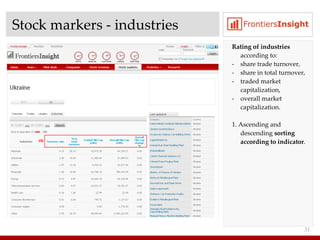
Stock markers - industries Rating of industries  according to : share trade turnover , share in total turnover , traded market capitalization , overall market capitalization . 1 . Ascending and descending  sorting according to indicator .
7 .  “Research” section
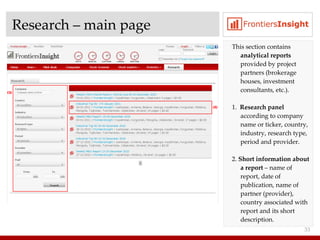
Research – main page This section contains  analytical reports  provided by project partners  ( brokerage houses, investment consultants, etc .) . 1.  Research panel  according to company name or ticker, country, industry, research type, period and provider. 2.  Short information about a report  –  name of report, date of publication, name of partner (provider), country associated with report and its short description .
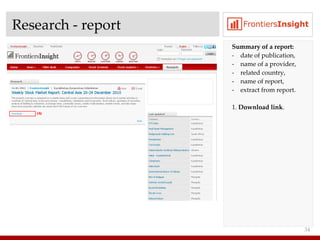
Research - report Summary of a report : -  date of publication , name of a provider , related country , name of report , extract from report . 1 .  Download link .
8 .  “Statistics” section
Statistics This section contains following information : exchange rates legislation of countries  macroeconomic indicators
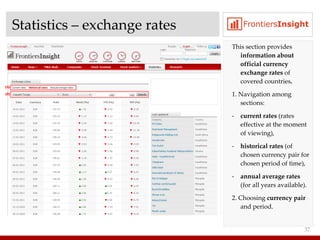
Statistics  –  exchange rates This section provides  information about official currency exchange rates  of covered countries . 1 . Navigation among sections : current rates  ( rates effective at the moment of viewing ), historical rates  ( of chosen currency pair for chosen period of time ), annual average rates   ( for all years available ). 2.  Choosing  currency pair  and period .
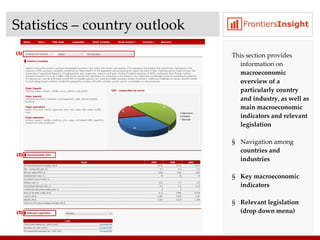
Statistics  –  country outlook This section provides information on  macroeconomic overview of a particularly country and industry, as well as main macroeconomic indicators and relevant legislation Navigation among  countries and industries Key macroeconomic indicators Relevant legislation (drop down menu)
9 .  Premium features
Premium features Subscribers may opt to include in their subscription following features : Watchlist – periodic notifications about new information  Stock screener   – searching stocks according to a set of individual criteria Portfolio management – managing own portfolio of stocks
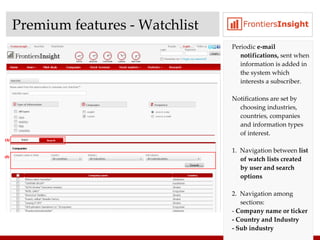
Premium features  -  Watchlist Periodic  e -mail  notifications,  sent   when information is added in the system which interests a subscriber .  Notifications are set by choosing industries, countries, companies and information types of interest . 1.  Navigation between  list of watch lists created by user and search options 2.  Navigation among sections: -  Company name or ticker - Country and Industry - Sub industry
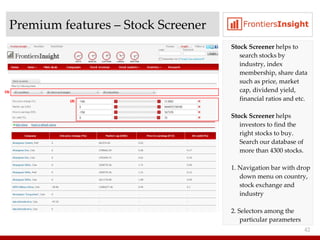
Premium features  –  Stock Screener Stock Screener  helps to search stocks by industry, index membership, share data such as price, market cap, dividend yield, financial ratios and etc. Stock Screener  helps investors to find the right stocks to buy. Search our database of more than 4300 stocks. 1. Navigation bar with drop down menu on country, stock exchange and industry 2. Selectors among the particular parameters
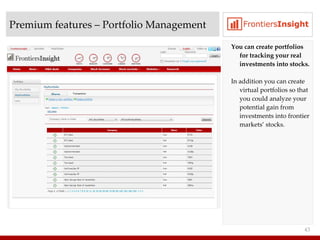
Premium features  –  Portfolio Management You can create portfolios for tracking your real investments into stocks. In addition you can create virtual portfolios so that you could analyze your potential gain from investments into frontier markets’ stocks.
Thank you for your attention If you have any questions please contact us at  [email_address]

FI Overview

  • 1.
    April, 2011 Productpresentation FrontiersInsight.com User guide
  • 2.
    Contents General informationMain page “ News” section “ M&A deals” section “ Companies” section “ Stock markets” section “ Research” section “ Statistics” section Premium features
  • 3.
    1. Generalinformation
  • 4.
    General information Countriescovered : Mongolia, CIS (All except Russia), Africa (Zimbabwe, South Africa, Nigeria), Asia (Nepal, Cambodia, Vietnam) 250+ information sources 19 stock exchanges : KASE and LSE ( Kazakhstan ) MSE ( Mongolia) TRSE and Elsis-savdo ( Uzbekistan ) Stock exchange Kyrgystan-BTS, Kyrgyz stock exchange ( Kyrgystan ) Zimbabwe Stock Exchange UX and PFTS (Ukraine) MOLDSE (Moldova) Botswana Stock Exchange Caucasus countries (Armenia, Georgia, Azerbaijan) 30+ stock exchanges (Asia and Africa) are in negotiation process
  • 5.
    Database (01 . 04 .20 11 ) 14,0 00+ public and private companies 180, 000+ news , substantial facts and events entries : 5,0 00+ corporate events 20,0 00+ announcements of substantial facts 14,0 00+ financial reports : 6,0 00+ balance sheets 6,0 00+ profit and loss accounts 16,0 00+ entries about company executives 5,0 00+ entries about company shareholders ( legal entities and individuals )
  • 6.
    2. Mainpage
  • 7.
    Main page Latestnews Last M&A deals Stock Exchange indexes Market Leaders - best and worst performing companies of the region and of a particular country
  • 8.
    Main page 5. Corporate calendar – indicates latest corporate events 6. Macroeconomic overview - shows best and worth performing countries by certain macroeconomic indicators 7. Exchange rates 8. Latest reports
  • 9.
  • 10.
    News News types: news corporate and other events substantial facts Tagging – each news item is assigned corresponding Company and Industry tags , which makes navigation in the system easy
  • 11.
    News – main page 1. News search according to keyword, company name, news type, country, industry and period of time 2. View of news in the list – headline, date of publication, source (hyperlink), country and short version of news 3. Graphical distinction of a news type
  • 12.
    News – individual news 1. Full text of a news 2, 3. Tags of Companies and Industries associated with this news. Tags are links to the list of news related to those companies and industries correspondingly 4. Fast access to last news of companies associated with the news
  • 13.
    4 . “M&A deals” section
  • 14.
    M&A deals – main page 1. M&A deal search according to keyword (e.g. company name), country and industry 2. Information about an M&A deal include: - date of the announcement - link to target company page - deal type - deal amount - share - status - country of target company - link to full text of news
  • 15.
    5 . “Companies” section
  • 16.
    Companies Companies areassigned alternative names , e.g. for Pahtabank – Pakhtabank, Paxtabank . This enhances effectiveness of companies search – system will find sought company, if any of common names of that company is entered as a search criteria. Classification of companies according to GICS ( Global Industry Classification Standards ).
  • 17.
    Companies - overview 1. Companies search according to keyword, company name, country, industry and sub-industry . 2. Navigation bar to sections of a company . 3. Last trade of a company 4. Profile – description of main activities of a company . 5. Fast access to company news . 6. Fast access to news of an industry associated with the company .
  • 18.
    Companies – trades 1. Available options – conversion into other currencies (local, USD, EUR) ; filtering according to deal currency , market sector, type of shares and stock exchange . 2. Interactive trade graph ( final testing ) – viewing trades for different periods of time; comparing price dynamics of a share with that of other shares and various indices ; mapping events ( dividends , general meetings of shareholders, other important events ).
  • 19.
    Companies - trades Daily stock trading summaries with company shares . 1. Available options – conversion into other currencies ; filtering according to deal currency , market sector, type of shares and stock exchange . 2. Setting period for displaying data . 3. To view all deals of the day click on the date .
  • 20.
    Companies - trades General analysis of stock trading information. 1. Available options and general information . 2. Historical annual indicators . 3. Current individual indicators according to share type .
  • 21.
    Companies - finances 1. Available options : – report standard ( national , IFRS , US GAAP) ; – type of report ( balance sheet , profit and loss account , cash flow statement) ; – period ( annual , quarterly) . 2. Conversion into other currencies .
  • 22.
    Companies – financial ratios 1. Available options – conversion into other currencies ; filtering according to market sector, type of shares and stock exchange . 2. Historical ratios calculated on the basis of financial statements .
  • 23.
    Companies - dividends 1. Conversion into other currencies . 2. Historical dividends – date of announcement ; amount according to share type ; period ( annual , quarterly ) and year .
  • 24.
    Companies - management 1. Choosing management body – Executive or Supervisory board . 2. Effective date . 3. Information about board members – name , position , total amount of shares he/she owns and his/her stakes in shareholding capital . * To view personal information (profile, positions in other companies, stakes in other companies) about board members click on their name. (under development)
  • 25.
    Companies - shareholders 1. Choosing type of shareholder – Current or Intended . 2. To view other investments of shareholders click on their name . 3 . Effective date. To view the list of shareholders for other dates choose from dates in the drop-down list .
  • 26.
    Companies - investments Information about disclosed investments , where company holds more than 5%. 1 . To view company information (including other shareholders) click on its name .
  • 27.
    6 . “Stock markets” section
  • 28.
    Stock markers -overview 1 . Option to choose among available stock exchanges . 2. Choosing period for calculations, currency converter . 3. Statistics of a stock exchange for specified period of time .
  • 29.
    Stock markers -trades Summary of stock trading information on chosen stock exchange for a specified period of time . 1 . To view “trades” section of a company click on its name . 2. To view all trades for particular date click on “learn more” .
  • 30.
    Stock markers -leaders 1 . Choosing type of ranking : - according to price ( leaders of growth and fall of share prices ); - according to activeness ( leaders by volume and turnover of shares ); - according to market capitalization ( leaders of growth and fall of market capitalization, as well as leaders by volume of capitalization ).
  • 31.
    Stock markers -industries Rating of industries according to : share trade turnover , share in total turnover , traded market capitalization , overall market capitalization . 1 . Ascending and descending sorting according to indicator .
  • 32.
    7 . “Research” section
  • 33.
    Research – mainpage This section contains analytical reports provided by project partners ( brokerage houses, investment consultants, etc .) . 1. Research panel according to company name or ticker, country, industry, research type, period and provider. 2. Short information about a report – name of report, date of publication, name of partner (provider), country associated with report and its short description .
  • 34.
    Research - reportSummary of a report : - date of publication , name of a provider , related country , name of report , extract from report . 1 . Download link .
  • 35.
    8 . “Statistics” section
  • 36.
    Statistics This sectioncontains following information : exchange rates legislation of countries macroeconomic indicators
  • 37.
    Statistics – exchange rates This section provides information about official currency exchange rates of covered countries . 1 . Navigation among sections : current rates ( rates effective at the moment of viewing ), historical rates ( of chosen currency pair for chosen period of time ), annual average rates ( for all years available ). 2. Choosing currency pair and period .
  • 38.
    Statistics – country outlook This section provides information on macroeconomic overview of a particularly country and industry, as well as main macroeconomic indicators and relevant legislation Navigation among countries and industries Key macroeconomic indicators Relevant legislation (drop down menu)
  • 39.
    9 . Premium features
  • 40.
    Premium features Subscribersmay opt to include in their subscription following features : Watchlist – periodic notifications about new information Stock screener – searching stocks according to a set of individual criteria Portfolio management – managing own portfolio of stocks
  • 41.
    Premium features - Watchlist Periodic e -mail notifications, sent when information is added in the system which interests a subscriber . Notifications are set by choosing industries, countries, companies and information types of interest . 1. Navigation between list of watch lists created by user and search options 2. Navigation among sections: - Company name or ticker - Country and Industry - Sub industry
  • 42.
    Premium features – Stock Screener Stock Screener helps to search stocks by industry, index membership, share data such as price, market cap, dividend yield, financial ratios and etc. Stock Screener helps investors to find the right stocks to buy. Search our database of more than 4300 stocks. 1. Navigation bar with drop down menu on country, stock exchange and industry 2. Selectors among the particular parameters
  • 43.
    Premium features – Portfolio Management You can create portfolios for tracking your real investments into stocks. In addition you can create virtual portfolios so that you could analyze your potential gain from investments into frontier markets’ stocks.
  • 44.
    Thank you foryour attention If you have any questions please contact us at [email_address]