Email Etiquette's
Why it needed??
 Legal ability
 Track productivity
 To protect corporate confidentiality
It should includes……,
 Recipient
 Subject
 Salutation
 Body
 Attachments if any
 Closing remark
 Signature
Recipients..
 TO – People who required to take actions
 CC – Courtesy Copy, people who need to be informed but
takes no actions.
 BCC – Blind courtesy copy, people need to be informed
without other recipient knowing..
Subject line..
 Good subject lines are often personal or descriptive, and
give the recipient a reason to check out your content.
 Keep it short
 Be clear and specific about the topic of the email –Tell your
email recipient exactly what to do .
(Review us, download this, register here).
A good email subject line is like a good landing page headline
Salutation
 Using “Hey,” “Yo,” or “Dude” isn’t professional
 Use “Hi” or “Hello”
 To be more formal, use “Dear (insert name).”
 Using the person’s name in the salutation — “Hello Robert”
— is quite appropriate, but remember not to shorten a
person’s name unless you’re given permission to do so.
Body- Main part of an email message
The email body is the main part of an email message. It contains
the message's text, images and other data.
It consists-
 First Paragraph: include information on why you are writing.
 Middle Paragraph: should describe what you have to offer the
employer or, if you're writing to ask for help, what type of
assistance you are seeking.
 Final Paragraph: Conclude your cover letter by thanking
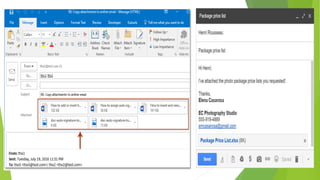
Attachments
When referring to e-mail, an attachment is a file sent with
an e-mail message. An attachment can be a picture,
a word document, a movie, a sound file, an Excel document,
or any other file that requires another program to open it.
Common mistakes of attachments
 Forgetting attach file
 Attach a wrong file
 Attach file where recipient cant open
 Attach large files
Professional Email Message Closing
Examples
 Thanks,
 Best regards,
 Best wishes,
 Kind regards,
 Sincerely,
Signature
 Every email should include a signature that tells the
recipient who you are and how to contact you.
 Set it up to automatically appear at the end of each email
 Include all of your contact details Viz
 Your address
 Email
 Phone number
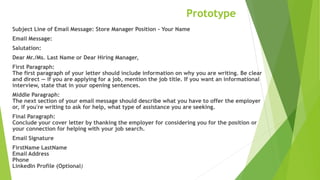
Prototype
Subject Line of Email Message: Store Manager Position - Your Name
Email Message:
Salutation:
Dear Mr./Ms. Last Name or Dear Hiring Manager,
First Paragraph:
The first paragraph of your letter should include information on why you are writing. Be clear
and direct — if you are applying for a job, mention the job title. If you want an informational
interview, state that in your opening sentences.
Middle Paragraph:
The next section of your email message should describe what you have to offer the employer
or, if you're writing to ask for help, what type of assistance you are seeking.
Final Paragraph:
Conclude your cover letter by thanking the employer for considering you for the position or
your connection for helping with your job search.
Email Signature
FirstName LastName
Email Address
Phone
LinkedIn Profile (Optional)
General Etiquette
 Be clear in your subject line
 Include the readers name- personalization makes people
feel better
 Keep it short and get to the point
 Use proper spelling, punctuation and grammar
 Respond to emails in a timely manner
Your e-mail is a reflection of you
General Etiquette(corporate )
 Timely respond to messages you receive
 Set an out-of-office alert when necessary
 Review email attachments before responding
 FORMATTING FUNDAS: Do not use all caps and bold fonts as
this will give the recipient the impression that you are
shouting at him/her.
 WATCH YOUR TONE: Always be careful about how your email
sounds.

Email etiquette's

  • 1.
  • 2.
    Why it needed?? Legal ability  Track productivity  To protect corporate confidentiality
  • 3.
    It should includes……, Recipient  Subject  Salutation  Body  Attachments if any  Closing remark  Signature
  • 4.
    Recipients..  TO –People who required to take actions  CC – Courtesy Copy, people who need to be informed but takes no actions.  BCC – Blind courtesy copy, people need to be informed without other recipient knowing..
  • 5.
    Subject line..  Goodsubject lines are often personal or descriptive, and give the recipient a reason to check out your content.  Keep it short  Be clear and specific about the topic of the email –Tell your email recipient exactly what to do . (Review us, download this, register here). A good email subject line is like a good landing page headline
  • 6.
    Salutation  Using “Hey,”“Yo,” or “Dude” isn’t professional  Use “Hi” or “Hello”  To be more formal, use “Dear (insert name).”  Using the person’s name in the salutation — “Hello Robert” — is quite appropriate, but remember not to shorten a person’s name unless you’re given permission to do so.
  • 7.
    Body- Main partof an email message The email body is the main part of an email message. It contains the message's text, images and other data. It consists-  First Paragraph: include information on why you are writing.  Middle Paragraph: should describe what you have to offer the employer or, if you're writing to ask for help, what type of assistance you are seeking.  Final Paragraph: Conclude your cover letter by thanking
  • 8.
    Attachments When referring toe-mail, an attachment is a file sent with an e-mail message. An attachment can be a picture, a word document, a movie, a sound file, an Excel document, or any other file that requires another program to open it.
  • 9.
    Common mistakes ofattachments  Forgetting attach file  Attach a wrong file  Attach file where recipient cant open  Attach large files
  • 11.
    Professional Email MessageClosing Examples  Thanks,  Best regards,  Best wishes,  Kind regards,  Sincerely,
  • 12.
    Signature  Every emailshould include a signature that tells the recipient who you are and how to contact you.  Set it up to automatically appear at the end of each email  Include all of your contact details Viz  Your address  Email  Phone number
  • 13.
    Prototype Subject Line ofEmail Message: Store Manager Position - Your Name Email Message: Salutation: Dear Mr./Ms. Last Name or Dear Hiring Manager, First Paragraph: The first paragraph of your letter should include information on why you are writing. Be clear and direct — if you are applying for a job, mention the job title. If you want an informational interview, state that in your opening sentences. Middle Paragraph: The next section of your email message should describe what you have to offer the employer or, if you're writing to ask for help, what type of assistance you are seeking. Final Paragraph: Conclude your cover letter by thanking the employer for considering you for the position or your connection for helping with your job search. Email Signature FirstName LastName Email Address Phone LinkedIn Profile (Optional)
  • 14.
    General Etiquette  Beclear in your subject line  Include the readers name- personalization makes people feel better  Keep it short and get to the point  Use proper spelling, punctuation and grammar  Respond to emails in a timely manner Your e-mail is a reflection of you
  • 15.
    General Etiquette(corporate ) Timely respond to messages you receive  Set an out-of-office alert when necessary  Review email attachments before responding  FORMATTING FUNDAS: Do not use all caps and bold fonts as this will give the recipient the impression that you are shouting at him/her.  WATCH YOUR TONE: Always be careful about how your email sounds.