Presented by: Paul Brierley,
Durham University
April 07, 2014
Session ID 1802
Learning to Love
Banner Workflow
Session Rules of Etiquette
• Please turn off your cell phone/pager
• If you must leave the session early, please
do so as discreetly as possible
• Please avoid side conversation during the
session
Thank you for your cooperation!
2
Apologies in advance…
3
theoatmeal.com and MadTV
Why, hello there good sir!
There's a rumble in Parliament.
Brandus Magles and Watson
Biggles exchanged heated words
but fortunately no one got their
pigeon squeezed over a flubsy
dubsy. The villagers are in for a
real dweazer as the Waverley
Thatches aren't doing too well with
the Lancaster Bug-a-boos.
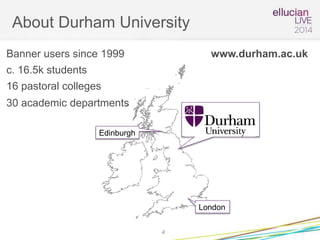
About Durham University
4
London
Edinburgh
Banner users since 1999
c. 16.5k students
16 pastoral colleges
30 academic departments
www.durham.ac.uk
• 3rd Oldest University in the UK
• UNESCO World Heritage Site
• World’s oldest occupied University building
About Durham University
5
About Durham University
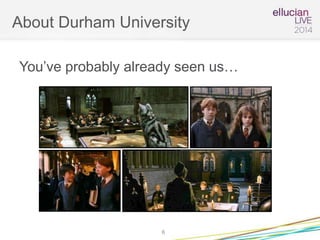
You’ve probably already seen us…
6
Agenda
Why we adopted Workflow
What we’ve done with it
Making use of Workflow 8.1 features
What we plan to do with it next…
7
Why Workflow?
It’s been in the box for over 10 years,
why open it now?
Why Workflow?
9
~1mile
Collingwood
Comb. Arts
Theology
Psychology
Politics
Registry
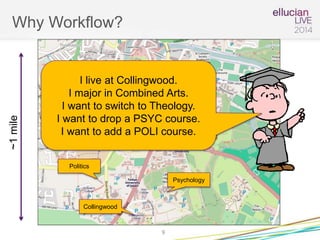
I live at Collingwood.
I major in Combined Arts.
I want to switch to Theology.
I want to drop a PSYC course.
I want to add a POLI course.
Why Workflow?
• First idea – Banner Self Service
• May 2012 –problems (process & priority)
• How can we make this happen?
10
Why Workflow?
• Summit 2011 – New Orleans
Lots of sessions on something called “Workflow”.
Maybe we could use this for some of our processes?
• Summit 2012 – Las Vegas
Hands on Training Session.
11
Why Workflow?
12
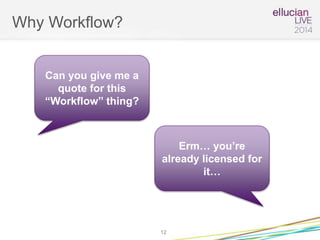
Can you give me a
quote for this
“Workflow” thing?
Erm… you’re
already licensed for
it…
Why Workflow?
• Objective: set up without IT development
• Use as a proof of concept / learning
experience for future developments
13
What we did with it
How many shoes did we save?
What we did with it
• IT agreed to install it
• One man + manual + hands on training
• Good knowledge of the current process
• Some things would be easier with IT but…
15
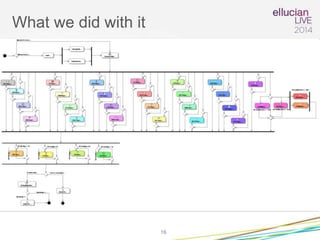
What we did with it
16
What we did with it
17
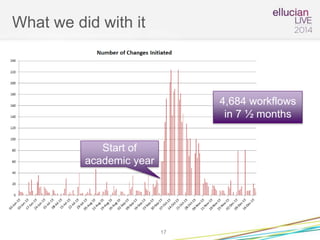
Start of
academic year
4,684 workflows
in 7 ½ months
What we did with it
Poses interesting questions…
Why so many changes?
Why do we have “spikes” out of the blue?
Which departments are initiating these?
18
What we did with it
• Typical processing time down from ~ 2
days to < 2 hours
• About 8,200 miles of walking saved
• That’s about the distance from Durham,
England to the Anaheim Convention
Center!
19
Feedback from Staff
• Overall feedback was very positive
• Easy learning curve
• Improvements to student experience
• Processing times much better
• Paper no longer vanishing into “black hole”
• Institutional appetite whetted
20
Unexpected Reactions
• “Transfer of responsibility” to staff
• Mistrust
• The colleges aren’t included
• Paper lovers
• Expected to be proactive
• Not releasing items
21
Making use of Workflow
8.1 features
Taking advantage of the new features
available in 8.1
Making use of 8.1 features
In 8.0 we could deliver some requested
features:
• Redesigning forms
• Notifications
• Simple extracts of Banner data
• Document attachments
Responsiveness seen as a major benefit
23
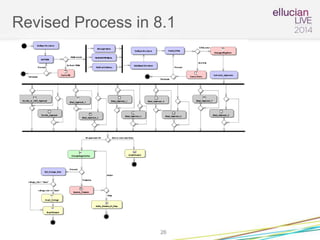
Making use of 8.1 features
Other things were trickier or impossible
• Renaming of workflows
• Automatic routing to the right people
• Pick lists (dynamic data sources)
• Validation
But these can be done in 8.1
24
Making use of 8.1 features
• Ellucian Consultancy
• Train more users
• Improve CIS understanding of modeller
25
Revised Process in 8.1
26
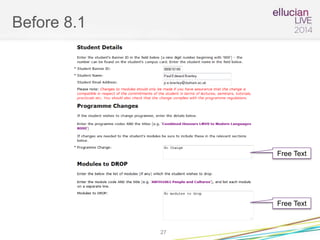
Before 8.1
27
Free Text
Free Text
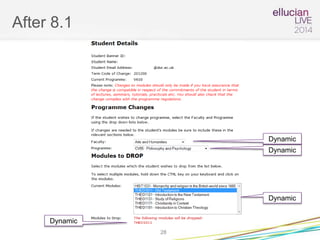
After 8.1
28
Dynamic
Dynamic
Dynamic
Dynamic
What we have planned
What next?
Where next?
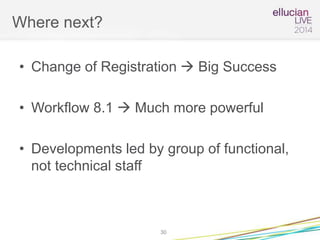
• Change of Registration  Big Success
• Workflow 8.1  Much more powerful
• Developments led by group of functional,
not technical staff
30
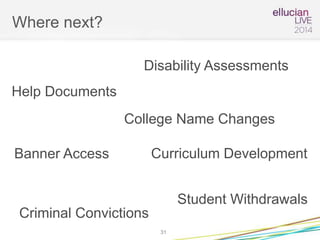
Where next?
31
Disability Assessments
Student Withdrawals
College Name Changes
Banner Access
Criminal Convictions
Curriculum Development
Help Documents
Summary
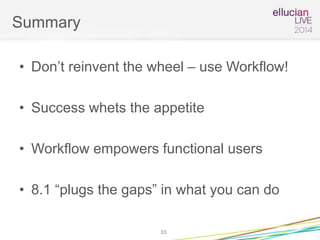
Summary
• Don’t reinvent the wheel – use Workflow!
• Success whets the appetite
• Workflow empowers functional users
• 8.1 “plugs the gaps” in what you can do
33
Questions & Answers
Any Questions?
34
Thank You!
Paul Brierley
p.e.brierley@durham.ac.uk
Please complete the online session evaluation form
Session ID 1802
.
© 2014 Ellucian. All rights reserved.
35

Ellucian Live Workflow PEB

  • 1.
    Presented by: PaulBrierley, Durham University April 07, 2014 Session ID 1802 Learning to Love Banner Workflow
  • 2.
    Session Rules ofEtiquette • Please turn off your cell phone/pager • If you must leave the session early, please do so as discreetly as possible • Please avoid side conversation during the session Thank you for your cooperation! 2
  • 3.
    Apologies in advance… 3 theoatmeal.comand MadTV Why, hello there good sir! There's a rumble in Parliament. Brandus Magles and Watson Biggles exchanged heated words but fortunately no one got their pigeon squeezed over a flubsy dubsy. The villagers are in for a real dweazer as the Waverley Thatches aren't doing too well with the Lancaster Bug-a-boos.
  • 4.
    About Durham University 4 London Edinburgh Bannerusers since 1999 c. 16.5k students 16 pastoral colleges 30 academic departments www.durham.ac.uk
  • 5.
    • 3rd OldestUniversity in the UK • UNESCO World Heritage Site • World’s oldest occupied University building About Durham University 5
  • 6.
    About Durham University You’veprobably already seen us… 6
  • 7.
    Agenda Why we adoptedWorkflow What we’ve done with it Making use of Workflow 8.1 features What we plan to do with it next… 7
  • 8.
    Why Workflow? It’s beenin the box for over 10 years, why open it now?
  • 9.
    Why Workflow? 9 ~1mile Collingwood Comb. Arts Theology Psychology Politics Registry Ilive at Collingwood. I major in Combined Arts. I want to switch to Theology. I want to drop a PSYC course. I want to add a POLI course.
  • 10.
    Why Workflow? • Firstidea – Banner Self Service • May 2012 –problems (process & priority) • How can we make this happen? 10
  • 11.
    Why Workflow? • Summit2011 – New Orleans Lots of sessions on something called “Workflow”. Maybe we could use this for some of our processes? • Summit 2012 – Las Vegas Hands on Training Session. 11
  • 12.
    Why Workflow? 12 Can yougive me a quote for this “Workflow” thing? Erm… you’re already licensed for it…
  • 13.
    Why Workflow? • Objective:set up without IT development • Use as a proof of concept / learning experience for future developments 13
  • 14.
    What we didwith it How many shoes did we save?
  • 15.
    What we didwith it • IT agreed to install it • One man + manual + hands on training • Good knowledge of the current process • Some things would be easier with IT but… 15
  • 16.
    What we didwith it 16
  • 17.
    What we didwith it 17 Start of academic year 4,684 workflows in 7 ½ months
  • 18.
    What we didwith it Poses interesting questions… Why so many changes? Why do we have “spikes” out of the blue? Which departments are initiating these? 18
  • 19.
    What we didwith it • Typical processing time down from ~ 2 days to < 2 hours • About 8,200 miles of walking saved • That’s about the distance from Durham, England to the Anaheim Convention Center! 19
  • 20.
    Feedback from Staff •Overall feedback was very positive • Easy learning curve • Improvements to student experience • Processing times much better • Paper no longer vanishing into “black hole” • Institutional appetite whetted 20
  • 21.
    Unexpected Reactions • “Transferof responsibility” to staff • Mistrust • The colleges aren’t included • Paper lovers • Expected to be proactive • Not releasing items 21
  • 22.
    Making use ofWorkflow 8.1 features Taking advantage of the new features available in 8.1
  • 23.
    Making use of8.1 features In 8.0 we could deliver some requested features: • Redesigning forms • Notifications • Simple extracts of Banner data • Document attachments Responsiveness seen as a major benefit 23
  • 24.
    Making use of8.1 features Other things were trickier or impossible • Renaming of workflows • Automatic routing to the right people • Pick lists (dynamic data sources) • Validation But these can be done in 8.1 24
  • 25.
    Making use of8.1 features • Ellucian Consultancy • Train more users • Improve CIS understanding of modeller 25
  • 26.
  • 27.
  • 28.
  • 29.
    What we haveplanned What next?
  • 30.
    Where next? • Changeof Registration  Big Success • Workflow 8.1  Much more powerful • Developments led by group of functional, not technical staff 30
  • 31.
    Where next? 31 Disability Assessments StudentWithdrawals College Name Changes Banner Access Criminal Convictions Curriculum Development Help Documents
  • 32.
  • 33.
    Summary • Don’t reinventthe wheel – use Workflow! • Success whets the appetite • Workflow empowers functional users • 8.1 “plugs the gaps” in what you can do 33
  • 34.
  • 35.
    Thank You! Paul Brierley p.e.brierley@durham.ac.uk Pleasecomplete the online session evaluation form Session ID 1802 . © 2014 Ellucian. All rights reserved. 35