Electric Circuits Lab
Series RC Circuits: Phase Angle, Phase Lag, and Capacitors as
Integrators
I.
Objectives:
After completing this lab experiment using, you should be able
to:
1. Understand the effect of frequency on capacitive reactance.
2. Measure the impedance of an RC circuit.
3. Measure the phase angle and phase lag of an RC circuit using
the oscilloscope.
4. Draw the impedance and voltage phasor diagrams.
5. Understand how a capacitor integrates current.
II.
Parts List:
1. Resistor 100 Ω, 1 kΩ, 6.8 kΩ
2. Capacitors 0.1 µF, 0.01 µF
III.
Procedures:
Part I:
1.
Connect the following circuit.
Figure 1: RC Circuit
2.
Connect one DMM across the resistor and one DMM
across the capacitor. Set both DMMs to read AC voltage.
Measure the voltage drop across each component.
Record the result in
Table 1.
3. Use Ohm’s law to
calculate the current flowing through the resistor. Since
the circuit in Figure 1 is a series RC circuit, the same current
will flow through the capacitor and the resistor.
Record the result in
Table 1.
Total current, I =
4.
Calculate the capacitive reactance using Ohm’s law.
Record the result in
Table 2.
Capacitive Reactance, XC =
5. Now,
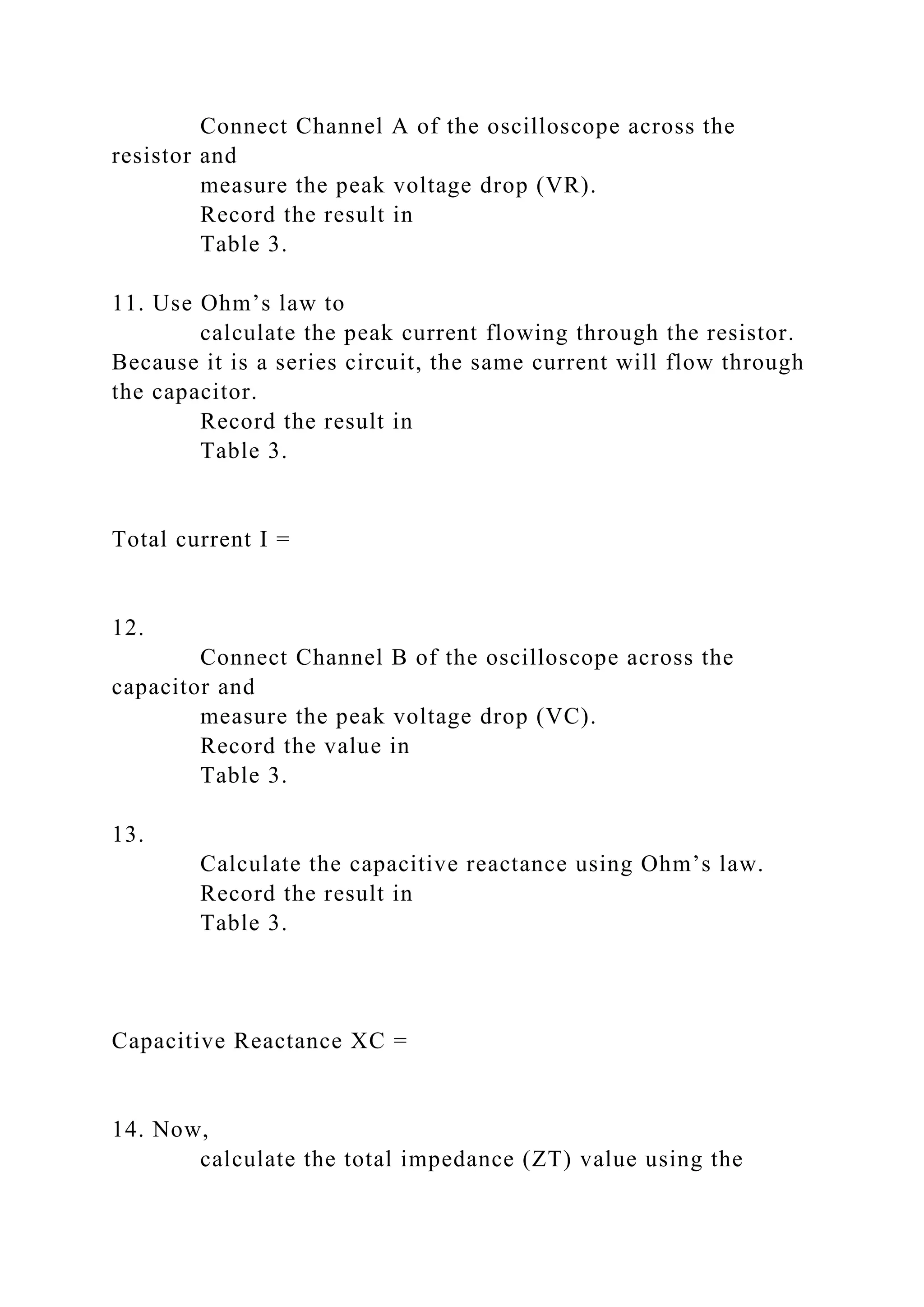
calculate the capacitive reactance value using the
equation below.
Record the result in
Table 1 under Computed Reactance, XC.
Capacitive Reactance,
Capacitor C1
Voltage across, R
846 mV
Voltage across, C
583 mV
Total Current, I
0.846 mA
Capacitive Reactance, XC
686 Ω
Computed Reactance, XC
Table 1: Calculated and measured values
6.
Adjust the function generator frequency following the
steps in
Table 2. Use the DMM to
measure the voltage across the resistor and the
capacitor.
Record your measurements below.
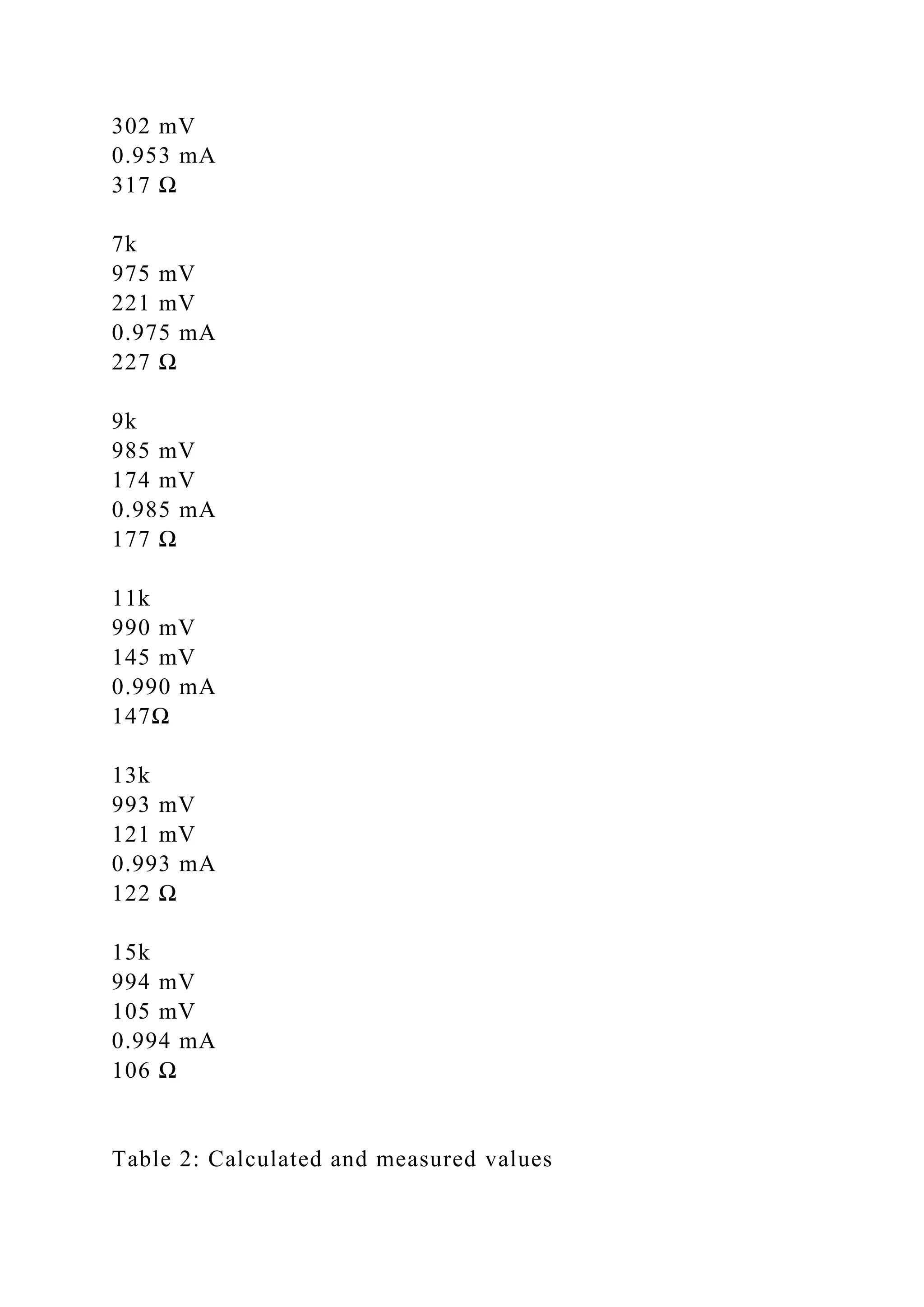
Frequency (in Hz)
VR
(measured)
VC
(measured)
I =
(calculated)
XC =
(calculated)
XC =
(calculated)
300
983 mV
186 mV
0.983 mA
189 Ω
1k
846 mV
583 mV
0.846 mA
686 Ω
3k
884 mV
468 mV
0.884 mA
529 Ω
5k
953 mV
302 mV
0.953 mA
317 Ω
7k
975 mV
221 mV
0.975 mA
227 Ω
9k
985 mV
174 mV
0.985 mA
177 Ω
11k
990 mV
145 mV
0.990 mA
147Ω
13k
993 mV
121 mV
0.993 mA
122 Ω
15k
994 mV
105 mV
0.994 mA
106 Ω
Table 2: Calculated and measured values
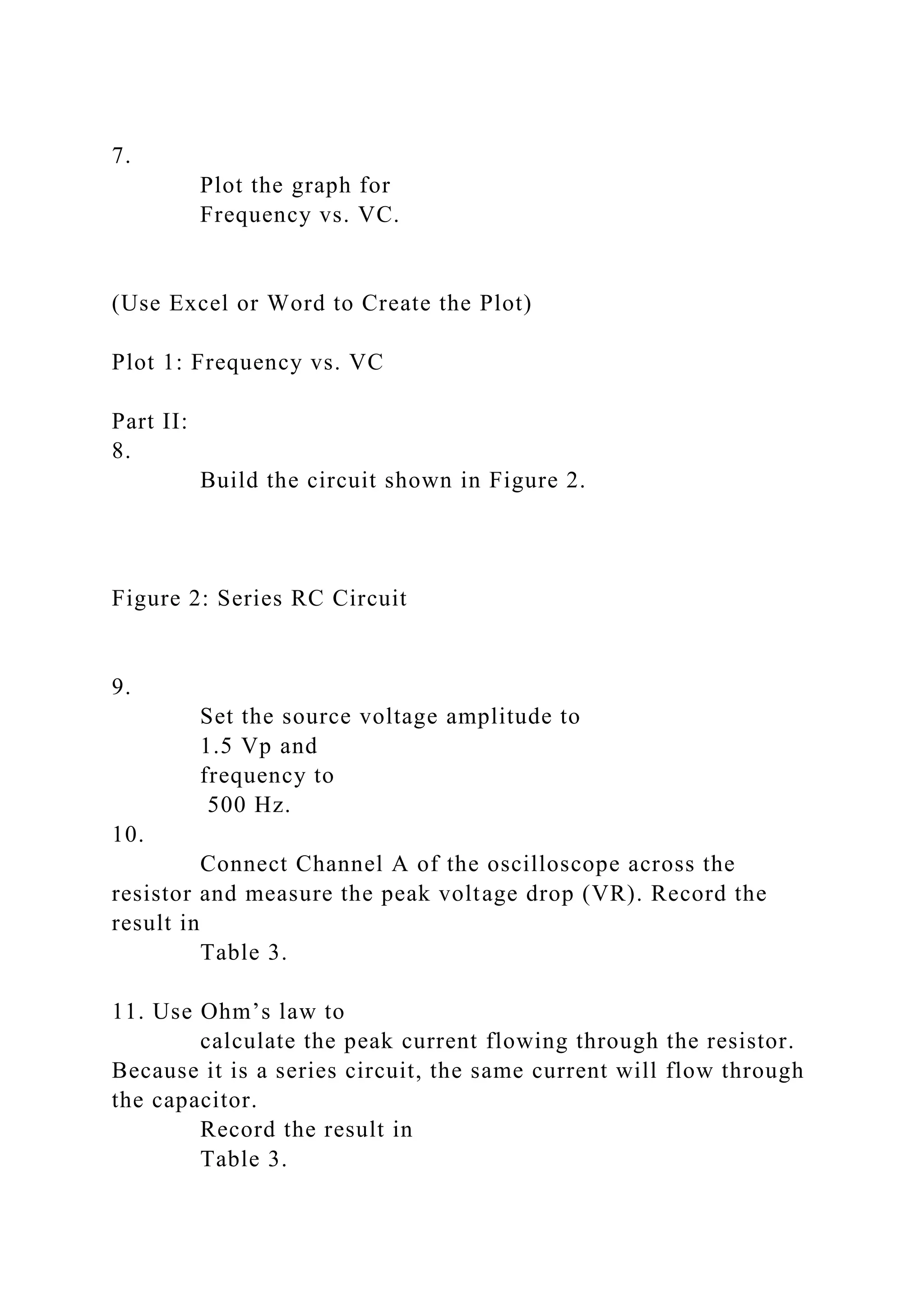
7.
Plot the graph for
Frequency vs. VC.
(Use Excel or Word to Create the Plot)
Plot 1: Frequency vs. VC
Part II:
8.
Build the circuit shown in Figure 2.
Figure 2: Series RC Circuit
9.
Set the source voltage amplitude to
1.5 Vp and
frequency to
500 Hz.
10.
Connect Channel A of the oscilloscope across the
resistor and measure the peak voltage drop (VR). Record the
result in
Table 3.
11. Use Ohm’s law to
calculate the peak current flowing through the resistor.
Because it is a series circuit, the same current will flow through
the capacitor.
Record the result in
Table 3.
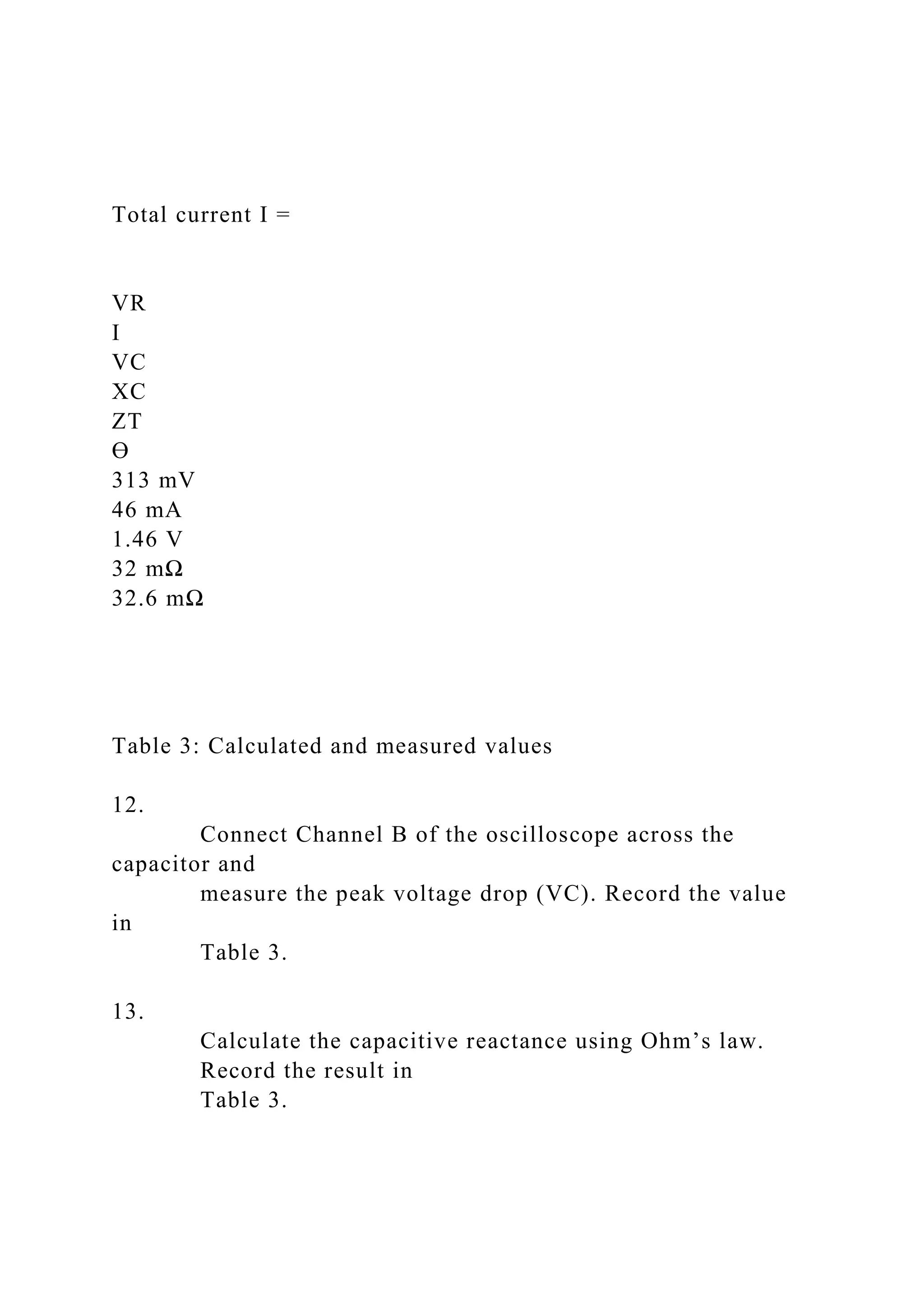
Total current I =
VR
I
VC
XC
ZT
Ө
313 mV
46 mA
1.46 V
32 mΩ
32.6 mΩ
Table 3: Calculated and measured values
12.
Connect Channel B of the oscilloscope across the
capacitor and
measure the peak voltage drop (VC). Record the value
in
Table 3.
13.
Calculate the capacitive reactance using Ohm’s law.
Record the result in
Table 3.
Capacitive Reactance XC =
14. Now,
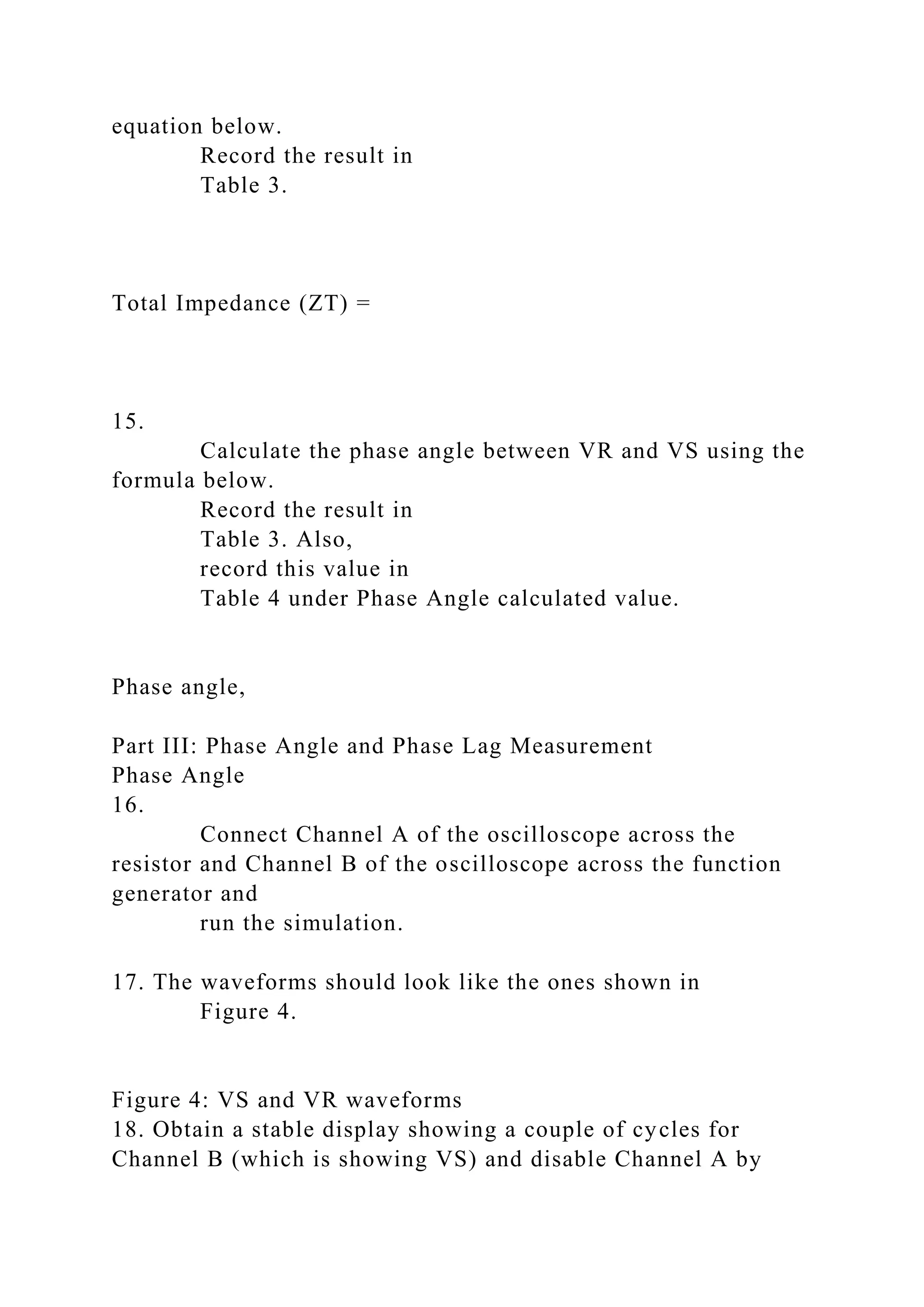
calculate the total impedance (ZT) value using the
equation below.
Record the result in
Table 3.
Total Impedance (ZT) =
15.
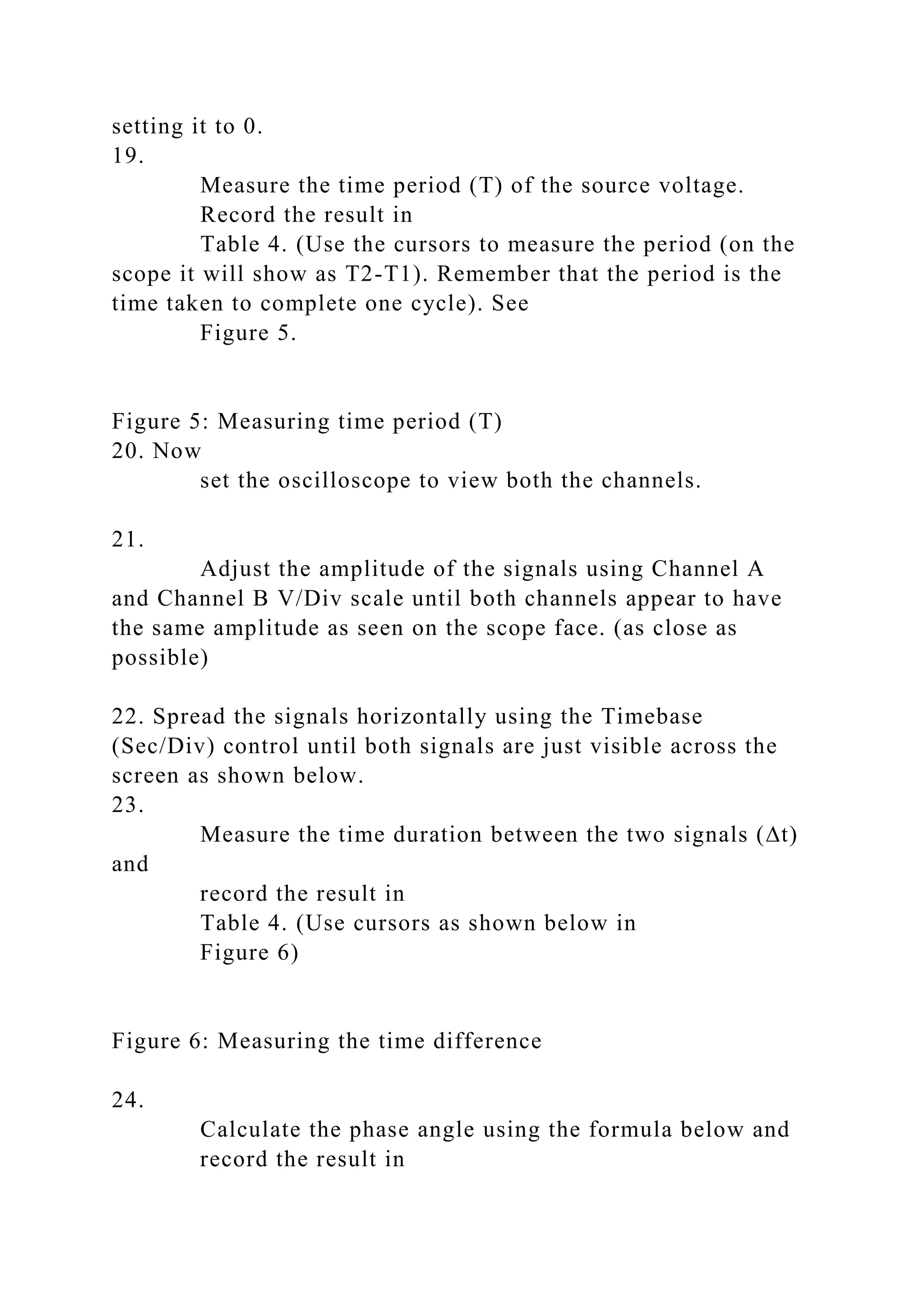
Calculate the phase angle between VR and VS using the
formula below.
Record the result in
Table 3. Also,
record this value in
Table 4 under Phase Angle calculated value.
Phase angle,
Part III: Phase Angle and Phase Lag Measurement
Phase Angle
16.
Connect Channel A of the oscilloscope across the
resistor and Channel B of the oscilloscope across the function
generator and run the simulation.
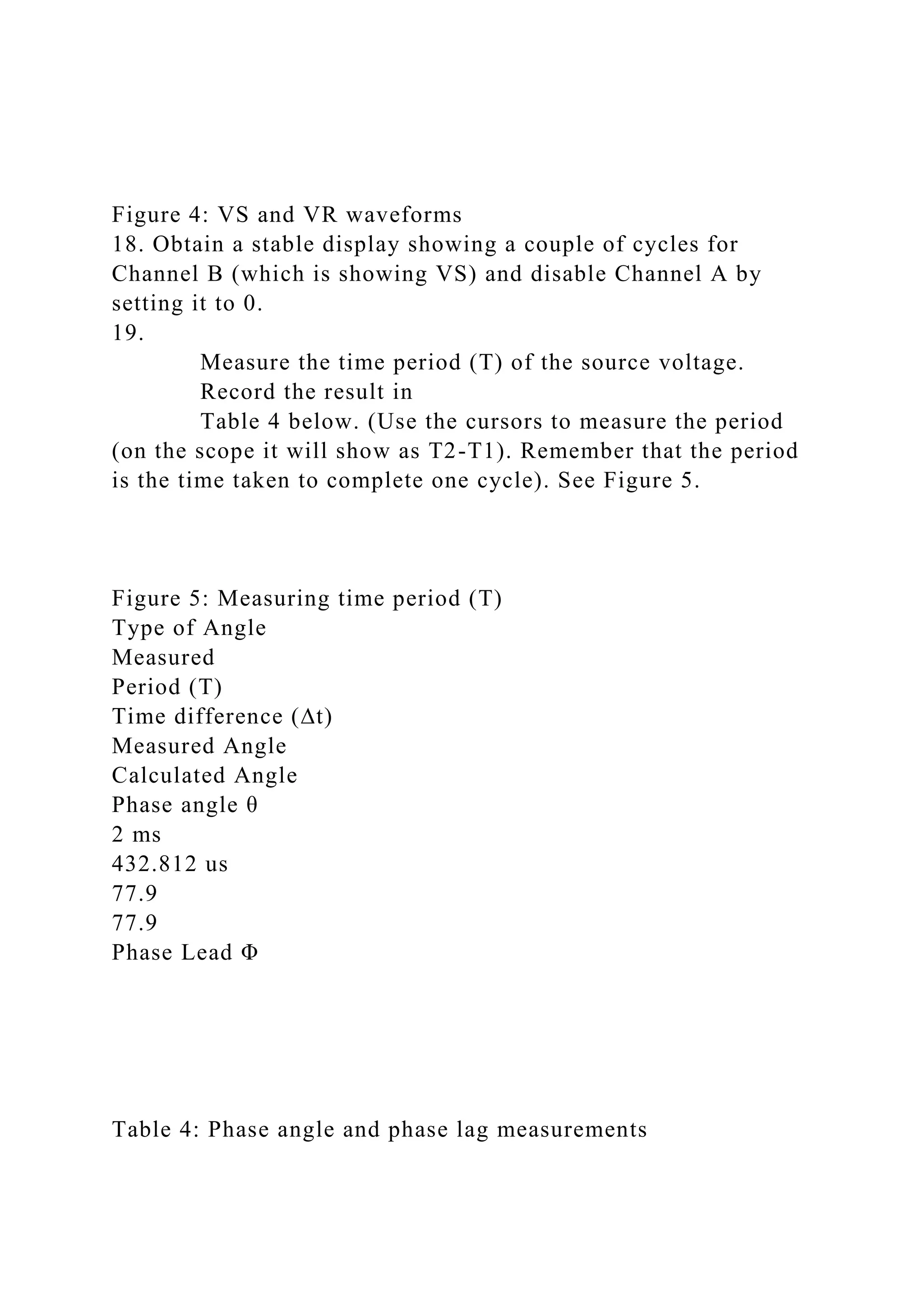
17. The waveforms should look like the ones shown in Figure 4.
Figure 4: VS and VR waveforms
18. Obtain a stable display showing a couple of cycles for
Channel B (which is showing VS) and disable Channel A by
setting it to 0.
19.
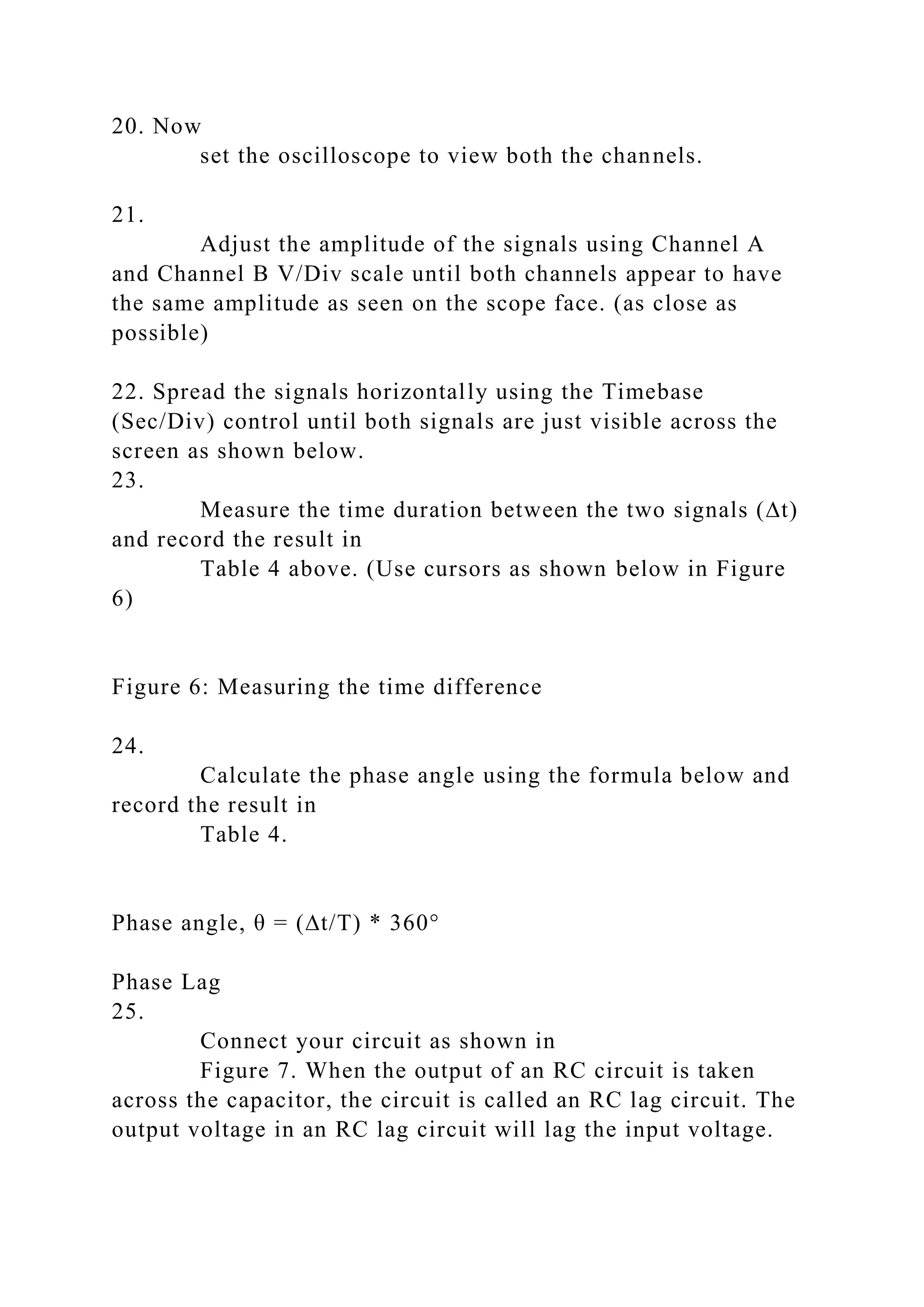
Measure the time period (T) of the source voltage.
Record the result in
Table 4 below. (Use the cursors to measure the period
(on the scope it will show as T2-T1). Remember that the period
is the time taken to complete one cycle). See Figure 5.
Figure 5: Measuring time period (T)
Type of Angle
Measured
Period (T)
Time difference (∆t)
Measured Angle
Calculated Angle
Phase angle θ
2 ms
432.812 us
77.9
77.9
Phase Lead Φ
Table 4: Phase angle and phase lag measurements
20. Now
set the oscilloscope to view both the channels.
21.
Adjust the amplitude of the signals using Channel A
and Channel B V/Div scale until both channels appear to have
the same amplitude as seen on the scope face. (as close as
possible)
22. Spread the signals horizontally using the Timebase
(Sec/Div) control until both signals are just visible across the
screen as shown below.
23.
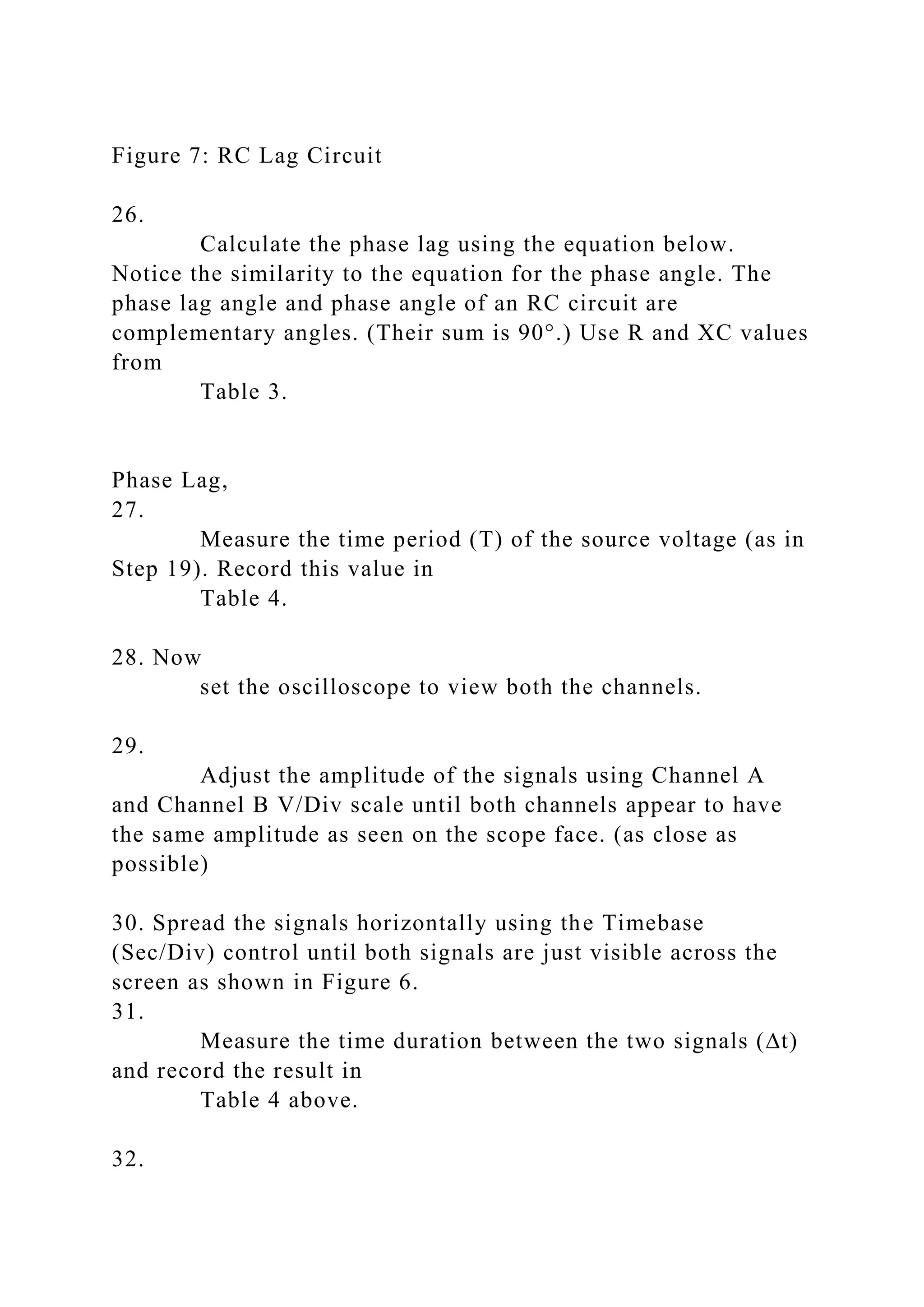
Measure the time duration between the two signals (∆t)
and record the result in
Table 4 above. (Use cursors as shown below in Figure
6)
Figure 6: Measuring the time difference
24.
Calculate the phase angle using the formula below and
record the result in
Table 4.
Phase angle, θ = (∆t/T) * 360°
Phase Lag
25.
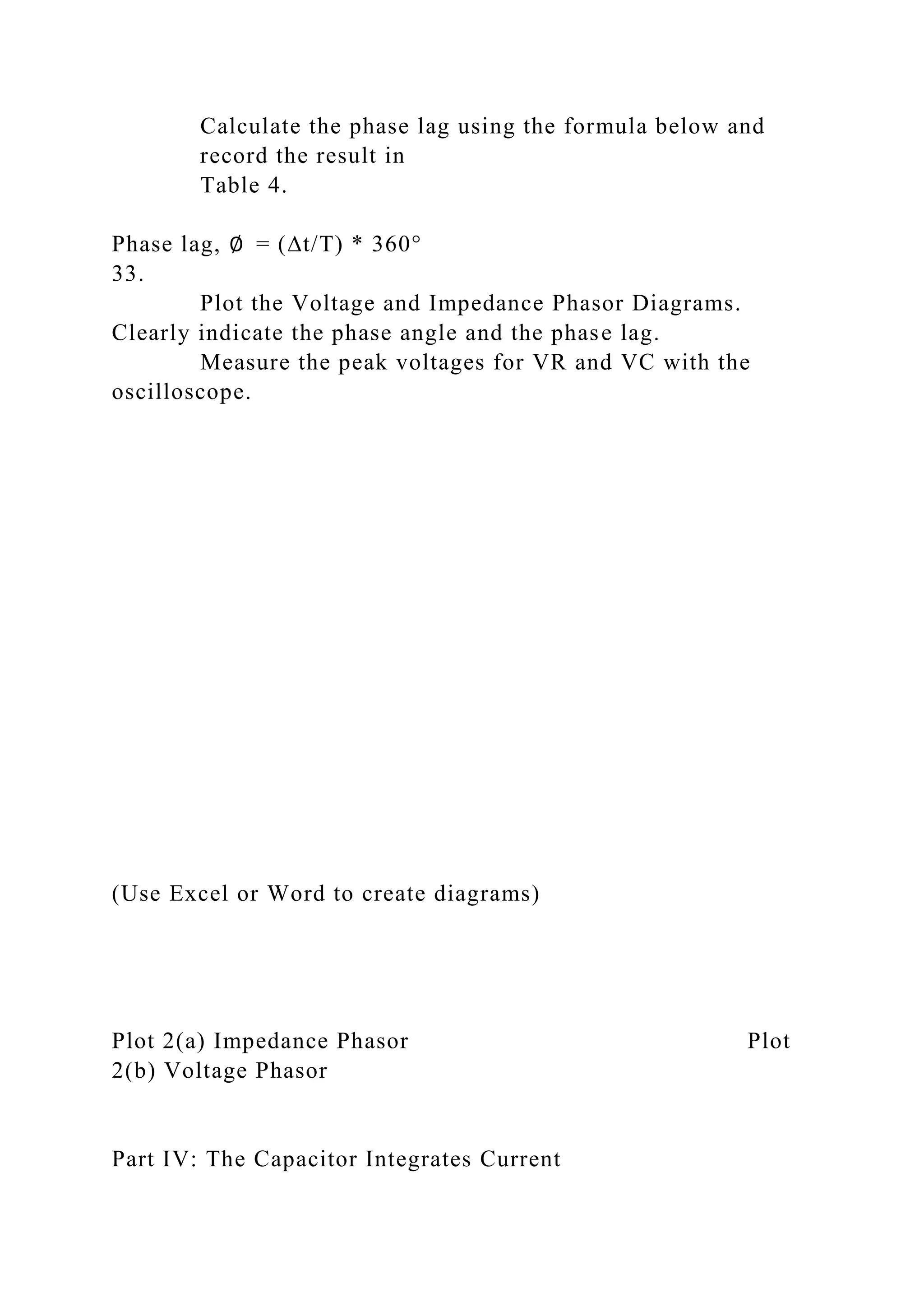
Connect your circuit as shown in
Figure 7. When the output of an RC circuit is taken
across the capacitor, the circuit is called an RC lag circuit. The
output voltage in an RC lag circuit will lag the input voltage.
Figure 7: RC Lag Circuit
26.
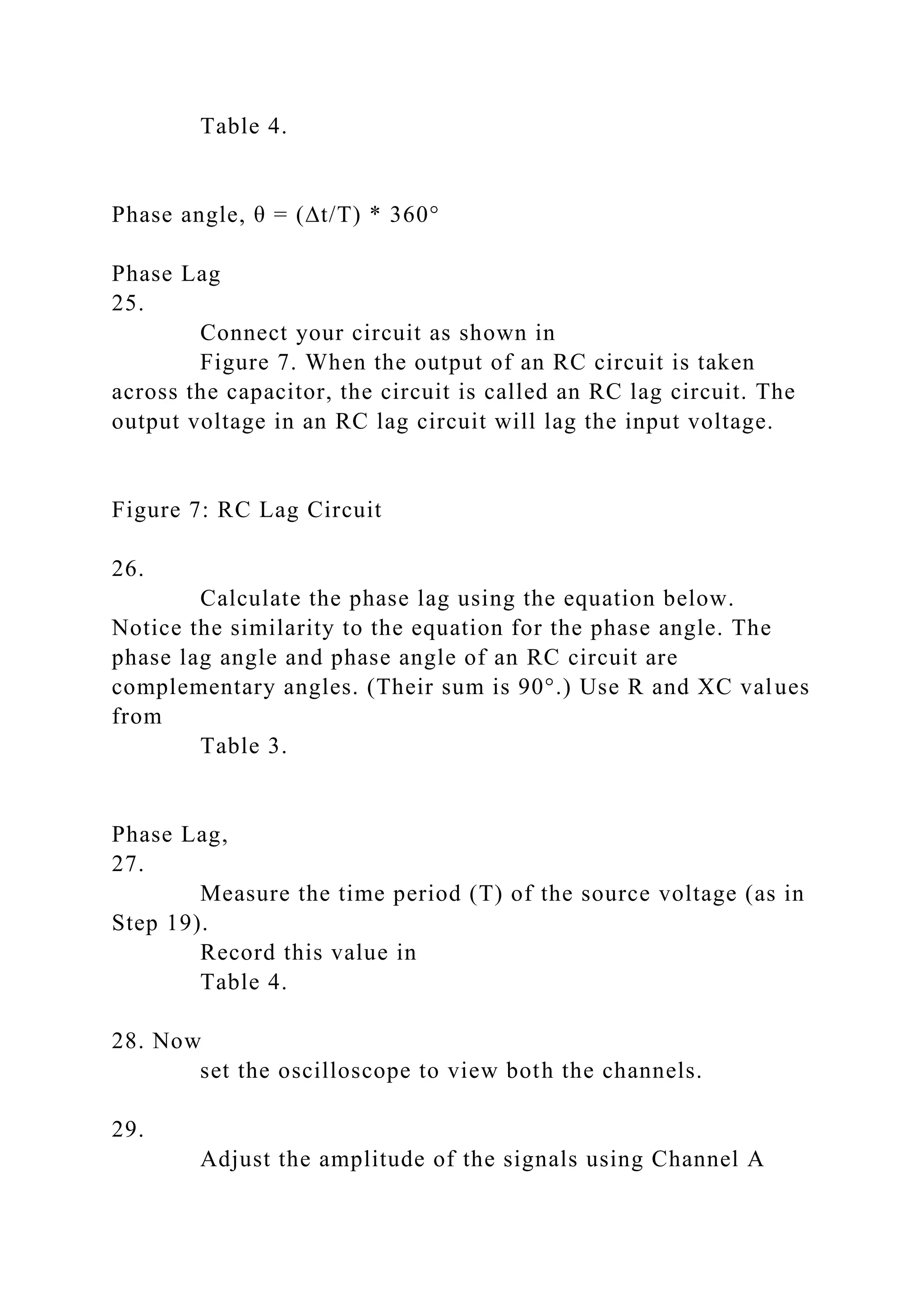
Calculate the phase lag using the equation below.
Notice the similarity to the equation for the phase angle. The
phase lag angle and phase angle of an RC circuit are
complementary angles. (Their sum is 90°.) Use R and XC values
from
Table 3.
Phase Lag,
27.
Measure the time period (T) of the source voltage (as in
Step 19). Record this value in
Table 4.
28. Now
set the oscilloscope to view both the channels.
29.
Adjust the amplitude of the signals using Channel A
and Channel B V/Div scale until both channels appear to have
the same amplitude as seen on the scope face. (as close as
possible)
30. Spread the signals horizontally using the Timebase
(Sec/Div) control until both signals are just visible across the
screen as shown in Figure 6.
31.
Measure the time duration between the two signals (∆t)
and record the result in
Table 4 above.
32.
Calculate the phase lag using the formula below and
record the result in
Table 4.
Phase lag, ∅ = (∆t/T) * 360°
33.
Plot the Voltage and Impedance Phasor Diagrams.
Clearly indicate the phase angle and the phase lag.
Measure the peak voltages for VR and VC with the
oscilloscope.
(Use Excel or Word to create diagrams)
Plot 2(a) Impedance Phasor Plot
2(b) Voltage Phasor
Part IV: The Capacitor Integrates Current
34.
Construct the following RC circuit in Multisim. Set the
clock voltage source to 10 kHz, 10V, 50% duty cycle.
Figure 9. Integrator Circuit
35.
Connect Channel A across the resistor and Channel B
across the capacitor. (Note: change one or both trace colors to
better observe the two signals)
Figure 9a. Integrator Circuit with Oscilloscope Connections
36.
Run the simulation. Your signals should look like the
example in Figure 9b.
Figure 9b: Capacitor as an integrator waveforms
37. Channel A will show the voltage across the resistor. This
signal can be used to find the circuit current using Ohm’s law.
38. Channel B shows the voltage across the capacitor.
Show that this signal satisfies the following equation.
We will do this in intervals in the following steps.
39. Refer to Figure 10 to answer the following questions.
Figure 10: Integrator values, 0 to 50 µs
a. The signal has a period of 100 µs.
Write the equation for the circuit current on the interval
0 to 50 µs. On the interval of 0 to 50 µs, vR(t) is constant so the
current will be constant as well.
b.
Write the equation for the voltage across the capacitor
by solving the integral. You will need to read the value vC(0)
from Figure 10.
c.
Confirm your equation by predicting the value of vC(50
µs).
d.
Read the value of vC(50 µs) from Figure 10.
40. Refer to Figure 11 to answer the following questions.
Figure 11: Integrator values, 50 to 100 µs
a. The signal has a period of 100 µs.
Write the equation for the circuit current on the interval
50 µs to 100 µs. On the interval of 50 to 100 µs, vR(t) is
constant so the current will be constant as well.
b.
Write the equation for the voltage across the capacitor
by solving the integral. You will need to read the value vC(50)
from Figure 11.
c.
Confirm your equation by predicting the value of
vC(100 µs).
d.
Read the value of vC(100 µs) from Figure 11.
1
image3.wmf
oleObject2.bin
oleObject3.bin
image4.wmf
oleObject4.bin
image5.png
oleObject5.bin
image6.wmf
oleObject6.bin
image7.wmf
oleObject7.bin
image8.png
image9.png
image10.png
image11.png
image12.png
image13.png
image14.png
image15.png
image16.png
image1.emf
image2.wmf
oleObject1.bin
Electric Circuits Lab
Instructor: -----------
Series RC Circuits
Student Name(s): Click or tap here to enter text.
Click or tap here to enter text.
Honor Pledge:
I pledge to support the Honor System of ECPI. I will refrain
from any form of academic dishonesty or deception, such as
cheating or plagiarism. I am aware that as a member of the
academic community, it is my responsibility to turn in all
suspected violators of the honor code. I understand that any
failure on my part to support the Honor System will be turned
over to a Judicial Review Board for determination. I will report
to the Judicial Review Board hearing if summoned.
Date: 1/1/2018
Contents
Abstract 3
Introduction 3
Procedures 3
Data Presentation & Analysis 4
Calculations 4
Required Screenshots 4
Conclusion 4
References 5
Lab Report Instructions:
(This instruction box is to be deleted before submission of the
Lab report)
Before starting on your lab report, please follow the following
steps:
1) Follow the instructions listed provided in the lab
instructions.
2) Complete this
lab report. Upon completion, you will submit
this lab report and your working Multisim files to your
instructor.
Abstract
(This instruction box is to be deleted before submission of the
Lab report)
What is an Abstract?
This should include a brief description of all parts of the lab.
The abstract should be complete in itself. It should summarize
the entire lab; what you did, why you did it, the results, and
your conclusion. Think of it as a summary to include all work
done. It needs to be succinct yet detailed enough for a person to
know what this report deals with in its entirety.
Objectives of Week 3 Lab 2:
· Understand the effect of frequency on capacitive reactance.
· Measure the impedance of an RC circuit.
· Measure the phase angle and phase lag of an RC circuit using
the oscilloscope.
· Draw the impedance and voltage phasor diagrams.
· Understand how a capacitor current.
Introduction
(This instruction box is to be deleted before submission of the
Lab report)
What is an Introduction?
In your own words, explain the reason for performing the
experiment and give a concise summary of the theory involved,
including any mathematical detail relevant to later discussion in
the report. State the objectives of the lab as well as the overall
background of the relevant topic.
Address the following items in your introduction:
· What is Impedance for an RC circuit? (Give formula)
· What is phase angle for an RC circuit? How is it calculated?
· What is phase lag for an RC lag circuit? How is it calculated?
· How/why does a capacitor integrate current? Give
formula.Procedures
(This instruction box is to be deleted before submission of the
Lab report)
This section should contain the procedures as outlined in the lab
instructions.
Part I:
1.
Connect the following circuit.
Figure 1: RC Circuit
2.
Connect one DMM across the resistor and one DMM
across the capacitor. Set both DMMs to read AC voltage.
Measure the voltage drop across each component.
Record the result in
Table 1.
3. Use Ohm’s law to calculate the current flowing through the
resistor. Since the circuit in
Figure 1 is a series RC circuit, the same current will
flow through the capacitor and the resistor.
Record the result in
Table 1.
Total current, I =
4.
Calculate the capacitive reactance using Ohm’s law.
Record the result in
Table 2.
Capacitive Reactance, XC =
5. Now,
calculate the capacitive reactance value using the
equation below.
Record the result in
Table 1 under Computed Reactance, XC.
Capacitive Reactance,
6.
Adjust the function generator frequency following the
steps in
Table 2. Use the DMM to
measure the voltage across the resistor and the
capacitor.
Record your measurements below.
7.
Plot the graph for
Frequency vs. VC.
Part II:
8.
Build the circuit shown in
Figure 2.
Figure 2: Series RC Circuit
9.
Set the source voltage amplitude to
1.5 Vp and
frequency to
500 Hz.
10.
Connect Channel A of the oscilloscope across the
resistor and
measure the peak voltage drop (VR).
Record the result in
Table 3.
11. Use Ohm’s law to
calculate the peak current flowing through the resistor.
Because it is a series circuit, the same current will flow through
the capacitor.
Record the result in
Table 3.
Total current I =
12.
Connect Channel B of the oscilloscope across the
capacitor and
measure the peak voltage drop (VC).
Record the value in
Table 3.
13.
Calculate the capacitive reactance using Ohm’s law.
Record the result in
Table 3.
Capacitive Reactance XC =
14. Now,
calculate the total impedance (ZT) value using the
equation below.
Record the result in
Table 3.
Total Impedance (ZT) =
15.
Calculate the phase angle between VR and VS using the
formula below.
Record the result in
Table 3. Also,
record this value in
Table 4 under Phase Angle calculated value.
Phase angle,
Part III: Phase Angle and Phase Lag Measurement
Phase Angle
16.
Connect Channel A of the oscilloscope across the
resistor and Channel B of the oscilloscope across the function
generator and
run the simulation.
17. The waveforms should look like the ones shown in
Figure 4.
Figure 4: VS and VR waveforms
18. Obtain a stable display showing a couple of cycles for
Channel B (which is showing VS) and disable Channel A by
setting it to 0.
19.
Measure the time period (T) of the source voltage.
Record the result in
Table 4. (Use the cursors to measure the period (on the
scope it will show as T2-T1). Remember that the period is the
time taken to complete one cycle). See
Figure 5.
Figure 5: Measuring time period (T)
20. Now
set the oscilloscope to view both the channels.
21.
Adjust the amplitude of the signals using Channel A
and Channel B V/Div scale until both channels appear to have
the same amplitude as seen on the scope face. (as close as
possible)
22. Spread the signals horizontally using the Timebase
(Sec/Div) control until both signals are just visible across the
screen as shown below.
23.
Measure the time duration between the two signals (∆t)
and
record the result in
Table 4. (Use cursors as shown below in
Figure 6)
Figure 6: Measuring the time difference
24.
Calculate the phase angle using the formula below and
record the result in
Table 4.
Phase angle, θ = (∆t/T) * 360°
Phase Lag
25.
Connect your circuit as shown in
Figure 7. When the output of an RC circuit is taken
across the capacitor, the circuit is called an RC lag circuit. The
output voltage in an RC lag circuit will lag the input voltage.
Figure 7: RC Lag Circuit
26.
Calculate the phase lag using the equation below.
Notice the similarity to the equation for the phase angle. The
phase lag angle and phase angle of an RC circuit are
complementary angles. (Their sum is 90°.) Use R and XC values
from
Table 3.
Phase Lag,
27.
Measure the time period (T) of the source voltage (as in
Step 19).
Record this value in
Table 4.
28. Now
set the oscilloscope to view both the channels.
29.
Adjust the amplitude of the signals using Channel A
and Channel B V/Div scale until both channels appear to have
the same amplitude as seen on the scope face. (as close as
possible)
30. Spread the signals horizontally using the Timebase
(Sec/Div) control until both signals are just visible across the
screen as shown in
Figure 6.
31.
Measure the time duration between the two signals (∆t)
and
record the result in
Table 4 above.
32.
Calculate the phase lag using the formula below and
record the result in
Table 4.
Phase lag, ∅ = (∆t/T) * 360°
33.
Plot the Voltage and Impedance Phasor Diagrams.
Clearly indicate the phase angle and the phase lag.
Measure the peak voltages for VR and VC with the
oscilloscope.
Part IV: The Capacitor Integrates Current
34.
Construct the following RC circuit in Multisim. Set the
clock voltage source to 10 kHz, 10V, 50% duty cycle.
Figure 9. Integrator Circuit
35.
Connect Channel A across the resistor and Channel B
across the capacitor. (Note: change one or both trace colors to
better observe the two signals)
Figure 9a. Integrator Circuit with Oscilloscope Connections
36.
Run the simulation. Your signals should look like the
example in
Figure 9b.
Figure 9b: Capacitor as an integrator waveforms
37. Channel A will show the voltage across the resistor. This
signal can be used to find the circuit current using Ohm’s law.
38. Channel B shows the voltage across the capacitor. Show that
this signal satisfies the following equation. We will do this in
intervals in the following steps.
39. Refer to
Figure 10 to answer the following questions.
Figure 10: Integrator values, 0 to 50 µs
a. The signal has a period of 100 µs.
Write the equation for the circuit current on the interval
0 to 50 µs. On the interval of 0 to 50 µs, vR(t) is constant so the
current will be constant as well.
b.
Write the equation for the voltage across the capacitor
by solving the integral. You will need to read the value vC(0)
from
Figure 10.
c.
Confirm your equation by predicting the value of vC
(50 µs).
d.
Read the value of vC(50 µs) from
Figure 10.
40. Refer to
Figure 11 to answer the following questions.
Figure 11: Integrator values, 50 to 100 µs
a. The signal has a period of 100 µs.
Write the equation for the circuit current on the interval
50 µs to 100 µs. On the interval of 50 to 100 µs, vR(t) is
constant so the current will be constant as well.
b.
Write the equation for the voltage across the capacitor
by solving the integral. You will need to read the value vC(50)
from
Figure 11.
c.
Confirm your equation by predicting the value of
vC(100 µs).
d.
Read the value of vC(100 µs) from
Figure 11.
Data Presentation & Analysis
Capacitor C1
Voltage across, R
Voltage across, C
Total Current, I
Capacitive Reactance, XC
Computed Reactance, XC
Table 1: Calculated and measured values
Frequency (in Hz)
VR
(measured)
VC
(measured)
I =
(calculated)
XC =
(calculated)
XC =
(calculated)
300
1k
3k
5k
7k
9k
11k
13k
15k
Table 2: Calculated and measured values
(Use Excel or Word to Create the Plot)
Plot 1. Frequency vs. Voltage, VC
VR
I
VC
XC
ZT
Ө
Table 3: Calculated and measured values
Type of Angle
Measured
Period (T)
Time difference (∆t)
Measured Angle
Calculated Angle
Phase angle θ
Phase Lead Φ
Table 4: Phase angle and phase lag measurements
(Use Excel or Word to create diagrams)
Plot 2(a) Impedance Phasor Plot
2(b) Voltage Phasor
Calculations
Part I step 3: I =
Part I step 4: XC =
Part I step 5: Xc =
Part II step 11: I =
Part II step 13: XC =
Part II step 14: ZT =
Part II step 15:
Part III step 24:
Part III step 26:
Part III step 32:
Part IV step 39 a: i(t) =
Part IV step 39 b: vc(t) =
Part IV step 39 c: vc(50 µs) =
Part IV step 39 d: vc(50 µs) =
Part IV step 40 a: i(t) =
Part IV step 40 b: vC(t) =
Part IV step 40 c: vc(100 µs) =
Part IV step 40 d: vc(100 µs) =
Required Screenshots
Figure 12: Screenshot of Waveforms for Part 2 Step 10
Figure 13: Screenshot of Waveforms for Part 2 Step 12
Figure 14: Screenshot of Waveforms for Part 3 Step 19
Figure 15: Screenshot of Waveforms for Part 3 Step 23
Figure 16: Screenshot of Waveforms for Part 3 Step 27
Figure 17: Screenshot of Waveforms for Part 3 Step 31
Figure 18: Screenshot of Waveforms for Part 3 Step 33
Conclusion
(This instruction box is to be deleted before submission of the
Lab report)
What is a Conclusion?
This section should reflect your understanding of the
experiment conducted. Important points to include are a brief
discussion of your results, and an interpretation of the actual
experimental results as they apply to the objectives of the
experiment set out in the introduction should be given. Also,
discuss any problems encountered and how they were resolved.
Address the following in your conclusions:
· Were your measured and calculated capacitive reactance
values in agreement?
· What happened to the inductance and the capacitive reactance
as you increased the frequency of the voltage source?
· Were your measured and calculated phase angle values in
agreement?
· Which quantity leads in a series RC circuit? (Current or
voltage) How do you know?
· What happens to phase angle as the frequency increases? What
happens to phase angle as the frequency decreases?
· Were your measured and calculated phase lag values in
agreement?
· Which quantity lags in an RC lag circuit? (Source voltage or
capacitor voltage)
· What is the relationship between phase angle and phase lag?
· What happens to the phase lag as the frequency increases?
What happens to the phase lag as the frequency decreases?
References
Floyd, T. L., & Buchla, D. M. (2019).
Principles of Electric Circuits (10th Edition). Pearson
Education (US).
https://bookshelf.vitalsource.com/books/9780134880068
(2017) National Instruments Multisim (V 14.1) [Windows].
Retrieved from http://www.ni.com/multisim/
6
image3.wmf
oleObject1.bin
image4.wmf
oleObject2.bin
image5.png
oleObject3.bin
image6.wmf
oleObject4.bin
image7.wmf
oleObject5.bin
image8.png
image9.png
image10.png
image11.png
image12.png
image13.png
image14.png
image15.png
image16.png
oleObject6.bin
image17.wmf
oleObject7.bin
image18.png
image19.png
image20.png
image21.png
image22.png
image1.PNG
image2.emf
image23.jpg

Electric Circuits Lab Series RC Circuits Phase Angle, Phase Lag.docx

  • 1.
    Electric Circuits Lab SeriesRC Circuits: Phase Angle, Phase Lag, and Capacitors as Integrators I. Objectives: After completing this lab experiment using, you should be able to: 1. Understand the effect of frequency on capacitive reactance. 2. Measure the impedance of an RC circuit. 3. Measure the phase angle and phase lag of an RC circuit using the oscilloscope. 4. Draw the impedance and voltage phasor diagrams. 5. Understand how a capacitor integrates current. II. Parts List: 1. Resistor 100 Ω, 1 kΩ, 6.8 kΩ 2. Capacitors 0.1 µF, 0.01 µF III. Procedures: Part I: 1. Connect the following circuit. Figure 1: RC Circuit
  • 2.
    2. Connect one DMMacross the resistor and one DMM across the capacitor. Set both DMMs to read AC voltage. Measure the voltage drop across each component. Record the result in Table 1. 3. Use Ohm’s law to calculate the current flowing through the resistor. Since the circuit in Figure 1 is a series RC circuit, the same current will flow through the capacitor and the resistor. Record the result in Table 1. Total current, I = 4. Calculate the capacitive reactance using Ohm’s law. Record the result in Table 2. Capacitive Reactance, XC = 5. Now, calculate the capacitive reactance value using the equation below. Record the result in Table 1 under Computed Reactance, XC.
  • 3.
    Capacitive Reactance, Capacitor C1 Voltageacross, R 846 mV Voltage across, C 583 mV Total Current, I 0.846 mA Capacitive Reactance, XC 686 Ω Computed Reactance, XC Table 1: Calculated and measured values 6. Adjust the function generator frequency following the steps in Table 2. Use the DMM to measure the voltage across the resistor and the capacitor. Record your measurements below. Frequency (in Hz) VR (measured)
  • 4.
    VC (measured) I = (calculated) XC = (calculated) XC= (calculated) 300 983 mV 186 mV 0.983 mA 189 Ω 1k 846 mV 583 mV 0.846 mA 686 Ω 3k 884 mV 468 mV 0.884 mA 529 Ω 5k 953 mV
  • 5.
    302 mV 0.953 mA 317Ω 7k 975 mV 221 mV 0.975 mA 227 Ω 9k 985 mV 174 mV 0.985 mA 177 Ω 11k 990 mV 145 mV 0.990 mA 147Ω 13k 993 mV 121 mV 0.993 mA 122 Ω 15k 994 mV 105 mV 0.994 mA 106 Ω Table 2: Calculated and measured values
  • 6.
    7. Plot the graphfor Frequency vs. VC. (Use Excel or Word to Create the Plot) Plot 1: Frequency vs. VC Part II: 8. Build the circuit shown in Figure 2. Figure 2: Series RC Circuit 9. Set the source voltage amplitude to 1.5 Vp and frequency to 500 Hz. 10. Connect Channel A of the oscilloscope across the resistor and measure the peak voltage drop (VR). Record the result in Table 3. 11. Use Ohm’s law to calculate the peak current flowing through the resistor. Because it is a series circuit, the same current will flow through the capacitor. Record the result in Table 3.
  • 7.
    Total current I= VR I VC XC ZT Ө 313 mV 46 mA 1.46 V 32 mΩ 32.6 mΩ Table 3: Calculated and measured values 12. Connect Channel B of the oscilloscope across the capacitor and measure the peak voltage drop (VC). Record the value in Table 3. 13. Calculate the capacitive reactance using Ohm’s law. Record the result in Table 3.
  • 8.
    Capacitive Reactance XC= 14. Now, calculate the total impedance (ZT) value using the equation below. Record the result in Table 3. Total Impedance (ZT) = 15. Calculate the phase angle between VR and VS using the formula below. Record the result in Table 3. Also, record this value in Table 4 under Phase Angle calculated value. Phase angle, Part III: Phase Angle and Phase Lag Measurement Phase Angle 16. Connect Channel A of the oscilloscope across the resistor and Channel B of the oscilloscope across the function generator and run the simulation. 17. The waveforms should look like the ones shown in Figure 4.
  • 9.
    Figure 4: VSand VR waveforms 18. Obtain a stable display showing a couple of cycles for Channel B (which is showing VS) and disable Channel A by setting it to 0. 19. Measure the time period (T) of the source voltage. Record the result in Table 4 below. (Use the cursors to measure the period (on the scope it will show as T2-T1). Remember that the period is the time taken to complete one cycle). See Figure 5. Figure 5: Measuring time period (T) Type of Angle Measured Period (T) Time difference (∆t) Measured Angle Calculated Angle Phase angle θ 2 ms 432.812 us 77.9 77.9 Phase Lead Φ Table 4: Phase angle and phase lag measurements
  • 10.
    20. Now set theoscilloscope to view both the channels. 21. Adjust the amplitude of the signals using Channel A and Channel B V/Div scale until both channels appear to have the same amplitude as seen on the scope face. (as close as possible) 22. Spread the signals horizontally using the Timebase (Sec/Div) control until both signals are just visible across the screen as shown below. 23. Measure the time duration between the two signals (∆t) and record the result in Table 4 above. (Use cursors as shown below in Figure 6) Figure 6: Measuring the time difference 24. Calculate the phase angle using the formula below and record the result in Table 4. Phase angle, θ = (∆t/T) * 360° Phase Lag 25. Connect your circuit as shown in Figure 7. When the output of an RC circuit is taken across the capacitor, the circuit is called an RC lag circuit. The output voltage in an RC lag circuit will lag the input voltage.
  • 11.
    Figure 7: RCLag Circuit 26. Calculate the phase lag using the equation below. Notice the similarity to the equation for the phase angle. The phase lag angle and phase angle of an RC circuit are complementary angles. (Their sum is 90°.) Use R and XC values from Table 3. Phase Lag, 27. Measure the time period (T) of the source voltage (as in Step 19). Record this value in Table 4. 28. Now set the oscilloscope to view both the channels. 29. Adjust the amplitude of the signals using Channel A and Channel B V/Div scale until both channels appear to have the same amplitude as seen on the scope face. (as close as possible) 30. Spread the signals horizontally using the Timebase (Sec/Div) control until both signals are just visible across the screen as shown in Figure 6. 31. Measure the time duration between the two signals (∆t) and record the result in Table 4 above. 32.
  • 12.
    Calculate the phaselag using the formula below and record the result in Table 4. Phase lag, ∅ = (∆t/T) * 360° 33. Plot the Voltage and Impedance Phasor Diagrams. Clearly indicate the phase angle and the phase lag. Measure the peak voltages for VR and VC with the oscilloscope. (Use Excel or Word to create diagrams) Plot 2(a) Impedance Phasor Plot 2(b) Voltage Phasor Part IV: The Capacitor Integrates Current
  • 13.
    34. Construct the followingRC circuit in Multisim. Set the clock voltage source to 10 kHz, 10V, 50% duty cycle. Figure 9. Integrator Circuit 35. Connect Channel A across the resistor and Channel B across the capacitor. (Note: change one or both trace colors to better observe the two signals) Figure 9a. Integrator Circuit with Oscilloscope Connections 36. Run the simulation. Your signals should look like the example in Figure 9b. Figure 9b: Capacitor as an integrator waveforms 37. Channel A will show the voltage across the resistor. This signal can be used to find the circuit current using Ohm’s law. 38. Channel B shows the voltage across the capacitor. Show that this signal satisfies the following equation. We will do this in intervals in the following steps.
  • 14.
    39. Refer toFigure 10 to answer the following questions. Figure 10: Integrator values, 0 to 50 µs a. The signal has a period of 100 µs. Write the equation for the circuit current on the interval 0 to 50 µs. On the interval of 0 to 50 µs, vR(t) is constant so the current will be constant as well. b. Write the equation for the voltage across the capacitor by solving the integral. You will need to read the value vC(0) from Figure 10. c. Confirm your equation by predicting the value of vC(50 µs). d. Read the value of vC(50 µs) from Figure 10. 40. Refer to Figure 11 to answer the following questions. Figure 11: Integrator values, 50 to 100 µs a. The signal has a period of 100 µs. Write the equation for the circuit current on the interval 50 µs to 100 µs. On the interval of 50 to 100 µs, vR(t) is constant so the current will be constant as well.
  • 15.
    b. Write the equationfor the voltage across the capacitor by solving the integral. You will need to read the value vC(50) from Figure 11. c. Confirm your equation by predicting the value of vC(100 µs). d. Read the value of vC(100 µs) from Figure 11. 1 image3.wmf oleObject2.bin oleObject3.bin image4.wmf oleObject4.bin image5.png oleObject5.bin image6.wmf oleObject6.bin image7.wmf oleObject7.bin image8.png image9.png image10.png image11.png image12.png image13.png image14.png image15.png image16.png
  • 16.
    image1.emf image2.wmf oleObject1.bin Electric Circuits Lab Instructor:----------- Series RC Circuits Student Name(s): Click or tap here to enter text. Click or tap here to enter text. Honor Pledge: I pledge to support the Honor System of ECPI. I will refrain from any form of academic dishonesty or deception, such as cheating or plagiarism. I am aware that as a member of the academic community, it is my responsibility to turn in all suspected violators of the honor code. I understand that any failure on my part to support the Honor System will be turned over to a Judicial Review Board for determination. I will report to the Judicial Review Board hearing if summoned. Date: 1/1/2018 Contents
  • 17.
    Abstract 3 Introduction 3 Procedures3 Data Presentation & Analysis 4 Calculations 4 Required Screenshots 4 Conclusion 4 References 5 Lab Report Instructions: (This instruction box is to be deleted before submission of the Lab report) Before starting on your lab report, please follow the following steps: 1) Follow the instructions listed provided in the lab instructions. 2) Complete this lab report. Upon completion, you will submit this lab report and your working Multisim files to your instructor. Abstract (This instruction box is to be deleted before submission of the Lab report) What is an Abstract? This should include a brief description of all parts of the lab. The abstract should be complete in itself. It should summarize the entire lab; what you did, why you did it, the results, and your conclusion. Think of it as a summary to include all work done. It needs to be succinct yet detailed enough for a person to know what this report deals with in its entirety. Objectives of Week 3 Lab 2:
  • 18.
    · Understand theeffect of frequency on capacitive reactance. · Measure the impedance of an RC circuit. · Measure the phase angle and phase lag of an RC circuit using the oscilloscope. · Draw the impedance and voltage phasor diagrams. · Understand how a capacitor current. Introduction (This instruction box is to be deleted before submission of the Lab report) What is an Introduction? In your own words, explain the reason for performing the experiment and give a concise summary of the theory involved, including any mathematical detail relevant to later discussion in the report. State the objectives of the lab as well as the overall background of the relevant topic. Address the following items in your introduction: · What is Impedance for an RC circuit? (Give formula) · What is phase angle for an RC circuit? How is it calculated? · What is phase lag for an RC lag circuit? How is it calculated? · How/why does a capacitor integrate current? Give formula.Procedures (This instruction box is to be deleted before submission of the Lab report) This section should contain the procedures as outlined in the lab instructions. Part I: 1.
  • 19.
    Connect the followingcircuit. Figure 1: RC Circuit 2. Connect one DMM across the resistor and one DMM across the capacitor. Set both DMMs to read AC voltage. Measure the voltage drop across each component. Record the result in Table 1. 3. Use Ohm’s law to calculate the current flowing through the resistor. Since the circuit in Figure 1 is a series RC circuit, the same current will flow through the capacitor and the resistor. Record the result in Table 1. Total current, I = 4. Calculate the capacitive reactance using Ohm’s law. Record the result in Table 2. Capacitive Reactance, XC = 5. Now,
  • 20.
    calculate the capacitivereactance value using the equation below. Record the result in Table 1 under Computed Reactance, XC. Capacitive Reactance, 6. Adjust the function generator frequency following the steps in Table 2. Use the DMM to measure the voltage across the resistor and the capacitor. Record your measurements below. 7. Plot the graph for Frequency vs. VC. Part II: 8. Build the circuit shown in Figure 2. Figure 2: Series RC Circuit 9. Set the source voltage amplitude to 1.5 Vp and frequency to 500 Hz. 10.
  • 21.
    Connect Channel Aof the oscilloscope across the resistor and measure the peak voltage drop (VR). Record the result in Table 3. 11. Use Ohm’s law to calculate the peak current flowing through the resistor. Because it is a series circuit, the same current will flow through the capacitor. Record the result in Table 3. Total current I = 12. Connect Channel B of the oscilloscope across the capacitor and measure the peak voltage drop (VC). Record the value in Table 3. 13. Calculate the capacitive reactance using Ohm’s law. Record the result in Table 3. Capacitive Reactance XC = 14. Now, calculate the total impedance (ZT) value using the
  • 22.
    equation below. Record theresult in Table 3. Total Impedance (ZT) = 15. Calculate the phase angle between VR and VS using the formula below. Record the result in Table 3. Also, record this value in Table 4 under Phase Angle calculated value. Phase angle, Part III: Phase Angle and Phase Lag Measurement Phase Angle 16. Connect Channel A of the oscilloscope across the resistor and Channel B of the oscilloscope across the function generator and run the simulation. 17. The waveforms should look like the ones shown in Figure 4. Figure 4: VS and VR waveforms 18. Obtain a stable display showing a couple of cycles for Channel B (which is showing VS) and disable Channel A by
  • 23.
    setting it to0. 19. Measure the time period (T) of the source voltage. Record the result in Table 4. (Use the cursors to measure the period (on the scope it will show as T2-T1). Remember that the period is the time taken to complete one cycle). See Figure 5. Figure 5: Measuring time period (T) 20. Now set the oscilloscope to view both the channels. 21. Adjust the amplitude of the signals using Channel A and Channel B V/Div scale until both channels appear to have the same amplitude as seen on the scope face. (as close as possible) 22. Spread the signals horizontally using the Timebase (Sec/Div) control until both signals are just visible across the screen as shown below. 23. Measure the time duration between the two signals (∆t) and record the result in Table 4. (Use cursors as shown below in Figure 6) Figure 6: Measuring the time difference 24. Calculate the phase angle using the formula below and record the result in
  • 24.
    Table 4. Phase angle,θ = (∆t/T) * 360° Phase Lag 25. Connect your circuit as shown in Figure 7. When the output of an RC circuit is taken across the capacitor, the circuit is called an RC lag circuit. The output voltage in an RC lag circuit will lag the input voltage. Figure 7: RC Lag Circuit 26. Calculate the phase lag using the equation below. Notice the similarity to the equation for the phase angle. The phase lag angle and phase angle of an RC circuit are complementary angles. (Their sum is 90°.) Use R and XC values from Table 3. Phase Lag, 27. Measure the time period (T) of the source voltage (as in Step 19). Record this value in Table 4. 28. Now set the oscilloscope to view both the channels. 29. Adjust the amplitude of the signals using Channel A
  • 25.
    and Channel BV/Div scale until both channels appear to have the same amplitude as seen on the scope face. (as close as possible) 30. Spread the signals horizontally using the Timebase (Sec/Div) control until both signals are just visible across the screen as shown in Figure 6. 31. Measure the time duration between the two signals (∆t) and record the result in Table 4 above. 32. Calculate the phase lag using the formula below and record the result in Table 4. Phase lag, ∅ = (∆t/T) * 360° 33. Plot the Voltage and Impedance Phasor Diagrams. Clearly indicate the phase angle and the phase lag. Measure the peak voltages for VR and VC with the oscilloscope. Part IV: The Capacitor Integrates Current 34. Construct the following RC circuit in Multisim. Set the clock voltage source to 10 kHz, 10V, 50% duty cycle. Figure 9. Integrator Circuit 35.
  • 26.
    Connect Channel Aacross the resistor and Channel B across the capacitor. (Note: change one or both trace colors to better observe the two signals) Figure 9a. Integrator Circuit with Oscilloscope Connections 36. Run the simulation. Your signals should look like the example in Figure 9b. Figure 9b: Capacitor as an integrator waveforms 37. Channel A will show the voltage across the resistor. This signal can be used to find the circuit current using Ohm’s law. 38. Channel B shows the voltage across the capacitor. Show that this signal satisfies the following equation. We will do this in intervals in the following steps. 39. Refer to Figure 10 to answer the following questions. Figure 10: Integrator values, 0 to 50 µs a. The signal has a period of 100 µs. Write the equation for the circuit current on the interval 0 to 50 µs. On the interval of 0 to 50 µs, vR(t) is constant so the current will be constant as well.
  • 27.
    b. Write the equationfor the voltage across the capacitor by solving the integral. You will need to read the value vC(0) from Figure 10. c. Confirm your equation by predicting the value of vC (50 µs). d. Read the value of vC(50 µs) from Figure 10. 40. Refer to Figure 11 to answer the following questions. Figure 11: Integrator values, 50 to 100 µs a. The signal has a period of 100 µs. Write the equation for the circuit current on the interval 50 µs to 100 µs. On the interval of 50 to 100 µs, vR(t) is constant so the current will be constant as well. b. Write the equation for the voltage across the capacitor by solving the integral. You will need to read the value vC(50) from
  • 28.
    Figure 11. c. Confirm yourequation by predicting the value of vC(100 µs). d. Read the value of vC(100 µs) from Figure 11. Data Presentation & Analysis Capacitor C1 Voltage across, R Voltage across, C Total Current, I Capacitive Reactance, XC Computed Reactance, XC
  • 29.
    Table 1: Calculatedand measured values Frequency (in Hz) VR (measured) VC (measured) I = (calculated) XC = (calculated) XC = (calculated) 300 1k 3k
  • 30.
  • 31.
    Table 2: Calculatedand measured values (Use Excel or Word to Create the Plot) Plot 1. Frequency vs. Voltage, VC VR I VC XC ZT Ө Table 3: Calculated and measured values Type of Angle Measured Period (T) Time difference (∆t) Measured Angle Calculated Angle
  • 32.
    Phase angle θ PhaseLead Φ Table 4: Phase angle and phase lag measurements (Use Excel or Word to create diagrams) Plot 2(a) Impedance Phasor Plot 2(b) Voltage Phasor Calculations Part I step 3: I = Part I step 4: XC = Part I step 5: Xc = Part II step 11: I = Part II step 13: XC = Part II step 14: ZT = Part II step 15: Part III step 24: Part III step 26: Part III step 32: Part IV step 39 a: i(t) = Part IV step 39 b: vc(t) = Part IV step 39 c: vc(50 µs) = Part IV step 39 d: vc(50 µs) =
  • 33.
    Part IV step40 a: i(t) = Part IV step 40 b: vC(t) = Part IV step 40 c: vc(100 µs) = Part IV step 40 d: vc(100 µs) = Required Screenshots Figure 12: Screenshot of Waveforms for Part 2 Step 10 Figure 13: Screenshot of Waveforms for Part 2 Step 12 Figure 14: Screenshot of Waveforms for Part 3 Step 19 Figure 15: Screenshot of Waveforms for Part 3 Step 23 Figure 16: Screenshot of Waveforms for Part 3 Step 27 Figure 17: Screenshot of Waveforms for Part 3 Step 31 Figure 18: Screenshot of Waveforms for Part 3 Step 33 Conclusion (This instruction box is to be deleted before submission of the Lab report) What is a Conclusion? This section should reflect your understanding of the experiment conducted. Important points to include are a brief discussion of your results, and an interpretation of the actual experimental results as they apply to the objectives of the experiment set out in the introduction should be given. Also, discuss any problems encountered and how they were resolved. Address the following in your conclusions: · Were your measured and calculated capacitive reactance
  • 34.
    values in agreement? ·What happened to the inductance and the capacitive reactance as you increased the frequency of the voltage source? · Were your measured and calculated phase angle values in agreement? · Which quantity leads in a series RC circuit? (Current or voltage) How do you know? · What happens to phase angle as the frequency increases? What happens to phase angle as the frequency decreases? · Were your measured and calculated phase lag values in agreement? · Which quantity lags in an RC lag circuit? (Source voltage or capacitor voltage) · What is the relationship between phase angle and phase lag? · What happens to the phase lag as the frequency increases? What happens to the phase lag as the frequency decreases? References Floyd, T. L., & Buchla, D. M. (2019). Principles of Electric Circuits (10th Edition). Pearson Education (US). https://bookshelf.vitalsource.com/books/9780134880068 (2017) National Instruments Multisim (V 14.1) [Windows]. Retrieved from http://www.ni.com/multisim/ 6 image3.wmf oleObject1.bin image4.wmf
  • 35.