By,
Ramya mK
PavithRa N
8th sem eCe
shiRdi sai eNgiNeeRiNg College
aNeKal,BaNgaloRe
eLearning
PaPeRless ClassRoom
INTRODUCTION TO
INFORMATION TECHNOLOGY
The world is rapidly becoming moreThe world is rapidly becoming more
technologicaltechnological. The way we. The way we
communicatecommunicate in society, the wayin society, the way
businesses communicate and thebusinesses communicate and the
way people getway people get informationinformation isis
changing.changing.
ComputersComputers and otherand other high-techhigh-tech
equipmentequipment are becoming significantare becoming significant
components in educationalcomponents in educational
institutions.institutions.
The use of this equipment can helpThe use of this equipment can help
create a virtuallycreate a virtually paperlesspaperless
classroomclassroom..
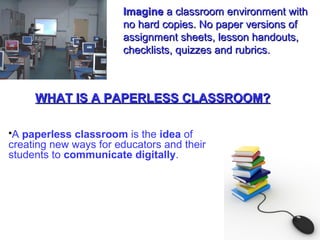
ImagineImagine a classroom environment witha classroom environment with
no hard copies. No paper versions ofno hard copies. No paper versions of
assignment sheets, lesson handouts,assignment sheets, lesson handouts,
checklists, quizzes and rubrics.checklists, quizzes and rubrics.
A paperless classroom is the idea of
creating new ways for educators and their
students to communicate digitally.
WHAT IS A PAPERLESS CLASSROOM?WHAT IS A PAPERLESS CLASSROOM?
What is E-learning?
E-learning is essentially the computer and network-
enabled transfer of skills and knowledge.
It comprises all forms of electronically supported
learning and teaching.
E-learning tools: E-mail
• Every teacher should have an e-mail account
• Communicate with students
• Communicate with parents
• Students can submit assignment
• Can have attachments
• Create a paperless environment
• Simple but effective
• Efficient and cost effective
Tools: Learning Management SystemTools: Learning Management System
(LMS)(LMS)
• Management of content
• Tracking students
• Administrative features
• Integration with various tools such as chat,
forum, e-mail, etc.
• Reporting
• Demo... of Multimedia Learning System (MMLS)
DIGITAL RESOURCESDIGITAL RESOURCES
 Internet
 Photo Gallery Websites
 Digital Tutorials
 Digital Booklets and Manuals
 MP3 Audio Lessons
 Photo Essays
 Digital Collages
 Digital Based Posters
Digital presentationsDigital presentations
• Laptops and projector
• smart board
• TV/DVD
• Digital video cameras
• Microsoft office and powerpoint.
• act as a digital organizer that will automatically
synchronize with ur PC’s outlook program.
• act as a digital input device that will infrared any
document onto ur pc to load on the pda.
• act as a electronic means of a notebook and
textbook.
• act as a tool of entertainment, allowing you to
play games and load your favourite news
paper/web site for palm use.
A personal digital assistant can..A personal digital assistant can..
Traditional Classroom
Traditional ClassroomTraditional Classroom
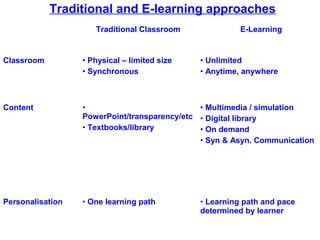
Traditional and E-learning approaches
Traditional Classroom E-Learning
Classroom • Physical – limited size
• Synchronous
• Unlimited
• Anytime, anywhere
Content •
PowerPoint/transparency/etc
• Textbooks/library
• Multimedia / simulation
• Digital library
• On demand
• Syn & Asyn. Communication
Personalisation • One learning path • Learning path and pace
determined by learner
Environment friendly.Environment friendly.
Electronic media enhances presentations and students‘Electronic media enhances presentations and students‘
interest.interest.
Students can be provided with immediate feedback onStudents can be provided with immediate feedback on
assignments.assignments.
Using a computer to grade assignments saves time andUsing a computer to grade assignments saves time and
promotes a more efficient record keeping environmentpromotes a more efficient record keeping environment.
ADVANTAGESADVANTAGES
Students can transfer/update files instantly.Students can transfer/update files instantly.
Work can be easily kept for future reference.Work can be easily kept for future reference.
Work from multiple work stations students can accessWork from multiple work stations students can access
work from home (web sites).work from home (web sites).
Encourages all students with different learning abilities.Encourages all students with different learning abilities.
 media-rich
– Easier to understand & more engaging
 repeatable
– As many times as you like
 easier to monitor progress
– less administrative work
– can be more precise
CONCLUSION
ICT and e-learning offers opportunity to raiseICT and e-learning offers opportunity to raise
educational standards in schools;educational standards in schools;
Large range of ICT tools are available for teaching andLarge range of ICT tools are available for teaching and
learning.learning.
Closes the gap of “Digital Divide”.Closes the gap of “Digital Divide”.
Involvement of teachers and parents is important.Involvement of teachers and parents is important.
Institutions will need funding, access and training.Institutions will need funding, access and training.
QUESTIONS?

Elearning Paperless classroom

  • 1.
    By, Ramya mK PavithRa N 8thsem eCe shiRdi sai eNgiNeeRiNg College aNeKal,BaNgaloRe eLearning PaPeRless ClassRoom
  • 2.
  • 3.
    The world israpidly becoming moreThe world is rapidly becoming more technologicaltechnological. The way we. The way we communicatecommunicate in society, the wayin society, the way businesses communicate and thebusinesses communicate and the way people getway people get informationinformation isis changing.changing. ComputersComputers and otherand other high-techhigh-tech equipmentequipment are becoming significantare becoming significant components in educationalcomponents in educational institutions.institutions. The use of this equipment can helpThe use of this equipment can help create a virtuallycreate a virtually paperlesspaperless classroomclassroom..
  • 4.
    ImagineImagine a classroomenvironment witha classroom environment with no hard copies. No paper versions ofno hard copies. No paper versions of assignment sheets, lesson handouts,assignment sheets, lesson handouts, checklists, quizzes and rubrics.checklists, quizzes and rubrics. A paperless classroom is the idea of creating new ways for educators and their students to communicate digitally. WHAT IS A PAPERLESS CLASSROOM?WHAT IS A PAPERLESS CLASSROOM?
  • 5.
    What is E-learning? E-learningis essentially the computer and network- enabled transfer of skills and knowledge. It comprises all forms of electronically supported learning and teaching.
  • 6.
    E-learning tools: E-mail •Every teacher should have an e-mail account • Communicate with students • Communicate with parents • Students can submit assignment • Can have attachments • Create a paperless environment • Simple but effective • Efficient and cost effective
  • 7.
    Tools: Learning ManagementSystemTools: Learning Management System (LMS)(LMS) • Management of content • Tracking students • Administrative features • Integration with various tools such as chat, forum, e-mail, etc. • Reporting • Demo... of Multimedia Learning System (MMLS)
  • 9.
    DIGITAL RESOURCESDIGITAL RESOURCES Internet  Photo Gallery Websites  Digital Tutorials  Digital Booklets and Manuals  MP3 Audio Lessons  Photo Essays  Digital Collages  Digital Based Posters
  • 10.
    Digital presentationsDigital presentations •Laptops and projector • smart board • TV/DVD • Digital video cameras • Microsoft office and powerpoint.
  • 11.
    • act asa digital organizer that will automatically synchronize with ur PC’s outlook program. • act as a digital input device that will infrared any document onto ur pc to load on the pda. • act as a electronic means of a notebook and textbook. • act as a tool of entertainment, allowing you to play games and load your favourite news paper/web site for palm use. A personal digital assistant can..A personal digital assistant can..
  • 12.
    Traditional Classroom Traditional ClassroomTraditionalClassroom Traditional and E-learning approaches Traditional Classroom E-Learning Classroom • Physical – limited size • Synchronous • Unlimited • Anytime, anywhere Content • PowerPoint/transparency/etc • Textbooks/library • Multimedia / simulation • Digital library • On demand • Syn & Asyn. Communication Personalisation • One learning path • Learning path and pace determined by learner
  • 13.
    Environment friendly.Environment friendly. Electronicmedia enhances presentations and students‘Electronic media enhances presentations and students‘ interest.interest. Students can be provided with immediate feedback onStudents can be provided with immediate feedback on assignments.assignments. Using a computer to grade assignments saves time andUsing a computer to grade assignments saves time and promotes a more efficient record keeping environmentpromotes a more efficient record keeping environment. ADVANTAGESADVANTAGES Students can transfer/update files instantly.Students can transfer/update files instantly. Work can be easily kept for future reference.Work can be easily kept for future reference. Work from multiple work stations students can accessWork from multiple work stations students can access work from home (web sites).work from home (web sites). Encourages all students with different learning abilities.Encourages all students with different learning abilities.
  • 14.
     media-rich – Easierto understand & more engaging  repeatable – As many times as you like  easier to monitor progress – less administrative work – can be more precise
  • 15.
    CONCLUSION ICT and e-learningoffers opportunity to raiseICT and e-learning offers opportunity to raise educational standards in schools;educational standards in schools; Large range of ICT tools are available for teaching andLarge range of ICT tools are available for teaching and learning.learning. Closes the gap of “Digital Divide”.Closes the gap of “Digital Divide”. Involvement of teachers and parents is important.Involvement of teachers and parents is important. Institutions will need funding, access and training.Institutions will need funding, access and training.
  • 17.