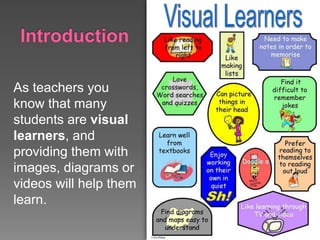
As teachers you
know that many
students are visual
learners, and
providing them with
images, diagrams or
videos will help them
learn.
Today’s students have access to many forms
of communication through computers, cell
phones, handhelds, and television. They are
also familiar and use different ways to learn
and share information using web 2.0
Teachers should take advantage of it and
incorporate it into their classroom instruction.
Teachers: can use images and visual
presentations to encourage students to
develop critical thinking while developing skills
of analysis and creativity.
Students: by learning to create meaning and
communicate with visual tools they can make
digital media projects using presentations,
videos and podcasts.
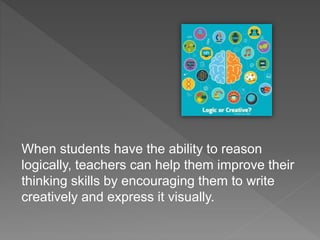
When students have the ability to reason
logically, teachers can help them improve their
thinking skills by encouraging them to write
creatively and express it visually.
Flickr
It is easy for students to add images to the stories.
When they can edit, save, post and include photos
in their work they get creative while enhances their
writing skills.
This user friendly app allows them import photos,
add comments and annotations, design. They can
share the digital story by printing, saving or
posting to web with a professional look.
“creating a documentary changes the students
from being spectators of history or literature,
for example, to being active participants”.
G. Solomon & L. Schrum
(Web 2.0 how-to for educators, 2010)
Teachers: formative assessment tool that can
evaluate the student learning of application
rather than remembering.
Students: demonstrate their strengths and
skills of researching, reading, writing, and
speaking as they build problem solving skills.
They are involved in gathering evidence,
analyzing and interpreting.
TeacherTube
Is a public video sharing website for teachers
to post videos and tutorials.
Students can create, communicate, produce
digital stories and share them for educational
purposes.
 A student that doesn’t talk develops a digital
story about being afraid to talk, and describes
his feelings. Result: found some true friends
and now has much to say.
 A student with Asperger's syndrome tells a story
about his favorite hobby.
 A student reconnects with her separated
relatives through her digital story.
 Brainstorm and develop a topic and purpose
for writing.
 Discuss expectations and assessment of
digital stories.
 Create a storyboard or outline for the story
line.
 Discuss how images can help communicate
a story and enhance the message.
 Use a digital camera to capture photos or
find photos online that are free and available
to use (attribute photos that were online).
 Identify elements of digital stories.
 Use editing tools to edit images and create
the digital story.
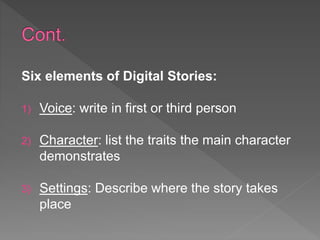
Six elements of Digital Stories:
1) Voice: write in first or third person
2) Character: list the traits the main character
demonstrates
3) Settings: Describe where the story takes
place
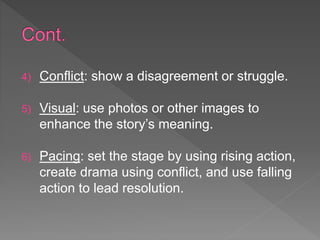
4) Conflict: show a disagreement or struggle.
5) Visual: use photos or other images to
enhance the story’s meaning.
6) Pacing: set the stage by using rising action,
create drama using conflict, and use falling
action to lead resolution.
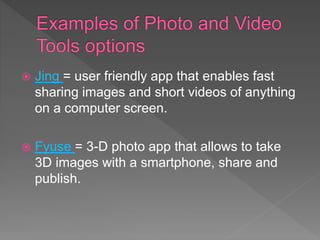
 Jing = user friendly app that enables fast
sharing images and short videos of anything
on a computer screen.
 Fyuse = 3-D photo app that allows to take
3D images with a smartphone, share and
publish.
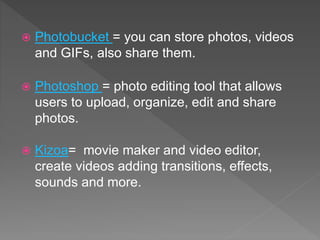
 Photobucket = you can store photos, videos
and GIFs, also share them.
 Photoshop = photo editing tool that allows
users to upload, organize, edit and share
photos.
 Kizoa= movie maker and video editor,
create videos adding transitions, effects,
sounds and more.
 Google Photo = Storage for pictures and
videos automatically organized and easy to
share.
 Prezi = online presentation tool that allow
you to create public-only presentations.
Users can create, edit, embed them to blogs,
and much more.
 IBM Watson Media = video streaming
platform, AI-powered video ecosystem.
 VoiceThread = images, documents and
video as a multimedia slide show that allows
people to navigate pages and leave
comments.
 Windows Live Movie Maker = free microsoft
video editor. Import photos and videos to
create a movie.
EDUC 554 Visual learning tools (rev 2019) (1)

EDUC 554 Visual learning tools (rev 2019) (1)

  • 2.
    As teachers you knowthat many students are visual learners, and providing them with images, diagrams or videos will help them learn.
  • 3.
    Today’s students haveaccess to many forms of communication through computers, cell phones, handhelds, and television. They are also familiar and use different ways to learn and share information using web 2.0 Teachers should take advantage of it and incorporate it into their classroom instruction.
  • 4.
    Teachers: can useimages and visual presentations to encourage students to develop critical thinking while developing skills of analysis and creativity. Students: by learning to create meaning and communicate with visual tools they can make digital media projects using presentations, videos and podcasts.
  • 5.
    When students havethe ability to reason logically, teachers can help them improve their thinking skills by encouraging them to write creatively and express it visually.
  • 6.
    Flickr It is easyfor students to add images to the stories. When they can edit, save, post and include photos in their work they get creative while enhances their writing skills. This user friendly app allows them import photos, add comments and annotations, design. They can share the digital story by printing, saving or posting to web with a professional look.
  • 7.
    “creating a documentarychanges the students from being spectators of history or literature, for example, to being active participants”. G. Solomon & L. Schrum (Web 2.0 how-to for educators, 2010)
  • 8.
    Teachers: formative assessmenttool that can evaluate the student learning of application rather than remembering. Students: demonstrate their strengths and skills of researching, reading, writing, and speaking as they build problem solving skills. They are involved in gathering evidence, analyzing and interpreting.
  • 9.
    TeacherTube Is a publicvideo sharing website for teachers to post videos and tutorials. Students can create, communicate, produce digital stories and share them for educational purposes.
  • 10.
     A studentthat doesn’t talk develops a digital story about being afraid to talk, and describes his feelings. Result: found some true friends and now has much to say.  A student with Asperger's syndrome tells a story about his favorite hobby.  A student reconnects with her separated relatives through her digital story.
  • 11.
     Brainstorm anddevelop a topic and purpose for writing.  Discuss expectations and assessment of digital stories.  Create a storyboard or outline for the story line.  Discuss how images can help communicate a story and enhance the message.
  • 12.
     Use adigital camera to capture photos or find photos online that are free and available to use (attribute photos that were online).  Identify elements of digital stories.  Use editing tools to edit images and create the digital story.
  • 13.
    Six elements ofDigital Stories: 1) Voice: write in first or third person 2) Character: list the traits the main character demonstrates 3) Settings: Describe where the story takes place
  • 14.
    4) Conflict: showa disagreement or struggle. 5) Visual: use photos or other images to enhance the story’s meaning. 6) Pacing: set the stage by using rising action, create drama using conflict, and use falling action to lead resolution.
  • 15.
     Jing =user friendly app that enables fast sharing images and short videos of anything on a computer screen.  Fyuse = 3-D photo app that allows to take 3D images with a smartphone, share and publish.
  • 16.
     Photobucket =you can store photos, videos and GIFs, also share them.  Photoshop = photo editing tool that allows users to upload, organize, edit and share photos.  Kizoa= movie maker and video editor, create videos adding transitions, effects, sounds and more.
  • 17.
     Google Photo= Storage for pictures and videos automatically organized and easy to share.  Prezi = online presentation tool that allow you to create public-only presentations. Users can create, edit, embed them to blogs, and much more.
  • 18.
     IBM WatsonMedia = video streaming platform, AI-powered video ecosystem.  VoiceThread = images, documents and video as a multimedia slide show that allows people to navigate pages and leave comments.  Windows Live Movie Maker = free microsoft video editor. Import photos and videos to create a movie.