Digital Storytelling in the Content Curriculum Tom Turner – Polk County Schools
Defining our students Multi-taskers Creators Innovators Connected Engaged Open and Transparent What does all this mean?
Most of our students are more knowledgeable with computers than the teacher at the front of the class
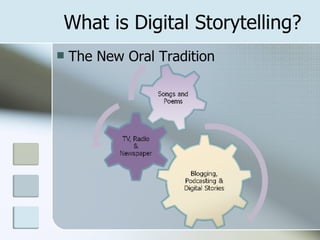
What is Digital Storytelling? The New Oral Tradition
Goals Appeal to the diverse learning styles of our students Generate interest and motivation for the ‘digital natives’ we teach Increase collaborative research skills Develop communication skills
Authentic Assessment Teaching today is data driven (FCAT, Kaplan, DIBELS, Thinklink) Skill & Drill is not the answer Digital Storytelling follows the Project Based Learning Approach Student Inquiry New Bloom’s Top Level: Create (generate, produce, construct)
Storytelling Ideas Use as anticipatory set of a unit Integrate with other applications Inspiration Google Earth – Virtual Tourism Timeliner Project-based learning with an essential question
Storytelling Ideas First Person Narratives - “All About Me”
Storytelling Ideas Examining Historical Events
Storytelling Ideas Informational or Instructional
Storytelling Ideas Voicethread – Digital Storytelling meets web 2.0
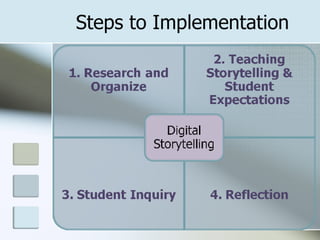
Steps to Implementation
Research & Organize Plan, Plan, Plan! Gather Resources for student use Hardware/Software demands
Teaching Storytelling to Students Be the expert for your students Demonstrate any software/hardware to be used Share exemplary examples ( http://www.digitales.us ) Explain expectations - Rubric
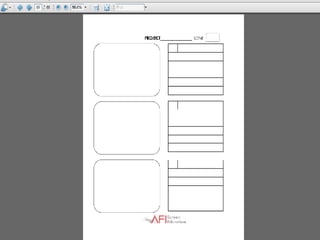
Student Inquiry Student Brainstorming Creating Storyboards – have a template to be used ( American Film Institute ) Scripting - building writing skills Creating – Bloom’s Taxonomy
 
Reflection Teacher Reflection What went well? What didn’t go well? What could be improved? Interview students  Student Reflection Did I do my best? What I liked about this project? What did I learn from this project?
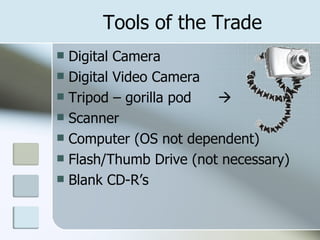
Tools of the Trade Digital Camera Digital Video Camera Tripod – gorilla pod   Scanner Computer (OS not dependent) Flash/Thumb Drive (not necessary) Blank CD-R’s
Tools of the Trade Microsoft Photostory3 (free download) Windows Moviemaker (free/installed on Windows XP Machines) iMovie (Mac OS only) Adobe Premier Elements Adobe Photoshop Elements Audacity ( free download )
Tools of the Trade – Web 2.0 Picasa – www.google.com Fotoflexer -  fotoflexer.com TeacherTube –  teachertube.com Discovery Education streaming – streaming.discoveryeducation.com FreePlay Music -  freeplaymusic.com/ Picnik –  www.picknik.com FLICKR –  www.flickr.com
Tools of the Trade – Web 2.0 50 Tools  – compiled by Alan Levine Cliotech Digital Storytelling Resources –  http://jdorman.wikispaces.com/digitalstorytelling Virtual Tourism -  virtualtourism.blogspot.com/
Jennifer Dorman – PA “ I think that digital storytelling puts students in the "driver's seat" and invests them in the learning process because they are constructing, understanding and uncovering learning while the teacher may facilitate the process; it is the students who are thinking and learning in rigorous and relevant ways”
Steve Dembo – Chicago, IL “ Writing a story allows students to express themselves.  Digital storytelling gives their expressions life.”
Diana Laufenberg – Flagstaff, AZ “ Providing students the flexibility and creativity to digitally craft their own stories has been one of the most  professionally transformative moments of my career.”
My Contact Information Email [email_address] Blog http://tnturner.edublogs.org Wiki http://tnturner.wikispaces.com Skype tom.turner19 IM Yahoo and AIM – mithrass19

Digital Storytelling

  • 1.
    Digital Storytelling inthe Content Curriculum Tom Turner – Polk County Schools
  • 2.
    Defining our studentsMulti-taskers Creators Innovators Connected Engaged Open and Transparent What does all this mean?
  • 3.
    Most of ourstudents are more knowledgeable with computers than the teacher at the front of the class
  • 4.
    What is DigitalStorytelling? The New Oral Tradition
  • 5.
    Goals Appeal tothe diverse learning styles of our students Generate interest and motivation for the ‘digital natives’ we teach Increase collaborative research skills Develop communication skills
  • 6.
    Authentic Assessment Teachingtoday is data driven (FCAT, Kaplan, DIBELS, Thinklink) Skill & Drill is not the answer Digital Storytelling follows the Project Based Learning Approach Student Inquiry New Bloom’s Top Level: Create (generate, produce, construct)
  • 7.
    Storytelling Ideas Useas anticipatory set of a unit Integrate with other applications Inspiration Google Earth – Virtual Tourism Timeliner Project-based learning with an essential question
  • 8.
    Storytelling Ideas FirstPerson Narratives - “All About Me”
  • 9.
  • 10.
  • 11.
    Storytelling Ideas Voicethread– Digital Storytelling meets web 2.0
  • 12.
  • 13.
    Research & OrganizePlan, Plan, Plan! Gather Resources for student use Hardware/Software demands
  • 14.
    Teaching Storytelling toStudents Be the expert for your students Demonstrate any software/hardware to be used Share exemplary examples ( http://www.digitales.us ) Explain expectations - Rubric
  • 15.
    Student Inquiry StudentBrainstorming Creating Storyboards – have a template to be used ( American Film Institute ) Scripting - building writing skills Creating – Bloom’s Taxonomy
  • 16.
  • 17.
    Reflection Teacher ReflectionWhat went well? What didn’t go well? What could be improved? Interview students Student Reflection Did I do my best? What I liked about this project? What did I learn from this project?
  • 18.
    Tools of theTrade Digital Camera Digital Video Camera Tripod – gorilla pod  Scanner Computer (OS not dependent) Flash/Thumb Drive (not necessary) Blank CD-R’s
  • 19.
    Tools of theTrade Microsoft Photostory3 (free download) Windows Moviemaker (free/installed on Windows XP Machines) iMovie (Mac OS only) Adobe Premier Elements Adobe Photoshop Elements Audacity ( free download )
  • 20.
    Tools of theTrade – Web 2.0 Picasa – www.google.com Fotoflexer - fotoflexer.com TeacherTube – teachertube.com Discovery Education streaming – streaming.discoveryeducation.com FreePlay Music - freeplaymusic.com/ Picnik – www.picknik.com FLICKR – www.flickr.com
  • 21.
    Tools of theTrade – Web 2.0 50 Tools – compiled by Alan Levine Cliotech Digital Storytelling Resources – http://jdorman.wikispaces.com/digitalstorytelling Virtual Tourism - virtualtourism.blogspot.com/
  • 22.
    Jennifer Dorman –PA “ I think that digital storytelling puts students in the "driver's seat" and invests them in the learning process because they are constructing, understanding and uncovering learning while the teacher may facilitate the process; it is the students who are thinking and learning in rigorous and relevant ways”
  • 23.
    Steve Dembo –Chicago, IL “ Writing a story allows students to express themselves. Digital storytelling gives their expressions life.”
  • 24.
    Diana Laufenberg –Flagstaff, AZ “ Providing students the flexibility and creativity to digitally craft their own stories has been one of the most professionally transformative moments of my career.”
  • 25.
    My Contact InformationEmail [email_address] Blog http://tnturner.edublogs.org Wiki http://tnturner.wikispaces.com Skype tom.turner19 IM Yahoo and AIM – mithrass19