<Insert Picture Here>


Oracle Enterprise Data Quality for Siebel
March 2013


                                            1
Architecture


               2
Architecture
                                                                 Siebel Server
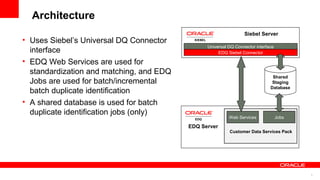
• Uses Siebel’s Universal DQ Connector
                                                Universal DQ Connector interface
  interface                                          EDQ Siebel Connector

• EDQ Web Services are used for
  standardization and matching, and EDQ
                                                                               Shared
  Jobs are used for batch/incremental                                          Staging
                                                                              Database
  batch duplicate identification
• A shared database is used for batch
  duplicate identification jobs (only)
                                                          Web Services             Jobs

                                          EDQ Server
                                                          Customer Data Services Pack


                                                                                          3
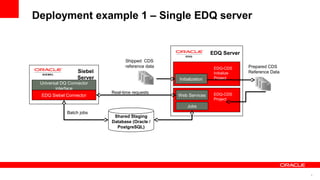
Deployment example 1 – Single EDQ server


                                                                   EDQ Server
                                 Shipped CDS
                                 reference data                     EDQ-CDS      Prepared CDS
                  Siebel                                            Initialize   Reference Data
                  Server                          Initialization    Project
 Universal DQ Connector
        interface
                           Real-time requests                       EDQ-CDS
 EDQ Siebel Connector                             Web Services
                                                                    Project
                                                      Jobs
             Batch jobs
                            Shared Staging
                           Database (Oracle /
                             PostgreSQL)


                                                                                                  4
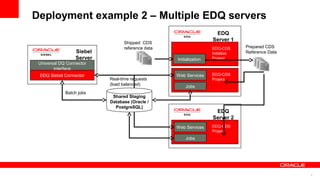
Deployment example 2 – Multiple EDQ servers
                                                                    EDQ
                                                                   Server 1
                                 Shipped CDS
                                 reference data                    EDQ-CDS      Prepared CDS
                  Siebel                                           Initialize   Reference Data
                  Server                          Initialization   Project
 Universal DQ Connector
        interface
 EDQ Siebel Connector                             Web Services     EDQ-CDS
                           Real-time requests                      Project
                           (load balanced)            Jobs
             Batch jobs
                            Shared Staging
                           Database (Oracle /
                             PostgreSQL)
                                                                    EDQ
                                                                   Server 2
                                                  Web Services     EDQ-CDS
                                                                   Project
                                                      Jobs


                                                                                                 5
Matching


           6
Matching
• EDQ uses Siebel’s Universal DQ Interface to prevent duplicate contacts or
  accounts being entered into a Siebel CRM
• The same interface is used to match records in real-time in Siebel UCM
• In both cases, the EDQ server does not hold a copy of the working data
• Instead, records are passed between the application and the DQ service.
  This is a three step process:
   – Cluster Generation (Siebel)
   – Candidate Selection (Siebel)
   – Matching (EDQ web service)


                                                                              7
Matching Process (1) - Offline

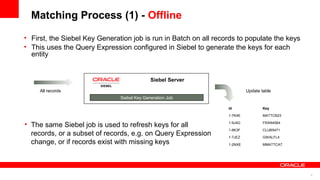
• First, the Siebel Key Generation job is run in Batch on all records to populate the keys
• This uses the Query Expression configured in Siebel to generate the keys for each
  entity


                                             Siebel Server

     All records                                                           Update table
                               Siebel Key Generation Job

                                                                  Id               Key

                                                                  1-7K4E           MATTCB23

• The same Siebel job is used to refresh keys for all             1-9J4G           FRAN4564

                                                                  1-8K3F           CLUB5471
  records, or a subset of records, e.g. on Query Expression       1-7JEZ           GWALFL4
  change, or if records exist with missing keys                   1-2NXE           MMATTCA7


                                                                                              8
Matching Process (2) - Online
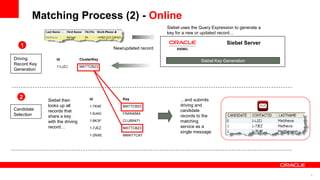
                                                                   Siebel uses the Query Expression to generate a
                                                                   key for a new or updated record…

                                                                                                Siebel Server
   1                                          New/updated record

Driving          Id             ClusterKey                                         Siebel Key Generation
Record Key
                 1-LJZJ         MATTCB23
Generation


  2          Siebel then             Id           Key                    …and submits
             looks up all            1-7K4E       MATTCB23               driving and
Candidate    records that                                                candidate
Selection                            1-9J4G       FRAN4564
             share a key                                                 records to the
             with the driving        1-8K3F       CLUB5471               matching
             record…                 1-7JEZ       MATTCB23               service as a
                                                                         single message
                                     1-2NXE       MMATTCA7


                                                                                                                    9
Matching Process (3) - Online

  3

Matching


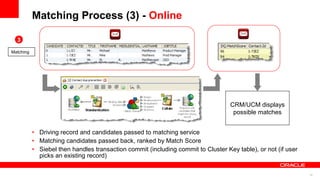
                                                                                   CRM/UCM displays
                                                                                    possible matches


           • Driving record and candidates passed to matching service
           • Matching candidates passed back, ranked by Match Score
           • Siebel then handles transaction commit (including commit to Cluster Key table), or not (if user
             picks an existing record)

                                                                                                               10
OEDQ Advantages


• Stateless real-time DQ services easier to scale and
  make Highly Available
• Fully configurable matching processes with all the
  power of OEDQ transformation and matching available
• Transactional commit integrity controlled by Siebel – no
  complex replication/synchronization issues


                                                             11
Functionality
• Records can be checked, cleaned and checked for matches as they are entered
• Supports real time, batch and incremental batch modes
• No integration code is required – the service interface and functionality are all defined in
  configuration
• Templates and complete configuration instructions for both Siebel and EDQ are provided to
  ease initial deployment
• Function-rich templates are provided in the Customer Data Services Pack for:
   –   Real-time contact matching
   –   Batch contact matching
   –   Real-time account matching
   –   Batch account matching
   –   Real-time/Batch address verification/cleaning
• ‘Insert logic here’ templates are provided for:
   – Real-time/Batch account standardization/cleaning
   – Real-time/Batch contact standardization/cleaning


                                                                                                 12
Standardization


                  13
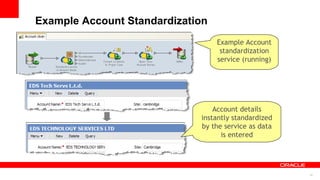
Example Account Standardization
                                  Example Account
                                   standardization
                                  service (running)


                                 Account details
                             instantly standardized
                             by the service as data
                                   is entered


                                                      14
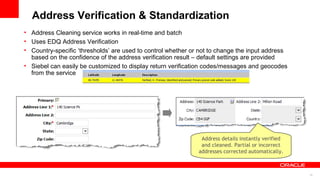
Address Verification & Standardization
• Address Cleaning service works in real-time and batch
• Uses EDQ Address Verification
• Country-specific ‘thresholds’ are used to control whether or not to change the input address
  based on the confidence of the address verification result – default settings are provided
• Siebel can easily be customized to display return verification codes/messages and geocodes
  from the service


                                                               Address details instantly verified
                                                               and cleaned. Partial or incorrect
                                                              addresses corrected automatically.


                                                                                                    15
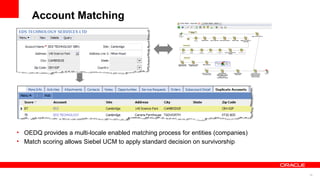
Account Matching


• OEDQ provides a multi-locale enabled matching process for entities (companies)
• Match scoring allows Siebel UCM to apply standard decision on survivorship


                                                                                   16
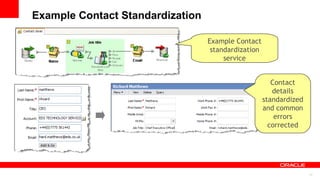
Example Contact Standardization

                                  Example Contact
                                   standardization
                                       service


                                                        Contact
                                                        details
                                                     standardized
                                                     and common
                                                         errors
                                                       corrected


                                                                    17
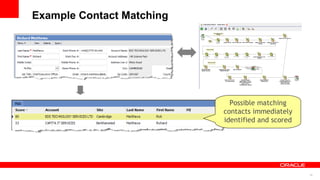
Example Contact Matching


                             Possible matching
                           contacts immediately
                           identified and scored


                                                   18
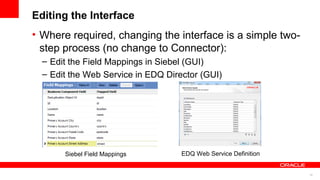
Editing the Interface
• Where required, changing the interface is a simple two-
  step process (no change to Connector):
  – Edit the Field Mappings in Siebel (GUI)
  – Edit the Web Service in EDQ Director (GUI)


       Siebel Field Mappings        EDQ Web Service Definition


                                                                 19
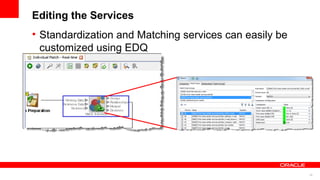
Editing the Services
• Standardization and Matching services can easily be
  customized using EDQ


                                                        20
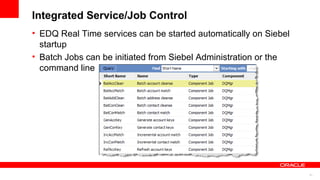
Integrated Service/Job Control
• EDQ Real Time services can be started automatically on Siebel
  startup
• Batch Jobs can be initiated from Siebel Administration or the
  command line


                                                                  21
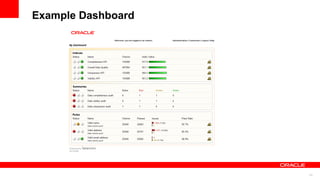
Siebel Data Quality Reporting

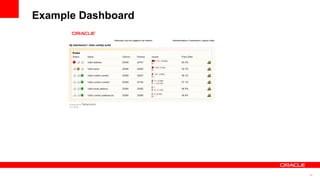
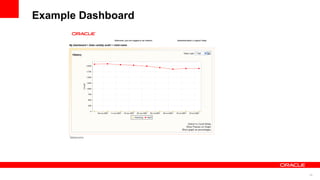
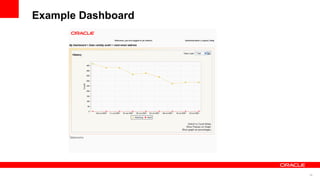
• Use EDQ’s built-in Dashboard capability to provide up
  to the minute reporting on the quality of data in the
  Siebel system as reported by the running services and
  jobs
• Additional jobs can be set up to profile data


                                                          22
Example Dashboard


                    23
Example Dashboard


                    24
Example Dashboard


                    25
Example Dashboard


                    26
27

Siebel Enterprise Data Quality for Siebel

  • 1.
    <Insert Picture Here> OracleEnterprise Data Quality for Siebel March 2013 1
  • 2.
  • 3.
    Architecture Siebel Server • Uses Siebel’s Universal DQ Connector Universal DQ Connector interface interface EDQ Siebel Connector • EDQ Web Services are used for standardization and matching, and EDQ Shared Jobs are used for batch/incremental Staging Database batch duplicate identification • A shared database is used for batch duplicate identification jobs (only) Web Services Jobs EDQ Server Customer Data Services Pack 3
  • 4.
    Deployment example 1– Single EDQ server EDQ Server Shipped CDS reference data EDQ-CDS Prepared CDS Siebel Initialize Reference Data Server Initialization Project Universal DQ Connector interface Real-time requests EDQ-CDS EDQ Siebel Connector Web Services Project Jobs Batch jobs Shared Staging Database (Oracle / PostgreSQL) 4
  • 5.
    Deployment example 2– Multiple EDQ servers EDQ Server 1 Shipped CDS reference data EDQ-CDS Prepared CDS Siebel Initialize Reference Data Server Initialization Project Universal DQ Connector interface EDQ Siebel Connector Web Services EDQ-CDS Real-time requests Project (load balanced) Jobs Batch jobs Shared Staging Database (Oracle / PostgreSQL) EDQ Server 2 Web Services EDQ-CDS Project Jobs 5
  • 6.
  • 7.
    Matching • EDQ usesSiebel’s Universal DQ Interface to prevent duplicate contacts or accounts being entered into a Siebel CRM • The same interface is used to match records in real-time in Siebel UCM • In both cases, the EDQ server does not hold a copy of the working data • Instead, records are passed between the application and the DQ service. This is a three step process: – Cluster Generation (Siebel) – Candidate Selection (Siebel) – Matching (EDQ web service) 7
  • 8.
    Matching Process (1)- Offline • First, the Siebel Key Generation job is run in Batch on all records to populate the keys • This uses the Query Expression configured in Siebel to generate the keys for each entity Siebel Server All records Update table Siebel Key Generation Job Id Key 1-7K4E MATTCB23 • The same Siebel job is used to refresh keys for all 1-9J4G FRAN4564 1-8K3F CLUB5471 records, or a subset of records, e.g. on Query Expression 1-7JEZ GWALFL4 change, or if records exist with missing keys 1-2NXE MMATTCA7 8
  • 9.
    Matching Process (2)- Online Siebel uses the Query Expression to generate a key for a new or updated record… Siebel Server 1 New/updated record Driving Id ClusterKey Siebel Key Generation Record Key 1-LJZJ MATTCB23 Generation 2 Siebel then Id Key …and submits looks up all 1-7K4E MATTCB23 driving and Candidate records that candidate Selection 1-9J4G FRAN4564 share a key records to the with the driving 1-8K3F CLUB5471 matching record… 1-7JEZ MATTCB23 service as a single message 1-2NXE MMATTCA7 9
  • 10.
    Matching Process (3)- Online 3 Matching CRM/UCM displays possible matches • Driving record and candidates passed to matching service • Matching candidates passed back, ranked by Match Score • Siebel then handles transaction commit (including commit to Cluster Key table), or not (if user picks an existing record) 10
  • 11.
    OEDQ Advantages • Statelessreal-time DQ services easier to scale and make Highly Available • Fully configurable matching processes with all the power of OEDQ transformation and matching available • Transactional commit integrity controlled by Siebel – no complex replication/synchronization issues 11
  • 12.
    Functionality • Records canbe checked, cleaned and checked for matches as they are entered • Supports real time, batch and incremental batch modes • No integration code is required – the service interface and functionality are all defined in configuration • Templates and complete configuration instructions for both Siebel and EDQ are provided to ease initial deployment • Function-rich templates are provided in the Customer Data Services Pack for: – Real-time contact matching – Batch contact matching – Real-time account matching – Batch account matching – Real-time/Batch address verification/cleaning • ‘Insert logic here’ templates are provided for: – Real-time/Batch account standardization/cleaning – Real-time/Batch contact standardization/cleaning 12
  • 13.
  • 14.
    Example Account Standardization Example Account standardization service (running) Account details instantly standardized by the service as data is entered 14
  • 15.
    Address Verification &Standardization • Address Cleaning service works in real-time and batch • Uses EDQ Address Verification • Country-specific ‘thresholds’ are used to control whether or not to change the input address based on the confidence of the address verification result – default settings are provided • Siebel can easily be customized to display return verification codes/messages and geocodes from the service Address details instantly verified and cleaned. Partial or incorrect addresses corrected automatically. 15
  • 16.
    Account Matching • OEDQprovides a multi-locale enabled matching process for entities (companies) • Match scoring allows Siebel UCM to apply standard decision on survivorship 16
  • 17.
    Example Contact Standardization Example Contact standardization service Contact details standardized and common errors corrected 17
  • 18.
    Example Contact Matching Possible matching contacts immediately identified and scored 18
  • 19.
    Editing the Interface •Where required, changing the interface is a simple two- step process (no change to Connector): – Edit the Field Mappings in Siebel (GUI) – Edit the Web Service in EDQ Director (GUI) Siebel Field Mappings EDQ Web Service Definition 19
  • 20.
    Editing the Services •Standardization and Matching services can easily be customized using EDQ 20
  • 21.
    Integrated Service/Job Control •EDQ Real Time services can be started automatically on Siebel startup • Batch Jobs can be initiated from Siebel Administration or the command line 21
  • 22.
    Siebel Data QualityReporting • Use EDQ’s built-in Dashboard capability to provide up to the minute reporting on the quality of data in the Siebel system as reported by the running services and jobs • Additional jobs can be set up to profile data 22
  • 23.
  • 24.
  • 25.
  • 26.
  • 27.