TOPIC
EDITORS
Presented by:-
Ms. Sonali Kharade
Assistant Professor, Computer Science Department
Introduction
 Editors or text editors are software programs that enable the user to create
and edit text files.
Classification of Editors
Editors
Line
editor
Stream
editor
Screen
Editor
Word
Processor
Structure
editor
Types of Editors
1. Line editor: In this, you can only edit one line at a time or an integral number of lines. You
cannot have a free-flowing sequence of characters. It will take care of only one line.Ex :
Teleprinter, edlin, teco
2. Stream editors: In this type of editors, the file is treated as continuous flow or sequence of
characters instead of line numbers, which means here you can type paragraphs.Ex : Sed
editor in UNIX
3. Screen editors: In this type of editors, the user is able to see the cursor on the screen and can
make a copy, cut, paste operation easily. It is very easy to use mouse pointer.Ex : vi, emacs,
Notepad
4. Word Processor: Overcoming the limitations of screen editors, it allows one to use some
format to insert images, files, videos, use font, size, style features. It majorly focuses on
Natural language.
5. Structure Editor: Structure editor focuses on programming languages. It provides features to
write and edit source code.Ex : Netbeans IDE, gEdit.
6. VI Editor: The vi editor (short name for the visual editor) is a screen editor which is available
in UNIX OS. Vi has no menus instead it uses a combination of keystrokes to accomplish
tasks.
The document editing process mainly compromises of the following four tasks :
 The part of the document to edited or modifies is selected.
 determining how to format this lines on view and how to display it.
 Specify and execute the operations that modify the document.
 Update the view properly.
The above steps include filtering, formatting, and traveling.
1. Formatting : Visibility on display screen.
2. Filtering : Finding out the main/important subset.
3. Traveling : Locating the area of interest.
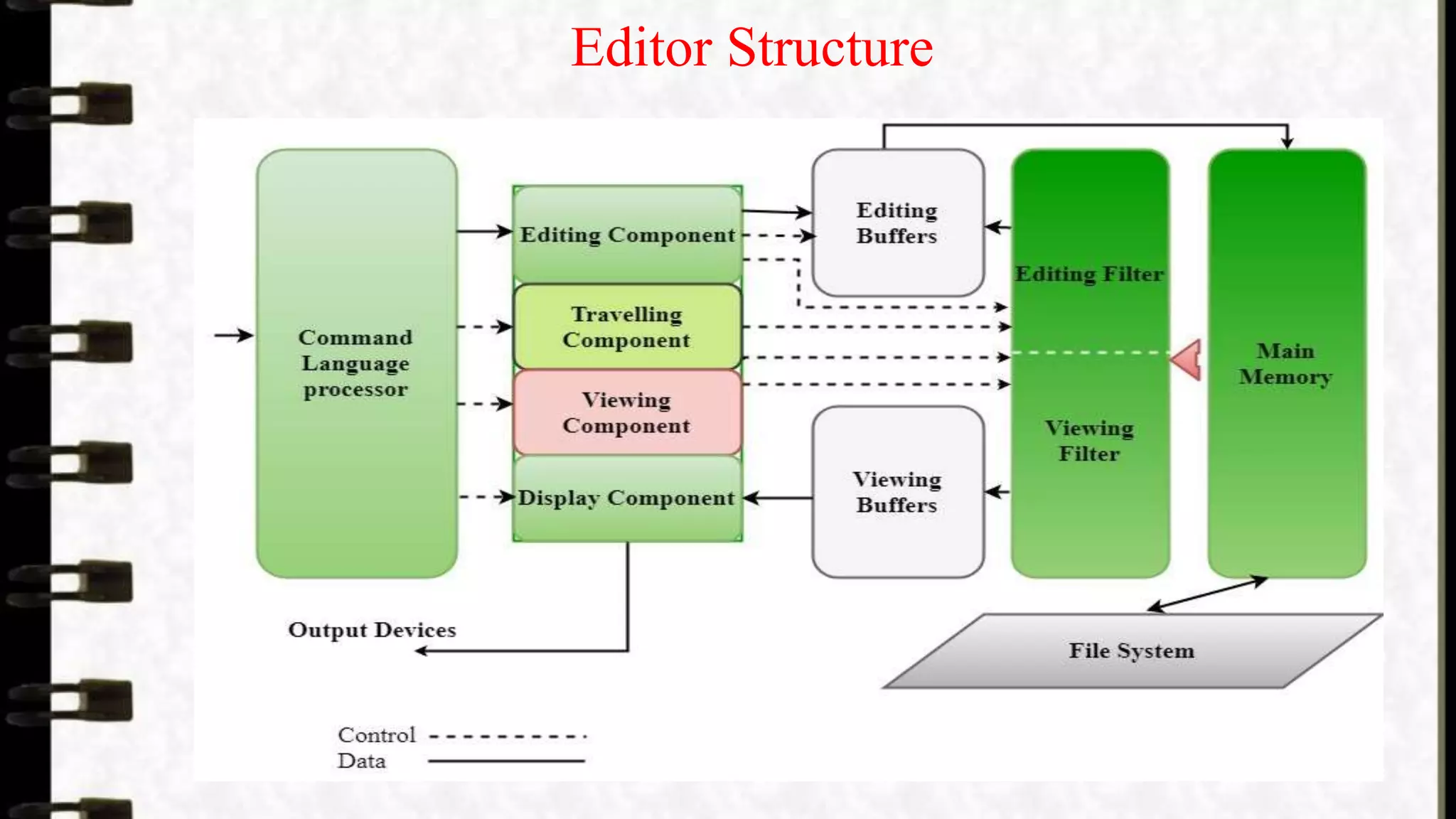
The command language processor accepts commands, performs functions such as
editing and viewing. It involves traveling, editing, viewing and display. Editing
operations are specified by the user and display operations are specified by the
editor. Traveling and viewing components are invoked by the editor or the user itself
during the operations.
Editor Structure

EDITORS

  • 1.
    TOPIC EDITORS Presented by:- Ms. SonaliKharade Assistant Professor, Computer Science Department
  • 2.
    Introduction  Editors ortext editors are software programs that enable the user to create and edit text files.
  • 3.
  • 4.
    Types of Editors 1.Line editor: In this, you can only edit one line at a time or an integral number of lines. You cannot have a free-flowing sequence of characters. It will take care of only one line.Ex : Teleprinter, edlin, teco 2. Stream editors: In this type of editors, the file is treated as continuous flow or sequence of characters instead of line numbers, which means here you can type paragraphs.Ex : Sed editor in UNIX 3. Screen editors: In this type of editors, the user is able to see the cursor on the screen and can make a copy, cut, paste operation easily. It is very easy to use mouse pointer.Ex : vi, emacs, Notepad 4. Word Processor: Overcoming the limitations of screen editors, it allows one to use some format to insert images, files, videos, use font, size, style features. It majorly focuses on Natural language. 5. Structure Editor: Structure editor focuses on programming languages. It provides features to write and edit source code.Ex : Netbeans IDE, gEdit. 6. VI Editor: The vi editor (short name for the visual editor) is a screen editor which is available in UNIX OS. Vi has no menus instead it uses a combination of keystrokes to accomplish tasks.
  • 5.
    The document editingprocess mainly compromises of the following four tasks :  The part of the document to edited or modifies is selected.  determining how to format this lines on view and how to display it.  Specify and execute the operations that modify the document.  Update the view properly. The above steps include filtering, formatting, and traveling. 1. Formatting : Visibility on display screen. 2. Filtering : Finding out the main/important subset. 3. Traveling : Locating the area of interest. The command language processor accepts commands, performs functions such as editing and viewing. It involves traveling, editing, viewing and display. Editing operations are specified by the user and display operations are specified by the editor. Traveling and viewing components are invoked by the editor or the user itself during the operations.
  • 6.