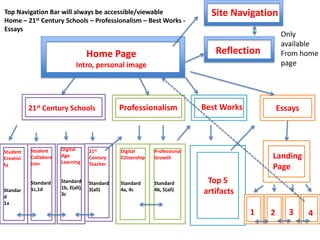
Top Navigation Bar will always be accessible/viewable
Home – 21st Century Schools – Professionalism – Best Works Essays

Site Navigation
Only
available
From home
page

Reflection

Home Page
Intro, personal image

21st Century Schools

Student
Creativi
ty

Standar
d
1a

Professionalism

Student
Collabora
tion

Digital
Age
Learning

21st
Century
Teacher

Digital
Citizenship

Standard
1b, 2(all),
3c

Standard
3(all)

Standard
4a, 4c

Standard
4b, 5(all)

Essays

Professional
Growth

Standard
1c,1d

Best Works

Landing
Page

Top 5
artifacts
1

2

3

4
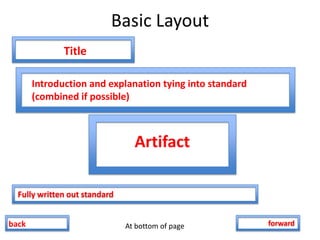
Basic Layout
Title
Introduction and explanation tying into standard
(combined if possible)

Artifact
Fully written out standard

back

At bottom of page

forward
Student Creativity
• Creating and Editing Movies
– Artifact Explanation
– iMovie
– Standard 1a

• Creating Music
– Artifact Explanation
– Garageband
– Standard 1a

• Creating and Editing Photos
– Artifact Explanation
– Digital Photo
– Standard 1a

• Button Back
• Button Forward
Student Collaboration
• Student Blogging
– Artifact Explanation
– Kidblog screencast/screenshot
– Standard 1c

• Using Wikis for Teacher/Student Collaboration
– Artifact Explanation
– Wikispaces screencast/screenshot
– Standard 1d

• Button Back

• Button Forward
Digital Age Learning
•

Podcast Excerpt of Mini Lecture
– Artifact Explanation
– podcast
– Standard 2a

•

Online Moodle US History Class
– Artifact Explanation
– Screenshots/screencast
– Standard 2b

•

iMovie Instructional Guide
– Artifact Explanation
– Instructional Guide
– Standard 2c

•

Questionpress Online Response System
– Artifact Explanation
– Screenshot/screencast
– Standard 2d

•

Button Back
•

Button Forward
21st Century Teacher
•

Recreating a Trail of Tears Unit with Web 2.0 Tools
–
–
–

•

Tech Audit
–
–
–

•

Artifact Explanation
Embedded eXe module (hosted on dropbox)
Standard 3c

LiveBinders
–
–
–

•

Artifact Explanation
Class Website – screenshot/screencast
Standard 3c

Communicating Information in the Digital Age: eXe module
–
–
–

•

Artifact Explanation
Google Forms Survey (screencast/screenshot? Live link?)
Standard 3b

Class Website – Updating Parents and Students Not in the Classroom
–
–
–

•

Artifact Explanation
YouTube Video
Standard 3a

Artifact Explanation
Embedded LiveBinder
Standard 3d

Button Back
•

Button Forward
Digital Citizenship
• Poster on digital citizenship topic (x2)
– Artifact Explanation
– Copyright and Anti Bullying posters
– Standard 4a and 4c

• iPad Grant Work
– Artifact Explanation
– “Documentary” of work
– Standard 4b

• Creating and Editing Photos
– Artifact Explanation
– Digital Photo
– Standard 1a

• Button Back
• Button Forward
Professional Growth
• Edublogs and/or Twitter Account
– Artifact Explanation
– Screenshots/live feeds/rss/screencast
– Standard 5a

• Using Calameo and Weebly for student eportfolio
– Artifact Explanation (focus on my presentation of this to
colleagues)
– screencast
– Standard 5b

• Button Back

• Button Forward
Best Works
• Choose artifacts that represent best works
• Focus on why you are proud of them and their
usefulness
– Title
– Explanation
– Artifact
Essays
• Landing Page has button links to each essay
and brief explanation
• Each page has:
– Title
– Brief explanation
– Paper
– Standard (if applicable)

E portfolio flowchart

  • 1.
    Top Navigation Barwill always be accessible/viewable Home – 21st Century Schools – Professionalism – Best Works Essays Site Navigation Only available From home page Reflection Home Page Intro, personal image 21st Century Schools Student Creativi ty Standar d 1a Professionalism Student Collabora tion Digital Age Learning 21st Century Teacher Digital Citizenship Standard 1b, 2(all), 3c Standard 3(all) Standard 4a, 4c Standard 4b, 5(all) Essays Professional Growth Standard 1c,1d Best Works Landing Page Top 5 artifacts 1 2 3 4
  • 2.
    Basic Layout Title Introduction andexplanation tying into standard (combined if possible) Artifact Fully written out standard back At bottom of page forward
  • 3.
    Student Creativity • Creatingand Editing Movies – Artifact Explanation – iMovie – Standard 1a • Creating Music – Artifact Explanation – Garageband – Standard 1a • Creating and Editing Photos – Artifact Explanation – Digital Photo – Standard 1a • Button Back • Button Forward
  • 4.
    Student Collaboration • StudentBlogging – Artifact Explanation – Kidblog screencast/screenshot – Standard 1c • Using Wikis for Teacher/Student Collaboration – Artifact Explanation – Wikispaces screencast/screenshot – Standard 1d • Button Back • Button Forward
  • 5.
    Digital Age Learning • PodcastExcerpt of Mini Lecture – Artifact Explanation – podcast – Standard 2a • Online Moodle US History Class – Artifact Explanation – Screenshots/screencast – Standard 2b • iMovie Instructional Guide – Artifact Explanation – Instructional Guide – Standard 2c • Questionpress Online Response System – Artifact Explanation – Screenshot/screencast – Standard 2d • Button Back • Button Forward
  • 6.
    21st Century Teacher • Recreatinga Trail of Tears Unit with Web 2.0 Tools – – – • Tech Audit – – – • Artifact Explanation Embedded eXe module (hosted on dropbox) Standard 3c LiveBinders – – – • Artifact Explanation Class Website – screenshot/screencast Standard 3c Communicating Information in the Digital Age: eXe module – – – • Artifact Explanation Google Forms Survey (screencast/screenshot? Live link?) Standard 3b Class Website – Updating Parents and Students Not in the Classroom – – – • Artifact Explanation YouTube Video Standard 3a Artifact Explanation Embedded LiveBinder Standard 3d Button Back • Button Forward
  • 7.
    Digital Citizenship • Posteron digital citizenship topic (x2) – Artifact Explanation – Copyright and Anti Bullying posters – Standard 4a and 4c • iPad Grant Work – Artifact Explanation – “Documentary” of work – Standard 4b • Creating and Editing Photos – Artifact Explanation – Digital Photo – Standard 1a • Button Back • Button Forward
  • 8.
    Professional Growth • Edublogsand/or Twitter Account – Artifact Explanation – Screenshots/live feeds/rss/screencast – Standard 5a • Using Calameo and Weebly for student eportfolio – Artifact Explanation (focus on my presentation of this to colleagues) – screencast – Standard 5b • Button Back • Button Forward
  • 9.
    Best Works • Chooseartifacts that represent best works • Focus on why you are proud of them and their usefulness – Title – Explanation – Artifact
  • 10.
    Essays • Landing Pagehas button links to each essay and brief explanation • Each page has: – Title – Brief explanation – Paper – Standard (if applicable)