
























Getting Started with
SAS Enterprise Miner 4.3
       ®               ™
The correct bibliographic citation for this manual is as follows: SAS Institute Inc. 2004.
Getting Started with SAS ® Enterprise Miner TM 4.3. Cary, NC: SAS Institute Inc.
Getting Started with SAS® Enterprise MinerTM 4.3
Copyright © 2004, SAS Institute Inc., Cary, NC, USA
ISBN 1-59047-231-4
All rights reserved. Produced in the United States of America. No part of this publication
may be reproduced, stored in a retrieval system, or transmitted, in any form or by any
means, electronic, mechanical, photocopying, or otherwise, without the prior written
permission of the publisher, SAS Institute Inc.
U.S. Government Restricted Rights Notice. Use, duplication, or disclosure of this
software and related documentation by the U.S. government is subject to the Agreement
with SAS Institute and the restrictions set forth in FAR 52.227–19 Commercial Computer
Software-Restricted Rights (June 1987).
SAS Institute Inc., SAS Campus Drive, Cary, North Carolina 27513.
1st printing, January 2004
SAS Publishing provides a complete selection of books and electronic products to help
customers use SAS software to its fullest potential. For more information about our
e-books, e-learning products, CDs, and hard-copy books, visit the SAS Publishing Web site
at support.sas.com/pubs or call 1-800-727-3228.
SAS® and all other SAS Institute Inc. product or service names are registered trademarks
or trademarks of SAS Institute Inc. in the USA and other countries. ® indicates USA
registration.
Other brand and product names are registered trademarks or trademarks of their
respective companies.
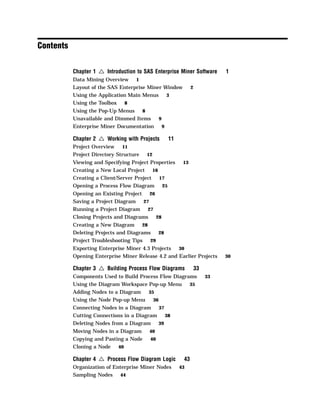
Contents

           Chapter 1   4 Introduction to SAS Enterprise Miner Software     1
           Data Mining Overview 1
           Layout of the SAS Enterprise Miner Window         2
           Using the Application Main Menus 3
           Using the Toolbox   8
           Using the Pop-Up Menus   8
           Unavailable and Dimmed Items   9
           Enterprise Miner Documentation 9

           Chapter 2   4 Working with Projects    11
           Project Overview    11
           Project Directory Structure    12
           Viewing and Specifying Project Properties    13
           Creating a New Local Project 16
           Creating a Client/Server Project 17
           Opening a Process Flow Diagram 25
           Opening an Existing Project 26
           Saving a Project Diagram    27
           Running a Project Diagram 27
           Closing Projects and Diagrams  28
           Creating a New Diagram 28
           Deleting Projects and Diagrams  28
           Project Troubleshooting Tips 29
           Exporting Enterprise Miner 4.3 Projects  30
           Opening Enterprise Miner Release 4.2 and Earlier Projects       30

           Chapter 3   4 Building Process Flow Diagrams          33
           Components Used to Build Process Flow Diagrams             33
           Using the Diagram Workspace Pop-up Menu     35
           Adding Nodes to a Diagram   35
           Using the Node Pop-up Menu    36
           Connecting Nodes in a Diagram 37
           Cutting Connections in a Diagram 38
           Deleting Nodes from a Diagram 39
           Moving Nodes in a Diagram       40
           Copying and Pasting a Node      40
           Cloning a Node 40

           Chapter 4   4 Process Flow Diagram Logic     43
           Organization of Enterprise Miner Nodes      43
           Sampling Nodes 44
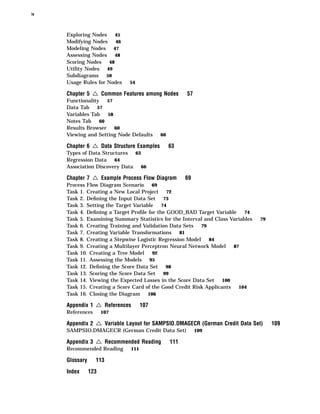
iv


     Exploring Nodes    45
     Modifying Nodes    46
     Modeling Nodes 47
     Assessing Nodes 48
     Scoring Nodes 48
     Utility Nodes 49
     Subdiagrams     50
     Usage Rules for Nodes    54

     Chapter 5   4 Common Features among Nodes          57
     Functionality 57
     Data Tab 57
     Variables Tab   58
     Notes Tab 60
     Results Browser 60
     Viewing and Setting Node Defaults       60

     Chapter 6   4 Data Structure Examples        63
     Types of Data Structures 63
     Regression Data    64
     Association Discovery Data  66

     Chapter 7   4 Example Process Flow Diagram         69
     Process Flow Diagram Scenario     69
     Task 1. Creating a New Local Project 72
     Task 2. Defining the Input Data Set 73
     Task 3. Setting the Target Variable   74
     Task 4. Defining a Target Profile for the GOOD_BAD Target Variable      74
     Task 5. Examining Summary Statistics for the Interval and Class Variables   79
     Task 6. Creating Training and Validation Data Sets 79
     Task 7. Creating Variable Transformations    81
     Task 8. Creating a Stepwise Logistic Regression Model   84
     Task 9. Creating a Multilayer Perceptron Neural Network Model     87
     Task 10. Creating a Tree Model     92
     Task 11. Assessing the Models 95
     Task 12. Defining the Score Data Set 98
     Task 13. Scoring the Score Data Set 99
     Task 14. Viewing the Expected Losses in the Score Data Set 100
     Task 15. Creating a Score Card of the Good Credit Risk Applicants   104
     Task 16. Closing the Diagram 106

     Appendix 1   4 References       107
     References       107

     Appendix 2   4 Variable Layout for SAMPSIO.DMAGECR (German Credit Data Set)      109
     SAMPSIO.DMAGECR (German Credit Data Set)                109

     Appendix 3   4 Recommended Reading           111
     Recommended Reading       111

     Glossary     113
     Index      123
1


            CHAPTER


                1
                                   Introduction to SAS Enterprise
                                   Miner Software

         Data Mining Overview 1
         Layout of the SAS Enterprise Miner Window   2
         Using the Application Main Menus 3
         Using the Toolbox 8
         Using the Pop-Up Menus 8
         Unavailable and Dimmed Items 9
         Enterprise Miner Documentation 9


Data Mining Overview
           SAS defines data mining as the process of uncovering hidden patterns in large
         amounts of data. Many industries use data mining to address business problems and
         opportunities such as fraud detection, risk and affinity analyses, database marketing,
         householding, customer churn, bankruptcy prediction, and portfolio analysis.The SAS
         data mining process is summarized in the acronym SEMMA, which stands for
         sampling, exploring, modifying, modeling, and assessing data.
           3 Sample the data by creating one or more data tables. The sample should be large
              enough to contain the significant information, yet small enough to process.
           3 Explore the data by searching for anticipated relationships, unanticipated trends,
              and anomalies in order to gain understanding and ideas.
           3 Modify the data by creating, selecting, and transforming the variables to focus the
              model selection process.
           3 Model the data by using the analytical tools to search for a combination of the
              data that reliably predicts a desired outcome.
           3 Assess the data by evaluating the usefulness and reliability of the findings from
              the data mining process.
            You might not include all of these steps in your analysis, and it might be necessary to
         repeat one or more of the steps several times before you are satisfied with the results.
         After you have completed the assessment phase of the SEMMA process, you apply the
         scoring formula from one or more champion models to new data that might or might not
         contain the target. The goal of most data mining tasks is to apply models that are
         constructed using training and validation data to make accurate predictions about
         observations of new, raw data.
            The SEMMA data mining process is driven by a process flow diagram, which you can
         modify and save. The GUI is designed in such a way that the business analyst who has
         little statistical expertise can navigate through the data mining methodology, while the
         quantitative expert can go “behind the scenes” to fine-tune the analytical process.
            Enterprise Miner contains a collection of sophisticated analysis tools that have a
         common user-friendly interface that you can use to create and compare multiple
2   Layout of the SAS Enterprise Miner Window   4   Chapter 1


                 models. Statistical tools include clustering, self-organizing maps / Kohonen, variable
                 selection, trees, linear and logistic regression, and neural networking. Data preparation
                 tools include outlier detection, variable transformations, data imputation, random
                 sampling, and the partitioning of data sets (into train, test, and validate data sets).
                 Advanced visualization tools enable you to quickly and easily examine large amounts of
                 data in multidimensional histograms and to graphically compare modeling results.
                    Enterprise Miner is designed for PCs that are running under Windows 95, 98, NT,
                 2000, XP, or subsequent releases of those operating environments. The figures and
                 screen captures presented in this document were taken on a PC running under
                 Windows NT 4.0.


Layout of the SAS Enterprise Miner Window
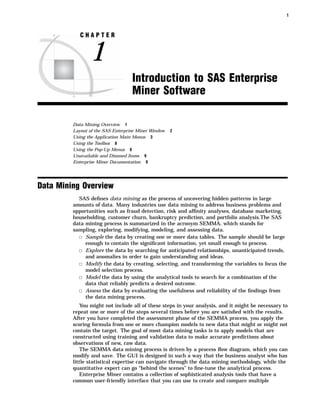
                    To start Enterprise Miner, start SAS and then type miner on the SAS command
                 dialog bar. The SAS Enterprise Miner window opens:


                    The SAS Enterprise Miner window contains the following interface components:
                    3 Project Navigator — You use the Project Navigator to manage projects and
                        diagrams, add tools to the Diagram Workspace, and view HTML reports that are
                        created by the Reporter node. Note that when a tool is added to the Diagram
                        Workspace, it is referred to as a node. The Project Navigator has three tabs:
                           3 Diagrams tab — lists the current project and the diagrams within the project.
                              By default, Enterprise Miner creates a local project that uses your user ID as
                              the name (for this example, Phoenix) and a process flow diagram that is
                              named Untitled. When you reopen Enterprise Miner, the last project you
                              were working with is loaded.
                           3 Tools tab — contains the Enterprise Miner Tools Palette. The Tools Palette
                              presents all the data mining tools that are available for constructing process
                              flow diagrams. The tools are grouped according to the SEMMA data mining
                              methodology.
                           3 Reports tab — contains the HTML report entries for the project. You
                              generate reports using Enterprise Miner’s Reporter node.
Introduction to SAS Enterprise Miner Software   4   Using the Application Main Menus   3


           3 Diagram Workspace — enables you to build, edit, run, and save process flow
             diagrams.
           3 Tools Bar — contains a customizable subset of Enterpriser Miner tools that are
             commonly used to build process flow diagrams in the Diagram Workspace. You can
             add or delete tools from the Tools Bar.
           3 Progress Indicator — displays a progress indicator bar that indicates the execution
             status of an Enterprise Miner task.
           3 Message Panel — displays messages about the execution of an Enterprise Miner
             task.
           3 Connection Status Indicator — displays the remote host name and indicates
             whether or not the connection is active for a client/server project.


Using the Application Main Menus
            You use Enterprise Miner’s application menus to perform common tasks. Different
         windows have different menus. Here is a brief summary of the SAS Enterprise Miner
         window pull-down menus:
           3 File
             3 New
               3 Project – creates a new project.
               3 Diagram – creates a new diagram.
             3   Open – opens a new or existing diagram within the current project.
             3   Save Diagram – saves the current diagram to the project.
             3   Save Diagram as – names and saves the current diagram to the project.
             3   Print Setup – specifies printing options.
             3   Print – prints the contents of the SAS Enterprise Miner window.
             3   Delete current project – deletes the current project. If you select this menu
                 item, then a message appears that asks you to verify the deletion.
                   To delete the project, select Yes . All files in the project folder and any
                 subfolders will be deleted. You cannot delete a project that someone else has
                 opened.
             3 Close diagram – closes and saves the diagram.
             3 Close project – closes the project.
             3 Exit Enterprise Miner – ends the Enterprise Miner session.
           3 Edit
             3 Copy diagram to clipboard – copies the diagram to the clipboard.
             3 Undelete – restores the last deleted node.
             3 Copy – copies a node or object to the paste buffer. You must first select the node
                 or object that you want to copy.
             3 Delete – deletes the selected node or connection from the Diagram Workspace.
             3 Clone – copies the current node and adds it to the Custom folder of the Tools
                 Palette.
             3 Paste – pastes the node, diagram, or object from the clipboard.
             3 Select all – selects all nodes in the Diagram Workspace.
             3 Create subdiagram – creates a subdiagram that you use to collapse a set of
                 selected nodes and connections into a single Subdiagram node icon.
4   Using the Application Main Menus   4   Chapter 1


                    3 View
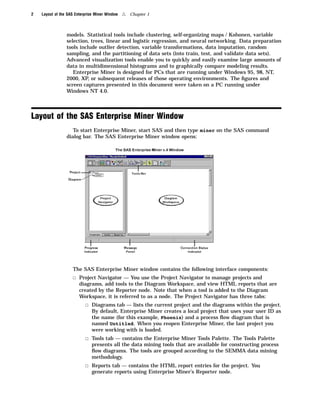
                      3 Messages – opens the Messages window that displays collected messages for
                           this diagram.


                        3 Refresh – refreshes the Project Navigator and the Diagram Workspace view.
                        3 Up One Level – displays the next higher level of the process flow diagram. If
                           there are no subdiagrams in your process flow diagram, then only one level can
                           be displayed. If there are subdiagrams in your process flow diagram, then the
                           subdiagrams can be displayed either in their condensed form (hiding the
                           internal structure of the subdiagram) or in their expanded form (showing their
                           internal structure). The higher level displays subdiagrams in condensed form.
                        3 Top Level – displays the process flow diagram in its most condensed form. All
                           subdiagrams are condensed.
                    3 Options
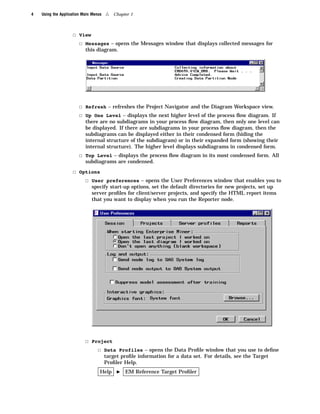
                        3 User preferences – opens the User Preferences window that enables you to
                              specify start-up options, set the default directories for new projects, set up
                              server profiles for client/server projects, and specify the HTML report items
                              that you want to display when you run the Reporter node.


                           3 Project
                               3 Data Profiles – opens the Data Profile window that you use to define
                                       target profile information for a data set. For details, see the Target
                                       Profiler Help.
                                   Help     I   EM Reference Target Profiler
Introduction to SAS Enterprise Miner Software   4   Using the Application Main Menus   5


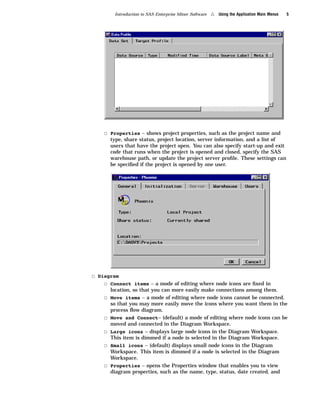
    3 Properties – shows project properties, such as the project name and
        type, share status, project location, server information, and a list of
        users that have the project open. You can also specify start-up and exit
        code that runs when the project is opened and closed, specify the SAS
        warehouse path, or update the project server profile. These settings can
        be specified if the project is opened by one user.


3 Diagram
    3 Connect items – a mode of editing where node icons are fixed in
        location, so that you can more easily make connections among them.
    3   Move items – a mode of editing where node icons cannot be connected,
        so that you may more easily move the icons where you want them in the
        process flow diagram.
    3   Move and Connect– (default) a mode of editing where node icons can be
        moved and connected in the Diagram Workspace.
    3   Large icons – displays large node icons in the Diagram Workspace.
        This item is dimmed if a node is selected in the Diagram Workspace.
    3   Small icons – (default) displays small node icons in the Diagram
        Workspace. This item is dimmed if a node is selected in the Diagram
        Workspace.
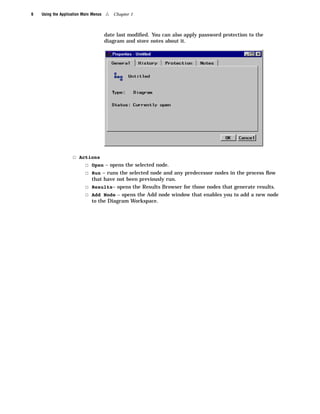
    3   Properties – opens the Properties window that enables you to view
        diagram properties, such as the name, type, status, date created, and
6   Using the Application Main Menus   4   Chapter 1


                                       date last modified. You can also apply password protection to the
                                       diagram and store notes about it.


                    3 Actions
                        3 Open – opens the selected node.
                        3 Run – runs the selected node and any predecessor nodes in the process flow
                             that have not been previously run.
                           3 Results– opens the Results Browser for those nodes that generate results.
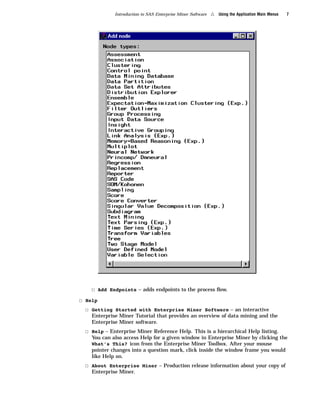
                           3 Add Node – opens the Add node window that enables you to add a new node
                             to the Diagram Workspace.
Introduction to SAS Enterprise Miner Software   4   Using the Application Main Menus   7


    3 Add Endpoints – adds endpoints to the process flow.
3 Help
  3 Getting Started with Enterprise Miner Software – an interactive
    Enterprise Miner Tutorial that provides an overview of data mining and the
    Enterprise Miner software.
  3 Help – Enterprise Miner Reference Help. This is a hierarchical Help listing.
    You can also access Help for a given window in Enterprise Miner by clicking the
    What’s This? icon from the Enterprise Miner Toolbox. After your mouse
    pointer changes into a question mark, click inside the window frame you would
    like Help on.
  3 About Enterprise Miner – Production release information about your copy of
    Enterprise Miner.
8   Using the Toolbox    4    Chapter 1


Using the Toolbox
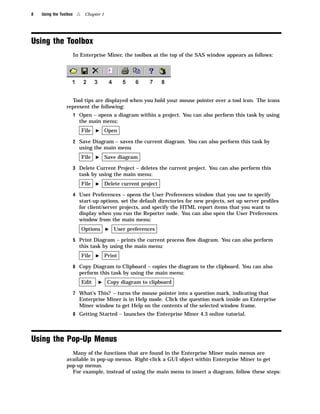
                        In Enterprise Miner, the toolbox at the top of the SAS window appears as follows:


                   Tool tips are displayed when you hold your mouse pointer over a tool icon. The icons
                 represent the following:
                        1 Open – opens a diagram within a project. You can also perform this task by using
                          the main menu:
                             File   I     Open

                        2 Save Diagram – saves the current diagram. You can also perform this task by
                          using the main menu
                             File   I     Save diagram

                        3 Delete Current Project – deletes the current project. You can also perform this
                          task by using the main menu:
                             File   I     Delete current project

                        4 User Preferences – opens the User Preferences window that you use to specify
                          start-up options, set the default directories for new projects, set up server profiles
                          for client/server projects, and specify the HTML report items that you want to
                          display when you run the Reporter node. You can also open the User Preferences
                          window from the main menu:
                             Options      I   User preferences

                        5 Print Diagram – prints the current process flow diagram. You can also perform
                          this task by using the main menu:
                             File   I     Print

                        6 Copy Diagram to Clipboard – copies the diagram to the clipboard. You can also
                          perform this task by using the main menu:
                             Edit   I      Copy diagram to clipboard

                        7 What’s This? – turns the mouse pointer into a question mark, indicating that
                          Enterprise Miner is in Help mode. Click the question mark inside an Enterprise
                          Miner window to get Help on the contents of the selected window frame.
                        8 Getting Started – launches the Enterprise Miner 4.3 online tutorial.


Using the Pop-Up Menus
                   Many of the functions that are found in the Enterprise Miner main menus are
                 available in pop-up menus. Right-click a GUI object within Enterprise Miner to get
                 pop-up menus.
                   For example, instead of using the main menu to insert a diagram, follow these steps:
Introduction to SAS Enterprise Miner Software   4   Enterprise Miner Documentation   9


           1 Select the Diagrams tab of the Project Navigator and right-click either the Project
             folder, the diagram icon, or anywhere in the background of the tab. A pop-up
             menu appears.
           2 Select the New Diagram pop-up menu item. A new diagram is added to the project.


Unavailable and Dimmed Items
            At times particular window objects and menu items are unavailable for use. When a
         window object or menu item is unavailable, it appears dimmed and does not respond to
         mouse clicks. When the data mining settings are changed so that the object’s use is
         contextually appropriate, then the objects become active and will accept user input.
            When you configure statistical settings within a node, dimmed objects prevent you
         from selecting inappropriate option combinations. Selecting some options enables
         additional option settings that you should specify to completely configure your data
         mining node.


Enterprise Miner Documentation
           For more information, see
           3 Enterprise Miner Reference Help – describes how to use each Enterprise Miner
             node as well as other features of Enterprise Miner, such as the Target Profiler.
             Help is available through the Enterprise Miner main menu:
              Help   I   EM Reference

             Note: You can search for text strings in the EM Reference Help, using the menu
             choices:
              Edit   I   Find

             and typing in a search string.    4
           3 Frame Help – Enterprise Miner nodes have Help available at the window frame
             level. For Help on a field or object that is contained in a particular window frame:
                1 Click the What’s This? tool icon in the Enterprise Miner Toolbox. The
                  mouse pointer changes into a question mark.
                2 Click inside the window that you would like help on.
           3 Add-In Tools for SAS/Warehouse Administrator Software – To download
             information about these tools, go to the SAS/Warehouse Administrator product
             page: http://support.sas.com/rnd.
           3 Data Mining Using SAS Enterprise Miner: A Case Study Approach, Second
             Edition – provides simple directions about how to begin accessing data and how to
             complete an analysis.
10
11


            CHAPTER


                2
                                    Working with Projects

         Project Overview 11
         Project Directory Structure 12
               Project Location 12
               EMDATA Directory 13
               EMPROJ Directory 13
               REPORTS Directory 13
         Viewing and Specifying Project Properties 13
         Creating a New Local Project 16
         Creating a Client/Server Project 17
               Defining a New Server Profile 18
               How to Create a Client/Server Project 22
               Using a Server Profile in Batch Mode to Connect to a Server   25
         Opening a Process Flow Diagram 25
         Opening an Existing Project 26
         Saving a Project Diagram 27
         Running a Project Diagram 27
         Closing Projects and Diagrams 28
         Creating a New Diagram 28
         Deleting Projects and Diagrams 28
         Project Troubleshooting Tips 29
         Exporting Enterprise Miner 4.3 Projects 30
         Opening Enterprise Miner Release 4.2 and Earlier Projects 30


Project Overview
            A project is a collection of Enterprise Miner process flow diagrams and information
         that pertains to them. Projects are often differentiated by the type of data that you
         intend to analyze. In other words, it is a good idea to create a separate project for each
         major data mining problem that you intend to investigate. Local projects are useful
         when the data is available locally on your machine. If you need to access databases on
         a remote host or distribute the data-intensive processing to a more powerful remote
         host, then you should create a client/server project.
            Both local projects and client/server projects are shareable; that is, multiple users
         can work on the same project simultaneously. In order for the project to be shareable,
         all parties must access the same client files. The server.cfg client file uses the remote
         server path to point to the server, allowing multiple users to work on the same project
         on both the client and server side.
            Although projects are shareable, only one user can open a diagram at a time. Users
         can create, edit, and delete diagrams without affecting the work of others who are
         sharing that project, because each diagram is an independent unit. Node clones and
12   Project Directory Structure   4   Chapter 2


                  target profiles that were created by one user may be shared by other users for use in
                  their own diagrams.
                     Updates to the project start-up or exit code, warehouse path, or server profile can be
                  made only when there is one and only one person using the project. To learn about how
                  to update these project settings, see “Viewing and Specifying Project Properties” on
                  page 13. In a shared environment, it may be necessary to request everyone to close that
                  project from within their own Enterprise Miner sessions, while an administrator makes
                  the required changes. The same applies to renaming or deleting a project.
                     In an Enterprise Miner client/server project, the server profile is stored with the
                  project, and is thus shared by all users of that project. Storing the profile with the
                  project facilitates profile maintenance in a shared project environment.


Project Directory Structure
                    For each project, Enterprise Miner dynamically creates a number of subdirectories
                  that have the following structure:


                     Note: To view your project files in a Windows file browser, select the Diagrams tab
                  of the Enterprise Miner Project Navigator, right-click a named project icon, and then
                  select Explore. 4
                     When you create a project, Enterprise Miner automatically assigns the EMDATA and
                  EMPROJ librefs to the EMDATA and EMPROJ subdirectories, respectively. Enterprise
                  Miner uses a standard directory structure and stores a given project’s files in the root of
                  the project directory. This enables you to back up or copy Enterprise Miner projects
                  simply by placing a copy of the project directory and its subdirectories in the new
                  location. Enterprise Miner does not limit the number of projects. There is a limit of
                  100,000 diagrams per project.


                  Project Location
                     The project location directory contains the .dmp file that corresponds to the project
                  definition, and the various .dmd files which represent the various diagrams that were
                  created within the project. The name of the .dmp file defines the name of the project.
                     The following display shows the directory layout for a project named Phoenix.
Working with Projects   4   Viewing and Specifying Project Properties   13


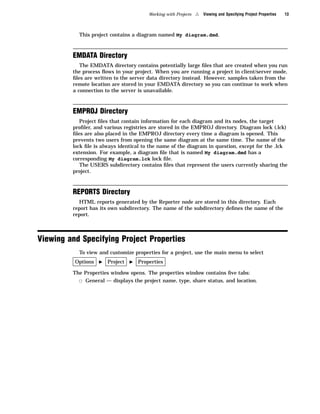
           This project contains a diagram named My diagram.dmd.


         EMDATA Directory
            The EMDATA directory contains potentially large files that are created when you run
         the process flows in your project. When you are running a project in client/server mode,
         files are written to the server data directory instead. However, samples taken from the
         remote location are stored in your EMDATA directory so you can continue to work when
         a connection to the server is unavailable.


         EMPROJ Directory
            Project files that contain information for each diagram and its nodes, the target
         profiler, and various registries are stored in the EMPROJ directory. Diagram lock (.lck)
         files are also placed in the EMPROJ directory every time a diagram is opened. This
         prevents two users from opening the same diagram at the same time. The name of the
         lock file is always identical to the name of the diagram in question, except for the .lck
         extension. For example, a diagram file that is named My diagram.dmd has a
         corresponding My diagram.lck lock file.
            The USERS subdirectory contains files that represent the users currently sharing the
         project.


         REPORTS Directory
           HTML reports generated by the Reporter node are stored in this directory. Each
         report has its own subdirectory. The name of the subdirectory defines the name of the
         report.


Viewing and Specifying Project Properties
           To view and customize properties for a project, use the main menu to select
          Options   I   Project   I   Properties

         The Properties window opens. The properties window contains five tabs:
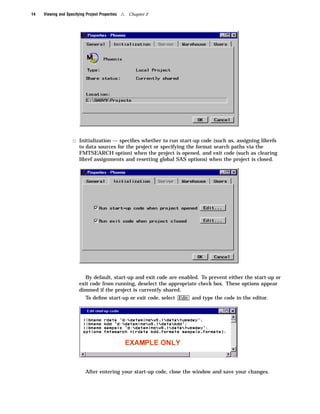
           3 General — displays the project name, type, share status, and location.
14   Viewing and Specifying Project Properties   4   Chapter 2


                     3 Initialization — specifies whether to run start-up code (such as, assigning librefs
                        to data sources for the project or specifying the format search paths via the
                        FMTSEARCH option) when the project is opened, and exit code (such as clearing
                        libref assignments and resetting global SAS options) when the project is closed.


                           By default, start-up and exit code are enabled. To prevent either the start-up or
                        exit code from running, deselect the appropriate check box. These options appear
                        dimmed if the project is currently shared.
                            To define start-up or exit code, select Edit and type the code in the editor.


                            After entering your start-up code, close the window and save your changes.
Working with Projects   4   Viewing and Specifying Project Properties   15


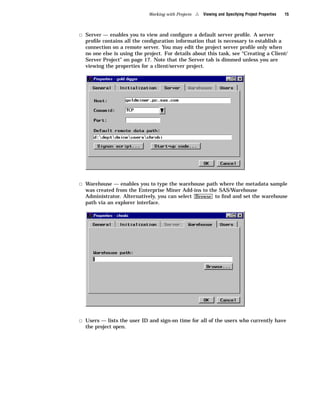
3 Server — enables you to view and configure a default server profile. A server
  profile contains all the configuration information that is necessary to establish a
  connection on a remote server. You may edit the project server profile only when
  no one else is using the project. For details about this task, see “Creating a Client/
  Server Project” on page 17. Note that the Server tab is dimmed unless you are
  viewing the properties for a client/server project.


3 Warehouse — enables you to type the warehouse path where the metadata sample
  was created from the Enterprise Miner Add-ins to the SAS/Warehouse
  Administrator. Alternatively, you can select Browse to find and set the warehouse
  path via an explorer interface.


3 Users — lists the user ID and sign-on time for all of the users who currently have
  the project open.
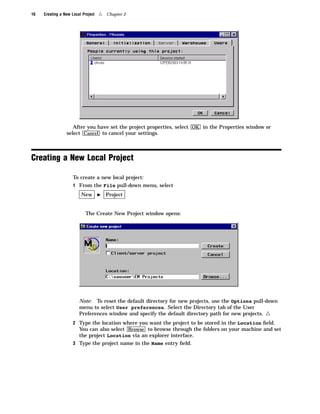
16   Creating a New Local Project   4   Chapter 2


                    After you have set the project properties, select OK in the Properties window or
                 select Cancel to cancel your settings.


Creating a New Local Project

                     To create a new local project:
                     1 From the File pull-down menu, select
                         New        I   Project


                            The Create New Project window opens:


                        Note: To reset the default directory for new projects, use the Options pull-down
                        menu to select User preferences. Select the Directory tab of the User
                        Preferences window and specify the default directory path for new projects.4
                     2 Type the location where you want the project to be stored in the Location field.
                       You can also select Browse to browse through the folders on your machine and set
                        the project Location via an explorer interface.
                     3 Type the project name in the Name entry field.
Working with Projects   4   Creating a Client/Server Project   17


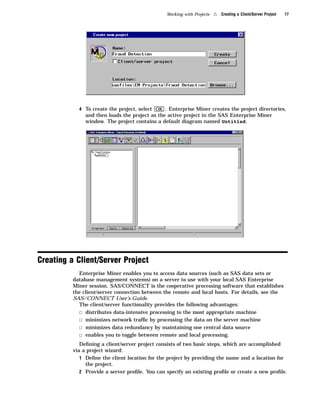
            4 To create the project, select OK . Enterprise Miner creates the project directories,
               and then loads the project as the active project in the SAS Enterprise Miner
               window. The project contains a default diagram named Untitled.


Creating a Client/Server Project
            Enterprise Miner enables you to access data sources (such as SAS data sets or
          database management systems) on a server to use with your local SAS Enterprise
          Miner session. SAS/CONNECT is the cooperative processing software that establishes
          the client/server connection between the remote and local hosts. For details, see the
          SAS/CONNECT User’s Guide.
            The client/server functionality provides the following advantages:
            3 distributes data-intensive processing to the most appropriate machine
            3 minimizes network traffic by processing the data on the server machine
            3 minimizes data redundancy by maintaining one central data source
            3 enables you to toggle between remote and local processing.
             Defining a client/server project consists of two basic steps, which are accomplished
          via a project wizard:
             1 Define the client location for the project by providing the name and a location for
               the project.
             2 Provide a server profile. You can specify an existing profile or create a new profile.
18   Defining a New Server Profile   4   Chapter 2


                  Note: To use data sets that have user-defined formats on the server, you must
                ensure that the formats are available both locally and on the server. At the client,
                assign a format search path in a project’s start-up code. At the server, use the server
                seed code to point to the format catalogs that reside on both the client and server. 4


                Defining a New Server Profile
                   Before you define the location and name for the client/server project, you might want
                to define a new server profile as part of your user preferences. A server profile contains
                all of the information that is necessary to establish a connection to the remote server.
                   To define a new server profile, follow these steps:
                    1 Use the Options pull-down menu from the SAS Enterprise Miner window to select
                       the User Preferences item.
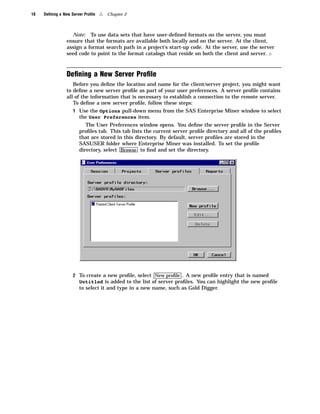
                          The User Preferences window opens. You define the server profile in the Server
                       profiles tab. This tab lists the current server profile directory and all of the profiles
                       that are stored in this directory. By default, server profiles are stored in the
                       SASUSER folder where Enterprise Miner was installed. To set the profile
                       directory, select Browse to find and set the directory.


                    2 To create a new profile, select New profile . A new profile entry that is named
                       Untitled is added to the list of server profiles. You can highlight the new profile
                       to select it and type in a new name, such as Gold Digger.
Working with Projects   4   Defining a New Server Profile   19


  Note: To edit an existing profile, click Edit . To rename a profile, right-click on
  the server profile in the list and select Rename. Type the profile name. To delete a
                       4
  profile, click Delete .
3 Type a more descriptive profile name.
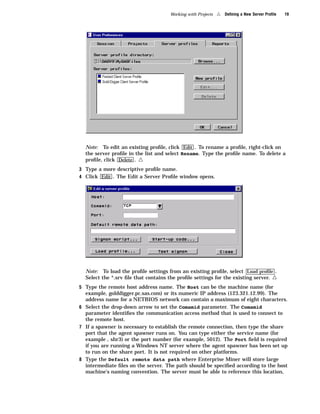
4 Click Edit . The Edit a Server Profile window opens.


  Note: To load the profile settings from an existing profile, select Load profile .
  Select the *.srv file that contains the profile settings for the existing server.        4
5 Type the remote host address name. The Host can be the machine name (for
  example, golddigger.pc.sas.com) or its numeric IP address (123.321.12.99). The
  address name for a NETBIOS network can contain a maximum of eight characters.
6 Select the drop-down arrow to set the Comamid parameter. The Comamid
  parameter identifies the communication access method that is used to connect to
  the remote host.
7 If a spawner is necessary to establish the remote connection, then type the share
  port that the agent spawner runs on. You can type either the service name (for
  example , shr3) or the port number (for example, 5012). The Port field is required
  if you are running a Windows NT server where the agent spawner has been set up
  to run on the share port. It is not required on other platforms.
8 Type the Default remote data path where Enterprise Miner will store large
  intermediate files on the server. The path should be specified according to the host
  machine’s naming convention. The server must be able to reference this location,
20   Defining a New Server Profile   4   Chapter 2


                       and you must have write access to this path. Files in this path are accessed via
                       remote library services when needed; they are not moved to the client.


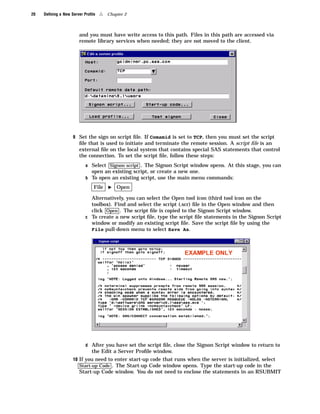
                    9 Set the sign on script file. If Comamid is set to TCP, then you must set the script
                       file that is used to initiate and terminate the remote session. A script file is an
                       external file on the local system that contains special SAS statements that control
                       the connection. To set the script file, follow these steps:
                          a Select Signon script . The Signon Script window opens. At this stage, you can
                              open an existing script, or create a new one.
                          b To open an existing script, use the main menu commands:

                               File    I   Open

                            Alternatively, you can select the Open tool icon (third tool icon on the
                            toolbox). Find and select the script (.scr) file in the Open window and then
                            click Open . The script file is copied to the Signon Script window.
                          c To create a new script file, type the script file statements in the Signon Script
                            window or modify an existing script file. Save the script file by using the
                            File pull-down menu to select Save As.


                          d After you have set the script file, close the Signon Script window to return to
                              the Edit a Server Profile window.
                    10 If you need to enter start-up code that runs when the server is initialized, select
                       Start-up Code . The Start-up Code window opens. Type the start-up code in the
                       Start-up Code window. You do not need to enclose the statements in an RSUBMIT
Working with Projects   4   Defining a New Server Profile   21


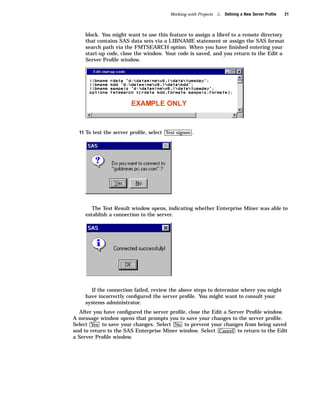
    block. You might want to use this feature to assign a libref to a remote directory
    that contains SAS data sets via a LIBNAME statement or assign the SAS format
    search path via the FMTSEARCH option. When you have finished entering your
    start-up code, close the window. Your code is saved, and you return to the Edit a
    Server Profile window.


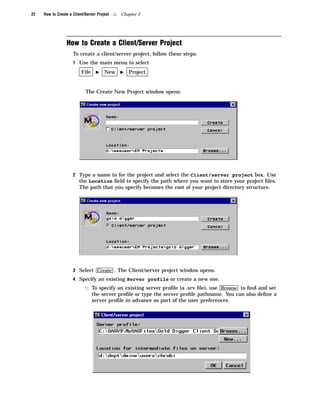
  11 To test the server profile, select Test signon .


       The Test Result window opens, indicating whether Enterprise Miner was able to
    establish a connection to the server.


      If the connection failed, review the above steps to determine where you might
    have incorrectly configured the server profile. You might want to consult your
    systems administrator.
  After you have configured the server profile, close the Edit a Server Profile window.
A message window opens that prompts you to save your changes to the server profile.
Select Yes to save your changes. Select No to prevent your changes from being saved
and to return to the SAS Enterprise Miner window. Select Cancel to return to the Edit
a Server Profile window.
22   How to Create a Client/Server Project   4   Chapter 2


                 How to Create a Client/Server Project
                     To create a client/server project, follow these steps:
                     1 Use the main menu to select

                          File    I    New       I   Project


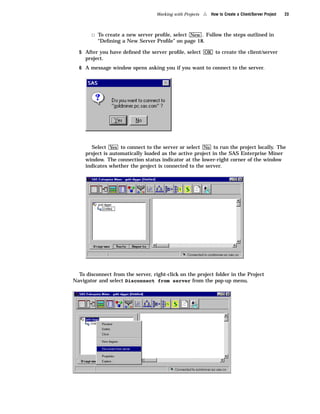
                            The Create New Project window opens:


                     2 Type a name in for the project and select the Client/server project box. Use
                         the Location field to specify the path where you want to store your project files.
                         The path that you specify becomes the root of your project directory structure.


                     3 Select Create . The Client/server project window opens.
                     4 Specify an existing Server profile or create a new one.
                            3 To specify an existing server profile (a .srv file), use Browse to find and set
                                 the server profile or type the server profile pathname. You can also define a
                                 server profile in advance as part of the user preferences.
Working with Projects   4   How to Create a Client/Server Project   23


       3 To create a new server profile, select New . Follow the steps outlined in
          “Defining a New Server Profile” on page 18.

  5 After you have defined the server profile, select OK to create the client/server
     project.
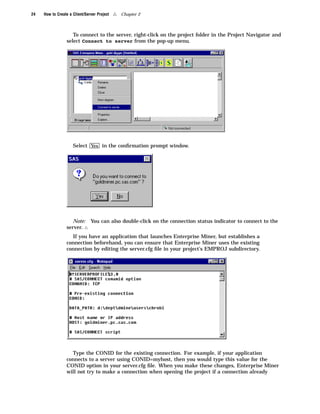
  6 A message window opens asking you if you want to connect to the server.


       Select Yes to connect to the server or select No to run the project locally. The
     project is automatically loaded as the active project in the SAS Enterprise Miner
     window. The connection status indicator at the lower-right corner of the window
     indicates whether the project is connected to the server.


  To disconnect from the server, right-click on the project folder in the Project
Navigator and select Disconnect from server from the pop-up menu.
24   How to Create a Client/Server Project   4   Chapter 2


                    To connect to the server, right-click on the project folder in the Project Navigator and
                 select Connect to server from the pop-up menu.


                     Select Yes in the confirmation prompt window.


                    Note: You can also double-click on the connection status indicator to connect to the
                 server. 4
                   If you have an application that launches Enterprise Miner, but establishes a
                 connection beforehand, you can ensure that Enterprise Miner uses the existing
                 connection by editing the server.cfg file in your project’s EMPROJ subdirectory.


                   Type the CONID for the existing connection. For example, if your application
                 connects to a server using CONID=myhost, then you would type this value for the
                 CONID option in your server.cfg file. When you make these changes, Enterprise Miner
                 will not try to make a connection when opening the project if a connection already
Working with Projects   4   Opening a Process Flow Diagram   25


         exists. If Enterprise Miner opens a project and uses an existing connection instead of
         creating one, the connection is not terminated when you close the project.


         Using a Server Profile in Batch Mode to Connect to a Server
           You can use your server profile in batch mode to connect to the server by submitting
         the following code from the SAS Program Editor window:
           %let profile=c:profilesmy server.srv;
           proc display c=sashelp.dmcon.connect.scl;
           run;

            Note: The code assumes that your server profile is named ’my server.srv’ and is
         stored in c:profiles. You should modify those parameters to match the server profile
         name and storage path with those on your installation. 4


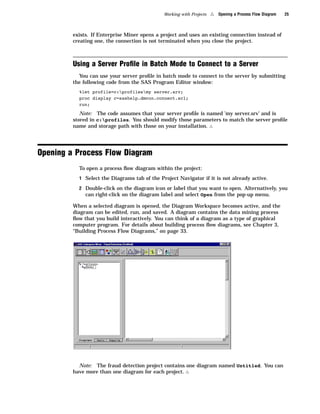
Opening a Process Flow Diagram
           To open a process flow diagram within the project:
           1 Select the Diagrams tab of the Project Navigator if it is not already active.

           2 Double-click on the diagram icon or label that you want to open. Alternatively, you
              can right-click on the diagram label and select Open from the pop-up menu.

         When a selected diagram is opened, the Diagram Workspace becomes active, and the
         diagram can be edited, run, and saved. A diagram contains the data mining process
         flow that you build interactively. You can think of a diagram as a type of graphical
         computer program. For details about building process flow diagrams, see Chapter 3,
         “Building Process Flow Diagrams,” on page 33.


           Note: The fraud detection project contains one diagram named Untitled. You can
         have more than one diagram for each project. 4
26   Opening an Existing Project   4   Chapter 2


Opening an Existing Project

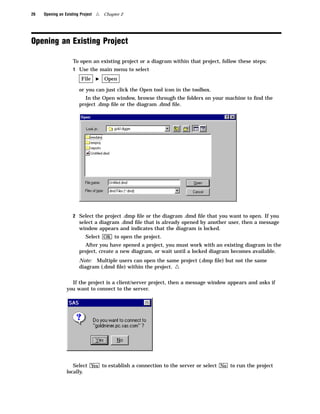
                     To open an existing project or a diagram within that project, follow these steps:
                     1 Use the main menu to select

                          File     I   Open

                        or you can just click the Open tool icon in the toolbox.
                          In the Open window, browse through the folders on your machine to find the
                        project .dmp file or the diagram .dmd file.


                     2 Select the project .dmp file or the diagram .dmd file that you want to open. If you
                        select a diagram .dmd file that is already opened by another user, then a message
                        window appears and indicates that the diagram is locked.
                            Select OK to open the project.
                          After you have opened a project, you must work with an existing diagram in the
                        project, create a new diagram, or wait until a locked diagram becomes available.
                        Note: Multiple users can open the same project (.dmp file) but not the same
                        diagram (.dmd file) within the project.  4
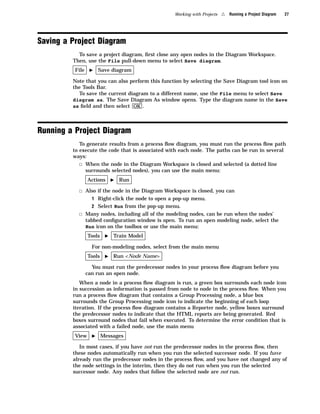
                   If the project is a client/server project, then a message window appears and asks if
                 you want to connect to the server.


                    Select Yes to establish a connection to the server or select No to run the project
                 locally.
Working with Projects   4   Running a Project Diagram   27


Saving a Project Diagram
           To save a project diagram, first close any open nodes in the Diagram Workspace.
         Then, use the File pull-down menu to select Save diagram.
          File    I    Save diagram

         Note that you can also perform this function by selecting the Save Diagram tool icon on
         the Tools Bar.
           To save the current diagram to a different name, use the File menu to select Save
         diagram as. The Save Diagram As window opens. Type the diagram name in the Save
         as field and then select OK .


Running a Project Diagram
            To generate results from a process flow diagram, you must run the process flow path
         to execute the code that is associated with each node. The paths can be run in several
         ways:
            3 When the node in the Diagram Workspace is closed and selected (a dotted line
              surrounds selected nodes), you can use the main menu:
                 Actions      I   Run

           3 Also if the node in the Diagram Workspace is closed, you can
                   1 Right-click the node to open a pop-up menu.
                   2 Select Run from the pop-up menu.
           3 Many nodes, including all of the modeling nodes, can be run when the nodes’
                 tabbed configuration window is open. To run an open modeling node, select the
                 Run icon on the toolbox or use the main menu:
                 Tools    I   Train Model

                   For non-modeling nodes, select from the main menu
                 Tools    I   Run <Node Name>

                   You must run the predecessor nodes in your process flow diagram before you
                 can run an open node.
            When a node in a process flow diagram is run, a green box surrounds each node icon
         in succession as information is passed from node to node in the process flow. When you
         run a process flow diagram that contains a Group Processing node, a blue box
         surrounds the Group Processing node icon to indicate the beginning of each loop
         iteration. If the process flow diagram contains a Reporter node, yellow boxes surround
         the predecessor nodes to indicate that the HTML reports are being generated. Red
         boxes surround nodes that fail when executed. To determine the error condition that is
         associated with a failed node, use the main menu
          View     I     Messages

            In most cases, if you have not run the predecessor nodes in the process flow, then
         these nodes automatically run when you run the selected successor node. If you have
         already run the predecessor nodes in the process flow, and you have not changed any of
         the node settings in the interim, then they do not run when you run the selected
         successor node. Any nodes that follow the selected node are not run.
28   Closing Projects and Diagrams   4   Chapter 2


                    When the path has executed, a message dialog box appears and states that the task
                 is completed.
                    Select Yes to close the message dialog box.


                    You can view the results for nodes that generate results by right–clicking the node
                 icon in the process flow diagram and selecting Results from the pop-up menu.
                 Alternatively, use the main menu:
                  Actions     I      Results


Closing Projects and Diagrams
                   To close a project that is open, right-click the project folder in the Project Navigator
                 and select Close. You can also use the main menu:
                  File    I    Close project

                    Both methods automatically save your changes to the project.
                    To close a diagram, use the main menu:
                  File    I    Close diagram


Creating a New Diagram
                    To create a new diagram, follow these steps:
                    1 Open the project that will contain the new diagram.
                    2 Right-click anywhere in the Diagram tab of the Project Navigator and select the
                         New Diagram.
                    3 By default, a new diagram named Untitled is added to the project. An n
                         subscript is added to the diagram name to distinguish untitled diagrams.
                 Alternatively, you can use the main menu:
                  File    I    New       I   Diagram

                    The diagram becomes active in the Diagram Workspace. To rename the diagram,
                 right-click on the diagram label in the Project Navigator and select Rename.


Deleting Projects and Diagrams
                   To delete a project, first open the project to be deleted, then right-click on the project
                 name in the Project Navigator and select Delete current project.
Working with Projects   4   Project Troubleshooting Tips   29


           Alternately, you could select the project name in the Project Navigator and use the
         main menu:
          File     I   Delete current project

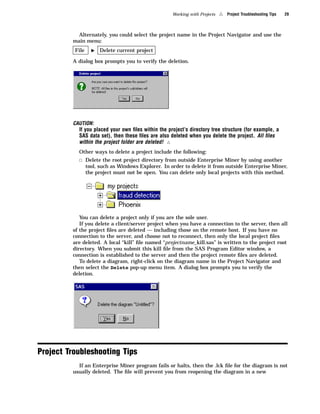
         A dialog box prompts you to verify the deletion.


         CAUTION:
           If you placed your own files within the project’s directory tree structure (for example, a
           SAS data set), then these files are also deleted when you delete the project. All files
           within the project folder are deleted! 4
           Other ways to delete a project include the following:
           3 Delete the root project directory from outside Enterprise Miner by using another
                 tool, such as Windows Explorer. In order to delete it from outside Enterprise Miner,
                 the project must not be open. You can delete only local projects with this method.


            You can delete a project only if you are the sole user.
            If you delete a client/server project when you have a connection to the server, then all
         of the project files are deleted — including those on the remote host. If you have no
         connection to the server, and choose not to reconnect, then only the local project files
         are deleted. A local “kill” file named “projectname_kill.sas” is written to the project root
         directory. When you submit this kill file from the SAS Program Editor window, a
         connection is established to the server and then the project remote files are deleted.
            To delete a diagram, right-click on the diagram name in the Project Navigator and
         then select the Delete pop-up menu item. A dialog box prompts you to verify the
         deletion.


Project Troubleshooting Tips
           If an Enterprise Miner program fails or halts, then the .lck file for the diagram is not
         usually deleted. The file will prevent you from reopening the diagram in a new
30   Exporting Enterprise Miner 4.3 Projects   4   Chapter 2


                  Enterprise Miner session, because you will hold a lock on the diagram. If this occurs,
                  follow these steps:
                     1 Close your Enterprise Miner session.
                     2 Use Windows Explorer or another file utility to locate and open the EMPROJ
                         subfolder for the project.
                     3 Find the .lck file that matches the diagram that you were working on and delete it.
                     4 Restart Enterprise Miner and open the diagram.

                     If you restart Enterprise Miner and the Project Properties window indicates the
                  project is currently being shared, but you know that you are the only person using the
                  project, then Enterprise Miner was also probably not shut down properly. In this case,
                  follow these steps:
                     1 Close all Enterprise Miner sessions.
                     2 Make sure that no one else is using the project.
                     3 Use Windows Explorer or another file utility to open the EMPROJ folder for the
                         project.
                     4 Open the USERS folder and delete its contents, but not delete the USERS folder.
                     5 Restart Enterprise Miner and reopen the project.

                     If you try to open a project and are informed by a message window that the project
                  libraries could not be assigned, then either the EMPROJ or EMDATA library is still in
                  use. A few reasons why the EMPROJ or EMDATA library is still in use include the
                  following:
                     3 An FSVIEW window for a data set in either library could be open.
                     3 A CATALOG window is open.
                     3 A data set or some other SAS file was not closed properly by Enterprise Miner.
                    You should first try to find and close the window that is using the data set or file. If
                  you are still unable to open the project, you should close and then restart Enterprise
                  Miner. If this step fails as well, then close and restart SAS.


Exporting Enterprise Miner 4.3 Projects
                     In Enterprise Miner 4.3, the project export wizard has been removed. Since
                  Enterprise Miner 3.x and 4.x projects are self-contained in the project root directory,
                  exporting a project simply involves copying or moving the entire project to the desired
                  target location using an external application such as Windows Explorer. You might also
                  want to use a third-party application such as Winzip to archive the project before
                  exporting it to a new location. You can unzip the project in your new directory.
                     For Enterprise Miner 3.x and 4.x client/server projects, you should archive the server
                  files separately from the client files.


Opening Enterprise Miner Release 4.2 and Earlier Projects
                    Enterprise Miner 4.3 runs on SAS 9.1, but can still open most Enterprise Miner
                  projects that were created in versions of Enterprise Miner that used SAS Versions 7
                  and 8. To open a project that was saved in Enterprise Miner 3.x, 4.0, 4.1, or 4.2, you
                  must convert the project files for use with SAS System 9.
Working with Projects   4   Opening Enterprise Miner Release 4.2 and Earlier Projects   31


CAUTION:
  You should ALWAYS back up your legacy Enterprise Miner projects and data files before
  attempting to convert them to Enterprise Miner 4.3 format! After you have converted your
  Enterprise Miner projects to comply with SAS 9.1, you will not be able to reopen them in
  earlier versions of Enterprise Miner. 4
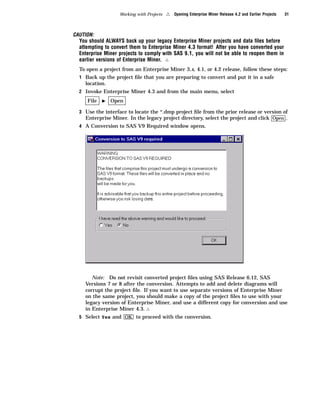
  To open a project from an Enterprise Miner 3.x, 4.1, or 4.2 release, follow these steps:
  1 Back up the project file that you are preparing to convert and put it in a safe
    location.
  2 Invoke Enterprise Miner 4.3 and from the main menu, select
     File   I   Open

  3 Use the interface to locate the *.dmp project file from the prior release or version of
    Enterprise Miner. In the legacy project directory, select the project and click Open .
  4 A Conversion to SAS V9 Required window opens.


       Note: Do not revisit converted project files using SAS Release 6.12, SAS
    Versions 7 or 8 after the conversion. Attempts to add and delete diagrams will
    corrupt the project file. If you want to use separate versions of Enterprise Miner
    on the same project, you should make a copy of the project files to use with your
    legacy version of Enterprise Miner, and use a different copy for conversion and use
    in Enterprise Miner 4.3. 4
  5 Select Yes and OK to proceed with the conversion.
32
33


            CHAPTER


                3
                                   Building Process Flow Diagrams

         Components Used to Build Process Flow Diagrams   33
               The Tools Palette 34
               The Tools Bar 34
               The Messages Window 34
         Using the Diagram Workspace Pop-up Menu 35
         Adding Nodes to a Diagram 35
         Using the Node Pop-up Menu 36
         Connecting Nodes in a Diagram 37
         Cutting Connections in a Diagram 38
         Deleting Nodes from a Diagram 39
         Moving Nodes in a Diagram 40
         Copying and Pasting a Node 40
         Cloning a Node 40


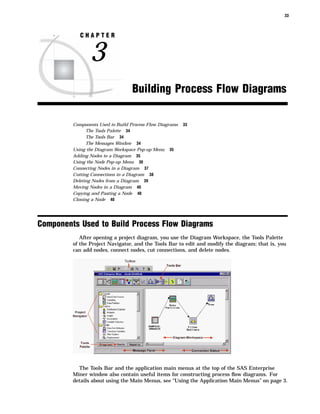
Components Used to Build Process Flow Diagrams
            After opening a project diagram, you use the Diagram Workspace, the Tools Palette
         of the Project Navigator, and the Tools Bar to edit and modify the diagram; that is, you
         can add nodes, connect nodes, cut connections, and delete nodes.


           The Tools Bar and the application main menus at the top of the SAS Enterprise
         Miner window also contain useful items for constructing process flow diagrams. For
         details about using the Main Menus, see “Using the Application Main Menus” on page 3.
34   The Tools Palette   4   Chapter 3


                 The Tools Palette
                   The Tools Palette in the Project Navigator displays all of the data mining tools that
                 are available for constructing process flow diagrams. The tools are grouped according to
                 the phase of the SEMMA data mining process. You drag nodes from the Tools Palette
                 onto the Diagram Workspace.
                   To view the properties of a node, right-click on the tool icon and select the
                 Properties pop-up menu item. For details about this task, see “Viewing and Setting
                 Node Defaults” on page 60.
                   For a description of the nodes, see “Organization of Enterprise Miner Nodes” on page
                 43.


                 The Tools Bar
                   By default, the Tools Bar contains a subset of Enterprise Miner tools that are
                 commonly used to build process flow diagrams in the Diagram Workspace. You can also
                 drag tools from the Tools Bar onto the Diagram Workspace. To display tool tips, move
                 your mouse pointer slowly over the icons on the Tools Bar.
                   To reposition a tool on the Tools Bar, drag the tool icon to the desired location.
                   To add a node from the Tools Palette to the Tools Bar, drag the tool icon from the
                 Tools Palette to the Tools Bar.
                   To remove a tool from the Tools Bar, right-click on the tool icon and select Remove
                 from tool bar.
                   To view the properties for a tool, right-click on a tool icon and select Tool
                 Properties.


                 The Messages Window
                    The Messages window displays messages that are generated by the creation or
                 execution of a process flow diagram. The Messages window is useful for detecting errors
                 that might have occurred when you were running a node or a process flow path. To
                 display the Messages window, use the View pull-down menu to select Messages. The
                 Messages window appears. You must close the Messages window to continue working
                 with the process flow diagram.
Building Process Flow Diagrams   4   Adding Nodes to a Diagram   35


           The messages are stored as part of the diagram. They can be cleared from within the
         Messages window by selecting from the main menu:
         Edit    I   Clear Text

            Note: Messages are also displayed in the message panel when you create or execute
         a process flow diagram. 4


Using the Diagram Workspace Pop-up Menu
           You can use the Diagram Workspace pop-up menus to perform many tasks. To open
         the pop-up menu, right-click in an open area of the Diagram Workspace. (Note that you
         can also perform many of these tasks by using the pull-down menus.) The pop-up menu
         contains the following items:
           3   Add node — accesses the Add Node window.
           3   Add endpoints — adds enter and exit endpoints to a subdiagram.
           3   Paste — pastes a node from the clipboard to the Diagram Workspace.
           3   Undelete — undeletes the last deleted node.
           3   Delete — deletes the selected node.
           3   Select All — selects all nodes in the process flow diagram.
           3   Create subdiagram — creates a subdiagram (see “Subdiagrams” on page 50). To
               create a subdiagram, you must first select the nodes and connections that are to be
               included in the subdiagram.
           3 Refresh — refreshes the image that is displayed in the Enterprise Miner window.
           3 Up one level — collapses a subdiagram.
           3 Top level — moves to the top level of the process flow diagram. At the top level,
               all subdiagrams are condensed.
           3 Connect items — a mode of editing in which node icons are fixed in one location
               so that it is easier to connect nodes.
           3 Move items — a mode of editing in which node icons cannot be connected so that
               it is easier to move nodes.
           3 Move and connect — the default mode of editing in which node icons can be
               moved and connected.


Adding Nodes to a Diagram
           You add nodes to the Diagram Workspace to create a process flow. Nodes should be
         connected in a logical order that represents the desired components of the sample,
         explore, modify, model, and assess (SEMMA) methodology.
           You can add nodes to a process flow diagram in several ways:
           3 Drag node icons from the Tools Palette of the Project Navigator to the Diagram
               Workspace.
           3 Drag node icons from the Tools Bar to the Diagram Workspace. This task is
               accomplished the same way that you drag nodes from the Tools Palette.
           3 Use the Diagram Workspace pop-up menu. Right-click on an open area in the
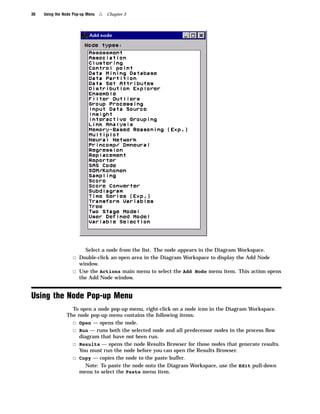
               Diagram Workspace, and select Add node. The Add Node window appears.
36   Using the Node Pop-up Menu   4   Chapter 3


                          Select a node from the list. The node appears in the Diagram Workspace.
                   3 Double-click an open area in the Diagram Workspace to display the Add Node
                     window.
                   3 Use the Actions main menu to select the Add Node menu item. This action opens
                     the Add Node window.


Using the Node Pop-up Menu
                  To open a node pop-up menu, right-click on a node icon in the Diagram Workspace.
                The node pop-up menu contains the following items:
                  3 Open — opens the node.
                  3 Run — runs both the selected node and all predecessor nodes in the process flow
                    diagram that have not been run.
                  3 Results — opens the node Results Browser for those nodes that generate results.
                    You must run the node before you can open the Results Browser.
                  3 Copy — copies the node to the paste buffer.
                       Note: To paste the node onto the Diagram Workspace, use the Edit pull-down
                    menu to select the Paste menu item.
Building Process Flow Diagrams   4   Connecting Nodes in a Diagram   37


           3   Delete — deletes the node.
           3   Clone — clones a node.
           3   About — displays node properties in the About window.
           3   Connect items — a mode of editing in which node icons are fixed in location so
               that it is easier to connect nodes.
           3 Move items — a mode of editing in which node icons cannot be connected so that
               it is easier to move nodes.
           3 Move and connect — the default mode of editing in which node icons can be
               moved and connected.


Connecting Nodes in a Diagram
            You connect nodes in the Diagram Workspace to create a logical process flow. When
         you create a process flow, you should follow the Sample, Explore, Modify, Model, and
         Assess (SEMMA) data mining methodology. Information flows from node to node in the
         direction that the connecting arrows point.


         There are three editing modes available in the Diagram Workspace. You can right-click
         on a node to access these modes.
           3 Connect items — Create connections between nodes. In this editing mode, the
               nodes are fixed in location, so that you can more easily make connections.
           3 Move items — Move nodes from one location to another within the Diagram
               Workspace. In this editing mode, you cannot make connections.
           3 Move and connect — Move and Connect is the default mode for moving and
               connecting items.
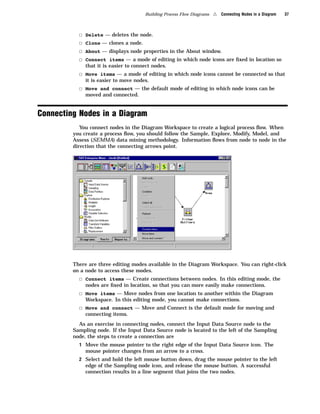
           As an exercise in connecting nodes, connect the Input Data Source node to the
         Sampling node. If the Input Data Source node is located to the left of the Sampling
         node, the steps to create a connection are
           1 Move the mouse pointer to the right edge of the Input Data Source icon. The
               mouse pointer changes from an arrow to a cross.
           2 Select and hold the left mouse button down, drag the mouse pointer to the left
               edge of the Sampling node icon, and release the mouse button. A successful
               connection results in a line segment that joins the two nodes.
38   Cutting Connections in a Diagram   4   Chapter 3


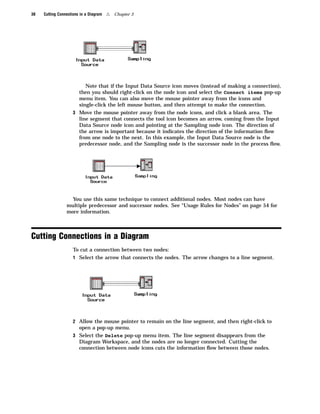
                         Note that if the Input Data Source icon moves (instead of making a connection),
                      then you should right-click on the node icon and select the Connect items pop-up
                      menu item. You can also move the mouse pointer away from the icons and
                      single-click the left mouse button, and then attempt to make the connection.
                    3 Move the mouse pointer away from the node icons, and click a blank area. The
                      line segment that connects the tool icon becomes an arrow, coming from the Input
                      Data Source node icon and pointing at the Sampling node icon. The direction of
                      the arrow is important because it indicates the direction of the information flow
                      from one node to the next. In this example, the Input Data Source node is the
                      predecessor node, and the Sampling node is the successor node in the process flow.


                   You use this same technique to connect additional nodes. Most nodes can have
                 multiple predecessor and successor nodes. See “Usage Rules for Nodes” on page 54 for
                 more information.


Cutting Connections in a Diagram
                    To cut a connection between two nodes:
                    1 Select the arrow that connects the nodes. The arrow changes to a line segment.


                    2 Allow the mouse pointer to remain on the line segment, and then right-click to
                      open a pop-up menu.
                    3 Select the Delete pop-up menu item. The line segment disappears from the
                      Diagram Workspace, and the nodes are no longer connected. Cutting the
                      connection between node icons cuts the information flow between those nodes.
Building Process Flow Diagrams   4   Deleting Nodes from a Diagram   39


Deleting Nodes from a Diagram
           To delete a node from a process flow diagram:
           1 Right-click on the node icon to open a pop-up menu.
           2 Select the Delete pop-up menu item. A verification window appears that asks you
             to verify that you want to delete this node. If you select OK , then the node is
             removed from the process flow diagram. If you select Cancel , then the node
              remains in the process flow diagram.
            Note: This task can also be performed by selecting the node and using the Delete
         tool icon from the toolbox. 4
           To restore the deleted node, right-click in an open area of the Diagram Workspace
         area and select the Undelete pop-up menu item. The node is copied to the Diagram
         Workspace, but any previous connections are lost. You must redraw your node
         connections.
           To delete multiple nodes:
           1 Select a node icon that you want to delete, and then SHIFT-click or CTRL-click
              the remaining node icons that you want to delete. The selected nodes become
              highlighted. Alternatively, you can select multiple nodes by dragging your mouse
              pointer around the nodes that you want to delete. A box appears around the
              selected node icons. This technique is referred to as “rubber banding” nodes.
           2 Allow the mouse pointer to remain on the selected icons, and then right–click to
              open a pop-up menu.
           3 Select the Delete pop-up menu item. A verification window appears that asks you
             to verify that you want to delete these nodes. If you select OK , then the nodes
              and their connections are removed from the process flow diagram. If you select
              Cancel , then the nodes remain in the process flow diagram.

           To delete all nodes in the process flow diagram:
           1 From the main menu, select
               Edit   I   Select all

           2 After all the nodes are selected, from the main menu select
               Edit   I   Delete

              or click the Delete icon from the toolbox.
           Note:   You cannot restore a multiple-node deletion.    4
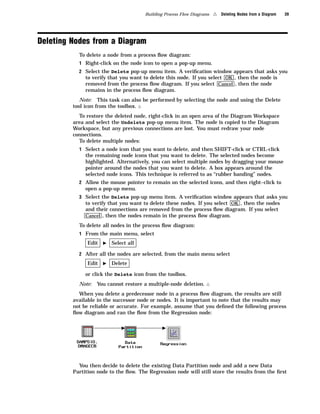
           When you delete a predecessor node in a process flow diagram, the results are still
         available in the successor node or nodes. It is important to note that the results may
         not be reliable or accurate. For example, assume that you defined the following process
         flow diagram and ran the flow from the Regression node:


           You then decide to delete the existing Data Partition node and add a new Data
         Partition node to the flow. The Regression node will still store the results from the first
40   Moving Nodes in a Diagram   4   Chapter 3


                run of the flow. To obtain the updated regression results, you need to re-run the entire
                process flow diagram.


Moving Nodes in a Diagram
                   To move a node within a process flow diagram:
                   1 Use the mouse pointer to drag the node that you want to move. A box appears
                       around the icon to indicate that it has been selected.
                   2 Drag the node icon to a new position in the Diagram Workspace. Note that when
                       you drag the node icon, the mouse pointer becomes the shape of a hand. The
                       connection arrows will typically bend or stretch (or both) to accommodate the move.
                   Note: To move multiple nodes, select them all by using keyboard and mouse
                combinations. CTRL-click to select multiple individual nodes that you want to move as
                a group. 4


Copying and Pasting a Node
                   You can copy an existing node to memory and paste it in the Diagram Workspace.
                The same node attributes that you copy are used in the new node. You can copy a node
                from one diagram and paste it to another diagram if you want. However, you cannot
                copy a node from one project to another project. To copy an existing node:
                   1 Right-click on the node that you want to copy in the Diagram Workspace. Select
                       the Copy pop-up menu item.
                   2 Right-click on the location where you want to paste the node. Select the Paste
                       pop-up menu item.
                  Because a Subdiagram node can represent multiple nodes in a diagram, you can use
                the Subdiagram node to copy multiple nodes at one time.


Cloning a Node
                   You may want to clone a node if you plan to use the node repeatedly in a project. For
                example, assume that you have defined an input data set in an Input Data Source node.
                If you want to use the same input data set in the current diagram or in another
                diagram of the project, then you can clone the existing Input Data Source node. When
                you clone a node, it is added as a new node on the Tools Palette in the Custom section.
                When you want to use the node, you simply drag it from the Tools Palette onto the
                Diagram Workspace. The information that is contained in the original (parent) node is
                included in the cloned node; for example, the target variable, the roles and
                measurement levels for other variables and for the metadata sample are the same. You
                can also redefine the attributes of the cloned node.
                   If you did not clone the node, you would have to add a new Input Data Source node
                to the Diagram Workspace, set the node options, and create the metadata sample. If
                you are going to use the same data set often in the project, then cloning an existing
                node will save time.
                  Note: If you are going to use the same data set in several projects or diagrams, you
                can use the SAS/Warehouse Administrator to set up the data sets, and use the
Building Process Flow Diagrams   4   Cloning a Node   41


Enterprise Miner add-in tools for applying whatever measurement levels and roles you
want in your data. Any users who use this data will pick up the metadata sample,
along with the roles and measurement levels that are already assigned. 4
  To clone multiple nodes, condense the nodes into a subdiagram node (see
“Subdiagrams” on page 50) and then clone the subdiagram node.
  To clone a node:
  1 Select the node that you want to clone (the parent node) in the Diagram
    Workspace.
  2 Right–click the node and select the Clone pop-menu item.
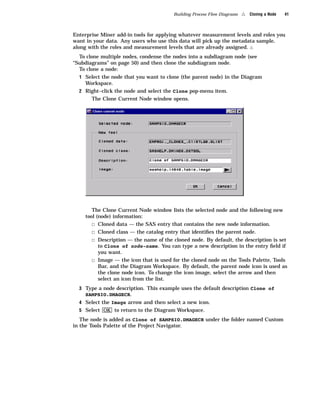
        The Clone Current Node window opens.


       The Clone Current Node window lists the selected node and the following new
    tool (node) information:
       3 Cloned data — the SAS entry that contains the new node information.
       3 Cloned class — the catalog entry that identifies the parent node.
       3 Description — the name of the cloned node. By default, the description is set
         to Clone of node-name. You can type a new description in the entry field if
         you want.
       3 Image — the icon that is used for the cloned node on the Tools Palette, Tools
         Bar, and the Diagram Workspace. By default, the parent node icon is used as
         the clone node icon. To change the icon image, select the arrow and then
         select an icon from the list.
  3 Type a node description. This example uses the default description Clone of
    SAMPSIO.DMAGECR.
  4 Select the Image arrow and then select a new icon.
  5 Select OK to return to the Diagram Workspace.

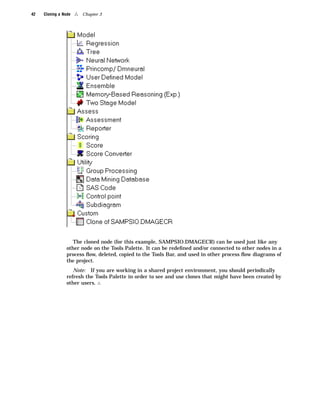
   The node is added as Clone of SAMPSIO.DMAGECR under the folder named Custom
in the Tools Palette of the Project Navigator.
42   Cloning a Node   4   Chapter 3


                    The cloned node (for this example, SAMPSIO.DMAGECR) can be used just like any
                 other node on the Tools Palette. It can be redefined and/or connected to other nodes in a
                 process flow, deleted, copied to the Tools Bar, and used in other process flow diagrams of
                 the project.
                    Note: If you are working in a shared project environment, you should periodically
                 refresh the Tools Palette in order to see and use clones that might have been created by
                 other users. 4
43


            CHAPTER


                4
                                    Process Flow Diagram Logic

         Organization of Enterprise Miner Nodes   43
         Sampling Nodes 44
         Exploring Nodes 45
         Modifying Nodes 46
         Modeling Nodes 47
         Assessing Nodes 48
         Scoring Nodes 48
         Utility Nodes 49
         Subdiagrams 50
                Subdiagram Example 1 50
                Subdiagram Example 2 52
         Usage Rules for Nodes 54


Organization of Enterprise Miner Nodes
            The nodes of Enterprise Miner are organized into categories of the Sample, Explore,
         Modify, Model, and Assess (SEMMA) data mining methodology. In addition, there are
         also Scoring and Utility node tools. You use the Scoring node tools to score your data
         models and to create freestanding code. You use the Utility node tools to submit SAS
         programming statements, to create data mining databases, to perform group processing,
         to define control points in the process flow diagram, and to create subdiagrams.
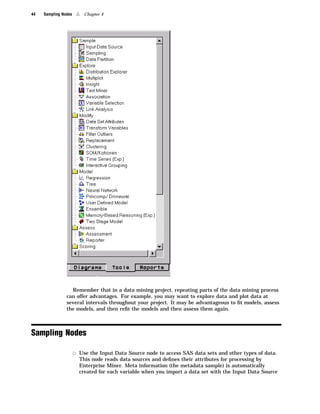
            All of the Enterprise Miner nodes are listed in a set of folders that are located on the
         Tools tab of the Enterprise Miner Project Navigator. The nodes are listed under the
         folder that corresponds to their data mining functions.
44   Sampling Nodes    4   Chapter 4


                  Remember that in a data mining project, repeating parts of the data mining process
                can offer advantages. For example, you may want to explore data and plot data at
                several intervals throughout your project. It may be advantageous to fit models, assess
                the models, and then refit the models and then assess them again.


Sampling Nodes

                      3 Use the Input Data Source node to access SAS data sets and other types of data.
                        This node reads data sources and defines their attributes for processing by
                        Enterprise Miner. Meta information (the metadata sample) is automatically
                        created for each variable when you import a data set with the Input Data Source
Process Flow Diagram Logic   4   Exploring Nodes   45


             node. Initial values are set for the measurement level and the model role for each
             variable. You can change these values if you are not satisfied with the automatic
             selections that the node makes. Summary statistics are displayed for interval and
             class variables.
           3 Use the Sampling node to take random, stratified random samples, and to take
             cluster samples of data sets. Sampling is recommended for extremely large
             databases because it can significantly decrease model training time. If the random
             sample sufficiently represents the source data set, then data relationships that
             Enterprise Miner finds in the sample can be extrapolated upon the complete
             source data set.The Sampling node writes the sampled observations to an output
             data set and saves the seed values that are used to generate the random numbers
             for the samples so that you may replicate the samples.
           3 Use the Data Partition node to partition data sets into training, test, and
             validation data sets. The training data set is used for preliminary model fitting.
             The test data set is an additional hold-out data set that you can use for model
             assessment. The validation data set is used to monitor and tune the model
             weights during estimation and is also used for model assessment. This node uses
             simple random sampling, stratified random sampling, or user defined partitions to
             create partitioned data sets.


Exploring Nodes

           3 The Distribution Explorer node is an advanced visualization tool that enables you
             to quickly and easily explore large volumes of data in multidimensional
             histograms. You can view the distribution of up to three variables at a time with
             this node. When the variable is binary, nominal, or ordinal, you can select specific
             values to exclude from the chart. To exclude extreme values for interval variables,
             you can set a range cutoff. The node also generates summary statistics for the
             charting variables.
           3 The Multiplot node is another visualization tool that enables you to explore larger
             volumes of data graphically. Unlike the Insight or Distribution Explorer nodes, the
             Multiplot node automatically creates bar charts and scatter plots for the input and
             target variables without requiring you to make several menu or window item
             selections. The code that is created by this node can be used to create graphs in a
             batch environment, whereas the Insight and Distribution Explorer nodes must be
             run interactively.
           3 Use the Insight node to open a SAS/INSIGHT session. SAS/INSIGHT software is
             an interactive tool for data exploration and analysis. With it, you explore data
             through graphs and analyses that are linked across multiple windows. You can
             analyze univariate distributions, investigate multivariate distributions, and fit
             explanatory models by using generalized linear models.
           3 Use the Association node to identify association relationships within the data. For
             example, if a customer buys a loaf of bread, how likely is the customer to also buy
             a gallon of milk? You also use the Association node to perform sequence discovery
             if a time stamp variable (a sequence variable) is present in the data set. Binary
             sequences are constructed automatically, but you can use the Event Chain
             Handler to construct longer sequences that are based on the patterns that the
             algorithm discovered.
           3 You use the Variable Selection node to evaluate the importance of input variables
             in predicting or classifying the target variable. To preselect the important inputs,
             the Variable Selection node uses either an R-Square or a Chi-Square selection
46   Modifying Nodes    4   Chapter 4


                         (tree based) criterion. You can use the R-Square criterion to remove variables in
                         hierarchies, remove variables that have large percentages of missing values, and
                         remove class variables that are based on the number of unique values. The
                         variables that are not related to the target are set to a status of rejected.
                         Although rejected variables are passed to subsequent nodes in the process flow
                         diagram, these variables are not used as model inputs by a more detailed modeling
                         node, such as the Neural Network and Tree nodes. You can reassign the status of
                         the input model variables to rejected in the Variable Selection node.
                       3 Use the Link Analysis node to transform data from differing sources into a data
                         model that can be graphed. The data model supports simple statistical measures,
                         presents a simple interactive graph for basic analytical exploration, and generates
                         cluster scores from raw data that can be used for data reduction and segmentation.


Modifying Nodes

                       3 Use the Data Set Attributes node to modify data set attributes, such as data set
                         names, descriptions, and roles. You can also use the Data Set Attributes node to
                         modify the metadata sample that is associated with a data set, and to specify
                         target profiles for a target. An example of a useful Data Set Attributes application
                         is to generate a data set in the SAS Code node and then modify its metadata
                         sample with this node.
                       3 Use the Transform Variables node to transform variables. For example, you can
                         transform variables by taking the square root of a variable or by taking its natural
                         logarithm. Additionally, the Transform Variables node supports user-defined
                         formulas for transformations and provides a visual interface for grouping
                         interval-valued variables into buckets or quantiles. Transforming variables to
                         similar scale and variability may improve the fit of models, and subsequently, the
                         classification and prediction precision of fitted models.
                       3 Use the Filter Outliers node to identify and remove outliers or “noise” from data
                         sets. Checking for outliers is recommended as outliers may greatly affect modeling
                         results and, subsequently, the classification and prediction precision of fitted
                         models.
                       3 Use the Replacement node to impute (fill in) values for observations that have
                         missing values. You can replace missing values for interval variables with the
                         mean, median, midrange, or mid-minimum spacing, or with a distribution-based
                         replacement. Alternatively, you can use a replacement M-estimator such as Tukey’s
                         biweight, Huber’s, or Andrew’s Wave. You can also estimate the replacement
                         values for each interval input by using a tree-based imputation method. Missing
                         values for class variables can be replaced with the most frequently occurring
                         value, distribution-based replacement, tree-based imputation, or a constant.
                       3 Use the Clustering node to segment your data so that you can identify data
                         observations that are similar in some way. When displayed in a plot, observations
                         that are similar tend to be in the same cluster, and observations that are different
                         tend to be in different clusters. The cluster identifier for each observation can be
                         passed to other nodes for use as an input, ID, or target variable. It can also be
                         passed as a group variable that enables you to automatically construct separate
                         models for each group.
                       3 Use the SOM/Kohonen node to generate self-organizing maps, Kohonen networks,
                         and vector quantization networks. The SOM/Kohonen node performs unsupervised
                         learning in which it attempts to learn the structure of the data. As with the
                         Clustering node, after the network maps have been created, the characteristics can
Process Flow Diagram Logic   4   Modeling Nodes   47


            be examined graphically by using the SOM/Kohonen Results Browser. The SOM/
            Kohonen node provides the analysis results in the form of an interactive map that
            illustrates the characteristics of the clusters. Furthermore, the SOM/Kohonen node
            Results Browser provides a report that indicates the importance of each variable.
          3 The Time Series experimental node converts transactional data to time series
            data, and performs seasonal and trend analysis on an interval target variable.
          3 Use the Interactive Grouping node to interactively group variable values into
            classes. The Interactive Grouping functionality is required to create a specific type
            of predictive model that is called a score card. Statistical and plotted information
            can be interactively rearranged as you explore various variable groupings. Score
            card models are frequently used for application and behavioral scoring in the
            credit scoring industry.


Modeling Nodes

          3 Use the Regression node to fit both linear and logistic regression models to your
              data. You can use continuous, ordinal, and binary target variables. You can use
              both continuous and discrete variables as inputs. The node supports the stepwise,
              forward, and backward selection methods. A point-and-click interaction builder
              enables you to create higher-order modeling terms.
          3   Use the Tree node to fit decision tree models to your data. The implementation
              includes features that are found in a variety of popular decision tree algorithms
              (for example, CHAID, CART, C4.5, and C5.0.) The Tree node supports both
              automatic and interactive training. When you run the Tree node in automatic
              mode, it automatically ranks the input variables based on the strength of their
              contribution to the tree. This ranking may be used to select variables for use in
              subsequent modeling. You may override any automatic step with the option to
              define a splitting rule and delete explicit nodes or subtrees. Interactive training
              enables you to explore and evaluate a large set of trees as you develop them.
          3   Use the Neural Network node to construct, train, and validate multilayer
              feedforward neural networks. By default, the Neural Network node constructs
              multilayer feedforward networks that have one hidden layer that contains three
              neurons. In general, each input is fully connected to the first hidden layer, each
              hidden layer is fully connected to the next hidden layer, and the last hidden layer
              is fully connected to the output. The Neural Network node supports many
              variations of this general form.
          3   Use the Princomp/Dmneural node to fit an additive nonlinear model that uses the
              bucketed principal components as inputs to predict a binary or an interval target
              variable. The Princomp/Dmneural node also performs a principal components
              analysis and passes the scored principal components to the successor nodes.
          3   Use the User Defined Model node to generate assessment statistics using
              predicted values from a model that you built with the SAS Code node (for example,
              a logistic model using the SAS/STAT LOGISTIC procedure) or the Variable
              Selection node. The predicted values can also be saved to a SAS data set and then
              imported into the process flow with the Input Data Source node.
          3   Use the Ensemble node to create a new model by averaging the posterior
              probabilities (for class targets) or the predicted values (for interval targets) from
              multiple models. The new model is then used to score new data. One common
              ensemble approach is to resample the training data and fit a separate model for
              each sample. The component models are then integrated by the Ensemble node to
              form a potentially stronger solution.
48   Assessing Nodes    4   Chapter 4


                       3 The Memory-Based Reasoning experimental node uses a k-nearest neighbor
                         algorithm to categorize or predict observations.
                       3 The Two Stage Model node computes a two-stage model to predict a class target
                         and an interval target. The interval target variable is usually the value that is
                         associated with a level of the class target variable.
                   Note: These modeling nodes use a directory table facility, called the Model Manager,
                in which you can store and assess models on demand. The modeling nodes also enable
                you to modify the target profile(s) for a target variable. 4


Assessing Nodes

                       3 The Assessment node provides a common framework for comparing models and
                         predictions from any of the modeling nodes (Regression, Tree, Neural Network,
                         and User Defined Model nodes). The comparison is based on the expected and
                         actual profits or losses that would result from implementing the model. The node
                         produces the following charts that help to describe the usefulness of the model:
                         lift, profit, return on investment, receiver operating curves, diagnostic charts, and
                         threshold-based charts.
                       3 The Reporter node assembles the results from a process flow analysis into an
                         HTML report that can be viewed with your favorite Web browser. Each report
                         contains header information, an image of the process flow diagram, and a separate
                         subreport for each node in the flow. Reports are managed in the Reports tab of the
                         Project Navigator.


Scoring Nodes

                       3 The Score node enables you to generate and manage predicted values from a
                         trained model. Scoring formulas are created for both assessment and prediction.
                         Enterprise Miner generates and manages scoring formulas in the form of SAS
                         DATA step code, which can be used in most SAS environments with or without
                         Enterprise Miner.
                       3 Use the Score Converter node to translate the SAS DATA step score code that is
                         produced by predecessor nodes in a process flow diagram into the C and Java
                         programming languages. It is an open-ended tool that is intended for use by
                         experienced C and Java programmers.
                           The Score Converter node supports input from the following Enterprise Miner
                         nodes:
                            3 Sampling Nodes:
                              3 Input Data Source
                              3 Sampling
                              3 Data Partition
                            3 Exploring Nodes:
                              3 Distribution Explorer
Process Flow Diagram Logic   4   Utility Nodes   49


                   3   Multiplot
                   3   Insight
                   3   Association
                   3   Variable Selection
                   3   Link Analysis
                 3 Modifying Nodes:
                   3 Data Set Attributes
                   3 Transform Variables
                   3 Filter Outliers
                   3 Replacement
                   3 Clustering
                   3 SOM/Kohonen
                   3 Interactive Grouping
                 3 Modeling Nodes:
                   3 Regression
                   3 Tree
                   3 Neural Networking
                   3 User Defined Model
                   3 Ensemble
                   3 Two Stage Model
                 3 Assessing Nodes:
                   3 Assessment
                   3 Reporter
                 3 Scoring Nodes:
                     3 Score
                 3 Utility Nodes:
                   3 Group Processing
                   3 Data Mining Database
                   3 Control Point
                   3 Subdiagram


Utility Nodes

            3 The Group Processing node enables you to perform group BY processing for class
              variables such as GENDER. You can also use this node to analyze multiple
              targets, and you can process the same data source repeatedly by setting the group
              processing mode to index.
            3 The Data Mining Database node enables you to create data mining databases
              (DMDBs) for batch processing. For non-batch processing, DMDBs are
              automatically created as they are needed.
            3 Use the SAS Code node to incorporate new or existing SAS code into process flow
              diagrams. The ability to write SAS code enables you to include additional SAS
              procedures into your data mining analysis. You can also use a SAS DATA step to
50   Subdiagrams    4   Chapter 4


                       create customized scoring code, to conditionally process data, and to concatenate or
                       to merge existing data sets. The node provides a macro facility to dynamically
                       reference data sets used for training, validation, testing, or scoring and variables,
                       such as input, target, and predict variables. After you run the SAS Code node, the
                       results and the data sets can then be exported for use by subsequent nodes in the
                       diagram.
                     3 Use the Control Point node to establish a control point to reduce the number of
                       connections that are made in process flow diagrams. For example, suppose three
                       Input Data Source nodes are to be connected to three modeling nodes. If no
                       Control Point node is used, then nine connections are required to connect all of the
                       Input Data Source nodes to all of the modeling nodes. However, if a Control Point
                       node is used, only six connections are required.
                     3 Use the Subdiagram node to group or condense a portion of a process flow diagram
                       into a subdiagram. For complex process flow diagrams, you may want to create
                       subdiagrams to better design and control the process flow.


Subdiagrams
                     Some process flow diagrams may be quite complex. To help control the process flow,
                   you can create subdiagrams and collapse a set of nodes and connections into a single
                   node icon. Subdiagrams can be opened to display the complete structure of the process
                   flow diagram.
                     Note:   You cannot uncondense the nodes in a subdiagram.    4
                     There are two major approaches to creating subdiagrams:
                     3 You know in advance that you will use a subdiagram. First, you add a Subdiagram
                       node, and then add nodes within the subdiagram. See “Subdiagram Example 1” on
                       page 50.
                     3 You realize later that if a particular set of nodes were condensed into a
                       subdiagram, then the process flow would be much easier to control. See
                       “Subdiagram Example 2” on page 52.


                   Subdiagram Example 1
                     Suppose you want a process flow diagram to contain a subdiagram for the following
                   nodes: Sampling, Data Partition, Filter Outliers, and Transform Variables.
                     To create a subdiagram for these nodes, follow these steps:
                     1 Add and define any predecessor nodes from the Tools Palette that you do not want
                       as part of the subdiagram to the Diagram Workspace.
                     2 Add a Subdiagram node to the process flow diagram.


                     3 Connect the predecessor node to the Subdiagram node and then open the
                        Subdiagram node by double-clicking the node icon. Alternatively, you can
                        right-click the node icon and select Open.
Process Flow Diagram Logic   4   Subdiagram Example 1   51


    Within the Subdiagram node are Enter and Exit nodes, which by default are
  connected.


4 Cut the connection between the Enter and Exit nodes by right-clicking the
  connection arrow and selecting the Delete pop-up menu item.
  Note: The Enter and Exit nodes are connected to allow for independent
  subdiagrams.  4
5 Move the Enter and Exit nodes to the appropriate locations in the process flow
  diagram, and then add and connect the desired nodes.


6 Condense the subdiagram, by using the View pull-down menu (or the pop-up
  menu) to select Up One Level.


  Note: When a subdiagram has been defined, a keyhole appears beside the
  Subdiagram node. To open the subdiagram, you can select the keyhole or you can
  double-click the node icon.4
7 Position the Subdiagram node in the appropriate location within the process flow
  diagram, and then connect the Subdiagram node to the appropriate nodes.
52   Subdiagram Example 2   4   Chapter 4


                        This example process flow diagram has an Input Data Source node that is
                      connected to the Subdiagram node, which in turn connects to a Neural Network
                      node and a Regression node. The resulting models are compared and assessed in
                      an Assessment node.

                        Note: You can clone a node if you need to use it often in the project. See
                      “Cloning a Node” on page 40 for an example. 4


                Subdiagram Example 2
                   In this example, you are developing a process flow diagram:


                  You realize that you could create a subdiagram to contain the following nodes:
                Sampling, Data Partition, Filter Outliers, and Transform Variables. By condensing
                these nodes into a subdiagram, you can more easily view other portions of the complete
                process flow diagram. To create a subdiagram for these nodes, follow these steps:
                   1 Select the first node to be included in the subdiagram. A box appears around the
                      selected node (for this example, the Sampling node).


                   2 Place the mouse pointer on the arrow that connects the node that you selected in
                      step 1 and the second node to be included in the subdiagram, then CTRL-click or
                      SHIFT-click on the arrow. The selected arrow changes from an arrow to a line
                      segment.
                   3 CTRL-click or SHIFT-click on the second node that you want to include in the
                      subdiagram.
                   4 Repeat steps 2 and 3 until all nodes and arrows that you want to place in the
                      subdiagram are selected. Note that for large process flow diagrams that contain
                      many nodes only the nodes and arrows that are selected are used to create the
                      subdiagram.
                      Note: As an alternative to steps 1 through 4, you can select all the multiple nodes
                      and arrows at one time. That is, place the mouse pointer in the process flow
                      diagram near the nodes to be included in the subdiagram (where “near” is on one
                      side of the set of node icons and either above or below the node icons), click and
                      hold the left mouse button, and stretch the dotted box around the appropriate
                      node icons.
Process Flow Diagram Logic   4   Subdiagram Example 2   53


   4
5 Use the main menu to select

   Edit   I   Create subdiagram

  A dialog box appears that asks you to verify that the currently selected nodes and
  arrows are to be condensed into a subdiagram.


    If you click Cancel , then the subdiagram is not created. If you click OK , then
  the subdiagram is created, and a subdiagram node icon replaces the selected nodes
  and arrows.


6 To open the Subdiagram node, double-click on the node icon or select the keyhole.


7 Add endpoints (a pair of nodes that consist of an Enter node and an Exit node) to
  the subdiagram to indicate where information enters the subdiagram and where it
54   Usage Rules for Nodes   4   Chapter 4


                       exits the subdiagram. To add endpoints, right-click on an open area of the
                       Diagram Workspace and select Add endpoints. By default, the Enter node is
                       connected to the Exit node. Cut the connection between the Enter and Exit nodes,
                       and then position the Enter node to the left of the subdiagram (so that it precedes
                       the subdiagram) and the Exit node to the right of the subdiagram (so that it
                       follows the subdiagram). Connect the Enter node to the subdiagram (the
                       connection arrow should point to the subdiagram), and connect the subdiagram to
                       the Exit node (the connection arrow should point to the Exit node).


                    8 Condense the subdiagram by using the View pull-down menu (or the pop-up menu)
                       to select Up One Level.
                    9 Connect the Subdiagram node to the appropriate nodes. In this example, an Input
                       Data Source node passes information to the Subdiagram node, which passes
                       information to the Regression and Neural Network nodes, which in turn pass
                       information to the Assessment node.


                   You cannot uncondense the nodes in a subdiagram. There is no restriction on how
                 many Subdiagram nodes you can nest in the process flow diagram.


Usage Rules for Nodes
                    Here are some general rules that govern the placement of nodes in a process flow
                 diagram:
                    3 The Input Data Source node cannot be preceded by any other nodes.
                    3 All nodes except the Input Data Source and SAS Code nodes must be preceded by
                       a node that exports a data set.
                    3 The SAS Code node can be defined in any stage of the process flow diagram. It
                       does not require an input data set that is defined in the Input Data Source node. If
                       you create a SAS data set with code you write in the SAS Code node (for example,
                       a data set that contains target and predict variables), you can use a successor Data
                       Set Attributes node to assign model roles to the variables in the SAS data set.
Process Flow Diagram Logic   4   Usage Rules for Nodes   55


3 The Assessment node must be preceded by one or more modeling nodes.
3 The Score node must be preceded by a node that produces score code. For
  example, the modeling nodes produce score code.
3 The Data Set Attributes can have only one node preceding it.
3 The Ensemble node must be preceded by a modeling node.
3 The Reporter node generates HTML reports for all of the predecessor nodes. It
  does not generate reports for the successor nodes. When you run the flow from the
  Reporter node, Enterprise Miner makes a first pass through the flow to analyze
  the data. After the analysis is complete, Enterprise Miner makes a second pass to
  generate the HTML reports. The node icons are colored green during the analysis
  pass and yellow during the reporting pass.
3 You can have one Group Processing node per process flow. Group processing occurs
  when you run the process flow path. The Group Processing node can be connected
  to any successor node, but the only nodes that accumulate results from each pass
  are the modeling nodes and the Score node.
56
57


              CHAPTER


                  5
                                      Common Features among Nodes

           Functionality 57
           Data Tab 57
           Variables Tab 58
           Notes Tab 60
           Results Browser 60
           Viewing and Setting Node Defaults   60


Functionality

             The following functionalities are common to all or most nodes.
             3 If you make changes to a node and then close it, the following message window
               appears. The message window does not appear if you did not make any changes to
               the node settings.


             3 When a node is run, information flows through the process flow diagram. A green
               box appears around each node as it processes the incoming information. If a node
               cannot process the information, then a red box appears around it, and you should
               check the Message Panel, the message window, or the Log window and adjust the
               settings as necessary.
             3 When the analysis for the selected node has run, a message window prompts you
               to view the results. Select Yes to close the message window and open the Results
               Browser. Select No to close the message window and return to the Diagram
               Workspace.


Data Tab
              Most node configuration interfaces use a Data tab. The Data tab displays the names
           of the available predecessor data sets, which can include some or all of the training,
           validation, test, and score data sets. You can select a predecessor data set from this list.
58   Variables Tab   4   Chapter 5


                   By default, Enterprise Miner exports the data set that precedes the current node. To
                 substitute another data set, click Select . Use the file utility window to find and select
                 another data set. The Select button is dimmed and remains unavailable if only one
                 node that exports a data set precedes the current node.
                   Note: Many nodes contain training, test, validation, and score buttons on the tab.
                 You can use these to assign a specific data set to each data set role. 4
                    Click Properties on the Data tab to view administrative information about the data
                 set. The administrative information includes the data set name, label, type, date
                 created, date last modified, number of columns, number of rows, and number of deleted
                 rows.


                     To see a table view of the data, select the Table View tab.


Variables Tab
                    Most Enterprise Miner nodes have a Variables tab. Typically, the Variables tab
                 displays variable attribute information, such as
                     3 the names of the variables in the input data set. The values that are displayed in
                         the Name column of most Variable tabs are protected.
                     3 the status of the variables, which can be use or don’t use. You can change the
                         status of a variable in one of the sampling or modeling nodes. For most explore
                         nodes, you cannot change the variable’s status. To change the status of a variable,
                         follow these steps:
Common Features among Nodes   4   Variables Tab   59


        1 Right-click on the appropriate cell of the Status column.
        2 Select Set Status.
        3 Select the appropriate status (either don’t use or use).
        Note: The Variables tab of the Input Data Source node does not contain a
      Status column. To assign the rejected model role to a variable, right-click on the
      appropriate cell of the Model Role column to open a pop-up menu. Select Set
      Model Role and then select rejected. You use this same protocol to assign the
      rejected role to variables in the Manual Selection tab of the Variable Selection
      node. 4
         This example shows the Variables tab of the Data Partition node:


        In this node, the Variables tab contains the following columns:
  3 Name — the variable name.
  3 Model Role — the variable model role. Examples of model roles include cost, freq,
      ID, input, predict, rejected, sequence, target, and trial. The role of a variable is
      automatically assigned in the Input Data Source node based on the information in
      the metadata sample. You can change the role that is automatically assigned to a
      variable by right-clicking on the appropriate role cell.
  3   Measurement — the measurement type of the variable. Examples of measurement
      types include binary, interval, ordinal, and nominal. The measurement type of
      variables is automatically assigned in the Input Data Source node based on the
      information in the metadata sample.
  3   Type — either character (char) or numeric (num). The variable type is displayed
      in the Input Data Source node, but it cannot be changed (the values in this column
      are protected).
  3   Format — the format of the variable. Examples of formats include $18. (18
      characters) and BEST12. (12-digit numeric). The variable formats are assigned in
      the Input Data Source node.
  3   Label — the descriptive variable label, which is assigned in the Input Data Source
      node. To change the label for a variable, type a new value in the appropriate cell
      of the Label column.
   You can sort by clicking the column header. Successive clicks on the header toggle
the sort between ascending and descending order.
   Subsetting (displaying a subset of the variables) can be performed for the variable
attributes of status, model role, measurement, and type:
   1 Right-click in any row of the attribute that you want to subset.
   2 Select Subset by <attribute> from the menu. A selection list box appears that
      contains the set of attribute values that are available for subsetting.
60   Notes Tab   4   Chapter 5


                     3 Select the appropriate attribute values for subsetting.
                     4 To accept the selections and display the subsetting, click OK . To cancel the
                       subsetting dialog box, click Cancel .
                     To find a value within a column:
                     1 Right-click on the column heading or a cell within the column and select Find
                       column name. The Find column name window opens, which is modeled after the
                       Find dialog box in Internet Explorer.
                     2 Type the text that you want to find.
                     3 Specify the search direction (up or down) and whether you want the text to match
                       the whole field.
                     4 Click OK .
                 If Enterprise Miner finds the text that you are searching for in the column and
                 direction that you specified, it moves the row that contains the text to the top of the
                 table. If it does not, it displays No match detected at the bottom of the screen and
                 issues a beep signal.


Notes Tab
                   You use the Notes tab to type and store notes such as those about the project, the
                 analysis, and the results. When you run a process flow diagram that contains a
                 Reporter node, the notes are printed in the resulting HTML report.


Results Browser
                    Enterprise Miner nodes that produce output generally use a Results Browser to
                 display and graphically manipulate the data mining results. To open the Results
                 Browser of an Enterprise Miner node
                    3 If the node is closed,
                      1 right–click on the node icon and select Results.
                      2 from the main menu, select

                           Actions     I   Results

                     3 If the node is open,
                       1 select the Results Browser tool icon on the Toolbox.
                       2 from the main menu, select

                           Tools   I   Results Browser
                   Note: After you run particular nodes, such as the Tree or the Data Partition node, a
                 message window appears that asks you if you want to view the results. Click Yes to
                 open the Results Browser for that node. 4


Viewing and Setting Node Defaults
                    To view the properties for any node, right-click on the node icon in the Tools Palette
                 of the Project Navigator, or click the Tools Bar at the top of the SAS Enterprise Miner
Common Features among Nodes   4   Viewing and Setting Node Defaults   61


window, and select Properties. The Properties Node Name window opens, which
summarizes the node properties.


  Note:   The Reset button is dimmed if the node is set to the defaults.         4
  You can customize the default settings for the following nodes:
  3   Data Partition
  3   Sampling
  3   Multiplot
  3   Insight
  3   Association
  3   Variable Selection
  3   Replacement
  3   Clustering
  3   SOM/Kohonen
  3   Time Series
  3   Regression
  3   Tree
  3   Neural Network
  3   Princomp /DMNeural
  3   Two Stage Model
  3   Assessment
  3   Score
  3   Score Converter
  3   Group Processing
62   Viewing and Setting Node Defaults   4   Chapter 5


                   To customize the default node settings, select Edit defaults in the Properties Node
                 Name window and make the desired selections in the tabs of the Defaults window:


                   After you have set the node defaults, close the Defaults window to return to the
                 Properties window.
                   To reset the node to the defaults, click Reset .
63


            CHAPTER


                6
                                   Data Structure Examples

         Types of Data Structures 63
         Regression Data 64
         Association Discovery Data 66


Types of Data Structures
           Data structures for data mining data sets and data marts include
           3 Regression Data (see “Regression Data” on page 64), which has the following
              characteristics:
                 3 one observation per customer.
                 3 a binary target (dependent) variable, a continuous (interval) target variable,
                    or both. Often only one target variable is modeled per run, but you can use a
                    Group Processing node to model multiple targets. An example of a binary
                    target variable is Purchase or No-purchase, which is useful for modeling
                    customer profiles. An example of a continuous (interval) target variable is
                    Value of Purchase, which is useful for modeling the best customers for
                    particular products, catalogs, or sales campaigns.
                 3 many or few input variables, such as ID (identification) variables,
                    demographic data, and history or previous purchases.
                 3 cross-sectional data, which is data that is collected across multiple customers,
                    products, geographic regions, but that typically is not collected across
                    multiple time periods.
           3 Association Discovery Data (see “Association Discovery Data” on page 66), also
              called basket analysis data, which is a common data structure of online
              transaction processing systems (OLTPs). Such data structures have the following
              characteristics:
                 3 multiple observations per customer. The data set must contain a separate
                    observation for each transaction.
                 3 a target (dependent) variable – often a class variable that has a level for each
                    product.
                 3 one or more ID variables to identify the customers.
                 3 a sequence variable if you are performing a sequence discovery. The sequence
                    variable identifies the ordering of the purchases.
           3 Time Series data analysis, which is more fully supported in SAS/ETS (econometric
              and time series) software. Analyses that use SAS/ETS procedures can be
              submitted in the SAS Code node.
64   Regression Data    4   Chapter 6


                       3 Time Series Cross-Sectional (panel) data analysis, which is more fully supported in
                         the SAS/ETS and SAS/STAT products. Analyses that use SAS/ETS and SAS/STAT
                         procedures can be submitted in the SAS Code node.


Regression Data
                       Here is an example of the regression data.


                   Note: Some of the variables in the example data set are hidden in this
                 SAS/INSIGHT display. 4

                       Following are all of the variables in the example data set:
                       3 CUST_NUM, customer number, an ID (identification) variable.
                       3 LASTNAME, the customer’s last name.
                       3 FIRSTNAM, the customer’s first name.
                       3 PUR_YN, a binary variable where “0” indicates no purchase, and “1” indicates
                         purchase.
                       3 PUR_AMT, a continuous variable that contains the amount of purchase.
                       3 CAP, a continuous variable that contains the number of baseball caps purchased.
                       3 T_SHIRT, a continuous variable that contains the number of t-shirts purchased.
                       3 SW_SHIRT, a continuous variable that contains the number of sweatshirts
                         purchased.
                       3 MARRIED, a binary variable where “0” indicates the customer is not currently
                         married, and “1” indicates that the customer is married.
                       3 CHILDREN, a binary variable where “0” indicates the customer has no children,
                         and “1” indicates that the customer has children.
                       3 SALARY, a continuous variable that contains the customer’s annual salary in
                         thousands.
                       3 OWN_RENT, a binary variable where “0” indicates that the customer rents a
                         home, and “1” indicates that the customer owns a home.
                       3 PREV_PUR, a binary variable where “0” indicates the customer has not made
                         previous purchases, and “1” indicates that the customer has made previous
                         purchases.
Data Structure Examples   4   Regression Data   65


  For a regression model that uses PUR_AMT as the target variable and MARRIED,
CHILDREN, SALARY, OWN_RENT, and PREV_PUR as input variables, the Variables
tab of the Input Data Source node would appear as follows:


  Note that the binary variable PUR_YN has been excluded from the analysis along
with six other variables.
  The process flow diagram might be as follows:


   After you run the process flow diagram, you can view the regression results by
right-clicking the Regression node icon and selecting Results.


  You can also open the Assessment node to create assessment charts that indicate the
usefulness of the model.
66   Association Discovery Data   4   Chapter 6


Association Discovery Data
                     Here is an example of association discovery data.


                     This output contains the following variables:
                     3 CUST_NUM, customer number, an ID (identification) variable.
                     3 LASTNAME, the customer’s last name.
                     3 FIRSTNAM, the customer’s first name.
                     3 PRODUCT, a nominal (class) variable that contains the product purchased.
                    For an association discovery analysis (basket analysis) that uses PRODUCT as the
                 target variable and CUST_NUM as the ID (identification) variable, the Variables tab of
                 the Input Data Source node would appear as follows:


                   Note: The values in the Name and Type columns are dimmed and unavailable
                 because they are protected fields. 4
Data Structure Examples   4   Association Discovery Data   67


  The process flow diagram appears as follows:


   You can also use the Association node to perform sequence discovery. Sequence
discovery goes one step further than association discovery by taking into account the
ordering of the relationship among items. For example sequence discovery asks, “Of
those customers who purchase a new computer, 25% of them will purchase a laser
printer in the next quarter.” To perform sequence discovery, you must also assign a
sequence model role to a time stamp variable. For information about sequence
discovery, see the online documentation for the Association node.
68
69


            CHAPTER


                7
                                    Example Process Flow Diagram

         Process Flow Diagram Scenario 69
         Task 1. Creating a New Local Project 72
         Task 2. Defining the Input Data Set 73
         Task 3. Setting the Target Variable 74
         Task 4. Defining a Target Profile for the GOOD_BAD Target Variable 74
         Task 5. Examining Summary Statistics for the Interval and Class Variables   79
         Task 6. Creating Training and Validation Data Sets 79
         Task 7. Creating Variable Transformations 81
         Task 8. Creating a Stepwise Logistic Regression Model 84
         Task 9. Creating a Multilayer Perceptron Neural Network Model 87
         Task 10. Creating a Tree Model 92
         Task 11. Assessing the Models 95
         Task 12. Defining the Score Data Set 98
         Task 13. Scoring the Score Data Set 99
         Task 14. Viewing the Expected Losses in the Score Data Set 100
         Task 15. Creating a Score Card of the Good Credit Risk Applicants 104
         Task 16. Closing the Diagram 106


Process Flow Diagram Scenario
           This section shows you how to arrange various Enterprise Miner nodes into a data
         mining diagram. Several key components of the Enterprise Miner process flow diagram
         are covered:
           3 input data set
           3 target profile for the target
           3 partitioned data sets
           3 variable transformation
           3 supervised modeling, including logistic regression, tree, and neural network
              models.
           3 model comparison and assessment
           3 new data scoring.
           For more information about the nodes used in this example, see the Enterprise Miner
         online reference documentation,
         Help    I   EM Reference

         or attend one of the data mining courses that the SAS Education Division offers.
            In the following scenario, you want to build models that predict the credit status of
         credit applicants. You will use the champion model, or score card, to determine whether
70   Process Flow Diagram Scenario   4   Chapter 7


                to extend credit to new applicants. The aim is to anticipate and reduce charge-offs and
                defaults, which management has deemed are too high.
                   The input data set that you will use to train the models is named
                SAMPSIO.DMAGECR (the German Credit benchmark data set). This data set is stored
                in the SAS Sample Library that is included with Enterprise Miner software. It consists
                of 1,000 past applicants and their resulting credit rating (“GOOD” or “BAD”). The binary
                target (dependent, response variable) is named GOOD_BAD. The other 20 variables in
                the data set will serve as model inputs (independent, explanatory variables).

                VARIABLE                 ROLE        LEVEL           DESCRIPTION

                CHECKING                 input       ordinal         Checking account status
                DURATION                 input       interval        Duration in months

                HISTORY                  input       ordinal         Credit history

                PURPOSE                  input       nominal         Purpose

                AMOUNT                   input       interval        Credit amount

                SAVINGS                  input       ordinal         Savings account/bonds
                EMPLOYED                 input       ordinal         Present employment since

                INSTALLP                 input       interval        Installment rate as % of disposable
                                                                     income

                MARITAL                  input       nominal         Personal status and gender
                COAPP                    input       nominal         Other debtors/guarantors

                RESIDENT                 input       interval        Present residence since

                PROPERTY                 input       nominal         Property

                AGE                      input       interval        Age in years
                OTHER                    input       nominal         Other installment plans

                HOUSING                  input       nominal         Housing

                EXISTCR                  input       interval        Number of existing credits at this
                                                                     bank

                JOB                      input       ordinal         Job title
                DEPENDS                  input       interval        Number of dependents

                TELEPHON                 input       binary          Telephone

                FOREIGN                  input       binary          Foreign worker

                GOOD_BAD                 target      binary          Good or bad credit rating


                   Sixty percent of the data in the SAMPSIO.DMAGECR data set will be employed to
                train the models (the training data). The remainder of the data will be used to adjust
                the models for overfitting with regard to the training data and to compare the models
                (the validation data). The models will be judged primarily on their assessed
                profitability and accuracy and secondarily on their interpretability.
                   Each of the modeling nodes can make a decision for each case in the data to be
                scored, based on numerical consequences that you can specify via a decision matrix and
                cost variables or constant costs. In Enterprise Miner, a decision matrix is defined as
                part of the target profile for the target. For this example flow, you want to define a loss
Example Process Flow Diagram   4   Process Flow Diagram Scenario   71


matrix that adjusts the models for the expected losses for each decision (accept or reject
an applicant). Michie, Spiegelhalter, and Taylor (1994, p. 153) propose the following
loss matrix for the SAMPSIO.DMAGECR data set:

                                     Decisions:

Target Values          Accept            Reject

Good                   $0                $1

Bad                    $5                $0


   The rows of the matrix represent the target values, and the columns represent the
decisions. For the loss matrix, accepting a bad credit risk is five times worse than
rejecting a good credit risk. However, this loss matrix also says that you cannot make
any money no matter what you do, so the results may be difficult to interpret. In fact, if
you accept a good credit risk, you will make money, that is, you will have a negative
loss. And if you reject an applicant (good or bad), there will be no profit or loss aside
from the cost of processing the application, which will be ignored. Hence it would be
more realistic to subtract one from the first row of the matrix to give a more realistic
loss matrix:

                                    Decisions:

Target Values          Accept            Reject

Good                   $-1               0

Bad                    $5                0


   This loss matrix will yield the same decisions and the same model selections as the
first matrix, but the summary statistics for the second matrix will be easier to interpret.
   For a categorical target, such as GOOD_BAD, each modeling node can estimate
posterior probabilities for each class, which are defined as conditional probabilities of
the classes, given the input variables. By default, Enterprise Miner computes the
posterior probabilities under the assumption that the prior probabilities are
proportional to the frequencies of the classes in the training data set. For this example,
you need to specify the correct prior probabilities in the decision data set, because the
sample proportions of the classes in the training data set differ substantially from the
proportions in the operational data set to be scored. The training data set that you will
use for modeling contains 70% good credit risk applicants and 30% bad credit risk
applicants, respectively. The actual assumed proportion of good-to-bad credit risk
applicants in the score data set is 90% and 10%, respectively. If you specify the correct
priors in the target profile for GOOD_BAD, the posterior probabilities will be correctly
adjusted no matter what the proportions are in the training data set.
   When the most appropriate model for screening bad credit applicants is determined,
the scoring code will be deployed to a fictitious score data set that is named
SAMPSIO.DMAGESCR. It contains 75 new applicants. This data set is also stored in
the SAS Sample Library. Scoring new data that does not contain the target is the end
result of most data mining applications.
72   Task 1. Creating a New Local Project   4   Chapter 7


                     Follow these steps to create this process flow diagram:


                    Note: Example results may differ. Enterprise Miner nodes and their statistical
                 methods may incrementally change between successive releases. Your process flow
                 diagram results may differ slightly from the results shown in this example. However,
                 the overall scope of the analysis will be the same. 4


Task 1. Creating a New Local Project
                     1 To start Enterprise Miner, you must first have a session of SAS running. You open
                        Enterprise Miner from within SAS by typing miner in the command bar (found in
                        the upper left corner) in an open SAS session. Enterprise Miner should start and
                        load itself inside the main SAS window.
                     2 Use the File pull-down menu from the SAS Enterprise Miner window to select
                         New      I    Project

                        The Create New Project window opens.


                     3 Type the project name in the Name text box.
                     4 A project location will be suggested. You can type a different location for storing
                       the project, or use the Browse button to search for a location.
                     5 After setting your project location, select Create . Enterprise Miner creates the
                        project, which contains a default diagram labeled “Untitled.”
Example Process Flow Diagram   4   Task 2. Defining the Input Data Set   73


           6 To rename the diagram, right-click on the diagram icon or label in the Diagrams
             tab of the Project Navigator and select Rename. Type a new diagram name.


Task 2. Defining the Input Data Set
           1 Drag an Input Data Source node from the Tools Palette of the Project Navigator or
             from the toolbox onto the Diagram Workspace.
           2 Double-click on the Input Data Source node icon in the Diagram Workspace to
             open the node’s configuration interface. The Input Data Source node opens to the
             Data tab.
           3 Type SAMPSIO.DMAGECR in the Source Data text box, and then press the
             ENTER key. Alternatively, you can click Select to find and set
             SAMPSIO.DMAGECR as the input data source.


           The node automatically creates the metadata sample, which is used in several
         Enterprise Miner nodes to determine metadata information about the analysis data set.
74   Task 3. Setting the Target Variable   4   Chapter 7


                  By default, the metadata sample consists of a random sample of 2,000 cases. Because
                  there are only 1,000 customer cases in this data set, the metadata sample contains all
                  the customer cases in the SAMPSIO.DMAGECR data set. Enterprise Miner assigns a
                  model role and measurement level to each variable that is listed in the Variables tab
                  based on the metadata sample. You can reassign the model role or measurement level
                  for a variable. The summary statistics for interval and class variables are also
                  calculated from the metadata sample.
                     You can control the size of the metadata sample by selecting Change in the Data tab.
                    Note: The SAMPSIO.DMAGECR credit data set is small relative to many data
                  marts, which often contain gigabytes or even terabytes of data. Therefore, there is no
                  need to sample this data set with a Sampling node prior to creating the partitioned
                  data sets with the Data Partition node. 4


Task 3. Setting the Target Variable
                     You must assign the target role to the appropriate variables in the input data source.
                  If you have multiple targets, you can use a Group Processing node to generate separate
                  models for each target variable in one run of the process flow diagram. For this
                  example, there is one target variable that is named GOOD_BAD.
                     To assign the target model role to GOOD_BAD, follow these steps:
                     1 Select the Variables tab.
                     2 Scroll down (or page down) the Input Data Source window to display the variable
                       GOOD_BAD.
                     3 Right-click in the Model Role cell of the row that contains the GOOD_BAD
                       variable and select Set Model Role. Another pop-up menu opens.
                     4 Select target. Do not close the Input Data Source node.


Task 4. Defining a Target Profile for the GOOD_BAD Target Variable
                     A target profile contains information for the target, such as the event level for binary
                  targets, decision matrices, and prior probabilities. The active target profile information
                  is read downstream in the process flow by the modeling nodes and the Assessment
                  node. Although you can define and edit a target profile in any of the modeling nodes, it
                  is often convenient to define this information early in the process flow when you set the
                  target variable in the Input Data Source node.
Example Process Flow Diagram   4   Task 4. Defining a Target Profile for the GOOD_BAD Target Variable   75


  In this section, you will set the target event level, specify the loss matrix, and define
the prior vector for the target GOOD_BAD. Follow these steps to define the target
profile for GOOD_BAD:
  1 Open the Target Profiler by right-clicking in any cell of the GOOD_BAD target
     variable row of the Variables tab, and select Edit target profile. The Target
     Profiles for the GOOD_BAD window opens.


        By default, the Target Profiles for the GOOD_BAD window contains a
     predefined profile. The asterisk beside the profile name indicates that it is the
     active target profile. You can create new target profiles, but for this example, you
     will modify the existing profile.
  2 Set the Target Event Level:
        Select the Target tab. By default, the Input Data Source node sets the Order
          value to Descending for binary targets. Because the order is set to
          descending by default, good is the target event level. You will model the
          probability that a customer has good credit. The Assessment node is
          dependent on the event level when calculating assessment statistics, such as
          expected profit or loss. If you wanted to model the probability that a
          customer has bad credit, you would need to set the event level to bad. You
          can accomplish this by setting the Order value for GOOD_BAD to Ascending
          in the Class Variables tab of the Input Data Source window.


  3 Define the Loss Matrix for the Target GOOD_BAD:

     a Use the Assessment Information tab to define decision matrices, and set the
        assessment objective for each matrix to either maximize profit, maximize profit
        with costs (revenue), or minimize loss. For binary targets, the Assessment
        Information tab contains four predefined decision matrices. These matrices
        cannot be redefined and are not suitable for this example. Here, you want to
        define the realistic loss matrix that was described in the overview of the process
        flow.
76   Task 4. Defining a Target Profile for the GOOD_BAD Target Variable   4   Chapter 7


                        b Add a new loss matrix that you can modify by copying the Default Loss
                          matrix (right-click on the Default Loss matrix and then select Copy). A new
                          decision matrix that is named Profit matrix is added to the list box.
                          Alternatively, you can add a new decision matrix by right-clicking an open area
                          of the list box, and selecting Add. This matrix will always also be a copy of the
                          Default profit matrix.
                        c Only one matrix can have a status of use. To set the status of the new matrix to
                          use, select the Profit matrix entry, right-click on the entry, and select the Set
                          to use menu item. An asterisk appears besides the matrix name indicating
                          that it is now the active decision matrix that will be read downstream in the
                          process flow by the modeling and Assessment nodes.


                        d To rename the matrix, delete the existing name in the Name text box, type a new
                           name, and then press the ENTER key. In this example, the matrix has been
                           renamed Realistic Loss.
Example Process Flow Diagram   4   Task 4. Defining a Target Profile for the GOOD_BAD Target Variable   77


    Note: The values in the matrix are still the same as the predefined Default
    Loss matrix that you copied. You use this matrix to obtain the correct
    misclassification rate for the good and bad credit risk applicants.                4
e By default, the decision column names are set to the target levels (good and
    bad). To rename the decision column names to accept and reject, click
    Edit Decisions . Then type accept in place of the decision that is named good,
    and reject in place of the decision that is named bad.


    Note: You can also use the Decisions and Utilities tab to set the assessment
    objective for the matrix to either Maximize profit, Maximize profit with
    costs (revenue), or Minimize loss. Because you copied the predefined
    Default loss matrix, the assessment objective is already correctly set to
    Minimize loss. If you set the assessment objective to Maximize profit with
    costs, you can assign a cost variable or a constant cost to each decision. To
    assign a cost variable to a decision, the cost model role must have been assigned
    to the appropriate variables in the Variables tab of the Input Data Source
    node. 4
f Close the Editing Decisions and Utilities window and follow the prompts to save
  your changes. Click Yes to return to the Assessment Information tab.
g Type the following values in the loss matrix:


     Each of the modeling nodes will use this loss matrix to calculate the expected
  losses.
h To specify the true operational priors for the data that you intend to score,
  select the Prior tab.
78   Task 4. Defining a Target Profile for the GOOD_BAD Target Variable   4   Chapter 7


                             By default, there are three predefined prior vectors. The Equal probability
                          vector contains equal probabilities for the target levels. The Proportional to
                          data vector contains priors that are proportional to those in the input data set.
                          Note that the input data set contains 70% good risk applicants and 30% bad
                          risk applicants. The actual probabilities in the score data set are believed to be
                          90% and 10% for good and bad credit risk applicants, respectively. The active
                          None prior vector computes the posterior probabilities under the assumption
                          that the prior probabilities are proportional to the frequencies of the classes in
                          the training data set.
                        i To add a new prior vector, right-click in an open area of the list box and select
                          Add. A new Prior vector is added that contains prior values that are also
                          proportional to those in the input data set.
                        j To set the status of the vector to use, right-click on the Prior vector and
                          select Set to Use.
                        k Type the following values in the vector matrix:


                             The prior probabilities will be used to adjust the relative contribution of each
                          class when computing the total and average loss.
                        l Close the window and follow the prompts to save your changes to the target
                          profile. You are returned to the Variables tab of the Input Data Source node. Do
                          not close the Input Data Source node.
Example Process Flow Diagram   4   Task 6. Creating Training and Validation Data Sets   79


Task 5. Examining Summary Statistics for the Interval and Class
Variables
            It is advisable to examine the summary statistics for the interval and class variables
         prior to modeling. Interval variables that are heavily skewed and that have large
         kurtosis values may need to be filtered or transformed (or both) prior to modeling. It is
         also important to identify the class and interval variables that have missing values.
         The entire customer case is excluded from the regression or neural network analysis
         when a variable attribute for a customer is missing. Although it is usual to collect
         much information about customers, missing values are common in most data mining
         data marts. If variables have missing values, you may want to consider imputing these
         variables with the Replacement node.
            1 To view summary statistics for the interval variables, select the Interval Variables
               tab. The variable AMOUNT has the largest skewness statistic. The skewness
               statistic is 0 for a symmetric distribution. Note that there are no missing values
               for the interval variables.


           2 To view summary statistics for the class variables, select the Class Variables tab.
             Note that also there are no missing values for the class variables.
           3 Close the Input Data Source node and save all changes when prompted.
           Note: You can view the distribution of any variable by right-clicking in a cell in the
         variable row and selecting View Distribution of <variable name>. 4


Task 6. Creating Training and Validation Data Sets
            In data mining, one strategy for assessing model generalization is to partition the
         input data source. A portion of the data, called the training data, is used for model
         fitting. The rest is held out for empirical validation. The hold-out sample itself is often
         split into two parts: validation data and test data. The validation data is used to help
         prevent a modeling node from overfitting the training data (model fine-tuning), and to
         compare prediction models. The test data set is used for a final assessment of the
         chosen model.
            Because there are only 1,000 customer cases in the input data source, only training
         and validation data sets will be created. The validation data set will be used to choose
         the champion model for screening new credit applicants based on the model that
80   Task 6. Creating Training and Validation Data Sets   4   Chapter 7


                 minimizes loss. Ideally, you would want to create a test data set to obtain a final,
                 unbiased estimate of the generalization error of each model.
                   To create the training and validation data sets:
                     1 Add a Data Partition node to the Diagram Workspace.

                     2 Connect the Input Data Source node to the Data Partition node.

                     3 Open the configuration interface to the Data Partition node. When the node opens,
                         the Partition tab is displayed.
                     4 Allocate 60% of the input data to the training data set and 40% of the input data
                         to the validation data set (type 0 in the Test text box). To replicate the results of
                         this example flow, use the default Random Seed value of 12345.


                     5 Create the partitioned data sets using a sample that is stratified by the target
                         GOOD_BAD. A stratified sample helps to preserve the initial ratio of good to bad
                         credit applicants in both the training and validation data sets. Stratification is
                         often important when one of the target event levels is rare.

                            a Select Stratified under Method in the Partition tab.
                            b Select the Stratification tab.
                            c Scroll down to the bottom of the window to display the GOOD_BAD variable.
                            d Right-click in the Status cell of the GOOD_BAD variable row and select Set
                              Status. Another pop-up menu appears.
                            e Select use.


                     6 Close the Data Partition node. Select Yes in the Message window to save the
                         node settings.
Example Process Flow Diagram   4   Task 7. Creating Variable Transformations   81


Task 7. Creating Variable Transformations
            Now that you have partitioned the data, you might want to explore the data with
         exploratory nodes and perhaps modify the data with modification nodes. For brevity, in
         this section you will use the Transform Variables node to create transformations of
         existing variables. The data is often useful in its original form, but transformations
         may help to maximize the information content that you can retrieve. Transformations
         are useful when you want to improve the fit of a model to the data. For example,
         transformations can be used to stabilize variance, remove nonlinearity, improve
         additivity, and correct nonnormality.
           1 Add a Transform Variables node to the Diagram Workspace.
           2 Connect the Data Partition node to the Transform Variables node.

           3 Open the configuration interface to the Transform Variables node. The Variables
              tab is displayed.
           4 View the distribution of AMOUNT:

                a Right-click in any cell of the AMOUNT variable row and select View
                   Distribution of AMOUNT. A histogram of AMOUNT is displayed in the
                   Variable Histogram window.


                   Note: Notice that the distribution for AMOUNT is skewed heavily to one
                   side. The extreme values may cause imprecision in the parameter
                   estimates.     4
                b Close the window to return to the Variables tab of the Transform Variables
                   window.
           5 Create a new input variable that maximizes the normality of AMOUNT:

                a Right-click in any cell of the row that contains the variable AMOUNT and
                   select Transform. Another pop-up menu opens.
                b Select the Maximize Normality power transformation to create the
                   transformation and return to the Variables tab of the Transform Variables
                   window. Maximize Normality chooses the transformation from a set of best
                   power transformations that yields sample quantiles that are closest to the
                   theoretical quantiles of a normal distribution.
82   Task 7. Creating Variable Transformations   4   Chapter 7


                                  A new variable has been created (for this example, AMOU_ONV), which is
                               the log of AMOUNT. If you scroll to the right, the Formula column lists the
                               formula for the transformation. The skewness statistic has been reduced
                               from 1.95 for AMOUNT to 0.13 for the transformed variable AMOU_ONV.
                               The Keep status column identifies variables that will be kept and passed to
                               subsequent modeling nodes (Yes) and those that will not be (No). The keep
                               status for the original input AMOUNT is automatically set to No when you
                               apply a transformation.


                            c View the distribution for the log of AMOUNT (for this example, AMOU_ONV).
Example Process Flow Diagram   4   Task 7. Creating Variable Transformations   83


       Note: Notice that the distribution for the log of AMOUNT is fairly
       symmetrical.  4
     d Close the window to return to the Variables tab of the Transform Variables
       window.
6 Create an ordinal grouping variable from an interval variable:
     Using the Transformation node, you can easily transform an interval variable
  into a group variable. Because you are interested in the credit worthiness of
  particular age groups, create an ordinal grouping variable from the interval input
  variable AGE.
     a Right-click in any cell of the AGE variable row and select Transform.
       Another pop-up menu opens.
     b Select Bucket. This selection opens the Input Number window, which is used
       to define the number of buckets (groups) that you want to create. By default,
       the node creates four buckets.


     c Select Close to create the default four buckets. The Select values window
       opens. It displays the position of each bucket.


          To reposition a bin (bucket), drag the slider bar for the bin to a new
       location. You can also set the bin position by selecting the bin number that
       you want to modify from the Bin drop-down arrow and entering a new bin
       value in the Value text box.
    d For this example, close the Select Values window to use the default bin
       positions and to return to the Variables tab. The new bucket variable is
       added as a variable entry in the Variables tab. The keep status of the
       original input variable AGE is set to No.
7 Close the Transform Variables node. Click Yes in the Message window to save
  your changes.
84   Task 8. Creating a Stepwise Logistic Regression Model    4   Chapter 7


Task 8. Creating a Stepwise Logistic Regression Model
                    You can use Enterprise Miner to develop predictive models with the Regression,
                 Neural Network, and Tree nodes. You can also import a model that you developed
                 outside Enterprise Miner with a User Defined Model node, or you can write SAS code in
                 a SAS Code node to create a predictive model. It is also possible to predetermine the
                 important inputs (reduce the data dimension) with the Variable Selection node before
                 modeling with one of the intensive modeling nodes. For more information about
                 predictive modeling, see the Predictive Modeling section in the Enterprise Miner online
                 reference documentation,
                  Help     I    EM Reference         I       Predictive Modeling

                   Many credit organizations use logistic regression to model a binary target, such as
                 GOOD_BAD. For this reason, a regression model will be the first trained.
                    1 Add a Regression node to the Diagram Workspace.
                    2 Connect the Transform Variables node to the Regression node.
                    3 Open the configuration interface to the Regression node. The Variables tab lists
                        the input variables and the target. All of the input variables have a status of use,
                        indicating they will be used for training. If you know that an input is not
                        important in predicting the target, you might want to set the status of that
                        variable to don’t use (right-click in the Status cell for that input, select Set
                        Status, and then select don’t use). For this example, all variable inputs will be
                        used to train the model.
                    4 For this example, use a stepwise regression to build the model. Stepwise
                        regression systematically adds and deletes variables from the model based on the
                        Entry and Stay significance levels (defaults of 0.05). Select the Selection Method
                        tab and then click the Method drop-down arrow to select Stepwise.
                    5 By default, the Regression node chooses the model with the smallest negative log
                        likelihood. For this example, the node should automatically set the value for
                        Criteria to Profit/loss. Profit/loss chooses the model that minimizes the
                        expected loss for each decision using the validation data set. Because the
                        validation data set will be used to fine-tune the model and to assess the model,
                        ideally you would want to withhold a test data set to perform an unbiased
                        assessment of the model.


                    6 Select the Model Options tab. Notice that Type (of regression) is set to Logistic
                        in the Regression subtab. If the target was an interval variable, such as average
                        daily balance, then the type would automatically be set to Linear.
Example Process Flow Diagram   4   Task 8. Creating a Stepwise Logistic Regression Model   85


7 Select the Target Definition subtab of the Model Options tab. Notice that the event
  level is set to GOOD. If you wanted to model the probability that a customer has
  bad credit, you would need to reset the event level in the target profile. You can
  edit the target profile by right-clicking any cell of the target variable row in the
  Variables tab and selecting Edit profile.
8 Save the model by using the File menu to select Save Model As. Type a model
  name and description in the respective text boxes and then click OK . When you
  run the node, the model is saved as entry in the Model Manager. By default, the
  model is named “Untitled.”


9 Close the Regression node.
10 Train the model by right-clicking the Regression node icon in the Diagram
  Workspace and selecting Run. Because you did not run the predecessor nodes in
  the process flow, they execute before the Regression node begins training. In
  general, when a node is run, all predecessor nodes need to run in order to pass
  information through the process flow. You can run the Regression node when it is
  open, but only if you have first run the predecessor nodes in the process flow.
11 Click Yes in the Message window to view the results.


12 When the Regression Results Browser opens, the Estimates tab is displayed.
86   Task 8. Creating a Stepwise Logistic Regression Model   4   Chapter 7


                        Note: The initial bar chart frame may not have room to display all of the bar
                        effects. To view all of the effect estimates, use the Format menu and select
                        Rescale Axes.         4
                           The scores are ordered by decreasing value in the chart. The color density
                        legend indicates the size of the score for a bar. The legend also displays the
                        minimum and maximum score to the left and right of the legend, respectively.
                        CHECKING, DURATION, and HISTORY are the most important model predictors.
                           To display a text box that contains summary statistics for a bar, select the View
                        Info tool (   ), then select the bar that you want to investigate, and hold the
                        mouse button down to see the statistics.


                          You can use the Move and Resize Legend tool icon (       ) on the toolbox to
                        reposition and increase the size of the legend.
                           To see a chart of the raw parameter estimates, click Estimates to display the
                        parameter estimates plot. An advantage of effect T-scores over the raw parameter
                        estimates is that their size can be compared directly to show the relative strengths
                        of several explanatory variables for the same target. This eliminates the effect of
                        differences in measurement scale for the different explanatory variables.
                           None of the transformations that you created in the Transform Variables node
                        have large absolute effect T-scores. You should work on the exploratory and
                        modification phases of the SEMMA methodology before training models. You can
                        also try different Regression node settings to obtain a better fitting model.
Example Process Flow Diagram   4   Task 9. Creating a Multilayer Perceptron Neural Network Model   87


           13 Select the Statistics tab to display statistics, such as Akaike’s Information
              Criterion, the average squared error, and the average expected loss for the
              training and validation data sets. The average loss for the cases in the validation
              data set is about -54 cents (a 54-cent profit), adjusted for the prior probabilities
              that you specified in the prior vector of the target profile.


           14 Select the Output tab to view the DMREG procedure output. PROC DMREG is
              the underlying Enterprise Miner procedure that is used to generate the results.
              The Output tab lists background information about the fitting of the logistic
              model, a response profile table, and a summary of the stepwise selection process.
              At each step, odd ratio estimates are provided. Odd ratios are often used to make
              summary statements about standard logistic regression models. By subtracting
              one from the odds ratio and multiplying by 100, you can state the percentage in
              odds for the response for each unit change in a model input. For nominal and
              binary inputs, odds ratios are presented versus the last level of the input.


           15 Close the Results Browser.


Task 9. Creating a Multilayer Perceptron Neural Network Model
            The attraction of a standard regression model is its simplicity. Unfortunately, the
         structure of the standard model does not allow for nonlinear associations between the
88   Task 9. Creating a Multilayer Perceptron Neural Network Model   4   Chapter 7


                 inputs and the target. If such associations exist, both the predicted response
                 probabilities and any interpretations of the modeling results will be inaccurate.
                    By adding polynomial and interaction terms to the standard model, nonlinear
                 associations can be incorporated into the logistic regression. For more information
                 about this task, see the Regression node section in the Enterpriser Miner online
                 reference documentation.
                  Help     I    EM Reference          I   Regression Node

                    You can also use a different modeling tool, such as the Neural Network node. You
                 can use the Neural Network node to fit nonlinear models like a multilayer perceptron
                 (MLP). Neural networks are flexible classification methods that, when carefully tuned,
                 often provide optimal performance in classification problems such as this one.
                 Unfortunately, it is difficult to assess the importance of individual inputs on the
                 classification. For this reason, MLPs have come to be known as “black box” predictive
                 modeling tools. To create an MLP model:
                     1 Add a Neural Network node to the Diagram Workspace.
                     2 Connect the Transform Variables node to the Neural Network node. (Now, both
                       the Neural Network node and the Regression node should be connected to the
                       Transform Variables node.)
                     3 Open the configuration interface to the Neural Network node. The Variables tab
                       lists the input variables and the target. All of the input variables have a status of
                       use, indicating that they will be used to train the network. If you know that an
                       input is not important in predicting the target, you might want to set the status of
                       that variable to don’t use (right-click in the Status cell for that variable input,
                       select Set Status, and then select don’t use). For this example, all variable
                       inputs will be used to train the network.
                     4 The Neural Network node provides a basic (default) and an advanced user
                       interface for configuring the network. The basic interface contains a set of
                       easy-to-use templates for configuring the network. The advanced user interface
                       enables you to have more control over configuring the network. For example, you
                       can change the objective function in the advance interface, but not in the basic
                       interface. If you are not familiar with neural networks, you might want to first
                       experiment with different basic network configurations. To configure the network
                       in the advanced interface, you must first select the Advanced user interface
                       check box in the General tab. For this example, you will use the advanced
                       interface to see a schematic representation of the network.
                     5 Because you defined a loss matrix for the GOOD_BAD target, the node
                       automatically sets the model selection criteria to Profit/Loss. The node will
                       select the model that minimizes the expected loss for the cases in the validation
                       data set.
                     6 Select the Advance user interface check box. The Advanced tab becomes active
                       and the Basic tab becomes dimmed and unavailable when you select this check box.
Example Process Flow Diagram   4   Task 9. Creating a Multilayer Perceptron Neural Network Model   89


7 To display a schematic representation of the network, select the Advanced tab.


     The layer on the left represents the input layer that consists of all the interval,
  nominal, and ordinal inputs. The middle layer is the hidden layer, which has three
  hidden units (neurons). The layer on the right is the output layer, which
  corresponds to the target (GOOD_BAD). When you train the Neural Network node,
  linear combinations of the inputs are transformed by the hidden units and are
  recombined to form an estimate of the predicted probability of having bad credit.
8 Save the model by using the File menu to select Save New Model. Type a model
  name and description and then click OK . The model is added as an entry in the
  Model Manager. By default, the model is saved as “Untitled.”


9 Train the model by clicking the Run tool icon at the top of the application.
90   Task 9. Creating a Multilayer Perceptron Neural Network Model   4   Chapter 7


                          Note: Because you have already run the predecessor nodes in the process flow,
                        you can run the Neural Network node while it is open. 4
                     10 When the node is running, the Neural Network Monitor window displays the error
                        evolution for the training and validation data sets during optimization.


                     11 After the node finishes training, click Yes in the message window to view the
                        results. By default, the node will complete 100 iterations. You can stop training at
                        any time by clicking Stop . Click Continue to continue training. Click Close to
                        stop training altogether and close the monitor.
                     12 When the node has completed training, click Yes in the message window to open
                        the Results Browser.
                     13 Select the Plot tab of the Neural Network Results Browser. By default, the plot
                        shows the average squared error for each iteration of the training and validation
                        data sets.


                          For this example, the optimal average error was achieved at the 35th iteration.
                        Beyond the 35th iteration, overtraining occurs with respect to the validation data
Example Process Flow Diagram   4   Task 9. Creating a Multilayer Perceptron Neural Network Model   91


  set. The network is being trained to the noise in the training data set instead of
  the underlying patterns in the data. Note how the training and validation lines
  diverge beyond the 35th iteration. The message indicator panel at the bottom of
  the window lists the optimal run, step, iteration, and the average square error for
  the training and validation data sets.
  Note: Each time that you open the Neural Network node, a new random seed is
  created and used to generate starting values for training the network. Therefore,
  your results may differ slightly from the results that are displayed in this
  document.   4
14 To view the average loss for each iteration, right-click on the plot and select Loss.


    The average expected loss is minimized at the 35th iteration. To access a dialog
  box that displays the average loss for this iteration, right-click on the plot, select
  Enable pop-up info, and then select the vertical, white reference line.


    The average profit for the cases in the validation data set is 58 cents. Note that
  the expected loss of -58 cents is adjusted for the prior probabilities that you
  specified in the prior vector of the target profile for GOOD_BAD.
15 Close the Neural Network Results Browser and the Neural Network node.
92   Task 10. Creating a Tree Model   4   Chapter 7


Task 10. Creating a Tree Model
                    An empirical tree represents segmentation of the data that is created by applying a
                 series of simple rules. Each rule assigns an observation to a segment based on the
                 value of one input. One rule is applied after another rule, resulting in a hierarchy of
                 segments within segments. The hierarchy is called a tree, and each segment is called a
                 node. The original segment contains the entire data set and is called the root node of
                 the tree. A node and all its successors form a branch of the node that created it. The
                 final nodes are called leaves. For each leaf, a decision is made and applied to all
                 observations in the leaf. The type of decision depends on the context. In predictive
                 modeling, as in this example, the decision is simply the predicted value.
                    Tree models readily accommodate nonlinear associations between the input variables
                 and the target. They offer easy interpretability, and they handle missing values without
                 using imputation.
                    1 Add a Tree node to the Diagram Workspace.
                    2 Connect the Transform Variables node to the Tree node.
                    3 Open the Tree node. For binary targets, the node uses a chi-square test that has a
                        significance level of 0.200 as the default splitting criterion for binary targets.


                         For brevity, use the default Basic tab settings of the Tree node to fit the model.
                    4 Select the Advanced tab. Because the Tree node recognizes that an active loss
                      matrix has been defined, it automatically sets the model assessment measure to
                      Average loss. The best tree will be created, based on minimizing the expected
                      loss for the cases in the validation data set.
Example Process Flow Diagram   4   Task 10. Creating a Tree Model   93


5 Save the model using the Save tool icon from the toolbox. The Save Model As
  window opens. Type a model name and description in the respective entry fields
  and then click OK . By default, the model is saved as “Untitled.”
6 Train the node by using the Run icon in the Toolbox.
7 After the node finishes training, click Yes in the Message window to view the
  Tree node Results Browser.


    The All tab of the Tree Results Browser is displayed:


     The table in the upper-left corner summarizes the overall classification process.
  Below this is another table that lists the training and validation expected loss
  values for increasing tree complexity. The plot at the bottom-right corner
  represents this same information graphically.
     The tree that has only two leaves provides the smallest expected loss for the
  validation data. The average expected loss for the cases in the validation data set
  is about -12 cents (a 12-cent profit).
     The tree ring provides a quick overview of the tree complexity, split balance,
  and discriminatory power. The center of the ring corresponds to the root node of
94   Task 10. Creating a Tree Model   4   Chapter 7


                      the tree: the farther from the center, the deeper the tree. A split in the ring
                      corresponds to a split in the tree. The arc length of the regions within each ring
                      corresponds to the sample sizes of the nodes. Darker colors represent node purity
                      (“pure” nodes have minimal expected loss values). The Assessment Colors window
                      displays the segment color hues that correspond to the expected loss values in the
                      tree ring.
                    8 To view the more traditional tree diagram, click the View menu and select Tree.


                           The tree diagram contains the following items:
                           3 Root node — the top node in the tree that contains all cases.
                           3 Internal nodes — nonterminal nodes (also includes the root node) that
                             contain the splitting rule.
                           3 Leaf nodes — terminal nodes that contain the final classification for a set of
                             observations.
                           You can use the scroll bars to display additional nodes. The expected loss values
                        are used to recursively partition the data in homogeneous groups. The method is
                        recursive because each subgroup results from splitting a subgroup from a previous
                        split.
                           The numeric labels that are directly above each node indicate at which point the
                        Tree node found significant splits. The character labels that are in the center of
                        each split are the variable names. For the credit data, the only input variable that
                        resulted in a split was CHECKING.
                           When you use the loss assessment criterion to build the tree, each row of a node
                        contains the following statistics:
Example Process Flow Diagram   4   Task 11. Assessing the Models   95


                3 The first row lists the percentage of good values in the training and
                    validation data sets.
                3   The second row lists the percentage of bad values in the training and
                    validation data sets.
                3   The third row lists the number of good values in the training and validation
                    data sets.
                3   The fourth row lists the number of bad values in the training and validation
                    data sets.
                3   The fifth row lists the total number of observations in the training and
                    validation data sets.
                3   The sixth row lists the decision alternative that is assigned to the node
                    (accept or reject).
                3 The seventh row lists the expected loss for the accept decision in the
                    training and validation data sets.
                3 The eighth row lists the expected loss for the reject decision in the training
                    and validation data sets.
           9 Close the Tree Results Browser and then close the Tree node.


Task 11. Assessing the Models
            You use the Assessment node to judge the generalization properties of each predictive
         model based on characteristics such as their predictive power, lift, sensitivity, profit or
         loss.
            1 Add an Assessment node to the Diagram Workspace.
            2 Connect each modeling node to the Assessment node. Assessment statistics are
               automatically calculated by each modeling node during training. The Assessment
               node assembles these statistics, thus enabling you to compare the models with
               assessment charts.
            3 Open the configuration interface to the Assessment node. The Models tab of the
               Assessment Tool window is displayed.
            4 Select all three models by dragging your mouse pointer across each model row
               entry.
96   Task 11. Assessing the Models   4   Chapter 7


                    5 To create a lift chart (gains chart) for the models, use the Tools pull-down menu to
                       select Lift Chart. Alternatively, you can create a lift chart by selecting the Draw
                       Lift Chart tool (the second tool on the Toolbox). By default, the validation data set
                       is used to create the assessment charts. For a binary target, the lift chart does not
                       adjust for the expected loss, it considers only the event posterior probabilities.


                         By default, the Assessment node displays a cumulative %Response lift chart.
                       For this example chart, the customer cases are sorted from left to right by
                       individuals who are most likely to have good credit as predicted by each model.
                       The sorted group is then divided into ten deciles along the X axis. The left-most
                       decile represents the 10% of the customers who are most likely to have good credit.
                       The vertical axis represents the actual cumulative response rate in each decile.
                          The lift chart displays the cumulative % response values for a baseline model
                       and for the three predictive models. The legend at the bottom of the display
                       corresponds to each of the models in the chart. Note that the default legend might
                       not have enough room to display all models.
Example Process Flow Diagram   4   Task 11. Assessing the Models   97


     To resize the legend, select the Move and Resize Legend tool icon (  ), click
  and hold the mouse pointer on the legend resize handles, and then drag the legend
  to obtain the desired size.
     You measure the performance of each model by determining how well the
  models capture the good credit risk applicants across the various deciles. To
  display a text box that shows the % response for a point, select the View Info tool
  (    ), and then click and hold on a point. For the regression model, the second
  decile contains 97.92% good credit risk applicants.


    The regression model captures a few more good applicants in the second decile
  than the neural network model. For the other deciles, the performance of the
  neural network model is as good as or better than the regression model.
     For this data, the tree model does not perform quite as well as the regression
  and neural network models. Note that since a different random seed is used to
  generate the starting values for training the neural network, your results may
  differ slightly from the neural network results that are displayed in this lift chart.
6 To create a loss chart, select Loss.
98   Task 12. Defining the Score Data Set   4   Chapter 7


                         The loss chart shows the expected loss across all deciles for each model and for
                      the baseline model. In the first and second deciles, the regression model provides
                      minimal expected loss values of about –70 and –64 cents, respectively (remember
                      that you can use the View Info tool to probe a point on the loss chart). In the
                      remaining deciles, the neural network model provides smaller expected loss values
                      than does the regression model. The performance of the tree model is not as good
                      as the neural model or the regression model in the earlier deciles. The regression
                      model becomes the poorest performing model beyond the fifth decile. In fact,
                      beyond the seventh decile, the regression model yields positive loss values.
                         There does not seem to be a clear-cut champion model to use for subsequent
                      scoring. Actually, the German credit data set is a highly random data set, which
                      makes it difficult to develop a really good model. This is typical of data mining
                      problems. The selection of the champion model for scoring ultimately depends on
                      how many applicants you intend to target. For this example, you will use the
                      neural network model to score the SAMPSIO.DMAGESCR data set.
                    7 Select the model for subsequent scoring. To export the neural network model to
                      subsequent nodes in the process flow (for example, to the Score node), follow these
                      steps:
                           a Select the Output tab.
                           b Click on the Neural Network entry in the Highlight Model for Output list
                               box.


                    8 Close the Assessment node.


Task 12. Defining the Score Data Set
                    The purpose of predictive modeling is to apply the model to new data. If you are
                 satisfied with the performance of the neural network model, then you can use this
                 model to screen (score) the credit applicants. If you are not satisfied with this model,
                 review the desired components of the sample, explore, modify, model, and assess
                 methodology to try to obtain a better predictive model.
                    For this example, SAMPSIO.DMAGESCR is the name of the score data set. It is also
                 stored in the sample library.
                    Follow these steps to set SAMPSIO.DMAGESCR as the score data set:
                    1 Add a second Input Data Source node to the data mining workspace.
                    2 Open the configuration interface to the Input Data Source node.
Example Process Flow Diagram   4   Task 13. Scoring the Score Data Set   99


           3 Click the down arrow beside Role and select Score.
           4 Type SAMPSIO.DMAGESCR in the Source Data text box and press the ENTER
             key.


           5 Select the Variables tab. Notice that the target variable GOOD_BAD does not
             appear in this data set. You want to estimate the expected loss for the applicants
             by applying the scoring formula from the neural network model to this data set.
           6 Close the Input Data Source node and save changes.


Task 13. Scoring the Score Data Set
            The Score node generates and manages scoring code that is generated by the nodes
         in the process flow diagram. The code is encapsulated in the form of a single SAS DATA
         step, which can be used in most SAS environments even without the presence of
         Enterprise Miner.
           1 Connect the Assessment node to the Score node.
           2 Connect the Input Data Source node that contains the score data set to the Score
             node.
           3 Open the configuration interface to the Score node. The Settings tab is displayed.
             Set the action to Apply training data score code to score data set.
100   Task 14. Viewing the Expected Losses in the Score Data Set   4   Chapter 7


                    4 Select the Score Code tab to see the current imports. Because you explicitly
                        selected the neural network model in the Output tab of the Assessment node, the
                        Assessment import contains the scoring code for the neural network model. To
                        view the scoring code, double-click the Assessment current import entry. The code
                        is displayed in the list box to the right.


                        Note: The score data set is often much larger than the data set from this
                        example, making it more difficult to score within Enterprise Miner. For this
                        reason, many companies often store the score data set (applicant database) on a
                        mainframe computer. You could save and transport this scoring formula to the
                        target mainframe and score the applicant database on the more powerful
                        mainframe. The code contains the entire instructions for scoring. Only base SAS
                        software is required to run the code.             4
                    5 Close the Score node. Click Yes in the message window to save your changes.
                    6 To score the SAMPSIO.DMAGESCR data set, right-click the node icon and then
                      select Run. When scoring is completed, click Yes in the message window.


Task 14. Viewing the Expected Losses in the Score Data Set
                    1 Add a Distribution Explorer node to the Diagram Workspace.
                    2 Connect the Score node to the Distribution Explorer node.
                    3 Open the configuration interface to the Distribution Explorer node and select the
                        Data tab. The Score node exports the training, validation, and score data sets to
                        the Distribution Explorer node. By default, the Distribution Explorer node selects
                        the training data set as the active data set. To view the distribution of the expected
                        loss values, you must first set the score data set as the active data set. In the Data
                        tab, click Select , and then find and select the score data set in the Imports Map
                        window. The score data set name contains the prefix “SD_”. Click OK .
Example Process Flow Diagram   4   Task 14. Viewing the Expected Losses in the Score Data Set   101


4 Select the Variables tab. When you scored SAMPSIO.DMAGESCR, Enterprise
  Miner automatically created several score variables, such as predicted values,
  residuals, and classifications. Two important variables that you will plot are
     3 EL_GOOD_BAD_ — contains the expected loss values for making the good
       decision.
     3 D_GOOD_BAD_ — assigns either the accept or reject decision status to an
       applicant in the score data set.
     Note: For a complete listing of the variable names that are written to the
  scored data sets see the Predictive Modeling section in the Enterprise Miner
  online reference documentation. 4
   Help   I     EM Reference   I     Predictive Modeling

5 To assign EL_GOOD_BAD_ as the X-axis variable, right-click in the Axis cell for
  this variable, select Set Axis, and then select X. Repeat these steps to assign
  D_GOOD_BAD_ as the Y-axis variable. You will use the D_GOOD_BAD_ variable
  in code that you write in the SAS Code node. Write down the name of this variable
  for future reference.


6 To view a histogram of the expected losses for making the good decision, select the
  X Axis tab.
102   Task 14. Viewing the Expected Losses in the Score Data Set   4   Chapter 7


                        Note: The metadata sample is used to create the histogram in the X axis tab and
                        the bar chart in the Y axis tab. For this example, there are only 75 applicants in
                        the score data set. If the scored data set contains more observations than the
                        metadata sample, then you should examine the histogram that is created when
                        you run the node. The node uses all of the observations in the score data set to
                        generate the graphs that are shown in the Results Browser.    4
                          Applicants who have negative expected loss values (the yellow bars) represent
                        the customers who pose a good credit risk. All of these customers are assigned to
                        the accept decision (D_GOOD_BAD_=accept). The orange and red bars represent
                        the applicants that pose a bad credit risk. Because these applicants have positive
                        expected loss values, they are assigned to the reject decision
                        (D_GOOD_BAD_=reject).
                    7 To view a bar chart of the accepted and rejected customers in the score data set,
                        select the Y Axis tab.


                        Note:     The data in both charts is based on the metadata sample.   4
                          To determine the percentage of accepted and rejected customers in the score
                        data set, use the Probe tool icon and click on a bar: the screen shows that 68% of
Example Process Flow Diagram   4   Task 14. Viewing the Expected Losses in the Score Data Set   103


  the applicants were assigned to the accept decision, and 32% of the applicants
  were assigned to the reject decision.
     You can use the SAS Code node to create a data set that contains only those
  customers who pose a good credit risk (accept status). Alternatively, you could use
  the Filter Outliers node to create a data set that contains only the good credit
  applicants.
8 To create a three-dimensional histogram of the expected losses for the accepted and
  rejected applicants, use the Tools menu to select Run Distribution Explorer.


9 After the node runs, click Yes in the message window to display the histogram.
  To display frequencies on the vertical axis, use the View menu to select
   Axes Statistics   I   Response Axis       I    Frequency
104   Task 15. Creating a Score Card of the Good Credit Risk Applicants   4   Chapter 7


                     10 Close the Results Browser and then close the Distribution Explorer node.


Task 15. Creating a Score Card of the Good Credit Risk Applicants
                   You can use a SAS Code node to create a score card of the good credit risk applicants.
                 The SAS Code node enables you to incorporate new or existing SAS code into process
                 flows.
                   1 Add a SAS Code node to the data mining workspace.
                     2 Connect the Distribution Explorer node to the SAS Code node.
                     3 Open the configuration interface to the SAS Code node.
                     4 The SAS Code node provides a macro facility to dynamically reference the data sets
                        and variables. Before you write code to screen for (score) the bad credit applicants,
                        determine the name of the macro variable that references the score data set:
                            a Select the Macros tab.
                            b Notice that the name of the macro variable that references the score data set
                               is &_MAC_3.
Example Process Flow Diagram   4   Task 15. Creating a Score Card of the Good Credit Risk Applicants   105


5 Select the Program tab and type the following SAS code:


    The name of the D_GOOD_BAD_ variable is assigned when the score data set is
  processed. Make sure you use the correct variable name.
    The SAS DATA step reads the observations (customer applicants) from the score
  data set. The applicants who were assigned to the accept decision are written to
  the output data set GOODAPPS. These applicants are deemed to be credit-worthy.
    The PROC PRINT step produces a list report of the good credit risk applicants.
  The variable CUSTID identifies the good applicants.
6 To run the code, click the Run tool icon (    ).
7 After the code runs, click Yes in the Message window. Select the Output tab to
  view the list of good credit risk applicants.
106   Task 16. Closing the Diagram   4   Chapter 7


                    8 Close the SAS Code node.


Task 16. Closing the Diagram
                   When you close the Diagram Workspace, the diagram is automatically saved to the
                 project. You can reopen the diagram and make revisions.
                   As you apply the production model, you should record and track the results of the
                 model. (Each node contains a Notes tab where you can type and store notes.) At some
                 point, as you track the model results, you might decide that you need to use additional
                 data and recalibrate the model to improve its predictive ability.
107


             APPENDIX


                  1
                                  References

         References   107


References

             Adriaans, P., and D. Zantinge. 1996. Data Mining. Edinburgh Gate, England:
               Addison Wesley Longman.
             Berry, M. J. A., and G. Linoff. 1997. Data Mining Techniques for Marketing, Sales,
               and Customer Support. New York: John Wiley & Sons, Inc.
             Bigus, J. P. 1996. Data Mining with Neural Networks: Solving Business Problems
               from Application Development to Decision Support. New York: McGraw-Hill
               Companies.
             Bishop, C. M. 1995. Neural Networks for Pattern Recognition. New York: Oxford
               University Press.
             Breiman, L., et al. 1984. Classification and Regression Trees. Belmont, CA:
               Wadsworth International Group.
             CART: Tree-Structured Non-Parametric Data Analysis. Salford Systems, San Diego,
               CA.
             Hand, D. J. 1997. Construction and Assessment of Classification Rules. New York:
               John Wiley & Sons, Inc.
             Hoaglin, D. C., F. Mosteller, and J. W. Tukey. 1983. Understanding Robust and
               Exploratory Data Analysis. New York: John Wiley & Sons, Inc.
             Little, R. J. A. 1992. “Regression with Missing X’s: A Review,” Journal of the
                American Statistical Association 87: 1227–1237.
             Little, R. J. A., and D. B. Rubin. 1987. Statistical Analysis with Missing Data. New
                York: John Wiley & Sons, Inc.
             Michie, D., D. J. Spiegelhalter, and C. C. Taylor. 1994. Machine Learning, Neural
               and Statistical Classification. New York: Ellis Horwood.
             Ripley, B. D., and N. L. Hjort. 1996. Pattern Recognition and Neural Networks. New
               York: Cambridge University Press.
             Sarle, W. S. 1994a, “Neural Network Implementation in SAS Software.” Proceedings
               of the Nineteenth Annual SAS Users Group International Conference, Dallas, TX,
               1550-1573.
             Sarle, W. S. 1994b. “Neural Networks and Statistical Models.” Proceedings of the
               Nineteenth Annual SAS Users Group International Conference, Dallas, TX,
               1538–1550.
108   References    4   Appendix 1


                     Sarle, W. S. 1995. “Stopped Training and Other Remedies for Overfitting.”
                       Proceedings of the 27th Symposium on the Interface. Statistics and Manufacturing
                       with Subthemes in Environmental Statistics, Graphics, and Imaging, Pittsburgh,
                       PA, 352–60.
                     SAS Institute Inc. Data Mining Using Enterprise Miner Software: A Case Study
                       Approach. Cary, NC: SAS Institute Inc.
                     SAS Institute Inc. Logistic Regression Examples Using the SAS System. Cary, NC:
                       SAS Institute Inc.
                     SAS Institute Inc. SAS Language Reference: Concepts. Cary, NC: SAS Institute Inc.
                     SAS Institute Inc. SAS Language Reference: Dictionary. Cary, NC: SAS Institute Inc.
                     SAS Institute Inc. SAS Procedures Guide. Cary, NC: SAS Institute Inc.
                     SAS Institute Inc. SAS/INSIGHT User’s Guide. Cary, NC: SAS Institute Inc.
                     SAS Institute Inc. SAS/STAT User’s Guide. Cary, NC: SAS Institute Inc.
                     Small, R. D. “Debunking Data Mining Myths.” Information Week, January 20, 1997:
                       http://www.twocrows.com/iwk9701.htm.
                     Smith, M. 1993. Neural Networks for Statistical Modeling. New York: Van Nostrand
                       Reinhold.
                     Weiss, S. M., and N. Indurkhya. 1997. Predictive Data Mining: A Practical Guide.
                       San Francisco, CA: Morgan Kaufmann.
                     Weiss, S. M., and C. A. Kulikowski. 1992. Computer Systems That Learn:
                       Classification and Prediction Methods from Statistics, Neural Nets, Machine
                       Learning, and Expert Systems. San Mateo, CA: Morgan Kaufmann.
                     Note: White papers about related topics are often available on the Web at
                   support.sas.com/documentation. 4
                      SAS Publishing provides a complete selection of books and electronic products to help
                   customers use SAS software to its fullest potential. For more information about our
                   e-books, e-learning products, CDs, and hard-copy books, visit the SAS Publishing Web
                   site at support.sas.com/publishing or call 1–800–727–3228.
                      Customers outside the U.S. should contact their local SAS office.
109


           APPENDIX


                2                Variable Layout for
                                 SAMPSIO.DMAGECR (German
                                 Credit Data Set)

         SAMPSIO.DMAGECR (German Credit Data Set)    109


SAMPSIO.DMAGECR (German Credit Data Set)
           3 CHECKING: Status of existing checking account
             3 1: < 0 DM
             3 2: 0 to <200 DM
             3 3: >=200 DM/ salary assignments for at least 1 year
             3 4: no checking account
           3 DURATION: Duration in months
           3 HISTORY: Credit history
             3 0: no credits taken/all credits paid back duly
             3 1: all credits at this bank paid back duly
             3 2: existing credits paid back duly till now
             3 3: delay in paying off in the past
             3 4: critical account/other credits existing (not at this bank)
           3 PURPOSE: Purpose
             3 0: car (new)
             3 1: car (used)
             3 2: furniture/equipment
             3 3: radio/television
             3 4: domestic appliances
             3 5: repairs
             3 6: education
             3 7: vacation
             3 8: retraining
             3 9: business
             3 X: others
           3 AMOUNT: Credit amount
           3 SAVINGS: Savings account/bonds
             3 1: < 100 DM
             3 2: 100 to < 500 DM
             3 3: 500 to < 1000 DM
110   SAMPSIO.DMAGECR (German Credit Data Set)   4   Appendix 2


                      3 4: >= 1000 DM
                      3 5: unknown/no savings account
                   3 EMPLOYED: Present employment since
                     3 1: unemployed
                     3 2: < 1 year
                     3 3: 1 to < 4 years
                     3 4: 4 to < 7 years
                     3 5: >= 7 years
                   3 INSTALLP: Installment rate in percentage of disposable income
                   3 MARITAL: Personal status and gender
                     3 1: male: divorced/separated
                     3 2: female: divorced/separated/married
                     3 3: male: single
                     3 4: male: married/widowed
                     3 5: female: single
                   3 COAPP: Other debtors/guarantors
                     3 1: none
                     3 2: co-applicant
                     3 3: guarantor
                   3 RESIDENT: Date beginning permanent residence
                   3 PROPERTY: Property
                     3 1: real estate
                     3 2: if not 1: building society savings agreement/life insurance
                     3 3: if not 1/2: car or other, not in attribute 6
                     3 4: unknown/no property
                   3 AGE: Age in years
                   3 OTHER: Other installment plans
                     3 1: bank
                     3 2: stores
                     3 3: none
                   3 HOUSING: Housing
                     3 1: rent
                     3 2: own
                     3 3: for free
                   3 EXISTCR: Number of existing credits at this bank
                   3 JOB: Job
                     3 1: unemployed/unskilled - nonresident
                     3 2: unskilled - resident
                     3 3: skilled employee/official
                     3 4: management/self-employed/highly qualified employee/officer
                   3 DEPENDS: Number of dependents
                   3 TELEPHON: Telephone
                     3 1: none
                     3 2: yes, registered under the customer’s name
                   3 FOREIGN: foreign worker
                     3 1: yes
                     3 2: no
111


           APPENDIX


                3
                                    Recommended Reading

        Recommended Reading   111


Recommended Reading

        Here is the recommended reading list for this title:
          3 Data Mining Using SAS Enterprise Miner: A Case Study Approach
          3 SAS/CONNECT User’s Guide
          3 SAS/ETS User’s Guide
          3 SAS/STAT User’s Guide
        For a complete list of SAS publications, see the current SAS Publishing Catalog. To
        order the most current publications or to receive a free copy of the catalog, contact a
        SAS representative at

        SAS Publishing Sales
        SAS Campus Drive
        Cary, NC 27513
        Telephone: (800) 727-3228*
        Fax: (919) 677-8166
        E-mail: sasbook@sas.com
        Web address: support.sas.com/pubs
        * For other SAS Institute business, call (919) 677-8000.

        Customers outside the United States should contact their local SAS office.
112
113


Glossary

       activation
           a mathematical transformation of a neuron’s net input to yield the neuron’s output.
       activation function
           in a neural network, a mathematical transformation of the net input that will yield
           the output of a neuron.
       assessment
           the process of determining how well a model computes good outputs from input data
           that is not used during training. Assessment statistics are automatically computed
           when you train a model with a modeling node. By default, assessment statistics are
           calculated from the validation data set.
       association analysis
           the identification of items that occur together in a particular event or record.
           Association analysis rules are based on frequency counts of the number of times
           items occur alone and in combination in a database. See also association discovery.
       association analysis rule
           in association analyses, an association between two or more items. An association
           analysis rule should not be interpreted as a direct causation. An association analysis
           rule is expressed as follows: If item A is part of an event, then item B is also part of
           the event X percent of the time.
       association discovery
           the process of identifying items that occur together in a particular event or record.
           This technique is also known as market basket analysis. Association discovery rules
           are based on frequency counts of the number of times items occur alone and in
           combination in the database.
       back propagation
           the computation of derivatives for a multilayer perceptron. See also multilayer
           perceptron (MLP).
       binary variable
           a variable that contains two discrete values (for example, PURCHASE: Yes and No).
       branch
           a subtree that is rooted in one of the initial divisions of a segment of a tree. For
           example, if a rule splits a segment into seven subsets, then seven branches grow
           from the segment.
114 Glossary


               case
                 a collection of information about one of many entities that are represented in a data
                 set. A case is an observation in the data set.
               character variable
                 a variable whose values can consist of alphabetic characters and special characters
                 as well as numeric characters.
               cluster sampling
                 the process of selecting a sample of groups or clusters from a population. The sample
                 contains all of the members of each selected group or cluster.
               clustering
                 the process of dividing a data set into mutually exclusive groups such that the
                 observations for each group are as close as possible to one another, and different
                 groups are as far as possible from one another.
               combination function
                 a function that is applied both to inputs and to hidden layers and which computes
                 the net input to a hidden neuron or to an output neuron.
               competitive network
                 a two-layer neural network that is trained over time by tracking and predicting
                 input-output responses. Over time, output nodes become associated with input vector
                 patterns from the input data set. The weight vector for an output node can be
                 approximated. The approximated weight vector is the average of the input data
                 vectors that are in the vector pattern that is associated with an output node.
               confidence
                 in association analyses, a measure of the strength of the association. In the rule A –>
                 B, confidence is the percentage of times that event B occurs after event A occurs. See
                 also association analysis rule.
               cost variable
                 a variable that is used to track cost in a data mining analysis.
               data mining database (DMDB)
                 a SAS data set that is designed to optimize the performance of the modeling nodes.
                 DMDBs enhance performance by reducing the number of passes that the analytical
                 engine needs to make through the data. Each DMDB contains a meta catalog, which
                 includes summary statistics for numeric variables and factor-level information for
                 categorical variables.
               data subdirectory
                 a subdirectory within the Enterprise Miner project location. The data subdirectory
                 contains files that are created when you run process flow diagrams in an Enterprise
                 Miner project.
               DataSources folder
                 a folder in the project subdirectory for an Enterprise Miner project. The DataSources
                 folder contains all of the data sources that have been created, configured, and
                 associated with a data mining project. See also project subdirectory.
               decile
                 any of the nine points that divide the values of a variable into ten groups of equal
                 frequency, or any of those groups.
               dependent variable
                 a variable whose value is determined by the value of another variable or by the
                 values of a set of variables.
Glossary 115


depth
  the number of successive hierarchical partitions of the data in a tree. The initial,
  undivided segment has a depth of 0.
diagram lock file
  a temporary lock (.lck) file that is created when an Enterprise Miner process flow
  diagram is opened and that is deleted when the diagram is closed. The lock file
  prevents more than one user from modifying an Enterprise Miner process flow
  diagram at one time. Diagram lock files are created in the Workspaces folder, one
  level beneath the project subdirectory. See also project subdirectory.
error function
  a function that measures how well a neural network or other model fits the training
  data. The error function is also called a Lyapunov function or an estimation criterion.
estimation criterion
  another term for error function. See error function.
expected confidence
  in association analyses, the number of consequent transactions divided by the total
  number of transactions. For example, suppose that 100 transactions of item B were
  made, and that the data set includes a total of 10,000 transactions. Given the rule
  A–>B, the expected confidence for item B is 100 divided by 10,000, or one percent.
format
  a pattern or set of instructions that SAS uses to determine how the values of a
  variable (or column) should be written or displayed. SAS provides a set of standard
  formats and also enables you to define your own formats.
frequency variable (freq variable)
  a variable that represents the frequency of occurrence for other values in each
  observation in a data mining analysis. Unlike some variables that are used by SAS
  procedures, a frequency variable can contain noninteger values and can be used for
  weighting observations.
generalization
  the computation of accurate outputs, using input data that was not used during
  training.
Gini index
  a measure of the total leaf impurity in a decision tree.
hidden layer
  in a neural network, a layer between input and output to which one or more
  activation functions are applied. Hidden layers are typically used to introduce
  nonlinearity.
hidden neuron
  in a feed-forward, multilayer neural network, a neuron that is in one or more of the
  hidden layers that exist between the input and output neuron layers. The size of a
  neural network depends largely on the number of layers and on the number of
  hidden units per layer. See also hidden layer.
imputation
  the computation of replacement values for missing input values.
informat
  a pattern or set of instructions that SAS uses to determine how data values in an
  input file should be interpreted. SAS provides a set of standard informats and also
  enables you to define your own informats.
116 Glossary


               input variable
                  a variable that is used in a data mining process to predict the value of one or more
                  target variables.
               internal node
                  in a tree, a segment that has been further segmented. See also node.
               interval variable
                  a continuous variable that contains values across a range. For example, a continuous
                  variable called Temperature could have values such as 0, 32, 34, 36, 43.5, 44, 56, 80,
                  99, 99.9, and 100.
               Kass adjustment
                  a p-value adjustment that multiplies the p-value by a Bonferroni factor that depends
                  on the number of branches and chi-square target values, and sometimes on the
                  number of distinct input values. The Kass adjustment is used in the Tree node.
               Kohonen network
                  any of several types of competitive networks that were invented by Teuvo Kohonen.
                  Kohonen vector quantization networks and self-organizing maps (SOMs) are two
                  types of Kohonen network that are commonly used in data mining. See also Kohonen
                  vector quantization network, SOM (self-organizing map).
               Kohonen vector quantization network
                  a type of competitive network that can be viewed either as an unsupervised density
                  estimator or as an autoassociator. The Kohonen vector quantization algorithm is
                  closely related to the k-means cluster analysis algorithm. See also Kohonen network.
               leaf
                  in a tree diagram, any segment that is not further segmented. The final leaves in a
                  tree are called terminal nodes.
               level
                  a successive hierarchical partition of data in a tree. The first level represents the
                  entire unpartitioned data set. The second level represents the first partition of the
                  data into segments, and so on.
               libref (library reference)
                  a name that is temporarily associated with a SAS library. The complete name of a
                  SAS file consists of two words, separated by a period. The libref, which is the first
                  word, indicates the library. The second word is the name of the specific SAS file. For
                  example, in VLIB.NEWBDAY, the libref VLIB tells SAS which library contains the
                  file NEWBDAY. You assign a libref with a LIBNAME statement or with an operating
                  system command.
               lift
                  in association analyses and sequence analyses, a calculation that is equal to the
                  confidence factor divided by the expected confidence. See also confidence, expected
                  confidence.
               logistic regression
                  a form of regression analysis in which the target variable (response variable)
                  represents a binary-level or ordinal-level response.
               Lyapunov function
                  another term for error function. See error function.
               macro variable
                  a variable that is part of the SAS macro programming language. The value of a
                  macro variable is a string that remains constant until you change it. Macro variables
                  are sometimes referred to as symbolic variables.
Glossary 117


measurement
  the process of assigning numbers to an object in order to quantify, rank, or scale an
  attribute of the object.

measurement level
  a classification that describes the type of data that a variable contains. The most
  common measurement levels for variables are nominal, ordinal, interval, log-interval,
  ratio, and absolute. See also interval variable, nominal variable, ordinal variable.

metadata
  a description or definition of data or information.

metadata sample
  a sample of the input data source that is downloaded to the client and that is used
  throughout SAS Enterprise Miner to determine meta information about the data,
  such as number of variables, variable roles, variable status, variable level, variable
  type, and variable label.

model
  a formula or algorithm that computes outputs from inputs. A data mining model
  includes information about the conditional distribution of the target variables, given
  the input variables.

multilayer perceptron (MLP)
  a neural network that has one or more hidden layers, each of which has a linear
  combination function and executes a nonlinear activation function on the input to
  that layer. See also hidden layer.

neural networks
  a class of flexible nonlinear regression models, discriminant models, data reduction
  models, and nonlinear dynamic systems that often consist of a large number of
  neurons. These neurons are usually interconnected in complex ways and are often
  organized into layers. See also neuron.

neuron
  a linear or nonlinear computing element in a neural network. Neurons accept one or
  more inputs. They apply functions to the inputs, and they can send the results to one
  or more other neurons. Neurons are also called nodes or units.

node
  (1) in the SAS Enterprise Miner user interface, a graphical object that represents a
  data mining task in a process flow diagram. The statistical tools that perform the
  data mining tasks are called nodes when they are placed on a data mining process
  flow diagram. Each node performs a mathematical or graphical operation as a
  component of an analytical and predictive data model. (2) in a neural network, a
  linear or nonlinear computing element that accepts one or more inputs, computes a
  function of the inputs, and optionally directs the result to one or more other neurons.
  Nodes are also known as neurons or units. (3) a leaf in a tree diagram. The terms
  leaf, node, and segment are closely related and sometimes refer to the same part of a
  tree. See also process flow diagram, internal node.

nominal variable
  a variable that contains discrete values that do not have a logical order. For example,
  a nominal variable called Vehicle could have values such as car, truck, bus, and train.

numeric variable
  a variable that contains only numeric values and related symbols, such as decimal
  points, plus signs, and minus signs.
118 Glossary


               observation
                 a row in a SAS data set. All of the data values in an observation are associated with
                 a single entity such as a customer or a state. Each observation contains one data
                 value for each variable.
               ordinal variable
                 a variable that contains discrete values that have a logical order. For example, a
                 variable called Rank could have values such as 1, 2, 3, 4, and 5.
               output variable
                 in a data mining process, a variable that is computed from the input variables as a
                 prediction of the value of a target variable.
               overfit
                 to train a model to the random variation in the sample data. Overfit models contain
                 too many parameters (weights), and they do not generalize well. See also underfit.
               partition
                 to divide available data into training, validation, and test data sets.
               perceptron
                 a linear or nonlinear neural network with or without one or more hidden layers.
               predicted value
                 in a regression model, the value of a dependent variable that is calculated by
                 evaluating the estimated regression equation for a specified set of values of the
                 explanatory variables.
               prediction variable
                 a variable that contains predicted values (outputs) for a target variable.
               process flow diagram
                 a graphical representation of the various data mining tasks that are performed by
                 individual Enterprise Miner nodes during a data mining analysis. A process flow
                 diagram consists of two or more individual nodes that are connected in the order in
                 which the data miner wants the corresponding statistical operations to be performed.
               profit matrix
                 a table of expected revenues and expected costs for each decision alternative for each
                 level of a target variable.
               project
                 a collection of Enterprise Miner process flow diagrams. See also process flow diagram.
               project subdirectory
                 a subdirectory that is used for storing Enterprise Miner project files. The project
                 subdirectory contains folders for data sources, process flow diagram workspaces,
                 target profiles, and statistical results that are associated with a project. The project
                 subdirectory also contains the temporary diagram lock (.lck) files that are created
                 whenever a process flow diagram is opened. See also diagram lock file, DataSources
                 folder, Workspaces folder, Results folder.
               rejected variable
                 a variable that is excluded from a data mining analysis. Variables can be rejected
                 manually during data configuration, or data mining nodes can reject a variable that
                 does not meet some specified criterion.
               Reports subdirectory
                 a subdirectory that is used for storing HTML reports that are generated by the
                 Reporter node. Each report has its own subdirectory. The name of the subdirectory is
                 the same as the name of the corresponding report.
Glossary 119


Results folder
  a folder in the project subdirectory of an Enterprise Miner project. The Results folder
  contains the result files that are generated by process flow diagrams in the project.
  See also project subdirectory.
root node
  the initial segment of a tree. The root node represents the entire data set that is
  submitted to the tree, before any splits are made.
rule
  See association analysis rule, sequence analysis rule, tree splitting rule.
sampling
  the process of subsetting a population into n cases. The reason for sampling is to
  decrease the time required for fitting a model.
SAS data set
  a file whose contents are in one of the native SAS file formats. There are two types of
  SAS data sets: SAS data files and SAS data views. SAS data files contain data
  values in addition to descriptor information that is associated with the data. SAS
  data views contain only the descriptor information plus other information that is
  required for retrieving data values from other SAS data sets or from files whose
  contents are in other software vendors’ file formats.
SAS data view
  a type of SAS data set that retrieves data values from other files. A SAS data view
  contains only descriptor information such as the data types and lengths of the
  variables (columns), plus other information that is required for retrieving data values
  from other SAS data sets or from files that are stored in other software vendors’ file
  formats. SAS data views can be created by the ACCESS and SQL procedures, as well
  as by the SAS DATA step.
scoring
  the process of applying a model to new data in order to compute outputs. Scoring is
  the last process that is performed in data mining.
seed
  an initial value from which a random number function or CALL routine calculates a
  random value.
segmentation
  the process of dividing a population into sub-populations of similar individuals.
  Segmentation can be done in a supervisory mode (using a target variable and various
  techniques, including decision trees) or without supervision (using clustering or a
  Kohonen network). See also Kohonen network.
self-organizing map
  See SOM (self-organizing map).
SEMMA
  the data mining process that is used by Enterprise Miner. SEMMA stands for
  Sample, Explore, Modify, Model, and Assess.
sequence analysis rule
  in sequence discovery, an association between two or more items, taking a time
  element into account. For example, the sequence analysis rule A –> B implies that
  event B occurs after event A occurs.
sequence variable
  a variable whose value is a time stamp that is used to determine the sequence in
  which two or more events occurred.
120 Glossary


               simple random sample
                 a sample in which each item in the population has an equal chance of being selected.
               SOM (self-organizing map)
                 a competitive learning neural network that is used for clustering, visualization, and
                 abstraction. A SOM classifies the parameter space into multiple clusters, while at
                 the same time organizing the clusters into a map that is based on the relative
                 distances between clusters. See also Kohonen network.
               standard deviation
                 a statistical measure of the variability of a group of data values. This measure,
                 which is the most widely used measure of the dispersion of a frequency distribution,
                 is equal to the positive square root of the variance.
               stratified random sample
                 a sample obtained by dividing a population into nonoverlapping parts, called strata,
                 and randomly selecting items from each stratum.
               subdiagram
                 in a process flow diagram, a collection of nodes that are compressed into a single
                 node. The use of subdiagrams can improve your control of the information flow in the
                 diagram.
               target variable
                 a variable whose values are known in one or more data sets that are available (in
                 training data, for example) but whose values are unknown in one or more future data
                 sets (in a score data set, for example). Data mining models use data from known
                 variables to predict the values of target variables.
               test data
                 currently available data that contains input values and target values that are not
                 used during training, but which instead are used for generalization and to compare
                 models.
               training
                 the process of computing good values for the weights in a model.
               training data
                 currently available data that contains input values and target values that are used
                 for model training.
               transformation
                 the process of applying a function to a variable in order to adjust the variable’s
                 range, variability, or both.
               tree
                 the complete set of rules that are used to split data into a hierarchy of successive
                 segments. A tree consists of branches and leaves, in which each set of leaves
                 represents an optimal segmentation of the branches above them according to a
                 statistical measure.
               tree diagram
                 a graphical representation of part or all of a tree. The tree diagram can include
                 segment statistics, the names of the variables that were used to split the segments,
                 and the values of the variables.
               tree splitting rule
                 in decision trees, a conditional mathematical statement that specifies how to split
                 segments of a tree’s data into subsegments.
Glossary 121


trial variable
  a variable that contains count data for a binomial target. For example, the number
  of individuals who responded to a mailing would be a trial variable. Some of the
  trials are classified as events, and the others are classified as non-events.
unary variable
  a variable that contains a single, discrete value.
underfit
  to train a model to only part of the actual patterns in the sample data. Underfit
  models contain too few parameters (weights), and they do not generalize well. See
  also overfit.
validation data
  data that is used to validate the suitability of a data model that was developed using
  training data. Both training data sets and validation data sets contain target
  variable values. Target variable values in the training data are used to train the
  model. Target variable values in the validation data set are used to compare the
  training model’s predictions to the known target values, assessing the model’s fit
  before using the model to score new data.
variable
  a column in a SAS data set or in a SAS data view. The data values for each variable
  describe a single characteristic for all observations. Each SAS variable can have the
  following attributes: name, data type (character or numeric), length, format,
  informat, and label. See also SAS data set, SAS data view, macro variable.
variable attributes
  the name, label, format, informat, data type, and length that are associated with a
  particular variable.
weight
  a constant that is used in a model for which the constant values are unknown or
  unspecified prior to the analysis.
Workspaces folder
  a folder in the project subdirectory for an Enterprise Miner project. One workspace
  named Emwsnn is created in the Workspaces folder for every process flow diagram
  that is created in the data mining project, where nn is the ordinal for the diagram’s
  creation. The Workspaces folder contains a process flow diagram, a subfolder for each
  node in the diagram, and target profile descriptor tables, as well as Reports and
  Results subfolders that are associated with the diagram. See also project subdirectory.
122
Index 123


Index

A                                                 connecting nodes 37                                    EMPROJ directory 13
                                                    cutting connections 38                               project location 12
Actions menu 6                                      reducing number of connections      50               REPORTS directory 13
additive nonlinear models 47                      Connection Status Indicator 3                        Distribution Explorer node 45, 100
application menus 3                               Control Point node 50
                                                                                                       DMDBs
Assessing nodes 48                                copying nodes 40
                                                                                                         for batch processing 49
  Assessment node 48, 55, 95                      credit risk applicants 104
                                                                                                       DMREG procedure 87
  Reporter node 27, 48, 55, 60
Assessment node 48, 55, 95                                                                             documentation 9
association discovery data 63, 66                 D
Association node 45, 67
                                                  data mining 1                                        E
                                                  Data Mining Database node 49
                                                  Data Partition node 45                               Edit menu 3
B                                                 Data Set Attributes node 46, 54, 55                  EMDATA directory 13
bar charts 45                                     data sets                                            EMDATA library 30
basket analysis data 63, 66                          attributes 46                                     EMPROJ directory 13
batch                                                input data set 73                                 EMPROJ library 30
  data mining databases for batch processing 49      partitioning 45, 79                               endpoints 53
  graphs in batch environment 45                     test data set 45
                                                                                                       Ensemble node 47, 55
  server profile in batch mode 25                     training data set 45, 79
                                                                                                       Enter node 53
bucketed principal components 47                     validation data set 45, 79
                                                  data sources                                         Enterprise Miner 1
building process flow diagrams 33
                                                     reading and processing 44                           documentation 9
BY processing
                                                  data structures 63                                     exporting Release 4.3 projects 30
  for class variables 49
                                                     association discovery data 63, 66                   Release 4.2 and earlier projects 30
                                                     regression data 63, 64                              starting 2
                                                     time series cross-sectional (panel) data analy-   Enterprise Miner window
C                                                          sis 64                                        layout 2
                                                     time series data analysis 63
C language 48                                                                                            menus 3
                                                  Data tab 57
categorizing observations 48                                                                           Event Chain Handler 45
                                                  decision tree models 47, 92
charts 45, 48                                                                                          exit code 14
                                                  deleting
class targets                                        client/server projects 29                         Exit node 53
   predicting 48                                     nodes 39                                          explanatory models 45
class variables                                      project diagrams 28                               Exploring nodes 45
   group BY processing for 49                        projects 28                                         Association node 45, 67
   summary statistics for 79                      diagram lock files 13, 29                               Distribution Explorer node 45, 100
client/server projects 11                         Diagram menu 5                                         Insight node 45
   creating 17, 22                                Diagram tab 2
   defining server profile 18                                                                              Link Analysis node 46
                                                  Diagram Workspace 3
   deleting 29                                                                                           Multiplot node 45
                                                     adding nodes to 35
   server data directory 13                          connecting nodes in 37                              Variable Selection node 45
   server profile in batch mode 25                    pop-up menu 35                                    exporting Release 4.3 projects 30
   storing the server profile 12                   diagrams
cloning nodes 40                                     See process flow diagrams
cluster samples 45                                   See project diagrams                              F
cluster scores 46                                 dimmed menu items 9
Clustering node 46                                directory structure 12                               File menu 3
CONID 24                                             EMDATA directory 13                               Filter Outliers node   46
124   Index


G                                     M                                         N
generalized linear models 45          maps, self-organizing 46                  Neural Network node 47
graphs 45, 48                         Memory-Based Reasoning node 48              multilayer perceptrons 87
  in batch 45                         menus                                     node pop-up menu 36
group BY processing                     Actions menu 6                          nodes 2
  for class variables 49                application menus 3                       adding to process flow diagrams 35
Group Processing node 49, 55            Diagram menu 5                            Assessing nodes 48
  running project diagrams 27           Diagram Workspace pop-up 35               Assessment node 48, 55, 95
  setting a target variable 74          dimmed items 9                            Association node 45, 67
grouping variables interactively 47     Edit menu 3                               changes to 57
                                        Enterprise Miner window 3                 cloning 40
                                        File menu 3                               Clustering node 46
                                        Help menu 7                               connecting 37
H                                       node pop-up menu 36                       connections, cutting 38
                                        Options menu 4                            connections, reducing number of 50
halts 29
                                        pop-up 8, 35, 36                          Control Point node 50
Help menu 7
                                        pull-down 3                               copying 40
histograms, multidimensional 45
                                        View menu 4                               Data Mining Database node 49
HTML reports 13, 48, 55
                                      Message Panel 3                             Data Partition node 45
                                      messages                                    Data Set Attributes node 46, 54, 55
                                        about nodes 57                            Data tab 57
I                                     Messages window 34                          default settings 60
                                      metadata sample 44, 46                      deleting 39
initialization 14                     missing values                              Distribution Explorer node 45, 100
input data set                          replacing 46                              endpoints 53
   defining 73                         MLPs (multilayer perceptrons) 87            Ensemble node 47, 55
Input Data Source node 44, 54         Model Manager 48                            Enter node 53
   example 73                         Modeling nodes 47                           Exit node 53
   Variables tab 59                     comparing models and predictions 48       Exploring nodes 45
input variables 45                      Ensemble node 47, 55                      Filter Outliers node 46
Insight node 45                         Memory-Based Reasoning node 48            functionalities 57
Interactive Grouping node 47            Model Manager 48                          Group Processing node 27, 49, 55, 74
interface 2                             Neural Network node 47, 87                Input Data Source node 44, 54, 59, 73
interval targets                        Princomp/Dmneural node 47                 Insight node 45
   predicting 48                        Regression node 47                        Interactive Grouping node 47
interval variables                      Tree node 47, 92                          Link Analysis node 46
   summary statistics for 79            Two Stage Model node 48                   Memory-Based Reasoning node 48
                                        User Defined Model node 47                 messages about 57
                                      models                                      Modeling nodes 47
                                        additive nonlinear models 47              Modifying nodes 46
J                                       assessing 48, 95                          moving 40
Java language 48                        comparing 48                              Multiplot node 45
                                        decision tree models 47, 92               Neural Network node 47, 87
                                        explanatory models 45                     Notes tab 60
                                        generalized linear models 45              organization of 43
K                                       linear regression models 47               pasting 40
                                        logistic regression models 47             placement in process flow diagrams 54
k-nearest neighbor algorithm    48
                                        Model Manager 48                          Princomp/Dmneural node 47
kill file 29
                                        predictive modeling 84                    properties 60
Kohonen networks 46
                                        stepwise logistic regression model 84     properties, viewing 34
                                        storing 48                                Regression node 47
                                        user-defined 47                            Replacement node 46
L                                     Modifying nodes 46                          Reporter node 27, 48, 55, 60
                                        Clustering node 46                        Results Browser 57, 60
large files 13                           Data Set Attributes node 46, 54, 55       running project diagrams and 27
.lck files 13, 29                        Filter Outliers node 46                   Sampling node 45
legacy projects and files 30             Interactive Grouping node 47              Sampling nodes 44
libraries not assigned 30               Replacement node 46                       SAS Code node 49, 54, 104
linear regression models 47             SOM/Kohonen node 46                       Score Converter node 48
Link Analysis node 46                   Time Series node 47                       Score node 48, 55, 99
local projects 11                       Transform Variables node 46, 81           Scoring nodes 48
   creating 16                        moving nodes 40                             SOM/Kohonen node 46
   example 72                         multidimensional histograms 45              Subdiagram node 50
lock files 13, 29                      multilayer perceptrons (MLPs) 87            Time Series node 47
logistic regression models 47         Multiplot node 45                           Transform Variables node 46, 81
   stepwise 84                        multivariate distributions 45               Tree node 47, 92
Index 125


  Two Stage Model node 48                     Tools Palette 2, 34                           S
  undeleting 39                             profiles
  usage rules for 54                          See server profile                             Sampling node 45
  User Defined Model node 47                   See target profiles                            Sampling nodes 44
  Utility nodes 49                          Progress Indicator 3                               Data Partition node 45
  Variable Selection node 45                project diagrams 27                                Input Data Source node 44, 54, 59, 73
  Variables tab 58                                                                             Sampling node 45
                                              See also process flow diagrams
Notes tab 60                                                                                SAS Code node 49, 54
                                              closing 28
                                                                                               creating score cards 104
                                              creating 28
                                                                                            SAS/CONNECT software 17
                                              deleting 28                                   SAS/ETS software 63, 64
O                                             running 27                                    SAS/INSIGHT software 45
                                              saving 27                                     SAS/STAT software 64
observations
                                            project files                                    saving project diagrams 27
  categorizing 48
                                              viewing 12                                    scatter plots 45
  predicting 48
OLTPs (online transaction processing sys-   project location directory 12                   score cards 47, 104
    tems) 63                                Project Navigator 2                             Score Converter node 48
Options menu 4                                Diagram tab 2                                 Score node 48, 55, 99
outliers 46                                   Reports tab 2                                 scoring 47, 98, 99
                                              Tools Palette 2, 34                           scoring formulas 48
                                              Tools tab 2, 43                               Scoring nodes 48
                                                                                               Score Converter node 48
                                            projects 11
P                                                                                              Score node 48, 55, 99
                                              See also client/server projects
                                                                                            script files 20
panel data analysis 64                        See also local projects
                                                                                            seasonal and trend analysis 47
partitioning data sets 45, 79                 closing 28                                    seed values 45
pasting nodes 40                              deleting 28                                   segmenting data 46
plots 45                                      directory structure 12                        self-organizing maps 46
pop-up menus 8                                exporting Release 4.3 projects 30             SEMMA data mining process 1, 43
   Diagram Workspace 35                       input data set 73                             sequence discovery 45, 67
   node pop-up 36                             libraries not assigned 30                     server data dictionary 13
posterior probabilities                       location directory 12                         server profile 15
   averaging 47                                                                                batch mode 25
                                              opening 26
predicted values                                                                               defining 18
                                              opening Release 4.2 and earlier projects 30
   averaging 47                                                                                storing 12
                                              properties 13
   from a trained model 48                                                                  shareable projects 11, 30
                                              shareable projects 11, 30
predictions                                                                                 sign-on time 15
   class targets 48                           troubleshooting 29
                                                                                            SOM/Kohonen node 46
   comparing 48                               updating settings 12
                                                                                            spawners 19
   interval targets 48                        viewing project files 12
                                                                                            start-up code 14, 20
   observations 48                          properties
                                                                                            starting Enterprise Miner 2
predictive modeling 84                        nodes 34, 60                                  statistical settings
principal components analysis 47              projects 13                                      configuring 9
Princomp/Dmneural node 47                   Properties window 13                            statistics
process flow diagrams 1                      pull-down menus 3                                  summary statistics 79
   See also project diagrams                                                                stepwise logistic regression model 84
   adding nodes to 35                                                                       stratification 80
   building 33                                                                              Subdiagram node 50
   cloning nodes 40
                                            R
                                                                                            subdiagrams 50
   closing 106                              R-Square criterion 45                              endpoints 53
   connecting nodes 37                      random samples 45                                  examples 50, 52
   copying nodes 40                         regression data 63, 64                          summary statistics 79
   cutting node connections 38              Regression node 47
   deleting nodes 39                        rejected variables 45
   Diagram Workspace 3, 35
   example 69
                                            Release 4.2 and earlier projects                T
                                               opening 30
   generating results from 27                                                               target profiles 46
                                            Release 4.3 projects
   Messages window 34                                                                          example 74
                                               exporting 30
   moving nodes 40                                                                             for target variables 48
   node placement in 54                     Replacement node 46
                                                                                            target variables 45
   node pop-up menu 36                      Reporter node 48, 55
                                                                                               setting 74
   opening 25                                  notes 60                                        target profiles for 48
   pasting nodes 40                            running project diagrams 27                  test data set 45
   reducing number of connections 50        REPORTS directory 13                            time series cross-sectional (panel) data analy-
   SAS code in 49                           Reports tab 2                                        sis 64
   subdiagrams 50                           Results Browser 57, 60                          time series data
   Tools Bar 3, 34                          running project diagrams 27                        converting transactional data to 47
126   Index


time series data analysis 63           univariate distributions   45                     variables
Time Series node 47                    updating project settings 12                        class variables     49, 79
toolbox 8
                                       User Defined Model node 47                           grouping interactively 47
Tools Bar 3, 34
Tools Palette 2, 34                    userid and sign-on time 15                          input variables 45
Tools tab 2, 43                        Utility nodes 49                                    interval variables       79
training data set 45                     Control Point node       50                       rejected variables 45
   creating 79
                                         Data Mining Database node 49                      target variables 45, 48, 74
transactional data
   converting to time series data 47     Group Processing node          27, 49, 55, 74     transforming 46, 81
Transform Variables node 46, 81          SAS Code node       49, 54, 104                 Variables tab   58
transforming variables 46, 81            Subdiagram node 50                              vector quantization networks    46
Tree node 47, 92
                                                                                         View menu 4
trend analysis 47
troubleshooting projects 29                                                              viewing project files       12
Two Stage Model node 48                V                                                 visualization tools       45
                                       validation data set   45
                                         creating 79
U                                      Variable Selection node     45
                                                                                         W
undeleting nodes 39                    variable transformations        46, 81            warehouse path       15
Your Turn

         If you have comments or suggestions about Getting Started with SAS® Enterprise
       MinerTM 4.3, please send them to us on a photocopy of this page, or send us electronic
       mail.
         For comments about this book, please return the photocopy to
         SAS Publishing
         SAS Campus Drive
         Cary, NC 27513
         email: yourturn@sas.com
         For suggestions about the software, please return the photocopy to
         SAS Institute, Inc.
         Technical Support Division
         SAS Campus Drive
         Cary, NC 27513
         email: suggest@sas.com
E miner

E miner

  • 1.
    Getting Started with SASEnterprise Miner 4.3 ® ™
  • 2.
    The correct bibliographiccitation for this manual is as follows: SAS Institute Inc. 2004. Getting Started with SAS ® Enterprise Miner TM 4.3. Cary, NC: SAS Institute Inc. Getting Started with SAS® Enterprise MinerTM 4.3 Copyright © 2004, SAS Institute Inc., Cary, NC, USA ISBN 1-59047-231-4 All rights reserved. Produced in the United States of America. No part of this publication may be reproduced, stored in a retrieval system, or transmitted, in any form or by any means, electronic, mechanical, photocopying, or otherwise, without the prior written permission of the publisher, SAS Institute Inc. U.S. Government Restricted Rights Notice. Use, duplication, or disclosure of this software and related documentation by the U.S. government is subject to the Agreement with SAS Institute and the restrictions set forth in FAR 52.227–19 Commercial Computer Software-Restricted Rights (June 1987). SAS Institute Inc., SAS Campus Drive, Cary, North Carolina 27513. 1st printing, January 2004 SAS Publishing provides a complete selection of books and electronic products to help customers use SAS software to its fullest potential. For more information about our e-books, e-learning products, CDs, and hard-copy books, visit the SAS Publishing Web site at support.sas.com/pubs or call 1-800-727-3228. SAS® and all other SAS Institute Inc. product or service names are registered trademarks or trademarks of SAS Institute Inc. in the USA and other countries. ® indicates USA registration. Other brand and product names are registered trademarks or trademarks of their respective companies.
  • 3.
    Contents Chapter 1 4 Introduction to SAS Enterprise Miner Software 1 Data Mining Overview 1 Layout of the SAS Enterprise Miner Window 2 Using the Application Main Menus 3 Using the Toolbox 8 Using the Pop-Up Menus 8 Unavailable and Dimmed Items 9 Enterprise Miner Documentation 9 Chapter 2 4 Working with Projects 11 Project Overview 11 Project Directory Structure 12 Viewing and Specifying Project Properties 13 Creating a New Local Project 16 Creating a Client/Server Project 17 Opening a Process Flow Diagram 25 Opening an Existing Project 26 Saving a Project Diagram 27 Running a Project Diagram 27 Closing Projects and Diagrams 28 Creating a New Diagram 28 Deleting Projects and Diagrams 28 Project Troubleshooting Tips 29 Exporting Enterprise Miner 4.3 Projects 30 Opening Enterprise Miner Release 4.2 and Earlier Projects 30 Chapter 3 4 Building Process Flow Diagrams 33 Components Used to Build Process Flow Diagrams 33 Using the Diagram Workspace Pop-up Menu 35 Adding Nodes to a Diagram 35 Using the Node Pop-up Menu 36 Connecting Nodes in a Diagram 37 Cutting Connections in a Diagram 38 Deleting Nodes from a Diagram 39 Moving Nodes in a Diagram 40 Copying and Pasting a Node 40 Cloning a Node 40 Chapter 4 4 Process Flow Diagram Logic 43 Organization of Enterprise Miner Nodes 43 Sampling Nodes 44
  • 4.
    iv Exploring Nodes 45 Modifying Nodes 46 Modeling Nodes 47 Assessing Nodes 48 Scoring Nodes 48 Utility Nodes 49 Subdiagrams 50 Usage Rules for Nodes 54 Chapter 5 4 Common Features among Nodes 57 Functionality 57 Data Tab 57 Variables Tab 58 Notes Tab 60 Results Browser 60 Viewing and Setting Node Defaults 60 Chapter 6 4 Data Structure Examples 63 Types of Data Structures 63 Regression Data 64 Association Discovery Data 66 Chapter 7 4 Example Process Flow Diagram 69 Process Flow Diagram Scenario 69 Task 1. Creating a New Local Project 72 Task 2. Defining the Input Data Set 73 Task 3. Setting the Target Variable 74 Task 4. Defining a Target Profile for the GOOD_BAD Target Variable 74 Task 5. Examining Summary Statistics for the Interval and Class Variables 79 Task 6. Creating Training and Validation Data Sets 79 Task 7. Creating Variable Transformations 81 Task 8. Creating a Stepwise Logistic Regression Model 84 Task 9. Creating a Multilayer Perceptron Neural Network Model 87 Task 10. Creating a Tree Model 92 Task 11. Assessing the Models 95 Task 12. Defining the Score Data Set 98 Task 13. Scoring the Score Data Set 99 Task 14. Viewing the Expected Losses in the Score Data Set 100 Task 15. Creating a Score Card of the Good Credit Risk Applicants 104 Task 16. Closing the Diagram 106 Appendix 1 4 References 107 References 107 Appendix 2 4 Variable Layout for SAMPSIO.DMAGECR (German Credit Data Set) 109 SAMPSIO.DMAGECR (German Credit Data Set) 109 Appendix 3 4 Recommended Reading 111 Recommended Reading 111 Glossary 113 Index 123
  • 5.
    1 CHAPTER 1 Introduction to SAS Enterprise Miner Software Data Mining Overview 1 Layout of the SAS Enterprise Miner Window 2 Using the Application Main Menus 3 Using the Toolbox 8 Using the Pop-Up Menus 8 Unavailable and Dimmed Items 9 Enterprise Miner Documentation 9 Data Mining Overview SAS defines data mining as the process of uncovering hidden patterns in large amounts of data. Many industries use data mining to address business problems and opportunities such as fraud detection, risk and affinity analyses, database marketing, householding, customer churn, bankruptcy prediction, and portfolio analysis.The SAS data mining process is summarized in the acronym SEMMA, which stands for sampling, exploring, modifying, modeling, and assessing data. 3 Sample the data by creating one or more data tables. The sample should be large enough to contain the significant information, yet small enough to process. 3 Explore the data by searching for anticipated relationships, unanticipated trends, and anomalies in order to gain understanding and ideas. 3 Modify the data by creating, selecting, and transforming the variables to focus the model selection process. 3 Model the data by using the analytical tools to search for a combination of the data that reliably predicts a desired outcome. 3 Assess the data by evaluating the usefulness and reliability of the findings from the data mining process. You might not include all of these steps in your analysis, and it might be necessary to repeat one or more of the steps several times before you are satisfied with the results. After you have completed the assessment phase of the SEMMA process, you apply the scoring formula from one or more champion models to new data that might or might not contain the target. The goal of most data mining tasks is to apply models that are constructed using training and validation data to make accurate predictions about observations of new, raw data. The SEMMA data mining process is driven by a process flow diagram, which you can modify and save. The GUI is designed in such a way that the business analyst who has little statistical expertise can navigate through the data mining methodology, while the quantitative expert can go “behind the scenes” to fine-tune the analytical process. Enterprise Miner contains a collection of sophisticated analysis tools that have a common user-friendly interface that you can use to create and compare multiple
  • 6.
    2 Layout of the SAS Enterprise Miner Window 4 Chapter 1 models. Statistical tools include clustering, self-organizing maps / Kohonen, variable selection, trees, linear and logistic regression, and neural networking. Data preparation tools include outlier detection, variable transformations, data imputation, random sampling, and the partitioning of data sets (into train, test, and validate data sets). Advanced visualization tools enable you to quickly and easily examine large amounts of data in multidimensional histograms and to graphically compare modeling results. Enterprise Miner is designed for PCs that are running under Windows 95, 98, NT, 2000, XP, or subsequent releases of those operating environments. The figures and screen captures presented in this document were taken on a PC running under Windows NT 4.0. Layout of the SAS Enterprise Miner Window To start Enterprise Miner, start SAS and then type miner on the SAS command dialog bar. The SAS Enterprise Miner window opens: The SAS Enterprise Miner window contains the following interface components: 3 Project Navigator — You use the Project Navigator to manage projects and diagrams, add tools to the Diagram Workspace, and view HTML reports that are created by the Reporter node. Note that when a tool is added to the Diagram Workspace, it is referred to as a node. The Project Navigator has three tabs: 3 Diagrams tab — lists the current project and the diagrams within the project. By default, Enterprise Miner creates a local project that uses your user ID as the name (for this example, Phoenix) and a process flow diagram that is named Untitled. When you reopen Enterprise Miner, the last project you were working with is loaded. 3 Tools tab — contains the Enterprise Miner Tools Palette. The Tools Palette presents all the data mining tools that are available for constructing process flow diagrams. The tools are grouped according to the SEMMA data mining methodology. 3 Reports tab — contains the HTML report entries for the project. You generate reports using Enterprise Miner’s Reporter node.
  • 7.
    Introduction to SASEnterprise Miner Software 4 Using the Application Main Menus 3 3 Diagram Workspace — enables you to build, edit, run, and save process flow diagrams. 3 Tools Bar — contains a customizable subset of Enterpriser Miner tools that are commonly used to build process flow diagrams in the Diagram Workspace. You can add or delete tools from the Tools Bar. 3 Progress Indicator — displays a progress indicator bar that indicates the execution status of an Enterprise Miner task. 3 Message Panel — displays messages about the execution of an Enterprise Miner task. 3 Connection Status Indicator — displays the remote host name and indicates whether or not the connection is active for a client/server project. Using the Application Main Menus You use Enterprise Miner’s application menus to perform common tasks. Different windows have different menus. Here is a brief summary of the SAS Enterprise Miner window pull-down menus: 3 File 3 New 3 Project – creates a new project. 3 Diagram – creates a new diagram. 3 Open – opens a new or existing diagram within the current project. 3 Save Diagram – saves the current diagram to the project. 3 Save Diagram as – names and saves the current diagram to the project. 3 Print Setup – specifies printing options. 3 Print – prints the contents of the SAS Enterprise Miner window. 3 Delete current project – deletes the current project. If you select this menu item, then a message appears that asks you to verify the deletion. To delete the project, select Yes . All files in the project folder and any subfolders will be deleted. You cannot delete a project that someone else has opened. 3 Close diagram – closes and saves the diagram. 3 Close project – closes the project. 3 Exit Enterprise Miner – ends the Enterprise Miner session. 3 Edit 3 Copy diagram to clipboard – copies the diagram to the clipboard. 3 Undelete – restores the last deleted node. 3 Copy – copies a node or object to the paste buffer. You must first select the node or object that you want to copy. 3 Delete – deletes the selected node or connection from the Diagram Workspace. 3 Clone – copies the current node and adds it to the Custom folder of the Tools Palette. 3 Paste – pastes the node, diagram, or object from the clipboard. 3 Select all – selects all nodes in the Diagram Workspace. 3 Create subdiagram – creates a subdiagram that you use to collapse a set of selected nodes and connections into a single Subdiagram node icon.
  • 8.
    4 Using the Application Main Menus 4 Chapter 1 3 View 3 Messages – opens the Messages window that displays collected messages for this diagram. 3 Refresh – refreshes the Project Navigator and the Diagram Workspace view. 3 Up One Level – displays the next higher level of the process flow diagram. If there are no subdiagrams in your process flow diagram, then only one level can be displayed. If there are subdiagrams in your process flow diagram, then the subdiagrams can be displayed either in their condensed form (hiding the internal structure of the subdiagram) or in their expanded form (showing their internal structure). The higher level displays subdiagrams in condensed form. 3 Top Level – displays the process flow diagram in its most condensed form. All subdiagrams are condensed. 3 Options 3 User preferences – opens the User Preferences window that enables you to specify start-up options, set the default directories for new projects, set up server profiles for client/server projects, and specify the HTML report items that you want to display when you run the Reporter node. 3 Project 3 Data Profiles – opens the Data Profile window that you use to define target profile information for a data set. For details, see the Target Profiler Help. Help I EM Reference Target Profiler
  • 9.
    Introduction to SASEnterprise Miner Software 4 Using the Application Main Menus 5 3 Properties – shows project properties, such as the project name and type, share status, project location, server information, and a list of users that have the project open. You can also specify start-up and exit code that runs when the project is opened and closed, specify the SAS warehouse path, or update the project server profile. These settings can be specified if the project is opened by one user. 3 Diagram 3 Connect items – a mode of editing where node icons are fixed in location, so that you can more easily make connections among them. 3 Move items – a mode of editing where node icons cannot be connected, so that you may more easily move the icons where you want them in the process flow diagram. 3 Move and Connect– (default) a mode of editing where node icons can be moved and connected in the Diagram Workspace. 3 Large icons – displays large node icons in the Diagram Workspace. This item is dimmed if a node is selected in the Diagram Workspace. 3 Small icons – (default) displays small node icons in the Diagram Workspace. This item is dimmed if a node is selected in the Diagram Workspace. 3 Properties – opens the Properties window that enables you to view diagram properties, such as the name, type, status, date created, and
  • 10.
    6 Using the Application Main Menus 4 Chapter 1 date last modified. You can also apply password protection to the diagram and store notes about it. 3 Actions 3 Open – opens the selected node. 3 Run – runs the selected node and any predecessor nodes in the process flow that have not been previously run. 3 Results– opens the Results Browser for those nodes that generate results. 3 Add Node – opens the Add node window that enables you to add a new node to the Diagram Workspace.
  • 11.
    Introduction to SASEnterprise Miner Software 4 Using the Application Main Menus 7 3 Add Endpoints – adds endpoints to the process flow. 3 Help 3 Getting Started with Enterprise Miner Software – an interactive Enterprise Miner Tutorial that provides an overview of data mining and the Enterprise Miner software. 3 Help – Enterprise Miner Reference Help. This is a hierarchical Help listing. You can also access Help for a given window in Enterprise Miner by clicking the What’s This? icon from the Enterprise Miner Toolbox. After your mouse pointer changes into a question mark, click inside the window frame you would like Help on. 3 About Enterprise Miner – Production release information about your copy of Enterprise Miner.
  • 12.
    8 Using the Toolbox 4 Chapter 1 Using the Toolbox In Enterprise Miner, the toolbox at the top of the SAS window appears as follows: Tool tips are displayed when you hold your mouse pointer over a tool icon. The icons represent the following: 1 Open – opens a diagram within a project. You can also perform this task by using the main menu: File I Open 2 Save Diagram – saves the current diagram. You can also perform this task by using the main menu File I Save diagram 3 Delete Current Project – deletes the current project. You can also perform this task by using the main menu: File I Delete current project 4 User Preferences – opens the User Preferences window that you use to specify start-up options, set the default directories for new projects, set up server profiles for client/server projects, and specify the HTML report items that you want to display when you run the Reporter node. You can also open the User Preferences window from the main menu: Options I User preferences 5 Print Diagram – prints the current process flow diagram. You can also perform this task by using the main menu: File I Print 6 Copy Diagram to Clipboard – copies the diagram to the clipboard. You can also perform this task by using the main menu: Edit I Copy diagram to clipboard 7 What’s This? – turns the mouse pointer into a question mark, indicating that Enterprise Miner is in Help mode. Click the question mark inside an Enterprise Miner window to get Help on the contents of the selected window frame. 8 Getting Started – launches the Enterprise Miner 4.3 online tutorial. Using the Pop-Up Menus Many of the functions that are found in the Enterprise Miner main menus are available in pop-up menus. Right-click a GUI object within Enterprise Miner to get pop-up menus. For example, instead of using the main menu to insert a diagram, follow these steps:
  • 13.
    Introduction to SASEnterprise Miner Software 4 Enterprise Miner Documentation 9 1 Select the Diagrams tab of the Project Navigator and right-click either the Project folder, the diagram icon, or anywhere in the background of the tab. A pop-up menu appears. 2 Select the New Diagram pop-up menu item. A new diagram is added to the project. Unavailable and Dimmed Items At times particular window objects and menu items are unavailable for use. When a window object or menu item is unavailable, it appears dimmed and does not respond to mouse clicks. When the data mining settings are changed so that the object’s use is contextually appropriate, then the objects become active and will accept user input. When you configure statistical settings within a node, dimmed objects prevent you from selecting inappropriate option combinations. Selecting some options enables additional option settings that you should specify to completely configure your data mining node. Enterprise Miner Documentation For more information, see 3 Enterprise Miner Reference Help – describes how to use each Enterprise Miner node as well as other features of Enterprise Miner, such as the Target Profiler. Help is available through the Enterprise Miner main menu: Help I EM Reference Note: You can search for text strings in the EM Reference Help, using the menu choices: Edit I Find and typing in a search string. 4 3 Frame Help – Enterprise Miner nodes have Help available at the window frame level. For Help on a field or object that is contained in a particular window frame: 1 Click the What’s This? tool icon in the Enterprise Miner Toolbox. The mouse pointer changes into a question mark. 2 Click inside the window that you would like help on. 3 Add-In Tools for SAS/Warehouse Administrator Software – To download information about these tools, go to the SAS/Warehouse Administrator product page: http://support.sas.com/rnd. 3 Data Mining Using SAS Enterprise Miner: A Case Study Approach, Second Edition – provides simple directions about how to begin accessing data and how to complete an analysis.
  • 14.
  • 15.
    11 CHAPTER 2 Working with Projects Project Overview 11 Project Directory Structure 12 Project Location 12 EMDATA Directory 13 EMPROJ Directory 13 REPORTS Directory 13 Viewing and Specifying Project Properties 13 Creating a New Local Project 16 Creating a Client/Server Project 17 Defining a New Server Profile 18 How to Create a Client/Server Project 22 Using a Server Profile in Batch Mode to Connect to a Server 25 Opening a Process Flow Diagram 25 Opening an Existing Project 26 Saving a Project Diagram 27 Running a Project Diagram 27 Closing Projects and Diagrams 28 Creating a New Diagram 28 Deleting Projects and Diagrams 28 Project Troubleshooting Tips 29 Exporting Enterprise Miner 4.3 Projects 30 Opening Enterprise Miner Release 4.2 and Earlier Projects 30 Project Overview A project is a collection of Enterprise Miner process flow diagrams and information that pertains to them. Projects are often differentiated by the type of data that you intend to analyze. In other words, it is a good idea to create a separate project for each major data mining problem that you intend to investigate. Local projects are useful when the data is available locally on your machine. If you need to access databases on a remote host or distribute the data-intensive processing to a more powerful remote host, then you should create a client/server project. Both local projects and client/server projects are shareable; that is, multiple users can work on the same project simultaneously. In order for the project to be shareable, all parties must access the same client files. The server.cfg client file uses the remote server path to point to the server, allowing multiple users to work on the same project on both the client and server side. Although projects are shareable, only one user can open a diagram at a time. Users can create, edit, and delete diagrams without affecting the work of others who are sharing that project, because each diagram is an independent unit. Node clones and
  • 16.
    12 Project Directory Structure 4 Chapter 2 target profiles that were created by one user may be shared by other users for use in their own diagrams. Updates to the project start-up or exit code, warehouse path, or server profile can be made only when there is one and only one person using the project. To learn about how to update these project settings, see “Viewing and Specifying Project Properties” on page 13. In a shared environment, it may be necessary to request everyone to close that project from within their own Enterprise Miner sessions, while an administrator makes the required changes. The same applies to renaming or deleting a project. In an Enterprise Miner client/server project, the server profile is stored with the project, and is thus shared by all users of that project. Storing the profile with the project facilitates profile maintenance in a shared project environment. Project Directory Structure For each project, Enterprise Miner dynamically creates a number of subdirectories that have the following structure: Note: To view your project files in a Windows file browser, select the Diagrams tab of the Enterprise Miner Project Navigator, right-click a named project icon, and then select Explore. 4 When you create a project, Enterprise Miner automatically assigns the EMDATA and EMPROJ librefs to the EMDATA and EMPROJ subdirectories, respectively. Enterprise Miner uses a standard directory structure and stores a given project’s files in the root of the project directory. This enables you to back up or copy Enterprise Miner projects simply by placing a copy of the project directory and its subdirectories in the new location. Enterprise Miner does not limit the number of projects. There is a limit of 100,000 diagrams per project. Project Location The project location directory contains the .dmp file that corresponds to the project definition, and the various .dmd files which represent the various diagrams that were created within the project. The name of the .dmp file defines the name of the project. The following display shows the directory layout for a project named Phoenix.
  • 17.
    Working with Projects 4 Viewing and Specifying Project Properties 13 This project contains a diagram named My diagram.dmd. EMDATA Directory The EMDATA directory contains potentially large files that are created when you run the process flows in your project. When you are running a project in client/server mode, files are written to the server data directory instead. However, samples taken from the remote location are stored in your EMDATA directory so you can continue to work when a connection to the server is unavailable. EMPROJ Directory Project files that contain information for each diagram and its nodes, the target profiler, and various registries are stored in the EMPROJ directory. Diagram lock (.lck) files are also placed in the EMPROJ directory every time a diagram is opened. This prevents two users from opening the same diagram at the same time. The name of the lock file is always identical to the name of the diagram in question, except for the .lck extension. For example, a diagram file that is named My diagram.dmd has a corresponding My diagram.lck lock file. The USERS subdirectory contains files that represent the users currently sharing the project. REPORTS Directory HTML reports generated by the Reporter node are stored in this directory. Each report has its own subdirectory. The name of the subdirectory defines the name of the report. Viewing and Specifying Project Properties To view and customize properties for a project, use the main menu to select Options I Project I Properties The Properties window opens. The properties window contains five tabs: 3 General — displays the project name, type, share status, and location.
  • 18.
    14 Viewing and Specifying Project Properties 4 Chapter 2 3 Initialization — specifies whether to run start-up code (such as, assigning librefs to data sources for the project or specifying the format search paths via the FMTSEARCH option) when the project is opened, and exit code (such as clearing libref assignments and resetting global SAS options) when the project is closed. By default, start-up and exit code are enabled. To prevent either the start-up or exit code from running, deselect the appropriate check box. These options appear dimmed if the project is currently shared. To define start-up or exit code, select Edit and type the code in the editor. After entering your start-up code, close the window and save your changes.
  • 19.
    Working with Projects 4 Viewing and Specifying Project Properties 15 3 Server — enables you to view and configure a default server profile. A server profile contains all the configuration information that is necessary to establish a connection on a remote server. You may edit the project server profile only when no one else is using the project. For details about this task, see “Creating a Client/ Server Project” on page 17. Note that the Server tab is dimmed unless you are viewing the properties for a client/server project. 3 Warehouse — enables you to type the warehouse path where the metadata sample was created from the Enterprise Miner Add-ins to the SAS/Warehouse Administrator. Alternatively, you can select Browse to find and set the warehouse path via an explorer interface. 3 Users — lists the user ID and sign-on time for all of the users who currently have the project open.
  • 20.
    16 Creating a New Local Project 4 Chapter 2 After you have set the project properties, select OK in the Properties window or select Cancel to cancel your settings. Creating a New Local Project To create a new local project: 1 From the File pull-down menu, select New I Project The Create New Project window opens: Note: To reset the default directory for new projects, use the Options pull-down menu to select User preferences. Select the Directory tab of the User Preferences window and specify the default directory path for new projects.4 2 Type the location where you want the project to be stored in the Location field. You can also select Browse to browse through the folders on your machine and set the project Location via an explorer interface. 3 Type the project name in the Name entry field.
  • 21.
    Working with Projects 4 Creating a Client/Server Project 17 4 To create the project, select OK . Enterprise Miner creates the project directories, and then loads the project as the active project in the SAS Enterprise Miner window. The project contains a default diagram named Untitled. Creating a Client/Server Project Enterprise Miner enables you to access data sources (such as SAS data sets or database management systems) on a server to use with your local SAS Enterprise Miner session. SAS/CONNECT is the cooperative processing software that establishes the client/server connection between the remote and local hosts. For details, see the SAS/CONNECT User’s Guide. The client/server functionality provides the following advantages: 3 distributes data-intensive processing to the most appropriate machine 3 minimizes network traffic by processing the data on the server machine 3 minimizes data redundancy by maintaining one central data source 3 enables you to toggle between remote and local processing. Defining a client/server project consists of two basic steps, which are accomplished via a project wizard: 1 Define the client location for the project by providing the name and a location for the project. 2 Provide a server profile. You can specify an existing profile or create a new profile.
  • 22.
    18 Defining a New Server Profile 4 Chapter 2 Note: To use data sets that have user-defined formats on the server, you must ensure that the formats are available both locally and on the server. At the client, assign a format search path in a project’s start-up code. At the server, use the server seed code to point to the format catalogs that reside on both the client and server. 4 Defining a New Server Profile Before you define the location and name for the client/server project, you might want to define a new server profile as part of your user preferences. A server profile contains all of the information that is necessary to establish a connection to the remote server. To define a new server profile, follow these steps: 1 Use the Options pull-down menu from the SAS Enterprise Miner window to select the User Preferences item. The User Preferences window opens. You define the server profile in the Server profiles tab. This tab lists the current server profile directory and all of the profiles that are stored in this directory. By default, server profiles are stored in the SASUSER folder where Enterprise Miner was installed. To set the profile directory, select Browse to find and set the directory. 2 To create a new profile, select New profile . A new profile entry that is named Untitled is added to the list of server profiles. You can highlight the new profile to select it and type in a new name, such as Gold Digger.
  • 23.
    Working with Projects 4 Defining a New Server Profile 19 Note: To edit an existing profile, click Edit . To rename a profile, right-click on the server profile in the list and select Rename. Type the profile name. To delete a 4 profile, click Delete . 3 Type a more descriptive profile name. 4 Click Edit . The Edit a Server Profile window opens. Note: To load the profile settings from an existing profile, select Load profile . Select the *.srv file that contains the profile settings for the existing server. 4 5 Type the remote host address name. The Host can be the machine name (for example, golddigger.pc.sas.com) or its numeric IP address (123.321.12.99). The address name for a NETBIOS network can contain a maximum of eight characters. 6 Select the drop-down arrow to set the Comamid parameter. The Comamid parameter identifies the communication access method that is used to connect to the remote host. 7 If a spawner is necessary to establish the remote connection, then type the share port that the agent spawner runs on. You can type either the service name (for example , shr3) or the port number (for example, 5012). The Port field is required if you are running a Windows NT server where the agent spawner has been set up to run on the share port. It is not required on other platforms. 8 Type the Default remote data path where Enterprise Miner will store large intermediate files on the server. The path should be specified according to the host machine’s naming convention. The server must be able to reference this location,
  • 24.
    20 Defining a New Server Profile 4 Chapter 2 and you must have write access to this path. Files in this path are accessed via remote library services when needed; they are not moved to the client. 9 Set the sign on script file. If Comamid is set to TCP, then you must set the script file that is used to initiate and terminate the remote session. A script file is an external file on the local system that contains special SAS statements that control the connection. To set the script file, follow these steps: a Select Signon script . The Signon Script window opens. At this stage, you can open an existing script, or create a new one. b To open an existing script, use the main menu commands: File I Open Alternatively, you can select the Open tool icon (third tool icon on the toolbox). Find and select the script (.scr) file in the Open window and then click Open . The script file is copied to the Signon Script window. c To create a new script file, type the script file statements in the Signon Script window or modify an existing script file. Save the script file by using the File pull-down menu to select Save As. d After you have set the script file, close the Signon Script window to return to the Edit a Server Profile window. 10 If you need to enter start-up code that runs when the server is initialized, select Start-up Code . The Start-up Code window opens. Type the start-up code in the Start-up Code window. You do not need to enclose the statements in an RSUBMIT
  • 25.
    Working with Projects 4 Defining a New Server Profile 21 block. You might want to use this feature to assign a libref to a remote directory that contains SAS data sets via a LIBNAME statement or assign the SAS format search path via the FMTSEARCH option. When you have finished entering your start-up code, close the window. Your code is saved, and you return to the Edit a Server Profile window. 11 To test the server profile, select Test signon . The Test Result window opens, indicating whether Enterprise Miner was able to establish a connection to the server. If the connection failed, review the above steps to determine where you might have incorrectly configured the server profile. You might want to consult your systems administrator. After you have configured the server profile, close the Edit a Server Profile window. A message window opens that prompts you to save your changes to the server profile. Select Yes to save your changes. Select No to prevent your changes from being saved and to return to the SAS Enterprise Miner window. Select Cancel to return to the Edit a Server Profile window.
  • 26.
    22 How to Create a Client/Server Project 4 Chapter 2 How to Create a Client/Server Project To create a client/server project, follow these steps: 1 Use the main menu to select File I New I Project The Create New Project window opens: 2 Type a name in for the project and select the Client/server project box. Use the Location field to specify the path where you want to store your project files. The path that you specify becomes the root of your project directory structure. 3 Select Create . The Client/server project window opens. 4 Specify an existing Server profile or create a new one. 3 To specify an existing server profile (a .srv file), use Browse to find and set the server profile or type the server profile pathname. You can also define a server profile in advance as part of the user preferences.
  • 27.
    Working with Projects 4 How to Create a Client/Server Project 23 3 To create a new server profile, select New . Follow the steps outlined in “Defining a New Server Profile” on page 18. 5 After you have defined the server profile, select OK to create the client/server project. 6 A message window opens asking you if you want to connect to the server. Select Yes to connect to the server or select No to run the project locally. The project is automatically loaded as the active project in the SAS Enterprise Miner window. The connection status indicator at the lower-right corner of the window indicates whether the project is connected to the server. To disconnect from the server, right-click on the project folder in the Project Navigator and select Disconnect from server from the pop-up menu.
  • 28.
    24 How to Create a Client/Server Project 4 Chapter 2 To connect to the server, right-click on the project folder in the Project Navigator and select Connect to server from the pop-up menu. Select Yes in the confirmation prompt window. Note: You can also double-click on the connection status indicator to connect to the server. 4 If you have an application that launches Enterprise Miner, but establishes a connection beforehand, you can ensure that Enterprise Miner uses the existing connection by editing the server.cfg file in your project’s EMPROJ subdirectory. Type the CONID for the existing connection. For example, if your application connects to a server using CONID=myhost, then you would type this value for the CONID option in your server.cfg file. When you make these changes, Enterprise Miner will not try to make a connection when opening the project if a connection already
  • 29.
    Working with Projects 4 Opening a Process Flow Diagram 25 exists. If Enterprise Miner opens a project and uses an existing connection instead of creating one, the connection is not terminated when you close the project. Using a Server Profile in Batch Mode to Connect to a Server You can use your server profile in batch mode to connect to the server by submitting the following code from the SAS Program Editor window: %let profile=c:profilesmy server.srv; proc display c=sashelp.dmcon.connect.scl; run; Note: The code assumes that your server profile is named ’my server.srv’ and is stored in c:profiles. You should modify those parameters to match the server profile name and storage path with those on your installation. 4 Opening a Process Flow Diagram To open a process flow diagram within the project: 1 Select the Diagrams tab of the Project Navigator if it is not already active. 2 Double-click on the diagram icon or label that you want to open. Alternatively, you can right-click on the diagram label and select Open from the pop-up menu. When a selected diagram is opened, the Diagram Workspace becomes active, and the diagram can be edited, run, and saved. A diagram contains the data mining process flow that you build interactively. You can think of a diagram as a type of graphical computer program. For details about building process flow diagrams, see Chapter 3, “Building Process Flow Diagrams,” on page 33. Note: The fraud detection project contains one diagram named Untitled. You can have more than one diagram for each project. 4
  • 30.
    26 Opening an Existing Project 4 Chapter 2 Opening an Existing Project To open an existing project or a diagram within that project, follow these steps: 1 Use the main menu to select File I Open or you can just click the Open tool icon in the toolbox. In the Open window, browse through the folders on your machine to find the project .dmp file or the diagram .dmd file. 2 Select the project .dmp file or the diagram .dmd file that you want to open. If you select a diagram .dmd file that is already opened by another user, then a message window appears and indicates that the diagram is locked. Select OK to open the project. After you have opened a project, you must work with an existing diagram in the project, create a new diagram, or wait until a locked diagram becomes available. Note: Multiple users can open the same project (.dmp file) but not the same diagram (.dmd file) within the project. 4 If the project is a client/server project, then a message window appears and asks if you want to connect to the server. Select Yes to establish a connection to the server or select No to run the project locally.
  • 31.
    Working with Projects 4 Running a Project Diagram 27 Saving a Project Diagram To save a project diagram, first close any open nodes in the Diagram Workspace. Then, use the File pull-down menu to select Save diagram. File I Save diagram Note that you can also perform this function by selecting the Save Diagram tool icon on the Tools Bar. To save the current diagram to a different name, use the File menu to select Save diagram as. The Save Diagram As window opens. Type the diagram name in the Save as field and then select OK . Running a Project Diagram To generate results from a process flow diagram, you must run the process flow path to execute the code that is associated with each node. The paths can be run in several ways: 3 When the node in the Diagram Workspace is closed and selected (a dotted line surrounds selected nodes), you can use the main menu: Actions I Run 3 Also if the node in the Diagram Workspace is closed, you can 1 Right-click the node to open a pop-up menu. 2 Select Run from the pop-up menu. 3 Many nodes, including all of the modeling nodes, can be run when the nodes’ tabbed configuration window is open. To run an open modeling node, select the Run icon on the toolbox or use the main menu: Tools I Train Model For non-modeling nodes, select from the main menu Tools I Run <Node Name> You must run the predecessor nodes in your process flow diagram before you can run an open node. When a node in a process flow diagram is run, a green box surrounds each node icon in succession as information is passed from node to node in the process flow. When you run a process flow diagram that contains a Group Processing node, a blue box surrounds the Group Processing node icon to indicate the beginning of each loop iteration. If the process flow diagram contains a Reporter node, yellow boxes surround the predecessor nodes to indicate that the HTML reports are being generated. Red boxes surround nodes that fail when executed. To determine the error condition that is associated with a failed node, use the main menu View I Messages In most cases, if you have not run the predecessor nodes in the process flow, then these nodes automatically run when you run the selected successor node. If you have already run the predecessor nodes in the process flow, and you have not changed any of the node settings in the interim, then they do not run when you run the selected successor node. Any nodes that follow the selected node are not run.
  • 32.
    28 Closing Projects and Diagrams 4 Chapter 2 When the path has executed, a message dialog box appears and states that the task is completed. Select Yes to close the message dialog box. You can view the results for nodes that generate results by right–clicking the node icon in the process flow diagram and selecting Results from the pop-up menu. Alternatively, use the main menu: Actions I Results Closing Projects and Diagrams To close a project that is open, right-click the project folder in the Project Navigator and select Close. You can also use the main menu: File I Close project Both methods automatically save your changes to the project. To close a diagram, use the main menu: File I Close diagram Creating a New Diagram To create a new diagram, follow these steps: 1 Open the project that will contain the new diagram. 2 Right-click anywhere in the Diagram tab of the Project Navigator and select the New Diagram. 3 By default, a new diagram named Untitled is added to the project. An n subscript is added to the diagram name to distinguish untitled diagrams. Alternatively, you can use the main menu: File I New I Diagram The diagram becomes active in the Diagram Workspace. To rename the diagram, right-click on the diagram label in the Project Navigator and select Rename. Deleting Projects and Diagrams To delete a project, first open the project to be deleted, then right-click on the project name in the Project Navigator and select Delete current project.
  • 33.
    Working with Projects 4 Project Troubleshooting Tips 29 Alternately, you could select the project name in the Project Navigator and use the main menu: File I Delete current project A dialog box prompts you to verify the deletion. CAUTION: If you placed your own files within the project’s directory tree structure (for example, a SAS data set), then these files are also deleted when you delete the project. All files within the project folder are deleted! 4 Other ways to delete a project include the following: 3 Delete the root project directory from outside Enterprise Miner by using another tool, such as Windows Explorer. In order to delete it from outside Enterprise Miner, the project must not be open. You can delete only local projects with this method. You can delete a project only if you are the sole user. If you delete a client/server project when you have a connection to the server, then all of the project files are deleted — including those on the remote host. If you have no connection to the server, and choose not to reconnect, then only the local project files are deleted. A local “kill” file named “projectname_kill.sas” is written to the project root directory. When you submit this kill file from the SAS Program Editor window, a connection is established to the server and then the project remote files are deleted. To delete a diagram, right-click on the diagram name in the Project Navigator and then select the Delete pop-up menu item. A dialog box prompts you to verify the deletion. Project Troubleshooting Tips If an Enterprise Miner program fails or halts, then the .lck file for the diagram is not usually deleted. The file will prevent you from reopening the diagram in a new
  • 34.
    30 Exporting Enterprise Miner 4.3 Projects 4 Chapter 2 Enterprise Miner session, because you will hold a lock on the diagram. If this occurs, follow these steps: 1 Close your Enterprise Miner session. 2 Use Windows Explorer or another file utility to locate and open the EMPROJ subfolder for the project. 3 Find the .lck file that matches the diagram that you were working on and delete it. 4 Restart Enterprise Miner and open the diagram. If you restart Enterprise Miner and the Project Properties window indicates the project is currently being shared, but you know that you are the only person using the project, then Enterprise Miner was also probably not shut down properly. In this case, follow these steps: 1 Close all Enterprise Miner sessions. 2 Make sure that no one else is using the project. 3 Use Windows Explorer or another file utility to open the EMPROJ folder for the project. 4 Open the USERS folder and delete its contents, but not delete the USERS folder. 5 Restart Enterprise Miner and reopen the project. If you try to open a project and are informed by a message window that the project libraries could not be assigned, then either the EMPROJ or EMDATA library is still in use. A few reasons why the EMPROJ or EMDATA library is still in use include the following: 3 An FSVIEW window for a data set in either library could be open. 3 A CATALOG window is open. 3 A data set or some other SAS file was not closed properly by Enterprise Miner. You should first try to find and close the window that is using the data set or file. If you are still unable to open the project, you should close and then restart Enterprise Miner. If this step fails as well, then close and restart SAS. Exporting Enterprise Miner 4.3 Projects In Enterprise Miner 4.3, the project export wizard has been removed. Since Enterprise Miner 3.x and 4.x projects are self-contained in the project root directory, exporting a project simply involves copying or moving the entire project to the desired target location using an external application such as Windows Explorer. You might also want to use a third-party application such as Winzip to archive the project before exporting it to a new location. You can unzip the project in your new directory. For Enterprise Miner 3.x and 4.x client/server projects, you should archive the server files separately from the client files. Opening Enterprise Miner Release 4.2 and Earlier Projects Enterprise Miner 4.3 runs on SAS 9.1, but can still open most Enterprise Miner projects that were created in versions of Enterprise Miner that used SAS Versions 7 and 8. To open a project that was saved in Enterprise Miner 3.x, 4.0, 4.1, or 4.2, you must convert the project files for use with SAS System 9.
  • 35.
    Working with Projects 4 Opening Enterprise Miner Release 4.2 and Earlier Projects 31 CAUTION: You should ALWAYS back up your legacy Enterprise Miner projects and data files before attempting to convert them to Enterprise Miner 4.3 format! After you have converted your Enterprise Miner projects to comply with SAS 9.1, you will not be able to reopen them in earlier versions of Enterprise Miner. 4 To open a project from an Enterprise Miner 3.x, 4.1, or 4.2 release, follow these steps: 1 Back up the project file that you are preparing to convert and put it in a safe location. 2 Invoke Enterprise Miner 4.3 and from the main menu, select File I Open 3 Use the interface to locate the *.dmp project file from the prior release or version of Enterprise Miner. In the legacy project directory, select the project and click Open . 4 A Conversion to SAS V9 Required window opens. Note: Do not revisit converted project files using SAS Release 6.12, SAS Versions 7 or 8 after the conversion. Attempts to add and delete diagrams will corrupt the project file. If you want to use separate versions of Enterprise Miner on the same project, you should make a copy of the project files to use with your legacy version of Enterprise Miner, and use a different copy for conversion and use in Enterprise Miner 4.3. 4 5 Select Yes and OK to proceed with the conversion.
  • 36.
  • 37.
    33 CHAPTER 3 Building Process Flow Diagrams Components Used to Build Process Flow Diagrams 33 The Tools Palette 34 The Tools Bar 34 The Messages Window 34 Using the Diagram Workspace Pop-up Menu 35 Adding Nodes to a Diagram 35 Using the Node Pop-up Menu 36 Connecting Nodes in a Diagram 37 Cutting Connections in a Diagram 38 Deleting Nodes from a Diagram 39 Moving Nodes in a Diagram 40 Copying and Pasting a Node 40 Cloning a Node 40 Components Used to Build Process Flow Diagrams After opening a project diagram, you use the Diagram Workspace, the Tools Palette of the Project Navigator, and the Tools Bar to edit and modify the diagram; that is, you can add nodes, connect nodes, cut connections, and delete nodes. The Tools Bar and the application main menus at the top of the SAS Enterprise Miner window also contain useful items for constructing process flow diagrams. For details about using the Main Menus, see “Using the Application Main Menus” on page 3.
  • 38.
    34 The Tools Palette 4 Chapter 3 The Tools Palette The Tools Palette in the Project Navigator displays all of the data mining tools that are available for constructing process flow diagrams. The tools are grouped according to the phase of the SEMMA data mining process. You drag nodes from the Tools Palette onto the Diagram Workspace. To view the properties of a node, right-click on the tool icon and select the Properties pop-up menu item. For details about this task, see “Viewing and Setting Node Defaults” on page 60. For a description of the nodes, see “Organization of Enterprise Miner Nodes” on page 43. The Tools Bar By default, the Tools Bar contains a subset of Enterprise Miner tools that are commonly used to build process flow diagrams in the Diagram Workspace. You can also drag tools from the Tools Bar onto the Diagram Workspace. To display tool tips, move your mouse pointer slowly over the icons on the Tools Bar. To reposition a tool on the Tools Bar, drag the tool icon to the desired location. To add a node from the Tools Palette to the Tools Bar, drag the tool icon from the Tools Palette to the Tools Bar. To remove a tool from the Tools Bar, right-click on the tool icon and select Remove from tool bar. To view the properties for a tool, right-click on a tool icon and select Tool Properties. The Messages Window The Messages window displays messages that are generated by the creation or execution of a process flow diagram. The Messages window is useful for detecting errors that might have occurred when you were running a node or a process flow path. To display the Messages window, use the View pull-down menu to select Messages. The Messages window appears. You must close the Messages window to continue working with the process flow diagram.
  • 39.
    Building Process FlowDiagrams 4 Adding Nodes to a Diagram 35 The messages are stored as part of the diagram. They can be cleared from within the Messages window by selecting from the main menu: Edit I Clear Text Note: Messages are also displayed in the message panel when you create or execute a process flow diagram. 4 Using the Diagram Workspace Pop-up Menu You can use the Diagram Workspace pop-up menus to perform many tasks. To open the pop-up menu, right-click in an open area of the Diagram Workspace. (Note that you can also perform many of these tasks by using the pull-down menus.) The pop-up menu contains the following items: 3 Add node — accesses the Add Node window. 3 Add endpoints — adds enter and exit endpoints to a subdiagram. 3 Paste — pastes a node from the clipboard to the Diagram Workspace. 3 Undelete — undeletes the last deleted node. 3 Delete — deletes the selected node. 3 Select All — selects all nodes in the process flow diagram. 3 Create subdiagram — creates a subdiagram (see “Subdiagrams” on page 50). To create a subdiagram, you must first select the nodes and connections that are to be included in the subdiagram. 3 Refresh — refreshes the image that is displayed in the Enterprise Miner window. 3 Up one level — collapses a subdiagram. 3 Top level — moves to the top level of the process flow diagram. At the top level, all subdiagrams are condensed. 3 Connect items — a mode of editing in which node icons are fixed in one location so that it is easier to connect nodes. 3 Move items — a mode of editing in which node icons cannot be connected so that it is easier to move nodes. 3 Move and connect — the default mode of editing in which node icons can be moved and connected. Adding Nodes to a Diagram You add nodes to the Diagram Workspace to create a process flow. Nodes should be connected in a logical order that represents the desired components of the sample, explore, modify, model, and assess (SEMMA) methodology. You can add nodes to a process flow diagram in several ways: 3 Drag node icons from the Tools Palette of the Project Navigator to the Diagram Workspace. 3 Drag node icons from the Tools Bar to the Diagram Workspace. This task is accomplished the same way that you drag nodes from the Tools Palette. 3 Use the Diagram Workspace pop-up menu. Right-click on an open area in the Diagram Workspace, and select Add node. The Add Node window appears.
  • 40.
    36 Using the Node Pop-up Menu 4 Chapter 3 Select a node from the list. The node appears in the Diagram Workspace. 3 Double-click an open area in the Diagram Workspace to display the Add Node window. 3 Use the Actions main menu to select the Add Node menu item. This action opens the Add Node window. Using the Node Pop-up Menu To open a node pop-up menu, right-click on a node icon in the Diagram Workspace. The node pop-up menu contains the following items: 3 Open — opens the node. 3 Run — runs both the selected node and all predecessor nodes in the process flow diagram that have not been run. 3 Results — opens the node Results Browser for those nodes that generate results. You must run the node before you can open the Results Browser. 3 Copy — copies the node to the paste buffer. Note: To paste the node onto the Diagram Workspace, use the Edit pull-down menu to select the Paste menu item.
  • 41.
    Building Process FlowDiagrams 4 Connecting Nodes in a Diagram 37 3 Delete — deletes the node. 3 Clone — clones a node. 3 About — displays node properties in the About window. 3 Connect items — a mode of editing in which node icons are fixed in location so that it is easier to connect nodes. 3 Move items — a mode of editing in which node icons cannot be connected so that it is easier to move nodes. 3 Move and connect — the default mode of editing in which node icons can be moved and connected. Connecting Nodes in a Diagram You connect nodes in the Diagram Workspace to create a logical process flow. When you create a process flow, you should follow the Sample, Explore, Modify, Model, and Assess (SEMMA) data mining methodology. Information flows from node to node in the direction that the connecting arrows point. There are three editing modes available in the Diagram Workspace. You can right-click on a node to access these modes. 3 Connect items — Create connections between nodes. In this editing mode, the nodes are fixed in location, so that you can more easily make connections. 3 Move items — Move nodes from one location to another within the Diagram Workspace. In this editing mode, you cannot make connections. 3 Move and connect — Move and Connect is the default mode for moving and connecting items. As an exercise in connecting nodes, connect the Input Data Source node to the Sampling node. If the Input Data Source node is located to the left of the Sampling node, the steps to create a connection are 1 Move the mouse pointer to the right edge of the Input Data Source icon. The mouse pointer changes from an arrow to a cross. 2 Select and hold the left mouse button down, drag the mouse pointer to the left edge of the Sampling node icon, and release the mouse button. A successful connection results in a line segment that joins the two nodes.
  • 42.
    38 Cutting Connections in a Diagram 4 Chapter 3 Note that if the Input Data Source icon moves (instead of making a connection), then you should right-click on the node icon and select the Connect items pop-up menu item. You can also move the mouse pointer away from the icons and single-click the left mouse button, and then attempt to make the connection. 3 Move the mouse pointer away from the node icons, and click a blank area. The line segment that connects the tool icon becomes an arrow, coming from the Input Data Source node icon and pointing at the Sampling node icon. The direction of the arrow is important because it indicates the direction of the information flow from one node to the next. In this example, the Input Data Source node is the predecessor node, and the Sampling node is the successor node in the process flow. You use this same technique to connect additional nodes. Most nodes can have multiple predecessor and successor nodes. See “Usage Rules for Nodes” on page 54 for more information. Cutting Connections in a Diagram To cut a connection between two nodes: 1 Select the arrow that connects the nodes. The arrow changes to a line segment. 2 Allow the mouse pointer to remain on the line segment, and then right-click to open a pop-up menu. 3 Select the Delete pop-up menu item. The line segment disappears from the Diagram Workspace, and the nodes are no longer connected. Cutting the connection between node icons cuts the information flow between those nodes.
  • 43.
    Building Process FlowDiagrams 4 Deleting Nodes from a Diagram 39 Deleting Nodes from a Diagram To delete a node from a process flow diagram: 1 Right-click on the node icon to open a pop-up menu. 2 Select the Delete pop-up menu item. A verification window appears that asks you to verify that you want to delete this node. If you select OK , then the node is removed from the process flow diagram. If you select Cancel , then the node remains in the process flow diagram. Note: This task can also be performed by selecting the node and using the Delete tool icon from the toolbox. 4 To restore the deleted node, right-click in an open area of the Diagram Workspace area and select the Undelete pop-up menu item. The node is copied to the Diagram Workspace, but any previous connections are lost. You must redraw your node connections. To delete multiple nodes: 1 Select a node icon that you want to delete, and then SHIFT-click or CTRL-click the remaining node icons that you want to delete. The selected nodes become highlighted. Alternatively, you can select multiple nodes by dragging your mouse pointer around the nodes that you want to delete. A box appears around the selected node icons. This technique is referred to as “rubber banding” nodes. 2 Allow the mouse pointer to remain on the selected icons, and then right–click to open a pop-up menu. 3 Select the Delete pop-up menu item. A verification window appears that asks you to verify that you want to delete these nodes. If you select OK , then the nodes and their connections are removed from the process flow diagram. If you select Cancel , then the nodes remain in the process flow diagram. To delete all nodes in the process flow diagram: 1 From the main menu, select Edit I Select all 2 After all the nodes are selected, from the main menu select Edit I Delete or click the Delete icon from the toolbox. Note: You cannot restore a multiple-node deletion. 4 When you delete a predecessor node in a process flow diagram, the results are still available in the successor node or nodes. It is important to note that the results may not be reliable or accurate. For example, assume that you defined the following process flow diagram and ran the flow from the Regression node: You then decide to delete the existing Data Partition node and add a new Data Partition node to the flow. The Regression node will still store the results from the first
  • 44.
    40 Moving Nodes in a Diagram 4 Chapter 3 run of the flow. To obtain the updated regression results, you need to re-run the entire process flow diagram. Moving Nodes in a Diagram To move a node within a process flow diagram: 1 Use the mouse pointer to drag the node that you want to move. A box appears around the icon to indicate that it has been selected. 2 Drag the node icon to a new position in the Diagram Workspace. Note that when you drag the node icon, the mouse pointer becomes the shape of a hand. The connection arrows will typically bend or stretch (or both) to accommodate the move. Note: To move multiple nodes, select them all by using keyboard and mouse combinations. CTRL-click to select multiple individual nodes that you want to move as a group. 4 Copying and Pasting a Node You can copy an existing node to memory and paste it in the Diagram Workspace. The same node attributes that you copy are used in the new node. You can copy a node from one diagram and paste it to another diagram if you want. However, you cannot copy a node from one project to another project. To copy an existing node: 1 Right-click on the node that you want to copy in the Diagram Workspace. Select the Copy pop-up menu item. 2 Right-click on the location where you want to paste the node. Select the Paste pop-up menu item. Because a Subdiagram node can represent multiple nodes in a diagram, you can use the Subdiagram node to copy multiple nodes at one time. Cloning a Node You may want to clone a node if you plan to use the node repeatedly in a project. For example, assume that you have defined an input data set in an Input Data Source node. If you want to use the same input data set in the current diagram or in another diagram of the project, then you can clone the existing Input Data Source node. When you clone a node, it is added as a new node on the Tools Palette in the Custom section. When you want to use the node, you simply drag it from the Tools Palette onto the Diagram Workspace. The information that is contained in the original (parent) node is included in the cloned node; for example, the target variable, the roles and measurement levels for other variables and for the metadata sample are the same. You can also redefine the attributes of the cloned node. If you did not clone the node, you would have to add a new Input Data Source node to the Diagram Workspace, set the node options, and create the metadata sample. If you are going to use the same data set often in the project, then cloning an existing node will save time. Note: If you are going to use the same data set in several projects or diagrams, you can use the SAS/Warehouse Administrator to set up the data sets, and use the
  • 45.
    Building Process FlowDiagrams 4 Cloning a Node 41 Enterprise Miner add-in tools for applying whatever measurement levels and roles you want in your data. Any users who use this data will pick up the metadata sample, along with the roles and measurement levels that are already assigned. 4 To clone multiple nodes, condense the nodes into a subdiagram node (see “Subdiagrams” on page 50) and then clone the subdiagram node. To clone a node: 1 Select the node that you want to clone (the parent node) in the Diagram Workspace. 2 Right–click the node and select the Clone pop-menu item. The Clone Current Node window opens. The Clone Current Node window lists the selected node and the following new tool (node) information: 3 Cloned data — the SAS entry that contains the new node information. 3 Cloned class — the catalog entry that identifies the parent node. 3 Description — the name of the cloned node. By default, the description is set to Clone of node-name. You can type a new description in the entry field if you want. 3 Image — the icon that is used for the cloned node on the Tools Palette, Tools Bar, and the Diagram Workspace. By default, the parent node icon is used as the clone node icon. To change the icon image, select the arrow and then select an icon from the list. 3 Type a node description. This example uses the default description Clone of SAMPSIO.DMAGECR. 4 Select the Image arrow and then select a new icon. 5 Select OK to return to the Diagram Workspace. The node is added as Clone of SAMPSIO.DMAGECR under the folder named Custom in the Tools Palette of the Project Navigator.
  • 46.
    42 Cloning a Node 4 Chapter 3 The cloned node (for this example, SAMPSIO.DMAGECR) can be used just like any other node on the Tools Palette. It can be redefined and/or connected to other nodes in a process flow, deleted, copied to the Tools Bar, and used in other process flow diagrams of the project. Note: If you are working in a shared project environment, you should periodically refresh the Tools Palette in order to see and use clones that might have been created by other users. 4
  • 47.
    43 CHAPTER 4 Process Flow Diagram Logic Organization of Enterprise Miner Nodes 43 Sampling Nodes 44 Exploring Nodes 45 Modifying Nodes 46 Modeling Nodes 47 Assessing Nodes 48 Scoring Nodes 48 Utility Nodes 49 Subdiagrams 50 Subdiagram Example 1 50 Subdiagram Example 2 52 Usage Rules for Nodes 54 Organization of Enterprise Miner Nodes The nodes of Enterprise Miner are organized into categories of the Sample, Explore, Modify, Model, and Assess (SEMMA) data mining methodology. In addition, there are also Scoring and Utility node tools. You use the Scoring node tools to score your data models and to create freestanding code. You use the Utility node tools to submit SAS programming statements, to create data mining databases, to perform group processing, to define control points in the process flow diagram, and to create subdiagrams. All of the Enterprise Miner nodes are listed in a set of folders that are located on the Tools tab of the Enterprise Miner Project Navigator. The nodes are listed under the folder that corresponds to their data mining functions.
  • 48.
    44 Sampling Nodes 4 Chapter 4 Remember that in a data mining project, repeating parts of the data mining process can offer advantages. For example, you may want to explore data and plot data at several intervals throughout your project. It may be advantageous to fit models, assess the models, and then refit the models and then assess them again. Sampling Nodes 3 Use the Input Data Source node to access SAS data sets and other types of data. This node reads data sources and defines their attributes for processing by Enterprise Miner. Meta information (the metadata sample) is automatically created for each variable when you import a data set with the Input Data Source
  • 49.
    Process Flow DiagramLogic 4 Exploring Nodes 45 node. Initial values are set for the measurement level and the model role for each variable. You can change these values if you are not satisfied with the automatic selections that the node makes. Summary statistics are displayed for interval and class variables. 3 Use the Sampling node to take random, stratified random samples, and to take cluster samples of data sets. Sampling is recommended for extremely large databases because it can significantly decrease model training time. If the random sample sufficiently represents the source data set, then data relationships that Enterprise Miner finds in the sample can be extrapolated upon the complete source data set.The Sampling node writes the sampled observations to an output data set and saves the seed values that are used to generate the random numbers for the samples so that you may replicate the samples. 3 Use the Data Partition node to partition data sets into training, test, and validation data sets. The training data set is used for preliminary model fitting. The test data set is an additional hold-out data set that you can use for model assessment. The validation data set is used to monitor and tune the model weights during estimation and is also used for model assessment. This node uses simple random sampling, stratified random sampling, or user defined partitions to create partitioned data sets. Exploring Nodes 3 The Distribution Explorer node is an advanced visualization tool that enables you to quickly and easily explore large volumes of data in multidimensional histograms. You can view the distribution of up to three variables at a time with this node. When the variable is binary, nominal, or ordinal, you can select specific values to exclude from the chart. To exclude extreme values for interval variables, you can set a range cutoff. The node also generates summary statistics for the charting variables. 3 The Multiplot node is another visualization tool that enables you to explore larger volumes of data graphically. Unlike the Insight or Distribution Explorer nodes, the Multiplot node automatically creates bar charts and scatter plots for the input and target variables without requiring you to make several menu or window item selections. The code that is created by this node can be used to create graphs in a batch environment, whereas the Insight and Distribution Explorer nodes must be run interactively. 3 Use the Insight node to open a SAS/INSIGHT session. SAS/INSIGHT software is an interactive tool for data exploration and analysis. With it, you explore data through graphs and analyses that are linked across multiple windows. You can analyze univariate distributions, investigate multivariate distributions, and fit explanatory models by using generalized linear models. 3 Use the Association node to identify association relationships within the data. For example, if a customer buys a loaf of bread, how likely is the customer to also buy a gallon of milk? You also use the Association node to perform sequence discovery if a time stamp variable (a sequence variable) is present in the data set. Binary sequences are constructed automatically, but you can use the Event Chain Handler to construct longer sequences that are based on the patterns that the algorithm discovered. 3 You use the Variable Selection node to evaluate the importance of input variables in predicting or classifying the target variable. To preselect the important inputs, the Variable Selection node uses either an R-Square or a Chi-Square selection
  • 50.
    46 Modifying Nodes 4 Chapter 4 (tree based) criterion. You can use the R-Square criterion to remove variables in hierarchies, remove variables that have large percentages of missing values, and remove class variables that are based on the number of unique values. The variables that are not related to the target are set to a status of rejected. Although rejected variables are passed to subsequent nodes in the process flow diagram, these variables are not used as model inputs by a more detailed modeling node, such as the Neural Network and Tree nodes. You can reassign the status of the input model variables to rejected in the Variable Selection node. 3 Use the Link Analysis node to transform data from differing sources into a data model that can be graphed. The data model supports simple statistical measures, presents a simple interactive graph for basic analytical exploration, and generates cluster scores from raw data that can be used for data reduction and segmentation. Modifying Nodes 3 Use the Data Set Attributes node to modify data set attributes, such as data set names, descriptions, and roles. You can also use the Data Set Attributes node to modify the metadata sample that is associated with a data set, and to specify target profiles for a target. An example of a useful Data Set Attributes application is to generate a data set in the SAS Code node and then modify its metadata sample with this node. 3 Use the Transform Variables node to transform variables. For example, you can transform variables by taking the square root of a variable or by taking its natural logarithm. Additionally, the Transform Variables node supports user-defined formulas for transformations and provides a visual interface for grouping interval-valued variables into buckets or quantiles. Transforming variables to similar scale and variability may improve the fit of models, and subsequently, the classification and prediction precision of fitted models. 3 Use the Filter Outliers node to identify and remove outliers or “noise” from data sets. Checking for outliers is recommended as outliers may greatly affect modeling results and, subsequently, the classification and prediction precision of fitted models. 3 Use the Replacement node to impute (fill in) values for observations that have missing values. You can replace missing values for interval variables with the mean, median, midrange, or mid-minimum spacing, or with a distribution-based replacement. Alternatively, you can use a replacement M-estimator such as Tukey’s biweight, Huber’s, or Andrew’s Wave. You can also estimate the replacement values for each interval input by using a tree-based imputation method. Missing values for class variables can be replaced with the most frequently occurring value, distribution-based replacement, tree-based imputation, or a constant. 3 Use the Clustering node to segment your data so that you can identify data observations that are similar in some way. When displayed in a plot, observations that are similar tend to be in the same cluster, and observations that are different tend to be in different clusters. The cluster identifier for each observation can be passed to other nodes for use as an input, ID, or target variable. It can also be passed as a group variable that enables you to automatically construct separate models for each group. 3 Use the SOM/Kohonen node to generate self-organizing maps, Kohonen networks, and vector quantization networks. The SOM/Kohonen node performs unsupervised learning in which it attempts to learn the structure of the data. As with the Clustering node, after the network maps have been created, the characteristics can
  • 51.
    Process Flow DiagramLogic 4 Modeling Nodes 47 be examined graphically by using the SOM/Kohonen Results Browser. The SOM/ Kohonen node provides the analysis results in the form of an interactive map that illustrates the characteristics of the clusters. Furthermore, the SOM/Kohonen node Results Browser provides a report that indicates the importance of each variable. 3 The Time Series experimental node converts transactional data to time series data, and performs seasonal and trend analysis on an interval target variable. 3 Use the Interactive Grouping node to interactively group variable values into classes. The Interactive Grouping functionality is required to create a specific type of predictive model that is called a score card. Statistical and plotted information can be interactively rearranged as you explore various variable groupings. Score card models are frequently used for application and behavioral scoring in the credit scoring industry. Modeling Nodes 3 Use the Regression node to fit both linear and logistic regression models to your data. You can use continuous, ordinal, and binary target variables. You can use both continuous and discrete variables as inputs. The node supports the stepwise, forward, and backward selection methods. A point-and-click interaction builder enables you to create higher-order modeling terms. 3 Use the Tree node to fit decision tree models to your data. The implementation includes features that are found in a variety of popular decision tree algorithms (for example, CHAID, CART, C4.5, and C5.0.) The Tree node supports both automatic and interactive training. When you run the Tree node in automatic mode, it automatically ranks the input variables based on the strength of their contribution to the tree. This ranking may be used to select variables for use in subsequent modeling. You may override any automatic step with the option to define a splitting rule and delete explicit nodes or subtrees. Interactive training enables you to explore and evaluate a large set of trees as you develop them. 3 Use the Neural Network node to construct, train, and validate multilayer feedforward neural networks. By default, the Neural Network node constructs multilayer feedforward networks that have one hidden layer that contains three neurons. In general, each input is fully connected to the first hidden layer, each hidden layer is fully connected to the next hidden layer, and the last hidden layer is fully connected to the output. The Neural Network node supports many variations of this general form. 3 Use the Princomp/Dmneural node to fit an additive nonlinear model that uses the bucketed principal components as inputs to predict a binary or an interval target variable. The Princomp/Dmneural node also performs a principal components analysis and passes the scored principal components to the successor nodes. 3 Use the User Defined Model node to generate assessment statistics using predicted values from a model that you built with the SAS Code node (for example, a logistic model using the SAS/STAT LOGISTIC procedure) or the Variable Selection node. The predicted values can also be saved to a SAS data set and then imported into the process flow with the Input Data Source node. 3 Use the Ensemble node to create a new model by averaging the posterior probabilities (for class targets) or the predicted values (for interval targets) from multiple models. The new model is then used to score new data. One common ensemble approach is to resample the training data and fit a separate model for each sample. The component models are then integrated by the Ensemble node to form a potentially stronger solution.
  • 52.
    48 Assessing Nodes 4 Chapter 4 3 The Memory-Based Reasoning experimental node uses a k-nearest neighbor algorithm to categorize or predict observations. 3 The Two Stage Model node computes a two-stage model to predict a class target and an interval target. The interval target variable is usually the value that is associated with a level of the class target variable. Note: These modeling nodes use a directory table facility, called the Model Manager, in which you can store and assess models on demand. The modeling nodes also enable you to modify the target profile(s) for a target variable. 4 Assessing Nodes 3 The Assessment node provides a common framework for comparing models and predictions from any of the modeling nodes (Regression, Tree, Neural Network, and User Defined Model nodes). The comparison is based on the expected and actual profits or losses that would result from implementing the model. The node produces the following charts that help to describe the usefulness of the model: lift, profit, return on investment, receiver operating curves, diagnostic charts, and threshold-based charts. 3 The Reporter node assembles the results from a process flow analysis into an HTML report that can be viewed with your favorite Web browser. Each report contains header information, an image of the process flow diagram, and a separate subreport for each node in the flow. Reports are managed in the Reports tab of the Project Navigator. Scoring Nodes 3 The Score node enables you to generate and manage predicted values from a trained model. Scoring formulas are created for both assessment and prediction. Enterprise Miner generates and manages scoring formulas in the form of SAS DATA step code, which can be used in most SAS environments with or without Enterprise Miner. 3 Use the Score Converter node to translate the SAS DATA step score code that is produced by predecessor nodes in a process flow diagram into the C and Java programming languages. It is an open-ended tool that is intended for use by experienced C and Java programmers. The Score Converter node supports input from the following Enterprise Miner nodes: 3 Sampling Nodes: 3 Input Data Source 3 Sampling 3 Data Partition 3 Exploring Nodes: 3 Distribution Explorer
  • 53.
    Process Flow DiagramLogic 4 Utility Nodes 49 3 Multiplot 3 Insight 3 Association 3 Variable Selection 3 Link Analysis 3 Modifying Nodes: 3 Data Set Attributes 3 Transform Variables 3 Filter Outliers 3 Replacement 3 Clustering 3 SOM/Kohonen 3 Interactive Grouping 3 Modeling Nodes: 3 Regression 3 Tree 3 Neural Networking 3 User Defined Model 3 Ensemble 3 Two Stage Model 3 Assessing Nodes: 3 Assessment 3 Reporter 3 Scoring Nodes: 3 Score 3 Utility Nodes: 3 Group Processing 3 Data Mining Database 3 Control Point 3 Subdiagram Utility Nodes 3 The Group Processing node enables you to perform group BY processing for class variables such as GENDER. You can also use this node to analyze multiple targets, and you can process the same data source repeatedly by setting the group processing mode to index. 3 The Data Mining Database node enables you to create data mining databases (DMDBs) for batch processing. For non-batch processing, DMDBs are automatically created as they are needed. 3 Use the SAS Code node to incorporate new or existing SAS code into process flow diagrams. The ability to write SAS code enables you to include additional SAS procedures into your data mining analysis. You can also use a SAS DATA step to
  • 54.
    50 Subdiagrams 4 Chapter 4 create customized scoring code, to conditionally process data, and to concatenate or to merge existing data sets. The node provides a macro facility to dynamically reference data sets used for training, validation, testing, or scoring and variables, such as input, target, and predict variables. After you run the SAS Code node, the results and the data sets can then be exported for use by subsequent nodes in the diagram. 3 Use the Control Point node to establish a control point to reduce the number of connections that are made in process flow diagrams. For example, suppose three Input Data Source nodes are to be connected to three modeling nodes. If no Control Point node is used, then nine connections are required to connect all of the Input Data Source nodes to all of the modeling nodes. However, if a Control Point node is used, only six connections are required. 3 Use the Subdiagram node to group or condense a portion of a process flow diagram into a subdiagram. For complex process flow diagrams, you may want to create subdiagrams to better design and control the process flow. Subdiagrams Some process flow diagrams may be quite complex. To help control the process flow, you can create subdiagrams and collapse a set of nodes and connections into a single node icon. Subdiagrams can be opened to display the complete structure of the process flow diagram. Note: You cannot uncondense the nodes in a subdiagram. 4 There are two major approaches to creating subdiagrams: 3 You know in advance that you will use a subdiagram. First, you add a Subdiagram node, and then add nodes within the subdiagram. See “Subdiagram Example 1” on page 50. 3 You realize later that if a particular set of nodes were condensed into a subdiagram, then the process flow would be much easier to control. See “Subdiagram Example 2” on page 52. Subdiagram Example 1 Suppose you want a process flow diagram to contain a subdiagram for the following nodes: Sampling, Data Partition, Filter Outliers, and Transform Variables. To create a subdiagram for these nodes, follow these steps: 1 Add and define any predecessor nodes from the Tools Palette that you do not want as part of the subdiagram to the Diagram Workspace. 2 Add a Subdiagram node to the process flow diagram. 3 Connect the predecessor node to the Subdiagram node and then open the Subdiagram node by double-clicking the node icon. Alternatively, you can right-click the node icon and select Open.
  • 55.
    Process Flow DiagramLogic 4 Subdiagram Example 1 51 Within the Subdiagram node are Enter and Exit nodes, which by default are connected. 4 Cut the connection between the Enter and Exit nodes by right-clicking the connection arrow and selecting the Delete pop-up menu item. Note: The Enter and Exit nodes are connected to allow for independent subdiagrams. 4 5 Move the Enter and Exit nodes to the appropriate locations in the process flow diagram, and then add and connect the desired nodes. 6 Condense the subdiagram, by using the View pull-down menu (or the pop-up menu) to select Up One Level. Note: When a subdiagram has been defined, a keyhole appears beside the Subdiagram node. To open the subdiagram, you can select the keyhole or you can double-click the node icon.4 7 Position the Subdiagram node in the appropriate location within the process flow diagram, and then connect the Subdiagram node to the appropriate nodes.
  • 56.
    52 Subdiagram Example 2 4 Chapter 4 This example process flow diagram has an Input Data Source node that is connected to the Subdiagram node, which in turn connects to a Neural Network node and a Regression node. The resulting models are compared and assessed in an Assessment node. Note: You can clone a node if you need to use it often in the project. See “Cloning a Node” on page 40 for an example. 4 Subdiagram Example 2 In this example, you are developing a process flow diagram: You realize that you could create a subdiagram to contain the following nodes: Sampling, Data Partition, Filter Outliers, and Transform Variables. By condensing these nodes into a subdiagram, you can more easily view other portions of the complete process flow diagram. To create a subdiagram for these nodes, follow these steps: 1 Select the first node to be included in the subdiagram. A box appears around the selected node (for this example, the Sampling node). 2 Place the mouse pointer on the arrow that connects the node that you selected in step 1 and the second node to be included in the subdiagram, then CTRL-click or SHIFT-click on the arrow. The selected arrow changes from an arrow to a line segment. 3 CTRL-click or SHIFT-click on the second node that you want to include in the subdiagram. 4 Repeat steps 2 and 3 until all nodes and arrows that you want to place in the subdiagram are selected. Note that for large process flow diagrams that contain many nodes only the nodes and arrows that are selected are used to create the subdiagram. Note: As an alternative to steps 1 through 4, you can select all the multiple nodes and arrows at one time. That is, place the mouse pointer in the process flow diagram near the nodes to be included in the subdiagram (where “near” is on one side of the set of node icons and either above or below the node icons), click and hold the left mouse button, and stretch the dotted box around the appropriate node icons.
  • 57.
    Process Flow DiagramLogic 4 Subdiagram Example 2 53 4 5 Use the main menu to select Edit I Create subdiagram A dialog box appears that asks you to verify that the currently selected nodes and arrows are to be condensed into a subdiagram. If you click Cancel , then the subdiagram is not created. If you click OK , then the subdiagram is created, and a subdiagram node icon replaces the selected nodes and arrows. 6 To open the Subdiagram node, double-click on the node icon or select the keyhole. 7 Add endpoints (a pair of nodes that consist of an Enter node and an Exit node) to the subdiagram to indicate where information enters the subdiagram and where it
  • 58.
    54 Usage Rules for Nodes 4 Chapter 4 exits the subdiagram. To add endpoints, right-click on an open area of the Diagram Workspace and select Add endpoints. By default, the Enter node is connected to the Exit node. Cut the connection between the Enter and Exit nodes, and then position the Enter node to the left of the subdiagram (so that it precedes the subdiagram) and the Exit node to the right of the subdiagram (so that it follows the subdiagram). Connect the Enter node to the subdiagram (the connection arrow should point to the subdiagram), and connect the subdiagram to the Exit node (the connection arrow should point to the Exit node). 8 Condense the subdiagram by using the View pull-down menu (or the pop-up menu) to select Up One Level. 9 Connect the Subdiagram node to the appropriate nodes. In this example, an Input Data Source node passes information to the Subdiagram node, which passes information to the Regression and Neural Network nodes, which in turn pass information to the Assessment node. You cannot uncondense the nodes in a subdiagram. There is no restriction on how many Subdiagram nodes you can nest in the process flow diagram. Usage Rules for Nodes Here are some general rules that govern the placement of nodes in a process flow diagram: 3 The Input Data Source node cannot be preceded by any other nodes. 3 All nodes except the Input Data Source and SAS Code nodes must be preceded by a node that exports a data set. 3 The SAS Code node can be defined in any stage of the process flow diagram. It does not require an input data set that is defined in the Input Data Source node. If you create a SAS data set with code you write in the SAS Code node (for example, a data set that contains target and predict variables), you can use a successor Data Set Attributes node to assign model roles to the variables in the SAS data set.
  • 59.
    Process Flow DiagramLogic 4 Usage Rules for Nodes 55 3 The Assessment node must be preceded by one or more modeling nodes. 3 The Score node must be preceded by a node that produces score code. For example, the modeling nodes produce score code. 3 The Data Set Attributes can have only one node preceding it. 3 The Ensemble node must be preceded by a modeling node. 3 The Reporter node generates HTML reports for all of the predecessor nodes. It does not generate reports for the successor nodes. When you run the flow from the Reporter node, Enterprise Miner makes a first pass through the flow to analyze the data. After the analysis is complete, Enterprise Miner makes a second pass to generate the HTML reports. The node icons are colored green during the analysis pass and yellow during the reporting pass. 3 You can have one Group Processing node per process flow. Group processing occurs when you run the process flow path. The Group Processing node can be connected to any successor node, but the only nodes that accumulate results from each pass are the modeling nodes and the Score node.
  • 60.
  • 61.
    57 CHAPTER 5 Common Features among Nodes Functionality 57 Data Tab 57 Variables Tab 58 Notes Tab 60 Results Browser 60 Viewing and Setting Node Defaults 60 Functionality The following functionalities are common to all or most nodes. 3 If you make changes to a node and then close it, the following message window appears. The message window does not appear if you did not make any changes to the node settings. 3 When a node is run, information flows through the process flow diagram. A green box appears around each node as it processes the incoming information. If a node cannot process the information, then a red box appears around it, and you should check the Message Panel, the message window, or the Log window and adjust the settings as necessary. 3 When the analysis for the selected node has run, a message window prompts you to view the results. Select Yes to close the message window and open the Results Browser. Select No to close the message window and return to the Diagram Workspace. Data Tab Most node configuration interfaces use a Data tab. The Data tab displays the names of the available predecessor data sets, which can include some or all of the training, validation, test, and score data sets. You can select a predecessor data set from this list.
  • 62.
    58 Variables Tab 4 Chapter 5 By default, Enterprise Miner exports the data set that precedes the current node. To substitute another data set, click Select . Use the file utility window to find and select another data set. The Select button is dimmed and remains unavailable if only one node that exports a data set precedes the current node. Note: Many nodes contain training, test, validation, and score buttons on the tab. You can use these to assign a specific data set to each data set role. 4 Click Properties on the Data tab to view administrative information about the data set. The administrative information includes the data set name, label, type, date created, date last modified, number of columns, number of rows, and number of deleted rows. To see a table view of the data, select the Table View tab. Variables Tab Most Enterprise Miner nodes have a Variables tab. Typically, the Variables tab displays variable attribute information, such as 3 the names of the variables in the input data set. The values that are displayed in the Name column of most Variable tabs are protected. 3 the status of the variables, which can be use or don’t use. You can change the status of a variable in one of the sampling or modeling nodes. For most explore nodes, you cannot change the variable’s status. To change the status of a variable, follow these steps:
  • 63.
    Common Features amongNodes 4 Variables Tab 59 1 Right-click on the appropriate cell of the Status column. 2 Select Set Status. 3 Select the appropriate status (either don’t use or use). Note: The Variables tab of the Input Data Source node does not contain a Status column. To assign the rejected model role to a variable, right-click on the appropriate cell of the Model Role column to open a pop-up menu. Select Set Model Role and then select rejected. You use this same protocol to assign the rejected role to variables in the Manual Selection tab of the Variable Selection node. 4 This example shows the Variables tab of the Data Partition node: In this node, the Variables tab contains the following columns: 3 Name — the variable name. 3 Model Role — the variable model role. Examples of model roles include cost, freq, ID, input, predict, rejected, sequence, target, and trial. The role of a variable is automatically assigned in the Input Data Source node based on the information in the metadata sample. You can change the role that is automatically assigned to a variable by right-clicking on the appropriate role cell. 3 Measurement — the measurement type of the variable. Examples of measurement types include binary, interval, ordinal, and nominal. The measurement type of variables is automatically assigned in the Input Data Source node based on the information in the metadata sample. 3 Type — either character (char) or numeric (num). The variable type is displayed in the Input Data Source node, but it cannot be changed (the values in this column are protected). 3 Format — the format of the variable. Examples of formats include $18. (18 characters) and BEST12. (12-digit numeric). The variable formats are assigned in the Input Data Source node. 3 Label — the descriptive variable label, which is assigned in the Input Data Source node. To change the label for a variable, type a new value in the appropriate cell of the Label column. You can sort by clicking the column header. Successive clicks on the header toggle the sort between ascending and descending order. Subsetting (displaying a subset of the variables) can be performed for the variable attributes of status, model role, measurement, and type: 1 Right-click in any row of the attribute that you want to subset. 2 Select Subset by <attribute> from the menu. A selection list box appears that contains the set of attribute values that are available for subsetting.
  • 64.
    60 Notes Tab 4 Chapter 5 3 Select the appropriate attribute values for subsetting. 4 To accept the selections and display the subsetting, click OK . To cancel the subsetting dialog box, click Cancel . To find a value within a column: 1 Right-click on the column heading or a cell within the column and select Find column name. The Find column name window opens, which is modeled after the Find dialog box in Internet Explorer. 2 Type the text that you want to find. 3 Specify the search direction (up or down) and whether you want the text to match the whole field. 4 Click OK . If Enterprise Miner finds the text that you are searching for in the column and direction that you specified, it moves the row that contains the text to the top of the table. If it does not, it displays No match detected at the bottom of the screen and issues a beep signal. Notes Tab You use the Notes tab to type and store notes such as those about the project, the analysis, and the results. When you run a process flow diagram that contains a Reporter node, the notes are printed in the resulting HTML report. Results Browser Enterprise Miner nodes that produce output generally use a Results Browser to display and graphically manipulate the data mining results. To open the Results Browser of an Enterprise Miner node 3 If the node is closed, 1 right–click on the node icon and select Results. 2 from the main menu, select Actions I Results 3 If the node is open, 1 select the Results Browser tool icon on the Toolbox. 2 from the main menu, select Tools I Results Browser Note: After you run particular nodes, such as the Tree or the Data Partition node, a message window appears that asks you if you want to view the results. Click Yes to open the Results Browser for that node. 4 Viewing and Setting Node Defaults To view the properties for any node, right-click on the node icon in the Tools Palette of the Project Navigator, or click the Tools Bar at the top of the SAS Enterprise Miner
  • 65.
    Common Features amongNodes 4 Viewing and Setting Node Defaults 61 window, and select Properties. The Properties Node Name window opens, which summarizes the node properties. Note: The Reset button is dimmed if the node is set to the defaults. 4 You can customize the default settings for the following nodes: 3 Data Partition 3 Sampling 3 Multiplot 3 Insight 3 Association 3 Variable Selection 3 Replacement 3 Clustering 3 SOM/Kohonen 3 Time Series 3 Regression 3 Tree 3 Neural Network 3 Princomp /DMNeural 3 Two Stage Model 3 Assessment 3 Score 3 Score Converter 3 Group Processing
  • 66.
    62 Viewing and Setting Node Defaults 4 Chapter 5 To customize the default node settings, select Edit defaults in the Properties Node Name window and make the desired selections in the tabs of the Defaults window: After you have set the node defaults, close the Defaults window to return to the Properties window. To reset the node to the defaults, click Reset .
  • 67.
    63 CHAPTER 6 Data Structure Examples Types of Data Structures 63 Regression Data 64 Association Discovery Data 66 Types of Data Structures Data structures for data mining data sets and data marts include 3 Regression Data (see “Regression Data” on page 64), which has the following characteristics: 3 one observation per customer. 3 a binary target (dependent) variable, a continuous (interval) target variable, or both. Often only one target variable is modeled per run, but you can use a Group Processing node to model multiple targets. An example of a binary target variable is Purchase or No-purchase, which is useful for modeling customer profiles. An example of a continuous (interval) target variable is Value of Purchase, which is useful for modeling the best customers for particular products, catalogs, or sales campaigns. 3 many or few input variables, such as ID (identification) variables, demographic data, and history or previous purchases. 3 cross-sectional data, which is data that is collected across multiple customers, products, geographic regions, but that typically is not collected across multiple time periods. 3 Association Discovery Data (see “Association Discovery Data” on page 66), also called basket analysis data, which is a common data structure of online transaction processing systems (OLTPs). Such data structures have the following characteristics: 3 multiple observations per customer. The data set must contain a separate observation for each transaction. 3 a target (dependent) variable – often a class variable that has a level for each product. 3 one or more ID variables to identify the customers. 3 a sequence variable if you are performing a sequence discovery. The sequence variable identifies the ordering of the purchases. 3 Time Series data analysis, which is more fully supported in SAS/ETS (econometric and time series) software. Analyses that use SAS/ETS procedures can be submitted in the SAS Code node.
  • 68.
    64 Regression Data 4 Chapter 6 3 Time Series Cross-Sectional (panel) data analysis, which is more fully supported in the SAS/ETS and SAS/STAT products. Analyses that use SAS/ETS and SAS/STAT procedures can be submitted in the SAS Code node. Regression Data Here is an example of the regression data. Note: Some of the variables in the example data set are hidden in this SAS/INSIGHT display. 4 Following are all of the variables in the example data set: 3 CUST_NUM, customer number, an ID (identification) variable. 3 LASTNAME, the customer’s last name. 3 FIRSTNAM, the customer’s first name. 3 PUR_YN, a binary variable where “0” indicates no purchase, and “1” indicates purchase. 3 PUR_AMT, a continuous variable that contains the amount of purchase. 3 CAP, a continuous variable that contains the number of baseball caps purchased. 3 T_SHIRT, a continuous variable that contains the number of t-shirts purchased. 3 SW_SHIRT, a continuous variable that contains the number of sweatshirts purchased. 3 MARRIED, a binary variable where “0” indicates the customer is not currently married, and “1” indicates that the customer is married. 3 CHILDREN, a binary variable where “0” indicates the customer has no children, and “1” indicates that the customer has children. 3 SALARY, a continuous variable that contains the customer’s annual salary in thousands. 3 OWN_RENT, a binary variable where “0” indicates that the customer rents a home, and “1” indicates that the customer owns a home. 3 PREV_PUR, a binary variable where “0” indicates the customer has not made previous purchases, and “1” indicates that the customer has made previous purchases.
  • 69.
    Data Structure Examples 4 Regression Data 65 For a regression model that uses PUR_AMT as the target variable and MARRIED, CHILDREN, SALARY, OWN_RENT, and PREV_PUR as input variables, the Variables tab of the Input Data Source node would appear as follows: Note that the binary variable PUR_YN has been excluded from the analysis along with six other variables. The process flow diagram might be as follows: After you run the process flow diagram, you can view the regression results by right-clicking the Regression node icon and selecting Results. You can also open the Assessment node to create assessment charts that indicate the usefulness of the model.
  • 70.
    66 Association Discovery Data 4 Chapter 6 Association Discovery Data Here is an example of association discovery data. This output contains the following variables: 3 CUST_NUM, customer number, an ID (identification) variable. 3 LASTNAME, the customer’s last name. 3 FIRSTNAM, the customer’s first name. 3 PRODUCT, a nominal (class) variable that contains the product purchased. For an association discovery analysis (basket analysis) that uses PRODUCT as the target variable and CUST_NUM as the ID (identification) variable, the Variables tab of the Input Data Source node would appear as follows: Note: The values in the Name and Type columns are dimmed and unavailable because they are protected fields. 4
  • 71.
    Data Structure Examples 4 Association Discovery Data 67 The process flow diagram appears as follows: You can also use the Association node to perform sequence discovery. Sequence discovery goes one step further than association discovery by taking into account the ordering of the relationship among items. For example sequence discovery asks, “Of those customers who purchase a new computer, 25% of them will purchase a laser printer in the next quarter.” To perform sequence discovery, you must also assign a sequence model role to a time stamp variable. For information about sequence discovery, see the online documentation for the Association node.
  • 72.
  • 73.
    69 CHAPTER 7 Example Process Flow Diagram Process Flow Diagram Scenario 69 Task 1. Creating a New Local Project 72 Task 2. Defining the Input Data Set 73 Task 3. Setting the Target Variable 74 Task 4. Defining a Target Profile for the GOOD_BAD Target Variable 74 Task 5. Examining Summary Statistics for the Interval and Class Variables 79 Task 6. Creating Training and Validation Data Sets 79 Task 7. Creating Variable Transformations 81 Task 8. Creating a Stepwise Logistic Regression Model 84 Task 9. Creating a Multilayer Perceptron Neural Network Model 87 Task 10. Creating a Tree Model 92 Task 11. Assessing the Models 95 Task 12. Defining the Score Data Set 98 Task 13. Scoring the Score Data Set 99 Task 14. Viewing the Expected Losses in the Score Data Set 100 Task 15. Creating a Score Card of the Good Credit Risk Applicants 104 Task 16. Closing the Diagram 106 Process Flow Diagram Scenario This section shows you how to arrange various Enterprise Miner nodes into a data mining diagram. Several key components of the Enterprise Miner process flow diagram are covered: 3 input data set 3 target profile for the target 3 partitioned data sets 3 variable transformation 3 supervised modeling, including logistic regression, tree, and neural network models. 3 model comparison and assessment 3 new data scoring. For more information about the nodes used in this example, see the Enterprise Miner online reference documentation, Help I EM Reference or attend one of the data mining courses that the SAS Education Division offers. In the following scenario, you want to build models that predict the credit status of credit applicants. You will use the champion model, or score card, to determine whether
  • 74.
    70 Process Flow Diagram Scenario 4 Chapter 7 to extend credit to new applicants. The aim is to anticipate and reduce charge-offs and defaults, which management has deemed are too high. The input data set that you will use to train the models is named SAMPSIO.DMAGECR (the German Credit benchmark data set). This data set is stored in the SAS Sample Library that is included with Enterprise Miner software. It consists of 1,000 past applicants and their resulting credit rating (“GOOD” or “BAD”). The binary target (dependent, response variable) is named GOOD_BAD. The other 20 variables in the data set will serve as model inputs (independent, explanatory variables). VARIABLE ROLE LEVEL DESCRIPTION CHECKING input ordinal Checking account status DURATION input interval Duration in months HISTORY input ordinal Credit history PURPOSE input nominal Purpose AMOUNT input interval Credit amount SAVINGS input ordinal Savings account/bonds EMPLOYED input ordinal Present employment since INSTALLP input interval Installment rate as % of disposable income MARITAL input nominal Personal status and gender COAPP input nominal Other debtors/guarantors RESIDENT input interval Present residence since PROPERTY input nominal Property AGE input interval Age in years OTHER input nominal Other installment plans HOUSING input nominal Housing EXISTCR input interval Number of existing credits at this bank JOB input ordinal Job title DEPENDS input interval Number of dependents TELEPHON input binary Telephone FOREIGN input binary Foreign worker GOOD_BAD target binary Good or bad credit rating Sixty percent of the data in the SAMPSIO.DMAGECR data set will be employed to train the models (the training data). The remainder of the data will be used to adjust the models for overfitting with regard to the training data and to compare the models (the validation data). The models will be judged primarily on their assessed profitability and accuracy and secondarily on their interpretability. Each of the modeling nodes can make a decision for each case in the data to be scored, based on numerical consequences that you can specify via a decision matrix and cost variables or constant costs. In Enterprise Miner, a decision matrix is defined as part of the target profile for the target. For this example flow, you want to define a loss
  • 75.
    Example Process FlowDiagram 4 Process Flow Diagram Scenario 71 matrix that adjusts the models for the expected losses for each decision (accept or reject an applicant). Michie, Spiegelhalter, and Taylor (1994, p. 153) propose the following loss matrix for the SAMPSIO.DMAGECR data set: Decisions: Target Values Accept Reject Good $0 $1 Bad $5 $0 The rows of the matrix represent the target values, and the columns represent the decisions. For the loss matrix, accepting a bad credit risk is five times worse than rejecting a good credit risk. However, this loss matrix also says that you cannot make any money no matter what you do, so the results may be difficult to interpret. In fact, if you accept a good credit risk, you will make money, that is, you will have a negative loss. And if you reject an applicant (good or bad), there will be no profit or loss aside from the cost of processing the application, which will be ignored. Hence it would be more realistic to subtract one from the first row of the matrix to give a more realistic loss matrix: Decisions: Target Values Accept Reject Good $-1 0 Bad $5 0 This loss matrix will yield the same decisions and the same model selections as the first matrix, but the summary statistics for the second matrix will be easier to interpret. For a categorical target, such as GOOD_BAD, each modeling node can estimate posterior probabilities for each class, which are defined as conditional probabilities of the classes, given the input variables. By default, Enterprise Miner computes the posterior probabilities under the assumption that the prior probabilities are proportional to the frequencies of the classes in the training data set. For this example, you need to specify the correct prior probabilities in the decision data set, because the sample proportions of the classes in the training data set differ substantially from the proportions in the operational data set to be scored. The training data set that you will use for modeling contains 70% good credit risk applicants and 30% bad credit risk applicants, respectively. The actual assumed proportion of good-to-bad credit risk applicants in the score data set is 90% and 10%, respectively. If you specify the correct priors in the target profile for GOOD_BAD, the posterior probabilities will be correctly adjusted no matter what the proportions are in the training data set. When the most appropriate model for screening bad credit applicants is determined, the scoring code will be deployed to a fictitious score data set that is named SAMPSIO.DMAGESCR. It contains 75 new applicants. This data set is also stored in the SAS Sample Library. Scoring new data that does not contain the target is the end result of most data mining applications.
  • 76.
    72 Task 1. Creating a New Local Project 4 Chapter 7 Follow these steps to create this process flow diagram: Note: Example results may differ. Enterprise Miner nodes and their statistical methods may incrementally change between successive releases. Your process flow diagram results may differ slightly from the results shown in this example. However, the overall scope of the analysis will be the same. 4 Task 1. Creating a New Local Project 1 To start Enterprise Miner, you must first have a session of SAS running. You open Enterprise Miner from within SAS by typing miner in the command bar (found in the upper left corner) in an open SAS session. Enterprise Miner should start and load itself inside the main SAS window. 2 Use the File pull-down menu from the SAS Enterprise Miner window to select New I Project The Create New Project window opens. 3 Type the project name in the Name text box. 4 A project location will be suggested. You can type a different location for storing the project, or use the Browse button to search for a location. 5 After setting your project location, select Create . Enterprise Miner creates the project, which contains a default diagram labeled “Untitled.”
  • 77.
    Example Process FlowDiagram 4 Task 2. Defining the Input Data Set 73 6 To rename the diagram, right-click on the diagram icon or label in the Diagrams tab of the Project Navigator and select Rename. Type a new diagram name. Task 2. Defining the Input Data Set 1 Drag an Input Data Source node from the Tools Palette of the Project Navigator or from the toolbox onto the Diagram Workspace. 2 Double-click on the Input Data Source node icon in the Diagram Workspace to open the node’s configuration interface. The Input Data Source node opens to the Data tab. 3 Type SAMPSIO.DMAGECR in the Source Data text box, and then press the ENTER key. Alternatively, you can click Select to find and set SAMPSIO.DMAGECR as the input data source. The node automatically creates the metadata sample, which is used in several Enterprise Miner nodes to determine metadata information about the analysis data set.
  • 78.
    74 Task 3. Setting the Target Variable 4 Chapter 7 By default, the metadata sample consists of a random sample of 2,000 cases. Because there are only 1,000 customer cases in this data set, the metadata sample contains all the customer cases in the SAMPSIO.DMAGECR data set. Enterprise Miner assigns a model role and measurement level to each variable that is listed in the Variables tab based on the metadata sample. You can reassign the model role or measurement level for a variable. The summary statistics for interval and class variables are also calculated from the metadata sample. You can control the size of the metadata sample by selecting Change in the Data tab. Note: The SAMPSIO.DMAGECR credit data set is small relative to many data marts, which often contain gigabytes or even terabytes of data. Therefore, there is no need to sample this data set with a Sampling node prior to creating the partitioned data sets with the Data Partition node. 4 Task 3. Setting the Target Variable You must assign the target role to the appropriate variables in the input data source. If you have multiple targets, you can use a Group Processing node to generate separate models for each target variable in one run of the process flow diagram. For this example, there is one target variable that is named GOOD_BAD. To assign the target model role to GOOD_BAD, follow these steps: 1 Select the Variables tab. 2 Scroll down (or page down) the Input Data Source window to display the variable GOOD_BAD. 3 Right-click in the Model Role cell of the row that contains the GOOD_BAD variable and select Set Model Role. Another pop-up menu opens. 4 Select target. Do not close the Input Data Source node. Task 4. Defining a Target Profile for the GOOD_BAD Target Variable A target profile contains information for the target, such as the event level for binary targets, decision matrices, and prior probabilities. The active target profile information is read downstream in the process flow by the modeling nodes and the Assessment node. Although you can define and edit a target profile in any of the modeling nodes, it is often convenient to define this information early in the process flow when you set the target variable in the Input Data Source node.
  • 79.
    Example Process FlowDiagram 4 Task 4. Defining a Target Profile for the GOOD_BAD Target Variable 75 In this section, you will set the target event level, specify the loss matrix, and define the prior vector for the target GOOD_BAD. Follow these steps to define the target profile for GOOD_BAD: 1 Open the Target Profiler by right-clicking in any cell of the GOOD_BAD target variable row of the Variables tab, and select Edit target profile. The Target Profiles for the GOOD_BAD window opens. By default, the Target Profiles for the GOOD_BAD window contains a predefined profile. The asterisk beside the profile name indicates that it is the active target profile. You can create new target profiles, but for this example, you will modify the existing profile. 2 Set the Target Event Level: Select the Target tab. By default, the Input Data Source node sets the Order value to Descending for binary targets. Because the order is set to descending by default, good is the target event level. You will model the probability that a customer has good credit. The Assessment node is dependent on the event level when calculating assessment statistics, such as expected profit or loss. If you wanted to model the probability that a customer has bad credit, you would need to set the event level to bad. You can accomplish this by setting the Order value for GOOD_BAD to Ascending in the Class Variables tab of the Input Data Source window. 3 Define the Loss Matrix for the Target GOOD_BAD: a Use the Assessment Information tab to define decision matrices, and set the assessment objective for each matrix to either maximize profit, maximize profit with costs (revenue), or minimize loss. For binary targets, the Assessment Information tab contains four predefined decision matrices. These matrices cannot be redefined and are not suitable for this example. Here, you want to define the realistic loss matrix that was described in the overview of the process flow.
  • 80.
    76 Task 4. Defining a Target Profile for the GOOD_BAD Target Variable 4 Chapter 7 b Add a new loss matrix that you can modify by copying the Default Loss matrix (right-click on the Default Loss matrix and then select Copy). A new decision matrix that is named Profit matrix is added to the list box. Alternatively, you can add a new decision matrix by right-clicking an open area of the list box, and selecting Add. This matrix will always also be a copy of the Default profit matrix. c Only one matrix can have a status of use. To set the status of the new matrix to use, select the Profit matrix entry, right-click on the entry, and select the Set to use menu item. An asterisk appears besides the matrix name indicating that it is now the active decision matrix that will be read downstream in the process flow by the modeling and Assessment nodes. d To rename the matrix, delete the existing name in the Name text box, type a new name, and then press the ENTER key. In this example, the matrix has been renamed Realistic Loss.
  • 81.
    Example Process FlowDiagram 4 Task 4. Defining a Target Profile for the GOOD_BAD Target Variable 77 Note: The values in the matrix are still the same as the predefined Default Loss matrix that you copied. You use this matrix to obtain the correct misclassification rate for the good and bad credit risk applicants. 4 e By default, the decision column names are set to the target levels (good and bad). To rename the decision column names to accept and reject, click Edit Decisions . Then type accept in place of the decision that is named good, and reject in place of the decision that is named bad. Note: You can also use the Decisions and Utilities tab to set the assessment objective for the matrix to either Maximize profit, Maximize profit with costs (revenue), or Minimize loss. Because you copied the predefined Default loss matrix, the assessment objective is already correctly set to Minimize loss. If you set the assessment objective to Maximize profit with costs, you can assign a cost variable or a constant cost to each decision. To assign a cost variable to a decision, the cost model role must have been assigned to the appropriate variables in the Variables tab of the Input Data Source node. 4 f Close the Editing Decisions and Utilities window and follow the prompts to save your changes. Click Yes to return to the Assessment Information tab. g Type the following values in the loss matrix: Each of the modeling nodes will use this loss matrix to calculate the expected losses. h To specify the true operational priors for the data that you intend to score, select the Prior tab.
  • 82.
    78 Task 4. Defining a Target Profile for the GOOD_BAD Target Variable 4 Chapter 7 By default, there are three predefined prior vectors. The Equal probability vector contains equal probabilities for the target levels. The Proportional to data vector contains priors that are proportional to those in the input data set. Note that the input data set contains 70% good risk applicants and 30% bad risk applicants. The actual probabilities in the score data set are believed to be 90% and 10% for good and bad credit risk applicants, respectively. The active None prior vector computes the posterior probabilities under the assumption that the prior probabilities are proportional to the frequencies of the classes in the training data set. i To add a new prior vector, right-click in an open area of the list box and select Add. A new Prior vector is added that contains prior values that are also proportional to those in the input data set. j To set the status of the vector to use, right-click on the Prior vector and select Set to Use. k Type the following values in the vector matrix: The prior probabilities will be used to adjust the relative contribution of each class when computing the total and average loss. l Close the window and follow the prompts to save your changes to the target profile. You are returned to the Variables tab of the Input Data Source node. Do not close the Input Data Source node.
  • 83.
    Example Process FlowDiagram 4 Task 6. Creating Training and Validation Data Sets 79 Task 5. Examining Summary Statistics for the Interval and Class Variables It is advisable to examine the summary statistics for the interval and class variables prior to modeling. Interval variables that are heavily skewed and that have large kurtosis values may need to be filtered or transformed (or both) prior to modeling. It is also important to identify the class and interval variables that have missing values. The entire customer case is excluded from the regression or neural network analysis when a variable attribute for a customer is missing. Although it is usual to collect much information about customers, missing values are common in most data mining data marts. If variables have missing values, you may want to consider imputing these variables with the Replacement node. 1 To view summary statistics for the interval variables, select the Interval Variables tab. The variable AMOUNT has the largest skewness statistic. The skewness statistic is 0 for a symmetric distribution. Note that there are no missing values for the interval variables. 2 To view summary statistics for the class variables, select the Class Variables tab. Note that also there are no missing values for the class variables. 3 Close the Input Data Source node and save all changes when prompted. Note: You can view the distribution of any variable by right-clicking in a cell in the variable row and selecting View Distribution of <variable name>. 4 Task 6. Creating Training and Validation Data Sets In data mining, one strategy for assessing model generalization is to partition the input data source. A portion of the data, called the training data, is used for model fitting. The rest is held out for empirical validation. The hold-out sample itself is often split into two parts: validation data and test data. The validation data is used to help prevent a modeling node from overfitting the training data (model fine-tuning), and to compare prediction models. The test data set is used for a final assessment of the chosen model. Because there are only 1,000 customer cases in the input data source, only training and validation data sets will be created. The validation data set will be used to choose the champion model for screening new credit applicants based on the model that
  • 84.
    80 Task 6. Creating Training and Validation Data Sets 4 Chapter 7 minimizes loss. Ideally, you would want to create a test data set to obtain a final, unbiased estimate of the generalization error of each model. To create the training and validation data sets: 1 Add a Data Partition node to the Diagram Workspace. 2 Connect the Input Data Source node to the Data Partition node. 3 Open the configuration interface to the Data Partition node. When the node opens, the Partition tab is displayed. 4 Allocate 60% of the input data to the training data set and 40% of the input data to the validation data set (type 0 in the Test text box). To replicate the results of this example flow, use the default Random Seed value of 12345. 5 Create the partitioned data sets using a sample that is stratified by the target GOOD_BAD. A stratified sample helps to preserve the initial ratio of good to bad credit applicants in both the training and validation data sets. Stratification is often important when one of the target event levels is rare. a Select Stratified under Method in the Partition tab. b Select the Stratification tab. c Scroll down to the bottom of the window to display the GOOD_BAD variable. d Right-click in the Status cell of the GOOD_BAD variable row and select Set Status. Another pop-up menu appears. e Select use. 6 Close the Data Partition node. Select Yes in the Message window to save the node settings.
  • 85.
    Example Process FlowDiagram 4 Task 7. Creating Variable Transformations 81 Task 7. Creating Variable Transformations Now that you have partitioned the data, you might want to explore the data with exploratory nodes and perhaps modify the data with modification nodes. For brevity, in this section you will use the Transform Variables node to create transformations of existing variables. The data is often useful in its original form, but transformations may help to maximize the information content that you can retrieve. Transformations are useful when you want to improve the fit of a model to the data. For example, transformations can be used to stabilize variance, remove nonlinearity, improve additivity, and correct nonnormality. 1 Add a Transform Variables node to the Diagram Workspace. 2 Connect the Data Partition node to the Transform Variables node. 3 Open the configuration interface to the Transform Variables node. The Variables tab is displayed. 4 View the distribution of AMOUNT: a Right-click in any cell of the AMOUNT variable row and select View Distribution of AMOUNT. A histogram of AMOUNT is displayed in the Variable Histogram window. Note: Notice that the distribution for AMOUNT is skewed heavily to one side. The extreme values may cause imprecision in the parameter estimates. 4 b Close the window to return to the Variables tab of the Transform Variables window. 5 Create a new input variable that maximizes the normality of AMOUNT: a Right-click in any cell of the row that contains the variable AMOUNT and select Transform. Another pop-up menu opens. b Select the Maximize Normality power transformation to create the transformation and return to the Variables tab of the Transform Variables window. Maximize Normality chooses the transformation from a set of best power transformations that yields sample quantiles that are closest to the theoretical quantiles of a normal distribution.
  • 86.
    82 Task 7. Creating Variable Transformations 4 Chapter 7 A new variable has been created (for this example, AMOU_ONV), which is the log of AMOUNT. If you scroll to the right, the Formula column lists the formula for the transformation. The skewness statistic has been reduced from 1.95 for AMOUNT to 0.13 for the transformed variable AMOU_ONV. The Keep status column identifies variables that will be kept and passed to subsequent modeling nodes (Yes) and those that will not be (No). The keep status for the original input AMOUNT is automatically set to No when you apply a transformation. c View the distribution for the log of AMOUNT (for this example, AMOU_ONV).
  • 87.
    Example Process FlowDiagram 4 Task 7. Creating Variable Transformations 83 Note: Notice that the distribution for the log of AMOUNT is fairly symmetrical. 4 d Close the window to return to the Variables tab of the Transform Variables window. 6 Create an ordinal grouping variable from an interval variable: Using the Transformation node, you can easily transform an interval variable into a group variable. Because you are interested in the credit worthiness of particular age groups, create an ordinal grouping variable from the interval input variable AGE. a Right-click in any cell of the AGE variable row and select Transform. Another pop-up menu opens. b Select Bucket. This selection opens the Input Number window, which is used to define the number of buckets (groups) that you want to create. By default, the node creates four buckets. c Select Close to create the default four buckets. The Select values window opens. It displays the position of each bucket. To reposition a bin (bucket), drag the slider bar for the bin to a new location. You can also set the bin position by selecting the bin number that you want to modify from the Bin drop-down arrow and entering a new bin value in the Value text box. d For this example, close the Select Values window to use the default bin positions and to return to the Variables tab. The new bucket variable is added as a variable entry in the Variables tab. The keep status of the original input variable AGE is set to No. 7 Close the Transform Variables node. Click Yes in the Message window to save your changes.
  • 88.
    84 Task 8. Creating a Stepwise Logistic Regression Model 4 Chapter 7 Task 8. Creating a Stepwise Logistic Regression Model You can use Enterprise Miner to develop predictive models with the Regression, Neural Network, and Tree nodes. You can also import a model that you developed outside Enterprise Miner with a User Defined Model node, or you can write SAS code in a SAS Code node to create a predictive model. It is also possible to predetermine the important inputs (reduce the data dimension) with the Variable Selection node before modeling with one of the intensive modeling nodes. For more information about predictive modeling, see the Predictive Modeling section in the Enterprise Miner online reference documentation, Help I EM Reference I Predictive Modeling Many credit organizations use logistic regression to model a binary target, such as GOOD_BAD. For this reason, a regression model will be the first trained. 1 Add a Regression node to the Diagram Workspace. 2 Connect the Transform Variables node to the Regression node. 3 Open the configuration interface to the Regression node. The Variables tab lists the input variables and the target. All of the input variables have a status of use, indicating they will be used for training. If you know that an input is not important in predicting the target, you might want to set the status of that variable to don’t use (right-click in the Status cell for that input, select Set Status, and then select don’t use). For this example, all variable inputs will be used to train the model. 4 For this example, use a stepwise regression to build the model. Stepwise regression systematically adds and deletes variables from the model based on the Entry and Stay significance levels (defaults of 0.05). Select the Selection Method tab and then click the Method drop-down arrow to select Stepwise. 5 By default, the Regression node chooses the model with the smallest negative log likelihood. For this example, the node should automatically set the value for Criteria to Profit/loss. Profit/loss chooses the model that minimizes the expected loss for each decision using the validation data set. Because the validation data set will be used to fine-tune the model and to assess the model, ideally you would want to withhold a test data set to perform an unbiased assessment of the model. 6 Select the Model Options tab. Notice that Type (of regression) is set to Logistic in the Regression subtab. If the target was an interval variable, such as average daily balance, then the type would automatically be set to Linear.
  • 89.
    Example Process FlowDiagram 4 Task 8. Creating a Stepwise Logistic Regression Model 85 7 Select the Target Definition subtab of the Model Options tab. Notice that the event level is set to GOOD. If you wanted to model the probability that a customer has bad credit, you would need to reset the event level in the target profile. You can edit the target profile by right-clicking any cell of the target variable row in the Variables tab and selecting Edit profile. 8 Save the model by using the File menu to select Save Model As. Type a model name and description in the respective text boxes and then click OK . When you run the node, the model is saved as entry in the Model Manager. By default, the model is named “Untitled.” 9 Close the Regression node. 10 Train the model by right-clicking the Regression node icon in the Diagram Workspace and selecting Run. Because you did not run the predecessor nodes in the process flow, they execute before the Regression node begins training. In general, when a node is run, all predecessor nodes need to run in order to pass information through the process flow. You can run the Regression node when it is open, but only if you have first run the predecessor nodes in the process flow. 11 Click Yes in the Message window to view the results. 12 When the Regression Results Browser opens, the Estimates tab is displayed.
  • 90.
    86 Task 8. Creating a Stepwise Logistic Regression Model 4 Chapter 7 Note: The initial bar chart frame may not have room to display all of the bar effects. To view all of the effect estimates, use the Format menu and select Rescale Axes. 4 The scores are ordered by decreasing value in the chart. The color density legend indicates the size of the score for a bar. The legend also displays the minimum and maximum score to the left and right of the legend, respectively. CHECKING, DURATION, and HISTORY are the most important model predictors. To display a text box that contains summary statistics for a bar, select the View Info tool ( ), then select the bar that you want to investigate, and hold the mouse button down to see the statistics. You can use the Move and Resize Legend tool icon ( ) on the toolbox to reposition and increase the size of the legend. To see a chart of the raw parameter estimates, click Estimates to display the parameter estimates plot. An advantage of effect T-scores over the raw parameter estimates is that their size can be compared directly to show the relative strengths of several explanatory variables for the same target. This eliminates the effect of differences in measurement scale for the different explanatory variables. None of the transformations that you created in the Transform Variables node have large absolute effect T-scores. You should work on the exploratory and modification phases of the SEMMA methodology before training models. You can also try different Regression node settings to obtain a better fitting model.
  • 91.
    Example Process FlowDiagram 4 Task 9. Creating a Multilayer Perceptron Neural Network Model 87 13 Select the Statistics tab to display statistics, such as Akaike’s Information Criterion, the average squared error, and the average expected loss for the training and validation data sets. The average loss for the cases in the validation data set is about -54 cents (a 54-cent profit), adjusted for the prior probabilities that you specified in the prior vector of the target profile. 14 Select the Output tab to view the DMREG procedure output. PROC DMREG is the underlying Enterprise Miner procedure that is used to generate the results. The Output tab lists background information about the fitting of the logistic model, a response profile table, and a summary of the stepwise selection process. At each step, odd ratio estimates are provided. Odd ratios are often used to make summary statements about standard logistic regression models. By subtracting one from the odds ratio and multiplying by 100, you can state the percentage in odds for the response for each unit change in a model input. For nominal and binary inputs, odds ratios are presented versus the last level of the input. 15 Close the Results Browser. Task 9. Creating a Multilayer Perceptron Neural Network Model The attraction of a standard regression model is its simplicity. Unfortunately, the structure of the standard model does not allow for nonlinear associations between the
  • 92.
    88 Task 9. Creating a Multilayer Perceptron Neural Network Model 4 Chapter 7 inputs and the target. If such associations exist, both the predicted response probabilities and any interpretations of the modeling results will be inaccurate. By adding polynomial and interaction terms to the standard model, nonlinear associations can be incorporated into the logistic regression. For more information about this task, see the Regression node section in the Enterpriser Miner online reference documentation. Help I EM Reference I Regression Node You can also use a different modeling tool, such as the Neural Network node. You can use the Neural Network node to fit nonlinear models like a multilayer perceptron (MLP). Neural networks are flexible classification methods that, when carefully tuned, often provide optimal performance in classification problems such as this one. Unfortunately, it is difficult to assess the importance of individual inputs on the classification. For this reason, MLPs have come to be known as “black box” predictive modeling tools. To create an MLP model: 1 Add a Neural Network node to the Diagram Workspace. 2 Connect the Transform Variables node to the Neural Network node. (Now, both the Neural Network node and the Regression node should be connected to the Transform Variables node.) 3 Open the configuration interface to the Neural Network node. The Variables tab lists the input variables and the target. All of the input variables have a status of use, indicating that they will be used to train the network. If you know that an input is not important in predicting the target, you might want to set the status of that variable to don’t use (right-click in the Status cell for that variable input, select Set Status, and then select don’t use). For this example, all variable inputs will be used to train the network. 4 The Neural Network node provides a basic (default) and an advanced user interface for configuring the network. The basic interface contains a set of easy-to-use templates for configuring the network. The advanced user interface enables you to have more control over configuring the network. For example, you can change the objective function in the advance interface, but not in the basic interface. If you are not familiar with neural networks, you might want to first experiment with different basic network configurations. To configure the network in the advanced interface, you must first select the Advanced user interface check box in the General tab. For this example, you will use the advanced interface to see a schematic representation of the network. 5 Because you defined a loss matrix for the GOOD_BAD target, the node automatically sets the model selection criteria to Profit/Loss. The node will select the model that minimizes the expected loss for the cases in the validation data set. 6 Select the Advance user interface check box. The Advanced tab becomes active and the Basic tab becomes dimmed and unavailable when you select this check box.
  • 93.
    Example Process FlowDiagram 4 Task 9. Creating a Multilayer Perceptron Neural Network Model 89 7 To display a schematic representation of the network, select the Advanced tab. The layer on the left represents the input layer that consists of all the interval, nominal, and ordinal inputs. The middle layer is the hidden layer, which has three hidden units (neurons). The layer on the right is the output layer, which corresponds to the target (GOOD_BAD). When you train the Neural Network node, linear combinations of the inputs are transformed by the hidden units and are recombined to form an estimate of the predicted probability of having bad credit. 8 Save the model by using the File menu to select Save New Model. Type a model name and description and then click OK . The model is added as an entry in the Model Manager. By default, the model is saved as “Untitled.” 9 Train the model by clicking the Run tool icon at the top of the application.
  • 94.
    90 Task 9. Creating a Multilayer Perceptron Neural Network Model 4 Chapter 7 Note: Because you have already run the predecessor nodes in the process flow, you can run the Neural Network node while it is open. 4 10 When the node is running, the Neural Network Monitor window displays the error evolution for the training and validation data sets during optimization. 11 After the node finishes training, click Yes in the message window to view the results. By default, the node will complete 100 iterations. You can stop training at any time by clicking Stop . Click Continue to continue training. Click Close to stop training altogether and close the monitor. 12 When the node has completed training, click Yes in the message window to open the Results Browser. 13 Select the Plot tab of the Neural Network Results Browser. By default, the plot shows the average squared error for each iteration of the training and validation data sets. For this example, the optimal average error was achieved at the 35th iteration. Beyond the 35th iteration, overtraining occurs with respect to the validation data
  • 95.
    Example Process FlowDiagram 4 Task 9. Creating a Multilayer Perceptron Neural Network Model 91 set. The network is being trained to the noise in the training data set instead of the underlying patterns in the data. Note how the training and validation lines diverge beyond the 35th iteration. The message indicator panel at the bottom of the window lists the optimal run, step, iteration, and the average square error for the training and validation data sets. Note: Each time that you open the Neural Network node, a new random seed is created and used to generate starting values for training the network. Therefore, your results may differ slightly from the results that are displayed in this document. 4 14 To view the average loss for each iteration, right-click on the plot and select Loss. The average expected loss is minimized at the 35th iteration. To access a dialog box that displays the average loss for this iteration, right-click on the plot, select Enable pop-up info, and then select the vertical, white reference line. The average profit for the cases in the validation data set is 58 cents. Note that the expected loss of -58 cents is adjusted for the prior probabilities that you specified in the prior vector of the target profile for GOOD_BAD. 15 Close the Neural Network Results Browser and the Neural Network node.
  • 96.
    92 Task 10. Creating a Tree Model 4 Chapter 7 Task 10. Creating a Tree Model An empirical tree represents segmentation of the data that is created by applying a series of simple rules. Each rule assigns an observation to a segment based on the value of one input. One rule is applied after another rule, resulting in a hierarchy of segments within segments. The hierarchy is called a tree, and each segment is called a node. The original segment contains the entire data set and is called the root node of the tree. A node and all its successors form a branch of the node that created it. The final nodes are called leaves. For each leaf, a decision is made and applied to all observations in the leaf. The type of decision depends on the context. In predictive modeling, as in this example, the decision is simply the predicted value. Tree models readily accommodate nonlinear associations between the input variables and the target. They offer easy interpretability, and they handle missing values without using imputation. 1 Add a Tree node to the Diagram Workspace. 2 Connect the Transform Variables node to the Tree node. 3 Open the Tree node. For binary targets, the node uses a chi-square test that has a significance level of 0.200 as the default splitting criterion for binary targets. For brevity, use the default Basic tab settings of the Tree node to fit the model. 4 Select the Advanced tab. Because the Tree node recognizes that an active loss matrix has been defined, it automatically sets the model assessment measure to Average loss. The best tree will be created, based on minimizing the expected loss for the cases in the validation data set.
  • 97.
    Example Process FlowDiagram 4 Task 10. Creating a Tree Model 93 5 Save the model using the Save tool icon from the toolbox. The Save Model As window opens. Type a model name and description in the respective entry fields and then click OK . By default, the model is saved as “Untitled.” 6 Train the node by using the Run icon in the Toolbox. 7 After the node finishes training, click Yes in the Message window to view the Tree node Results Browser. The All tab of the Tree Results Browser is displayed: The table in the upper-left corner summarizes the overall classification process. Below this is another table that lists the training and validation expected loss values for increasing tree complexity. The plot at the bottom-right corner represents this same information graphically. The tree that has only two leaves provides the smallest expected loss for the validation data. The average expected loss for the cases in the validation data set is about -12 cents (a 12-cent profit). The tree ring provides a quick overview of the tree complexity, split balance, and discriminatory power. The center of the ring corresponds to the root node of
  • 98.
    94 Task 10. Creating a Tree Model 4 Chapter 7 the tree: the farther from the center, the deeper the tree. A split in the ring corresponds to a split in the tree. The arc length of the regions within each ring corresponds to the sample sizes of the nodes. Darker colors represent node purity (“pure” nodes have minimal expected loss values). The Assessment Colors window displays the segment color hues that correspond to the expected loss values in the tree ring. 8 To view the more traditional tree diagram, click the View menu and select Tree. The tree diagram contains the following items: 3 Root node — the top node in the tree that contains all cases. 3 Internal nodes — nonterminal nodes (also includes the root node) that contain the splitting rule. 3 Leaf nodes — terminal nodes that contain the final classification for a set of observations. You can use the scroll bars to display additional nodes. The expected loss values are used to recursively partition the data in homogeneous groups. The method is recursive because each subgroup results from splitting a subgroup from a previous split. The numeric labels that are directly above each node indicate at which point the Tree node found significant splits. The character labels that are in the center of each split are the variable names. For the credit data, the only input variable that resulted in a split was CHECKING. When you use the loss assessment criterion to build the tree, each row of a node contains the following statistics:
  • 99.
    Example Process FlowDiagram 4 Task 11. Assessing the Models 95 3 The first row lists the percentage of good values in the training and validation data sets. 3 The second row lists the percentage of bad values in the training and validation data sets. 3 The third row lists the number of good values in the training and validation data sets. 3 The fourth row lists the number of bad values in the training and validation data sets. 3 The fifth row lists the total number of observations in the training and validation data sets. 3 The sixth row lists the decision alternative that is assigned to the node (accept or reject). 3 The seventh row lists the expected loss for the accept decision in the training and validation data sets. 3 The eighth row lists the expected loss for the reject decision in the training and validation data sets. 9 Close the Tree Results Browser and then close the Tree node. Task 11. Assessing the Models You use the Assessment node to judge the generalization properties of each predictive model based on characteristics such as their predictive power, lift, sensitivity, profit or loss. 1 Add an Assessment node to the Diagram Workspace. 2 Connect each modeling node to the Assessment node. Assessment statistics are automatically calculated by each modeling node during training. The Assessment node assembles these statistics, thus enabling you to compare the models with assessment charts. 3 Open the configuration interface to the Assessment node. The Models tab of the Assessment Tool window is displayed. 4 Select all three models by dragging your mouse pointer across each model row entry.
  • 100.
    96 Task 11. Assessing the Models 4 Chapter 7 5 To create a lift chart (gains chart) for the models, use the Tools pull-down menu to select Lift Chart. Alternatively, you can create a lift chart by selecting the Draw Lift Chart tool (the second tool on the Toolbox). By default, the validation data set is used to create the assessment charts. For a binary target, the lift chart does not adjust for the expected loss, it considers only the event posterior probabilities. By default, the Assessment node displays a cumulative %Response lift chart. For this example chart, the customer cases are sorted from left to right by individuals who are most likely to have good credit as predicted by each model. The sorted group is then divided into ten deciles along the X axis. The left-most decile represents the 10% of the customers who are most likely to have good credit. The vertical axis represents the actual cumulative response rate in each decile. The lift chart displays the cumulative % response values for a baseline model and for the three predictive models. The legend at the bottom of the display corresponds to each of the models in the chart. Note that the default legend might not have enough room to display all models.
  • 101.
    Example Process FlowDiagram 4 Task 11. Assessing the Models 97 To resize the legend, select the Move and Resize Legend tool icon ( ), click and hold the mouse pointer on the legend resize handles, and then drag the legend to obtain the desired size. You measure the performance of each model by determining how well the models capture the good credit risk applicants across the various deciles. To display a text box that shows the % response for a point, select the View Info tool ( ), and then click and hold on a point. For the regression model, the second decile contains 97.92% good credit risk applicants. The regression model captures a few more good applicants in the second decile than the neural network model. For the other deciles, the performance of the neural network model is as good as or better than the regression model. For this data, the tree model does not perform quite as well as the regression and neural network models. Note that since a different random seed is used to generate the starting values for training the neural network, your results may differ slightly from the neural network results that are displayed in this lift chart. 6 To create a loss chart, select Loss.
  • 102.
    98 Task 12. Defining the Score Data Set 4 Chapter 7 The loss chart shows the expected loss across all deciles for each model and for the baseline model. In the first and second deciles, the regression model provides minimal expected loss values of about –70 and –64 cents, respectively (remember that you can use the View Info tool to probe a point on the loss chart). In the remaining deciles, the neural network model provides smaller expected loss values than does the regression model. The performance of the tree model is not as good as the neural model or the regression model in the earlier deciles. The regression model becomes the poorest performing model beyond the fifth decile. In fact, beyond the seventh decile, the regression model yields positive loss values. There does not seem to be a clear-cut champion model to use for subsequent scoring. Actually, the German credit data set is a highly random data set, which makes it difficult to develop a really good model. This is typical of data mining problems. The selection of the champion model for scoring ultimately depends on how many applicants you intend to target. For this example, you will use the neural network model to score the SAMPSIO.DMAGESCR data set. 7 Select the model for subsequent scoring. To export the neural network model to subsequent nodes in the process flow (for example, to the Score node), follow these steps: a Select the Output tab. b Click on the Neural Network entry in the Highlight Model for Output list box. 8 Close the Assessment node. Task 12. Defining the Score Data Set The purpose of predictive modeling is to apply the model to new data. If you are satisfied with the performance of the neural network model, then you can use this model to screen (score) the credit applicants. If you are not satisfied with this model, review the desired components of the sample, explore, modify, model, and assess methodology to try to obtain a better predictive model. For this example, SAMPSIO.DMAGESCR is the name of the score data set. It is also stored in the sample library. Follow these steps to set SAMPSIO.DMAGESCR as the score data set: 1 Add a second Input Data Source node to the data mining workspace. 2 Open the configuration interface to the Input Data Source node.
  • 103.
    Example Process FlowDiagram 4 Task 13. Scoring the Score Data Set 99 3 Click the down arrow beside Role and select Score. 4 Type SAMPSIO.DMAGESCR in the Source Data text box and press the ENTER key. 5 Select the Variables tab. Notice that the target variable GOOD_BAD does not appear in this data set. You want to estimate the expected loss for the applicants by applying the scoring formula from the neural network model to this data set. 6 Close the Input Data Source node and save changes. Task 13. Scoring the Score Data Set The Score node generates and manages scoring code that is generated by the nodes in the process flow diagram. The code is encapsulated in the form of a single SAS DATA step, which can be used in most SAS environments even without the presence of Enterprise Miner. 1 Connect the Assessment node to the Score node. 2 Connect the Input Data Source node that contains the score data set to the Score node. 3 Open the configuration interface to the Score node. The Settings tab is displayed. Set the action to Apply training data score code to score data set.
  • 104.
    100 Task 14. Viewing the Expected Losses in the Score Data Set 4 Chapter 7 4 Select the Score Code tab to see the current imports. Because you explicitly selected the neural network model in the Output tab of the Assessment node, the Assessment import contains the scoring code for the neural network model. To view the scoring code, double-click the Assessment current import entry. The code is displayed in the list box to the right. Note: The score data set is often much larger than the data set from this example, making it more difficult to score within Enterprise Miner. For this reason, many companies often store the score data set (applicant database) on a mainframe computer. You could save and transport this scoring formula to the target mainframe and score the applicant database on the more powerful mainframe. The code contains the entire instructions for scoring. Only base SAS software is required to run the code. 4 5 Close the Score node. Click Yes in the message window to save your changes. 6 To score the SAMPSIO.DMAGESCR data set, right-click the node icon and then select Run. When scoring is completed, click Yes in the message window. Task 14. Viewing the Expected Losses in the Score Data Set 1 Add a Distribution Explorer node to the Diagram Workspace. 2 Connect the Score node to the Distribution Explorer node. 3 Open the configuration interface to the Distribution Explorer node and select the Data tab. The Score node exports the training, validation, and score data sets to the Distribution Explorer node. By default, the Distribution Explorer node selects the training data set as the active data set. To view the distribution of the expected loss values, you must first set the score data set as the active data set. In the Data tab, click Select , and then find and select the score data set in the Imports Map window. The score data set name contains the prefix “SD_”. Click OK .
  • 105.
    Example Process FlowDiagram 4 Task 14. Viewing the Expected Losses in the Score Data Set 101 4 Select the Variables tab. When you scored SAMPSIO.DMAGESCR, Enterprise Miner automatically created several score variables, such as predicted values, residuals, and classifications. Two important variables that you will plot are 3 EL_GOOD_BAD_ — contains the expected loss values for making the good decision. 3 D_GOOD_BAD_ — assigns either the accept or reject decision status to an applicant in the score data set. Note: For a complete listing of the variable names that are written to the scored data sets see the Predictive Modeling section in the Enterprise Miner online reference documentation. 4 Help I EM Reference I Predictive Modeling 5 To assign EL_GOOD_BAD_ as the X-axis variable, right-click in the Axis cell for this variable, select Set Axis, and then select X. Repeat these steps to assign D_GOOD_BAD_ as the Y-axis variable. You will use the D_GOOD_BAD_ variable in code that you write in the SAS Code node. Write down the name of this variable for future reference. 6 To view a histogram of the expected losses for making the good decision, select the X Axis tab.
  • 106.
    102 Task 14. Viewing the Expected Losses in the Score Data Set 4 Chapter 7 Note: The metadata sample is used to create the histogram in the X axis tab and the bar chart in the Y axis tab. For this example, there are only 75 applicants in the score data set. If the scored data set contains more observations than the metadata sample, then you should examine the histogram that is created when you run the node. The node uses all of the observations in the score data set to generate the graphs that are shown in the Results Browser. 4 Applicants who have negative expected loss values (the yellow bars) represent the customers who pose a good credit risk. All of these customers are assigned to the accept decision (D_GOOD_BAD_=accept). The orange and red bars represent the applicants that pose a bad credit risk. Because these applicants have positive expected loss values, they are assigned to the reject decision (D_GOOD_BAD_=reject). 7 To view a bar chart of the accepted and rejected customers in the score data set, select the Y Axis tab. Note: The data in both charts is based on the metadata sample. 4 To determine the percentage of accepted and rejected customers in the score data set, use the Probe tool icon and click on a bar: the screen shows that 68% of
  • 107.
    Example Process FlowDiagram 4 Task 14. Viewing the Expected Losses in the Score Data Set 103 the applicants were assigned to the accept decision, and 32% of the applicants were assigned to the reject decision. You can use the SAS Code node to create a data set that contains only those customers who pose a good credit risk (accept status). Alternatively, you could use the Filter Outliers node to create a data set that contains only the good credit applicants. 8 To create a three-dimensional histogram of the expected losses for the accepted and rejected applicants, use the Tools menu to select Run Distribution Explorer. 9 After the node runs, click Yes in the message window to display the histogram. To display frequencies on the vertical axis, use the View menu to select Axes Statistics I Response Axis I Frequency
  • 108.
    104 Task 15. Creating a Score Card of the Good Credit Risk Applicants 4 Chapter 7 10 Close the Results Browser and then close the Distribution Explorer node. Task 15. Creating a Score Card of the Good Credit Risk Applicants You can use a SAS Code node to create a score card of the good credit risk applicants. The SAS Code node enables you to incorporate new or existing SAS code into process flows. 1 Add a SAS Code node to the data mining workspace. 2 Connect the Distribution Explorer node to the SAS Code node. 3 Open the configuration interface to the SAS Code node. 4 The SAS Code node provides a macro facility to dynamically reference the data sets and variables. Before you write code to screen for (score) the bad credit applicants, determine the name of the macro variable that references the score data set: a Select the Macros tab. b Notice that the name of the macro variable that references the score data set is &_MAC_3.
  • 109.
    Example Process FlowDiagram 4 Task 15. Creating a Score Card of the Good Credit Risk Applicants 105 5 Select the Program tab and type the following SAS code: The name of the D_GOOD_BAD_ variable is assigned when the score data set is processed. Make sure you use the correct variable name. The SAS DATA step reads the observations (customer applicants) from the score data set. The applicants who were assigned to the accept decision are written to the output data set GOODAPPS. These applicants are deemed to be credit-worthy. The PROC PRINT step produces a list report of the good credit risk applicants. The variable CUSTID identifies the good applicants. 6 To run the code, click the Run tool icon ( ). 7 After the code runs, click Yes in the Message window. Select the Output tab to view the list of good credit risk applicants.
  • 110.
    106 Task 16. Closing the Diagram 4 Chapter 7 8 Close the SAS Code node. Task 16. Closing the Diagram When you close the Diagram Workspace, the diagram is automatically saved to the project. You can reopen the diagram and make revisions. As you apply the production model, you should record and track the results of the model. (Each node contains a Notes tab where you can type and store notes.) At some point, as you track the model results, you might decide that you need to use additional data and recalibrate the model to improve its predictive ability.
  • 111.
    107 APPENDIX 1 References References 107 References Adriaans, P., and D. Zantinge. 1996. Data Mining. Edinburgh Gate, England: Addison Wesley Longman. Berry, M. J. A., and G. Linoff. 1997. Data Mining Techniques for Marketing, Sales, and Customer Support. New York: John Wiley & Sons, Inc. Bigus, J. P. 1996. Data Mining with Neural Networks: Solving Business Problems from Application Development to Decision Support. New York: McGraw-Hill Companies. Bishop, C. M. 1995. Neural Networks for Pattern Recognition. New York: Oxford University Press. Breiman, L., et al. 1984. Classification and Regression Trees. Belmont, CA: Wadsworth International Group. CART: Tree-Structured Non-Parametric Data Analysis. Salford Systems, San Diego, CA. Hand, D. J. 1997. Construction and Assessment of Classification Rules. New York: John Wiley & Sons, Inc. Hoaglin, D. C., F. Mosteller, and J. W. Tukey. 1983. Understanding Robust and Exploratory Data Analysis. New York: John Wiley & Sons, Inc. Little, R. J. A. 1992. “Regression with Missing X’s: A Review,” Journal of the American Statistical Association 87: 1227–1237. Little, R. J. A., and D. B. Rubin. 1987. Statistical Analysis with Missing Data. New York: John Wiley & Sons, Inc. Michie, D., D. J. Spiegelhalter, and C. C. Taylor. 1994. Machine Learning, Neural and Statistical Classification. New York: Ellis Horwood. Ripley, B. D., and N. L. Hjort. 1996. Pattern Recognition and Neural Networks. New York: Cambridge University Press. Sarle, W. S. 1994a, “Neural Network Implementation in SAS Software.” Proceedings of the Nineteenth Annual SAS Users Group International Conference, Dallas, TX, 1550-1573. Sarle, W. S. 1994b. “Neural Networks and Statistical Models.” Proceedings of the Nineteenth Annual SAS Users Group International Conference, Dallas, TX, 1538–1550.
  • 112.
    108 References 4 Appendix 1 Sarle, W. S. 1995. “Stopped Training and Other Remedies for Overfitting.” Proceedings of the 27th Symposium on the Interface. Statistics and Manufacturing with Subthemes in Environmental Statistics, Graphics, and Imaging, Pittsburgh, PA, 352–60. SAS Institute Inc. Data Mining Using Enterprise Miner Software: A Case Study Approach. Cary, NC: SAS Institute Inc. SAS Institute Inc. Logistic Regression Examples Using the SAS System. Cary, NC: SAS Institute Inc. SAS Institute Inc. SAS Language Reference: Concepts. Cary, NC: SAS Institute Inc. SAS Institute Inc. SAS Language Reference: Dictionary. Cary, NC: SAS Institute Inc. SAS Institute Inc. SAS Procedures Guide. Cary, NC: SAS Institute Inc. SAS Institute Inc. SAS/INSIGHT User’s Guide. Cary, NC: SAS Institute Inc. SAS Institute Inc. SAS/STAT User’s Guide. Cary, NC: SAS Institute Inc. Small, R. D. “Debunking Data Mining Myths.” Information Week, January 20, 1997: http://www.twocrows.com/iwk9701.htm. Smith, M. 1993. Neural Networks for Statistical Modeling. New York: Van Nostrand Reinhold. Weiss, S. M., and N. Indurkhya. 1997. Predictive Data Mining: A Practical Guide. San Francisco, CA: Morgan Kaufmann. Weiss, S. M., and C. A. Kulikowski. 1992. Computer Systems That Learn: Classification and Prediction Methods from Statistics, Neural Nets, Machine Learning, and Expert Systems. San Mateo, CA: Morgan Kaufmann. Note: White papers about related topics are often available on the Web at support.sas.com/documentation. 4 SAS Publishing provides a complete selection of books and electronic products to help customers use SAS software to its fullest potential. For more information about our e-books, e-learning products, CDs, and hard-copy books, visit the SAS Publishing Web site at support.sas.com/publishing or call 1–800–727–3228. Customers outside the U.S. should contact their local SAS office.
  • 113.
    109 APPENDIX 2 Variable Layout for SAMPSIO.DMAGECR (German Credit Data Set) SAMPSIO.DMAGECR (German Credit Data Set) 109 SAMPSIO.DMAGECR (German Credit Data Set) 3 CHECKING: Status of existing checking account 3 1: < 0 DM 3 2: 0 to <200 DM 3 3: >=200 DM/ salary assignments for at least 1 year 3 4: no checking account 3 DURATION: Duration in months 3 HISTORY: Credit history 3 0: no credits taken/all credits paid back duly 3 1: all credits at this bank paid back duly 3 2: existing credits paid back duly till now 3 3: delay in paying off in the past 3 4: critical account/other credits existing (not at this bank) 3 PURPOSE: Purpose 3 0: car (new) 3 1: car (used) 3 2: furniture/equipment 3 3: radio/television 3 4: domestic appliances 3 5: repairs 3 6: education 3 7: vacation 3 8: retraining 3 9: business 3 X: others 3 AMOUNT: Credit amount 3 SAVINGS: Savings account/bonds 3 1: < 100 DM 3 2: 100 to < 500 DM 3 3: 500 to < 1000 DM
  • 114.
    110 SAMPSIO.DMAGECR (German Credit Data Set) 4 Appendix 2 3 4: >= 1000 DM 3 5: unknown/no savings account 3 EMPLOYED: Present employment since 3 1: unemployed 3 2: < 1 year 3 3: 1 to < 4 years 3 4: 4 to < 7 years 3 5: >= 7 years 3 INSTALLP: Installment rate in percentage of disposable income 3 MARITAL: Personal status and gender 3 1: male: divorced/separated 3 2: female: divorced/separated/married 3 3: male: single 3 4: male: married/widowed 3 5: female: single 3 COAPP: Other debtors/guarantors 3 1: none 3 2: co-applicant 3 3: guarantor 3 RESIDENT: Date beginning permanent residence 3 PROPERTY: Property 3 1: real estate 3 2: if not 1: building society savings agreement/life insurance 3 3: if not 1/2: car or other, not in attribute 6 3 4: unknown/no property 3 AGE: Age in years 3 OTHER: Other installment plans 3 1: bank 3 2: stores 3 3: none 3 HOUSING: Housing 3 1: rent 3 2: own 3 3: for free 3 EXISTCR: Number of existing credits at this bank 3 JOB: Job 3 1: unemployed/unskilled - nonresident 3 2: unskilled - resident 3 3: skilled employee/official 3 4: management/self-employed/highly qualified employee/officer 3 DEPENDS: Number of dependents 3 TELEPHON: Telephone 3 1: none 3 2: yes, registered under the customer’s name 3 FOREIGN: foreign worker 3 1: yes 3 2: no
  • 115.
    111 APPENDIX 3 Recommended Reading Recommended Reading 111 Recommended Reading Here is the recommended reading list for this title: 3 Data Mining Using SAS Enterprise Miner: A Case Study Approach 3 SAS/CONNECT User’s Guide 3 SAS/ETS User’s Guide 3 SAS/STAT User’s Guide For a complete list of SAS publications, see the current SAS Publishing Catalog. To order the most current publications or to receive a free copy of the catalog, contact a SAS representative at SAS Publishing Sales SAS Campus Drive Cary, NC 27513 Telephone: (800) 727-3228* Fax: (919) 677-8166 E-mail: sasbook@sas.com Web address: support.sas.com/pubs * For other SAS Institute business, call (919) 677-8000. Customers outside the United States should contact their local SAS office.
  • 116.
  • 117.
    113 Glossary activation a mathematical transformation of a neuron’s net input to yield the neuron’s output. activation function in a neural network, a mathematical transformation of the net input that will yield the output of a neuron. assessment the process of determining how well a model computes good outputs from input data that is not used during training. Assessment statistics are automatically computed when you train a model with a modeling node. By default, assessment statistics are calculated from the validation data set. association analysis the identification of items that occur together in a particular event or record. Association analysis rules are based on frequency counts of the number of times items occur alone and in combination in a database. See also association discovery. association analysis rule in association analyses, an association between two or more items. An association analysis rule should not be interpreted as a direct causation. An association analysis rule is expressed as follows: If item A is part of an event, then item B is also part of the event X percent of the time. association discovery the process of identifying items that occur together in a particular event or record. This technique is also known as market basket analysis. Association discovery rules are based on frequency counts of the number of times items occur alone and in combination in the database. back propagation the computation of derivatives for a multilayer perceptron. See also multilayer perceptron (MLP). binary variable a variable that contains two discrete values (for example, PURCHASE: Yes and No). branch a subtree that is rooted in one of the initial divisions of a segment of a tree. For example, if a rule splits a segment into seven subsets, then seven branches grow from the segment.
  • 118.
    114 Glossary case a collection of information about one of many entities that are represented in a data set. A case is an observation in the data set. character variable a variable whose values can consist of alphabetic characters and special characters as well as numeric characters. cluster sampling the process of selecting a sample of groups or clusters from a population. The sample contains all of the members of each selected group or cluster. clustering the process of dividing a data set into mutually exclusive groups such that the observations for each group are as close as possible to one another, and different groups are as far as possible from one another. combination function a function that is applied both to inputs and to hidden layers and which computes the net input to a hidden neuron or to an output neuron. competitive network a two-layer neural network that is trained over time by tracking and predicting input-output responses. Over time, output nodes become associated with input vector patterns from the input data set. The weight vector for an output node can be approximated. The approximated weight vector is the average of the input data vectors that are in the vector pattern that is associated with an output node. confidence in association analyses, a measure of the strength of the association. In the rule A –> B, confidence is the percentage of times that event B occurs after event A occurs. See also association analysis rule. cost variable a variable that is used to track cost in a data mining analysis. data mining database (DMDB) a SAS data set that is designed to optimize the performance of the modeling nodes. DMDBs enhance performance by reducing the number of passes that the analytical engine needs to make through the data. Each DMDB contains a meta catalog, which includes summary statistics for numeric variables and factor-level information for categorical variables. data subdirectory a subdirectory within the Enterprise Miner project location. The data subdirectory contains files that are created when you run process flow diagrams in an Enterprise Miner project. DataSources folder a folder in the project subdirectory for an Enterprise Miner project. The DataSources folder contains all of the data sources that have been created, configured, and associated with a data mining project. See also project subdirectory. decile any of the nine points that divide the values of a variable into ten groups of equal frequency, or any of those groups. dependent variable a variable whose value is determined by the value of another variable or by the values of a set of variables.
  • 119.
    Glossary 115 depth the number of successive hierarchical partitions of the data in a tree. The initial, undivided segment has a depth of 0. diagram lock file a temporary lock (.lck) file that is created when an Enterprise Miner process flow diagram is opened and that is deleted when the diagram is closed. The lock file prevents more than one user from modifying an Enterprise Miner process flow diagram at one time. Diagram lock files are created in the Workspaces folder, one level beneath the project subdirectory. See also project subdirectory. error function a function that measures how well a neural network or other model fits the training data. The error function is also called a Lyapunov function or an estimation criterion. estimation criterion another term for error function. See error function. expected confidence in association analyses, the number of consequent transactions divided by the total number of transactions. For example, suppose that 100 transactions of item B were made, and that the data set includes a total of 10,000 transactions. Given the rule A–>B, the expected confidence for item B is 100 divided by 10,000, or one percent. format a pattern or set of instructions that SAS uses to determine how the values of a variable (or column) should be written or displayed. SAS provides a set of standard formats and also enables you to define your own formats. frequency variable (freq variable) a variable that represents the frequency of occurrence for other values in each observation in a data mining analysis. Unlike some variables that are used by SAS procedures, a frequency variable can contain noninteger values and can be used for weighting observations. generalization the computation of accurate outputs, using input data that was not used during training. Gini index a measure of the total leaf impurity in a decision tree. hidden layer in a neural network, a layer between input and output to which one or more activation functions are applied. Hidden layers are typically used to introduce nonlinearity. hidden neuron in a feed-forward, multilayer neural network, a neuron that is in one or more of the hidden layers that exist between the input and output neuron layers. The size of a neural network depends largely on the number of layers and on the number of hidden units per layer. See also hidden layer. imputation the computation of replacement values for missing input values. informat a pattern or set of instructions that SAS uses to determine how data values in an input file should be interpreted. SAS provides a set of standard informats and also enables you to define your own informats.
  • 120.
    116 Glossary input variable a variable that is used in a data mining process to predict the value of one or more target variables. internal node in a tree, a segment that has been further segmented. See also node. interval variable a continuous variable that contains values across a range. For example, a continuous variable called Temperature could have values such as 0, 32, 34, 36, 43.5, 44, 56, 80, 99, 99.9, and 100. Kass adjustment a p-value adjustment that multiplies the p-value by a Bonferroni factor that depends on the number of branches and chi-square target values, and sometimes on the number of distinct input values. The Kass adjustment is used in the Tree node. Kohonen network any of several types of competitive networks that were invented by Teuvo Kohonen. Kohonen vector quantization networks and self-organizing maps (SOMs) are two types of Kohonen network that are commonly used in data mining. See also Kohonen vector quantization network, SOM (self-organizing map). Kohonen vector quantization network a type of competitive network that can be viewed either as an unsupervised density estimator or as an autoassociator. The Kohonen vector quantization algorithm is closely related to the k-means cluster analysis algorithm. See also Kohonen network. leaf in a tree diagram, any segment that is not further segmented. The final leaves in a tree are called terminal nodes. level a successive hierarchical partition of data in a tree. The first level represents the entire unpartitioned data set. The second level represents the first partition of the data into segments, and so on. libref (library reference) a name that is temporarily associated with a SAS library. The complete name of a SAS file consists of two words, separated by a period. The libref, which is the first word, indicates the library. The second word is the name of the specific SAS file. For example, in VLIB.NEWBDAY, the libref VLIB tells SAS which library contains the file NEWBDAY. You assign a libref with a LIBNAME statement or with an operating system command. lift in association analyses and sequence analyses, a calculation that is equal to the confidence factor divided by the expected confidence. See also confidence, expected confidence. logistic regression a form of regression analysis in which the target variable (response variable) represents a binary-level or ordinal-level response. Lyapunov function another term for error function. See error function. macro variable a variable that is part of the SAS macro programming language. The value of a macro variable is a string that remains constant until you change it. Macro variables are sometimes referred to as symbolic variables.
  • 121.
    Glossary 117 measurement the process of assigning numbers to an object in order to quantify, rank, or scale an attribute of the object. measurement level a classification that describes the type of data that a variable contains. The most common measurement levels for variables are nominal, ordinal, interval, log-interval, ratio, and absolute. See also interval variable, nominal variable, ordinal variable. metadata a description or definition of data or information. metadata sample a sample of the input data source that is downloaded to the client and that is used throughout SAS Enterprise Miner to determine meta information about the data, such as number of variables, variable roles, variable status, variable level, variable type, and variable label. model a formula or algorithm that computes outputs from inputs. A data mining model includes information about the conditional distribution of the target variables, given the input variables. multilayer perceptron (MLP) a neural network that has one or more hidden layers, each of which has a linear combination function and executes a nonlinear activation function on the input to that layer. See also hidden layer. neural networks a class of flexible nonlinear regression models, discriminant models, data reduction models, and nonlinear dynamic systems that often consist of a large number of neurons. These neurons are usually interconnected in complex ways and are often organized into layers. See also neuron. neuron a linear or nonlinear computing element in a neural network. Neurons accept one or more inputs. They apply functions to the inputs, and they can send the results to one or more other neurons. Neurons are also called nodes or units. node (1) in the SAS Enterprise Miner user interface, a graphical object that represents a data mining task in a process flow diagram. The statistical tools that perform the data mining tasks are called nodes when they are placed on a data mining process flow diagram. Each node performs a mathematical or graphical operation as a component of an analytical and predictive data model. (2) in a neural network, a linear or nonlinear computing element that accepts one or more inputs, computes a function of the inputs, and optionally directs the result to one or more other neurons. Nodes are also known as neurons or units. (3) a leaf in a tree diagram. The terms leaf, node, and segment are closely related and sometimes refer to the same part of a tree. See also process flow diagram, internal node. nominal variable a variable that contains discrete values that do not have a logical order. For example, a nominal variable called Vehicle could have values such as car, truck, bus, and train. numeric variable a variable that contains only numeric values and related symbols, such as decimal points, plus signs, and minus signs.
  • 122.
    118 Glossary observation a row in a SAS data set. All of the data values in an observation are associated with a single entity such as a customer or a state. Each observation contains one data value for each variable. ordinal variable a variable that contains discrete values that have a logical order. For example, a variable called Rank could have values such as 1, 2, 3, 4, and 5. output variable in a data mining process, a variable that is computed from the input variables as a prediction of the value of a target variable. overfit to train a model to the random variation in the sample data. Overfit models contain too many parameters (weights), and they do not generalize well. See also underfit. partition to divide available data into training, validation, and test data sets. perceptron a linear or nonlinear neural network with or without one or more hidden layers. predicted value in a regression model, the value of a dependent variable that is calculated by evaluating the estimated regression equation for a specified set of values of the explanatory variables. prediction variable a variable that contains predicted values (outputs) for a target variable. process flow diagram a graphical representation of the various data mining tasks that are performed by individual Enterprise Miner nodes during a data mining analysis. A process flow diagram consists of two or more individual nodes that are connected in the order in which the data miner wants the corresponding statistical operations to be performed. profit matrix a table of expected revenues and expected costs for each decision alternative for each level of a target variable. project a collection of Enterprise Miner process flow diagrams. See also process flow diagram. project subdirectory a subdirectory that is used for storing Enterprise Miner project files. The project subdirectory contains folders for data sources, process flow diagram workspaces, target profiles, and statistical results that are associated with a project. The project subdirectory also contains the temporary diagram lock (.lck) files that are created whenever a process flow diagram is opened. See also diagram lock file, DataSources folder, Workspaces folder, Results folder. rejected variable a variable that is excluded from a data mining analysis. Variables can be rejected manually during data configuration, or data mining nodes can reject a variable that does not meet some specified criterion. Reports subdirectory a subdirectory that is used for storing HTML reports that are generated by the Reporter node. Each report has its own subdirectory. The name of the subdirectory is the same as the name of the corresponding report.
  • 123.
    Glossary 119 Results folder a folder in the project subdirectory of an Enterprise Miner project. The Results folder contains the result files that are generated by process flow diagrams in the project. See also project subdirectory. root node the initial segment of a tree. The root node represents the entire data set that is submitted to the tree, before any splits are made. rule See association analysis rule, sequence analysis rule, tree splitting rule. sampling the process of subsetting a population into n cases. The reason for sampling is to decrease the time required for fitting a model. SAS data set a file whose contents are in one of the native SAS file formats. There are two types of SAS data sets: SAS data files and SAS data views. SAS data files contain data values in addition to descriptor information that is associated with the data. SAS data views contain only the descriptor information plus other information that is required for retrieving data values from other SAS data sets or from files whose contents are in other software vendors’ file formats. SAS data view a type of SAS data set that retrieves data values from other files. A SAS data view contains only descriptor information such as the data types and lengths of the variables (columns), plus other information that is required for retrieving data values from other SAS data sets or from files that are stored in other software vendors’ file formats. SAS data views can be created by the ACCESS and SQL procedures, as well as by the SAS DATA step. scoring the process of applying a model to new data in order to compute outputs. Scoring is the last process that is performed in data mining. seed an initial value from which a random number function or CALL routine calculates a random value. segmentation the process of dividing a population into sub-populations of similar individuals. Segmentation can be done in a supervisory mode (using a target variable and various techniques, including decision trees) or without supervision (using clustering or a Kohonen network). See also Kohonen network. self-organizing map See SOM (self-organizing map). SEMMA the data mining process that is used by Enterprise Miner. SEMMA stands for Sample, Explore, Modify, Model, and Assess. sequence analysis rule in sequence discovery, an association between two or more items, taking a time element into account. For example, the sequence analysis rule A –> B implies that event B occurs after event A occurs. sequence variable a variable whose value is a time stamp that is used to determine the sequence in which two or more events occurred.
  • 124.
    120 Glossary simple random sample a sample in which each item in the population has an equal chance of being selected. SOM (self-organizing map) a competitive learning neural network that is used for clustering, visualization, and abstraction. A SOM classifies the parameter space into multiple clusters, while at the same time organizing the clusters into a map that is based on the relative distances between clusters. See also Kohonen network. standard deviation a statistical measure of the variability of a group of data values. This measure, which is the most widely used measure of the dispersion of a frequency distribution, is equal to the positive square root of the variance. stratified random sample a sample obtained by dividing a population into nonoverlapping parts, called strata, and randomly selecting items from each stratum. subdiagram in a process flow diagram, a collection of nodes that are compressed into a single node. The use of subdiagrams can improve your control of the information flow in the diagram. target variable a variable whose values are known in one or more data sets that are available (in training data, for example) but whose values are unknown in one or more future data sets (in a score data set, for example). Data mining models use data from known variables to predict the values of target variables. test data currently available data that contains input values and target values that are not used during training, but which instead are used for generalization and to compare models. training the process of computing good values for the weights in a model. training data currently available data that contains input values and target values that are used for model training. transformation the process of applying a function to a variable in order to adjust the variable’s range, variability, or both. tree the complete set of rules that are used to split data into a hierarchy of successive segments. A tree consists of branches and leaves, in which each set of leaves represents an optimal segmentation of the branches above them according to a statistical measure. tree diagram a graphical representation of part or all of a tree. The tree diagram can include segment statistics, the names of the variables that were used to split the segments, and the values of the variables. tree splitting rule in decision trees, a conditional mathematical statement that specifies how to split segments of a tree’s data into subsegments.
  • 125.
    Glossary 121 trial variable a variable that contains count data for a binomial target. For example, the number of individuals who responded to a mailing would be a trial variable. Some of the trials are classified as events, and the others are classified as non-events. unary variable a variable that contains a single, discrete value. underfit to train a model to only part of the actual patterns in the sample data. Underfit models contain too few parameters (weights), and they do not generalize well. See also overfit. validation data data that is used to validate the suitability of a data model that was developed using training data. Both training data sets and validation data sets contain target variable values. Target variable values in the training data are used to train the model. Target variable values in the validation data set are used to compare the training model’s predictions to the known target values, assessing the model’s fit before using the model to score new data. variable a column in a SAS data set or in a SAS data view. The data values for each variable describe a single characteristic for all observations. Each SAS variable can have the following attributes: name, data type (character or numeric), length, format, informat, and label. See also SAS data set, SAS data view, macro variable. variable attributes the name, label, format, informat, data type, and length that are associated with a particular variable. weight a constant that is used in a model for which the constant values are unknown or unspecified prior to the analysis. Workspaces folder a folder in the project subdirectory for an Enterprise Miner project. One workspace named Emwsnn is created in the Workspaces folder for every process flow diagram that is created in the data mining project, where nn is the ordinal for the diagram’s creation. The Workspaces folder contains a process flow diagram, a subfolder for each node in the diagram, and target profile descriptor tables, as well as Reports and Results subfolders that are associated with the diagram. See also project subdirectory.
  • 126.
  • 127.
    Index 123 Index A connecting nodes 37 EMPROJ directory 13 cutting connections 38 project location 12 Actions menu 6 reducing number of connections 50 REPORTS directory 13 additive nonlinear models 47 Connection Status Indicator 3 Distribution Explorer node 45, 100 application menus 3 Control Point node 50 DMDBs Assessing nodes 48 copying nodes 40 for batch processing 49 Assessment node 48, 55, 95 credit risk applicants 104 DMREG procedure 87 Reporter node 27, 48, 55, 60 Assessment node 48, 55, 95 documentation 9 association discovery data 63, 66 D Association node 45, 67 data mining 1 E Data Mining Database node 49 Data Partition node 45 Edit menu 3 B Data Set Attributes node 46, 54, 55 EMDATA directory 13 bar charts 45 data sets EMDATA library 30 basket analysis data 63, 66 attributes 46 EMPROJ directory 13 batch input data set 73 EMPROJ library 30 data mining databases for batch processing 49 partitioning 45, 79 endpoints 53 graphs in batch environment 45 test data set 45 Ensemble node 47, 55 server profile in batch mode 25 training data set 45, 79 Enter node 53 bucketed principal components 47 validation data set 45, 79 data sources Enterprise Miner 1 building process flow diagrams 33 reading and processing 44 documentation 9 BY processing data structures 63 exporting Release 4.3 projects 30 for class variables 49 association discovery data 63, 66 Release 4.2 and earlier projects 30 regression data 63, 64 starting 2 time series cross-sectional (panel) data analy- Enterprise Miner window C sis 64 layout 2 time series data analysis 63 C language 48 menus 3 Data tab 57 categorizing observations 48 Event Chain Handler 45 decision tree models 47, 92 charts 45, 48 exit code 14 deleting class targets client/server projects 29 Exit node 53 predicting 48 nodes 39 explanatory models 45 class variables project diagrams 28 Exploring nodes 45 group BY processing for 49 projects 28 Association node 45, 67 summary statistics for 79 diagram lock files 13, 29 Distribution Explorer node 45, 100 client/server projects 11 Diagram menu 5 Insight node 45 creating 17, 22 Diagram tab 2 defining server profile 18 Link Analysis node 46 Diagram Workspace 3 deleting 29 Multiplot node 45 adding nodes to 35 server data directory 13 connecting nodes in 37 Variable Selection node 45 server profile in batch mode 25 pop-up menu 35 exporting Release 4.3 projects 30 storing the server profile 12 diagrams cloning nodes 40 See process flow diagrams cluster samples 45 See project diagrams F cluster scores 46 dimmed menu items 9 Clustering node 46 directory structure 12 File menu 3 CONID 24 EMDATA directory 13 Filter Outliers node 46
  • 128.
    124 Index G M N generalized linear models 45 maps, self-organizing 46 Neural Network node 47 graphs 45, 48 Memory-Based Reasoning node 48 multilayer perceptrons 87 in batch 45 menus node pop-up menu 36 group BY processing Actions menu 6 nodes 2 for class variables 49 application menus 3 adding to process flow diagrams 35 Group Processing node 49, 55 Diagram menu 5 Assessing nodes 48 running project diagrams 27 Diagram Workspace pop-up 35 Assessment node 48, 55, 95 setting a target variable 74 dimmed items 9 Association node 45, 67 grouping variables interactively 47 Edit menu 3 changes to 57 Enterprise Miner window 3 cloning 40 File menu 3 Clustering node 46 Help menu 7 connecting 37 H node pop-up menu 36 connections, cutting 38 Options menu 4 connections, reducing number of 50 halts 29 pop-up 8, 35, 36 Control Point node 50 Help menu 7 pull-down 3 copying 40 histograms, multidimensional 45 View menu 4 Data Mining Database node 49 HTML reports 13, 48, 55 Message Panel 3 Data Partition node 45 messages Data Set Attributes node 46, 54, 55 about nodes 57 Data tab 57 I Messages window 34 default settings 60 metadata sample 44, 46 deleting 39 initialization 14 missing values Distribution Explorer node 45, 100 input data set replacing 46 endpoints 53 defining 73 MLPs (multilayer perceptrons) 87 Ensemble node 47, 55 Input Data Source node 44, 54 Model Manager 48 Enter node 53 example 73 Modeling nodes 47 Exit node 53 Variables tab 59 comparing models and predictions 48 Exploring nodes 45 input variables 45 Ensemble node 47, 55 Filter Outliers node 46 Insight node 45 Memory-Based Reasoning node 48 functionalities 57 Interactive Grouping node 47 Model Manager 48 Group Processing node 27, 49, 55, 74 interface 2 Neural Network node 47, 87 Input Data Source node 44, 54, 59, 73 interval targets Princomp/Dmneural node 47 Insight node 45 predicting 48 Regression node 47 Interactive Grouping node 47 interval variables Tree node 47, 92 Link Analysis node 46 summary statistics for 79 Two Stage Model node 48 Memory-Based Reasoning node 48 User Defined Model node 47 messages about 57 models Modeling nodes 47 additive nonlinear models 47 Modifying nodes 46 J assessing 48, 95 moving 40 Java language 48 comparing 48 Multiplot node 45 decision tree models 47, 92 Neural Network node 47, 87 explanatory models 45 Notes tab 60 generalized linear models 45 organization of 43 K linear regression models 47 pasting 40 logistic regression models 47 placement in process flow diagrams 54 k-nearest neighbor algorithm 48 Model Manager 48 Princomp/Dmneural node 47 kill file 29 predictive modeling 84 properties 60 Kohonen networks 46 stepwise logistic regression model 84 properties, viewing 34 storing 48 Regression node 47 user-defined 47 Replacement node 46 L Modifying nodes 46 Reporter node 27, 48, 55, 60 Clustering node 46 Results Browser 57, 60 large files 13 Data Set Attributes node 46, 54, 55 running project diagrams and 27 .lck files 13, 29 Filter Outliers node 46 Sampling node 45 legacy projects and files 30 Interactive Grouping node 47 Sampling nodes 44 libraries not assigned 30 Replacement node 46 SAS Code node 49, 54, 104 linear regression models 47 SOM/Kohonen node 46 Score Converter node 48 Link Analysis node 46 Time Series node 47 Score node 48, 55, 99 local projects 11 Transform Variables node 46, 81 Scoring nodes 48 creating 16 moving nodes 40 SOM/Kohonen node 46 example 72 multidimensional histograms 45 Subdiagram node 50 lock files 13, 29 multilayer perceptrons (MLPs) 87 Time Series node 47 logistic regression models 47 Multiplot node 45 Transform Variables node 46, 81 stepwise 84 multivariate distributions 45 Tree node 47, 92
  • 129.
    Index 125 Two Stage Model node 48 Tools Palette 2, 34 S undeleting 39 profiles usage rules for 54 See server profile Sampling node 45 User Defined Model node 47 See target profiles Sampling nodes 44 Utility nodes 49 Progress Indicator 3 Data Partition node 45 Variable Selection node 45 project diagrams 27 Input Data Source node 44, 54, 59, 73 Variables tab 58 Sampling node 45 See also process flow diagrams Notes tab 60 SAS Code node 49, 54 closing 28 creating score cards 104 creating 28 SAS/CONNECT software 17 deleting 28 SAS/ETS software 63, 64 O running 27 SAS/INSIGHT software 45 saving 27 SAS/STAT software 64 observations project files saving project diagrams 27 categorizing 48 viewing 12 scatter plots 45 predicting 48 OLTPs (online transaction processing sys- project location directory 12 score cards 47, 104 tems) 63 Project Navigator 2 Score Converter node 48 Options menu 4 Diagram tab 2 Score node 48, 55, 99 outliers 46 Reports tab 2 scoring 47, 98, 99 Tools Palette 2, 34 scoring formulas 48 Tools tab 2, 43 Scoring nodes 48 Score Converter node 48 projects 11 P Score node 48, 55, 99 See also client/server projects script files 20 panel data analysis 64 See also local projects seasonal and trend analysis 47 partitioning data sets 45, 79 closing 28 seed values 45 pasting nodes 40 deleting 28 segmenting data 46 plots 45 directory structure 12 self-organizing maps 46 pop-up menus 8 exporting Release 4.3 projects 30 SEMMA data mining process 1, 43 Diagram Workspace 35 input data set 73 sequence discovery 45, 67 node pop-up 36 libraries not assigned 30 server data dictionary 13 posterior probabilities location directory 12 server profile 15 averaging 47 batch mode 25 opening 26 predicted values defining 18 opening Release 4.2 and earlier projects 30 averaging 47 storing 12 properties 13 from a trained model 48 shareable projects 11, 30 shareable projects 11, 30 predictions sign-on time 15 class targets 48 troubleshooting 29 SOM/Kohonen node 46 comparing 48 updating settings 12 spawners 19 interval targets 48 viewing project files 12 start-up code 14, 20 observations 48 properties starting Enterprise Miner 2 predictive modeling 84 nodes 34, 60 statistical settings principal components analysis 47 projects 13 configuring 9 Princomp/Dmneural node 47 Properties window 13 statistics process flow diagrams 1 pull-down menus 3 summary statistics 79 See also project diagrams stepwise logistic regression model 84 adding nodes to 35 stratification 80 building 33 Subdiagram node 50 cloning nodes 40 R subdiagrams 50 closing 106 R-Square criterion 45 endpoints 53 connecting nodes 37 random samples 45 examples 50, 52 copying nodes 40 regression data 63, 64 summary statistics 79 cutting node connections 38 Regression node 47 deleting nodes 39 rejected variables 45 Diagram Workspace 3, 35 example 69 Release 4.2 and earlier projects T opening 30 generating results from 27 target profiles 46 Release 4.3 projects Messages window 34 example 74 exporting 30 moving nodes 40 for target variables 48 node placement in 54 Replacement node 46 target variables 45 node pop-up menu 36 Reporter node 48, 55 setting 74 opening 25 notes 60 target profiles for 48 pasting nodes 40 running project diagrams 27 test data set 45 reducing number of connections 50 REPORTS directory 13 time series cross-sectional (panel) data analy- SAS code in 49 Reports tab 2 sis 64 subdiagrams 50 Results Browser 57, 60 time series data Tools Bar 3, 34 running project diagrams 27 converting transactional data to 47
  • 130.
    126 Index time series data analysis 63 univariate distributions 45 variables Time Series node 47 updating project settings 12 class variables 49, 79 toolbox 8 User Defined Model node 47 grouping interactively 47 Tools Bar 3, 34 Tools Palette 2, 34 userid and sign-on time 15 input variables 45 Tools tab 2, 43 Utility nodes 49 interval variables 79 training data set 45 Control Point node 50 rejected variables 45 creating 79 Data Mining Database node 49 target variables 45, 48, 74 transactional data converting to time series data 47 Group Processing node 27, 49, 55, 74 transforming 46, 81 Transform Variables node 46, 81 SAS Code node 49, 54, 104 Variables tab 58 transforming variables 46, 81 Subdiagram node 50 vector quantization networks 46 Tree node 47, 92 View menu 4 trend analysis 47 troubleshooting projects 29 viewing project files 12 Two Stage Model node 48 V visualization tools 45 validation data set 45 creating 79 U Variable Selection node 45 W undeleting nodes 39 variable transformations 46, 81 warehouse path 15
  • 131.
    Your Turn If you have comments or suggestions about Getting Started with SAS® Enterprise MinerTM 4.3, please send them to us on a photocopy of this page, or send us electronic mail. For comments about this book, please return the photocopy to SAS Publishing SAS Campus Drive Cary, NC 27513 email: yourturn@sas.com For suggestions about the software, please return the photocopy to SAS Institute, Inc. Technical Support Division SAS Campus Drive Cary, NC 27513 email: suggest@sas.com