Oracle Financial Analyzer


Key Features and Futures
Agenda
 Oracle   Financial Analyzer

   - Today’s Financial Issues
   - Features :
         - Basic
         - GL and OFA Integration

 Demonstrations
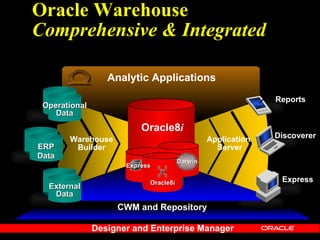
Oracle Warehouse
Comprehensive & Integrated

                  Analytic Applications
                                                              Reports
 Operational
    Data
                          Oracle8i
       Warehouse                                Application   Discoverer
ERP     Builder                                   Server
Data
                                       Darwin
                      Express

                            Oracle8i                           Express
  External
   Data
                    CWM and Repository

               Designer and Enterprise Manager
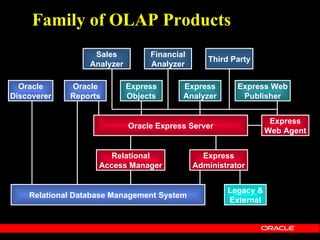
Family of OLAP Products
                   Sales          Financial
                                                 Third Party
                  Analyzer        Analyzer

  Oracle     Oracle          Express      Express        Express Web
Discoverer   Reports         Objects      Analyzer        Publisher


                                                                  Express
                             Oracle Express Server
                                                                 Web Agent


                      Relational                Express
                    Access Manager            Administrator


                                                      Legacy &
    Relational Database Management System
                                                      External
Financial Analysis


     Oracle Systems
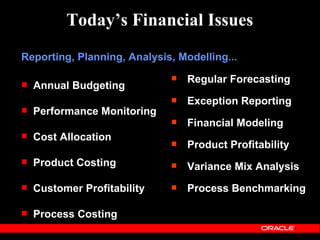
Today’s Financial Issues
Reporting, Planning, Analysis, Modelling...
                                Regular Forecasting
   Annual Budgeting
                                Exception Reporting
   Performance Monitoring
                                Financial Modeling
   Cost Allocation
                                Product Profitability
   Product Costing             Variance Mix Analysis
   Customer Profitability      Process Benchmarking

   Process Costing
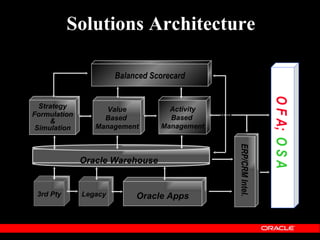
Solutions Architecture

                       Balanced Scorecard


                                                                O F A; O S A
  Strategy          Value           Activity
Formulation                         Based
     &             Based
 Simulation      Management       Management


                                               ERP/CRM Intel.
              Oracle Warehouse


 3rd Pty      Legacy        Oracle Apps
What is Oracle Financial Analyzer
Financial Analyzer is a distributed application for
   financial reporting, analysis, budgeting, and
    planning. By integrating a central source of
management data with powerful analytical tools,
 the system enables organizations to meet their
            critical financial objectives :


  control costs, analyze performance, evaluate
  opportunities, and formulate future direction.
Basic Overview

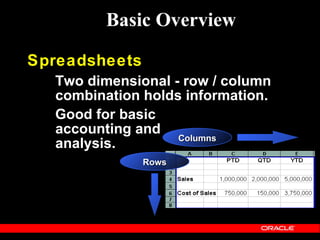
Spreadsheets
  Two dimensional - row / column
  combination holds information.
  Good for basic
  accounting and
                   Columns
  analysis.
               Rows
Basic Overview

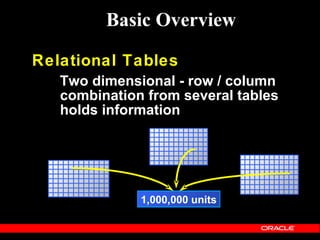
Relational Tables
   Two dimensional - row / column
   combination from several tables
   holds information


              1,000,000 units
Basic Overview

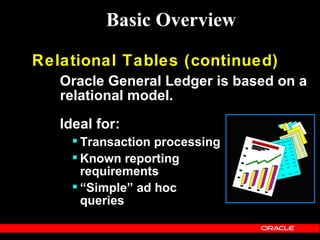
Relational Tables (continued)
   Oracle General Ledger is based on a
   relational model.

   Ideal for:
      Transaction processing
      Known reporting
       requirements
      “Simple” ad hoc
       queries
OFA Overview

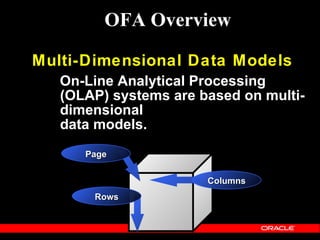
Multi-Dimensional Data Models
   On-Line Analytical Processing
   (OLAP) systems are based on multi-
   dimensional
   data models.
      Page


                       Columns
       Rows
OFA Overview

 Multi-Dimensional Data Models
(cont.)
 Oracle Financial Analyzer is based
 on a multi-dimensional model.

 Ideal for:
    Dynamic on-line analysis
    Complex ad-hoc queries
    Financial modeling
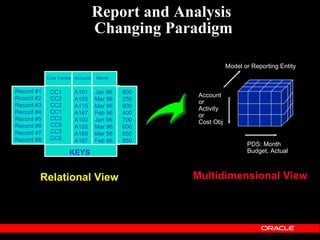
Report and Analysis
                                  Changing Paradigm

                                                             Model or Reporting Entity
            Cost Centre Account   Month


Record #1    CC1        A101      Jan 96   800
Rccord #2
                                                  Account
             CC2        A105      Mar 96   250
                                                  or
Record #3    CC2        A115      Mar 96   900    Activity
Record #4    CC1        A167      Feb 96   400    or
Record #5    CC3
             CC5
                        A100      Jan 96   700    Cost Obj       Actual
Record #6               A105      Mar 96   600
Record #7    CC3        A189      Mar 96   650
Record #8    CC5        A167      Feb 96   850
                                                                    PDS: Month
                     KEYS                                           Budget, Actual


        Relational View                          Multidimensional View
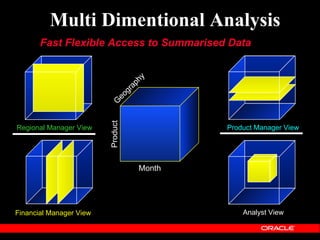
Multi Dimentional Analysis
       Fast Flexible Access to Summarised Data


                                   hy
                                ap
                              gr
                            eo
                         G
                         Product
Regional Manager View                      Product Manager View


                                   Month


Financial Manager View                         Analyst View
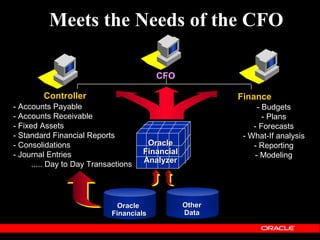
Meets the Needs of the CFO

                                          CFO

        Controller                                        Finance
- Accounts Payable                                              - Budgets
- Accounts Receivable                                             - Plans
- Fixed Assets                                                - Forecasts
- Standard Financial Reports                               - What-If analysis
- Consolidations                       Oracle                 - Reporting
- Journal Entries                     Financial                - Modeling
                                      Analyzer
      ..... Day to Day Transactions


                               Oracle             Other
                             Financials           Data
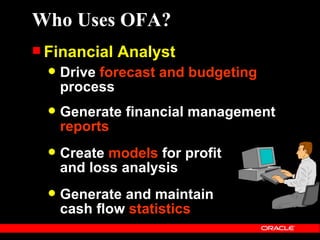
Who Uses OFA?
 Financial   Analyst
     Drive forecast and budgeting
      process
     Generate financial management
      reports
     Create models for profit
      and loss analysis
     Generate and maintain
      cash flow statistics
Who Uses OFA?
 Business    Unit Manager
    Effectively distribute information
     throughout the organization
      Low cost, web-based access

    Manage divisional or product
     performance
      Plan vs. Actual variances
      Business trends

    Business unit forecasts
Who Uses OFA?
 Chief   Financial Officer
     Examine risks and opportunities
       Performance measurement

     Planning for the future
       What-If analysis
       New opportunities
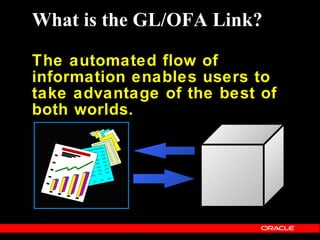
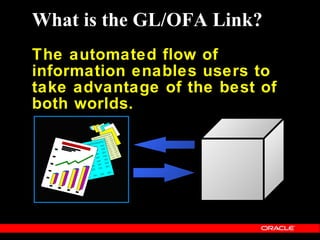
What is the GL/OFA Link?

The automated flow of
information enables users to
take advantage of the best of
both worlds.
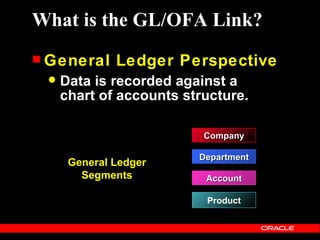
What is the GL/OFA Link?
 General     Ledger Perspective
    Data is recorded against a
     chart of accounts structure.

                          Company

                         Department
      General Ledger
        Segments          Account

                          Product
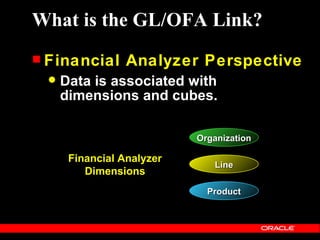
What is the GL/OFA Link?
 Financial       Analyzer Perspective
     Data is associated with
      dimensions and cubes.

                            Organization

       Financial Analyzer
                               Line
          Dimensions
                              Product
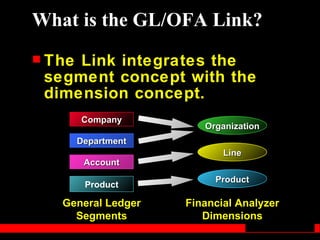
What is the GL/OFA Link?
 TheLink integrates the
 segment concept with the
 dimension concept.
        Company
                        Organization
        Department
                            Line
         Account
                          Product
         Product

   General Ledger    Financial Analyzer
     Segments           Dimensions
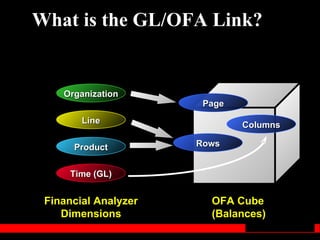
What is the GL/OFA Link?


    Organization
                       Page
        Line                  Columns

      Product         Rows


      Time (GL)


 Financial Analyzer     OFA Cube
    Dimensions          (Balances)
What is the GL/OFA Link?
The automated flow of
information enables users to
take advantage of the best of
both worlds.
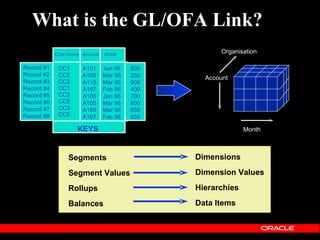
What is the GL/OFA Link?
            Cost Centre Account   Month
                                                        Organisation

Record #1    CC1        A101      Jan 96   800
Rccord #2    CC2        A105      Mar 96   250     Account
Record #3    CC2        A115      Mar 96   900
Record #4    CC1        A167      Feb 96   400
Record #5    CC3        A100      Jan 96   700
Record #6
Record #7
             CC5
             CC3
                        A105
                        A189
                                  Mar 96
                                  Mar 96
                                           600
                                           650
                                                             Actual
Record #8    CC5        A167      Feb 96   850

                     KEYS                                      Month


                 Segments                        Dimensions

                 Segment Values                  Dimension Values

                 Rollups                         Hierarchies

                 Balances                        Data Items
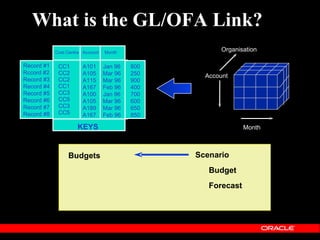
What is the GL/OFA Link?
            Cost Centre Account   Month
                                                        Organisation

Record #1    CC1        A101      Jan 96   800
Rccord #2    CC2        A105      Mar 96   250     Account
Record #3    CC2        A115      Mar 96   900
Record #4    CC1        A167      Feb 96   400
Record #5    CC3        A100      Jan 96   700
Record #6
Record #7
             CC5
             CC3
                        A105
                        A189
                                  Mar 96
                                  Mar 96
                                           600
                                           650
                                                             Actual
Record #8    CC5        A167      Feb 96   850

                     KEYS                                      Month


                 Budgets                         Scenario
                                                    Budget
                                                    Forecast
What is the GL/OFA Link?
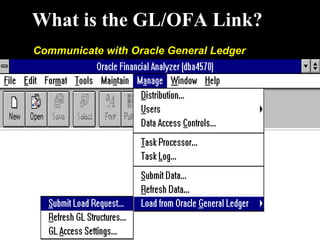
Communicate with Oracle General Ledger
What are Benefits of the Link?
 Manage     Your Business Globally
     Web deploy key information
      throughout the organization

 Make    Better Decisions
   Empower broad group of users
    to leverage OLAP analysis
   Develop better budgets with OFA
   Automatically transfer budgets back
    to GL
What are Benefits of the Link?
 Lower     Administrative Costs
     Single point of entry for data
        Consistent and reliable data for
         analysis
        Reduces maintenance
     Share structures and data
        Transfer any balance from GL to OFA
        Reduces reconciliation issues

     Automated data flow
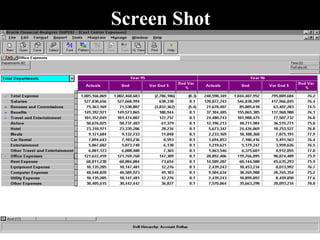
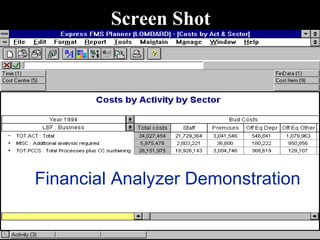
Screen Shot
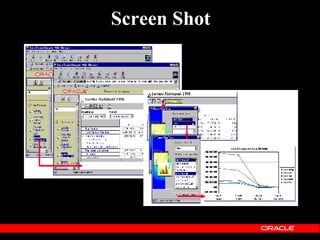
Screen Shot


Financial Analyzer Demonstration
Screen Shot
D E M O N S T R A T I O N

       Oracle
Financial Analyzer
Sales Analysis


   Oracle Systems
Oracle Sales Analyzer is...


   an enterprise wide on-line analytical
   processing application designed for
  managers and analysts to better utilize
their corporate data and data warehouses
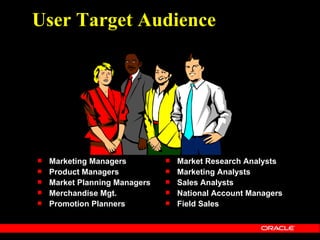
User Target Audience


   Marketing Managers            Market Research Analysts
   Product Managers              Marketing Analysts
   Market Planning Managers      Sales Analysts
   Merchandise Mgt.              National Account Managers
   Promotion Planners            Field Sales
Common Application Areas
   Competitive Analysis
    l   What are the driving factors for increasing my share?
    l   Where is my competition gaining?
   Market Analysis / Segmentation
    l   How are our Key Accounts performing vs last year?
    l   Which products aren’t being ordered by our Key
        Accounts?
   Product Mix
       What are my top 5 products in the US?
       What’s the market/cost for new products?
       Will our new product cannibalize existing ones?
   Promotional Effectiveness
    l   Can we correlate sales to promotions?
    l   Was the promotion profitable ?
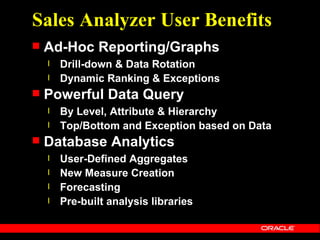
Sales Analyzer User Benefits
   Ad-Hoc Reporting/Graphs
    l   Drill-down & Data Rotation
    l   Dynamic Ranking & Exceptions
   Powerful Data Query
    l   By Level, Attribute & Hierarchy
    l   Top/Bottom and Exception based on Data
   Database Analytics
    l   User-Defined Aggregates
    l   New Measure Creation
    l   Forecasting
    l   Pre-built analysis libraries
Custom Measures
   Common Sales & Marketing
    calculated measures
       Arithmetic (+, -, /, x)
       Variance
       % Change vs Last Year / Prior Period
       % Share
       Moving Average / Maximum / Minimum /
        Total
   . . . using simple templates
Sales Analyzer IS Benefits
   Built-in Bridge to Data Mart / Data
    Warehouse
    l   (using Express Relational Access Manager)
    l   Periodic maintenance minimized
   Manages user objects
    l   DBA not necessary to create reports & graphs
   Built-in distribution routines
    l   Standard objects can be centrally distributed
    l   User to user distribution
   Data security
    l   Users can only see what they have access to.
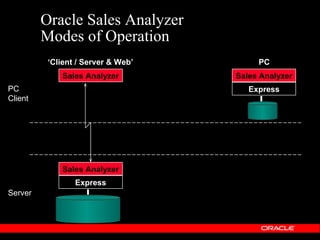
Oracle Sales Analyzer
         Modes of Operation
          ‘Client / Server & Web’        PC
             Sales Analyzer         Sales Analyzer
PC                                     Express
Client


             Sales Analyzer
                 Express
Server
A Telco Example
Churn Analysis Using OSA and DARWIN
  (Data Mining)
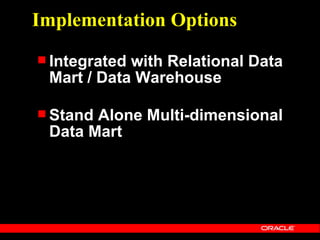
Implementation Options
 Integratedwith Relational Data
 Mart / Data Warehouse

 StandAlone Multi-dimensional
 Data Mart
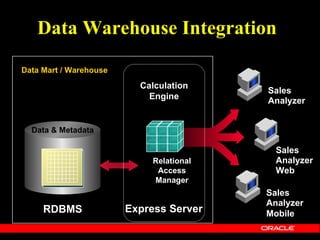
Data Warehouse Integration
Data Mart / Warehouse
                          Calculation
                                          Sales
                            Engine        Analyzer


  Data & Metadata

                                            Sales
                             Relational     Analyzer
                              Access        Web
                             Manager
                                          Sales
                                          Analyzer
     RDBMS              Express Server    Mobile
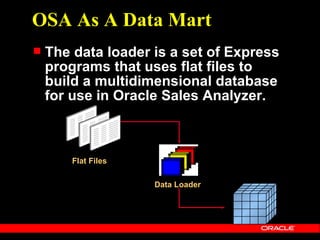
OSA As A Data Mart
   The data loader is a set of Express
    programs that uses flat files to
    build a multidimensional database
    for use in Oracle Sales Analyzer.


        Flat Files

                     Data Loader
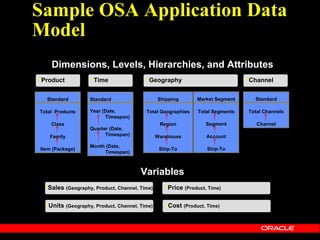
Sample OSA Application Data
Model
    Dimensions, Levels, Hierarchies, and Attributes
•Product           •Time                 •Geography                            •Channel

  Standard         Standard                    Shipping       Market Segment     Standard

Total Products     Year (Date,           Total Geographies    Total Segments   Total Channels
                         Timespan)
    Class                                       Region            Segment         Channel
                   Quarter (Date,
   Family                Timespan)             Warehouse          Account
                   Month (Date,
Item (Package)                                  Ship-To           Ship-To
                        Timespan)


                                       Variables
  •Sales (Geography, Product, Channel, Time)      •Price (Product, Time)

  •Units (Geography, Product, Channel, Time)      •Cost (Product, Time)
Oracle Sales Analyzer
Internet Computing
Oracle Sales Analyzer
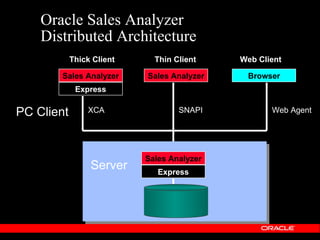
    Distributed Architecture
            Thick Client     Thin Client    Web Client

       Sales Analyzer      Sales Analyzer    Browser
             Express

PC Client       XCA                SNAPI           Web Agent


                           Sales Analyzer
                 Server       Express
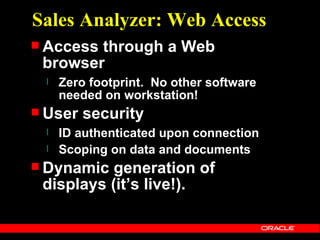
Sales Analyzer: Web Access
 Accessthrough a Web
 browser
  l   Zero footprint. No other software
      needed on workstation!
 User   security
  l   ID authenticated upon connection
  l   Scoping on data and documents
 Dynamic  generation of
 displays (it’s live!).
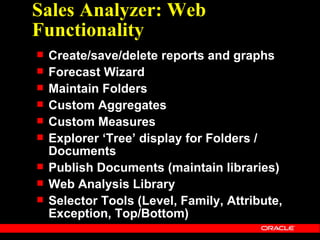
Sales Analyzer: Web
Functionality
   Create/save/delete reports and graphs
   Forecast Wizard
   Maintain Folders
   Custom Aggregates
   Custom Measures
   Explorer ‘Tree’ display for Folders /
    Documents
   Publish Documents (maintain libraries)
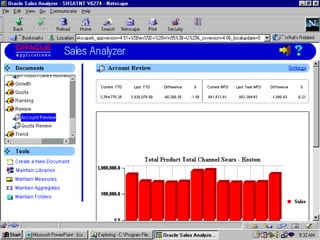
   Web Analysis Library
   Selector Tools (Level, Family, Attribute,
    Exception, Top/Bottom)
Oracle Sales Analyzer
Web Analysis Library
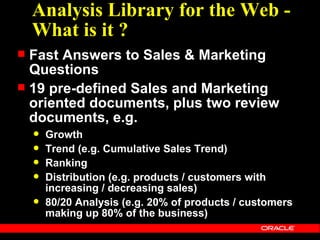
Analysis Library for the Web -
    What is it ?
 Fast Answers to Sales & Marketing
  Questions
 19 pre-defined Sales and Marketing
  oriented documents, plus two review
  documents, e.g.
       Growth
       Trend (e.g. Cumulative Sales Trend)
       Ranking
       Distribution (e.g. products / customers with
        increasing / decreasing sales)
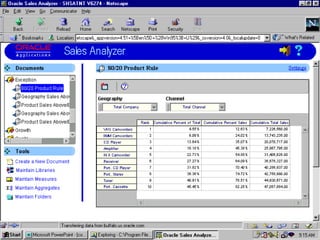
       80/20 Analysis (e.g. 20% of products / customers
        making up 80% of the business)
Analysis Library for the Web -
How do you configure it ?
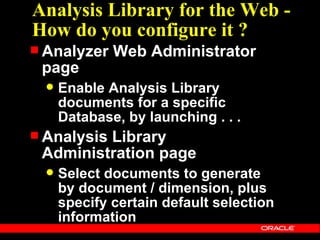
 Analyzer    Web Administrator
 page
     Enable Analysis Library
      documents for a specific
      Database, by launching . . .
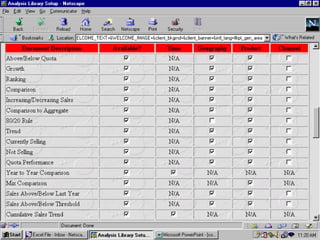
 Analysis
         Library
 Administration page
     Select documents to generate
      by document / dimension, plus
      specify certain default selection
      information
Oracle Sales Analyzer
Forecasting
Sales Analyzer Forecasting
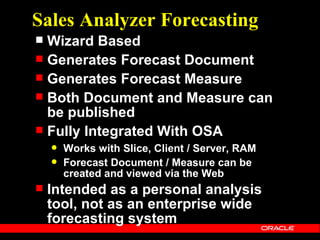
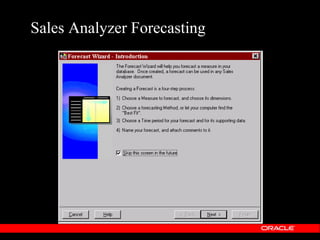
 Wizard Based
 Generates Forecast Document
 Generates Forecast Measure
 Both Document and Measure can
  be published
 Fully Integrated With OSA
       Works with Slice, Client / Server, RAM
       Forecast Document / Measure can be
        created and viewed via the Web
   Intended as a personal analysis
    tool, not as an enterprise wide
    forecasting system
Sales Analyzer Forecasting
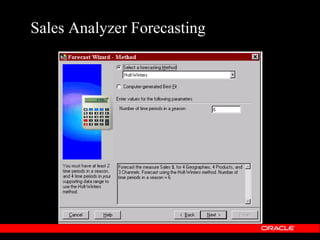
Forecasting Methods and
 Statistics
 Regression:
     Exponential Trend
     Linear Trend
 Smoothing:
   Moving Average
   Period-to-Period Percentage Change
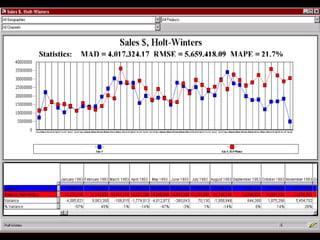
   Holt-Winters
   Single Exponential Smoothing
   Double Exponential Smoothing
   Triple Exponential Smoothing

 Best    Fit
OSA
Now
OSA 6.3
Sun and NT   Dec 1999
OSA 6.3
 100% Java Printing; no longer
 relying on the browser
  Panelling of logical pages to
   physical pages
  One or all pages
  Print preview
  Headers, footers
  Page layout, ie portrait/landscape,
   margins
  number of copies
OSA 6.3
 ImprovedExport to Excel
 (windows client)
    Export multi-page report to multiple
     worksheets
    Automatically create a table of contents,
     with a link to each worksheet
    Automatically start up excel upon export
 Performance  improvements,
 especially for RAM
 implementations
Oracle Sales Analyzer - TODAY
   Wide range of implementation options
    ...
       Scalable MOLAP databases using OSA
        Data Loaders and Express Server
       ROLAP / HOLAP access to DW / Data
        Mart via Relational Access Manager
       Distributed client / server using either
        ‘thick’ or ‘thin’ client
       Disconnected distributed access via
        slices
       Very light distributed access over
        intranet / internet via Web Browser.
D E M O N S T R A T I O N

       OFA & OSA
QUESTIONS ?
DW OSA OFA

DW OSA OFA

  • 2.
    Oracle Financial Analyzer KeyFeatures and Futures
  • 3.
    Agenda  Oracle Financial Analyzer - Today’s Financial Issues - Features : - Basic - GL and OFA Integration  Demonstrations
  • 4.
    Oracle Warehouse Comprehensive &Integrated Analytic Applications Reports Operational Data Oracle8i Warehouse Application Discoverer ERP Builder Server Data Darwin Express Oracle8i Express External Data CWM and Repository Designer and Enterprise Manager
  • 5.
    Family of OLAPProducts Sales Financial Third Party Analyzer Analyzer Oracle Oracle Express Express Express Web Discoverer Reports Objects Analyzer Publisher Express Oracle Express Server Web Agent Relational Express Access Manager Administrator Legacy & Relational Database Management System External
  • 6.
    Financial Analysis Oracle Systems
  • 7.
    Today’s Financial Issues Reporting,Planning, Analysis, Modelling...  Regular Forecasting  Annual Budgeting  Exception Reporting  Performance Monitoring  Financial Modeling  Cost Allocation  Product Profitability  Product Costing  Variance Mix Analysis  Customer Profitability  Process Benchmarking  Process Costing
  • 8.
    Solutions Architecture Balanced Scorecard O F A; O S A Strategy Value Activity Formulation Based & Based Simulation Management Management ERP/CRM Intel. Oracle Warehouse 3rd Pty Legacy Oracle Apps
  • 9.
    What is OracleFinancial Analyzer Financial Analyzer is a distributed application for financial reporting, analysis, budgeting, and planning. By integrating a central source of management data with powerful analytical tools, the system enables organizations to meet their critical financial objectives : control costs, analyze performance, evaluate opportunities, and formulate future direction.
  • 10.
    Basic Overview Spreadsheets Two dimensional - row / column combination holds information. Good for basic accounting and Columns analysis. Rows
  • 11.
    Basic Overview Relational Tables Two dimensional - row / column combination from several tables holds information 1,000,000 units
  • 12.
    Basic Overview Relational Tables(continued) Oracle General Ledger is based on a relational model. Ideal for:  Transaction processing  Known reporting requirements  “Simple” ad hoc queries
  • 13.
    OFA Overview Multi-Dimensional DataModels On-Line Analytical Processing (OLAP) systems are based on multi- dimensional data models. Page Columns Rows
  • 14.
    OFA Overview Multi-DimensionalData Models (cont.) Oracle Financial Analyzer is based on a multi-dimensional model. Ideal for:  Dynamic on-line analysis  Complex ad-hoc queries  Financial modeling
  • 15.
    Report and Analysis Changing Paradigm Model or Reporting Entity Cost Centre Account Month Record #1 CC1 A101 Jan 96 800 Rccord #2 Account CC2 A105 Mar 96 250 or Record #3 CC2 A115 Mar 96 900 Activity Record #4 CC1 A167 Feb 96 400 or Record #5 CC3 CC5 A100 Jan 96 700 Cost Obj Actual Record #6 A105 Mar 96 600 Record #7 CC3 A189 Mar 96 650 Record #8 CC5 A167 Feb 96 850 PDS: Month KEYS Budget, Actual Relational View Multidimensional View
  • 16.
    Multi Dimentional Analysis Fast Flexible Access to Summarised Data hy ap gr eo G Product Regional Manager View Product Manager View Month Financial Manager View Analyst View
  • 17.
    Meets the Needsof the CFO CFO Controller Finance - Accounts Payable - Budgets - Accounts Receivable - Plans - Fixed Assets - Forecasts - Standard Financial Reports - What-If analysis - Consolidations Oracle - Reporting - Journal Entries Financial - Modeling Analyzer ..... Day to Day Transactions Oracle Other Financials Data
  • 18.
    Who Uses OFA? Financial Analyst  Drive forecast and budgeting process  Generate financial management reports  Create models for profit and loss analysis  Generate and maintain cash flow statistics
  • 19.
    Who Uses OFA? Business Unit Manager  Effectively distribute information throughout the organization  Low cost, web-based access  Manage divisional or product performance  Plan vs. Actual variances  Business trends  Business unit forecasts
  • 20.
    Who Uses OFA? Chief Financial Officer  Examine risks and opportunities  Performance measurement  Planning for the future  What-If analysis  New opportunities
  • 21.
    What is theGL/OFA Link? The automated flow of information enables users to take advantage of the best of both worlds.
  • 22.
    What is theGL/OFA Link?  General Ledger Perspective  Data is recorded against a chart of accounts structure. Company Department General Ledger Segments Account Product
  • 23.
    What is theGL/OFA Link?  Financial Analyzer Perspective  Data is associated with dimensions and cubes. Organization Financial Analyzer Line Dimensions Product
  • 24.
    What is theGL/OFA Link?  TheLink integrates the segment concept with the dimension concept. Company Organization Department Line Account Product Product General Ledger Financial Analyzer Segments Dimensions
  • 25.
    What is theGL/OFA Link? Organization Page Line Columns Product Rows Time (GL) Financial Analyzer OFA Cube Dimensions (Balances)
  • 26.
    What is theGL/OFA Link? The automated flow of information enables users to take advantage of the best of both worlds.
  • 27.
    What is theGL/OFA Link? Cost Centre Account Month Organisation Record #1 CC1 A101 Jan 96 800 Rccord #2 CC2 A105 Mar 96 250 Account Record #3 CC2 A115 Mar 96 900 Record #4 CC1 A167 Feb 96 400 Record #5 CC3 A100 Jan 96 700 Record #6 Record #7 CC5 CC3 A105 A189 Mar 96 Mar 96 600 650 Actual Record #8 CC5 A167 Feb 96 850 KEYS Month Segments Dimensions Segment Values Dimension Values Rollups Hierarchies Balances Data Items
  • 28.
    What is theGL/OFA Link? Cost Centre Account Month Organisation Record #1 CC1 A101 Jan 96 800 Rccord #2 CC2 A105 Mar 96 250 Account Record #3 CC2 A115 Mar 96 900 Record #4 CC1 A167 Feb 96 400 Record #5 CC3 A100 Jan 96 700 Record #6 Record #7 CC5 CC3 A105 A189 Mar 96 Mar 96 600 650 Actual Record #8 CC5 A167 Feb 96 850 KEYS Month Budgets Scenario Budget Forecast
  • 29.
    What is theGL/OFA Link? Communicate with Oracle General Ledger
  • 30.
    What are Benefitsof the Link?  Manage Your Business Globally  Web deploy key information throughout the organization  Make Better Decisions  Empower broad group of users to leverage OLAP analysis  Develop better budgets with OFA  Automatically transfer budgets back to GL
  • 31.
    What are Benefitsof the Link?  Lower Administrative Costs  Single point of entry for data  Consistent and reliable data for analysis  Reduces maintenance  Share structures and data  Transfer any balance from GL to OFA  Reduces reconciliation issues  Automated data flow
  • 32.
  • 33.
  • 34.
  • 35.
    D E MO N S T R A T I O N Oracle Financial Analyzer
  • 36.
    Sales Analysis Oracle Systems
  • 37.
    Oracle Sales Analyzeris... an enterprise wide on-line analytical processing application designed for managers and analysts to better utilize their corporate data and data warehouses
  • 38.
    User Target Audience  Marketing Managers  Market Research Analysts  Product Managers  Marketing Analysts  Market Planning Managers  Sales Analysts  Merchandise Mgt.  National Account Managers  Promotion Planners  Field Sales
  • 39.
    Common Application Areas  Competitive Analysis l What are the driving factors for increasing my share? l Where is my competition gaining?  Market Analysis / Segmentation l How are our Key Accounts performing vs last year? l Which products aren’t being ordered by our Key Accounts?  Product Mix  What are my top 5 products in the US?  What’s the market/cost for new products?  Will our new product cannibalize existing ones?  Promotional Effectiveness l Can we correlate sales to promotions? l Was the promotion profitable ?
  • 40.
    Sales Analyzer UserBenefits  Ad-Hoc Reporting/Graphs l Drill-down & Data Rotation l Dynamic Ranking & Exceptions  Powerful Data Query l By Level, Attribute & Hierarchy l Top/Bottom and Exception based on Data  Database Analytics l User-Defined Aggregates l New Measure Creation l Forecasting l Pre-built analysis libraries
  • 41.
    Custom Measures  Common Sales & Marketing calculated measures  Arithmetic (+, -, /, x)  Variance  % Change vs Last Year / Prior Period  % Share  Moving Average / Maximum / Minimum / Total  . . . using simple templates
  • 42.
    Sales Analyzer ISBenefits  Built-in Bridge to Data Mart / Data Warehouse l (using Express Relational Access Manager) l Periodic maintenance minimized  Manages user objects l DBA not necessary to create reports & graphs  Built-in distribution routines l Standard objects can be centrally distributed l User to user distribution  Data security l Users can only see what they have access to.
  • 43.
    Oracle Sales Analyzer Modes of Operation ‘Client / Server & Web’ PC Sales Analyzer Sales Analyzer PC Express Client Sales Analyzer Express Server
  • 44.
    A Telco Example ChurnAnalysis Using OSA and DARWIN (Data Mining)
  • 45.
    Implementation Options  IntegratedwithRelational Data Mart / Data Warehouse  StandAlone Multi-dimensional Data Mart
  • 46.
    Data Warehouse Integration DataMart / Warehouse Calculation Sales Engine Analyzer Data & Metadata Sales Relational Analyzer Access Web Manager Sales Analyzer RDBMS Express Server Mobile
  • 47.
    OSA As AData Mart  The data loader is a set of Express programs that uses flat files to build a multidimensional database for use in Oracle Sales Analyzer. Flat Files Data Loader
  • 48.
    Sample OSA ApplicationData Model Dimensions, Levels, Hierarchies, and Attributes •Product •Time •Geography •Channel Standard Standard Shipping Market Segment Standard Total Products Year (Date, Total Geographies Total Segments Total Channels Timespan) Class Region Segment Channel Quarter (Date, Family Timespan) Warehouse Account Month (Date, Item (Package) Ship-To Ship-To Timespan) Variables •Sales (Geography, Product, Channel, Time) •Price (Product, Time) •Units (Geography, Product, Channel, Time) •Cost (Product, Time)
  • 49.
  • 50.
    Oracle Sales Analyzer Distributed Architecture Thick Client Thin Client Web Client Sales Analyzer Sales Analyzer Browser Express PC Client XCA SNAPI Web Agent Sales Analyzer Server Express
  • 52.
    Sales Analyzer: WebAccess  Accessthrough a Web browser l Zero footprint. No other software needed on workstation!  User security l ID authenticated upon connection l Scoping on data and documents  Dynamic generation of displays (it’s live!).
  • 53.
    Sales Analyzer: Web Functionality  Create/save/delete reports and graphs  Forecast Wizard  Maintain Folders  Custom Aggregates  Custom Measures  Explorer ‘Tree’ display for Folders / Documents  Publish Documents (maintain libraries)  Web Analysis Library  Selector Tools (Level, Family, Attribute, Exception, Top/Bottom)
  • 54.
    Oracle Sales Analyzer WebAnalysis Library
  • 55.
    Analysis Library forthe Web - What is it ?  Fast Answers to Sales & Marketing Questions  19 pre-defined Sales and Marketing oriented documents, plus two review documents, e.g.  Growth  Trend (e.g. Cumulative Sales Trend)  Ranking  Distribution (e.g. products / customers with increasing / decreasing sales)  80/20 Analysis (e.g. 20% of products / customers making up 80% of the business)
  • 58.
    Analysis Library forthe Web - How do you configure it ?  Analyzer Web Administrator page  Enable Analysis Library documents for a specific Database, by launching . . .  Analysis Library Administration page  Select documents to generate by document / dimension, plus specify certain default selection information
  • 60.
  • 61.
    Sales Analyzer Forecasting Wizard Based  Generates Forecast Document  Generates Forecast Measure  Both Document and Measure can be published  Fully Integrated With OSA  Works with Slice, Client / Server, RAM  Forecast Document / Measure can be created and viewed via the Web  Intended as a personal analysis tool, not as an enterprise wide forecasting system
  • 62.
  • 63.
  • 65.
    Forecasting Methods and Statistics  Regression:  Exponential Trend  Linear Trend  Smoothing:  Moving Average  Period-to-Period Percentage Change  Holt-Winters  Single Exponential Smoothing  Double Exponential Smoothing  Triple Exponential Smoothing  Best Fit
  • 66.
  • 67.
    OSA 6.3 Sun andNT Dec 1999
  • 68.
    OSA 6.3  100%Java Printing; no longer relying on the browser  Panelling of logical pages to physical pages  One or all pages  Print preview  Headers, footers  Page layout, ie portrait/landscape, margins  number of copies
  • 69.
    OSA 6.3  ImprovedExportto Excel (windows client)  Export multi-page report to multiple worksheets  Automatically create a table of contents, with a link to each worksheet  Automatically start up excel upon export  Performance improvements, especially for RAM implementations
  • 70.
    Oracle Sales Analyzer- TODAY  Wide range of implementation options ...  Scalable MOLAP databases using OSA Data Loaders and Express Server  ROLAP / HOLAP access to DW / Data Mart via Relational Access Manager  Distributed client / server using either ‘thick’ or ‘thin’ client  Disconnected distributed access via slices  Very light distributed access over intranet / internet via Web Browser.
  • 71.
    D E MO N S T R A T I O N OFA & OSA
  • 72.

Editor's Notes

  • #4 The benefits of Sales Analyzer from a users’ perspective are many. Sales Analyzer provides the user with the ability to analyze their information in a completely ad-hoc way. We provide data rotation and drill-down mechanism. In addition to that, knowing that a lot of marketing and sales analysis is exception based, Sales Analyzer provides a special report type just for Exceptions and rankings. Sales Analyzer also provides the user with very powerful data query and analysis functions. A user can query and drill into the data by levels of product (i.e., I want to see my product families), by attributes (I want to see only my customers in the Manufacturing industry), or by hierarchy (show me my Geographical rollups as opposed to my sales rollups). Additionally, the user can sub-set their selections based on the data (give me all my customers who have lost market share from last year). The users are also empowered to create their own views and ways to analyze the data. IS can never (at least as far as I know) predict all of the ways users will want to aggregate or view their data. Sales Analyzer provides a way for the user to create their own groupings. I want to group all the stores that I am promoting product x, y, and z and analyze those stores as one. The other tool the user has access to is one which allows them to create their own measures based on the data and dimensions which are in the database. A user can create a % Chg from Yr Ago measure or a moving average or total. Tons of power to the users (which can be cut back if desired).
  • #5 7 11 In addition to being integrated with one another, Oracle's BI tools are also integrated parts of Oracle's total data warehouse solution. We're focusing today on the front end BI capabilities, but the Oracle Warehouse also includes tools for defining and building a warehouse or data mart, mapping to various data sources, loading data into the warehouse, and managing metadata at each level. Oracle 8i obviously provides a powerful platform for data warehousing--and I'll talk a bit more about how our BI tools leverage the features of 8i--but the Oracle Warehouse approach also supports other data structures such as Express multidimensional OLAP cubes and data in Oracle's Darwin data mining engine. In addition to providing the various components for customers to assemble their own solutions, Oracle offers a number of analytic applications that package various pieces of this solution.
  • #8 OFA supports a full range of financial mangement applications. Organisations / Finance can address their current top issue - may be the annual budgeting process, and then move on to address strategic opportunities like Profit Management & ABC. The key is its the same single system, same skills. Integrated strategic financial management not ad hoc, haphazard, individual project based financial mangement. Investment in the future. So what’s different about OFA?
  • #28 Actual financial data is the starting point for the financial management process. To ensure integrity, Oracle Financial Analyzer can load data from external sources, typically a general ledger. Translating the data stored in the general ledger from a relational view to a multidimensional view is an important step in providing data optimized for query and analysis. Where an Oracle general Ledger is the source, the Oracle GL DBA has specific functionality in the GL to mapp the data struactures. The mapping is achieved by filling in simple tables as part of the a pre-defined link capability. An example would be that Segments, Company / Cost Centre could be mapped onto one dimension - Organisation. The hierarchies defined over the two GL segments would be intelligently combined to generate an Organisation hierarchy in OFA. This mapping at source ensures accurate data transfer and the basis for sound decision making.
  • #29 Finalised budget or plan data can be passed back to Oracle Financials or any other ledger.
  • #38 What? Sales Analyzer is an enterprise wide on-line analytical processing application designed for managers and analysts to better utilize either corporate data and data warehouse. It is used in industries as varied as pharmaceutical to manufacturing to oil & gas to telecommunications I think we can all agree that to be successful today, we can no longer rely on paper reports and/or simple query tools. We have to be able to make decisions based on knowledge as opposed to Information or intuition. We need the power of an on-line analytical processing system for the entire enterprise.
  • #39 WHO? Within these companies, who are the users? Well, as you can see, the users are generally marketing or sales based analysts. People like product managers, marketing analysts and researchers and sales analysts. As I said earlier, Sales Analyzer is used by a broad base of marketing and sales analysts and professionals.
  • #40 The benefits of Sales Analyzer from a users’ perspective are many. Sales Analyzer provides the user with the ability to analyze their information in a completely ad-hoc way. We provide data rotation and drill-down mechanism. In addition to that, knowing that a lot of marketing and sales analysis is exception based, Sales Analyzer provides a special report type just for Exceptions and rankings. Sales Analyzer also provides the user with very powerful data query and analysis functions. A user can query and drill into the data by levels of product (i.e., I want to see my product families), by attributes (I want to see only my customers in the Manufacturing industry), or by hierarchy (show me my Geographical rollups as opposed to my sales rollups). Additionally, the user can sub-set their selections based on the data (give me all my customers who have lost market share from last year). The users are also empowered to create their own views and ways to analyze the data. IS can never (at least as far as I know) predict all of the ways users will want to aggregate or view their data. Sales Analyzer provides a way for the user to create their own groupings. I want to group all the stores that I am promoting product x, y, and z and analyze those stores as one. The other tool the user has access to is one which allows them to create their own measures based on the data and dimensions which are in the database. A user can create a % Chg from Yr Ago measure or a moving average or total. Tons of power to the users (which can be cut back if desired).
  • #41 The benefits of Sales Analyzer from a users’ perspective are many. Sales Analyzer provides the user with the ability to analyze their information in a completely ad-hoc way. We provide data rotation and drill-down mechanism. In addition to that, knowing that a lot of marketing and sales analysis is exception based, Sales Analyzer provides a special report type just for Exceptions and rankings. Sales Analyzer also provides the user with very powerful data query and analysis functions. A user can query and drill into the data by levels of product (i.e., I want to see my product families), by attributes (I want to see only my customers in the Manufacturing industry), or by hierarchy (show me my Geographical rollups as opposed to my sales rollups). Additionally, the user can sub-set their selections based on the data (give me all my customers who have lost market share from last year). The users are also empowered to create their own views and ways to analyze the data. IS can never (at least as far as I know) predict all of the ways users will want to aggregate or view their data. Sales Analyzer provides a way for the user to create their own groupings. I want to group all the stores that I am promoting product x, y, and z and analyze those stores as one. The other tool the user has access to is one which allows them to create their own measures based on the data and dimensions which are in the database. A user can create a % Chg from Yr Ago measure or a moving average or total. Tons of power to the users (which can be cut back if desired).
  • #42 The benefits of Sales Analyzer from a users’ perspective are many. Sales Analyzer provides the user with the ability to analyze their information in a completely ad-hoc way. We provide data rotation and drill-down mechanism. In addition to that, knowing that a lot of marketing and sales analysis is exception based, Sales Analyzer provides a special report type just for Exceptions and rankings. Sales Analyzer also provides the user with very powerful data query and analysis functions. A user can query and drill into the data by levels of product (i.e., I want to see my product families), by attributes (I want to see only my customers in the Manufacturing industry), or by hierarchy (show me my Geographical rollups as opposed to my sales rollups). Additionally, the user can sub-set their selections based on the data (give me all my customers who have lost market share from last year). The users are also empowered to create their own views and ways to analyze the data. IS can never (at least as far as I know) predict all of the ways users will want to aggregate or view their data. Sales Analyzer provides a way for the user to create their own groupings. I want to group all the stores that I am promoting product x, y, and z and analyze those stores as one. The other tool the user has access to is one which allows them to create their own measures based on the data and dimensions which are in the database. A user can create a % Chg from Yr Ago measure or a moving average or total. Tons of power to the users (which can be cut back if desired).
  • #43 If you thought the users have it easy, let me describe to you some of the benefits from the IS standpoint. Firstly, Sales Analyzer is an application developed and supported by Oracle. This gets you the support, documentation, maintenance, and the thousands for highly trained consultants we have in the field. Secondly, an option with Sales Analyzer is what is called the SQL Bridge. The SQL bridge is a built-in link between Oracle (or any RDBMS) and Sales Analyzer which allows users to access (t run-time when they request it), Oracle data. No more specific IS requests for reports for each user. Thirdly, the user is empowered to create their own “objects” to do their analytics. This means that they can create their own reports, graphs, measures and custom aggregations of the data. Not only can the users create their own objects, but they can distribute them to other users and the DBA as well for more enterprise wide use. The DBA can additionally create “standard” objects which everyone has access to. Security is also a feature of Sales Analyzer. The DBA can (but is not required) to set up users’ and determine what data/information each user or group of users can access. Now, why do we view an OLAP application such as Sales Analyzer is necessary in todays market?
  • #46 The benefits of Sales Analyzer from a users’ perspective are many. Sales Analyzer provides the user with the ability to analyze their information in a completely ad-hoc way. We provide data rotation and drill-down mechanism. In addition to that, knowing that a lot of marketing and sales analysis is exception based, Sales Analyzer provides a special report type just for Exceptions and rankings. Sales Analyzer also provides the user with very powerful data query and analysis functions. A user can query and drill into the data by levels of product (i.e., I want to see my product families), by attributes (I want to see only my customers in the Manufacturing industry), or by hierarchy (show me my Geographical rollups as opposed to my sales rollups). Additionally, the user can sub-set their selections based on the data (give me all my customers who have lost market share from last year). The users are also empowered to create their own views and ways to analyze the data. IS can never (at least as far as I know) predict all of the ways users will want to aggregate or view their data. Sales Analyzer provides a way for the user to create their own groupings. I want to group all the stores that I am promoting product x, y, and z and analyze those stores as one. The other tool the user has access to is one which allows them to create their own measures based on the data and dimensions which are in the database. A user can create a % Chg from Yr Ago measure or a moving average or total. Tons of power to the users (which can be cut back if desired).
  • #47 18 21 39 That is why Oracle has acquired and integrated the Express technology with its industry leading warehouse and data mart technology. Express is the calculation engine and multidimensional caache for analysis.
  • #49 Understanding the Sample OSA Applicition Data Model In the pictured example, there are four dimensions. Note that the lowest levels in both of the Geography hierarchies is Ship-To. The Product, Channel, and Time dimensions each have one hierarchy, the Standard hierarchy. The Geography dimension has two dimensions, the Market Segment hierarchy and the Shipping hierarchy. Each hierarchy is composed of two or more levels. The Product and Time dimensions have attributes associated with one or more levels. In the Product dimension, the Package attribute is applied to the Item level. In the Time dimension, the Date and Timespan attributes are applied to the Year, Quarter, and Month levels. There are four variables in this example. The Sales and Units variables are dimensioned by all four dimensions, while the Price and Cost variables are dimensioned only by Product and Time.