





Understanding and using JBoss
A-MQ 6.1 and client APIs
Kenneth Peeples, Technical Marketing Manager
2 RED HAT
Abstract
In a fast-paced world, you need a messaging platform that makes it easy and safe for
enterprise applications to exchange information. Red Hat® JBoss® A-MQ is a high
performance, flexible, cost-effective messaging platform that delivers information safely
and reliably with a small footprint.
Red Hat JBoss A-MQ clients can connect to a broker using a variety of transports and
APIs. The connections are highly configurable and can be tuned for the majority of use
cases. Multi-protocol support (JMS 1.1, TCP, SSL, STOMP, NMS) and multi-client support
(Java, C, C++) enables real-time messaging with all enterprise assets.
Join this webinar to explore:
 An introduction to JBoss A-MQ 6.1.
 An introduction to JBoss client APIs.
 A demo using the different client APIs, including the Qpid JMS client API.
JBOSS A-MQ 6.1 INTRODUCTION
4 RED HAT
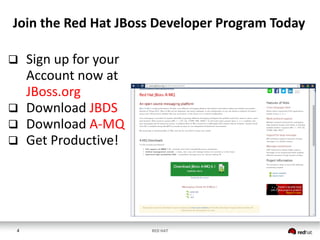
Join the Red Hat JBoss Developer Program Today
 Sign up for your
Account now at
JBoss.org
 Download JBDS
 Download A-MQ
 Get Productive!
5 RED HAT
Developer Program Benefits
 Access to Enterprise Binaries
 Access to Enterprise Developer Forums
 Exclusive Enterprise Content
6 RED HAT
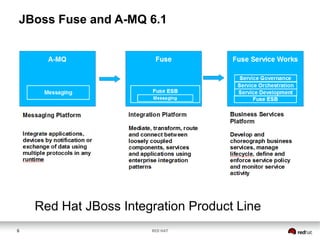
JBoss Fuse and A-MQ 6.1
Red Hat JBoss Integration Product Line
7 RED HAT
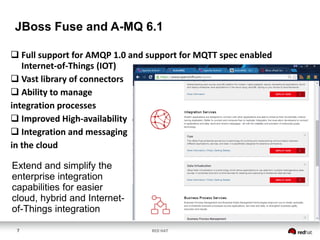
JBoss Fuse and A-MQ 6.1
 Full support for AMQP 1.0 and support for MQTT spec enabled
Internet-of-Things (IOT)
 Vast library of connectors
 Ability to manage
integration processes
 Improved High-availability
 Integration and messaging
in the cloud
Extend and simplify the
enterprise integration
capabilities for easier
cloud, hybrid and Internet-
of-Things integration
8 RED HAT
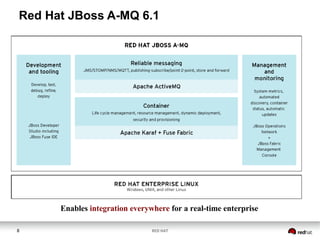
Red Hat JBoss A-MQ 6.1
Enables integration everywhere for a real-time enterprise
9 RED HAT
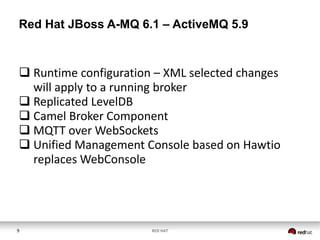
Red Hat JBoss A-MQ 6.1 – ActiveMQ 5.9
 Runtime configuration – XML selected changes
will apply to a running broker
 Replicated LevelDB
 Camel Broker Component
 MQTT over WebSockets
 Unified Management Console based on Hawtio
replaces WebConsole
10 RED HAT
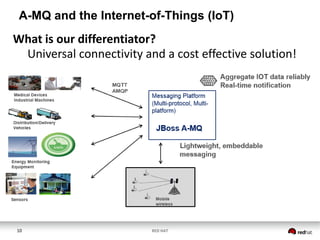
A-MQ and the Internet-of-Things (IoT)
What is our differentiator?
Universal connectivity and a cost effective solution!
11 RED HAT
JBOSS A-MQ 6.1 CLIENT
CONNECTIVITY INTRODUCTION
13 RED HAT
JBoss A-MQ - Transports and Protocols
 OpenWire (Default) over TCP/SSL/HTTP(S)/UDP/IP
 STOMP
 Multicast
 MQTT
 AMQP
 REST
 Ajax
 VM Transport
 Dynamic Discovery
 Fanout Protocol
 Peer Protocol
14 RED HAT
JBoss A-MQ – Client APIs
 Native JMS
 Native C++
 Native .NET
 Qpid JMS
 REST
15 RED HAT
JBoss A-MQ - Configuration
There are two types of properties that effects client
connections:
 transport
 destination
16 RED HAT
JBoss A-MQ – Native ActiveMQ Client APIs
Establishing a connection between a messaging client and a
message broker:
1. Get an instance of the connection factory.
2. Use the connection factory to create a connection.
3. Get an instance of the destination used for sending or
receiving messages.
4. Use the connection to create a session.
5. Use the session to create the message consumer or
message producer.
6. Start the connection.
17 RED HAT
JBoss A-MQ – Native Client APIs
 Native JMS Client API - standard JMS APIs to interact
with the message broker
 Native C++ Client API – JMS-like API for C++ for
interfacing with Message Brokers
 Native .NET Client API - provides a standard .NET
interface to Messaging Systems through a JMS style
API
18 RED HAT
JBoss A-MQ – Qpid JMS Client API
The Advanced Message Queuing Protocol (AMQP) is an open standard
messaging system
The key features of AMQP are:
 Open standard (defined by the OASIS AMQP Technical Committee)
 Defines a wire protocol
 Defines APIs for multiple languages (C++, Java)
 Interoperability between different AMQP implementations
19 RED HAT
JBoss A-MQ – REST API
The REST API provides a simple HTTP-based protocol that
enables you to interact with the message broker using HTML
forms and DHTML scripts.
The following servlets implement REST API:
 message servlet
 queueBrowse servlet
20 RED HAT
JBoss A-MQ – Intra-JVM Connections
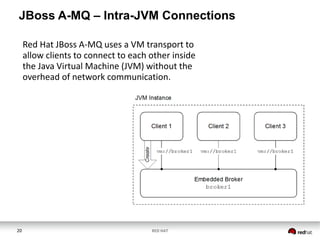
Red Hat JBoss A-MQ uses a VM transport to
allow clients to connect to each other inside
the Java Virtual Machine (JVM) without the
overhead of network communication.
DEMONSTRATIONS
22 RED HAT
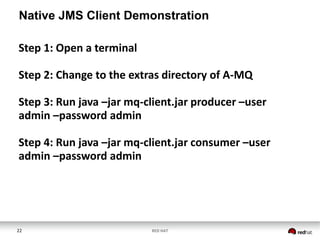
Native JMS Client Demonstration
Step 1: Open a terminal
Step 2: Change to the extras directory of A-MQ
Step 3: Run java –jar mq-client.jar producer –user
admin –password admin
Step 4: Run java –jar mq-client.jar consumer –user
admin –password admin
23 RED HAT
INSERT SCREEN SHARE
24 RED HAT
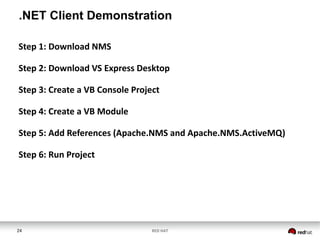
.NET Client Demonstration
Step 1: Download NMS
Step 2: Download VS Express Desktop
Step 3: Create a VB Console Project
Step 4: Create a VB Module
Step 5: Add References (Apache.NMS and Apache.NMS.ActiveMQ)
Step 6: Run Project
25 RED HAT
INSERT SCREEN SHARE
26 RED HAT
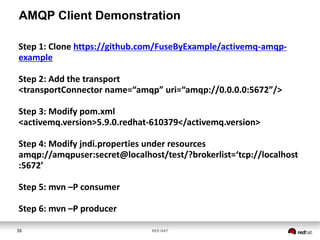
AMQP Client Demonstration
Step 1: Clone https://github.com/FuseByExample/activemq-amqp-
example
Step 2: Add the transport
<transportConnector name=“amqp” uri=“amqp://0.0.0.0:5672”/>
Step 3: Modify pom.xml
<activemq.version>5.9.0.redhat-610379</activemq.version>
Step 4: Modify jndi.properties under resources
amqp://amqpuser:secret@localhost/test/?brokerlist=‘tcp://localhost
:5672’
Step 5: mvn –P consumer
Step 6: mvn –P producer
27 RED HAT
INSERT SCREEN SHARE
Q&A
Try JBoss A-MQ – jboss.org/products/amq

Understanding and Using Client JBoss A-MQ APIs

  • 1.
    Understanding and usingJBoss A-MQ 6.1 and client APIs Kenneth Peeples, Technical Marketing Manager
  • 2.
    2 RED HAT Abstract Ina fast-paced world, you need a messaging platform that makes it easy and safe for enterprise applications to exchange information. Red Hat® JBoss® A-MQ is a high performance, flexible, cost-effective messaging platform that delivers information safely and reliably with a small footprint. Red Hat JBoss A-MQ clients can connect to a broker using a variety of transports and APIs. The connections are highly configurable and can be tuned for the majority of use cases. Multi-protocol support (JMS 1.1, TCP, SSL, STOMP, NMS) and multi-client support (Java, C, C++) enables real-time messaging with all enterprise assets. Join this webinar to explore:  An introduction to JBoss A-MQ 6.1.  An introduction to JBoss client APIs.  A demo using the different client APIs, including the Qpid JMS client API.
  • 3.
    JBOSS A-MQ 6.1INTRODUCTION
  • 4.
    4 RED HAT Jointhe Red Hat JBoss Developer Program Today  Sign up for your Account now at JBoss.org  Download JBDS  Download A-MQ  Get Productive!
  • 5.
    5 RED HAT DeveloperProgram Benefits  Access to Enterprise Binaries  Access to Enterprise Developer Forums  Exclusive Enterprise Content
  • 6.
    6 RED HAT JBossFuse and A-MQ 6.1 Red Hat JBoss Integration Product Line
  • 7.
    7 RED HAT JBossFuse and A-MQ 6.1  Full support for AMQP 1.0 and support for MQTT spec enabled Internet-of-Things (IOT)  Vast library of connectors  Ability to manage integration processes  Improved High-availability  Integration and messaging in the cloud Extend and simplify the enterprise integration capabilities for easier cloud, hybrid and Internet- of-Things integration
  • 8.
    8 RED HAT RedHat JBoss A-MQ 6.1 Enables integration everywhere for a real-time enterprise
  • 9.
    9 RED HAT RedHat JBoss A-MQ 6.1 – ActiveMQ 5.9  Runtime configuration – XML selected changes will apply to a running broker  Replicated LevelDB  Camel Broker Component  MQTT over WebSockets  Unified Management Console based on Hawtio replaces WebConsole
  • 10.
    10 RED HAT A-MQand the Internet-of-Things (IoT) What is our differentiator? Universal connectivity and a cost effective solution!
  • 11.
  • 12.
    JBOSS A-MQ 6.1CLIENT CONNECTIVITY INTRODUCTION
  • 13.
    13 RED HAT JBossA-MQ - Transports and Protocols  OpenWire (Default) over TCP/SSL/HTTP(S)/UDP/IP  STOMP  Multicast  MQTT  AMQP  REST  Ajax  VM Transport  Dynamic Discovery  Fanout Protocol  Peer Protocol
  • 14.
    14 RED HAT JBossA-MQ – Client APIs  Native JMS  Native C++  Native .NET  Qpid JMS  REST
  • 15.
    15 RED HAT JBossA-MQ - Configuration There are two types of properties that effects client connections:  transport  destination
  • 16.
    16 RED HAT JBossA-MQ – Native ActiveMQ Client APIs Establishing a connection between a messaging client and a message broker: 1. Get an instance of the connection factory. 2. Use the connection factory to create a connection. 3. Get an instance of the destination used for sending or receiving messages. 4. Use the connection to create a session. 5. Use the session to create the message consumer or message producer. 6. Start the connection.
  • 17.
    17 RED HAT JBossA-MQ – Native Client APIs  Native JMS Client API - standard JMS APIs to interact with the message broker  Native C++ Client API – JMS-like API for C++ for interfacing with Message Brokers  Native .NET Client API - provides a standard .NET interface to Messaging Systems through a JMS style API
  • 18.
    18 RED HAT JBossA-MQ – Qpid JMS Client API The Advanced Message Queuing Protocol (AMQP) is an open standard messaging system The key features of AMQP are:  Open standard (defined by the OASIS AMQP Technical Committee)  Defines a wire protocol  Defines APIs for multiple languages (C++, Java)  Interoperability between different AMQP implementations
  • 19.
    19 RED HAT JBossA-MQ – REST API The REST API provides a simple HTTP-based protocol that enables you to interact with the message broker using HTML forms and DHTML scripts. The following servlets implement REST API:  message servlet  queueBrowse servlet
  • 20.
    20 RED HAT JBossA-MQ – Intra-JVM Connections Red Hat JBoss A-MQ uses a VM transport to allow clients to connect to each other inside the Java Virtual Machine (JVM) without the overhead of network communication.
  • 21.
  • 22.
    22 RED HAT NativeJMS Client Demonstration Step 1: Open a terminal Step 2: Change to the extras directory of A-MQ Step 3: Run java –jar mq-client.jar producer –user admin –password admin Step 4: Run java –jar mq-client.jar consumer –user admin –password admin
  • 23.
    23 RED HAT INSERTSCREEN SHARE
  • 24.
    24 RED HAT .NETClient Demonstration Step 1: Download NMS Step 2: Download VS Express Desktop Step 3: Create a VB Console Project Step 4: Create a VB Module Step 5: Add References (Apache.NMS and Apache.NMS.ActiveMQ) Step 6: Run Project
  • 25.
    25 RED HAT INSERTSCREEN SHARE
  • 26.
    26 RED HAT AMQPClient Demonstration Step 1: Clone https://github.com/FuseByExample/activemq-amqp- example Step 2: Add the transport <transportConnector name=“amqp” uri=“amqp://0.0.0.0:5672”/> Step 3: Modify pom.xml <activemq.version>5.9.0.redhat-610379</activemq.version> Step 4: Modify jndi.properties under resources amqp://amqpuser:secret@localhost/test/?brokerlist=‘tcp://localhost :5672’ Step 5: mvn –P consumer Step 6: mvn –P producer
  • 27.
    27 RED HAT INSERTSCREEN SHARE
  • 28.
    Q&A Try JBoss A-MQ– jboss.org/products/amq