Department of Computer Science (UG)
Cloud Computing
21BCA2T453
Mr. Narikamalli Yaswanth,
Assistant Professor,
Department of Computer Science,
Kristu Jayanti College (Autonomous)
Unit 2: Cloud Technologies and Concepts
Virtualization - Hypervisor, Virtual machine monitor; Types of
virtualization - Hardware, Operating system; Server virtualization;
Software defined networking, Network function virtualization; Data
Center- Components, types, Characteristics; Service level agreement;
Load balancing; Scalability and elasticity.
Virtualization
Virtualization in Cloud Computing
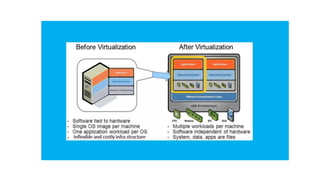
• Virtualization is the "creation of a virtual (rather than actual) version
of something, such as a server, a desktop, a storage device, an
operating system or network resources".
• In other words, Virtualization is a technique, which allows to share a
single physical instance of a resource or an application among
multiple customers and organizations.
• It does by assigning a logical name to a physical storage and providing
a pointer to that physical resource when demanded.
Virtualization in Cloud Computing
Cloud computing takes virtualization one step further:
• You don’t need to own the hardware
• Resources are rented as needed from a cloud
• Various providers allow creating virtual servers:
• Choose the OS and software each instance will have
• The chosen OS will run on a large server farm
• Can instantiate more virtual servers or shut down existing
ones within minutes
• You get billed only for what you used
Benefits of Virtualization
• Sharing of resources helps cost reduction
• Isolation: Virtual machines are isolated from each other as if
they are physically separated
• Encapsulation: Virtual machines encapsulate a complete
computing environment
• Hardware Independence: Virtual machines run independently
of underlying hardware
• Portability: Virtual machines can be migrated between
different hosts.
Hypervisor
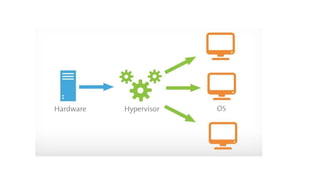
• A hypervisor is a form of virtualization software used in Cloud hosting
to divide and allocate the resources on various pieces of hardware.
• The program which provides partitioning, isolation, or abstraction is
called a virtualization hypervisor.
• The hypervisor is a hardware virtualization technique that allows
multiple guest operating systems (OS) to run on a single host system
at the same time.
• A hypervisor is sometimes also called a virtual machine
manager(VMM).
• (A hypervisor is a software that you can use to run multiple virtual
machines on a single physical machine)
Why use a hypervisor?
• Hypervisors make it possible to use more of a system’s available
resources and provide greater IT mobility since the guest VMs are
independent of the host hardware.
• This means they can be easily moved between different servers.
Because multiple virtual machines can run off of one physical server
with a hypervisor, a hypervisor reduces:
• Space
• Energy
• Maintenance requirements
Types of Hypervisor
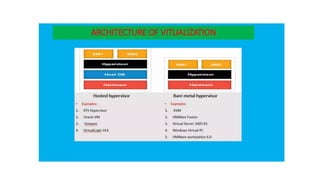
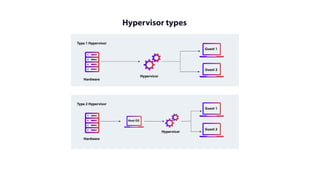
• TYPE-1 Hypervisor:
The hypervisor runs directly on the underlying host system. It is also
known as a “Native Hypervisor” or “Bare metal hypervisor”.
• It does not require any base server operating system.
• It has direct access to hardware resources.
• Examples of Type 1 hypervisors include VMware ESXi, Citrix
XenServer, and Microsoft Hyper-V hypervisor.
• TYPE-2 Hypervisor:
A Host operating system runs on the underlying host system. It is also
known as ‘Hosted Hypervisor”.
• Such kind of hypervisors doesn’t run directly over the underlying
hardware rather they run as an application in a Host system(physical
machine).
• Basically, the software is installed on an operating system.
• Hypervisor asks the operating system to make hardware calls.
• An example of a Type 2 hypervisor includes VMware Player or
Parallels Desktop. Hosted hypervisors are often found on endpoints
like PCs. The type-2 hypervisor is very useful for engineers, and
security analysts (for checking malware, or malicious source code and
newly developed applications).
• HYPERVISOR REFERENCE MODEL :
There are 3 main modules coordinates in order to emulate the underlying hardware:
• DISPATCHER:
The dispatcher behaves like the entry point of the monitor and reroutes the
instructions of the virtual machine instance to one of the other two modules.
• ALLOCATOR:
The allocator is responsible for deciding the system resources to be provided to the
virtual machine instance. It means whenever a virtual machine tries to execute an
instruction that results in changing the machine resources associated with the virtual
machine, the allocator is invoked by the dispatcher.
• INTERPRETER:
The interpreter module consists of routines. These are executed, whenever a virtual
machine executes a privileged instruction.
Benefits of hypervisors
• Speed: The hypervisors allow virtual machines to be built instantly unlike
bare-metal servers. This makes provisioning resources for complex workloads
much simpler.
• Efficiency: Hypervisors that run multiple virtual machines on the resources of
a single physical machine often allow for more effective use of a single
physical server.
• Flexibility: Since the hypervisor distinguishes the OS from the underlying
hardware, the program no longer relies on particular hardware devices or
drivers, bare-metal hypervisors enable operating systems and their related
applications to operate on a variety of hardware types.
• Portability: Multiple operating systems can run on the same physical server
thanks to hypervisors (host machine). The hypervisor's virtual machines are
portable because they are separate from the physical computer.
Department of Computer Science (UG)
Cloud Computing
21BCA2T453
Mr. Narikamalli Yaswanth,
Assistant Professor
Department of Computer Science,
Kristu Jayanti College (Autonomous)
Types of Virtualization
• Hardware Virtualization.
• Operating system Virtualization.
• Server Virtualization.
• Storage Virtualization.
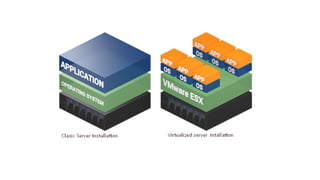
1) Hardware Virtualization
• When the virtual machine software or virtual machine manager (VMM) is
directly installed on the hardware system is known as hardware virtualization.
• The main job of hypervisor is to control and monitoring the processor, memory
and other hardware resources.
• After virtualization of hardware system we can install different operating system
on it and run different applications on those OS.
Usage:
• Hardware virtualization is mainly done for the server platforms, because
controlling virtual machines is much easier than controlling a physical server.
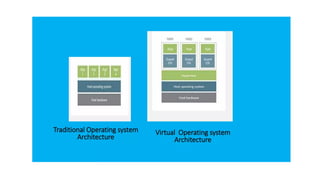
2) Operating System Virtualization:
• When the virtual machine software or virtual machine manager (VMM)
is installed on the Host operating system instead of directly on the
hardware system is known as operating system virtualization.
Usage:
• Operating testing the applications on different platforms of OSng
System Virtualization is mainly used for.
3) Server Virtualization:
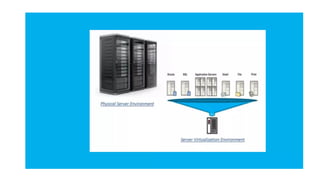
• When the virtual machine software or virtual machine manager (VMM)
is directly installed on the Server system is known as server
virtualization.
Usage:
• Server virtualization is done because a single physical server can be
divided into multiple servers on the demand basis and for balancing the
load.
4) Storage Virtualization:
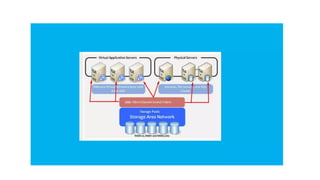
• Storage virtualization is the process of grouping the physical storage
from multiple network storage devices so that it looks like a single
storage device.
• Storage virtualization is also implemented by using software a
Usage:
• Storage virtualization is mainly done for back-up and recovery purposes
What is Software Defined Networking (SDN)?
• Software-defined networking (SDN) is a modern approach to managing computer
networks.
• Traditionally, networks are controlled by hardware devices like routers and switches,
which can be complex and hard to configure.
• SDN changes this by separating the control of the network (the decisions about where
data goes) from the actual movement of data.
• SDN stands for Software Defined Network which is a networking architecture approach.
It enables the control and management of the network using software applications.
• Through Software Defined Network (SDN), the networking behavior of the entire network
and its devices are programmed in a centrally controlled manner through software
applications using open APIs.
What is a Data Plane?
Data Plane: All the activities involving as well as resulting from data
packets sent by the end-user belong to this plane.
In computer networking, the data plane is the part of a network
device responsible for forwarding data packets from one interface to
another. It is also referred to as the forwarding plane or the user
plane.
This includes:
• Forwarding of packets.
• Segmentation and reassembly of data.
• Replication of packets for multicasting.
• What is a Control Plane?
• Control Plane: All activities necessary to perform data plane activities
but do not involve end-user data packets belong to this plane. In
other words, this is the brain of the network.
• In computer networking, the control plane is part of a network
device or system that is responsible for managing and controlling
the flow of network traffic.
• The activities of the control plane include:
• Making routing tables.
• Setting packet handling policies.
Why SDN is Important?
Better Network Connectivity:
SDN provides very better network connectivity for sales, services, and internal
communications. SDN also helps in faster data sharing.
Better Deployment of Applications:
Deployment of new applications, services, and many business models can be
speed up using Software Defined Networking.
Better Security:
Software-defined network provides better visibility throughout the network.
Operators can create separate zones for devices that require different levels of
security. SDN networks give more freedom to operators.
Better Control With High Speed:
Software-defined networking provides better speed than other networking types
by applying an open standard software-based controller.
Where is SDN Used?
• Enterprises use SDN, the most widely used method for application
deployment, to deploy applications faster while lowering overall
deployment and operating costs.
• SDN allows IT administrators to manage and provision network
services from a single location.
• Cloud networking software-defined uses white-box systems. Cloud
providers often use generic hardware so that the Cloud data center
can be changed and the cost of CAPEX and OPEX saved.
Components of Software Defining Networking (SDN)
The three main components that make the SDN are:
SDN Applications:
SDN Applications relay requests or networks through SDN Controller
using API.
SDN Controller:
SDN Controller collects network information from hardware and sends
this information to applications.
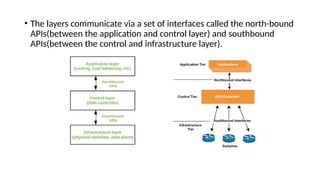
SDN Networking Devices:
SDN Network devices help in forwarding and data processing tasks.
• SDN Architecture
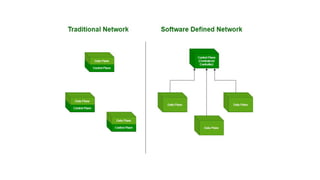
• In a traditional network, each switch has its own data plane as well as the control plane. The
control plane of various switches exchange topology information and hence construct a
forwarding table that decides where an incoming data packet has to be forwarded via the data
plane.
• Software-defined networking (SDN) is an approach via which we take the control plane away
from the switch and assign it to a centralized unit called the SDN controller. Hence, a network
administrator can shape traffic via a centralized console without having to touch the
individual switches.
• The data plane still resides in the switch and when a packet enters a switch, its forwarding
activity is decided based on the entries of flow tables, which are pre-assigned by the
controller.
• A flow table consists of match fields (like input port number and packet header) and
instructions.
• The packet is first matched against the match fields of the flow table entries. Then the
instructions of the corresponding flow entry are executed.
• The instructions can be forwarding the packet via one or multiple ports, dropping the packet,
or adding headers to the packet. If a packet doesn’t find a corresponding match in the flow
table, the switch queries the controller which sends a new flow entry to the switch.
• The switch forwards or drops the packet based on this flow entry.
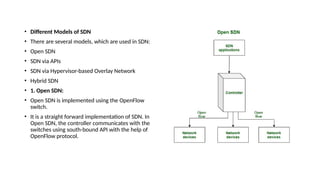
• A typical SDN architecture consists of three layers.
• Application Layer: It contains the typical network applications like
intrusion detection, firewall, and load balancing
• Control Layer: It consists of the SDN controller which acts as the brain
of the network. It also allows hardware abstraction to the applications
written on top of it.
• Infrastructure Layer: This consists of physical switches which form the
data plane and carries out the actual movement of data packets.
• The layers communicate via a set of interfaces called the north-bound
APIs(between the application and control layer) and southbound
APIs(between the control and infrastructure layer).
• Different Models of SDN
• There are several models, which are used in SDN:
• Open SDN
• SDN via APIs
• SDN via Hypervisor-based Overlay Network
• Hybrid SDN
• 1. Open SDN:
• Open SDN is implemented using the OpenFlow
switch.
• It is a straight forward implementation of SDN. In
Open SDN, the controller communicates with the
switches using south-bound API with the help of
OpenFlow protocol.
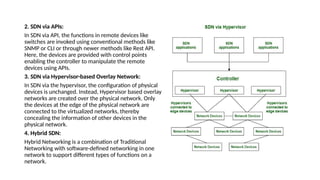
2. SDN via APIs:
In SDN via API, the functions in remote devices like
switches are invoked using conventional methods like
SNMP or CLI or through newer methods like Rest API.
Here, the devices are provided with control points
enabling the controller to manipulate the remote
devices using APIs.
3. SDN via Hypervisor-based Overlay Network:
In SDN via the hypervisor, the configuration of physical
devices is unchanged. Instead, Hypervisor based overlay
networks are created over the physical network. Only
the devices at the edge of the physical network are
connected to the virtualized networks, thereby
concealing the information of other devices in the
physical network.
4. Hybrid SDN:
Hybrid Networking is a combination of Traditional
Networking with software-defined networking in one
network to support different types of functions on a
network.
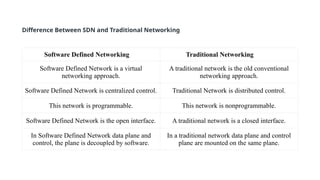
Software Defined Networking Traditional Networking
Software Defined Network is a virtual
networking approach.
A traditional network is the old conventional
networking approach.
Software Defined Network is centralized control. Traditional Network is distributed control.
This network is programmable. This network is nonprogrammable.
Software Defined Network is the open interface. A traditional network is a closed interface.
In Software Defined Network data plane and
control, the plane is decoupled by software.
In a traditional network data plane and control
plane are mounted on the same plane.
Difference Between SDN and Traditional Networking
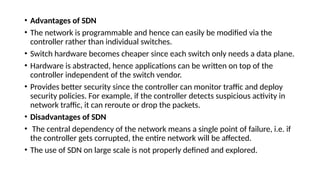
• Advantages of SDN
• The network is programmable and hence can easily be modified via the
controller rather than individual switches.
• Switch hardware becomes cheaper since each switch only needs a data plane.
• Hardware is abstracted, hence applications can be written on top of the
controller independent of the switch vendor.
• Provides better security since the controller can monitor traffic and deploy
security policies. For example, if the controller detects suspicious activity in
network traffic, it can reroute or drop the packets.
• Disadvantages of SDN
• The central dependency of the network means a single point of failure, i.e. if
the controller gets corrupted, the entire network will be affected.
• The use of SDN on large scale is not properly defined and explored.
Network Functions Virtualization
• The term “Network Functions Virtualization” (NFV) refers to the use of
virtual machines in place of physical network appliances.
• There is a requirement for a hypervisor to operate networking software
and procedures like load balancing and routing by virtual computers.
• A network functions virtualization standard was first proposed at the
OpenFlow World Congress in 2012 by the European Telecommunications
Standards Institute (ETSI).
Need of NFV
• With the help of NFV, it becomes possible to separate communication
services from specialized hardware like routers and firewalls.
• This eliminates the need for buying new hardware and network
operations can offer new services on demand. With this, it is possible to
deploy network components in a matter of hours as opposed to months
as with conventional networking.
• Furthermore, the virtualized services can run on less expensive generic
servers.
Advantages
• Lower expenses as it follows Pay as you go which implies companies only
pay for what they require.
• Less equipment as it works on virtual machines rather than actual
machines which leads to fewer appliances, which lowers operating
expenses as well.
• Scalability of network architecture is quite quick and simple using virtual
functions in NFV. As a result, it does not call for the purchase of more
hardware.
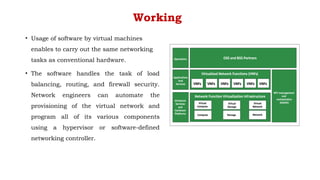
Working
• Usage of software by virtual machines
enables to carry out the same networking
tasks as conventional hardware.
• The software handles the task of load
balancing, routing, and firewall security.
Network engineers can automate the
provisioning of the virtual network and
program all of its various components
using a hypervisor or software-defined
networking controller.
Benefits of NFV
• Many service providers believe that advantages outweigh the issues of NFV.
• Traditional hardware-based networks are time-consuming as these require
network administrators to buy specialized hardware units, manually configure
them, then join them to form a network. For this skilled or well-equipped
worker is required.
• It costs less as it works under the management of a hypervisor, which is
significantly less expensive than buying specialized hardware that serves the
same purpose.
• Easy to configure and administer the network because of a virtualized
network. As a result, network capabilities may be updated or added instantly.
NFV Architecture:
An individual proprietary hardware component, such as a router, switch, gateway, firewall, load
balancer, or intrusion detection system, performs a specific networking function in a typical
network architecture. A virtualized network substitutes software programs that operate on virtual
machines for these pieces of hardware to carry out networking operations.
• Three components make up an NFV architecture:
• Centralized virtual network infrastructure: The foundation of an NFV infrastructure can be
either a platform for managing containers or a hypervisor that abstracts the resources for
computation, storage, and networking.
• Applications: Software delivers many forms of network functionality by substituting for the
hardware elements of a conventional network design (virtualized network functions).
• Framework: To manage the infrastructure and provide network functionality, a framework is
required (commonly abbreviated as MANO, meaning Management, Automation, and Network
Orchestration).

UNIT 2_cloud Computing.pptx Virtualization

  • 1.
    Department of ComputerScience (UG) Cloud Computing 21BCA2T453 Mr. Narikamalli Yaswanth, Assistant Professor, Department of Computer Science, Kristu Jayanti College (Autonomous)
  • 2.
    Unit 2: CloudTechnologies and Concepts Virtualization - Hypervisor, Virtual machine monitor; Types of virtualization - Hardware, Operating system; Server virtualization; Software defined networking, Network function virtualization; Data Center- Components, types, Characteristics; Service level agreement; Load balancing; Scalability and elasticity.
  • 3.
  • 4.
    Virtualization in CloudComputing • Virtualization is the "creation of a virtual (rather than actual) version of something, such as a server, a desktop, a storage device, an operating system or network resources". • In other words, Virtualization is a technique, which allows to share a single physical instance of a resource or an application among multiple customers and organizations. • It does by assigning a logical name to a physical storage and providing a pointer to that physical resource when demanded.
  • 5.
    Virtualization in CloudComputing Cloud computing takes virtualization one step further: • You don’t need to own the hardware • Resources are rented as needed from a cloud • Various providers allow creating virtual servers: • Choose the OS and software each instance will have • The chosen OS will run on a large server farm • Can instantiate more virtual servers or shut down existing ones within minutes • You get billed only for what you used
  • 7.
    Benefits of Virtualization •Sharing of resources helps cost reduction • Isolation: Virtual machines are isolated from each other as if they are physically separated • Encapsulation: Virtual machines encapsulate a complete computing environment • Hardware Independence: Virtual machines run independently of underlying hardware • Portability: Virtual machines can be migrated between different hosts.
  • 10.
    Hypervisor • A hypervisoris a form of virtualization software used in Cloud hosting to divide and allocate the resources on various pieces of hardware. • The program which provides partitioning, isolation, or abstraction is called a virtualization hypervisor. • The hypervisor is a hardware virtualization technique that allows multiple guest operating systems (OS) to run on a single host system at the same time. • A hypervisor is sometimes also called a virtual machine manager(VMM). • (A hypervisor is a software that you can use to run multiple virtual machines on a single physical machine)
  • 11.
    Why use ahypervisor? • Hypervisors make it possible to use more of a system’s available resources and provide greater IT mobility since the guest VMs are independent of the host hardware. • This means they can be easily moved between different servers. Because multiple virtual machines can run off of one physical server with a hypervisor, a hypervisor reduces: • Space • Energy • Maintenance requirements
  • 13.
    Types of Hypervisor •TYPE-1 Hypervisor: The hypervisor runs directly on the underlying host system. It is also known as a “Native Hypervisor” or “Bare metal hypervisor”. • It does not require any base server operating system. • It has direct access to hardware resources. • Examples of Type 1 hypervisors include VMware ESXi, Citrix XenServer, and Microsoft Hyper-V hypervisor.
  • 14.
    • TYPE-2 Hypervisor: AHost operating system runs on the underlying host system. It is also known as ‘Hosted Hypervisor”. • Such kind of hypervisors doesn’t run directly over the underlying hardware rather they run as an application in a Host system(physical machine). • Basically, the software is installed on an operating system. • Hypervisor asks the operating system to make hardware calls. • An example of a Type 2 hypervisor includes VMware Player or Parallels Desktop. Hosted hypervisors are often found on endpoints like PCs. The type-2 hypervisor is very useful for engineers, and security analysts (for checking malware, or malicious source code and newly developed applications).
  • 16.
    • HYPERVISOR REFERENCEMODEL : There are 3 main modules coordinates in order to emulate the underlying hardware: • DISPATCHER: The dispatcher behaves like the entry point of the monitor and reroutes the instructions of the virtual machine instance to one of the other two modules. • ALLOCATOR: The allocator is responsible for deciding the system resources to be provided to the virtual machine instance. It means whenever a virtual machine tries to execute an instruction that results in changing the machine resources associated with the virtual machine, the allocator is invoked by the dispatcher. • INTERPRETER: The interpreter module consists of routines. These are executed, whenever a virtual machine executes a privileged instruction.
  • 17.
    Benefits of hypervisors •Speed: The hypervisors allow virtual machines to be built instantly unlike bare-metal servers. This makes provisioning resources for complex workloads much simpler. • Efficiency: Hypervisors that run multiple virtual machines on the resources of a single physical machine often allow for more effective use of a single physical server. • Flexibility: Since the hypervisor distinguishes the OS from the underlying hardware, the program no longer relies on particular hardware devices or drivers, bare-metal hypervisors enable operating systems and their related applications to operate on a variety of hardware types. • Portability: Multiple operating systems can run on the same physical server thanks to hypervisors (host machine). The hypervisor's virtual machines are portable because they are separate from the physical computer.
  • 18.
    Department of ComputerScience (UG) Cloud Computing 21BCA2T453 Mr. Narikamalli Yaswanth, Assistant Professor Department of Computer Science, Kristu Jayanti College (Autonomous)
  • 19.
  • 20.
    Types of Virtualization •Hardware Virtualization. • Operating system Virtualization. • Server Virtualization. • Storage Virtualization.
  • 21.
    1) Hardware Virtualization •When the virtual machine software or virtual machine manager (VMM) is directly installed on the hardware system is known as hardware virtualization. • The main job of hypervisor is to control and monitoring the processor, memory and other hardware resources. • After virtualization of hardware system we can install different operating system on it and run different applications on those OS. Usage: • Hardware virtualization is mainly done for the server platforms, because controlling virtual machines is much easier than controlling a physical server.
  • 23.
    2) Operating SystemVirtualization: • When the virtual machine software or virtual machine manager (VMM) is installed on the Host operating system instead of directly on the hardware system is known as operating system virtualization. Usage: • Operating testing the applications on different platforms of OSng System Virtualization is mainly used for.
  • 25.
    3) Server Virtualization: •When the virtual machine software or virtual machine manager (VMM) is directly installed on the Server system is known as server virtualization. Usage: • Server virtualization is done because a single physical server can be divided into multiple servers on the demand basis and for balancing the load.
  • 27.
    4) Storage Virtualization: •Storage virtualization is the process of grouping the physical storage from multiple network storage devices so that it looks like a single storage device. • Storage virtualization is also implemented by using software a Usage: • Storage virtualization is mainly done for back-up and recovery purposes
  • 29.
    What is SoftwareDefined Networking (SDN)? • Software-defined networking (SDN) is a modern approach to managing computer networks. • Traditionally, networks are controlled by hardware devices like routers and switches, which can be complex and hard to configure. • SDN changes this by separating the control of the network (the decisions about where data goes) from the actual movement of data. • SDN stands for Software Defined Network which is a networking architecture approach. It enables the control and management of the network using software applications. • Through Software Defined Network (SDN), the networking behavior of the entire network and its devices are programmed in a centrally controlled manner through software applications using open APIs.
  • 30.
    What is aData Plane? Data Plane: All the activities involving as well as resulting from data packets sent by the end-user belong to this plane. In computer networking, the data plane is the part of a network device responsible for forwarding data packets from one interface to another. It is also referred to as the forwarding plane or the user plane. This includes: • Forwarding of packets. • Segmentation and reassembly of data. • Replication of packets for multicasting.
  • 31.
    • What isa Control Plane? • Control Plane: All activities necessary to perform data plane activities but do not involve end-user data packets belong to this plane. In other words, this is the brain of the network. • In computer networking, the control plane is part of a network device or system that is responsible for managing and controlling the flow of network traffic. • The activities of the control plane include: • Making routing tables. • Setting packet handling policies.
  • 32.
    Why SDN isImportant? Better Network Connectivity: SDN provides very better network connectivity for sales, services, and internal communications. SDN also helps in faster data sharing. Better Deployment of Applications: Deployment of new applications, services, and many business models can be speed up using Software Defined Networking. Better Security: Software-defined network provides better visibility throughout the network. Operators can create separate zones for devices that require different levels of security. SDN networks give more freedom to operators. Better Control With High Speed: Software-defined networking provides better speed than other networking types by applying an open standard software-based controller.
  • 33.
    Where is SDNUsed? • Enterprises use SDN, the most widely used method for application deployment, to deploy applications faster while lowering overall deployment and operating costs. • SDN allows IT administrators to manage and provision network services from a single location. • Cloud networking software-defined uses white-box systems. Cloud providers often use generic hardware so that the Cloud data center can be changed and the cost of CAPEX and OPEX saved.
  • 34.
    Components of SoftwareDefining Networking (SDN) The three main components that make the SDN are: SDN Applications: SDN Applications relay requests or networks through SDN Controller using API. SDN Controller: SDN Controller collects network information from hardware and sends this information to applications. SDN Networking Devices: SDN Network devices help in forwarding and data processing tasks.
  • 35.
    • SDN Architecture •In a traditional network, each switch has its own data plane as well as the control plane. The control plane of various switches exchange topology information and hence construct a forwarding table that decides where an incoming data packet has to be forwarded via the data plane. • Software-defined networking (SDN) is an approach via which we take the control plane away from the switch and assign it to a centralized unit called the SDN controller. Hence, a network administrator can shape traffic via a centralized console without having to touch the individual switches. • The data plane still resides in the switch and when a packet enters a switch, its forwarding activity is decided based on the entries of flow tables, which are pre-assigned by the controller. • A flow table consists of match fields (like input port number and packet header) and instructions. • The packet is first matched against the match fields of the flow table entries. Then the instructions of the corresponding flow entry are executed. • The instructions can be forwarding the packet via one or multiple ports, dropping the packet, or adding headers to the packet. If a packet doesn’t find a corresponding match in the flow table, the switch queries the controller which sends a new flow entry to the switch. • The switch forwards or drops the packet based on this flow entry.
  • 36.
    • A typicalSDN architecture consists of three layers. • Application Layer: It contains the typical network applications like intrusion detection, firewall, and load balancing • Control Layer: It consists of the SDN controller which acts as the brain of the network. It also allows hardware abstraction to the applications written on top of it. • Infrastructure Layer: This consists of physical switches which form the data plane and carries out the actual movement of data packets.
  • 37.
    • The layerscommunicate via a set of interfaces called the north-bound APIs(between the application and control layer) and southbound APIs(between the control and infrastructure layer).
  • 38.
    • Different Modelsof SDN • There are several models, which are used in SDN: • Open SDN • SDN via APIs • SDN via Hypervisor-based Overlay Network • Hybrid SDN • 1. Open SDN: • Open SDN is implemented using the OpenFlow switch. • It is a straight forward implementation of SDN. In Open SDN, the controller communicates with the switches using south-bound API with the help of OpenFlow protocol.
  • 39.
    2. SDN viaAPIs: In SDN via API, the functions in remote devices like switches are invoked using conventional methods like SNMP or CLI or through newer methods like Rest API. Here, the devices are provided with control points enabling the controller to manipulate the remote devices using APIs. 3. SDN via Hypervisor-based Overlay Network: In SDN via the hypervisor, the configuration of physical devices is unchanged. Instead, Hypervisor based overlay networks are created over the physical network. Only the devices at the edge of the physical network are connected to the virtualized networks, thereby concealing the information of other devices in the physical network. 4. Hybrid SDN: Hybrid Networking is a combination of Traditional Networking with software-defined networking in one network to support different types of functions on a network.
  • 40.
    Software Defined NetworkingTraditional Networking Software Defined Network is a virtual networking approach. A traditional network is the old conventional networking approach. Software Defined Network is centralized control. Traditional Network is distributed control. This network is programmable. This network is nonprogrammable. Software Defined Network is the open interface. A traditional network is a closed interface. In Software Defined Network data plane and control, the plane is decoupled by software. In a traditional network data plane and control plane are mounted on the same plane. Difference Between SDN and Traditional Networking
  • 42.
    • Advantages ofSDN • The network is programmable and hence can easily be modified via the controller rather than individual switches. • Switch hardware becomes cheaper since each switch only needs a data plane. • Hardware is abstracted, hence applications can be written on top of the controller independent of the switch vendor. • Provides better security since the controller can monitor traffic and deploy security policies. For example, if the controller detects suspicious activity in network traffic, it can reroute or drop the packets. • Disadvantages of SDN • The central dependency of the network means a single point of failure, i.e. if the controller gets corrupted, the entire network will be affected. • The use of SDN on large scale is not properly defined and explored.
  • 43.
    Network Functions Virtualization •The term “Network Functions Virtualization” (NFV) refers to the use of virtual machines in place of physical network appliances. • There is a requirement for a hypervisor to operate networking software and procedures like load balancing and routing by virtual computers. • A network functions virtualization standard was first proposed at the OpenFlow World Congress in 2012 by the European Telecommunications Standards Institute (ETSI).
  • 44.
    Need of NFV •With the help of NFV, it becomes possible to separate communication services from specialized hardware like routers and firewalls. • This eliminates the need for buying new hardware and network operations can offer new services on demand. With this, it is possible to deploy network components in a matter of hours as opposed to months as with conventional networking. • Furthermore, the virtualized services can run on less expensive generic servers.
  • 45.
    Advantages • Lower expensesas it follows Pay as you go which implies companies only pay for what they require. • Less equipment as it works on virtual machines rather than actual machines which leads to fewer appliances, which lowers operating expenses as well. • Scalability of network architecture is quite quick and simple using virtual functions in NFV. As a result, it does not call for the purchase of more hardware.
  • 46.
    Working • Usage ofsoftware by virtual machines enables to carry out the same networking tasks as conventional hardware. • The software handles the task of load balancing, routing, and firewall security. Network engineers can automate the provisioning of the virtual network and program all of its various components using a hypervisor or software-defined networking controller.
  • 47.
    Benefits of NFV •Many service providers believe that advantages outweigh the issues of NFV. • Traditional hardware-based networks are time-consuming as these require network administrators to buy specialized hardware units, manually configure them, then join them to form a network. For this skilled or well-equipped worker is required. • It costs less as it works under the management of a hypervisor, which is significantly less expensive than buying specialized hardware that serves the same purpose. • Easy to configure and administer the network because of a virtualized network. As a result, network capabilities may be updated or added instantly.
  • 48.
    NFV Architecture: An individualproprietary hardware component, such as a router, switch, gateway, firewall, load balancer, or intrusion detection system, performs a specific networking function in a typical network architecture. A virtualized network substitutes software programs that operate on virtual machines for these pieces of hardware to carry out networking operations. • Three components make up an NFV architecture: • Centralized virtual network infrastructure: The foundation of an NFV infrastructure can be either a platform for managing containers or a hypervisor that abstracts the resources for computation, storage, and networking. • Applications: Software delivers many forms of network functionality by substituting for the hardware elements of a conventional network design (virtualized network functions). • Framework: To manage the infrastructure and provide network functionality, a framework is required (commonly abbreviated as MANO, meaning Management, Automation, and Network Orchestration).