CONTENT
WHAT IS DUAL CORE PROCESSORWHAT IS DUAL CORE PROCESSOR?
SOME DETAILS ABOUT DUAL CORESOME DETAILS ABOUT DUAL CORE??
HOW IT IS DIFFERENT FROM SINGLECORE PROCESSORHOW IT IS DIFFERENT FROM SINGLECORE PROCESSOR??
WHAT IS ITS UTILITIESWHAT IS ITS UTILITIES??
HOW IT IS DIFFERENT FROM MULTIPROCESSOR SYSTEMHOW IT IS DIFFERENT FROM MULTIPROCESSOR SYSTEM??
PARALLEL PROCESSING OF CPUPARALLEL PROCESSING OF CPU??
CACHE OF DUAL CORECACHE OF DUAL CORE??
DISK CACHINGDISK CACHING??
ABOUT TFLOPABOUT TFLOP??
CLOCK SPEEDCLOCK SPEED??
ADVANTAGEADVANTAGE??
CONCLUSIONCONCLUSION??
DUAL CORE PROCESSOR
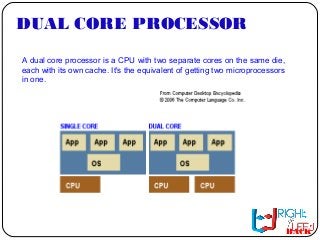
A dual core processor is a CPU with two separate cores on the same die,
each with its own cache. It's the equivalent of getting two microprocessors
in one.
BACK
SOME DETAILS ABOUT DUAL
CORE
BACK
dual core chip is that tasks can be carried out in parallel streams,
decreasing processing time. This is referred to as thread-level
parallelism (TLP).
TLP is also possible on motherboards that can accommodate two
separate CPU dies. When TLP is accomplished in a single CPU
through dual core technology, it is called chip-level multiprocessing
(CLM).
In dual core CPUs, each microprocessor generally has its own on-
board cache, known as Level 1 (L1) cache. L1 cache significantly
improves system performance, because it is much faster to access on-
chip cache than to use random access memory (RAM). L1 cache is
accessed at microprocessor speeds.
Dual core chips also commonly feature secondary shared cache on the
CPU, known as Level 2 (L2) cache. Motherboards may also have a
cache chip designated as Level 3 (L3) cache. While faster than RAM,
L3 cache is slower than cache built into the dual core chip.
DIFFERENT FROM SINGLECOREDIFFERENT FROM SINGLECORE
PROCESSORPROCESSOR
In a single-core or traditional processor the CPU is
fed strings of instructions it must order, execute, then selectively store in its
cache for quick retrieval. When data outside the cache is required, it is
retrieved through the system bus from random access memory (RAM) or
from storage devices. Accessing these slows down performance to the
maximum speed the bus, RAM or storage device will allow, which is far
slower than the speed of the CPU. The situation is compounded when multi-
tasking. In this case the processor must switch back and forth between two
or more sets of data streams and programs. CPU resources are depleted
and performance suffers.
In a dual core processor each core handles incoming data strings
simultaneously to improve efficiency. Just as two heads are better than one,
so are two hands. Now when one is executing the other can be accessing
the system bus or executing its own code. Adding to this favorable scenario,
both AMD and Intel's dual-core flagships are 64-bit.
BACK
ITS UTILITIESITS UTILITIES
To utilize a dual core processor, the operating system must be able to
recognize multi-threading and the software must have simultaneous multi-
threading technology (SMT) written into its code. SMT enables parallel
multi-threading wherein the cores are served multi-threaded instructions in
parallel. Without SMT the software will only recognize one core. Adobe
Photoshop is an example of SMT-aware software. SMT is also used with
multi-processor systems common to servers.
BACK
DIFFERENT FROM MULTI PROCESSORDIFFERENT FROM MULTI PROCESSOR
SYSTEMSYSTEM
A dual core processor is different from a multi-processor system. In the latter
there are two separate CPUs with their own resources. In the former,
resources are shared and the cores reside on the same chip. A multi-
processor system is faster than a system with a dual core processor, while a
dual core system is faster than a single-core system, all else being equal.
An attractive value of dual core processors is that they do not require a new
motherboard, but can be used in existing boards that feature the correct
socket. For the average user the difference in performance will be most
noticeable in multi-tasking until more software is SMT aware. Servers
running multiple dual core processors will see an appreciable increase in
performance.
BACK
PARALLEL PROCESSING OF CPUPARALLEL PROCESSING OF CPU
Parallel processing is the simultaneous processing of the same task on two
or more microprocessors in order to obtain faster results. The computer
resources can include a single computer with multiple processors, or a
number of computers connected by a network, or a combination of both. The
processors access data through shared memory. Some supercomputer
parallel processing systems have hundreds of thousands of
microprocessors.
With the help of parallel processing, a number of computations can be
performed at once, bringing down the time required to complete a project.
Parallel processing is particularly useful in projects that require complex
computations, such as weather modeling and digital special effects. Let's
take a real-life example to understand the efficacy of parallel processing.
BACK
CACHE OF DUAL CORECACHE OF DUAL CORE
Cache (pronounced cash) memory is extremely fast memory that is built into a computer’s
central processing unit (CPU), or located next to it on a separate chip. The CPU uses cache
memory to store instructions that are repeatedly required to run programs, improving overall
system speed. The advantage of cache memory is that the CPU does not have to use the
motherboard’s system bus for data transfer. Whenever data must be passed through the
system bus, the data transfer speed slows to the motherboard’s capability. The CPU can
process data much faster by avoiding the bottleneck created by the system bus.
As it happens, once most programs are open and running, they use very few resources. When
these resources are kept in cache, programs can operate more quickly and efficiently. All else
being equal, cache is so effective in system performance that a computer running a fast CPU
with little cache can have lower benchmarks than a system running a somewhat slower CPU
with more cache. Cache built into the CPU itself is referred to as Level 1 (L1) cache. Cache that
resides on a separate chip next to the CPU is called Level 2 (L2) cache. Some CPUs have both
L1 and L2 cache built-in and designate the separate cache chip as Level 3 (L3) cache.
Cache that is built into the CPU is faster than separate cache, running at the speed of the
microprocessor itself. However, separate cache is still roughly twice as fast as Random Access
Memory (RAM). Cache is more expensive than RAM, but it is well worth getting a CPU and
motherboard with built-in cache in order to maximize system performance.
BACK
DISK CACHINGDISK CACHING
Disk caching applies the same principle to the hard disk that
memory caching applies to the CPU. Frequently accessed hard
disk data is stored in a separate segment of RAM in order to
avoid having to retrieve it from the hard disk over and over. In
this case, RAM is faster than the platter technology used in
conventional hard disks. This situation will change, however, as
hybrid hard disks become ubiquitous. These disks have built-in
flash memory caches. Eventually, hard drives will be 100% flash
drives, eliminating the need for RAM disk caching, as flash
memory is faster than RAM.
BACK
ABOUT TFLOPABOUT TFLOP
A tflop, or teraflop, system is a parallel supercomputing system that has
the ability to compute one trillion floating point operations in a single
second. This term applies in many ways to the basic systems that run
database systems.
The tflop system is not the first parallel supercomputing system to be
created, although it has become the most used. The Intel Paragon was
in existence before the tflop and is also a parallel processing system.
Each of these systems is a reliable option. The tflop system, however, is
not as difficult to program as the Intel Paragon system. The N-cube
system preceded the Intel Paragon, but this is an outdated system and
very rarely used.
BACK
CLOCK SPEEDCLOCK SPEED
Clock speed is a measure of how quickly a computer completes
basic computations and operations. It is measured as a frequency
in hertz, and most commonly refers to the speed of the computer's
CPU, or Central Processing Unit. Since the frequency most clock
speed measures is very high, the terms megahertz and gigahertz
are used. A megahertz is one-million cycles per second, while a
gigahertz is one-billion cycles per second. So a computer with a
clock speed of 800MHz is running 800,000,000 cycles per
second, while a 2.4GHz computer is running 2,400,000,000
cycles per second.
BACK
ADVANTAGEADVANTAGE
Dual core technology has advantages over double-core or twin-core technology.
These latter terms refer to two independent CPUs installed on the same
motherboard. Dual core chips take up less real estate on the motherboard, have
greater cache coherency, and consume less power than two independent CPUs.
However, dual core technology also has its drawbacks.
For software to take advantage of dual core architecture, it must be written to
utilize parallel threading. Otherwise, the program functions in single-core mode,
using just one data stream or one of the built-in microprocessors. Unfortunately,
coding for TLP is quite intensive, as interleaving shared data can create errors and
slow performance. Because of these and other issues, a Dual Core Processor
does not deliver twice the speed of a single-core processor, though there is a
significant increase in performance under optimal conditions. Finally, dual core
chips run hotter than their single-core cousins.
Whether a dual core processor is right for you will depend on what you plan to use
your computer for. If the programs you regularly require are designed for TLP, then
you may benefit greatly from a dual core chip. If not, you may be better served by a
high-end single-core CPU.
BACK
CONCLUSIONCONCLUSION
If you haven’t done so already, now is the time to take a hard look at the design of
your application, determine what operations are CPU-sensitive now or are likely to
become so soon, and identify how those places could benefit from concurrency.
A few rare classes of applications are naturally parallelizable, but most aren’t. Even
when you know exactly where you’re CPU-bound, you may well find it difficult to
figure out how to parallelize those operations; all the most reason to start thinking
about it now. Implicitly parallelizing compilers can help a little, but don’t expect
much; they can’t do nearly as good a job of parallelizing your sequential program
as you could do by turning it into an explicitly parallel and threaded version.
Thanks to continued cache growth and probably a few more incremental straight-
line control flow optimizations, the free lunch will continue a little while longer; but
starting today the buffet will only be serving that one entrée and that one dessert.
The filet mignon of throughput gains is still on the menu, but now it costs extra—
extra development effort, extra code complexity, and extra testing effort. The good
news is that for many classes of applications the extra effort will be worthwhile,
because concurrency will let them fully exploit the continuing exponential gains in
processor throughput.
BACK

What is a Dual Core Processor?

  • 2.
    CONTENT WHAT IS DUALCORE PROCESSORWHAT IS DUAL CORE PROCESSOR? SOME DETAILS ABOUT DUAL CORESOME DETAILS ABOUT DUAL CORE?? HOW IT IS DIFFERENT FROM SINGLECORE PROCESSORHOW IT IS DIFFERENT FROM SINGLECORE PROCESSOR?? WHAT IS ITS UTILITIESWHAT IS ITS UTILITIES?? HOW IT IS DIFFERENT FROM MULTIPROCESSOR SYSTEMHOW IT IS DIFFERENT FROM MULTIPROCESSOR SYSTEM?? PARALLEL PROCESSING OF CPUPARALLEL PROCESSING OF CPU?? CACHE OF DUAL CORECACHE OF DUAL CORE?? DISK CACHINGDISK CACHING?? ABOUT TFLOPABOUT TFLOP?? CLOCK SPEEDCLOCK SPEED?? ADVANTAGEADVANTAGE?? CONCLUSIONCONCLUSION??
  • 3.
    DUAL CORE PROCESSOR Adual core processor is a CPU with two separate cores on the same die, each with its own cache. It's the equivalent of getting two microprocessors in one. BACK
  • 4.
    SOME DETAILS ABOUTDUAL CORE BACK dual core chip is that tasks can be carried out in parallel streams, decreasing processing time. This is referred to as thread-level parallelism (TLP). TLP is also possible on motherboards that can accommodate two separate CPU dies. When TLP is accomplished in a single CPU through dual core technology, it is called chip-level multiprocessing (CLM). In dual core CPUs, each microprocessor generally has its own on- board cache, known as Level 1 (L1) cache. L1 cache significantly improves system performance, because it is much faster to access on- chip cache than to use random access memory (RAM). L1 cache is accessed at microprocessor speeds. Dual core chips also commonly feature secondary shared cache on the CPU, known as Level 2 (L2) cache. Motherboards may also have a cache chip designated as Level 3 (L3) cache. While faster than RAM, L3 cache is slower than cache built into the dual core chip.
  • 5.
    DIFFERENT FROM SINGLECOREDIFFERENTFROM SINGLECORE PROCESSORPROCESSOR In a single-core or traditional processor the CPU is fed strings of instructions it must order, execute, then selectively store in its cache for quick retrieval. When data outside the cache is required, it is retrieved through the system bus from random access memory (RAM) or from storage devices. Accessing these slows down performance to the maximum speed the bus, RAM or storage device will allow, which is far slower than the speed of the CPU. The situation is compounded when multi- tasking. In this case the processor must switch back and forth between two or more sets of data streams and programs. CPU resources are depleted and performance suffers. In a dual core processor each core handles incoming data strings simultaneously to improve efficiency. Just as two heads are better than one, so are two hands. Now when one is executing the other can be accessing the system bus or executing its own code. Adding to this favorable scenario, both AMD and Intel's dual-core flagships are 64-bit. BACK
  • 6.
    ITS UTILITIESITS UTILITIES Toutilize a dual core processor, the operating system must be able to recognize multi-threading and the software must have simultaneous multi- threading technology (SMT) written into its code. SMT enables parallel multi-threading wherein the cores are served multi-threaded instructions in parallel. Without SMT the software will only recognize one core. Adobe Photoshop is an example of SMT-aware software. SMT is also used with multi-processor systems common to servers. BACK
  • 7.
    DIFFERENT FROM MULTIPROCESSORDIFFERENT FROM MULTI PROCESSOR SYSTEMSYSTEM A dual core processor is different from a multi-processor system. In the latter there are two separate CPUs with their own resources. In the former, resources are shared and the cores reside on the same chip. A multi- processor system is faster than a system with a dual core processor, while a dual core system is faster than a single-core system, all else being equal. An attractive value of dual core processors is that they do not require a new motherboard, but can be used in existing boards that feature the correct socket. For the average user the difference in performance will be most noticeable in multi-tasking until more software is SMT aware. Servers running multiple dual core processors will see an appreciable increase in performance. BACK
  • 8.
    PARALLEL PROCESSING OFCPUPARALLEL PROCESSING OF CPU Parallel processing is the simultaneous processing of the same task on two or more microprocessors in order to obtain faster results. The computer resources can include a single computer with multiple processors, or a number of computers connected by a network, or a combination of both. The processors access data through shared memory. Some supercomputer parallel processing systems have hundreds of thousands of microprocessors. With the help of parallel processing, a number of computations can be performed at once, bringing down the time required to complete a project. Parallel processing is particularly useful in projects that require complex computations, such as weather modeling and digital special effects. Let's take a real-life example to understand the efficacy of parallel processing. BACK
  • 9.
    CACHE OF DUALCORECACHE OF DUAL CORE Cache (pronounced cash) memory is extremely fast memory that is built into a computer’s central processing unit (CPU), or located next to it on a separate chip. The CPU uses cache memory to store instructions that are repeatedly required to run programs, improving overall system speed. The advantage of cache memory is that the CPU does not have to use the motherboard’s system bus for data transfer. Whenever data must be passed through the system bus, the data transfer speed slows to the motherboard’s capability. The CPU can process data much faster by avoiding the bottleneck created by the system bus. As it happens, once most programs are open and running, they use very few resources. When these resources are kept in cache, programs can operate more quickly and efficiently. All else being equal, cache is so effective in system performance that a computer running a fast CPU with little cache can have lower benchmarks than a system running a somewhat slower CPU with more cache. Cache built into the CPU itself is referred to as Level 1 (L1) cache. Cache that resides on a separate chip next to the CPU is called Level 2 (L2) cache. Some CPUs have both L1 and L2 cache built-in and designate the separate cache chip as Level 3 (L3) cache. Cache that is built into the CPU is faster than separate cache, running at the speed of the microprocessor itself. However, separate cache is still roughly twice as fast as Random Access Memory (RAM). Cache is more expensive than RAM, but it is well worth getting a CPU and motherboard with built-in cache in order to maximize system performance. BACK
  • 10.
    DISK CACHINGDISK CACHING Diskcaching applies the same principle to the hard disk that memory caching applies to the CPU. Frequently accessed hard disk data is stored in a separate segment of RAM in order to avoid having to retrieve it from the hard disk over and over. In this case, RAM is faster than the platter technology used in conventional hard disks. This situation will change, however, as hybrid hard disks become ubiquitous. These disks have built-in flash memory caches. Eventually, hard drives will be 100% flash drives, eliminating the need for RAM disk caching, as flash memory is faster than RAM. BACK
  • 11.
    ABOUT TFLOPABOUT TFLOP Atflop, or teraflop, system is a parallel supercomputing system that has the ability to compute one trillion floating point operations in a single second. This term applies in many ways to the basic systems that run database systems. The tflop system is not the first parallel supercomputing system to be created, although it has become the most used. The Intel Paragon was in existence before the tflop and is also a parallel processing system. Each of these systems is a reliable option. The tflop system, however, is not as difficult to program as the Intel Paragon system. The N-cube system preceded the Intel Paragon, but this is an outdated system and very rarely used. BACK
  • 12.
    CLOCK SPEEDCLOCK SPEED Clockspeed is a measure of how quickly a computer completes basic computations and operations. It is measured as a frequency in hertz, and most commonly refers to the speed of the computer's CPU, or Central Processing Unit. Since the frequency most clock speed measures is very high, the terms megahertz and gigahertz are used. A megahertz is one-million cycles per second, while a gigahertz is one-billion cycles per second. So a computer with a clock speed of 800MHz is running 800,000,000 cycles per second, while a 2.4GHz computer is running 2,400,000,000 cycles per second. BACK
  • 13.
    ADVANTAGEADVANTAGE Dual core technologyhas advantages over double-core or twin-core technology. These latter terms refer to two independent CPUs installed on the same motherboard. Dual core chips take up less real estate on the motherboard, have greater cache coherency, and consume less power than two independent CPUs. However, dual core technology also has its drawbacks. For software to take advantage of dual core architecture, it must be written to utilize parallel threading. Otherwise, the program functions in single-core mode, using just one data stream or one of the built-in microprocessors. Unfortunately, coding for TLP is quite intensive, as interleaving shared data can create errors and slow performance. Because of these and other issues, a Dual Core Processor does not deliver twice the speed of a single-core processor, though there is a significant increase in performance under optimal conditions. Finally, dual core chips run hotter than their single-core cousins. Whether a dual core processor is right for you will depend on what you plan to use your computer for. If the programs you regularly require are designed for TLP, then you may benefit greatly from a dual core chip. If not, you may be better served by a high-end single-core CPU. BACK
  • 14.
    CONCLUSIONCONCLUSION If you haven’tdone so already, now is the time to take a hard look at the design of your application, determine what operations are CPU-sensitive now or are likely to become so soon, and identify how those places could benefit from concurrency. A few rare classes of applications are naturally parallelizable, but most aren’t. Even when you know exactly where you’re CPU-bound, you may well find it difficult to figure out how to parallelize those operations; all the most reason to start thinking about it now. Implicitly parallelizing compilers can help a little, but don’t expect much; they can’t do nearly as good a job of parallelizing your sequential program as you could do by turning it into an explicitly parallel and threaded version. Thanks to continued cache growth and probably a few more incremental straight- line control flow optimizations, the free lunch will continue a little while longer; but starting today the buffet will only be serving that one entrée and that one dessert. The filet mignon of throughput gains is still on the menu, but now it costs extra— extra development effort, extra code complexity, and extra testing effort. The good news is that for many classes of applications the extra effort will be worthwhile, because concurrency will let them fully exploit the continuing exponential gains in processor throughput. BACK