




























Speed up your 

Drupal instance!
Daniele Piaggesi

@g0blin79

daniele.piaggesi@bmeme.com
About me
• Bmeme founder and CTO

• Drupal developer

• Drupal Association Org.Member

• System Architect

• Opensource Enthusiast

daniele.piaggesi@bmeme.com
g0blin79
@g0blin79
About bmeme
• Digital Factory and Drupal Shop

• Acquia Partner

• Drupal Association Org.Member

• DrupalDay Organizer

• >10 projects on drupal.org

info@bmeme.com
bmeme
@bonsaimeme
Agenda
• What about “web performance”?
• Why should you care about speeding up your website?
• And Drupal?
• Then…speed up our Drupal instance!
• Software tricks
• Server tricks
What about “web performance”?
Wikipedia says that…
“…refers to the speed in which
web pages are downloaded and
displayed on the user's web
browser. “
https://en.wikipedia.org/wiki/Web_performance
But some friends of mine thinks that…
“performance is the delay perceived between an
action (a click, for example) and a meaningful
response”
And I like more… :)
Why should you care about 

speeding up your website?
Money, baby
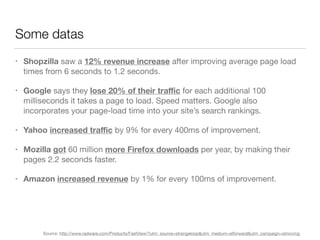
• Shopzilla saw a 12% revenue increase after improving average page load
times from 6 seconds to 1.2 seconds.

• Google says they lose 20% of their traffic for each additional 100
milliseconds it takes a page to load. Speed matters. Google also
incorporates your page-load time into your site’s search rankings.

• Yahoo increased traffic by 9% for every 400ms of improvement.

• Mozilla got 60 million more Firefox downloads per year, by making their
pages 2.2 seconds faster.

• Amazon increased revenue by 1% for every 100ms of improvement.
Some datas
Source: http://www.radware.com/Products/FastView/?utm_source=strangeloop&utm_medium=slforward&utm_campaign=slmoving
But it’s not all about money…let's do the math
The
rise
of
mobile!
Get a look at the context. Some figures of 2016.
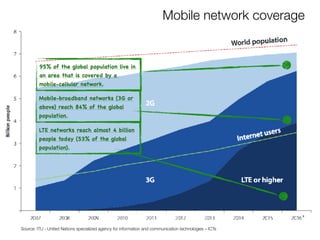
Mobile network coverage
95% of the global population live in 

an area that is covered by a 

mobile-cellular network.
Mobile-broadband networks (3G or
above) reach 84% of the global
population.
LTE networks reach almost 4 billion
people today (53% of the global
population).
Source: ITU - United Nations specialized agency for information and communication technologies – ICTs
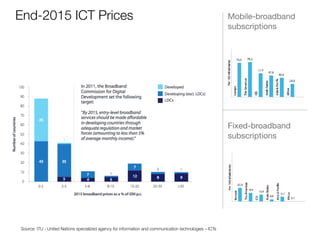
End-2015 ICT Prices Mobile-broadband
subscriptions
Fixed-broadband
subscriptions
Source: ITU - United Nations specialized agency for information and communication technologies – ICTs
Try to intersect factors: money and mobile rise.
In 2016, 67% of online shoppers
report purchasing from a mobile
device (up from 46% in 2015). 

The 40% on average 

of all their online purchases were
made from a mobile device.
Thinking about everything you
spent online in the past
3 months, what percentage of that
amount was spent
on purchases made using a mobile
device?
Source: http://www.criteo.com/media/6443/criteo-digital-commerce-marketing-trends-2017.pdf
…and in Italy?
Mobile Share of Retail eCommerce Transactions in Italy
25% of e-commerce leading retailer of furniture 

in Italy notes that almost half (46%) of sales 

coming from mobile devices.
Source: http://www.criteo.com/media/5605/criteo-mobilecommercereport-h12016-it2.pdf
The last consideration
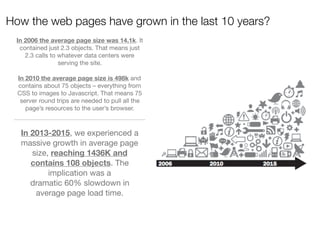
In 2013-2015, we experienced a
massive growth in average page
size, reaching 1436K and
contains 108 objects. The
implication was a

dramatic 60% slowdown in
average page load time.
In 2006 the average page size was 14.1k. It
contained just 2.3 objects. That means just
2.3 calls to whatever data centers were
serving the site.

In 2010 the average page size is 498k and
contains about 75 objects – everything from
CSS to images to Javascript. That means 75
server round trips are needed to pull all the
page’s resources to the user’s browser.
How the web pages have grown in the last 10 years?
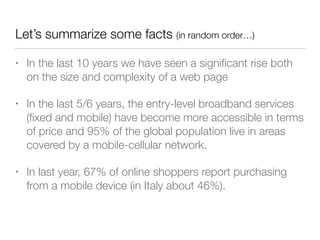
Let’s summarize some facts (in random order…)
• In the last 10 years we have seen a significant rise both
on the size and complexity of a web page
• In the last 5/6 years, the entry-level broadband services
(fixed and mobile) have become more accessible in terms
of price and 95% of the global population live in areas
covered by a mobile-cellular network.
• In last year, 67% of online shoppers report purchasing
from a mobile device (in Italy about 46%).
Let build connections
Increasing broadband Increasing mobile-network coverage Increase mobile-navigation
Increasing people with smartphone Increase mobile-businessIncreasing mobile-navigation
Increasing web performances Increase moneyIncreasing mobile-business
And Drupal?
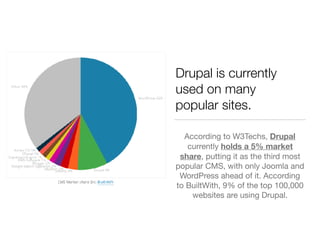
Drupal is currently
used on many 

popular sites.
According to W3Techs, Drupal
currently holds a 5% market
share, putting it as the third most
popular CMS, with only Joomla and
WordPress ahead of it. According
to BuiltWith, 9% of the top 100,000
websites are using Drupal.
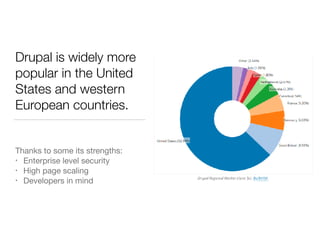
Drupal is widely more
popular in the United
States and western
European countries.
Thanks to some its strengths:

• Enterprise level security

• High page scaling

• Developers in mind
Then…speed up our Drupal instance!
Software tricks ranking
#1
Update your code
monthly.
Run (at least) security update every
month. Not periodically. Not one or
two times a year. Monthly.
Update your core, of course, but
also (and especially contrib
modules and themes). 

It’s really (-really-) important.

Subscribe the Security News
drupal.org newsletter to keep
yourself constantly updated on
vulnerabilities discovered by the
community. 


To run updates, navigate to
“Reports” → “Available Updates.”

You can then click on “Check
manually” to scan for additional
updates.
#2
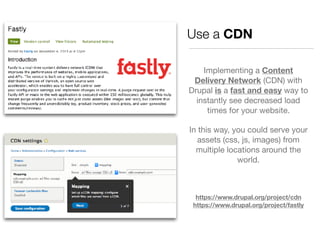
Use a CDN
Implementing a Content
Delivery Network (CDN) with
Drupal is a fast and easy way to
instantly see decreased load
times for your website. 

In this way, you could serve your
assets (css, js, images) from
multiple locations around the
world.

https://www.drupal.org/project/cdn

https://www.drupal.org/project/fastly
#3
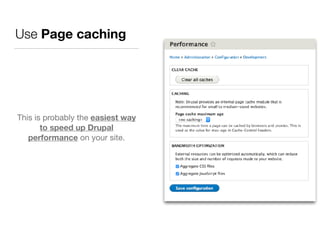
Use Page caching
This is probably the easiest way
to speed up Drupal
performance on your site.
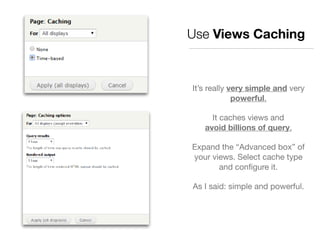
Use Views Caching
It’s really very simple and very
powerful.

It caches views and 

avoid billions of query.

Expand the “Advanced box” of
your views. Select cache type
and configure it.

As I said: simple and powerful.
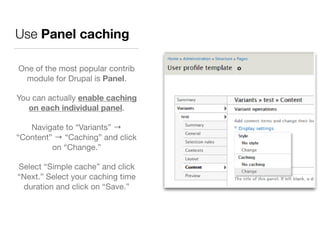
Use Panel caching
One of the most popular contrib
module for Drupal is Panel.

You can actually enable caching
on each individual panel.

Navigate to “Variants” →
“Content” → “Caching” and click
on “Change.”

Select “Simple cache” and click
“Next.” Select your caching time
duration and click on “Save.”
If we raise level…
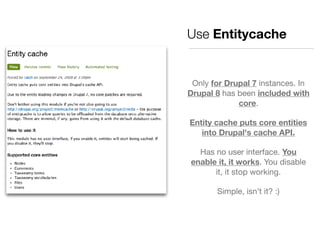
Only for Drupal 7 instances. In
Drupal 8 has been included with
core.

Entity cache puts core entities
into Drupal's cache API.
Has no user interface. You
enable it, it works. You disable
it, it stop working.

Simple, isn’t it? :)
Use Entitycache
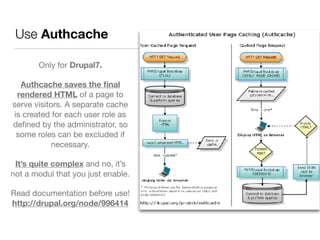
Use Authcache
Only for Drupal7.

Authcache saves the final
rendered HTML of a page to
serve visitors. A separate cache
is created for each user role as
defined by the administrator, so
some roles can be excluded if
necessary.

It’s quite complex and no, it’s
not a modul that you just enable.

Read documentation before use!

http://drupal.org/node/996414
And when you develop…
Use Cache APIs
In Drupal 7:

• cache_set
• cache_get
• cache_clear_all
See:

• A Beginner's Guide To Caching Data
• A Beginner's Guide To Caching Data in
Drupal 7 

In Drupal 8 use “Cacheability metadata”:

• cache tags: for dependencies on data
managed by Drupal, like entities &
configuration

• cache contexts: For variations, i.e.
dependencies on the request context
• cache max-age: For time-sensitive
caching, i.e. time dependencies 

See:

• Cacheability of render arrays 

• CacheableResponseInterface
[…]
if (!isset($mosaiks[$key])) {

$cache = cache_get($key, MOSAIK_CACHE_BIN);


if (empty($cache->data)) {

$mosaik = mosaik_complicated_calculation();
cache_set($key, $mosaik, MOSAIK_CACHE_BIN);

return $mosaiks[$key];
}

else {

$mosaiks[$key] = $cache->data;

}
[…]
$cid = 'mymodule_example:' .
Drupal::languageManager()
->getCurrentLanguage()
->getId();
$data = NULL;

if ($cache = Drupal::cache()->get($cid)) {

$data = $cache->data;

}

else {

$data = my_module_complicated_calculation();

Drupal::cache()->set($cid, $data);

}
and last but not least…
Use BigPipe
• The BigPipe technique was invented at Facebook.
• During rendering, the personalized parts are turned into placeholders.
• By default, Drupal 8 uses the Single Flush strategy (aka "traditional") for replacing the placeholders.
• Introduces a new strategy, that allows us to flush the initial page first, and then stream the
replacements for the placeholders.
• This results in hugely improved front-end/perceived performance.
• Zero configuration! BigPipe is able to make things faster automatically thanks to Drupal 8's improved
render pipeline & render API, and in particular thanks to the cacheability metadata and auto-placeholdering.
• Use it in conjunction with the Dynamic Page Cache module that is included with Drupal 8 core.
See:
• https://www.youtube.com/embed/X34MFjXNzzk
• https://www.drupal.org/docs/8/core/modules/bigpipe/bigpipe-environment-requirements
#4
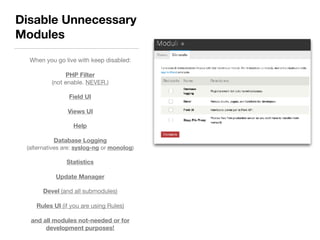
When you go live with keep disabled:

PHP Filter

(not enable. NEVER.)
Field UI
Views UI
Help
Database Logging 

(alternatives are: syslog-ng or monolog)
Statistics
Update Manager
Devel (and all submodules)

Rules UI (if you are using Rules)

and all modules not-needed or for
development purposes!
Disable Unnecessary
Modules
#5
Remove Query Strings from Static Resources
Query strings from your static resources can cause caching issues with
some proxy caches and CDNs.

To remove query strings from CSS filenames within Drupal, the following code
snippet can be added to your template.php file
/**

* Implements template_process_html().

*/

function MYTHEME_process_html(&$variables) {

$variables['styles'] = preg_replace(
‘https://www.example.com/.css?[^”]+/','.css',
$variables['styles']);

}
#6
Other (minor) stuff to remember
• Image Optimization: on average 56% of a website’s page weight is
made up of images. So optimizing images can drastically decrease
your page load times.
• Lazy Load Images: Load images only when they are visible to the
browser window. (https://www.drupal.org/project/lazyloader).
• Advanced CSS/JS Aggregation: aggregating your CSS and
Javascript files you can improve your frontend performance and
download times. (https://www.drupal.org/project/advagg).
• Client-side validation: add client side validation for web forms using
jQuery with the “Clientside Validation” module. 

(https://www.drupal.org/project/clientside_validation).
Server tricks
LAMP Stack
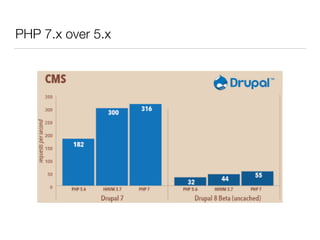
• PHP 7.x over 5.x
• PHP-FPM over mod_php/suphp/fastcgi
• OpCache over APC (or others)
• Nginx over Apache (or Apache 2.4 over < 2.4)
• Varnish over… anything
• Memcache/Redis over… anything
PHP 7.x over 5.x
PHP-fpm over mod_php
• Dynamic/On-Demand number of processes, depending
on the load
• Starting the workers with different uid/gid/chroot/
environment and different php.ini options.
• PHP daemonization: pid file, log file, setsid(), setuid(),
setgid(), chroot()
• Ability to emergency restart all the processes in the event
of an accidental destruction of the shared memory
opcode cache, if using an accelerator
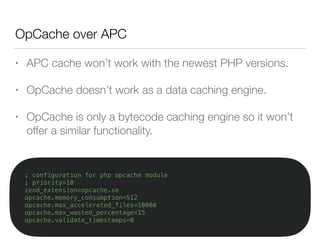
OpCache over APC
; configuration for php opcache module
; priority=10
zend_extension=opcache.so
opcache.memory_consumption=512
opcache.max_accelerated_files=10000
opcache.max_wasted_percentage=15
opcache.validate_timestamps=0
• APC cache won’t work with the newest PHP versions.
• OpCache doesn’t work as a data caching engine.
• OpCache is only a bytecode caching engine so it won’t
offer a similar functionality.
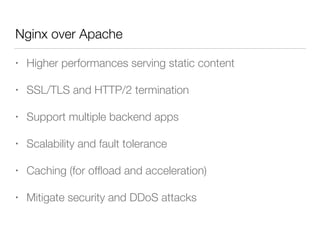
Nginx over Apache
• Higher performances serving static content
• SSL/TLS and HTTP/2 termination
• Support multiple backend apps
• Scalability and fault tolerance
• Caching (for offload and acceleration)
• Mitigate security and DDoS attacks
Varnish
• Reverse proxying
• Architecture: different subroutines to manage different
moments in request/response journey.
• Varnish can load and unload VCL configurations on the
fly, so changes to VCL can be deployed instantly.
• Varnish cache is heavily threaded
• Monitor Heath of himself
A cons of Varnish?
At the moment Varnish Cache Standard 

does not support SSL. 

Otherwise Varnish Cache Plus support it.
Since January 2017, Google mark as Unsecure all websites
that does not implement SSL on login page or credit card input
pages. All websites in SSL are now privileged in Google ranking.
Then Google decrees the 

death of “http: //“ in favour of “https://“
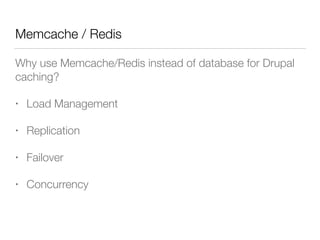
Memcache / Redis
Why use Memcache/Redis instead of database for Drupal
caching?
• Load Management
• Replication
• Failover
• Concurrency
– Bugs Bunny
“That’s all folks…”

[drupalday2017] - Speed-up your Drupal instance!

  • 1.
    Speed up your
 Drupal instance! Daniele Piaggesi @g0blin79 daniele.piaggesi@bmeme.com
  • 2.
    About me • Bmemefounder and CTO • Drupal developer • Drupal Association Org.Member • System Architect • Opensource Enthusiast daniele.piaggesi@bmeme.com g0blin79 @g0blin79
  • 3.
    About bmeme • DigitalFactory and Drupal Shop • Acquia Partner • Drupal Association Org.Member • DrupalDay Organizer • >10 projects on drupal.org info@bmeme.com bmeme @bonsaimeme
  • 4.
    Agenda • What about“web performance”? • Why should you care about speeding up your website? • And Drupal? • Then…speed up our Drupal instance! • Software tricks • Server tricks
  • 5.
    What about “webperformance”?
  • 6.
    Wikipedia says that… “…refersto the speed in which web pages are downloaded and displayed on the user's web browser. “ https://en.wikipedia.org/wiki/Web_performance
  • 8.
    But some friendsof mine thinks that… “performance is the delay perceived between an action (a click, for example) and a meaningful response” And I like more… :)
  • 9.
    Why should you careabout 
 speeding up your website?
  • 10.
  • 11.
    • Shopzilla sawa 12% revenue increase after improving average page load times from 6 seconds to 1.2 seconds. • Google says they lose 20% of their traffic for each additional 100 milliseconds it takes a page to load. Speed matters. Google also incorporates your page-load time into your site’s search rankings. • Yahoo increased traffic by 9% for every 400ms of improvement. • Mozilla got 60 million more Firefox downloads per year, by making their pages 2.2 seconds faster. • Amazon increased revenue by 1% for every 100ms of improvement. Some datas Source: http://www.radware.com/Products/FastView/?utm_source=strangeloop&utm_medium=slforward&utm_campaign=slmoving
  • 12.
    But it’s notall about money…let's do the math
  • 13.
  • 14.
    Get a lookat the context. Some figures of 2016.
  • 15.
    Mobile network coverage 95%of the global population live in 
 an area that is covered by a 
 mobile-cellular network. Mobile-broadband networks (3G or above) reach 84% of the global population. LTE networks reach almost 4 billion people today (53% of the global population). Source: ITU - United Nations specialized agency for information and communication technologies – ICTs
  • 16.
    End-2015 ICT PricesMobile-broadband subscriptions Fixed-broadband subscriptions Source: ITU - United Nations specialized agency for information and communication technologies – ICTs
  • 17.
    Try to intersectfactors: money and mobile rise.
  • 18.
    In 2016, 67%of online shoppers report purchasing from a mobile device (up from 46% in 2015). The 40% on average of all their online purchases were made from a mobile device. Thinking about everything you spent online in the past 3 months, what percentage of that amount was spent on purchases made using a mobile device? Source: http://www.criteo.com/media/6443/criteo-digital-commerce-marketing-trends-2017.pdf
  • 19.
  • 20.
    Mobile Share ofRetail eCommerce Transactions in Italy 25% of e-commerce leading retailer of furniture 
 in Italy notes that almost half (46%) of sales 
 coming from mobile devices. Source: http://www.criteo.com/media/5605/criteo-mobilecommercereport-h12016-it2.pdf
  • 21.
  • 22.
    In 2013-2015, weexperienced a massive growth in average page size, reaching 1436K and contains 108 objects. The implication was a dramatic 60% slowdown in average page load time. In 2006 the average page size was 14.1k. It contained just 2.3 objects. That means just 2.3 calls to whatever data centers were serving the site. In 2010 the average page size is 498k and contains about 75 objects – everything from CSS to images to Javascript. That means 75 server round trips are needed to pull all the page’s resources to the user’s browser. How the web pages have grown in the last 10 years?
  • 23.
    Let’s summarize somefacts (in random order…) • In the last 10 years we have seen a significant rise both on the size and complexity of a web page • In the last 5/6 years, the entry-level broadband services (fixed and mobile) have become more accessible in terms of price and 95% of the global population live in areas covered by a mobile-cellular network. • In last year, 67% of online shoppers report purchasing from a mobile device (in Italy about 46%).
  • 24.
  • 25.
    Increasing broadband Increasingmobile-network coverage Increase mobile-navigation Increasing people with smartphone Increase mobile-businessIncreasing mobile-navigation Increasing web performances Increase moneyIncreasing mobile-business
  • 26.
  • 27.
    Drupal is currently usedon many 
 popular sites. According to W3Techs, Drupal currently holds a 5% market share, putting it as the third most popular CMS, with only Joomla and WordPress ahead of it. According to BuiltWith, 9% of the top 100,000 websites are using Drupal.
  • 28.
    Drupal is widelymore popular in the United States and western European countries. Thanks to some its strengths: • Enterprise level security • High page scaling • Developers in mind
  • 29.
    Then…speed up ourDrupal instance!
  • 30.
  • 31.
  • 32.
    Update your code monthly. Run(at least) security update every month. Not periodically. Not one or two times a year. Monthly. Update your core, of course, but also (and especially contrib modules and themes). 
 It’s really (-really-) important. Subscribe the Security News drupal.org newsletter to keep yourself constantly updated on vulnerabilities discovered by the community. To run updates, navigate to “Reports” → “Available Updates.” You can then click on “Check manually” to scan for additional updates.
  • 33.
  • 34.
    Use a CDN Implementinga Content Delivery Network (CDN) with Drupal is a fast and easy way to instantly see decreased load times for your website. In this way, you could serve your assets (css, js, images) from multiple locations around the world. https://www.drupal.org/project/cdn
 https://www.drupal.org/project/fastly
  • 35.
  • 36.
    Use Page caching Thisis probably the easiest way to speed up Drupal performance on your site.
  • 37.
    Use Views Caching It’sreally very simple and very powerful. It caches views and 
 avoid billions of query. Expand the “Advanced box” of your views. Select cache type and configure it. As I said: simple and powerful.
  • 38.
    Use Panel caching Oneof the most popular contrib module for Drupal is Panel. You can actually enable caching on each individual panel. Navigate to “Variants” → “Content” → “Caching” and click on “Change.” Select “Simple cache” and click “Next.” Select your caching time duration and click on “Save.”
  • 39.
    If we raiselevel…
  • 40.
    Only for Drupal7 instances. In Drupal 8 has been included with core. Entity cache puts core entities into Drupal's cache API. Has no user interface. You enable it, it works. You disable it, it stop working. Simple, isn’t it? :) Use Entitycache
  • 41.
    Use Authcache Only forDrupal7. Authcache saves the final rendered HTML of a page to serve visitors. A separate cache is created for each user role as defined by the administrator, so some roles can be excluded if necessary. It’s quite complex and no, it’s not a modul that you just enable. Read documentation before use!
 http://drupal.org/node/996414
  • 42.
    And when youdevelop…
  • 43.
    Use Cache APIs InDrupal 7: • cache_set • cache_get • cache_clear_all See: • A Beginner's Guide To Caching Data • A Beginner's Guide To Caching Data in Drupal 7 In Drupal 8 use “Cacheability metadata”: • cache tags: for dependencies on data managed by Drupal, like entities & configuration • cache contexts: For variations, i.e. dependencies on the request context • cache max-age: For time-sensitive caching, i.e. time dependencies See: • Cacheability of render arrays • CacheableResponseInterface […] if (!isset($mosaiks[$key])) {
 $cache = cache_get($key, MOSAIK_CACHE_BIN);
 
 if (empty($cache->data)) {
 $mosaik = mosaik_complicated_calculation(); cache_set($key, $mosaik, MOSAIK_CACHE_BIN);
 return $mosaiks[$key]; }
 else {
 $mosaiks[$key] = $cache->data;
 } […] $cid = 'mymodule_example:' . Drupal::languageManager() ->getCurrentLanguage() ->getId(); $data = NULL;
 if ($cache = Drupal::cache()->get($cid)) {
 $data = $cache->data;
 }
 else {
 $data = my_module_complicated_calculation();
 Drupal::cache()->set($cid, $data);
 }
  • 44.
    and last butnot least…
  • 46.
    Use BigPipe • TheBigPipe technique was invented at Facebook. • During rendering, the personalized parts are turned into placeholders. • By default, Drupal 8 uses the Single Flush strategy (aka "traditional") for replacing the placeholders. • Introduces a new strategy, that allows us to flush the initial page first, and then stream the replacements for the placeholders. • This results in hugely improved front-end/perceived performance. • Zero configuration! BigPipe is able to make things faster automatically thanks to Drupal 8's improved render pipeline & render API, and in particular thanks to the cacheability metadata and auto-placeholdering. • Use it in conjunction with the Dynamic Page Cache module that is included with Drupal 8 core. See: • https://www.youtube.com/embed/X34MFjXNzzk • https://www.drupal.org/docs/8/core/modules/bigpipe/bigpipe-environment-requirements
  • 47.
  • 48.
    When you golive with keep disabled: PHP Filter
 (not enable. NEVER.) Field UI Views UI Help Database Logging 
 (alternatives are: syslog-ng or monolog) Statistics Update Manager Devel (and all submodules) Rules UI (if you are using Rules) and all modules not-needed or for development purposes! Disable Unnecessary Modules
  • 49.
  • 50.
    Remove Query Stringsfrom Static Resources Query strings from your static resources can cause caching issues with some proxy caches and CDNs. To remove query strings from CSS filenames within Drupal, the following code snippet can be added to your template.php file /**
 * Implements template_process_html().
 */
 function MYTHEME_process_html(&$variables) {
 $variables['styles'] = preg_replace( ‘https://www.example.com/.css?[^”]+/','.css', $variables['styles']);
 }
  • 51.
  • 52.
    Other (minor) stuffto remember • Image Optimization: on average 56% of a website’s page weight is made up of images. So optimizing images can drastically decrease your page load times. • Lazy Load Images: Load images only when they are visible to the browser window. (https://www.drupal.org/project/lazyloader). • Advanced CSS/JS Aggregation: aggregating your CSS and Javascript files you can improve your frontend performance and download times. (https://www.drupal.org/project/advagg). • Client-side validation: add client side validation for web forms using jQuery with the “Clientside Validation” module. 
 (https://www.drupal.org/project/clientside_validation).
  • 53.
  • 55.
    LAMP Stack • PHP7.x over 5.x • PHP-FPM over mod_php/suphp/fastcgi • OpCache over APC (or others) • Nginx over Apache (or Apache 2.4 over < 2.4) • Varnish over… anything • Memcache/Redis over… anything
  • 56.
  • 57.
    PHP-fpm over mod_php •Dynamic/On-Demand number of processes, depending on the load • Starting the workers with different uid/gid/chroot/ environment and different php.ini options. • PHP daemonization: pid file, log file, setsid(), setuid(), setgid(), chroot() • Ability to emergency restart all the processes in the event of an accidental destruction of the shared memory opcode cache, if using an accelerator
  • 58.
    OpCache over APC ;configuration for php opcache module ; priority=10 zend_extension=opcache.so opcache.memory_consumption=512 opcache.max_accelerated_files=10000 opcache.max_wasted_percentage=15 opcache.validate_timestamps=0 • APC cache won’t work with the newest PHP versions. • OpCache doesn’t work as a data caching engine. • OpCache is only a bytecode caching engine so it won’t offer a similar functionality.
  • 59.
    Nginx over Apache •Higher performances serving static content • SSL/TLS and HTTP/2 termination • Support multiple backend apps • Scalability and fault tolerance • Caching (for offload and acceleration) • Mitigate security and DDoS attacks
  • 60.
    Varnish • Reverse proxying •Architecture: different subroutines to manage different moments in request/response journey. • Varnish can load and unload VCL configurations on the fly, so changes to VCL can be deployed instantly. • Varnish cache is heavily threaded • Monitor Heath of himself
  • 61.
    A cons ofVarnish? At the moment Varnish Cache Standard 
 does not support SSL. 
 Otherwise Varnish Cache Plus support it. Since January 2017, Google mark as Unsecure all websites that does not implement SSL on login page or credit card input pages. All websites in SSL are now privileged in Google ranking. Then Google decrees the 
 death of “http: //“ in favour of “https://“
  • 62.
    Memcache / Redis Whyuse Memcache/Redis instead of database for Drupal caching? • Load Management • Replication • Failover • Concurrency
  • 63.