





<Insert Picture Here>

Optimizing MySQL

Morgan Tocker, MySQL Community Manager

http://www.tocker.ca/

Safe Harbor Statement
The	
  following	
  is	
  intended	
  to	
  outline	
  our	
  general	
  product	
  direction.	
  
It	
  is	
  intended	
  for	
  information	
  purposes	
  only,	
  and	
  may	
  not	
  be	
  
incorporated	
  into	
  any	
  contract.	
  It	
  is	
  not	
  a	
  commitment	
  to	
  deliver	
  
any	
  material,	
  code,	
  or	
  functionality,	
  and	
  should	
  not	
  be	
  relied	
  upon	
  
in	
  making	
  purchasing	
  decisions.	


The	
  development,	
  release,	
  and	
  timing	
  of	
  any	
  features	
  or	
  
functionality	
  described	
  for	
  Oracle’s	
  products	
  remains	
  at	
  the	
  sole	
  
discretion	
  of	
  Oracle.
Options
•
•
•
•

Upgrade Hardware and/or MySQL Version
Optimize Configuration
Optimize Queries
Optimize Schema
Commentary
• There are some specific cases where upgrades can
make individual queries faster (i.e. subqueries). When I
like this optimization the most, is to increase“capacity”.
Lots of multi-core, multi-disk enhancements in 5.5 / 5.6.
• MySQL 5.6 comes with a much more optimized
configuration. There are now only 3-4 settings that
need to change.
• Optimizing queries is my favourite method :) There can
be some big wins here.
• Optimizing schema relates to query optimization.
Sometimes you have to change schema to support
certain queries, but it always starts with the queries.
Optimizing Queries
• Allows you to focus on queries that damage user
experiences rather than just slow.
• Best method is to install a profiler.
• MySQL also supports slow query logging +
Performance Schema (5.6+).
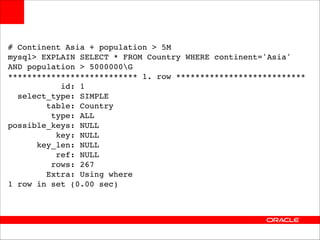
# Continent Asia + population > 5M!
mysql> EXPLAIN SELECT * FROM Country WHERE continent='Asia' 

AND population > 5000000G!
*************************** 1. row ***************************!
id: 1!
select_type: SIMPLE!
table: Country!
type: ALL!
possible_keys: NULL!
key: NULL!
key_len: NULL!
ref: NULL!
rows: 267!
Extra: Using where!
1 row in set (0.00 sec)
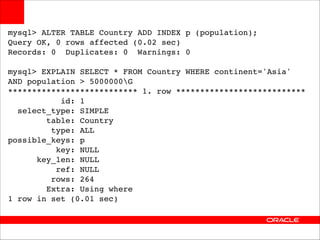
mysql> ALTER TABLE Country ADD INDEX p (population);!
Query OK, 0 rows affected (0.02 sec)!
Records: 0 Duplicates: 0 Warnings: 0!

!

mysql> EXPLAIN SELECT * FROM Country WHERE continent='Asia' 

AND population > 5000000G!
*************************** 1. row ***************************!
id: 1!
select_type: SIMPLE!
table: Country!
type: ALL!
possible_keys: p!
key: NULL!
key_len: NULL!
ref: NULL!
rows: 264!
Extra: Using where!
1 row in set (0.01 sec)
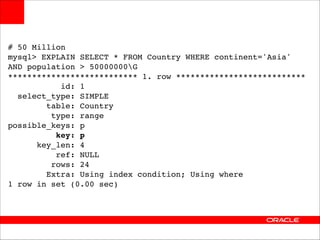
# 50 Million!
mysql> EXPLAIN SELECT * FROM Country WHERE continent='Asia' 

AND population > 50000000G!
*************************** 1. row ***************************!
id: 1!
select_type: SIMPLE!
table: Country!
type: range!
possible_keys: p!
key: p!
key_len: 4!
ref: NULL!
rows: 24!
Extra: Using index condition; Using where!
1 row in set (0.00 sec)
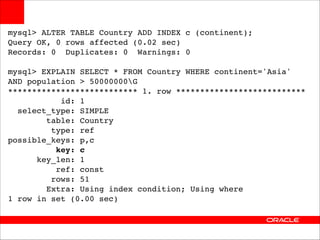
mysql> ALTER TABLE Country ADD INDEX c (continent);!
Query OK, 0 rows affected (0.02 sec)!
Records: 0 Duplicates: 0 Warnings: 0!

!

mysql> EXPLAIN SELECT * FROM Country WHERE continent='Asia' !
AND population > 50000000G!
*************************** 1. row ***************************!
id: 1!
select_type: SIMPLE!
table: Country!
type: ref!
possible_keys: p,c!
key: c!
key_len: 1!
ref: const!
rows: 51!
Extra: Using index condition; Using where!
1 row in set (0.00 sec)
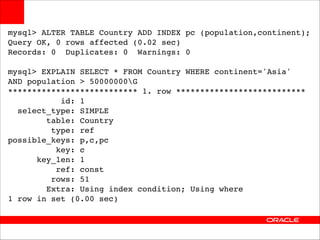
mysql> ALTER TABLE Country ADD INDEX pc (population,continent);!
Query OK, 0 rows affected (0.02 sec)!
Records: 0 Duplicates: 0 Warnings: 0!

!

mysql> EXPLAIN SELECT * FROM Country WHERE continent='Asia' !
AND population > 50000000G!
*************************** 1. row ***************************!
id: 1!
select_type: SIMPLE!
table: Country!
type: ref!
possible_keys: p,c,pc!
key: c!
key_len: 1!
ref: const!
rows: 51!
Extra: Using index condition; Using where!
1 row in set (0.00 sec)
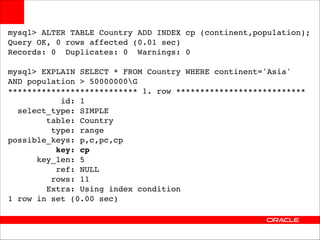
mysql> ALTER TABLE Country ADD INDEX cp (continent,population);!
Query OK, 0 rows affected (0.01 sec)!
Records: 0 Duplicates: 0 Warnings: 0!

!

mysql> EXPLAIN SELECT * FROM Country WHERE continent='Asia' !
AND population > 50000000G!
*************************** 1. row ***************************!
id: 1!
select_type: SIMPLE!
table: Country!
type: range!
possible_keys: p,c,pc,cp!
key: cp!
key_len: 5!
ref: NULL!
rows: 11!
Extra: Using index condition!
1 row in set (0.00 sec)
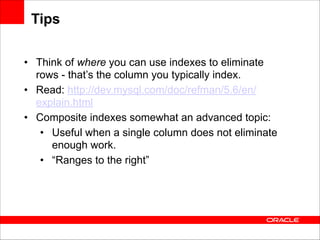
Tips
• Think of where you can use indexes to eliminate
rows - that’s the column you typically index.
• Read: http://dev.mysql.com/doc/refman/5.6/en/
explain.html
• Composite indexes somewhat an advanced topic:
• Useful when a single column does not eliminate
enough work.
• “Ranges to the right”

Optimizing MySQL

  • 1.
    <Insert Picture Here> OptimizingMySQL
 Morgan Tocker, MySQL Community Manager
 http://www.tocker.ca/

  • 2.
    Safe Harbor Statement The  following  is  intended  to  outline  our  general  product  direction.   It  is  intended  for  information  purposes  only,  and  may  not  be   incorporated  into  any  contract.  It  is  not  a  commitment  to  deliver   any  material,  code,  or  functionality,  and  should  not  be  relied  upon   in  making  purchasing  decisions.   
 The  development,  release,  and  timing  of  any  features  or   functionality  described  for  Oracle’s  products  remains  at  the  sole   discretion  of  Oracle.
  • 3.
    Options • • • • Upgrade Hardware and/orMySQL Version Optimize Configuration Optimize Queries Optimize Schema
  • 4.
    Commentary • There aresome specific cases where upgrades can make individual queries faster (i.e. subqueries). When I like this optimization the most, is to increase“capacity”. Lots of multi-core, multi-disk enhancements in 5.5 / 5.6. • MySQL 5.6 comes with a much more optimized configuration. There are now only 3-4 settings that need to change. • Optimizing queries is my favourite method :) There can be some big wins here. • Optimizing schema relates to query optimization. Sometimes you have to change schema to support certain queries, but it always starts with the queries.
  • 5.
    Optimizing Queries • Allowsyou to focus on queries that damage user experiences rather than just slow. • Best method is to install a profiler. • MySQL also supports slow query logging + Performance Schema (5.6+).
  • 6.
    # Continent Asia+ population > 5M! mysql> EXPLAIN SELECT * FROM Country WHERE continent='Asia' 
 AND population > 5000000G! *************************** 1. row ***************************! id: 1! select_type: SIMPLE! table: Country! type: ALL! possible_keys: NULL! key: NULL! key_len: NULL! ref: NULL! rows: 267! Extra: Using where! 1 row in set (0.00 sec)
  • 7.
    mysql> ALTER TABLECountry ADD INDEX p (population);! Query OK, 0 rows affected (0.02 sec)! Records: 0 Duplicates: 0 Warnings: 0! ! mysql> EXPLAIN SELECT * FROM Country WHERE continent='Asia' 
 AND population > 5000000G! *************************** 1. row ***************************! id: 1! select_type: SIMPLE! table: Country! type: ALL! possible_keys: p! key: NULL! key_len: NULL! ref: NULL! rows: 264! Extra: Using where! 1 row in set (0.01 sec)
  • 8.
    # 50 Million! mysql>EXPLAIN SELECT * FROM Country WHERE continent='Asia' 
 AND population > 50000000G! *************************** 1. row ***************************! id: 1! select_type: SIMPLE! table: Country! type: range! possible_keys: p! key: p! key_len: 4! ref: NULL! rows: 24! Extra: Using index condition; Using where! 1 row in set (0.00 sec)
  • 9.
    mysql> ALTER TABLECountry ADD INDEX c (continent);! Query OK, 0 rows affected (0.02 sec)! Records: 0 Duplicates: 0 Warnings: 0! ! mysql> EXPLAIN SELECT * FROM Country WHERE continent='Asia' ! AND population > 50000000G! *************************** 1. row ***************************! id: 1! select_type: SIMPLE! table: Country! type: ref! possible_keys: p,c! key: c! key_len: 1! ref: const! rows: 51! Extra: Using index condition; Using where! 1 row in set (0.00 sec)
  • 10.
    mysql> ALTER TABLECountry ADD INDEX pc (population,continent);! Query OK, 0 rows affected (0.02 sec)! Records: 0 Duplicates: 0 Warnings: 0! ! mysql> EXPLAIN SELECT * FROM Country WHERE continent='Asia' ! AND population > 50000000G! *************************** 1. row ***************************! id: 1! select_type: SIMPLE! table: Country! type: ref! possible_keys: p,c,pc! key: c! key_len: 1! ref: const! rows: 51! Extra: Using index condition; Using where! 1 row in set (0.00 sec)
  • 11.
    mysql> ALTER TABLECountry ADD INDEX cp (continent,population);! Query OK, 0 rows affected (0.01 sec)! Records: 0 Duplicates: 0 Warnings: 0! ! mysql> EXPLAIN SELECT * FROM Country WHERE continent='Asia' ! AND population > 50000000G! *************************** 1. row ***************************! id: 1! select_type: SIMPLE! table: Country! type: range! possible_keys: p,c,pc,cp! key: cp! key_len: 5! ref: NULL! rows: 11! Extra: Using index condition! 1 row in set (0.00 sec)
  • 12.
    Tips • Think ofwhere you can use indexes to eliminate rows - that’s the column you typically index. • Read: http://dev.mysql.com/doc/refman/5.6/en/ explain.html • Composite indexes somewhat an advanced topic: • Useful when a single column does not eliminate enough work. • “Ranges to the right”