The eternal question: Android or iOS first?
Android, but take care of UX and follow
design guidelines
Piervincenzo Madeo

07.02.2014 - Turin
Piervincenzo Madeo
Founder of Eyeonplay
http://eyeonplay.com

User Experience Specialist of Life Interaction
http://life-interaction.com

Google Developer Live Italia - Android UX
http://developersitalia.blogspot.it/

Startupper and Android enthusiast
First challenge in the mobile app market
A REAL TIME PLATFORM FOR FOOTBALL lovers
create game

track events

share match report
Let’s talk about mistakes!
iOS first
Not designed for users needs
Launching too late with too many features
Let’s talk about mistakes!
iOS first
Not designed for users needs
Launching too late with too many features
iOS first. Why?
Started in 2011… iPhone is so cool
Hard to find an Android developer
Fragmentation and UX/UI ‘anarchy’
Smartphone OS Market 2011Q3

Source: http://commons.wikimedia.org/wiki/File%3AWorld-Wide-Smartphone-Market-Share.png
By Milominderbinder2
Android hits 81.0% smartphone share in Q3 2013

Source: http://thenextweb.com/
Awesome things happen
Android 4.0 and Holo Theme
“Before Android 4.0 the variance in system themes from device to device
could make it difficult to design an app with a single predictable look and feel.
We set out to improve this situation for the developer community in Ice Cream
Sandwich and beyond.”
Adam Powell, Android Framework engineer
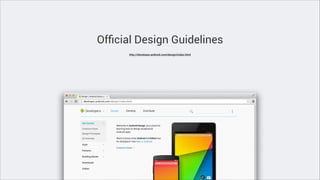
Official Design Guidelines
http://developer.android.com/design/index.html
Beautiful applications and great UX
Awesome Android Developer Community
Official Resources and Doc

Community resources

Design
http://developer.android.com/design/index.html

GitHub
https://github.com/search?l=Java&o=desc&q=andro...

Develop
http://developer.android.com/develop/index.html

Q&A
http://stackoverflow.com/questions/tagged/android

API Guides
http://developer.android.com/guide/index.html

Newsletter
http://androidweekly.net/

Android Developer Videos
http://www.youtube.com/user/androiddevelopers

Inspiration
http://www.android-app-patterns.com/

Android Design in Action Series
http://www.youtube.com/playlist?list=PLW…

…

Android Developers Blog
http://android-developers.blogspot.it
We’re changing and Android will help us
Our future plan with Android in mind
Consumer apps for football lovers
Solid backend framework
Business intelligence for game statistics
Android is for startups. No doubts!
Free and open source
Free resources that help you in creating great products
Thousands of new device activations
Immediate go to market
Dark side of the…
Monetisation strategy (in-app purchase)
Fragmentation
Competition
Take care of the User Experience
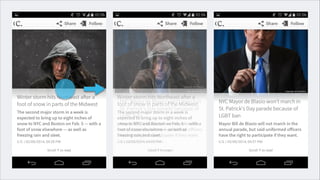
UX ≠ USABILITY
UX
User Experience is not about features.
The perfect UX meets the exact needs of the user
USABILITY
is a quality attribute that estimate how easy is
to use your user interface. It’s defined by: learnability,
efficiency, memorability and error repetitions
Mental Model
“Mental models are what people really have in their heads and what guides
their use of things”
Donald Norman, 1983
Mental model
What user thinks she knows about a UI impacts how she uses it
Additional experience with the system can change the users’ model
Mental models of your app is influenced by other apps
Courtesy of Nadav Savio | Gian Ant Design | CC | http://goo.gl/HX9EDa
Mobility constraints
Users have intermittent attention while using apps
It’s a multitasking scenario that means a lot of interruptions
Device constraints: battery, display and network
Your goals designing a new application
Make the UX of your app conform to users' mental models
Improve users' mental models
Offer relevant mobile-only functionalities
Design for user needs through highly specific tasks
Design apps that have a consistent and predictable behaviour
What a good UX can’t solve
Wrong product
Team structure and balance
Wrong strategy and inappropriate go to market
Android Patterns & Best Practices
Pay attention to your top level screen
Start screen requires always special attention
Put content and frequent actions forward
Top level switching with view controls
Make it easy to navigate and switch between top level view
Introduce the user to the major functional areas
Avoid duplication and mixed solutions
Action Bar
Display key actions in an accessible way
Actions should have clear and predictable behaviour (add item, search)
Expose brand identity
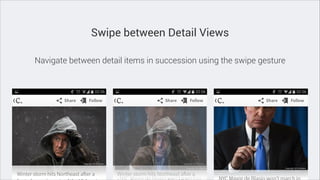
Swipe between Detail Views
Navigate between detail items in succession using the swipe gesture
The Contextual Action Bar (CAB)
Useful to select data items by touching them
Trigger action to selected items
Perform specific and predictable action
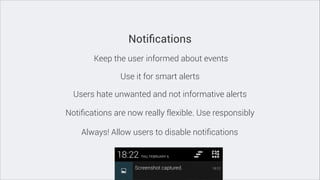
Notifications
Keep the user informed about events
Use it for smart alerts
Users hate unwanted and not informative alerts
Notifications are now really flexible. Use responsibly
Always! Allow users to disable notifications
Pull to refresh
Swipe down to update recent items in your ListView
Use the Action Bar to keep updated the user
Add a visible loader
Undo Bar
Show up just after a potential destructive action
Allow users to undo the most recent action
Show it in an easy-to-tap position
Please, forget pixels!
Use Density Independent Pixels
DIP or DP units keep things the same physical size across any screen size
Use Density Independent Pixels
1px is just 1dp at 160dpi

_____ px = [ ____ dip * ___dpi ] / 160dpi
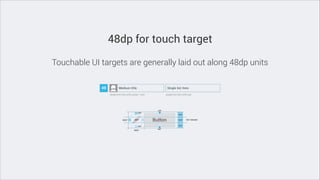
48dp for touch target
Touchable UI targets are generally laid out along 48dp units
8dp for your grid
Spacing between each UI element should 8dp (multiple of 4)
Text and scale independent pixel (sp)
1 scale-independent pixel unit is equal to 1dp with a 100% globe text scale
User can select a system-wide scaling factor for text in Settings
Always use scale independent pixel unit for text
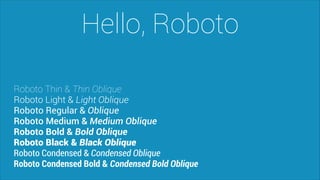
Hello, Roboto
Roboto Thin & Thin Oblique
Roboto Light & Light Oblique
Roboto Regular & Oblique
Roboto Medium & Medium Oblique
Roboto Bold & Bold Oblique
Roboto Black & Black Oblique
Roboto Condensed & Condensed Oblique
Roboto Condensed Bold & Condensed Bold Oblique
Support multiple screen
Explicitly declare in the manifest which screen sizes your application supports
Provide different layouts for different screen sizes
Provide different bitmap drawables for different screen densities
http://developer.android.com/guide/practices/screens_support.html
My typical workflow
1. Sketches, wireframes and UX flow
Describe the intent of each single view
Visualise the entire use flow
Tell a use case using personas
2. UI prototype
Create a more detailed UI prototype
Define the look and feel
Tell a use case using personas
3. User tests
Test your assumptions with real people
You need no more than 5 tests
Create clever tasks for the user
SVG and JavaScript - Live demo
Keep in touch!
http://twitter.com/piervix
http://dribbble.com/piervix

Droidcon2014 - Android UX

  • 1.
    The eternal question:Android or iOS first? Android, but take care of UX and follow design guidelines Piervincenzo Madeo 07.02.2014 - Turin
  • 2.
    Piervincenzo Madeo Founder ofEyeonplay http://eyeonplay.com User Experience Specialist of Life Interaction http://life-interaction.com Google Developer Live Italia - Android UX http://developersitalia.blogspot.it/ Startupper and Android enthusiast
  • 3.
    First challenge inthe mobile app market
  • 4.
    A REAL TIMEPLATFORM FOR FOOTBALL lovers
  • 5.
  • 6.
    Let’s talk aboutmistakes! iOS first Not designed for users needs Launching too late with too many features
  • 7.
    Let’s talk aboutmistakes! iOS first Not designed for users needs Launching too late with too many features
  • 8.
    iOS first. Why? Startedin 2011… iPhone is so cool Hard to find an Android developer Fragmentation and UX/UI ‘anarchy’
  • 9.
    Smartphone OS Market2011Q3 Source: http://commons.wikimedia.org/wiki/File%3AWorld-Wide-Smartphone-Market-Share.png By Milominderbinder2
  • 10.
    Android hits 81.0%smartphone share in Q3 2013 Source: http://thenextweb.com/
  • 11.
    Awesome things happen Android4.0 and Holo Theme “Before Android 4.0 the variance in system themes from device to device could make it difficult to design an app with a single predictable look and feel. We set out to improve this situation for the developer community in Ice Cream Sandwich and beyond.” Adam Powell, Android Framework engineer
  • 12.
  • 13.
  • 14.
    Awesome Android DeveloperCommunity Official Resources and Doc Community resources Design http://developer.android.com/design/index.html GitHub https://github.com/search?l=Java&o=desc&q=andro... Develop http://developer.android.com/develop/index.html Q&A http://stackoverflow.com/questions/tagged/android API Guides http://developer.android.com/guide/index.html Newsletter http://androidweekly.net/ Android Developer Videos http://www.youtube.com/user/androiddevelopers Inspiration http://www.android-app-patterns.com/ Android Design in Action Series http://www.youtube.com/playlist?list=PLW… … Android Developers Blog http://android-developers.blogspot.it
  • 15.
    We’re changing andAndroid will help us
  • 16.
    Our future planwith Android in mind Consumer apps for football lovers Solid backend framework Business intelligence for game statistics
  • 17.
    Android is forstartups. No doubts! Free and open source Free resources that help you in creating great products Thousands of new device activations Immediate go to market
  • 18.
    Dark side ofthe… Monetisation strategy (in-app purchase) Fragmentation Competition
  • 19.
    Take care ofthe User Experience
  • 20.
  • 21.
    UX User Experience isnot about features. The perfect UX meets the exact needs of the user
  • 22.
    USABILITY is a qualityattribute that estimate how easy is to use your user interface. It’s defined by: learnability, efficiency, memorability and error repetitions
  • 23.
    Mental Model “Mental modelsare what people really have in their heads and what guides their use of things” Donald Norman, 1983
  • 24.
    Mental model What userthinks she knows about a UI impacts how she uses it Additional experience with the system can change the users’ model Mental models of your app is influenced by other apps
  • 25.
    Courtesy of NadavSavio | Gian Ant Design | CC | http://goo.gl/HX9EDa
  • 26.
    Mobility constraints Users haveintermittent attention while using apps It’s a multitasking scenario that means a lot of interruptions Device constraints: battery, display and network
  • 27.
    Your goals designinga new application Make the UX of your app conform to users' mental models Improve users' mental models Offer relevant mobile-only functionalities Design for user needs through highly specific tasks Design apps that have a consistent and predictable behaviour
  • 28.
    What a goodUX can’t solve Wrong product Team structure and balance Wrong strategy and inappropriate go to market
  • 29.
    Android Patterns &Best Practices
  • 30.
    Pay attention toyour top level screen Start screen requires always special attention Put content and frequent actions forward
  • 32.
    Top level switchingwith view controls Make it easy to navigate and switch between top level view Introduce the user to the major functional areas Avoid duplication and mixed solutions
  • 34.
    Action Bar Display keyactions in an accessible way Actions should have clear and predictable behaviour (add item, search) Expose brand identity
  • 36.
    Swipe between DetailViews Navigate between detail items in succession using the swipe gesture
  • 38.
    The Contextual ActionBar (CAB) Useful to select data items by touching them Trigger action to selected items Perform specific and predictable action
  • 40.
    Notifications Keep the userinformed about events Use it for smart alerts Users hate unwanted and not informative alerts Notifications are now really flexible. Use responsibly Always! Allow users to disable notifications
  • 42.
    Pull to refresh Swipedown to update recent items in your ListView Use the Action Bar to keep updated the user Add a visible loader
  • 44.
    Undo Bar Show upjust after a potential destructive action Allow users to undo the most recent action Show it in an easy-to-tap position
  • 46.
  • 47.
    Use Density IndependentPixels DIP or DP units keep things the same physical size across any screen size
  • 48.
    Use Density IndependentPixels 1px is just 1dp at 160dpi _____ px = [ ____ dip * ___dpi ] / 160dpi
  • 49.
    48dp for touchtarget Touchable UI targets are generally laid out along 48dp units
  • 50.
    8dp for yourgrid Spacing between each UI element should 8dp (multiple of 4)
  • 51.
    Text and scaleindependent pixel (sp) 1 scale-independent pixel unit is equal to 1dp with a 100% globe text scale User can select a system-wide scaling factor for text in Settings Always use scale independent pixel unit for text
  • 52.
    Hello, Roboto Roboto Thin& Thin Oblique Roboto Light & Light Oblique Roboto Regular & Oblique Roboto Medium & Medium Oblique Roboto Bold & Bold Oblique Roboto Black & Black Oblique Roboto Condensed & Condensed Oblique Roboto Condensed Bold & Condensed Bold Oblique
  • 53.
    Support multiple screen Explicitlydeclare in the manifest which screen sizes your application supports Provide different layouts for different screen sizes Provide different bitmap drawables for different screen densities http://developer.android.com/guide/practices/screens_support.html
  • 55.
  • 56.
    1. Sketches, wireframesand UX flow Describe the intent of each single view Visualise the entire use flow Tell a use case using personas
  • 58.
    2. UI prototype Createa more detailed UI prototype Define the look and feel Tell a use case using personas
  • 60.
    3. User tests Testyour assumptions with real people You need no more than 5 tests Create clever tasks for the user
  • 62.
    SVG and JavaScript- Live demo
  • 63.