LINE
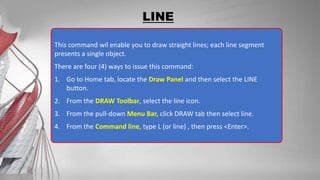
This command wil enable you to draw straight lines; each line segment
presents a single object.
There are four (4) ways to issue this command:
1. Go to Home tab, locate the Draw Panel and then select the LINE
button.
2. From the DRAW Toolbar, select the line icon.
3. From the pull-down Menu Bar, click DRAW tab then select line.
4. From the Command line, type L (or line) , then press <Enter>.
LINE
Specify first point: Move the cursor into the graphics window and pick a random
location with the left-click button, then move the mouse to a new position and
pick again. By continuing to pick point in the graphics area, you can add to the
line. When you are finished, press the <ESC> or <Enter> key to end the LINE
command.
Tips:
There are some helpful
options that can be used
during LINE drawings – by
right clicking the button of
your mouse.
End the LINE command
Connect the last point of line
to the first point of line.
The last point you clicked will
be undone.
Allows to view a drawing up
close or far away
Shift the view without
changing the magnification
Will be discussed on separate
lesson.
ORTHO MODE & POLAR TRACKING
Ortho mode aids in drawing horizontal or vertical lines. When Ortho modes is
ON, lines will snap or drawn either horizontally or vertically only.
Polar tracking is more flexible than Ortho mode, with the ability to constrain
lines to increments of a set angle. A list of common angles – 45, 90, 135, 180
and so on – is included on Polar Tracking’s context menu.
When polar tracking is set to 90, 180, 270, 360, it functions identically to Ortho
mode.
ORTHO MODE & POLAR TRACKING
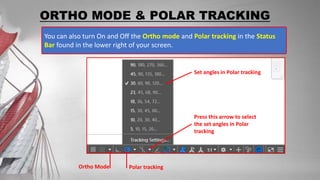
You can also turn On and Off the Ortho mode and Polar tracking in the Status
Bar found in the lower right of your screen.
Ortho Mode Polar tracking
Press this arrow to select
the set angles in Polar
tracking
Set angles in Polar tracking
ORTHO MODE & POLAR TRACKING
To turn Ortho mode On and OFF
Press F8 in your keyboard (if you are using Desktop computer).
Hold Fn and press F8 in your keyboard (if you are using laptop).
To turn Polar Tracking On and OFF
Press F10 in your keyboard (if you are using Desktop computer).
Hold Fn and press F10 in your keyboard (if you are using laptop).
LINE
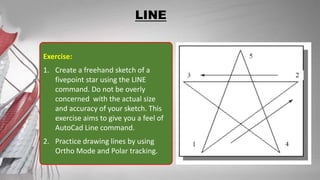
Exercise:
1. Create a freehand sketch of a
fivepoint star using the LINE
command. Do not be overly
concerned with the actual size
and accuracy of your sketch. This
exercise aims to give you a feel of
AutoCad Line command.
2. Practice drawing lines by using
Ortho Mode and Polar tracking.
LINE
Drawing lines in this manner to random points is easy;
drawing lines to exact points is a bit more complicated.
For this you’ll need to understand how to draw lines with
 direct entry
 absolute coordinates
 relative coordinates
 polar coordinates.
Cartesian Coordinates
Drawing lines by determining the direction and numerical distance.
 Type L in the command line, press <Enter>.
 Specify first point: Pick any point in the graphics area.
 Specify Next point: Move your mouse to the direction of the line. (Turn On
Ortho mode if you are drawing horizontal/vertical lines; or turn on Polar tracking
if you are drawing lines in a set angle.
 Type the length (distance) of the line. If the line is 50mm long, type 50 then
press <Enter>.
 Continue drawing lines with the same process.
 When you are finished, press the <ESC> or <Enter> key to end the LINE
command.
Drawing lines through Direct Entry
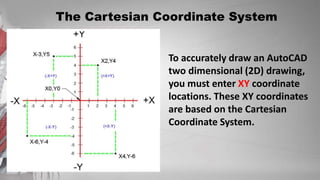
The Cartesian Coordinate System
To accurately draw an AutoCAD
two dimensional (2D) drawing,
you must enter XY coordinate
locations. These XY coordinates
are based on the Cartesian
Coordinate System.
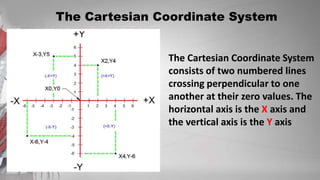
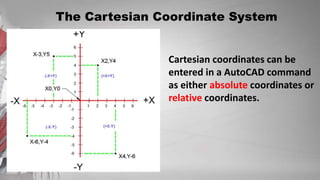
The Cartesian Coordinate System
consists of two numbered lines
crossing perpendicular to one
another at their zero values. The
horizontal axis is the X axis and
the vertical axis is the Y axis
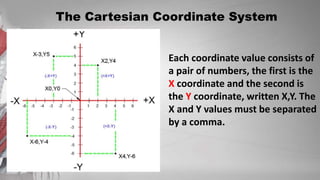
The Cartesian Coordinate System
Each coordinate value consists of
a pair of numbers, the first is the
X coordinate and the second is
the Y coordinate, written X,Y. The
X and Y values must be separated
by a comma.
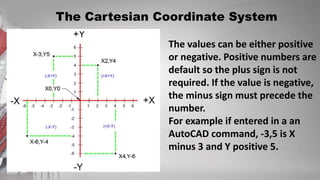
The Cartesian Coordinate System
The values can be either positive
or negative. Positive numbers are
default so the plus sign is not
required. If the value is negative,
the minus sign must precede the
number.
For example if entered in a an
AutoCAD command, -3,5 is X
minus 3 and Y positive 5.
The Cartesian Coordinate System
Cartesian coordinates can be
entered in a AutoCAD command
as either absolute coordinates or
relative coordinates.
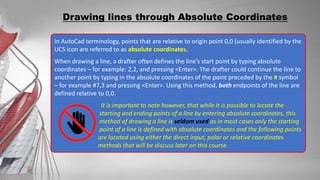
In AutoCad terminology, points that are relative to origin point 0,0 (usually identified by the
UCS icon are referred to as absolute coordinates.
When drawing a line, a drafter often defines the line’s start point by typing absolute
coordinates – for example: 2,2, and pressing <Enter>. The drafter could continue the line to
another point by typing in the absolute coordinates of the point preceded by the # symbol
– for example #7,3 and pressing <Enter>. Using this method, both endpoints of the line are
defined relative to 0,0.
It is important to note however, that while it is possible to locate the
starting and ending points of a line by entering absolute coordinates, this
method of drawing a line is seldom used as in most cases only the starting
point of a line is defined with absolute coordinates and the following points
are located using either the direct input, polar or relative coordinates
methods that will be discuss later on this course.
Drawing lines through Absolute Coordinates
After first points entered, your next points can be entered by specifying the next
coordinate compare/relative from the first points. The relative coordinate started
with symbol “@” tell AutoCAD it was a relative coordinates. Using relative
coordinate, points entered by typing @x,y [Enter]
Note: relative coordinates are very useful in drawing rectangle.
Drawing lines through Relative Coordinates
 Type L in the command line. <Enter>
 Specify first point: Pick any point in the
graphics area.
 Specify next point: Type @50,50
 Specify next point: Type @0,25
 Specify next point: Type @30,0
 When you are finished, press the <ESC> or
<Enter> key to end the LINE command.
Polar coordinates used when you need to draw the next points at specify angle.
Polar coordinates system in AutoCAD specifies distance length at which angle. Using
polar coordinate, points entered by typing @distance<angle [Enter]
Drawing lines through Polar Coordinates
 Type L in the command line. (Enter>
 Specify first point: Pick any point in the
graphics area.
 Specify next point: Type @70<45
 Specify next point: Type @25<90
 Specify next point: Type @30<0
 When you are finished, press the <ESC>
or <Enter> key to end the LINE
command.
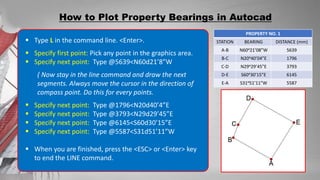
How to Plot Property Bearings in Autocad
PROPERTY NO. 1
STATION BEARING DISTANCE (m)
A-B N60ᵒ21’08”W 5.639
B-C N20ᵒ40’04”E 1.796
C-D N29ᵒ29’45”E 3.793
D-E S60ᵒ30’15”E 6.145
E-A S31ᵒ51’11”W 5.587
CONVERSION
DISTANCE (mm)
5639
1796
3793
6145
5587
To plot this, points entered by typing @distance<Bearing [Enter]. Degree (ᵒ) will be
represented by letter d.
If your Drawing Units was set to Decimal, any entities that you will draw will be measured
in millimeters.
On this Property bearings, since the distance was shown in meters (m), you have to
convert and draw it in millimeters.
How to Plot Property Bearings in Autocad
PROPERTY NO. 1
STATION BEARING DISTANCE (mm)
A-B N60ᵒ21’08”W 5639
B-C N20ᵒ40’04”E 1796
C-D N29ᵒ29’45”E 3793
D-E S60ᵒ30’15”E 6145
E-A S31ᵒ51’11”W 5587
 Type L in the command line. <Enter>.
 Specify first point: Pick any point in the graphics area.
 Specify next point: Type @5639<N60d21’8”W
( Now stay in the line command and draw the next
segments. Always move the cursor in the direction of
compass point. Do this for every points.
 Specify next point: Type @1796<N20d40’4”E
 Specify next point: Type @3793<N29d29’45”E
 Specify next point: Type @6145<S60d30’15”E
 Specify next point: Type @5587<S31d51’11”W
 When you are finished, press the <ESC> or <Enter> key
to end the LINE command.
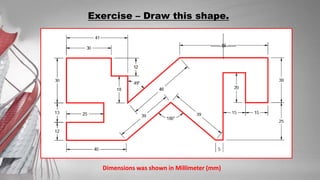
Exercise – Draw this shape.
Dimensions was shown in Millimeter (mm)
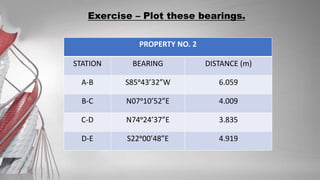
Exercise – Plot these bearings.
PROPERTY NO. 2
STATION BEARING DISTANCE (m)
A-B S85ᵒ43’32”W 6.059
B-C N07ᵒ10’52”E 4.009
C-D N74ᵒ24’37”E 3.835
D-E S22ᵒ00’48”E 4.919

DRAWING LINES.pptx

  • 2.
    LINE This command wilenable you to draw straight lines; each line segment presents a single object. There are four (4) ways to issue this command: 1. Go to Home tab, locate the Draw Panel and then select the LINE button. 2. From the DRAW Toolbar, select the line icon. 3. From the pull-down Menu Bar, click DRAW tab then select line. 4. From the Command line, type L (or line) , then press <Enter>.
  • 3.
    LINE Specify first point:Move the cursor into the graphics window and pick a random location with the left-click button, then move the mouse to a new position and pick again. By continuing to pick point in the graphics area, you can add to the line. When you are finished, press the <ESC> or <Enter> key to end the LINE command. Tips: There are some helpful options that can be used during LINE drawings – by right clicking the button of your mouse. End the LINE command Connect the last point of line to the first point of line. The last point you clicked will be undone. Allows to view a drawing up close or far away Shift the view without changing the magnification Will be discussed on separate lesson.
  • 4.
    ORTHO MODE &POLAR TRACKING Ortho mode aids in drawing horizontal or vertical lines. When Ortho modes is ON, lines will snap or drawn either horizontally or vertically only. Polar tracking is more flexible than Ortho mode, with the ability to constrain lines to increments of a set angle. A list of common angles – 45, 90, 135, 180 and so on – is included on Polar Tracking’s context menu. When polar tracking is set to 90, 180, 270, 360, it functions identically to Ortho mode.
  • 5.
    ORTHO MODE &POLAR TRACKING You can also turn On and Off the Ortho mode and Polar tracking in the Status Bar found in the lower right of your screen. Ortho Mode Polar tracking Press this arrow to select the set angles in Polar tracking Set angles in Polar tracking
  • 6.
    ORTHO MODE &POLAR TRACKING To turn Ortho mode On and OFF Press F8 in your keyboard (if you are using Desktop computer). Hold Fn and press F8 in your keyboard (if you are using laptop). To turn Polar Tracking On and OFF Press F10 in your keyboard (if you are using Desktop computer). Hold Fn and press F10 in your keyboard (if you are using laptop).
  • 7.
    LINE Exercise: 1. Create afreehand sketch of a fivepoint star using the LINE command. Do not be overly concerned with the actual size and accuracy of your sketch. This exercise aims to give you a feel of AutoCad Line command. 2. Practice drawing lines by using Ortho Mode and Polar tracking.
  • 8.
    LINE Drawing lines inthis manner to random points is easy; drawing lines to exact points is a bit more complicated. For this you’ll need to understand how to draw lines with  direct entry  absolute coordinates  relative coordinates  polar coordinates. Cartesian Coordinates
  • 9.
    Drawing lines bydetermining the direction and numerical distance.  Type L in the command line, press <Enter>.  Specify first point: Pick any point in the graphics area.  Specify Next point: Move your mouse to the direction of the line. (Turn On Ortho mode if you are drawing horizontal/vertical lines; or turn on Polar tracking if you are drawing lines in a set angle.  Type the length (distance) of the line. If the line is 50mm long, type 50 then press <Enter>.  Continue drawing lines with the same process.  When you are finished, press the <ESC> or <Enter> key to end the LINE command. Drawing lines through Direct Entry
  • 10.
    The Cartesian CoordinateSystem To accurately draw an AutoCAD two dimensional (2D) drawing, you must enter XY coordinate locations. These XY coordinates are based on the Cartesian Coordinate System.
  • 11.
    The Cartesian CoordinateSystem The Cartesian Coordinate System consists of two numbered lines crossing perpendicular to one another at their zero values. The horizontal axis is the X axis and the vertical axis is the Y axis
  • 12.
    The Cartesian CoordinateSystem Each coordinate value consists of a pair of numbers, the first is the X coordinate and the second is the Y coordinate, written X,Y. The X and Y values must be separated by a comma.
  • 13.
    The Cartesian CoordinateSystem The values can be either positive or negative. Positive numbers are default so the plus sign is not required. If the value is negative, the minus sign must precede the number. For example if entered in a an AutoCAD command, -3,5 is X minus 3 and Y positive 5.
  • 14.
    The Cartesian CoordinateSystem Cartesian coordinates can be entered in a AutoCAD command as either absolute coordinates or relative coordinates.
  • 15.
    In AutoCad terminology,points that are relative to origin point 0,0 (usually identified by the UCS icon are referred to as absolute coordinates. When drawing a line, a drafter often defines the line’s start point by typing absolute coordinates – for example: 2,2, and pressing <Enter>. The drafter could continue the line to another point by typing in the absolute coordinates of the point preceded by the # symbol – for example #7,3 and pressing <Enter>. Using this method, both endpoints of the line are defined relative to 0,0. It is important to note however, that while it is possible to locate the starting and ending points of a line by entering absolute coordinates, this method of drawing a line is seldom used as in most cases only the starting point of a line is defined with absolute coordinates and the following points are located using either the direct input, polar or relative coordinates methods that will be discuss later on this course. Drawing lines through Absolute Coordinates
  • 16.
    After first pointsentered, your next points can be entered by specifying the next coordinate compare/relative from the first points. The relative coordinate started with symbol “@” tell AutoCAD it was a relative coordinates. Using relative coordinate, points entered by typing @x,y [Enter] Note: relative coordinates are very useful in drawing rectangle. Drawing lines through Relative Coordinates  Type L in the command line. <Enter>  Specify first point: Pick any point in the graphics area.  Specify next point: Type @50,50  Specify next point: Type @0,25  Specify next point: Type @30,0  When you are finished, press the <ESC> or <Enter> key to end the LINE command.
  • 17.
    Polar coordinates usedwhen you need to draw the next points at specify angle. Polar coordinates system in AutoCAD specifies distance length at which angle. Using polar coordinate, points entered by typing @distance<angle [Enter] Drawing lines through Polar Coordinates  Type L in the command line. (Enter>  Specify first point: Pick any point in the graphics area.  Specify next point: Type @70<45  Specify next point: Type @25<90  Specify next point: Type @30<0  When you are finished, press the <ESC> or <Enter> key to end the LINE command.
  • 18.
    How to PlotProperty Bearings in Autocad PROPERTY NO. 1 STATION BEARING DISTANCE (m) A-B N60ᵒ21’08”W 5.639 B-C N20ᵒ40’04”E 1.796 C-D N29ᵒ29’45”E 3.793 D-E S60ᵒ30’15”E 6.145 E-A S31ᵒ51’11”W 5.587 CONVERSION DISTANCE (mm) 5639 1796 3793 6145 5587 To plot this, points entered by typing @distance<Bearing [Enter]. Degree (ᵒ) will be represented by letter d. If your Drawing Units was set to Decimal, any entities that you will draw will be measured in millimeters. On this Property bearings, since the distance was shown in meters (m), you have to convert and draw it in millimeters.
  • 19.
    How to PlotProperty Bearings in Autocad PROPERTY NO. 1 STATION BEARING DISTANCE (mm) A-B N60ᵒ21’08”W 5639 B-C N20ᵒ40’04”E 1796 C-D N29ᵒ29’45”E 3793 D-E S60ᵒ30’15”E 6145 E-A S31ᵒ51’11”W 5587  Type L in the command line. <Enter>.  Specify first point: Pick any point in the graphics area.  Specify next point: Type @5639<N60d21’8”W ( Now stay in the line command and draw the next segments. Always move the cursor in the direction of compass point. Do this for every points.  Specify next point: Type @1796<N20d40’4”E  Specify next point: Type @3793<N29d29’45”E  Specify next point: Type @6145<S60d30’15”E  Specify next point: Type @5587<S31d51’11”W  When you are finished, press the <ESC> or <Enter> key to end the LINE command.
  • 20.
    Exercise – Drawthis shape. Dimensions was shown in Millimeter (mm)
  • 21.
    Exercise – Plotthese bearings. PROPERTY NO. 2 STATION BEARING DISTANCE (m) A-B S85ᵒ43’32”W 6.059 B-C N07ᵒ10’52”E 4.009 C-D N74ᵒ24’37”E 3.835 D-E S22ᵒ00’48”E 4.919