Drawing images on the Server
****(GD-Graphics Designing)
****Image Manipulations in PHP
Page no.501 to 536
Chapter 14
JPEG – Joint Photographic Experts Group
PNG- Portable Network Graphics
BMP - bitmap image
GIF-Graphics Interchange Format
TIF – Tag Image File Format
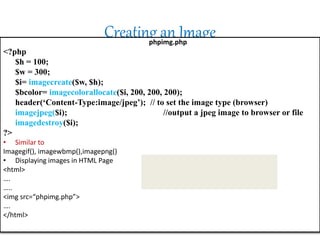
Creating an Imagephpimg.php
<?php
$h = 100;
$w = 300;
$i= imagecreate($w, $h);
$bcolor= imagecolorallocate($i, 200, 200, 200);
header(‘Content-Type:image/jpeg’); // to set the image type (browser)
imagejpeg($i); //output a jpeg image to browser or file
imagedestroy($i);
?>
• Similar to
Imagegif(), imagewbmp(),imagepng()
• Displaying images in HTML Page
<html>
….
…..
<img src=“phpimg.php”>
….
</html>
Drawing Lines
imageline(image,x1,y1,x2,y2,color)
<?php
$h = 100;
$w = 300;
$i= imagecreate($w, $h);
$bcolor= imagecolorallocate($i, 200, 200, 200);
$blkcolor=imagecolorallocate($i,0, 0, 0);
imageline($i, 40, 20, 90, 80, $blkcolor);
header(‘Content-Type:image/jpeg’); // to set the image type (browser)
imagejpeg($i); //output a jpeg image to browser or file
imagedestroy($i);
?>
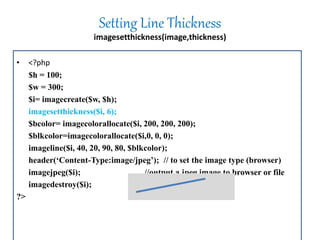
Setting Line Thickness
imagesetthickness(image,thickness)
• <?php
$h = 100;
$w = 300;
$i= imagecreate($w, $h);
imagesetthickness($i, 6);
$bcolor= imagecolorallocate($i, 200, 200, 200);
$blkcolor=imagecolorallocate($i,0, 0, 0);
imageline($i, 40, 20, 90, 80, $blkcolor);
header(‘Content-Type:image/jpeg’); // to set the image type (browser)
imagejpeg($i); //output a jpeg image to browser or file
imagedestroy($i);
?>
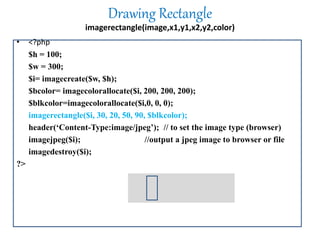
Drawing Rectangle
imagerectangle(image,x1,y1,x2,y2,color)
• <?php
$h = 100;
$w = 300;
$i= imagecreate($w, $h);
$bcolor= imagecolorallocate($i, 200, 200, 200);
$blkcolor=imagecolorallocate($i,0, 0, 0);
imagerectangle($i, 30, 20, 50, 90, $blkcolor);
header(‘Content-Type:image/jpeg’); // to set the image type (browser)
imagejpeg($i); //output a jpeg image to browser or file
imagedestroy($i);
?>
Drawing Ellipses
imageellipse(image,cx,cy,w,h,color)
• <?php
$h = 100;
$w = 300;
$i= imagecreate($w, $h);
$bcolor= imagecolorallocate($i, 200, 200, 200);
$blkcolor=imagecolorallocate($i,0, 0, 0);
imageellipse($i, 100,40,150,50,$blkcolor);
header(‘Content-Type:image/jpeg’); // to set the image type (browser)
imagejpeg($i); //output a jpeg image to browser or file
imagedestroy($i);
?>
Drawing Arcs
imagearc(image,cx,cy,w,h,s,e,color)• <?php
$h = 100;
$w = 300;
$i= imagecreate($w, $h);
$bcolor= imagecolorallocate($i, 200, 200, 200);
$blkcolor=imagecolorallocate($i,0, 0, 0);
// draw the mouth
imagearc($i, 100, 100, 150, 150, 25, 155, $blkcolor);
header(‘Content-Type:image/jpeg’); // to set the image type (browser)
imagejpeg($i); //output a jpeg image to browser or file
imagedestroy($i);
?>
Drawing Polygons
imagepolygon(image,points,num-points,color)
• <?php
$h = 100;
$w = 300;
$points=array{120,60,130,60,150,80,170,40,150,40,110,20,110,90};
$i= imagecreate($w, $h);
$bcolor= imagecolorallocate($i, 200, 200, 200);
$blkcolor=imagecolorallocate($i,0, 0, 0);
imagepolygon($i, $points, 7, $blkcolor);
header(‘Content-Type:image/jpeg’); // to set the image type (browser)
imagejpeg($i); //output a jpeg image to browser or file
imagedestroy($i);
?>
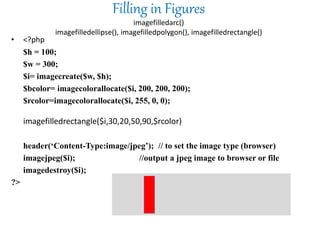
Filling in Figures
imagefilledarc()
imagefilledellipse(), imagefilledpolygon(), imagefilledrectangle()
• <?php
$h = 100;
$w = 300;
$i= imagecreate($w, $h);
$bcolor= imagecolorallocate($i, 200, 200, 200);
$rcolor=imagecolorallocate($i, 255, 0, 0);
imagefilledrectangle($i,30,20,50,90,$rcolor)
header(‘Content-Type:image/jpeg’); // to set the image type (browser)
imagejpeg($i); //output a jpeg image to browser or file
imagedestroy($i);
?>
Drawing Individual Pixels
imagesetpixel(image,x,y,color)
• <?php
$h = 100;
$w = 300;
$i= imagecreate($w, $h);
$bcolor= imagecolorallocate($i, 200, 200, 200);
$rcolor=imagecolorallocate($i, 255, 0, 0);
for($L=50;$L<270,$L+=3)
{
imagesetpixel($i, $L, $L/3, $rcolor);
}
header(‘Content-Type:image/jpeg’); // to set the image type (browser)
imagejpeg($i); //output a jpeg image to browser or file
imagedestroy($i);
?>
Adding text to an image/Drawing Text
• imagestring takes six arguments
imagestring($image, $font, $x, $y, $string, $colour);
• The font can be 1, 2, 3, 4, 5, where higher numbers produce bigger characters
Drawing vertical Text
• imagestring takes six arguments
imagestringup($image, $font, $x, $y, $string, $colour);
• The font can be 1, 2, 3, 4, 5, where higher numbers produce bigger characters
Helloworld!
We can also import images and then edit them /
working with image files
• imagecreatefromgif
– Example usages:
$im=imagecreatefromgif("someImage.gif");
$im=imagecreatefromgif("someUrlPointingToAGifFile");
• Similarly, there is
– imagecreatefrompng
– Imagecreatefromjpeg
– Imagecreatefromwbmp
– Imagecreatefromxbm
– Imagecreatefromxpm
Drawing on an existing image
Tiling Images
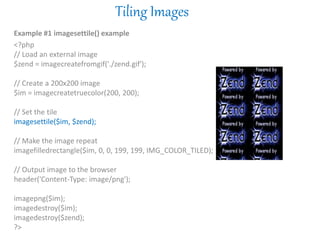
Example #1 imagesettile() example
<?php
// Load an external image
$zend = imagecreatefromgif('./zend.gif');
// Create a 200x200 image
$im = imagecreatetruecolor(200, 200);
// Set the tile
imagesettile($im, $zend);
// Make the image repeat
imagefilledrectangle($im, 0, 0, 199, 199, IMG_COLOR_TILED);
// Output image to the browser
header('Content-Type: image/png');
imagepng($im);
imagedestroy($im);
imagedestroy($zend);
?>
Copying Images (Flip image)
imagecopy — Copy part of an image
imagecopy ($dst_im , $src_im , $dst_x , $dst_y , $src_x, $src_y ,$src_w ,$src_h )
Copy a part of src_im on to dst_im starting at the x,y coordinates src_x, src_y with a width
of src_w and a height of src_h. The portion defined will be copied onto the x,y
coordinates, dst_x and dst_y.
Example #1 Cropping the PHP.net logo
<?php
// Create image instances
$src = imagecreatefromgif('php.gif');
$dest = imagecreatetruecolor(80, 40);
// Copy
imagecopy($dest, $src, 0, 0, 20, 13, 80, 40);
// Output and free from memory
header('Content-Type: image/gif');
imagegif($dest);
imagedestroy($dest);
imagedestroy($src);
?>

Drawing images

  • 1.
    Drawing images onthe Server ****(GD-Graphics Designing) ****Image Manipulations in PHP Page no.501 to 536 Chapter 14 JPEG – Joint Photographic Experts Group PNG- Portable Network Graphics BMP - bitmap image GIF-Graphics Interchange Format TIF – Tag Image File Format
  • 2.
    Creating an Imagephpimg.php <?php $h= 100; $w = 300; $i= imagecreate($w, $h); $bcolor= imagecolorallocate($i, 200, 200, 200); header(‘Content-Type:image/jpeg’); // to set the image type (browser) imagejpeg($i); //output a jpeg image to browser or file imagedestroy($i); ?> • Similar to Imagegif(), imagewbmp(),imagepng() • Displaying images in HTML Page <html> …. ….. <img src=“phpimg.php”> …. </html>
  • 3.
    Drawing Lines imageline(image,x1,y1,x2,y2,color) <?php $h =100; $w = 300; $i= imagecreate($w, $h); $bcolor= imagecolorallocate($i, 200, 200, 200); $blkcolor=imagecolorallocate($i,0, 0, 0); imageline($i, 40, 20, 90, 80, $blkcolor); header(‘Content-Type:image/jpeg’); // to set the image type (browser) imagejpeg($i); //output a jpeg image to browser or file imagedestroy($i); ?>
  • 4.
    Setting Line Thickness imagesetthickness(image,thickness) •<?php $h = 100; $w = 300; $i= imagecreate($w, $h); imagesetthickness($i, 6); $bcolor= imagecolorallocate($i, 200, 200, 200); $blkcolor=imagecolorallocate($i,0, 0, 0); imageline($i, 40, 20, 90, 80, $blkcolor); header(‘Content-Type:image/jpeg’); // to set the image type (browser) imagejpeg($i); //output a jpeg image to browser or file imagedestroy($i); ?>
  • 5.
    Drawing Rectangle imagerectangle(image,x1,y1,x2,y2,color) • <?php $h= 100; $w = 300; $i= imagecreate($w, $h); $bcolor= imagecolorallocate($i, 200, 200, 200); $blkcolor=imagecolorallocate($i,0, 0, 0); imagerectangle($i, 30, 20, 50, 90, $blkcolor); header(‘Content-Type:image/jpeg’); // to set the image type (browser) imagejpeg($i); //output a jpeg image to browser or file imagedestroy($i); ?>
  • 6.
    Drawing Ellipses imageellipse(image,cx,cy,w,h,color) • <?php $h= 100; $w = 300; $i= imagecreate($w, $h); $bcolor= imagecolorallocate($i, 200, 200, 200); $blkcolor=imagecolorallocate($i,0, 0, 0); imageellipse($i, 100,40,150,50,$blkcolor); header(‘Content-Type:image/jpeg’); // to set the image type (browser) imagejpeg($i); //output a jpeg image to browser or file imagedestroy($i); ?>
  • 7.
    Drawing Arcs imagearc(image,cx,cy,w,h,s,e,color)• <?php $h= 100; $w = 300; $i= imagecreate($w, $h); $bcolor= imagecolorallocate($i, 200, 200, 200); $blkcolor=imagecolorallocate($i,0, 0, 0); // draw the mouth imagearc($i, 100, 100, 150, 150, 25, 155, $blkcolor); header(‘Content-Type:image/jpeg’); // to set the image type (browser) imagejpeg($i); //output a jpeg image to browser or file imagedestroy($i); ?>
  • 8.
    Drawing Polygons imagepolygon(image,points,num-points,color) • <?php $h= 100; $w = 300; $points=array{120,60,130,60,150,80,170,40,150,40,110,20,110,90}; $i= imagecreate($w, $h); $bcolor= imagecolorallocate($i, 200, 200, 200); $blkcolor=imagecolorallocate($i,0, 0, 0); imagepolygon($i, $points, 7, $blkcolor); header(‘Content-Type:image/jpeg’); // to set the image type (browser) imagejpeg($i); //output a jpeg image to browser or file imagedestroy($i); ?>
  • 9.
    Filling in Figures imagefilledarc() imagefilledellipse(),imagefilledpolygon(), imagefilledrectangle() • <?php $h = 100; $w = 300; $i= imagecreate($w, $h); $bcolor= imagecolorallocate($i, 200, 200, 200); $rcolor=imagecolorallocate($i, 255, 0, 0); imagefilledrectangle($i,30,20,50,90,$rcolor) header(‘Content-Type:image/jpeg’); // to set the image type (browser) imagejpeg($i); //output a jpeg image to browser or file imagedestroy($i); ?>
  • 10.
    Drawing Individual Pixels imagesetpixel(image,x,y,color) •<?php $h = 100; $w = 300; $i= imagecreate($w, $h); $bcolor= imagecolorallocate($i, 200, 200, 200); $rcolor=imagecolorallocate($i, 255, 0, 0); for($L=50;$L<270,$L+=3) { imagesetpixel($i, $L, $L/3, $rcolor); } header(‘Content-Type:image/jpeg’); // to set the image type (browser) imagejpeg($i); //output a jpeg image to browser or file imagedestroy($i); ?>
  • 11.
    Adding text toan image/Drawing Text • imagestring takes six arguments imagestring($image, $font, $x, $y, $string, $colour); • The font can be 1, 2, 3, 4, 5, where higher numbers produce bigger characters
  • 12.
    Drawing vertical Text •imagestring takes six arguments imagestringup($image, $font, $x, $y, $string, $colour); • The font can be 1, 2, 3, 4, 5, where higher numbers produce bigger characters Helloworld!
  • 13.
    We can alsoimport images and then edit them / working with image files • imagecreatefromgif – Example usages: $im=imagecreatefromgif("someImage.gif"); $im=imagecreatefromgif("someUrlPointingToAGifFile"); • Similarly, there is – imagecreatefrompng – Imagecreatefromjpeg – Imagecreatefromwbmp – Imagecreatefromxbm – Imagecreatefromxpm
  • 14.
    Drawing on anexisting image
  • 15.
    Tiling Images Example #1imagesettile() example <?php // Load an external image $zend = imagecreatefromgif('./zend.gif'); // Create a 200x200 image $im = imagecreatetruecolor(200, 200); // Set the tile imagesettile($im, $zend); // Make the image repeat imagefilledrectangle($im, 0, 0, 199, 199, IMG_COLOR_TILED); // Output image to the browser header('Content-Type: image/png'); imagepng($im); imagedestroy($im); imagedestroy($zend); ?>
  • 16.
    Copying Images (Flipimage) imagecopy — Copy part of an image imagecopy ($dst_im , $src_im , $dst_x , $dst_y , $src_x, $src_y ,$src_w ,$src_h ) Copy a part of src_im on to dst_im starting at the x,y coordinates src_x, src_y with a width of src_w and a height of src_h. The portion defined will be copied onto the x,y coordinates, dst_x and dst_y. Example #1 Cropping the PHP.net logo <?php // Create image instances $src = imagecreatefromgif('php.gif'); $dest = imagecreatetruecolor(80, 40); // Copy imagecopy($dest, $src, 0, 0, 20, 13, 80, 40); // Output and free from memory header('Content-Type: image/gif'); imagegif($dest); imagedestroy($dest); imagedestroy($src); ?>