Background Values
Ivan Clark G Pasana
Sarah Krizel Cayacap
Neo De Villa
Christian Philipp Gomez
In these chapter,
you will learn about
the following CSS
background
properties:
Background-image
Background-color
Background-position
Background-repeat
Background (shorthand property)
Background-image
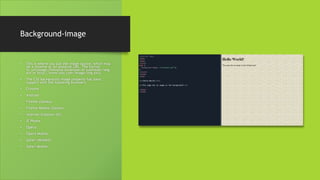
• This is where you put the image source, which may
be a relative or an absolute URL. The format
is: url(image_filename.extension or subfolder/img.
ext or http;//www.site.com/image/img.ext).
• The CSS background-image property has basic
support with the following browsers:
• Chrome
• Android
• Firefox (Gecko)
• Firefox Mobile (Gecko)
• Internet Explorer (IE)
• IE Phone
• Opera
• Opera Mobile
• Safari (WebKit)
• Safari Mobile
Background-image
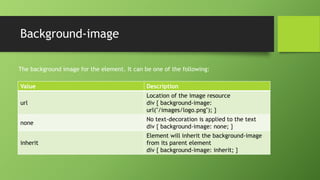
Value Description
url
Location of the image resource
div { background-image:
url("/images/logo.png"); }
none
No text-decoration is applied to the text
div { background-image: none; }
inherit
Element will inherit the background-image
from its parent element
div { background-image: inherit; }
The background image for the element. It can be one of the following:
Background-image
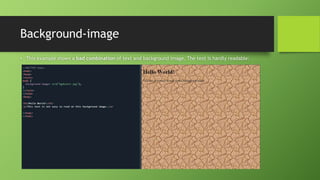
• This example shows a bad combination of text and background image. The text is hardly readable:
Background-
color
The value in the
CSS background-
color property can
be expressed as a
hexadecimal
value, rgb value,
or as a named
color.
Background-color
values can be
expressed in
hexadecimal
values such as
#FFFFFF, #000000,
and #FF0000.
Background-color
values can be
expressed using
rgb such as
rgb(255,255,255),
rgb(0,0,0), and
rgb(255,0,0).
Background-color
values can be
expressed as
named colors such
as white, black,
and red.
Background-color
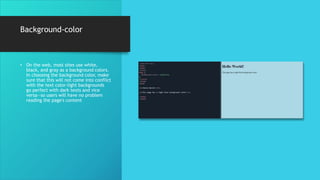
• On the web, most sites use white,
black, and gray as a background colors.
In choosing the background color, make
sure that this will not come into conflict
with the text color-light backgrounds
go perfect with dark texts and vice
versa—so users will have no problem
reading the page's content
Background-position
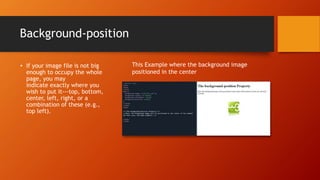
• If your image file is not big
enough to occupy the whole
page, you may
indicate exactly where you
wish to put it---top, bottom,
center, left, right, or a
combination of these (e.g.,
top left).
This Example where the background image
positioned in the center
Background-position
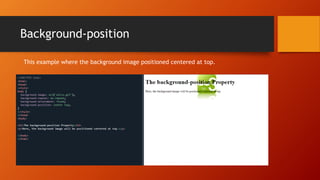
This example where the background image positioned centered at top.
Background-repeat
• You may tile your image file by using the value, repeat; repeat
it at the topmost and bottommost part, using repeat-y (on the y-
axis); repeat it side-by-side, using repeat-x (on the x-axis);
not repeat it at all, using no-repeat.
Background-repeat
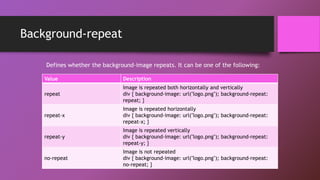
Value Description
repeat
Image is repeated both horizontally and vertically
div { background-image: url("logo.png"); background-repeat:
repeat; }
repeat-x
Image is repeated horizontally
div { background-image: url("logo.png"); background-repeat:
repeat-x; }
repeat-y
Image is repeated vertically
div { background-image: url("logo.png"); background-repeat:
repeat-y; }
no-repeat
Image is not repeated
div { background-image: url("logo.png"); background-repeat:
no-repeat; }
Defines whether the background-image repeats. It can be one of the following:
Background-repeat
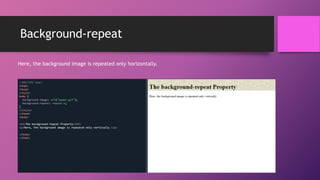
Here, the background image is repeated only horizontally.
Background-repeat
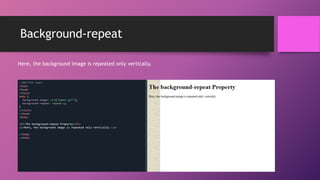
Here, the background image is repeated only vertically.
Background-repeat
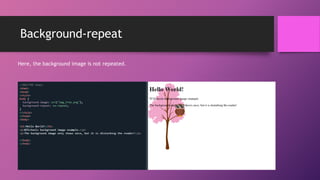
Here, the background image is not repeated.
Background (shorthand property)
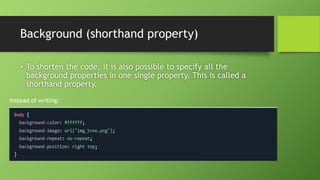
• To shorten the code, it is also possible to specify all the
background properties in one single property. This is called a
shorthand property.
Instead of writing:
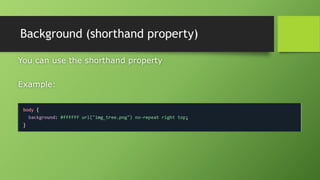
Background (shorthand property)
You can use the shorthand property
Example:
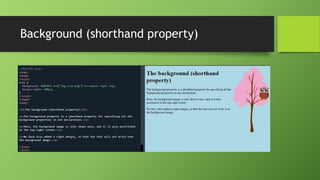
Background (shorthand property)
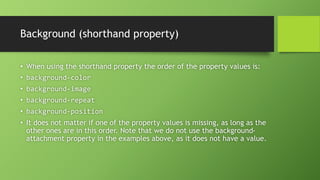
• When using the shorthand property the order of the property values is:
• background-color
• background-image
• background-repeat
• background-position
• It does not matter if one of the property values is missing, as long as the
other ones are in this order. Note that we do not use the background-
attachment property in the examples above, as it does not have a value.
THANK YOU!

Presentation-1-1.pptx

  • 1.
    Background Values Ivan ClarkG Pasana Sarah Krizel Cayacap Neo De Villa Christian Philipp Gomez
  • 2.
    In these chapter, youwill learn about the following CSS background properties: Background-image Background-color Background-position Background-repeat Background (shorthand property)
  • 3.
    Background-image • This iswhere you put the image source, which may be a relative or an absolute URL. The format is: url(image_filename.extension or subfolder/img. ext or http;//www.site.com/image/img.ext). • The CSS background-image property has basic support with the following browsers: • Chrome • Android • Firefox (Gecko) • Firefox Mobile (Gecko) • Internet Explorer (IE) • IE Phone • Opera • Opera Mobile • Safari (WebKit) • Safari Mobile
  • 4.
    Background-image Value Description url Location ofthe image resource div { background-image: url("/images/logo.png"); } none No text-decoration is applied to the text div { background-image: none; } inherit Element will inherit the background-image from its parent element div { background-image: inherit; } The background image for the element. It can be one of the following:
  • 5.
    Background-image • This exampleshows a bad combination of text and background image. The text is hardly readable:
  • 6.
    Background- color The value inthe CSS background- color property can be expressed as a hexadecimal value, rgb value, or as a named color. Background-color values can be expressed in hexadecimal values such as #FFFFFF, #000000, and #FF0000. Background-color values can be expressed using rgb such as rgb(255,255,255), rgb(0,0,0), and rgb(255,0,0). Background-color values can be expressed as named colors such as white, black, and red.
  • 7.
    Background-color • On theweb, most sites use white, black, and gray as a background colors. In choosing the background color, make sure that this will not come into conflict with the text color-light backgrounds go perfect with dark texts and vice versa—so users will have no problem reading the page's content
  • 8.
    Background-position • If yourimage file is not big enough to occupy the whole page, you may indicate exactly where you wish to put it---top, bottom, center, left, right, or a combination of these (e.g., top left). This Example where the background image positioned in the center
  • 9.
    Background-position This example wherethe background image positioned centered at top.
  • 10.
    Background-repeat • You maytile your image file by using the value, repeat; repeat it at the topmost and bottommost part, using repeat-y (on the y- axis); repeat it side-by-side, using repeat-x (on the x-axis); not repeat it at all, using no-repeat.
  • 11.
    Background-repeat Value Description repeat Image isrepeated both horizontally and vertically div { background-image: url("logo.png"); background-repeat: repeat; } repeat-x Image is repeated horizontally div { background-image: url("logo.png"); background-repeat: repeat-x; } repeat-y Image is repeated vertically div { background-image: url("logo.png"); background-repeat: repeat-y; } no-repeat Image is not repeated div { background-image: url("logo.png"); background-repeat: no-repeat; } Defines whether the background-image repeats. It can be one of the following:
  • 12.
    Background-repeat Here, the backgroundimage is repeated only horizontally.
  • 13.
    Background-repeat Here, the backgroundimage is repeated only vertically.
  • 14.
  • 15.
    Background (shorthand property) •To shorten the code, it is also possible to specify all the background properties in one single property. This is called a shorthand property. Instead of writing:
  • 16.
    Background (shorthand property) Youcan use the shorthand property Example:
  • 17.
  • 18.
    Background (shorthand property) •When using the shorthand property the order of the property values is: • background-color • background-image • background-repeat • background-position • It does not matter if one of the property values is missing, as long as the other ones are in this order. Note that we do not use the background- attachment property in the examples above, as it does not have a value.
  • 19.

Editor's Notes