Images & PWA in
Magento
© Rrap Software Pvt Ltd
Pradip Shah,
Founder, luroConnect
© Rrap Software Pvt Ltd
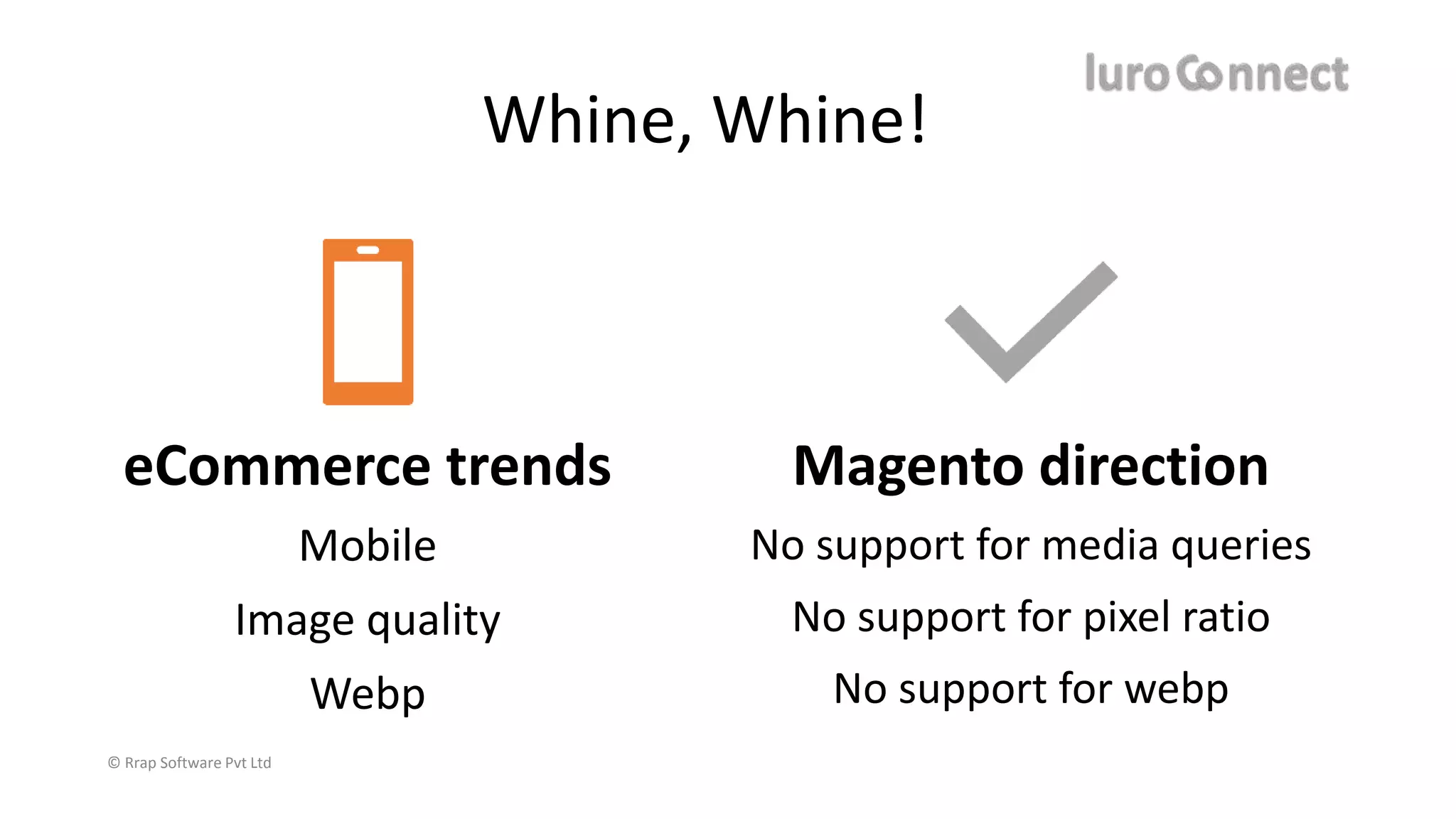
eCommerce trends
Mobile
Image quality
Webp
Magento direction
No support for media queries
No support for pixel ratio
No support for webp
Whine, Whine!
© Rrap Software Pvt Ltd
Problems of Magento Images
• One solution is not suitable to all – code is not flexible
• Ignores mobile completely
• Mobile displays are better than desktop
• Iphone X has 3x retina display
• Most android phones are 2x
• Major difference in image quality
• Chrome & Firefox support webp – not Magento
• Ignores custom transformations you may need
© Rrap Software Pvt Ltd
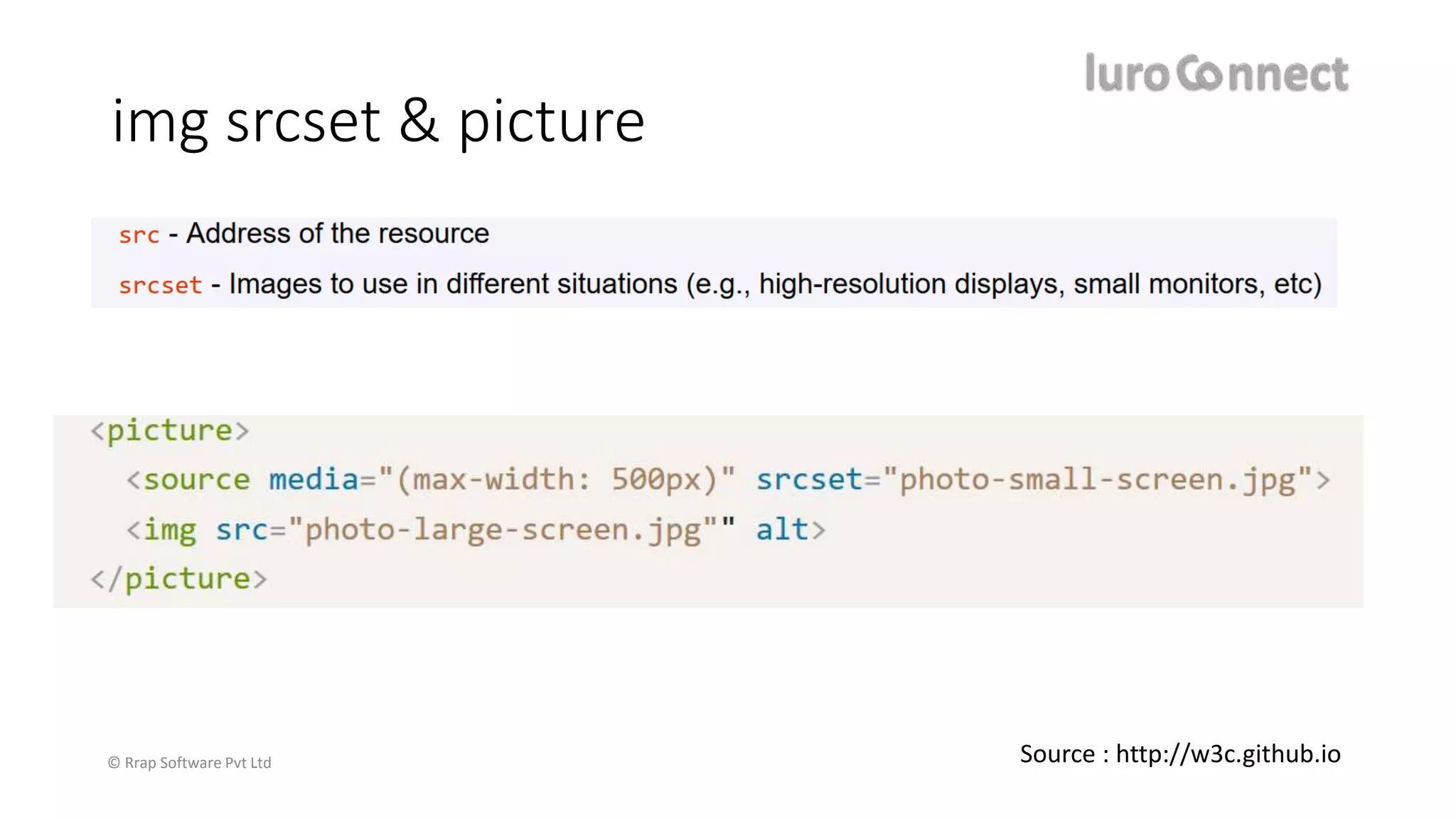
img srcset & picture
Source : http://w3c.github.io
© Rrap Software Pvt Ltd
Magento 2 & image code
module-catalog/Block/Product/AbstractProduct.php
public function getImage($product, $imageId, $attributes = []){
return $this->imageBuilder->create($product, $imageId, $attributes);
templates/product/list.phtml
$productImage = $block->getImage($_product, $image);
module-catalog/Block/Product/ImageBuilder.php
public function create(Product $product = null, string $imageId = null, array $attributes = null){
$product = $product ?? $this->product;
$imageId = $imageId ?? $this->imageId;
$attributes = $attributes ?? $this->attributes;
return $this->imageFactory->create($product, $imageId, $attributes);
module-catalog/Block/Product/ImageFactory.php
$data = [ 'data' => [
'template' => 'Magento_Catalog::product/image_with_borders.phtml',
'image_url' => $imageAsset->getUrl(), 'width' => $imageMiscParams['image_width’],
…
'product_id' => $product->getId()
],
];
return $this->objectManager->create(ImageBlock::class, $data);
© Rrap Software Pvt Ltd
Magento does not support devicepixelratio
<theme>/templates/product/image_with_borders.phtml :
<span class="product-image-container"
style="width:<?= /* @escapeNotVerified */ $block->getWidth() ?>px;">
<span class="product-image-wrapper"
style="padding-bottom: <?= /* @escapeNotVerified */ ($block->getRatio() * 100) ?>%;">
<img class="product-image-photo"
<?= /* @escapeNotVerified */ $block->getCustomAttributes() ?>
src="<?= /* @escapeNotVerified */ $block->getImageUrl() ?>"
max-width="<?= /* @escapeNotVerified */ $block->getWidth() ?>"
max-height="<?= /* @escapeNotVerified */ $block->getHeight() ?>"
alt="<?= /* @escapeNotVerified */ $block->stripTags($block->getLabel(), null, true) ?>"/></span>
</span>
Guess what?
You are hosed!
The lowest element is generating a product-container
© Rrap Software Pvt Ltd
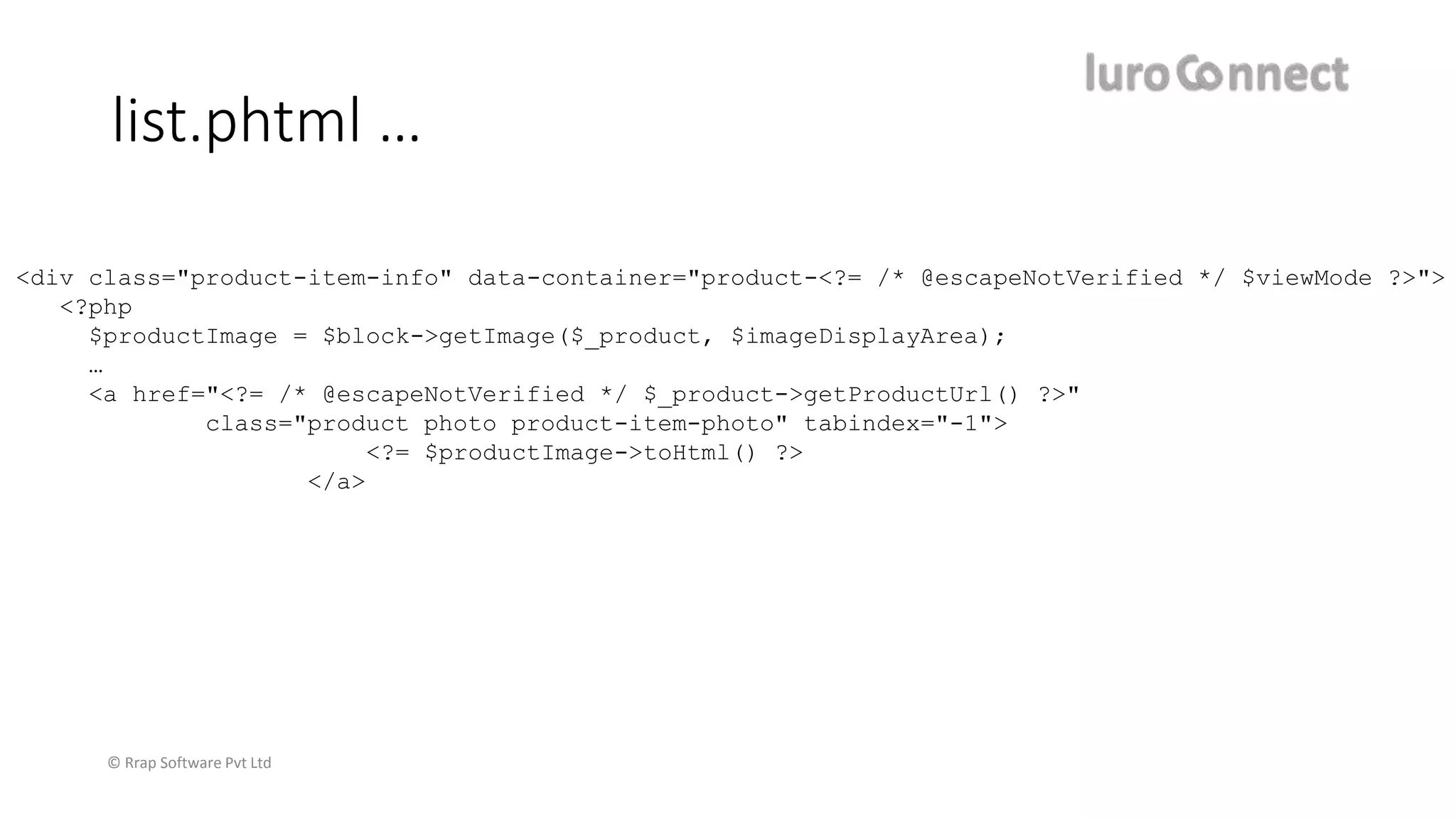
list.phtml …
<div class="product-item-info" data-container="product-<?= /* @escapeNotVerified */ $viewMode ?>">
<?php
$productImage = $block->getImage($_product, $imageDisplayArea);
…
<a href="<?= /* @escapeNotVerified */ $_product->getProductUrl() ?>"
class="product photo product-item-photo" tabindex="-1">
<?= $productImage->toHtml() ?>
</a>
© Rrap Software Pvt Ltd
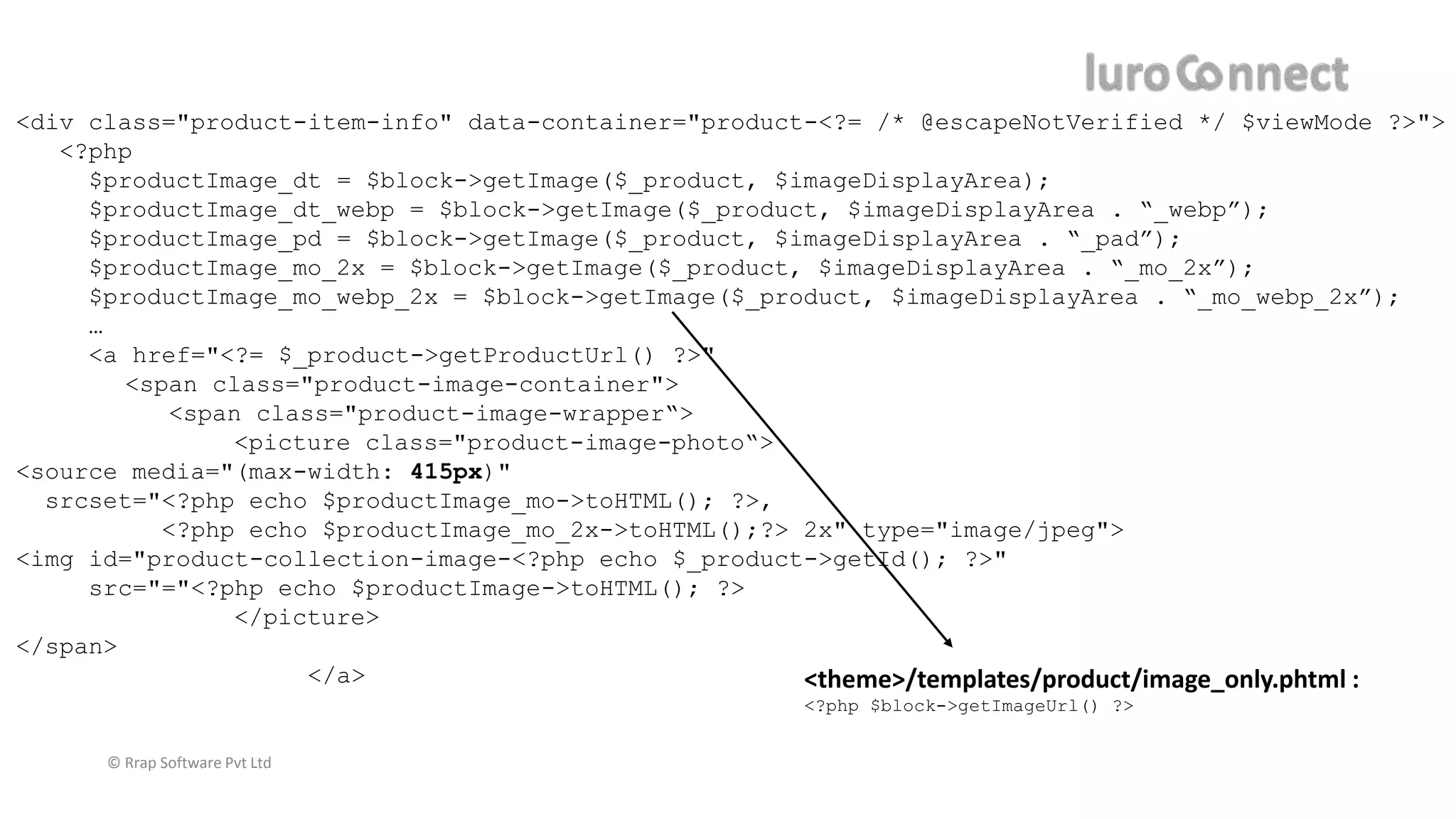
<div class="product-item-info" data-container="product-<?= /* @escapeNotVerified */ $viewMode ?>">
<?php
$productImage_dt = $block->getImage($_product, $imageDisplayArea);
$productImage_dt_webp = $block->getImage($_product, $imageDisplayArea . “_webp”);
$productImage_pd = $block->getImage($_product, $imageDisplayArea . “_pad”);
$productImage_mo_2x = $block->getImage($_product, $imageDisplayArea . “_mo_2x”);
$productImage_mo_webp_2x = $block->getImage($_product, $imageDisplayArea . “_mo_webp_2x”);
…
<a href="<?= $_product->getProductUrl() ?>"
<span class="product-image-container">
<span class="product-image-wrapper“>
<picture class="product-image-photo“>
<source media="(max-width: 415px)"
srcset="<?php echo $productImage_mo->toHTML(); ?>,
<?php echo $productImage_mo_2x->toHTML();?> 2x" type="image/jpeg">
<img id="product-collection-image-<?php echo $_product->getId(); ?>"
src="="<?php echo $productImage->toHTML(); ?>
</picture>
</span>
</a> <theme>/templates/product/image_only.phtml :
<?php $block->getImageUrl() ?>
<div class="product-item-info" data-container="product-<?= /* @escapeNotVerified */ $viewMode ?>">
<?php
$productImage_small = $product->getMediaConfig()->getMediaUrl($product->getData(‘small’);
$productImage_large = $product->getMediaConfig()->getMediaUrl($product->getData(‘large’);
…
<a href="<?= $_product->getProductUrl() ?>"
<span class="product-image-container">
<span class="product-image-wrapper“>
<picture class="product-image-photo“>
<source media="(max-width: 415px)"
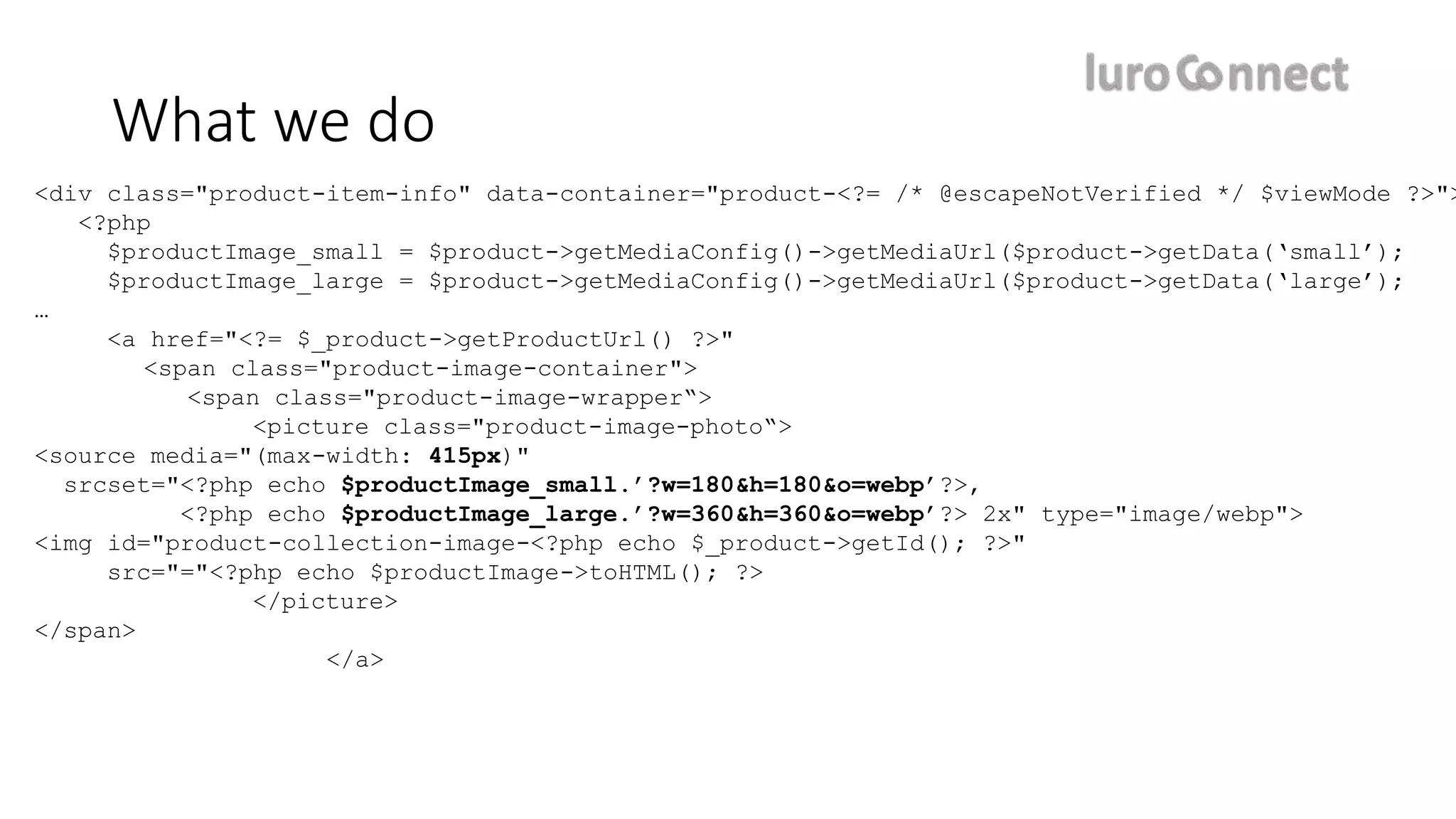
srcset="<?php echo $productImage_small.’?w=180&h=180&o=webp’?>,
<?php echo $productImage_large.’?w=360&h=360&o=webp’?> 2x" type="image/webp">
<img id="product-collection-image-<?php echo $_product->getId(); ?>"
src="="<?php echo $productImage->toHTML(); ?>
</picture>
</span>
</a>
What we do
© Rrap Software Pvt Ltd
Synchronous image generation
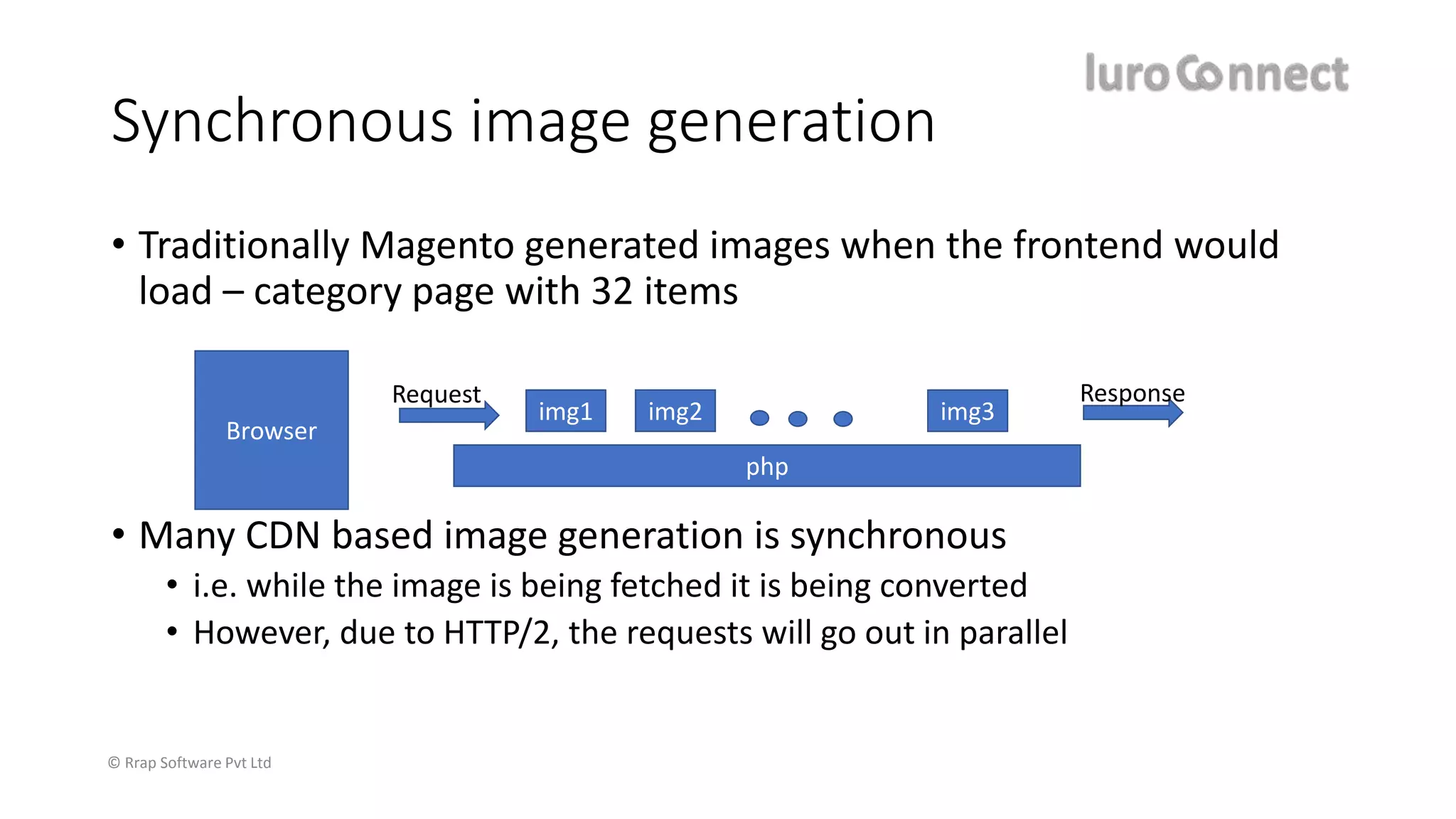
• Traditionally Magento generated images when the frontend would
load – category page with 32 items
• Many CDN based image generation is synchronous
• i.e. while the image is being fetched it is being converted
• However, due to HTTP/2, the requests will go out in parallel
Browser
php
img1 img2 img3
Request Response
© Rrap Software Pvt Ltd
Magento 2.3 and image code
Asynchronous generation of images
module-catalog/Observer/ImageResizeAfterProductSave.php
if (!(bool) $product->getId()) {
foreach ($product->getMediaGalleryImages() as $image) {
$this->imageResize->resizeFromImageName($image->getFile());
}
} else {
module-media-storage/Service/ImageResize.php
public function resizeFromImageName(string $originalImageName) {
…
foreach ($this->getViewImages($this->getThemesInUse()) as $viewImage) {
$this->resize($viewImage, $originalImagePath, $originalImageName);
private function resize(array $viewImage, string $originalImagePath, string $originalImageName)
{
$imageParams = $this->paramsBuilder->build($viewImage);
$image = $this->makeImage($originalImagePath, $imageParams);
…
$image->resize($imageParams['image_width'], $imageParams['image_height’]);
…
$image->save($imageAsset->getPath());
Guess what?
each image will have many variations use them or not!
Fix the view.xml in your themes now.
© Rrap Software Pvt Ltd
PWA and images
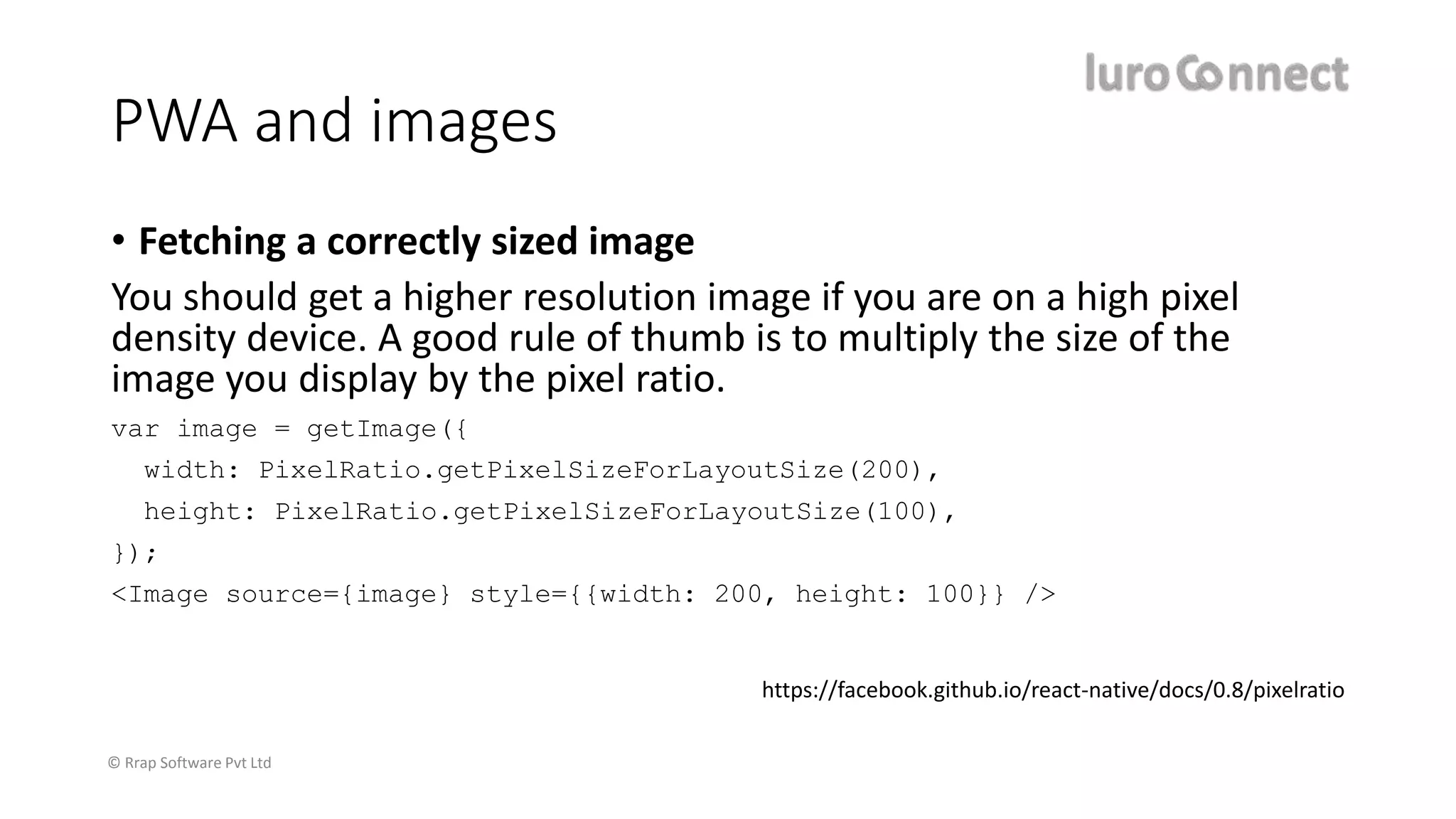
• Fetching a correctly sized image
You should get a higher resolution image if you are on a high pixel
density device. A good rule of thumb is to multiply the size of the
image you display by the pixel ratio.
var image = getImage({
width: PixelRatio.getPixelSizeForLayoutSize(200),
height: PixelRatio.getPixelSizeForLayoutSize(100),
});
<Image source={image} style={{width: 200, height: 100}} />
https://facebook.github.io/react-native/docs/0.8/pixelratio
© Rrap Software Pvt Ltd
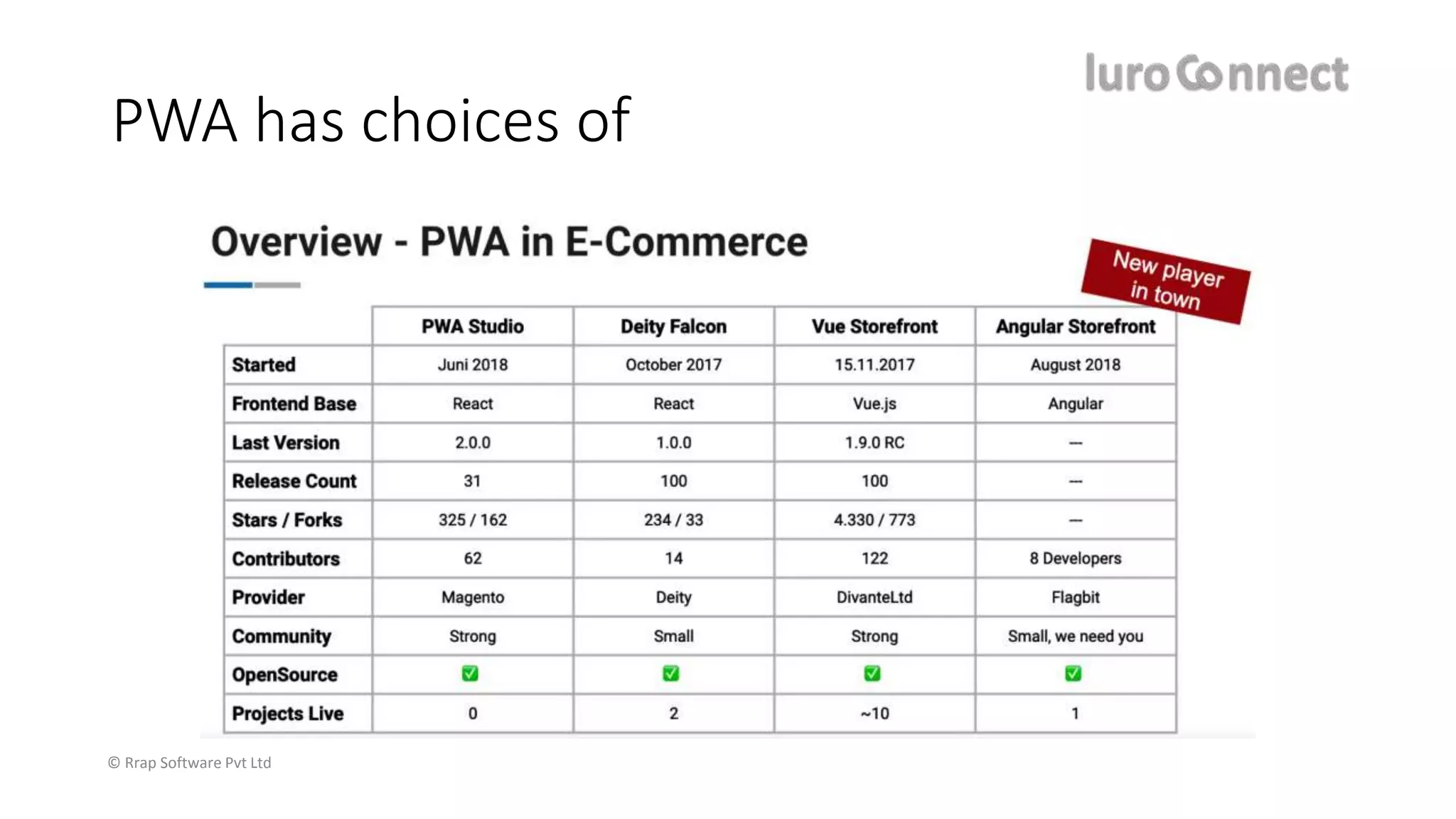
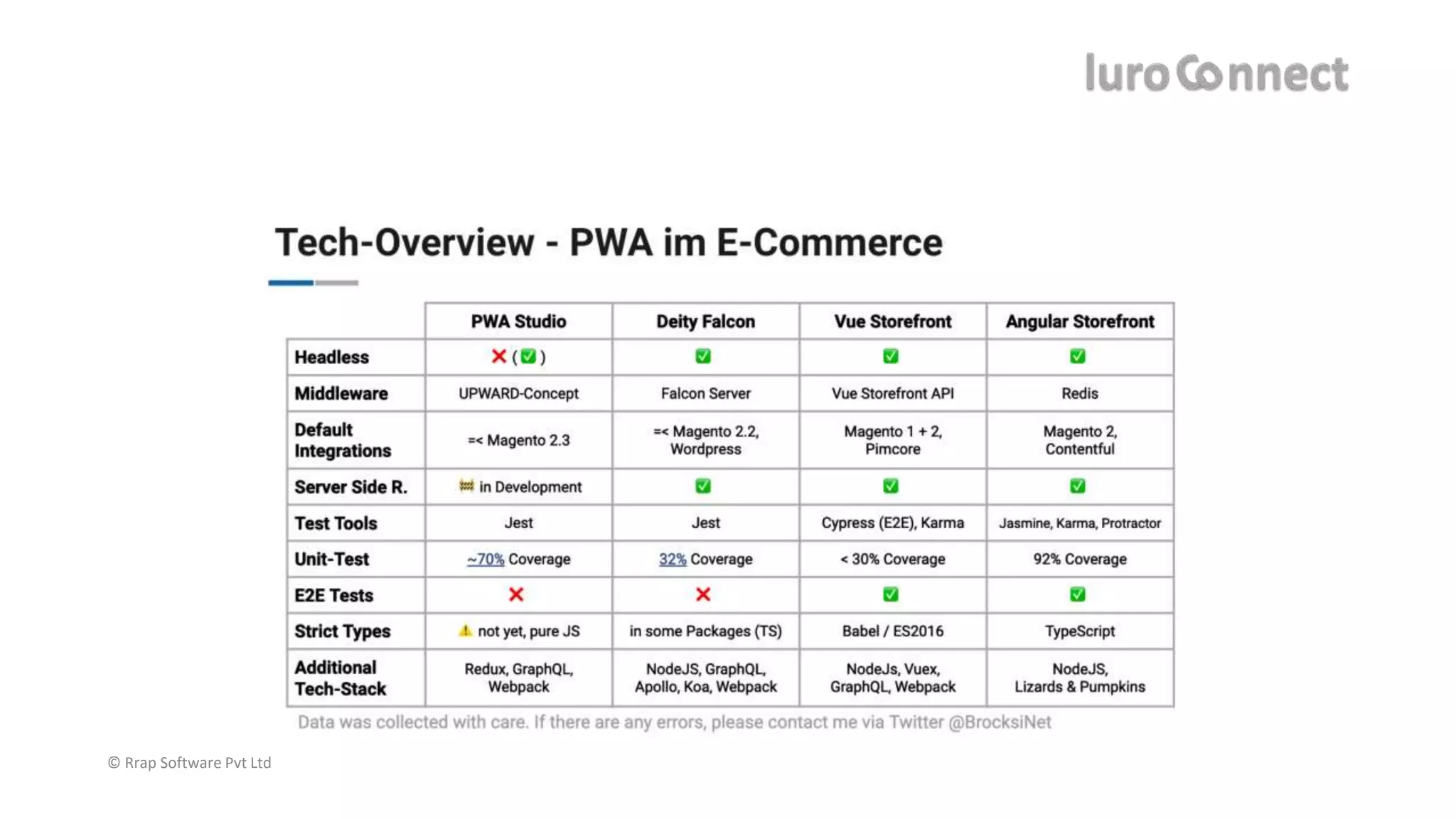
PWA has choices of
© Rrap Software Pvt Ltd
https://headless.page/
© Rrap Software Pvt Ltd
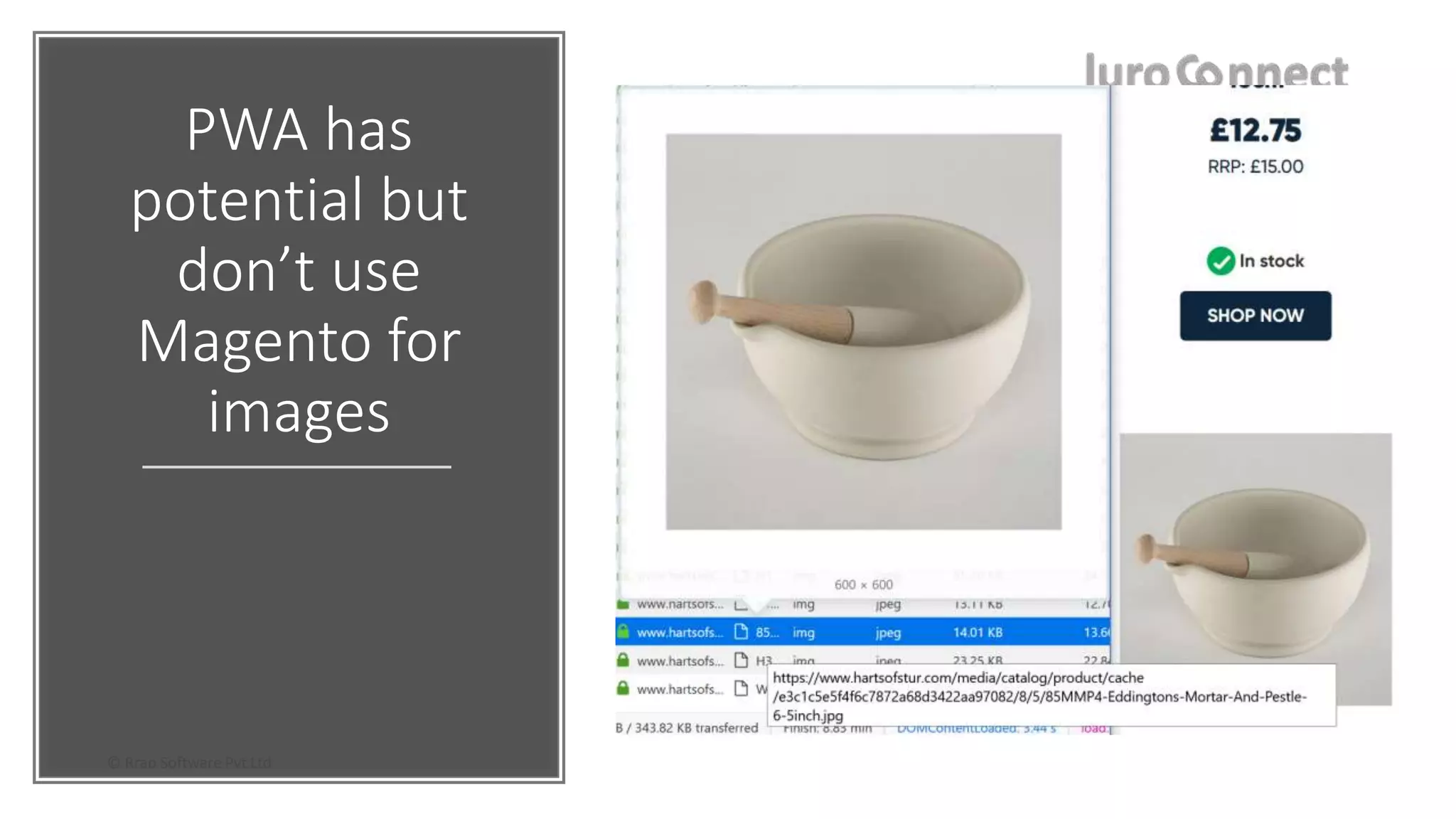
PWA has
potential but
don’t use
Magento for
images
© Rrap Software Pvt Ltd
www.hartsofstur.com
https://www.hartsofstur.com/api
/catalog/products/57
© Rrap Software Pvt Ltd
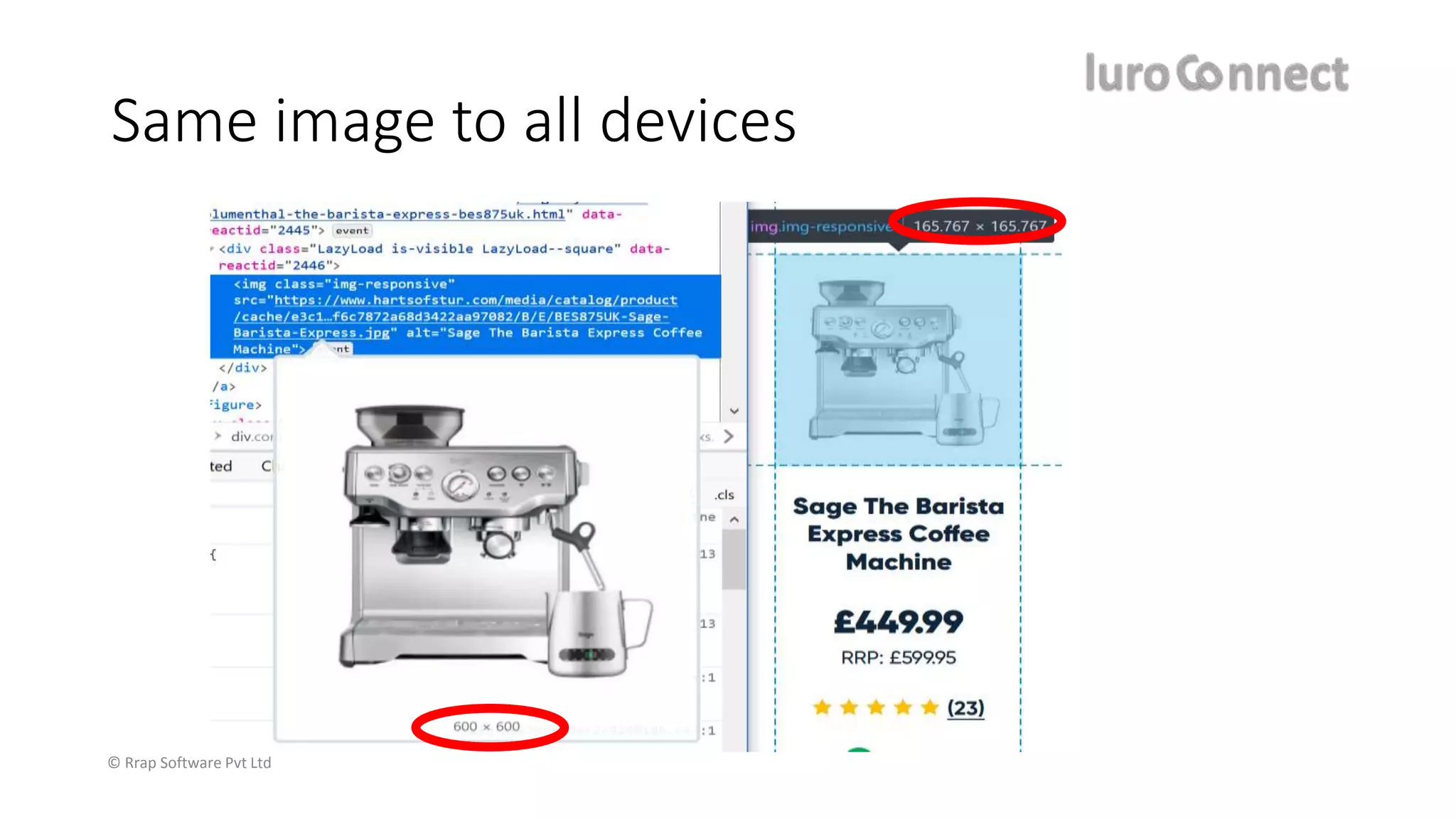
Same image to all devices
© Rrap Software Pvt Ltd
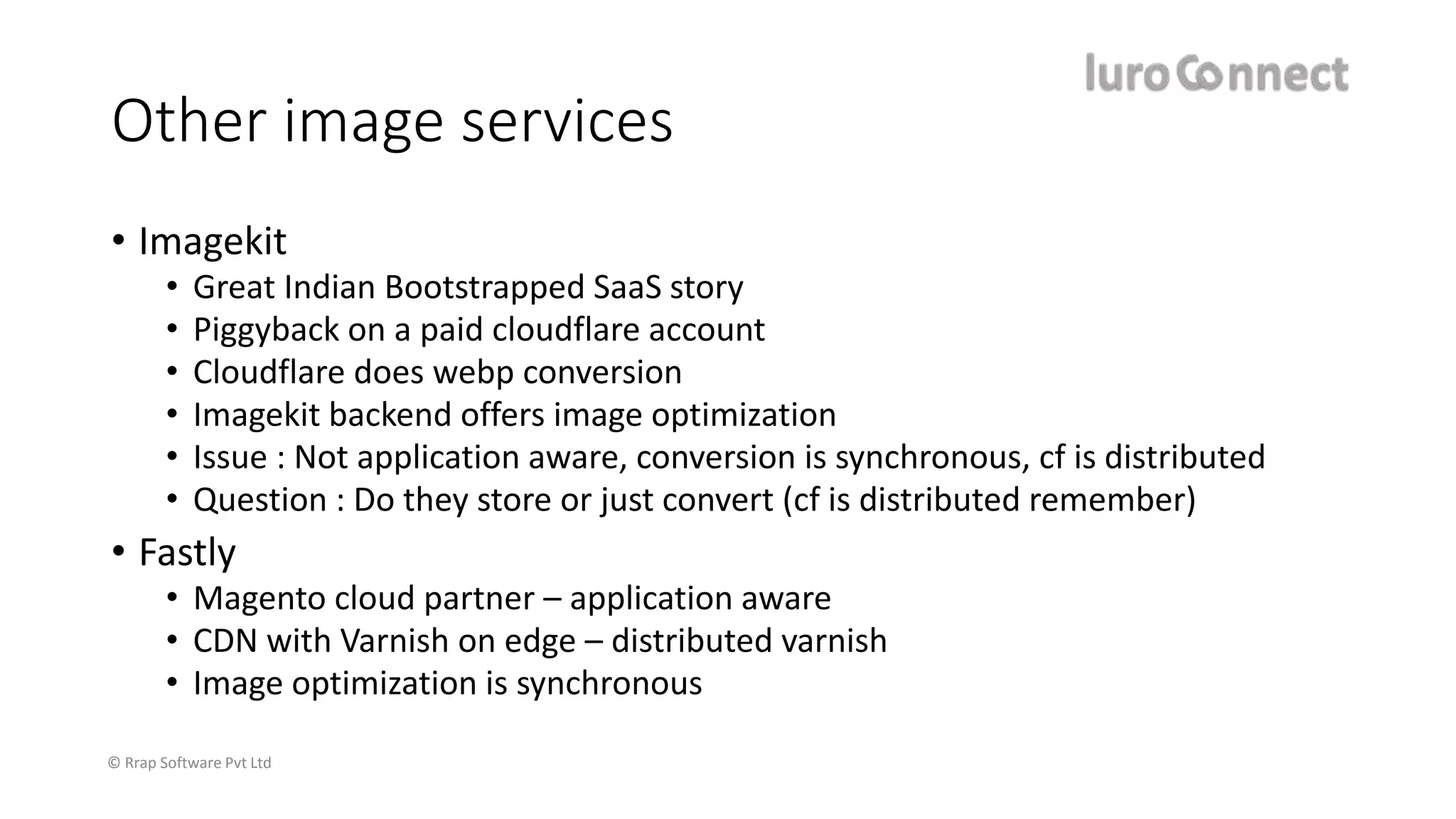
Other image services
• Imagekit
• Great Indian Bootstrapped SaaS story
• Piggyback on a paid cloudflare account
• Cloudflare does webp conversion
• Imagekit backend offers image optimization
• Issue : Not application aware, conversion is synchronous, cf is distributed
• Question : Do they store or just convert (cf is distributed remember)
• Fastly
• Magento cloud partner – application aware
• CDN with Varnish on edge – distributed varnish
• Image optimization is synchronous
© Rrap Software Pvt Ltd
Resources
• https://medium.com/@bjoern.meyer/pwa-ecommerce-solutions-
compared-83bb498433e9
• https://headless.page/
© Rrap Software Pvt Ltd
https://www.luroConnect.com/
Where to find us
https://www.luroConnect.com/
info@luroConnect.com
@luroconnect

Images and PWA in magento

  • 1.
    Images & PWAin Magento © Rrap Software Pvt Ltd Pradip Shah, Founder, luroConnect
  • 2.
  • 3.
    © Rrap SoftwarePvt Ltd eCommerce trends Mobile Image quality Webp Magento direction No support for media queries No support for pixel ratio No support for webp Whine, Whine!
  • 4.
    © Rrap SoftwarePvt Ltd Problems of Magento Images • One solution is not suitable to all – code is not flexible • Ignores mobile completely • Mobile displays are better than desktop • Iphone X has 3x retina display • Most android phones are 2x • Major difference in image quality • Chrome & Firefox support webp – not Magento • Ignores custom transformations you may need
  • 5.
    © Rrap SoftwarePvt Ltd img srcset & picture Source : http://w3c.github.io
  • 6.
    © Rrap SoftwarePvt Ltd Magento 2 & image code module-catalog/Block/Product/AbstractProduct.php public function getImage($product, $imageId, $attributes = []){ return $this->imageBuilder->create($product, $imageId, $attributes); templates/product/list.phtml $productImage = $block->getImage($_product, $image); module-catalog/Block/Product/ImageBuilder.php public function create(Product $product = null, string $imageId = null, array $attributes = null){ $product = $product ?? $this->product; $imageId = $imageId ?? $this->imageId; $attributes = $attributes ?? $this->attributes; return $this->imageFactory->create($product, $imageId, $attributes); module-catalog/Block/Product/ImageFactory.php $data = [ 'data' => [ 'template' => 'Magento_Catalog::product/image_with_borders.phtml', 'image_url' => $imageAsset->getUrl(), 'width' => $imageMiscParams['image_width’], … 'product_id' => $product->getId() ], ]; return $this->objectManager->create(ImageBlock::class, $data);
  • 7.
    © Rrap SoftwarePvt Ltd Magento does not support devicepixelratio <theme>/templates/product/image_with_borders.phtml : <span class="product-image-container" style="width:<?= /* @escapeNotVerified */ $block->getWidth() ?>px;"> <span class="product-image-wrapper" style="padding-bottom: <?= /* @escapeNotVerified */ ($block->getRatio() * 100) ?>%;"> <img class="product-image-photo" <?= /* @escapeNotVerified */ $block->getCustomAttributes() ?> src="<?= /* @escapeNotVerified */ $block->getImageUrl() ?>" max-width="<?= /* @escapeNotVerified */ $block->getWidth() ?>" max-height="<?= /* @escapeNotVerified */ $block->getHeight() ?>" alt="<?= /* @escapeNotVerified */ $block->stripTags($block->getLabel(), null, true) ?>"/></span> </span> Guess what? You are hosed! The lowest element is generating a product-container
  • 8.
    © Rrap SoftwarePvt Ltd list.phtml … <div class="product-item-info" data-container="product-<?= /* @escapeNotVerified */ $viewMode ?>"> <?php $productImage = $block->getImage($_product, $imageDisplayArea); … <a href="<?= /* @escapeNotVerified */ $_product->getProductUrl() ?>" class="product photo product-item-photo" tabindex="-1"> <?= $productImage->toHtml() ?> </a>
  • 9.
    © Rrap SoftwarePvt Ltd <div class="product-item-info" data-container="product-<?= /* @escapeNotVerified */ $viewMode ?>"> <?php $productImage_dt = $block->getImage($_product, $imageDisplayArea); $productImage_dt_webp = $block->getImage($_product, $imageDisplayArea . “_webp”); $productImage_pd = $block->getImage($_product, $imageDisplayArea . “_pad”); $productImage_mo_2x = $block->getImage($_product, $imageDisplayArea . “_mo_2x”); $productImage_mo_webp_2x = $block->getImage($_product, $imageDisplayArea . “_mo_webp_2x”); … <a href="<?= $_product->getProductUrl() ?>" <span class="product-image-container"> <span class="product-image-wrapper“> <picture class="product-image-photo“> <source media="(max-width: 415px)" srcset="<?php echo $productImage_mo->toHTML(); ?>, <?php echo $productImage_mo_2x->toHTML();?> 2x" type="image/jpeg"> <img id="product-collection-image-<?php echo $_product->getId(); ?>" src="="<?php echo $productImage->toHTML(); ?> </picture> </span> </a> <theme>/templates/product/image_only.phtml : <?php $block->getImageUrl() ?>
  • 10.
    <div class="product-item-info" data-container="product-<?=/* @escapeNotVerified */ $viewMode ?>"> <?php $productImage_small = $product->getMediaConfig()->getMediaUrl($product->getData(‘small’); $productImage_large = $product->getMediaConfig()->getMediaUrl($product->getData(‘large’); … <a href="<?= $_product->getProductUrl() ?>" <span class="product-image-container"> <span class="product-image-wrapper“> <picture class="product-image-photo“> <source media="(max-width: 415px)" srcset="<?php echo $productImage_small.’?w=180&h=180&o=webp’?>, <?php echo $productImage_large.’?w=360&h=360&o=webp’?> 2x" type="image/webp"> <img id="product-collection-image-<?php echo $_product->getId(); ?>" src="="<?php echo $productImage->toHTML(); ?> </picture> </span> </a> What we do
  • 11.
    © Rrap SoftwarePvt Ltd Synchronous image generation • Traditionally Magento generated images when the frontend would load – category page with 32 items • Many CDN based image generation is synchronous • i.e. while the image is being fetched it is being converted • However, due to HTTP/2, the requests will go out in parallel Browser php img1 img2 img3 Request Response
  • 12.
    © Rrap SoftwarePvt Ltd Magento 2.3 and image code Asynchronous generation of images module-catalog/Observer/ImageResizeAfterProductSave.php if (!(bool) $product->getId()) { foreach ($product->getMediaGalleryImages() as $image) { $this->imageResize->resizeFromImageName($image->getFile()); } } else { module-media-storage/Service/ImageResize.php public function resizeFromImageName(string $originalImageName) { … foreach ($this->getViewImages($this->getThemesInUse()) as $viewImage) { $this->resize($viewImage, $originalImagePath, $originalImageName); private function resize(array $viewImage, string $originalImagePath, string $originalImageName) { $imageParams = $this->paramsBuilder->build($viewImage); $image = $this->makeImage($originalImagePath, $imageParams); … $image->resize($imageParams['image_width'], $imageParams['image_height’]); … $image->save($imageAsset->getPath()); Guess what? each image will have many variations use them or not! Fix the view.xml in your themes now.
  • 13.
    © Rrap SoftwarePvt Ltd PWA and images • Fetching a correctly sized image You should get a higher resolution image if you are on a high pixel density device. A good rule of thumb is to multiply the size of the image you display by the pixel ratio. var image = getImage({ width: PixelRatio.getPixelSizeForLayoutSize(200), height: PixelRatio.getPixelSizeForLayoutSize(100), }); <Image source={image} style={{width: 200, height: 100}} /> https://facebook.github.io/react-native/docs/0.8/pixelratio
  • 14.
    © Rrap SoftwarePvt Ltd PWA has choices of
  • 15.
  • 16.
    © Rrap SoftwarePvt Ltd https://headless.page/
  • 17.
    © Rrap SoftwarePvt Ltd PWA has potential but don’t use Magento for images
  • 18.
    © Rrap SoftwarePvt Ltd www.hartsofstur.com https://www.hartsofstur.com/api /catalog/products/57
  • 19.
    © Rrap SoftwarePvt Ltd Same image to all devices
  • 20.
    © Rrap SoftwarePvt Ltd Other image services • Imagekit • Great Indian Bootstrapped SaaS story • Piggyback on a paid cloudflare account • Cloudflare does webp conversion • Imagekit backend offers image optimization • Issue : Not application aware, conversion is synchronous, cf is distributed • Question : Do they store or just convert (cf is distributed remember) • Fastly • Magento cloud partner – application aware • CDN with Varnish on edge – distributed varnish • Image optimization is synchronous
  • 21.
    © Rrap SoftwarePvt Ltd Resources • https://medium.com/@bjoern.meyer/pwa-ecommerce-solutions- compared-83bb498433e9 • https://headless.page/
  • 22.
    © Rrap SoftwarePvt Ltd https://www.luroConnect.com/ Where to find us https://www.luroConnect.com/ info@luroConnect.com @luroconnect