Drawing for Illustration and Annotation in 3D David Bourguignon*, Marie-Paule Cani* and George Drettakis** *i MAGIS, INRIA   Rhône-Alpes, France **REVES, INRIA Sophia-Antipolis, France
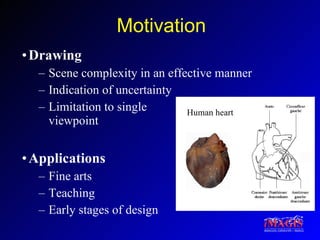
Motivation Drawing Scene complexity in an effective manner Indication of uncertainty Limitation to single  viewpoint Applications Fine arts Teaching Early stages of design Human heart
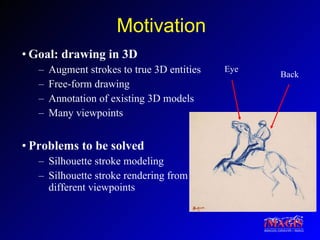
Motivation Goal: drawing in 3D Augment strokes to true 3D entities Free-form drawing Annotation of existing 3D models Many viewpoints Problems to be solved Silhouette stroke modeling Silhouette stroke rendering from different viewpoints Eye Back
Overview Previous work Contributions Silhouette stroke modeling Silhouette stroke rendering Interface for drawing Results
Previous Work [Akeo et al., 1994] [Pugh, 1992] 2D drawing is converted to 3D   Specify hidden parts by hand
Previous Work [Lipson and Shpitalni, 1996] [Eggli et al., 1997] No free-form drawing Limited number of primitives
Previous Work [Cohen et al., 1999] [Tolba et al., 1999] 3D curves design, no drawing 2D drawings reprojected, no visibility changes
Previous Work [Igarashi et al., 1999] [Zeleznik et al., 1996] Limited to a given gestural interface Closed strokes only
Previous Work [Cohen et al., 2000] Drawing modes adapted to landscaping only, no 3D model reconstruction in billboard mode
Overview Previous work Contributions Silhouette stroke modeling Silhouette stroke rendering Interface for drawing Results
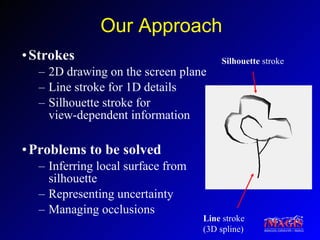
Our Approach Strokes 2D drawing on the screen plane Line stroke for 1D details Silhouette stroke for  view-dependent information Problems to be solved Inferring local surface from silhouette Representing uncertainty Managing occlusions Silhouette  stroke Line  stroke (3D spline)
Overview Previous work Contributions Silhouette stroke modeling Silhouette stroke rendering Interface for drawing Results
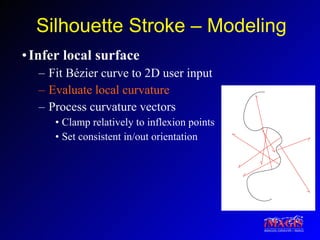
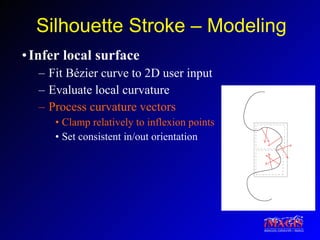
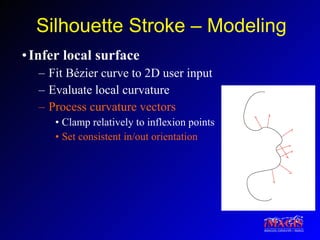
Silhouette Stroke – Modeling Infer local surface Fit Bézier curve to 2D user input Evaluate local curvature Process curvature vectors Clamp relatively to inflexion points Set consistent in/out orientation
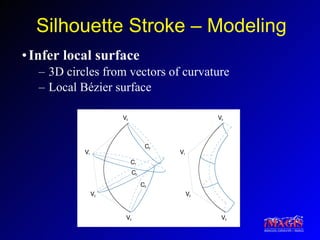
Silhouette Stroke – Modeling Infer local surface 3D circles from vectors of curvature Local Bézier surface
Overview Previous work Contributions Silhouette stroke modeling Silhouette stroke rendering Interface for drawing Results
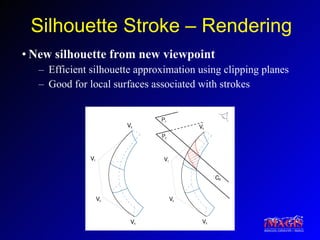
Silhouette Stroke – Rendering New silhouette from new viewpoint Efficient silhouette approximation using clipping planes Good for local surfaces associated with strokes
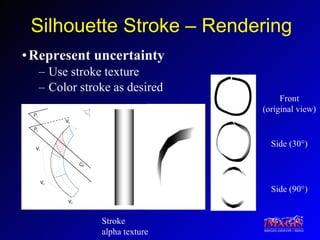
Silhouette Stroke – Rendering Represent uncertainty Use stroke texture Color stroke as desired Front (original view) Side (30°) Side (90°) Stroke alpha texture
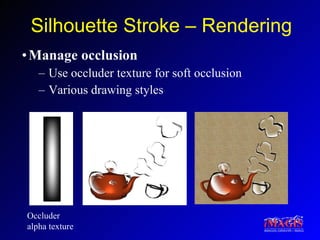
Silhouette Stroke – Rendering Manage occlusion Use occluder texture for soft occlusion Various drawing styles Occluder alpha texture
Silhouette Stroke – Rendering Multipass algorithm (Previously render scene and line strokes) First pass:  Rendering silhouette strokes With stroke texture With stroke color Second pass:  Soft occlusion by local surfaces (set depth) With occluder texture Third pass:  Soft occlusion by local surfaces (achieve blend) With occluder texture With occluder color
Overview Previous work Contributions Silhouette stroke modeling Silhouette stroke rendering Interface for drawing Results
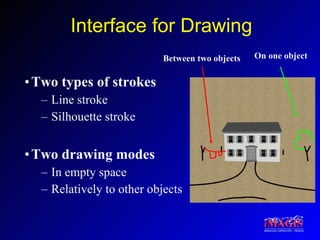
Interface for Drawing Two types of strokes Line stroke Silhouette stroke Two drawing modes In empty space Relatively to other objects On one object Between two objects
Overview Previous work Contributions Silhouette stroke modeling Silhouette stroke rendering Interface for drawing Results
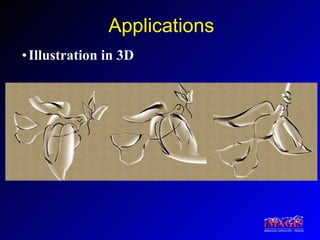
Applications Illustration in 3D
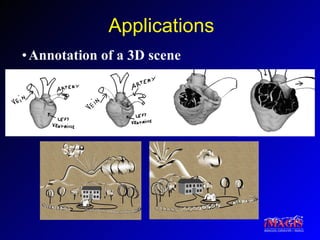
Applications Annotation of a 3D scene
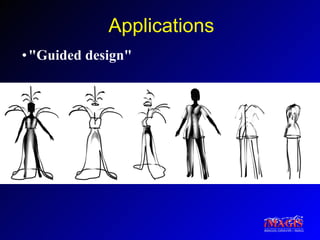
Applications "Guided design"
Video
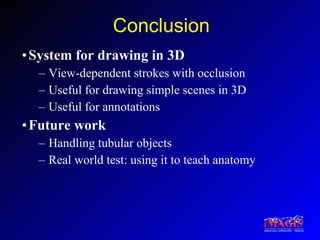
Conclusion System for drawing in 3D View-dependent strokes with occlusion Useful for drawing simple scenes in 3D Useful for annotations Future work Handling tubular objects Real world test: using it to teach anatomy
Acknowledgements Eric Ferley for feedback throughout the project Laurence Boissieux for creating some of the drawings, Marc Pont for help with models Frédo Durand for advice on the paper iMAGIS is a joint project of CNRS, INPG, INRIA and UJF
 

Drawing For Illustration And Annotation In 3D

  • 1.
    Drawing for Illustrationand Annotation in 3D David Bourguignon*, Marie-Paule Cani* and George Drettakis** *i MAGIS, INRIA Rhône-Alpes, France **REVES, INRIA Sophia-Antipolis, France
  • 2.
    Motivation Drawing Scenecomplexity in an effective manner Indication of uncertainty Limitation to single viewpoint Applications Fine arts Teaching Early stages of design Human heart
  • 3.
    Motivation Goal: drawingin 3D Augment strokes to true 3D entities Free-form drawing Annotation of existing 3D models Many viewpoints Problems to be solved Silhouette stroke modeling Silhouette stroke rendering from different viewpoints Eye Back
  • 4.
    Overview Previous workContributions Silhouette stroke modeling Silhouette stroke rendering Interface for drawing Results
  • 5.
    Previous Work [Akeoet al., 1994] [Pugh, 1992] 2D drawing is converted to 3D Specify hidden parts by hand
  • 6.
    Previous Work [Lipsonand Shpitalni, 1996] [Eggli et al., 1997] No free-form drawing Limited number of primitives
  • 7.
    Previous Work [Cohenet al., 1999] [Tolba et al., 1999] 3D curves design, no drawing 2D drawings reprojected, no visibility changes
  • 8.
    Previous Work [Igarashiet al., 1999] [Zeleznik et al., 1996] Limited to a given gestural interface Closed strokes only
  • 9.
    Previous Work [Cohenet al., 2000] Drawing modes adapted to landscaping only, no 3D model reconstruction in billboard mode
  • 10.
    Overview Previous workContributions Silhouette stroke modeling Silhouette stroke rendering Interface for drawing Results
  • 11.
    Our Approach Strokes2D drawing on the screen plane Line stroke for 1D details Silhouette stroke for view-dependent information Problems to be solved Inferring local surface from silhouette Representing uncertainty Managing occlusions Silhouette stroke Line stroke (3D spline)
  • 12.
    Overview Previous workContributions Silhouette stroke modeling Silhouette stroke rendering Interface for drawing Results
  • 13.
    Silhouette Stroke –Modeling Infer local surface Fit Bézier curve to 2D user input Evaluate local curvature Process curvature vectors Clamp relatively to inflexion points Set consistent in/out orientation
  • 14.
    Silhouette Stroke –Modeling Infer local surface Fit Bézier curve to 2D user input Evaluate local curvature Process curvature vectors Clamp relatively to inflexion points Set consistent in/out orientation
  • 15.
    Silhouette Stroke –Modeling Infer local surface Fit Bézier curve to 2D user input Evaluate local curvature Process curvature vectors Clamp relatively to inflexion points Set consistent in/out orientation
  • 16.
    Silhouette Stroke –Modeling Infer local surface 3D circles from vectors of curvature Local Bézier surface
  • 17.
    Overview Previous workContributions Silhouette stroke modeling Silhouette stroke rendering Interface for drawing Results
  • 18.
    Silhouette Stroke –Rendering New silhouette from new viewpoint Efficient silhouette approximation using clipping planes Good for local surfaces associated with strokes
  • 19.
    Silhouette Stroke –Rendering Represent uncertainty Use stroke texture Color stroke as desired Front (original view) Side (30°) Side (90°) Stroke alpha texture
  • 20.
    Silhouette Stroke –Rendering Manage occlusion Use occluder texture for soft occlusion Various drawing styles Occluder alpha texture
  • 21.
    Silhouette Stroke –Rendering Multipass algorithm (Previously render scene and line strokes) First pass: Rendering silhouette strokes With stroke texture With stroke color Second pass: Soft occlusion by local surfaces (set depth) With occluder texture Third pass: Soft occlusion by local surfaces (achieve blend) With occluder texture With occluder color
  • 22.
    Overview Previous workContributions Silhouette stroke modeling Silhouette stroke rendering Interface for drawing Results
  • 23.
    Interface for DrawingTwo types of strokes Line stroke Silhouette stroke Two drawing modes In empty space Relatively to other objects On one object Between two objects
  • 24.
    Overview Previous workContributions Silhouette stroke modeling Silhouette stroke rendering Interface for drawing Results
  • 25.
  • 26.
  • 27.
  • 28.
  • 29.
    Conclusion System fordrawing in 3D View-dependent strokes with occlusion Useful for drawing simple scenes in 3D Useful for annotations Future work Handling tubular objects Real world test: using it to teach anatomy
  • 30.
    Acknowledgements Eric Ferleyfor feedback throughout the project Laurence Boissieux for creating some of the drawings, Marc Pont for help with models Frédo Durand for advice on the paper iMAGIS is a joint project of CNRS, INPG, INRIA and UJF
  • 31.